wheel OPEL CROSSLAND X 2018 Manual user
[x] Cancel search | Manufacturer: OPEL, Model Year: 2018, Model line: CROSSLAND X, Model: OPEL CROSSLAND X 2018Pages: 257, PDF Size: 7.81 MB
Page 151 of 257

Driving and operating149Brakes
The brake system comprises two
independent brake circuits.
If a brake circuit fails, the vehicle can
still be braked using the other brake
circuit. However, braking effect is
achieved only when the brake pedal
is depressed firmly. Considerably
more force is needed for this. The
braking distance is extended. Seek the assistance of a workshop before
continuing the journey.
When the engine is not running, the
support of the brake servo unit
disappears once the brake pedal has
been depressed once or twice.
Braking effect is not reduced, but
braking requires significantly greater
force. It is especially important to bear this in mind when being towed.
Control indicator R 3 92.
Antilock brake system
Antilock brake system (ABS)
prevents the wheels from locking.ABS starts to regulate brake pressure as soon as a wheel shows a tendency to lock. The vehicle remains
steerable, even during hard braking.
ABS control is made apparent
through a pulse in the brake pedal
and the noise of the regulation
process.
For optimum braking, keep the brake
pedal fully depressed throughout the
braking process, despite the fact that
the pedal is pulsating. Do not reduce
the pressure on the pedal.
When braking in an emergency, the
hazard warning flashers are switched
on automatically depending on the
force of deceleration. They are
switched off automatically the first
time you accelerate.
After starting off, the system performs
a self-test which may be audible.
Control indicator u 3 92.
Fault9 Warning
If there is a fault in the ABS, the
wheels may be liable to lock due
to braking that is heavier than
normal. The advantages of ABS are no longer available. During
hard braking, the vehicle can no longer be steered and may
swerve.
Have the cause of the fault remedied
by a workshop.
Parking brake
9 Warning
Before leaving the vehicle, check
parking brake status. Control
indicator R must illuminate
constantly.
Page 152 of 257

150Driving and operatingManual parking brake9Warning
Always apply parking brake firmly
without operating the release
button, and apply as firmly as
possible on a downhill or uphill
slope.
To release the parking brake, pull
the lever up slightly, press the
release button and fully lower the
lever.
To reduce the operating forces of
the parking brake, depress the
foot brake at the same time.
Control indicator R 3 92.
Brake assist
If brake pedal is depressed quickly
and forcefully, maximum brake force
is automatically applied.
Operation of brake assist might
become apparent by a pulse in the
brake pedal and a greater resistance when depressing the brake pedal.
Maintain steady pressure on the
brake pedal as long as full braking is
required. Maximum brake force is
automatically reduced when brake
pedal is released.
Hill start assist The system helps prevent unintendedmovement when driving away on
inclines.
When releasing the brake pedal after
stopping on an incline, brakes remain on for further two seconds. The
brakes release automatically as soon
as the vehicle begins to accelerate.Ride control systems
Electronic Stability Control and Traction Control system
Electronic Stability Control improves
driving stability when necessary,
regardless of the type of road surface
or tyre grip.
As soon as the vehicle starts to
swerve (understeer/oversteer),
engine output is reduced and the
wheels are braked individually.
Electronic Stability Control operates
in combination with the Traction
Control system. It prevents the driven wheels from spinning.
The Traction Control system is a
component of the Electronic Stability
Control.
Traction Control improves driving
stability when necessary, regardless
of the type of road surface or tyre grip,
by preventing the driven wheels from
spinning.
As soon as the driven wheels starts to spin, engine output is reduced and
the wheel spinning the most is braked
Page 154 of 257
152Driving and operatingDriver assistance
systems9 Warning
Driver assistance systems are
developed to support the driver
and not to replace the driver's
attention.
The driver stays in full control of
the vehicle and accepts full
responsibility when driving the
vehicle.
When using driver assistance
systems, always take care
regarding the current traffic
situation and follow applicable
traffic rules.
Cruise control
The cruise control can store and
maintain speeds above 40 km/h.
Additionally at least the third gear
must be engaged on manual
transmission, on automatic
transmission position D or the second
or a higher gear in position M must be
selected.
Deviations from the stored speeds
may occur when driving uphill or
downhill.
The system maintains the vehicle
speed at the preset speed by the
driver, without any action on the
accelerator pedal.
The preset speed can be exceeded
temporarily by pressing the
accelerator pedal.
The status and preset speed is
displayed in the Driver Information Centre.
Do not use the cruise control if it is not advisable to maintain a constant
speed.
Activating in first gear is not possible.
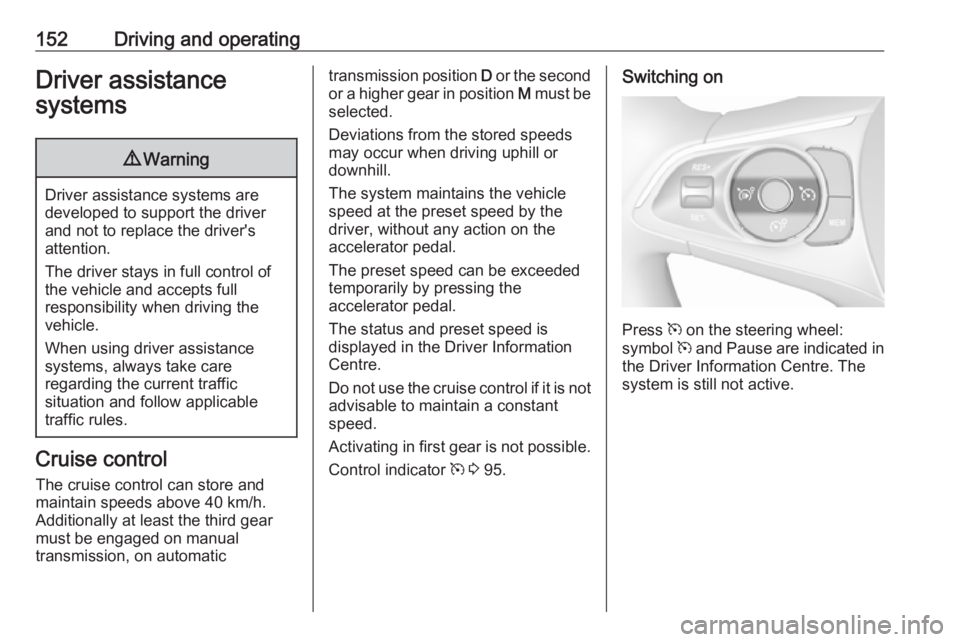
Control indicator m 3 95.Switching on
Press m on the steering wheel:
symbol m and Pause are indicated in
the Driver Information Centre. The
system is still not active.
Page 155 of 257
Driving and operating153ActivationSetting speed by the driver
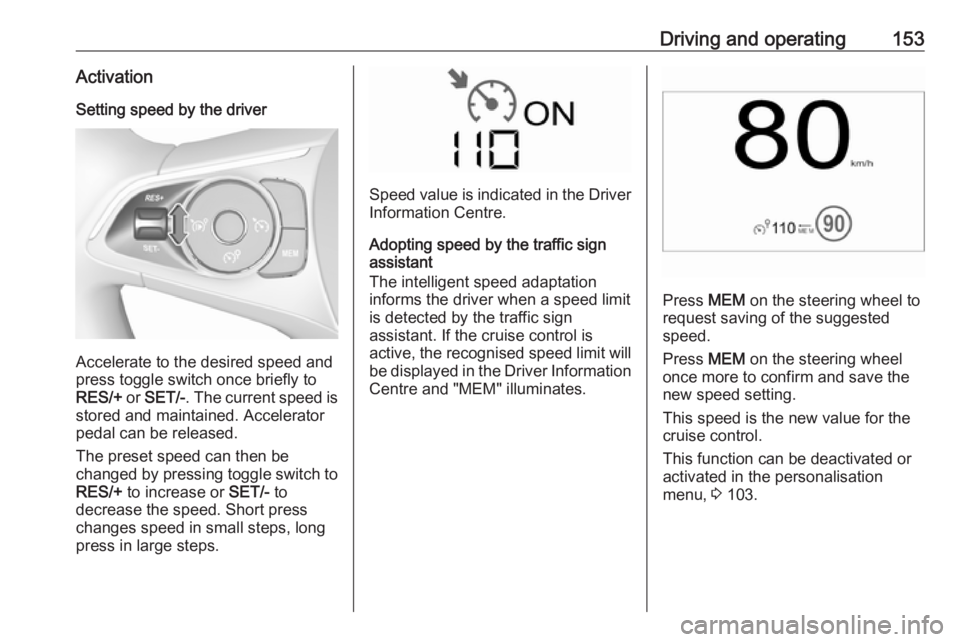
Accelerate to the desired speed and
press toggle switch once briefly to
RES/+ or SET/- . The current speed is
stored and maintained. Accelerator
pedal can be released.
The preset speed can then be
changed by pressing toggle switch to
RES/+ to increase or SET/- to
decrease the speed. Short press
changes speed in small steps, long
press in large steps.
Speed value is indicated in the Driver
Information Centre.
Adopting speed by the traffic sign
assistant
The intelligent speed adaptation
informs the driver when a speed limit
is detected by the traffic sign
assistant. If the cruise control is
active, the recognised speed limit will be displayed in the Driver Information
Centre and "MEM" illuminates.
Press MEM on the steering wheel to
request saving of the suggested
speed.
Press MEM on the steering wheel
once more to confirm and save the
new speed setting.
This speed is the new value for the
cruise control.
This function can be deactivated or activated in the personalisation
menu, 3 103.
Page 157 of 257
Driving and operating155ActivationSetting speed by the driver
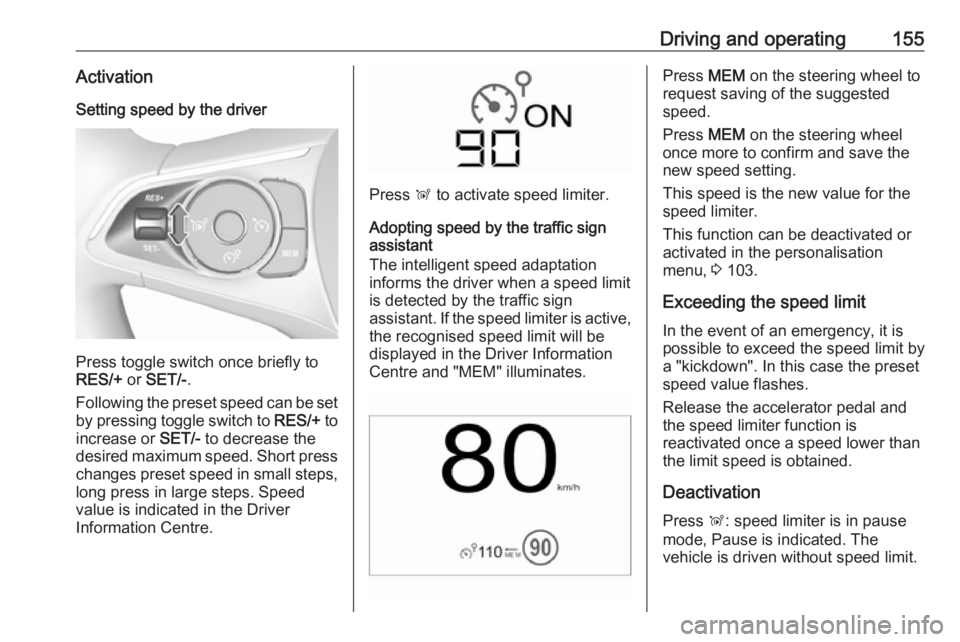
Press toggle switch once briefly to
RES/+ or SET/- .
Following the preset speed can be set by pressing toggle switch to RES/+ to
increase or SET/- to decrease the
desired maximum speed. Short press
changes preset speed in small steps, long press in large steps. Speed
value is indicated in the Driver
Information Centre.
Press Ñ to activate speed limiter.
Adopting speed by the traffic sign
assistant
The intelligent speed adaptation
informs the driver when a speed limit
is detected by the traffic sign
assistant. If the speed limiter is active,
the recognised speed limit will be
displayed in the Driver Information
Centre and "MEM" illuminates.
Press MEM on the steering wheel to
request saving of the suggested
speed.
Press MEM on the steering wheel
once more to confirm and save the
new speed setting.
This speed is the new value for the
speed limiter.
This function can be deactivated or activated in the personalisation
menu, 3 103.
Exceeding the speed limit
In the event of an emergency, it is possible to exceed the speed limit by
a "kickdown". In this case the preset
speed value flashes.
Release the accelerator pedal and
the speed limiter function is
reactivated once a speed lower than
the limit speed is obtained.
Deactivation Press Ñ: speed limiter is in pause
mode, Pause is indicated. The
vehicle is driven without speed limit.
Page 166 of 257

164Driving and operatingObjects with a very small reflection
cross-section, e.g. objects of
narrow size or soft materials, may
not be detected by the system.
Parking assist systems do not
detect objects outside the
detection range.
Advanced parking assist
9 Warning
The driver bears full responsibility
for accepting the parking slot
suggested by the system and the
parking manoeuvre.
Always check the surrounding
area in all directions when using
the advanced parking assist.
The advanced parking assist
measures a suitable parking slot
while passing, calculates the
trajectory and automatically steers
the vehicle while parking.
Advanced parking assist provides
assistance for the following
manoeuvres:
● Entry into a parallel parking slot.
● Entry into a perpendicular parking slot.
● Exit from a parallel parking slot.
The driver must control acceleration,
braking and gear shifting, while
steering is done automatically. The
driver can take control at any time by
gripping the steering wheel.
It may be necessary to move forwards and backwards more than once.
Instructions are given in the Info-
Display 3 98.
Advanced parking assist can only be activated when driving forwards.
Advanced parking assist is always
combined with front-rear parking assist.
The system has six ultrasonic parking
sensors each in both the rear and
front bumper.
Entry into a parallel parking slot
Activation
7'' Colour-Info-Display: to search for a
parking slot, activate the system by
selecting Park Assist on the
homepage of the touch screen. Then
select Enter parallel parking space .
Page 167 of 257

Driving and operating1658'' Colour-Info-Display: to search for a
parking slot, activate the system by
pressing Í. Select Driving functions
on the touch screen and then Park
Assist . Select Enter parallel parking
space .
$ illuminates in the instrument cluster
to confirm the function.
Slow down the vehicle speed below
20 km/h.
Select parking side by switching on
turn signal indicator on the respective
side.
The allowed parallel distance
between the vehicle and a row of
parked cars is between 0.5 metres
and 1.5 metres.
The system will not identify slots that
are clearly smaller or larger than the
vehicle.
When a free slot is detected, a visual
feedback on the Colour-Info-Display
and a first acoustic signal is given. Drive slowly forwards. When the
second acoustic signal is given, stop
the vehicle, select reverse gear,
release the steering wheel and start
moving without exceeding 7 km/h.Move forwards and backwards while
observing the warnings of the Parking
assist until the end of manoeuvre is
indicated. When finished, $
extinguishes in the instrument cluster.
Entry into a perpendicular parking slot
Activation
7'' Colour-Info-Display: to search for a
parking slot, activate the system by
selecting Park Assist on the
homepage of the touch screen. Then
select Enter perpendicular parking
space .
Page 168 of 257

166Driving and operating8'' Colour-Info-Display: when search
for a parking slot, activate the system
by pressing Í. Select Driving
functions on the touch screen and
then Park Assist . Select Enter bay
parking space .
$ illuminates in the instrument cluster
to confirm the function.
Slow down the vehicle speed below
20 km/h.
Select parking side by switching on
turn signal indicator on the respective
side.
The allowed parallel distance
between the vehicle and a row of
parked cars is between 0.5 metres
and 1.5 metres.
When several successive slots are
found, the vehicle will be directed
towards the last one.
When a free slot is detected, a visual
feedback on the Colour-Info-Display
and an acoustic signal is given. Stop
the vehicle, select reverse gear,
release the steering wheel and start
moving without exceeding 7 km/h.Move forwards and backwards as
instructed by observing the warnings
of the Parking assist and paying
attention to the acoustic signals until
the end of manoeuvre is indicated. When finished, $ extinguishes in the
instrument cluster.
During the parking manoeuvre, the
system is automatically deactivated
once the rear of the vehicle is within
50 cm of an obstacle.
Page 169 of 257

Driving and operating167Exiting a parallel parking slotActivation
7'' Colour-Info-Display: when exiting a
parallel parking slot, activate the
system by selecting Park Assist on
the homepage of the touch screen.
Then select Exit parallel parking
space .
8'' Colour-Info-Display: when exiting a parallel parking slot, activate the
system by pressing Í. Select Driving
functions on the touch screen and
then Park Assist . Select Exit parallel
parking space .
Select exit side by switching on the
respective turn signal indicator.
Engage reverse or forward gear,
release the steering wheel and start
moving without exceeding 5 km/h.
Move forwards and backwards while
observing the warnings of the Parking
assist until the end of manoeuvre is
indicated. The manoeuvre is
complete when the vehicle's front
wheels are out of the parking slot and
$ extinguishes in the instrument
cluster.
After deactivation check control over
the vehicle.
Display indication
The instructions on the display show: ● General hints and warning messages.
● The demand to stop the vehicle, when a parking slot is detected.
● The direction of driving during the
parking manoeuvre.
● The demand to shift into reverse or first gear.
● The demand to stop or to drive slowly.
● The successful completion of the
parking manoeuvre indicated by
a pop-up symbol and a chime.
● The cancelling of a parking manoeuvre.
Deactivation
The current park assist manoeuvre is
cancelled via the button to return to
the previous screen in the Colour-
Info-Display. To deactivate the
system completely, press r Off in
the centre console.
Page 170 of 257
168Driving and operatingThe system is deactivated
automatically:
● if the ignition is switched off
● if stalling the engine
● if no manoeuvre is started within 5 minutes of selection of the type
of manoeuvre
● after a prolonged stop of the vehicle during a manoeuvre
● if the electronic stability control (ESC) is triggered
● if the speed of the vehicle exceeds the stated limit
● when the driver interrupts movement of the steering wheel
● after 4 manoeuvre cycles
● on opening the driver's door
● if one of the front wheels encounters an obstacle
● parking manoeuvre successfully ended
Deactivation by the driver or by the system during manoeuvring will beindicated on the display. Additionally, an acoustic signal sounds.The system is switched off
automatically when towing a
electrically connected trailer.
Contact your dealer to switch off the
system for a prolonged period.
Fault
In the event of a fault, $ flashes for a
few seconds, accompanied by an
acoustic signal. If the fault occurs
during the use of the system, $
extinguishes.
In the event of a fault in the power
steering, c flashes in the instrument
panel, accompanied by a message.9 Warning
Under certain circumstances,
various reflective surfaces on
objects or clothing as well as
external noise sources may cause the system to fail to detect
obstacles.
Special attention must be paid to
low obstacles which can damage
the lower part of the bumper.
Caution
Performance of the system can be reduced when sensors are
covered, e.g. by ice or snow.
Performance of the parking assist
system can be reduced due to
heavy loading.
Special conditions apply if there
are taller vehicles in the vicinity
(e.g. off-road vehicles, mini vans,
vans). Object identification and correct distance indication in the
upper part of these vehicles
cannot be guaranteed.
Objects with a very small reflection
cross-section, e.g. objects of
narrow size or soft materials, may
not be detected by the system.
Parking assist systems do not
detect objects outside the
detection range.
Note
It is possible that the sensor detects a non-existing object caused by
echo disturbance from external