door lock OPEL CROSSLAND X 2018 User Guide
[x] Cancel search | Manufacturer: OPEL, Model Year: 2018, Model line: CROSSLAND X, Model: OPEL CROSSLAND X 2018Pages: 257, PDF Size: 7.81 MB
Page 33 of 257
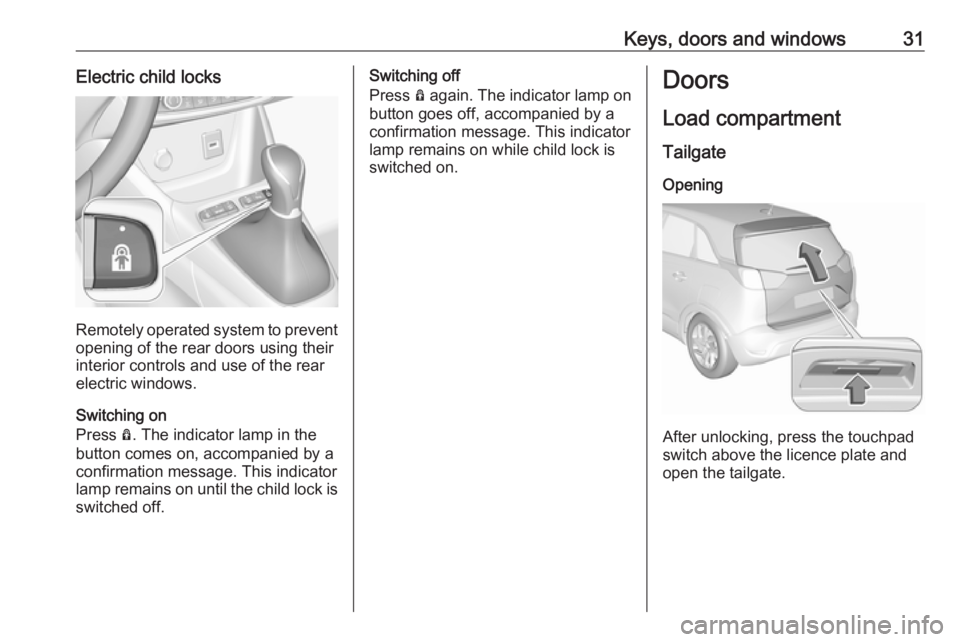
Keys, doors and windows31Electric child locks
Remotely operated system to prevent
opening of the rear doors using their
interior controls and use of the rear
electric windows.
Switching on
Press Ô. The indicator lamp in the
button comes on, accompanied by a
confirmation message. This indicator
lamp remains on until the child lock is
switched off.
Switching off
Press Ô again. The indicator lamp on
button goes off, accompanied by a
confirmation message. This indicator
lamp remains on while child lock is
switched on.Doors
Load compartment TailgateOpening
After unlocking, press the touchpad
switch above the licence plate and
open the tailgate.
Page 34 of 257
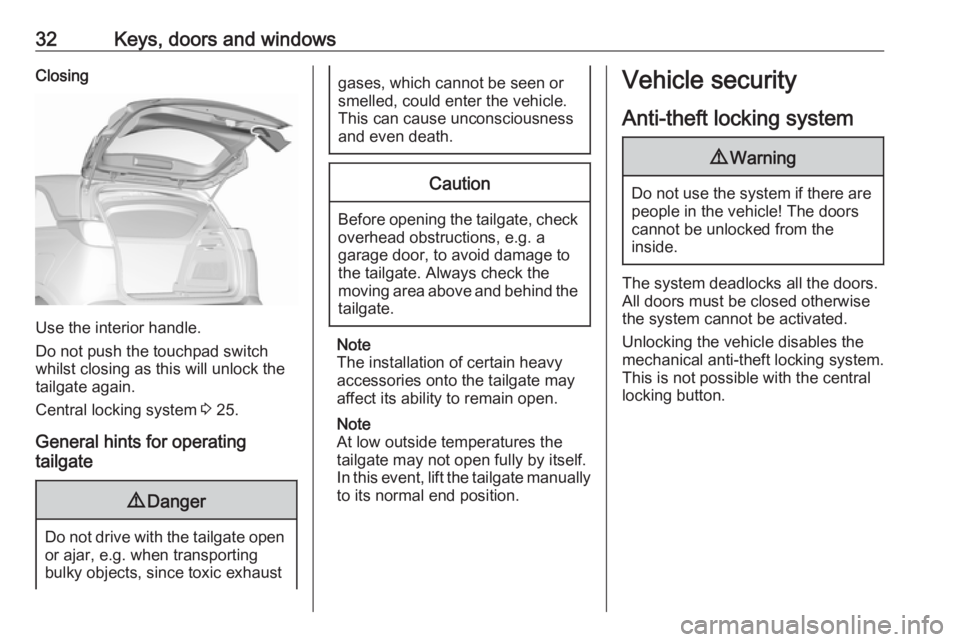
32Keys, doors and windowsClosing
Use the interior handle.
Do not push the touchpad switch
whilst closing as this will unlock the
tailgate again.
Central locking system 3 25.
General hints for operating
tailgate
9 Danger
Do not drive with the tailgate open
or ajar, e.g. when transporting
bulky objects, since toxic exhaust
gases, which cannot be seen or
smelled, could enter the vehicle.
This can cause unconsciousness
and even death.Caution
Before opening the tailgate, check overhead obstructions, e.g. a
garage door, to avoid damage to
the tailgate. Always check the
moving area above and behind the
tailgate.
Note
The installation of certain heavy
accessories onto the tailgate may
affect its ability to remain open.
Note
At low outside temperatures the
tailgate may not open fully by itself.
In this event, lift the tailgate manually
to its normal end position.
Vehicle security
Anti-theft locking system9 Warning
Do not use the system if there are
people in the vehicle! The doorscannot be unlocked from the
inside.
The system deadlocks all the doors. All doors must be closed otherwise
the system cannot be activated.
Unlocking the vehicle disables the
mechanical anti-theft locking system.
This is not possible with the central
locking button.
Page 35 of 257
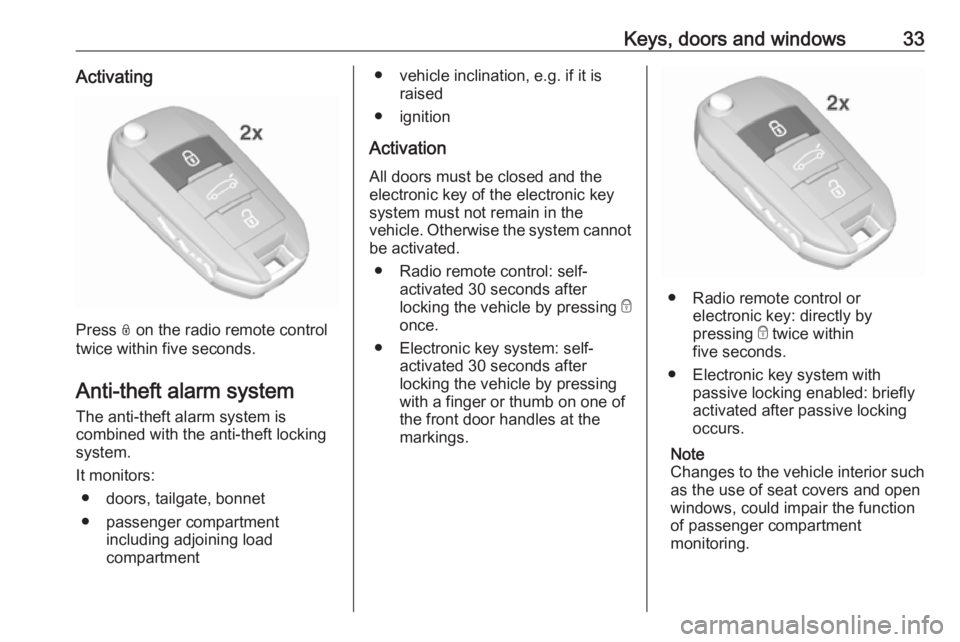
Keys, doors and windows33Activating
Press N on the radio remote control
twice within five seconds.
Anti-theft alarm system The anti-theft alarm system is
combined with the anti-theft locking
system.
It monitors: ● doors, tailgate, bonnet
● passenger compartment including adjoining load
compartment
● vehicle inclination, e.g. if it is raised
● ignition
Activation
All doors must be closed and the electronic key of the electronic key
system must not remain in the
vehicle. Otherwise the system cannot be activated.
● Radio remote control: self- activated 30 seconds after
locking the vehicle by pressing e
once.
● Electronic key system: self- activated 30 seconds after
locking the vehicle by pressing with a finger or thumb on one of
the front door handles at the
markings.
● Radio remote control or electronic key: directly by
pressing e twice within
five seconds.
● Electronic key system with passive locking enabled: briefly
activated after passive locking
occurs.
Note
Changes to the vehicle interior such as the use of seat covers and open
windows, could impair the function
of passenger compartment
monitoring.
Page 36 of 257

34Keys, doors and windowsActivation without monitoring of
passenger compartment and
vehicle inclination
Switch off the monitoring of
passenger compartment and vehicle
inclination when animals are being
left in the vehicle, because of high
volume ultrasonic signals or
movements triggering the alarm. Also switch off when the vehicle is on a
ferry or train.
1. Close tailgate, bonnet, windows.
2. Press o. LED in the button o
illuminates for a maximum of
ten minutes.
3. Close doors.
4. Activate the anti-theft alarm system.
Status message is displayed in the
Driver Information Centre.
Indication
LED in the central locking button
flashes if the anti-theft alarm system
is activated.
Seek the assistance of a workshop in the event of faults.
Deactivation Radio remote control: Unlocking the
vehicle by pressing c deactivates the
anti-theft alarm system.
Electronic key system: Unlocking the
vehicle by pressing on one of the front
door handles at the markings
deactivates the anti-theft alarm
system.
The electronic key must be outside
the vehicle, within a range of approx. one metre of the relevant door side.
The system is not deactivated by
unlocking the driver's door with the
key or with the central locking button
in the passenger compartment.
Page 37 of 257

Keys, doors and windows35AlarmWhen triggered, the alarm hornsounds and the hazard warning lights flash simultaneously. The number
and duration of alarm signals are
stipulated by legislation.
The anti-theft alarm system can be
deactivated by pressing c, by
pressing the switch on the door
handle with electronic key system or
switching on the ignition.
The anti-theft alarm system can be
deactivated by pressing c, by
pressing on one of the front door
handles at the markings with
electronic key system or switching on
the ignition.
A triggered alarm, which has not been interrupted by the driver, will be
indicated by the hazard warning
lights. They will flash quickly three
times the next time the vehicle is unlocked with the radio remote
control. Additionally a warning
message is displayed in the Driver
Information Centre after switching on
the ignition.
Vehicle messages 3 102.If the vehicle's battery is to be
disconnected (e.g. for maintenance
work), the alarm siren must be
deactivated as follows: switch the
ignition on then off, then disconnect
the vehicle's battery within
15 seconds.
Immobiliser The system is part of the ignition
switch and checks whether the
vehicle is allowed to be started with the key being used.
The immobiliser is activated
automatically after the key has been
removed from the ignition switch.
Note
Radio Frequency Identification
(RFID) tags may cause interference
with the key. Do not have it placed near the key when starting the
vehicle.
Note
The immobiliser does not lock the doors. You should always lock the
vehicle after leaving it and switch on the anti-theft alarm system 3 25,
3 33.Exterior mirrors
Convex shape
The convex exterior mirror on the
driver's side contains an aspherical
area and reduces blind spots. The
shape of the mirror makes objects
appear smaller, which will affect the
ability to estimate distances.
Side blind spot alert 3 169.
Electric adjustment
Select the relevant exterior mirror by
pushing the mirror button to the left or right.
Page 76 of 257
74Instruments and controlsInstruments and
controlsControls ....................................... 75
Steering wheel adjustment ........75
Steering wheel controls .............75
Heated steering wheel ...............75
Horn ........................................... 76
Windscreen wiper/washer .........76
Rear window wiper/washer .......78
Outside temperature ..................78
Clock ......................................... 79
Power outlets ............................. 79
Inductive charging .....................80
Cigarette lighter ......................... 81
Ashtrays .................................... 81
Warning lights, gauges and indi‐ cators ........................................... 82
Instrument cluster ......................82
Speedometer ............................. 85
Odometer .................................. 86
Trip odometer ............................ 86
Tachometer ............................... 86
Fuel gauge ................................ 87
Fuel selector .............................. 87
Engine coolant temperature gauge ....................................... 88Engine oil level monitor.............89
Service display .......................... 89
Control indicators ......................90
Turn signal ................................. 90
Seat belt reminder .....................90
Airbag and belt tensioners .........91
Airbag deactivation ....................91
Charging system .......................91
Malfunction indicator light ..........91
Service vehicle soon .................92
Stop engine ............................... 92
System check ............................ 92
Brake and clutch system ...........92
Antilock brake system (ABS) .....92
Gear shifting .............................. 93
Lane departure warning ............93
Electronic Stability Control and Traction Control system ...........93
Electronic Stability Control and Traction Control system off ......93
Engine coolant temperature ......93
Preheating ................................. 94
Diesel particle filter ....................94
AdBlue ....................................... 94
Deflation detection system ........94
Engine oil pressure ....................94
Low fuel ..................................... 95
Autostop .................................... 95
Exterior light .............................. 95
High beam ................................. 95High beam assist.......................95
Low beam .................................. 95
Fog light ..................................... 95
Rear fog light ............................. 95
Rain sensor ............................... 95
Cruise control ............................ 95
Speed limiter ............................. 96
Traffic sign assistant ..................96
Door open .................................. 96
Information displays .....................96
Driver Information Centre ..........96
Info display ................................ 98
Head-up display ......................100
Vehicle messages ......................102
Warning chimes .......................102
Battery voltage ........................ 102
Vehicle personalisation ..............103
Telematics service .....................106
OnStar ..................................... 106
Page 87 of 257
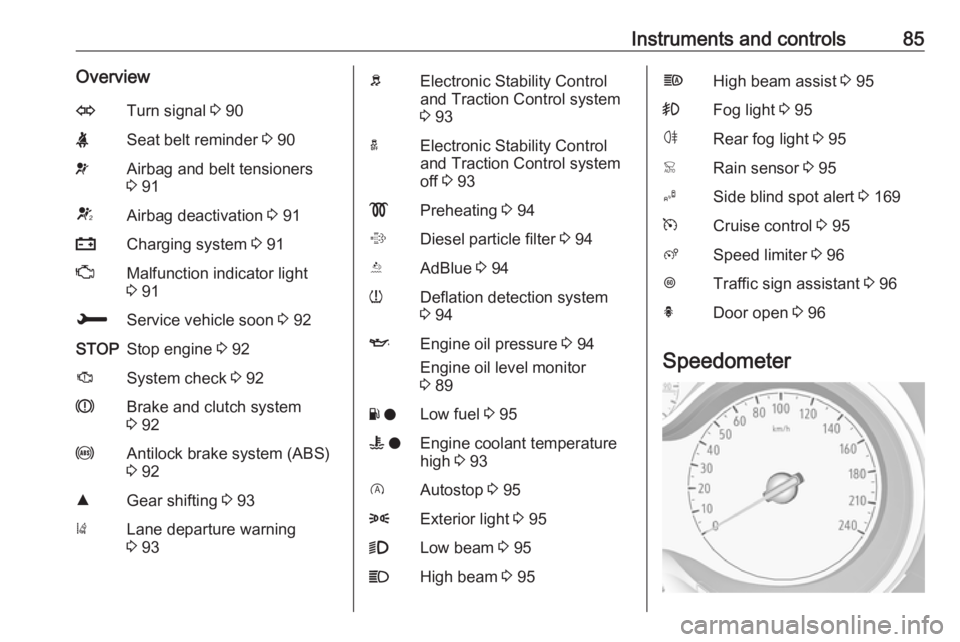
Instruments and controls85OverviewOTurn signal 3 90XSeat belt reminder 3 90vAirbag and belt tensioners
3 91VAirbag deactivation 3 91pCharging system 3 91ZMalfunction indicator light
3 91HService vehicle soon 3 92STOPStop engine 3 92JSystem check 3 92RBrake and clutch system
3 92uAntilock brake system (ABS)
3 92RGear shifting 3 93)Lane departure warning
3 93bElectronic Stability Control
and Traction Control system
3 93aElectronic Stability Control
and Traction Control system
off 3 93!Preheating 3 94%Diesel particle filter 3 94YAdBlue 3 94wDeflation detection system
3 94IEngine oil pressure 3 94
Engine oil level monitor
3 89Y oLow fuel 3 95W oEngine coolant temperature
high 3 93DAutostop 3 958Exterior light 3 959Low beam 3 95CHigh beam 3 95fHigh beam assist 3 95>Fog light 3 95øRear fog light 3 95
Page 106 of 257

104Instruments and controlsRear wiper in reverse gear:
Activation/Deactivation.
● Vehicle
Unlocking boot only : Activation/
Deactivation.
Plip action : Driver/all doors.
● Driving assistance
Fatigue Detection system :
Activation/Deactivation.
Speed recommendation :
Activation/Deactivation.
7" Colour-Info-Display
Press ; to open homepage.
Use touch buttons to operate the
display:
Select Settings .
Unit settings
Select Units
Change units for Consumption and
Distance and Temperature .
Touch 9 repeatedly to return to the
homepage.
Language settings
Select Language .
Change language by touching the respective entry.
Touch 9 repeatedly to return to the
homepage.
Vehicle settings
Select Vehicle .
In the corresponding submenus the
following settings can be changed:
● Collision / Detection Systems
Side Blind Spot Alert : Activates
or deactivates side blind spot
alert.Drowsy Driver Alert : Activates or
deactivates the driver
drowsiness system.
Speed Limit Information :
Activates or deactivates the
speed limit information by traffic sign recognition.
Rear View Camera Guidelines :
Activates or deactivates the rear
view camera guidelines on the
Info display.
● Comfort and Convenience
Auto Wipe in Reverse Gear :
Activates or deactivates
automatic switching on of the
rear window wiper when reverse
gear is engaged.
● Lighting
Ambient Lighting : Activates or
deactivates the ambient lighting
and adjusts its brightness.
Welcome Lighting : Activates or
deactivates and changes the
duration of welcome lighting.
Page 107 of 257

Instruments and controls105Exit Lighting: Activates or
deactivates and changes the
duration of exit lighting.
● Remote Lock, Unlock, Start
Remote Door Unlock : Changes
the configuration to unlock the
driver's door only or all doors
when pressing O on the remote
control.
Unlock boot only : Activates or
deactivates unlocking the tailgate only when pressing T on the
remote control.
Touch 9 repeatedly to return to the
homepage.8" Colour-Info-Display
Press SET to open settings menu.
Use touch buttons to operate the
display.
Unit settings
Select System settings .
Change units for Consumption and
Distance and Temperature .
Confirm with G
Touch r repeatedly to exit the menu.
Language settings
Select Languages .
Change language by touching the
respective entry.
Confirm with G
Touch r repeatedly to exit the menu.
Vehicle settings
Press Í.
Select Vehicle settings .
In the corresponding submenus the
following settings can be changed:
● Headlights
Welcome lighting : Activates or
deactivates the function and
adjusts its duration.
Page 108 of 257

106Instruments and controlsGuide-me-home lighting:
Activates or deactivates the
function and adjusts its duration.
● Comfort
Mood lighting : Adjusts the
brightness of the ambient
lighting.
Rear wiper in reverse : Activates
or deactivates automatic
switching on of the rear window
wiper when reverse gear is
engaged.
● Vehicle access
Door unlock: boot only : Activates
or deactivates unlocking the
tailgate only when pressing T
on the remote control.
Door unlock: driver only :
Changes the configuration to unlock the driver's door only or all
doors when pressing O on the
remote control.
● Safety
Driver attention warning :
Activates or deactivates the
driver drowsiness system.Driving functions
Press Í.
Select Driving functions .
In the corresponding submenus the
following settings can be changed:
● Park Assist : Activates advanced
park assist, a parking maneuver can be selected.
● Blind Spot Sensors : Activates or
deactivates side blind spot alert.
● Panoramic view system :
Activation/deactivation of the
function.
Telematics service
OnStar
OnStar is a personal connectivity and service assistant with integrated
Wi-Fi hotspot. The OnStar service is
available 24 hours a day, seven days
a week.
Note
OnStar is not available for all
markets. For further information,
contact your workshop.
Note
In order to be available and
operational, OnStar needs a valid
OnStar subscription, functioning
vehicle electrics, ignition on, mobile
service and GPS satellite link.
To activate the OnStar services and
set up an account, press Z and speak
with an advisor.