park assist OPEL GRANDLAND X 2018 Infotainment system
[x] Cancel search | Manufacturer: OPEL, Model Year: 2018, Model line: GRANDLAND X, Model: OPEL GRANDLAND X 2018Pages: 265, PDF Size: 7.5 MB
Page 182 of 265
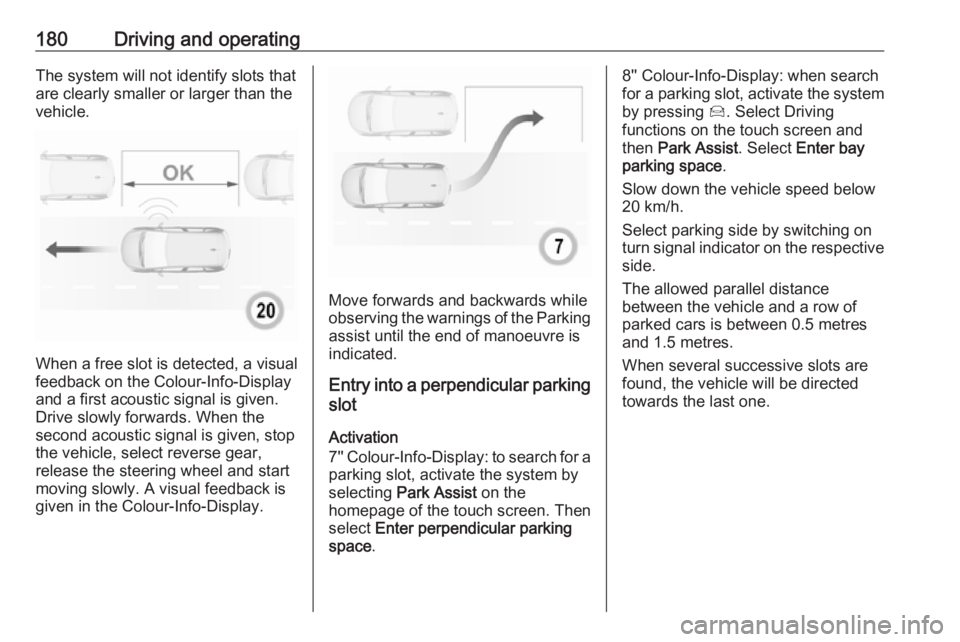
180Driving and operatingThe system will not identify slots that
are clearly smaller or larger than the
vehicle.
When a free slot is detected, a visual
feedback on the Colour-Info-Display and a first acoustic signal is given.Drive slowly forwards. When the
second acoustic signal is given, stop
the vehicle, select reverse gear,
release the steering wheel and start
moving slowly. A visual feedback is
given in the Colour-Info-Display.
Move forwards and backwards while
observing the warnings of the Parking
assist until the end of manoeuvre is
indicated.
Entry into a perpendicular parking
slot
Activation
7'' Colour-Info-Display: to search for a parking slot, activate the system by
selecting Park Assist on the
homepage of the touch screen. Then select Enter perpendicular parking
space .
8'' Colour-Info-Display: when search
for a parking slot, activate the system
by pressing Í. Select Driving
functions on the touch screen and
then Park Assist . Select Enter bay
parking space .
Slow down the vehicle speed below
20 km/h.
Select parking side by switching on
turn signal indicator on the respective
side.
The allowed parallel distance
between the vehicle and a row of
parked cars is between 0.5 metres
and 1.5 metres.
When several successive slots are found, the vehicle will be directed towards the last one.
Page 183 of 265
Driving and operating181
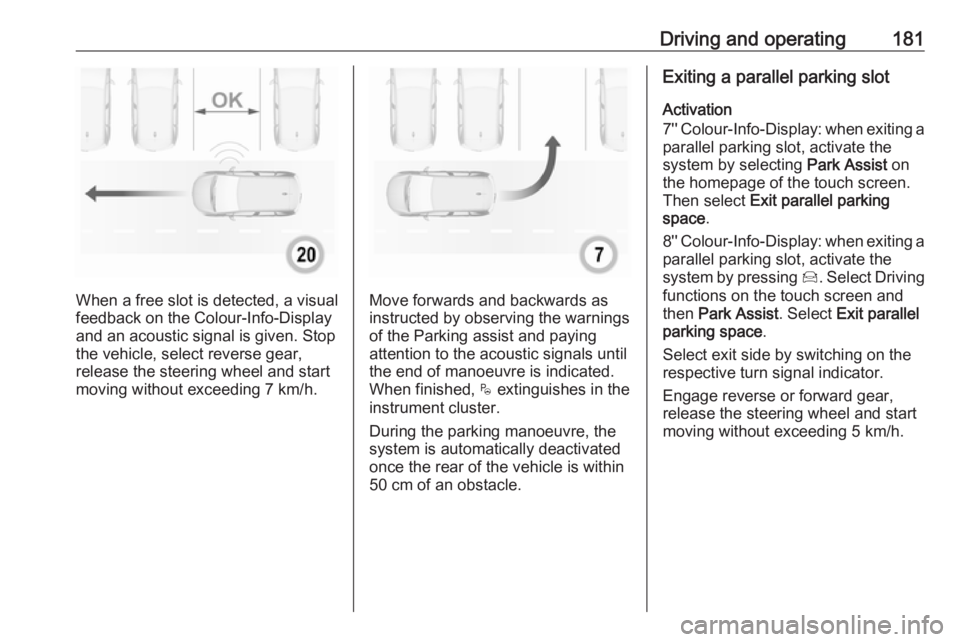
When a free slot is detected, a visual
feedback on the Colour-Info-Display and an acoustic signal is given. Stop
the vehicle, select reverse gear,
release the steering wheel and start
moving without exceeding 7 km/h.Move forwards and backwards as
instructed by observing the warnings
of the Parking assist and paying
attention to the acoustic signals until
the end of manoeuvre is indicated. When finished, $ extinguishes in the
instrument cluster.
During the parking manoeuvre, the
system is automatically deactivated
once the rear of the vehicle is within
50 cm of an obstacle.
Exiting a parallel parking slot
Activation
7'' Colour-Info-Display: when exiting a parallel parking slot, activate the
system by selecting Park Assist on
the homepage of the touch screen.
Then select Exit parallel parking
space .
8'' Colour-Info-Display: when exiting a
parallel parking slot, activate the
system by pressing Í. Select Driving
functions on the touch screen and
then Park Assist . Select Exit parallel
parking space .
Select exit side by switching on the
respective turn signal indicator.
Engage reverse or forward gear,
release the steering wheel and start
moving without exceeding 5 km/h.
Page 184 of 265
182Driving and operating
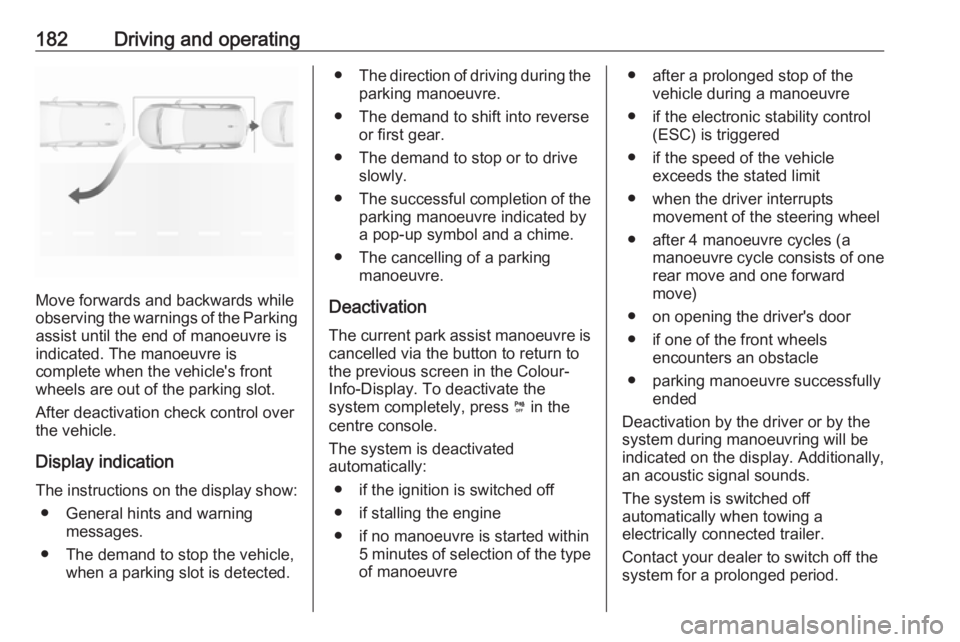
Move forwards and backwards while
observing the warnings of the Parking
assist until the end of manoeuvre is
indicated. The manoeuvre is
complete when the vehicle's front
wheels are out of the parking slot.
After deactivation check control over
the vehicle.
Display indication
The instructions on the display show: ● General hints and warning messages.
● The demand to stop the vehicle, when a parking slot is detected.
●The direction of driving during the
parking manoeuvre.
● The demand to shift into reverse or first gear.
● The demand to stop or to drive slowly.
● The successful completion of the
parking manoeuvre indicated by
a pop-up symbol and a chime.
● The cancelling of a parking manoeuvre.
Deactivation The current park assist manoeuvre is
cancelled via the button to return to
the previous screen in the Colour-
Info-Display. To deactivate the
system completely, press ¼ in the
centre console.
The system is deactivated
automatically:
● if the ignition is switched off
● if stalling the engine
● if no manoeuvre is started within 5 minutes of selection of the typeof manoeuvre● after a prolonged stop of the vehicle during a manoeuvre
● if the electronic stability control (ESC) is triggered
● if the speed of the vehicle exceeds the stated limit
● when the driver interrupts movement of the steering wheel
● after 4 manoeuvre cycles (a manoeuvre cycle consists of one
rear move and one forward
move)
● on opening the driver's door ● if one of the front wheels encounters an obstacle
● parking manoeuvre successfully ended
Deactivation by the driver or by the
system during manoeuvring will be
indicated on the display. Additionally,
an acoustic signal sounds.
The system is switched off
automatically when towing a
electrically connected trailer.
Contact your dealer to switch off the
system for a prolonged period.
Page 185 of 265
Driving and operating183Fault
In the event of a fault, a message is
displayed in the Colour Info Display, accompanied by an acoustic signal.
In the event of a fault in the power
steering, H illuminates and a
message is displayed in the Driver
Information Centre.9 Warning
Under certain circumstances,
various reflective surfaces on
objects or clothing as well as
external noise sources may cause the system to fail to detect
obstacles.
Special attention must be paid to
low obstacles which can damage
the lower part of the bumper.
Caution
Performance of the system can be reduced when sensors are
covered, e.g. by ice or snow.
Performance of the parking assist
system can be reduced due to
heavy loading.
Special conditions apply if there
are taller vehicles in the vicinity
(e.g. off-road vehicles, mini vans,
vans). Object identification and correct distance indication in the
upper part of these vehicles
cannot be guaranteed.
Objects with a very small reflection
cross-section, e.g. objects of
narrow size or soft materials, may
not be detected by the system.
Parking assist systems do not
detect objects outside the
detection range.
Note
It is possible that the sensor detects a non-existing object caused by
echo disturbance from external
acoustic noise or mechanical
misalignments (sporadic false
warnings may occur).
Make sure that the front number
plate is properly mounted (not bent
and no gaps to the bumper on the left
or right side) and the sensors are
firmly in place.
Advanced parking assist system
may not respond to changes in the
available parking space after
initiating a parking manoeuvre. The
system may recognize an entry, a
gateway, a courtyard or even a crossing as a parking slot. After
selecting reverse gear the system
will start a parking manoeuvre. Take care regarding the availability of the
suggested parking slot.
Surface irregularities, e.g. on construction zones, are not detected
by the system. The driver accepts
responsibility.
Side blind spot alert The Side blind spot alert system
detects and reports objects on either
side of the vehicle, within a specified
"blind spot" zone. The system
displays a visual alert in each exterior
Page 186 of 265
184Driving and operatingmirror, when detecting objects that
may not be visible in the interior and
exterior mirrors.
Side blind spot alert uses some of the
advanced parking assist sensors
which are located in the front and rear bumper on both sides of the vehicle.9 Warning
Side blind spot alert does not
replace driver vision.
The system does not detect:
● vehicles outside the side blind zones which may be rapidly
approaching
● pedestrians, cyclists or animals
Before changing a lane, always
check all mirrors, look over the
shoulder and use the turn signal.
Activation
7'' Colour-Info-Display: select Blind
spot monitoring on the homepage of
the touch screen and activate the
function.
8'' Colour-Info-Display: press Í.
Select Driving functions on the touch
screen and then Blind spot
monitoring . Activate the function.
B illuminates continously green in the
instrument cluster to confirm the
function.
Functionality
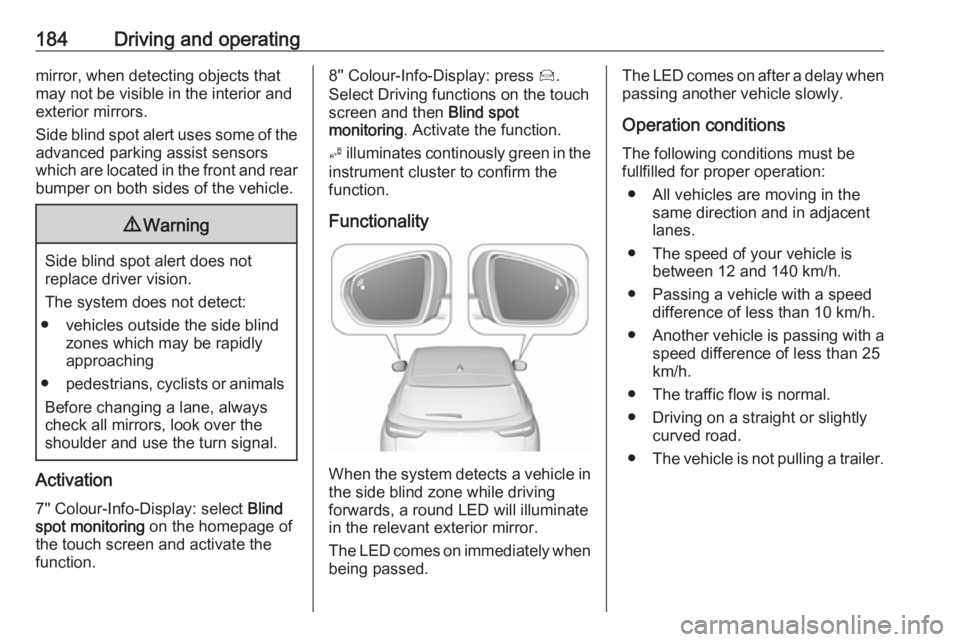
When the system detects a vehicle in the side blind zone while driving
forwards, a round LED will illuminate
in the relevant exterior mirror.
The LED comes on immediately when being passed.
The LED comes on after a delay when
passing another vehicle slowly.
Operation conditions
The following conditions must be
fullfilled for proper operation:
● All vehicles are moving in the same direction and in adjacent
lanes.
● The speed of your vehicle is between 12 and 140 km/h.
● Passing a vehicle with a speed difference of less than 10 km/h.
● Another vehicle is passing with a
speed difference of less than 25
km/h.
● The traffic flow is normal.
● Driving on a straight or slightly curved road.
● The vehicle is not pulling a trailer.
Page 190 of 265
188Driving and operatingDisplayed images may be furtheror closer than they appear. The
area displayed is limited and
objects that are close to either
edge of the bumper or under the
bumper are not displayed on the
screen.
System limitations
Caution
For optimal operation of the
system, it is important to keep the
lense of the camera in the tailgate between the number plate lightsand the lense in the front grill
below the enblem always clean. Rinse the lenses with water and
wipe with a soft cloth.
Do not clean the lenses with a
steam-jet or high-pressure jet
cleaner.
The panoramic view system may not operate properly when:
● The surrounding is dark.
● The sun or the beam of headlights is shining directly into
the camera lenses.
● During nighttime driving.
● Weather limits visibility, such as fog, rain, or snow.
● The camera lenses are blocked by snow, ice, slush, mud, dirt.
● The vehicle is towing a trailer. ● The vehicle had an accident.● There are extreme temperature changes.
Rear view camera The rear view camera assists the
driver when reversing by displaying a
view of the area behind the vehicle.
The view of the camera is displayed
in the Info-Display.9 Warning
The rear view camera does not
replace driver vision. Note that
objects that are outside the
camera's field of view and the
parking assist sensors, e.g. below
the bumper or underneath the
vehicle, are not displayed.
Do not reverse or park the vehicle
using only the rear view camera.
Always check the surrounding of
the vehicle before driving.
Switching on
Rear view camera is automatically
activated when reverse gear is
engaged.
Page 197 of 265
Driving and operating195Caution
Use of fuel that does not comply toEN 228 or E DIN 51626-1 or
equivalent can lead to deposits or
engine damage.
Caution
Use of fuel with a lower octane
rating than the lowest possible
rating could lead to uncontrolled combustion and engine damage.
The engine specific requirements
regarding octane rating are given in
the engine data overview 3 245. A
country-specific label at the fuel filler
flap can supersede the requirement.
Fuel additives outside Europe
Fuel should contain detergent
additives that help prevent engine
and fuel system deposits from
forming. Clean fuel injectors and
intake valves will allow the emission
control system to work properly.
Some fuel does not contain sufficient
quantities of additive to keep fuel
injectors and intake valves clean.
To make up for this lack of
detergency, add Fuel System
Treatment PLUS to the fuel tank at
every engine oil change or every
10,000 km, whichever occurs first. It
is available at your workshop.
Fuels containing oxygenates such as
ethers and ethanol, as well as
reformulated fuel, are available in
some cities. If these fuels comply with the previously described
specification, then they are
acceptable to use. However, E85
(85% ethanol) and other fuels
containing more than 15% ethanol
must be used only in FlexFuel
vehicles.Caution
Do not use fuel containing
methanol. It can corrode metal
parts in the fuel system and also
damage plastic and rubber parts.
This damage would not be
covered by the vehicle warranty.
Some fuels, mainly high octane
racing fuels, can contain an octane
enhancing additive called
methylcyclopentadienyl manganese
tricarbonyl (MMT). Do not use fuels or fuel additives with MMT as they can
reduce spark plug life and affect
emission control system
performance. The malfunction
indicator light Z may turn on 3 96. If
this occurs, seek the assistance of a
workshop.
Fuel for diesel engines Only use diesel fuel that complies
with EN 590.
In countries outside the European
Union use Euro-Diesel fuel with a
sulfur concentration below 50 ppm.Caution
Use of fuel that does not comply to EN 590 or similar can lead to
engine powerloss, increased wear
or engine damage.
Page 220 of 265
218Vehicle careWheels and tyres
Tyre condition, wheel condition Drive over edges slowly and at right
angles if possible. Driving over sharp
edges can cause tyre and wheel
damage. Do not trap tyres on the kerb when parking.
Regularly check the wheels for
damage. Seek the assistance of a
workshop in the event of damage or
unusual wear.
Winter tyres
Winter tyres improve driving safety at temperatures below 7 °C and shouldtherefore be fitted on all wheels.
In accordance with country-specific
regulations, affix the speed sticker in
the driver's field of view.
All tyre sizes are permitted as winter
tyres 3 250.Tyre designations
E.g. 225/55 R 18 98 V225:tyre width, mm55:cross-section ratio (tyre height
to tyre width), %R:belt type: RadialRF:type: RunFlat18:wheel diameter, inches98:load index e.g. 98 is equivalent
to 750 kgV:speed code letter
Speed code letter:
Q:up to 160 km/hS:up to 180 km/hT:up to 190 km/hH:up to 210 km/hV:up to 240 km/hW:up to 270 km/h
Choose a tyre appropriate for the
maximum speed of your vehicle.
The maximum speed is achievable at kerb weight with driver (75 kg) plus
125 kg payload. Optional equipment
could reduce the maximum speed of
the vehicle.
Performance 3 246.
Directional tyres
Directional tyres should be mounted
so that they rotate in the correct
direction. The proper rotation
direction is indicated by a symbol (e.g. an arrow) on the sidewall.
Tyre pressure
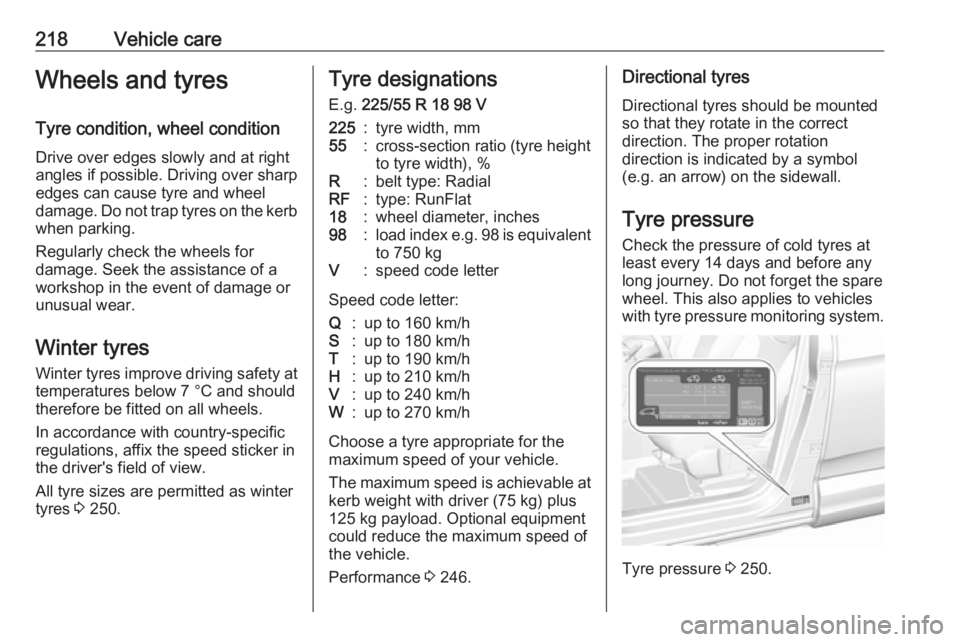
Check the pressure of cold tyres at
least every 14 days and before any
long journey. Do not forget the spare
wheel. This also applies to vehicles
with tyre pressure monitoring system.
Tyre pressure 3 250.
Page 227 of 265
Vehicle care225before. Drain excess tyre
pressure with the button on the air
hose.
If tyre pressure hasn't decreased
under 1.5 bar, set it to the correct
value. Otherwise the vehicle must
not be used. Seek assistance of a workshop. 3 250
Repeat the checking procedure
once more after driving further
10 km (but no more than ten
minutes) to check that there is no
more loss of pressure
If the tyre pressure has fallen
below 1.5 bar, the vehicle must
not be used. Seek the assistance
of a workshop.
17. Stow away tyre repair kit in load compartment.
Note
The driving characteristics of the
repaired tyre are severely affected, therefore have this tyre replaced.
If unusual noise is heard or the
compressor becomes hot, turn
compressor off for at least
30 minutes.The built-in safety valve opens at a
pressure of seven bar.
Note the expiry date of the kit. After
this date its sealing capability is no
longer guaranteed. Pay attention to
storage information on sealant
bottle.
Replace the used sealant bottle. Dispose of the bottle as prescribed
by applicable laws.
The compressor and sealant can be used from approx. -30 °C.
Wheel changing
Some vehicles are equipped with a tyre repair kit instead of a spare wheel 3 222.
Make the following preparations and
observe the following information:
● Park the vehicle on a level, firm and non-skid surface. The front
wheels must be in the straight- ahead position.
● If necessary, place a chock under
the wheel diagonally opposite the wheel to be changed.● Apply the parking brake and engage first gear, reverse gear or
P .
● Remove the spare wheel 3 228.
● Never change more than one wheel at once.
● Use the jack only to change wheels in case of puncture, not
for seasonal winter or summer
tyre change.
● The jack is maintenance-free. ● If the ground on which the vehicle
is standing is soft, a solid board
(max. 1 cm thick) should be
placed under the jack.
● Take heavy objects out of the vehicle before jacking up.
● No people or animals may be in the vehicle when it is jacked-up.
● Never crawl under a jacked-up vehicle.
● Do not start the vehicle when it is
raised on the jack.
● Before screwing in the wheel bolts, clean them.
Page 233 of 265
Vehicle care231
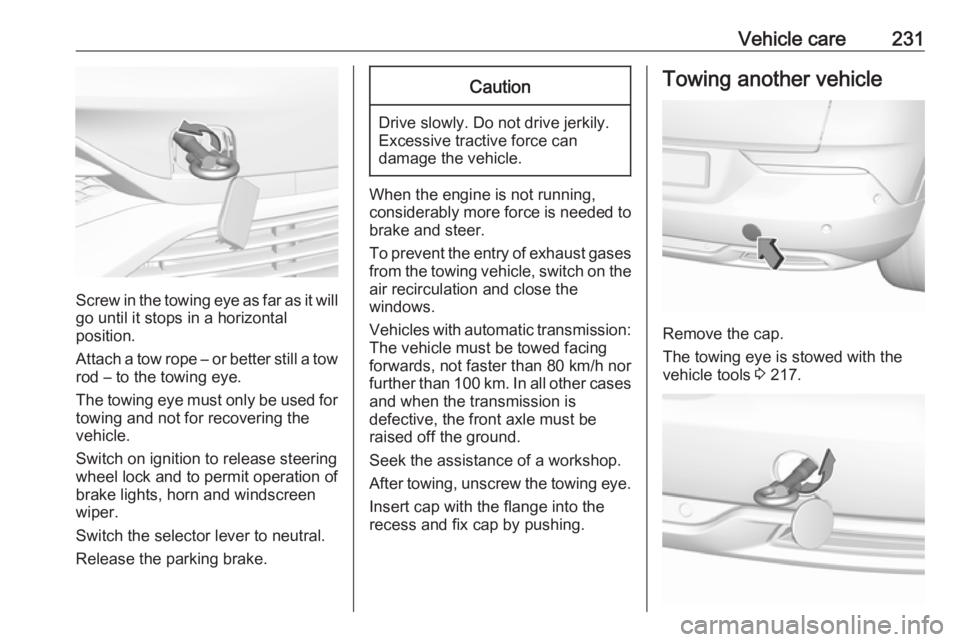
Screw in the towing eye as far as it will
go until it stops in a horizontal
position.
Attach a tow rope – or better still a tow
rod – to the towing eye.
The towing eye must only be used for towing and not for recovering the
vehicle.
Switch on ignition to release steering
wheel lock and to permit operation of
brake lights, horn and windscreen
wiper.
Switch the selector lever to neutral.
Release the parking brake.
Caution
Drive slowly. Do not drive jerkily.
Excessive tractive force can
damage the vehicle.
When the engine is not running,
considerably more force is needed to
brake and steer.
To prevent the entry of exhaust gases from the towing vehicle, switch on the
air recirculation and close the
windows.
Vehicles with automatic transmission: The vehicle must be towed facing
forwards, not faster than 80 km/h nor further than 100 km. In all other cases
and when the transmission is
defective, the front axle must be
raised off the ground.
Seek the assistance of a workshop.
After towing, unscrew the towing eye.
Insert cap with the flange into the
recess and fix cap by pushing.
Towing another vehicle
Remove the cap.
The towing eye is stowed with the
vehicle tools 3 217.