window OPEL GRANDLAND X 2018 Infotainment system
[x] Cancel search | Manufacturer: OPEL, Model Year: 2018, Model line: GRANDLAND X, Model: OPEL GRANDLAND X 2018Pages: 265, PDF Size: 7.5 MB
Page 27 of 265
Keys, doors and windows25Replacing battery in electronic
key
Replace the battery as soon as the
system no longer operates properly or the range is reduced. The need for battery replacement is indicated by a
message in the Driver Information
Centre 3 105.
Batteries do not belong in household
waste. They must be disposed of at
an appropriate recycling collection
point.
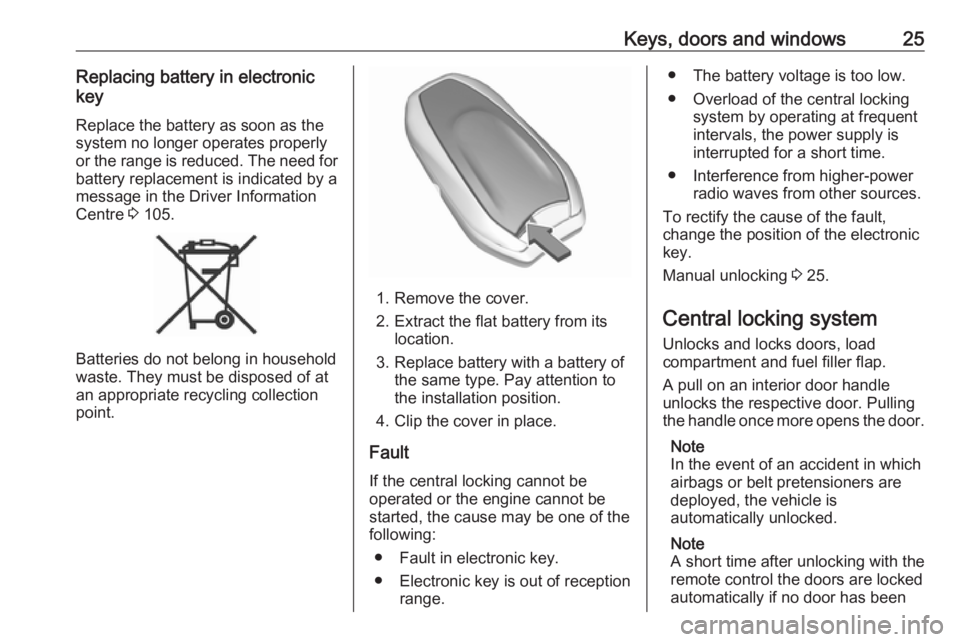
1. Remove the cover.
2. Extract the flat battery from its location.
3. Replace battery with a battery of the same type. Pay attention to
the installation position.
4. Clip the cover in place.
Fault
If the central locking cannot be
operated or the engine cannot be
started, the cause may be one of the
following:
● Fault in electronic key.
● Electronic key is out of reception range.
● The battery voltage is too low.
● Overload of the central locking system by operating at frequent
intervals, the power supply is
interrupted for a short time.
● Interference from higher-power radio waves from other sources.
To rectify the cause of the fault,
change the position of the electronic
key.
Manual unlocking 3 25.
Central locking system Unlocks and locks doors, load
compartment and fuel filler flap.
A pull on an interior door handle
unlocks the respective door. Pulling
the handle once more opens the door.
Note
In the event of an accident in which
airbags or belt pretensioners are
deployed, the vehicle is
automatically unlocked.
Note
A short time after unlocking with the
remote control the doors are locked
automatically if no door has been
Page 28 of 265
26Keys, doors and windowsopened. A precondition is that the
setting is activated in the vehicle
personalisation 3 106.
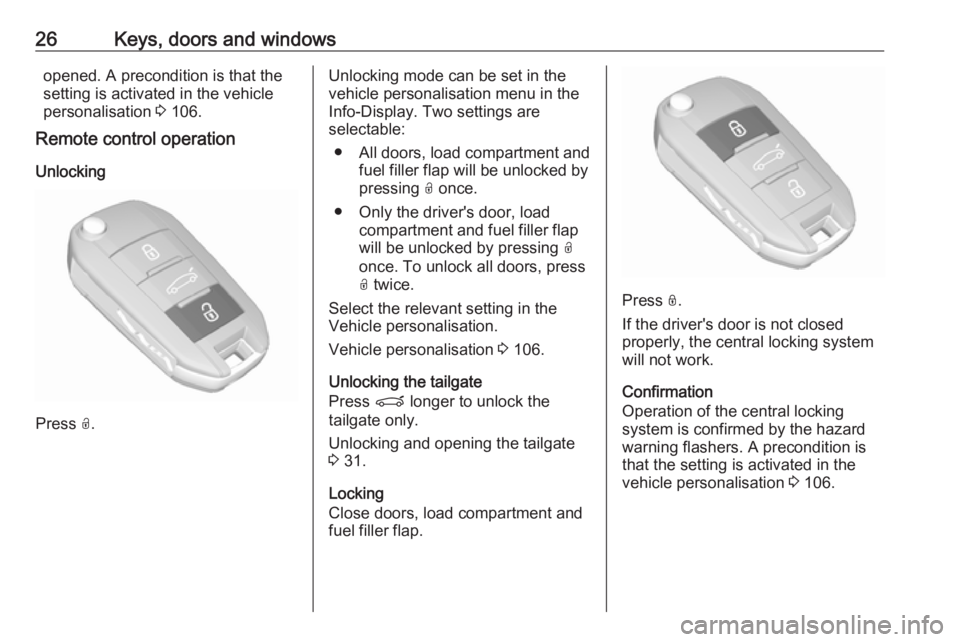
Remote control operation
Unlocking
Press O.
Unlocking mode can be set in the
vehicle personalisation menu in the
Info-Display. Two settings are
selectable:
● All doors, load compartment and fuel filler flap will be unlocked by
pressing O once.
● Only the driver's door, load compartment and fuel filler flap
will be unlocked by pressing O
once. To unlock all doors, press O twice.
Select the relevant setting in the Vehicle personalisation.
Vehicle personalisation 3 106.
Unlocking the tailgate
Press P longer to unlock the
tailgate only.
Unlocking and opening the tailgate
3 31.
Locking
Close doors, load compartment and
fuel filler flap.
Press N.
If the driver's door is not closed
properly, the central locking system
will not work.
Confirmation
Operation of the central locking
system is confirmed by the hazard
warning flashers. A precondition is
that the setting is activated in the
vehicle personalisation 3 106.
Page 29 of 265
Keys, doors and windows27Electronic key system operation
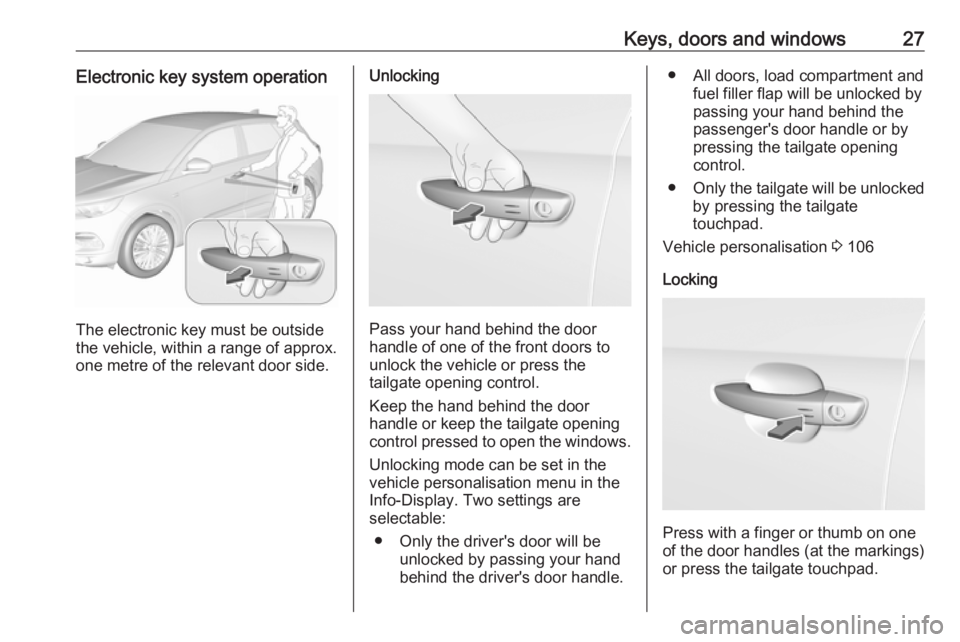
The electronic key must be outside
the vehicle, within a range of approx. one metre of the relevant door side.
Unlocking
Pass your hand behind the door
handle of one of the front doors to
unlock the vehicle or press the
tailgate opening control.
Keep the hand behind the door
handle or keep the tailgate opening control pressed to open the windows.
Unlocking mode can be set in the
vehicle personalisation menu in the
Info-Display. Two settings are
selectable:
● Only the driver's door will be unlocked by passing your hand
behind the driver's door handle.
● All doors, load compartment and fuel filler flap will be unlocked by
passing your hand behind the
passenger's door handle or by
pressing the tailgate opening
control.
● Only the tailgate will be unlocked
by pressing the tailgate
touchpad.
Vehicle personalisation 3 106
Locking
Press with a finger or thumb on one
of the door handles (at the markings)
or press the tailgate touchpad.
Page 30 of 265
28Keys, doors and windowsAll doors, load compartment and fuel
filler flap will be locked.
The system locks if any door has
been opened and all doors are now
closed.
If the driver's door is not closed
properly, the electronic key remains in the vehicle or the ignition is not off,
locking will not be permitted and a
warning chime sounds.
If there have been two or more
electronic keys in the vehicle and the
ignition was on once, the doors will be locked even if just one electronic key
is taken out of the vehicle.
Unlocking and opening the tailgate
The tailgate can be unlocked and
opened handsfree by pushing the
touchpad switch under the tailgate
moulding when the electronic key is in
range. The doors remain locked.
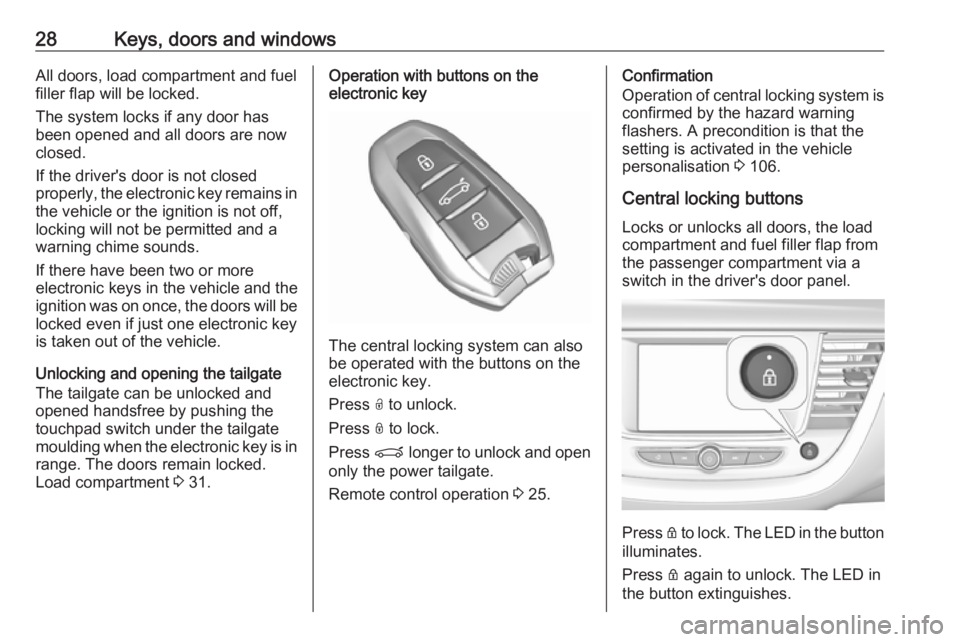
Load compartment 3 31.Operation with buttons on the
electronic key
The central locking system can also
be operated with the buttons on the
electronic key.
Press O to unlock.
Press N to lock.
Press P longer to unlock and open
only the power tailgate.
Remote control operation 3 25.
Confirmation
Operation of central locking system is
confirmed by the hazard warning
flashers. A precondition is that the
setting is activated in the vehicle
personalisation 3 106.
Central locking buttons Locks or unlocks all doors, the load
compartment and fuel filler flap from
the passenger compartment via a
switch in the driver's door panel.
Press Q to lock. The LED in the button
illuminates.
Press Q again to unlock. The LED in
the button extinguishes.
Page 31 of 265
Keys, doors and windows29Operation with the key in case of
a central locking system fault
In case of a fault, e.g. vehicle battery
or remote control/electronic key
battery is discharged, the driver's
door can be locked or unlocked with
the mechanical key.
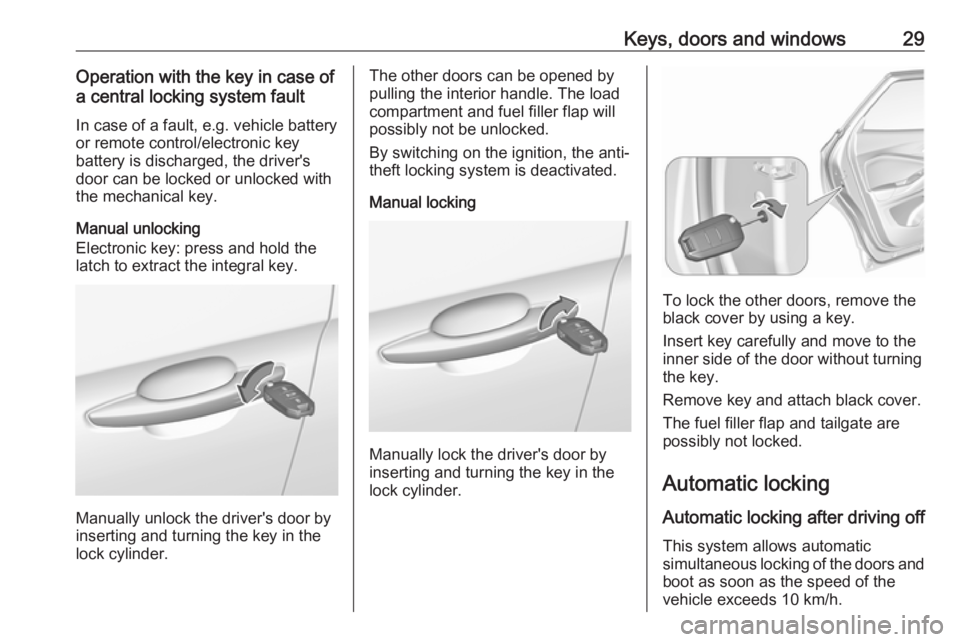
Manual unlocking
Electronic key: press and hold the
latch to extract the integral key.
Manually unlock the driver's door by
inserting and turning the key in the
lock cylinder.
The other doors can be opened by
pulling the interior handle. The load
compartment and fuel filler flap will
possibly not be unlocked.
By switching on the ignition, the anti- theft locking system is deactivated.
Manual locking
Manually lock the driver's door by
inserting and turning the key in the lock cylinder.
To lock the other doors, remove the
black cover by using a key.
Insert key carefully and move to the
inner side of the door without turning
the key.
Remove key and attach black cover.
The fuel filler flap and tailgate are
possibly not locked.
Automatic locking Automatic locking after driving off This system allows automatic
simultaneous locking of the doors and
boot as soon as the speed of the
vehicle exceeds 10 km/h.
Page 32 of 265
30Keys, doors and windowsIf one of the doors or the load
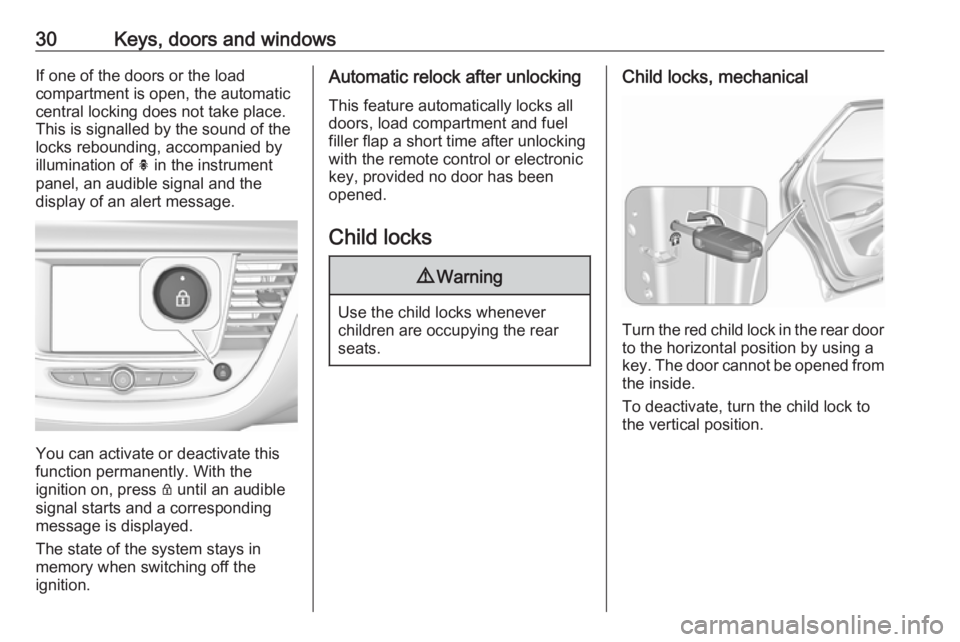
compartment is open, the automatic
central locking does not take place.
This is signalled by the sound of the
locks rebounding, accompanied by
illumination of h in the instrument
panel, an audible signal and the
display of an alert message.
You can activate or deactivate this
function permanently. With the
ignition on, press Q until an audible
signal starts and a corresponding message is displayed.
The state of the system stays in
memory when switching off the
ignition.
Automatic relock after unlocking
This feature automatically locks all
doors, load compartment and fuel
filler flap a short time after unlocking
with the remote control or electronic
key, provided no door has been
opened.
Child locks9 Warning
Use the child locks whenever
children are occupying the rear
seats.
Child locks, mechanical
Turn the red child lock in the rear door to the horizontal position by using a
key. The door cannot be opened from
the inside.
To deactivate, turn the child lock to
the vertical position.
Page 33 of 265
Keys, doors and windows31Child locks, electric
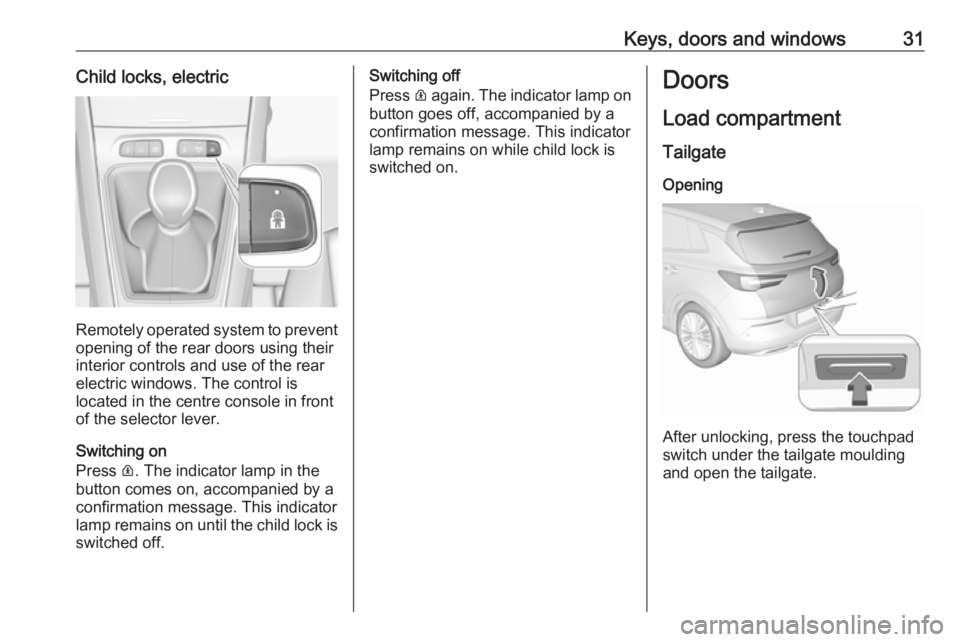
Remotely operated system to prevent
opening of the rear doors using their
interior controls and use of the rear
electric windows. The control is
located in the centre console in front
of the selector lever.
Switching on
Press R. The indicator lamp in the
button comes on, accompanied by a
confirmation message. This indicator
lamp remains on until the child lock is
switched off.
Switching off
Press R again. The indicator lamp on
button goes off, accompanied by a
confirmation message. This indicator
lamp remains on while child lock is
switched on.Doors
Load compartment TailgateOpening
After unlocking, press the touchpad
switch under the tailgate moulding
and open the tailgate.
Page 34 of 265
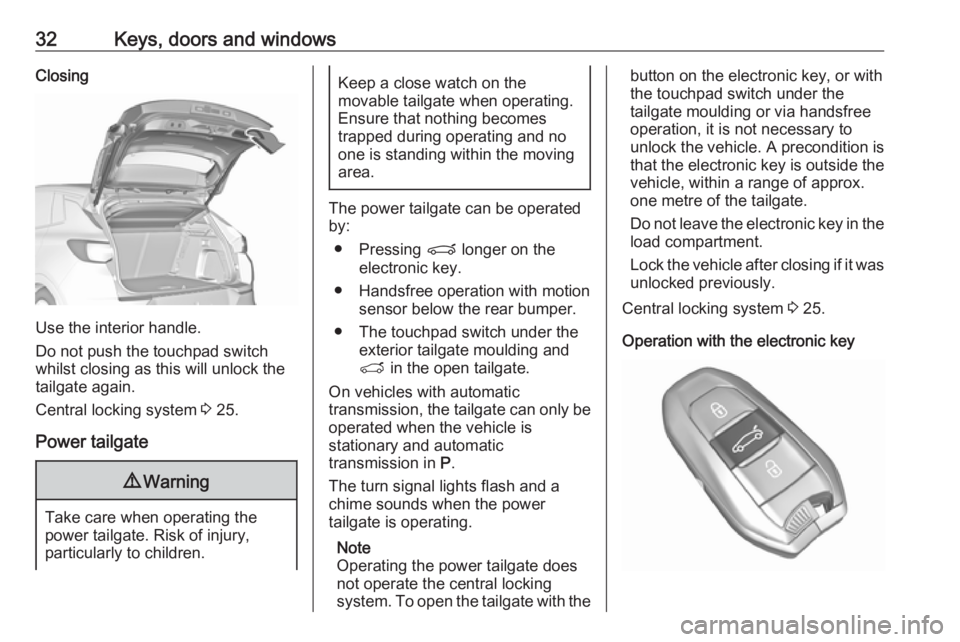
32Keys, doors and windowsClosing
Use the interior handle.
Do not push the touchpad switch
whilst closing as this will unlock the
tailgate again.
Central locking system 3 25.
Power tailgate
9 Warning
Take care when operating the
power tailgate. Risk of injury,
particularly to children.
Keep a close watch on the
movable tailgate when operating.
Ensure that nothing becomes
trapped during operating and no
one is standing within the moving
area.
The power tailgate can be operated
by:
● Pressing P longer on the
electronic key.
● Handsfree operation with motion sensor below the rear bumper.
● The touchpad switch under the exterior tailgate moulding andT in the open tailgate.
On vehicles with automatic
transmission, the tailgate can only be operated when the vehicle is
stationary and automatic
transmission in P.
The turn signal lights flash and a
chime sounds when the power
tailgate is operating.
Note
Operating the power tailgate does not operate the central locking
system. To open the tailgate with the
button on the electronic key, or with
the touchpad switch under the
tailgate moulding or via handsfree
operation, it is not necessary to
unlock the vehicle. A precondition is
that the electronic key is outside the
vehicle, within a range of approx.
one metre of the tailgate.
Do not leave the electronic key in the load compartment.
Lock the vehicle after closing if it was
unlocked previously.
Central locking system 3 25.
Operation with the electronic key
Page 35 of 265
Keys, doors and windows33Press P longer to open or close the
tailgate.
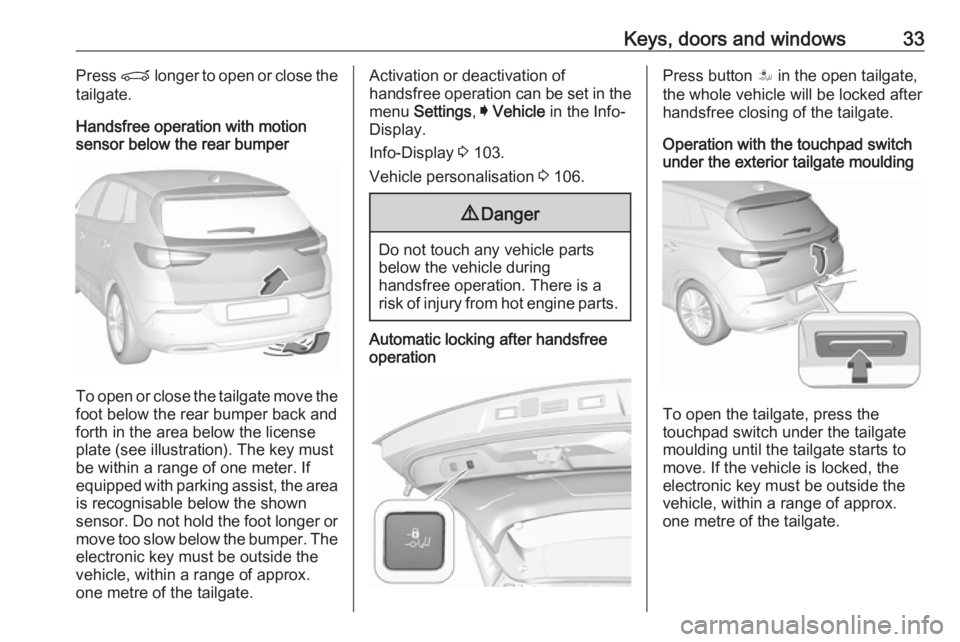
Handsfree operation with motion
sensor below the rear bumper
To open or close the tailgate move the
foot below the rear bumper back and
forth in the area below the license
plate (see illustration). The key must
be within a range of one meter. If
equipped with parking assist, the area is recognisable below the shown
sensor. Do not hold the foot longer or
move too slow below the bumper. The
electronic key must be outside the
vehicle, within a range of approx.
one metre of the tailgate.
Activation or deactivation of
handsfree operation can be set in the menu Settings , I Vehicle in the Info-
Display.
Info-Display 3 103.
Vehicle personalisation 3 106.9 Danger
Do not touch any vehicle parts
below the vehicle during
handsfree operation. There is a
risk of injury from hot engine parts.
Automatic locking after handsfree
operationPress button S in the open tailgate,
the whole vehicle will be locked after handsfree closing of the tailgate.
Operation with the touchpad switch
under the exterior tailgate moulding
To open the tailgate, press the
touchpad switch under the tailgate
moulding until the tailgate starts to
move. If the vehicle is locked, the
electronic key must be outside the
vehicle, within a range of approx.
one metre of the tailgate.
Page 36 of 265
34Keys, doors and windows
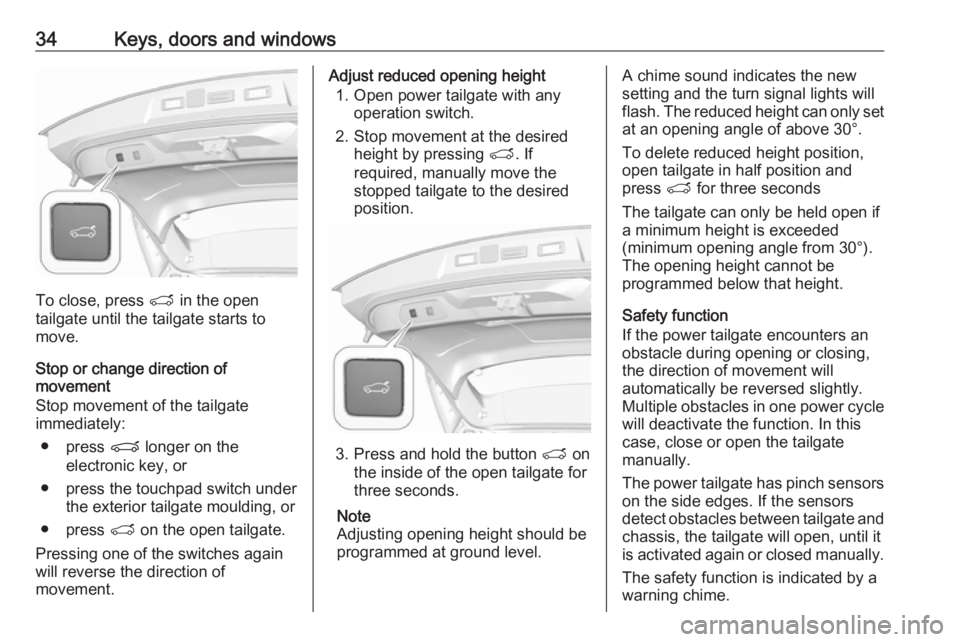
To close, press T in the open
tailgate until the tailgate starts to
move.
Stop or change direction of
movement
Stop movement of the tailgate immediately:
● press P longer on the
electronic key, or
● press the touchpad switch under the exterior tailgate moulding, or
● press T on the open tailgate.
Pressing one of the switches again
will reverse the direction of
movement.
Adjust reduced opening height
1. Open power tailgate with any operation switch.
2. Stop movement at the desired height by pressing T. If
required, manually move the
stopped tailgate to the desired
position.
3. Press and hold the button T on
the inside of the open tailgate for
three seconds.
Note
Adjusting opening height should be
programmed at ground level.
A chime sound indicates the new
setting and the turn signal lights will
flash. The reduced height can only set
at an opening angle of above 30°.
To delete reduced height position,
open tailgate in half position and
press T for three seconds
The tailgate can only be held open if
a minimum height is exceeded
(minimum opening angle from 30°).
The opening height cannot be
programmed below that height.
Safety function
If the power tailgate encounters an
obstacle during opening or closing,
the direction of movement will
automatically be reversed slightly.
Multiple obstacles in one power cycle will deactivate the function. In this
case, close or open the tailgate
manually.
The power tailgate has pinch sensors
on the side edges. If the sensors
detect obstacles between tailgate and chassis, the tailgate will open, until it
is activated again or closed manually.
The safety function is indicated by a
warning chime.