light OPEL GRANDLAND X 2018 Infotainment system
[x] Cancel search | Manufacturer: OPEL, Model Year: 2018, Model line: GRANDLAND X, Model: OPEL GRANDLAND X 2018Pages: 265, PDF Size: 7.5 MB
Page 174 of 265
172Driving and operating● The sensor in the windscreen orthe radar unit behind the front
bumper are blocked by snow, ice,
slush, mud, dirt etc.
● The windscreen is damaged or affected by foreign items, e.g.
stickers.
Active emergency braking Active emergency braking can help toreduce the damage and injury from
crashes with vehicles, pedestrians and obstacles directly ahead, when a
collision can no longer be avoided
either by manual braking or by
steering. Before the active
emergency braking applies, the driver
is warned by the Forward collision
alert 3 170 or the Front pedestrian
protection alert 3 175.
The feature uses various inputs (e.g.
camera sensor, radar sensor, brake
pressure, vehicle speed) to calculate
the probability of a frontal collision.9 Warning
This system is not intended to
replace the driver responsibility for driving the vehicle and looking
ahead. Its function is limited to
supplemental use only to reduce
the vehicle speed before a
collision.
The system may not react to
animals. After a sudden lane
change, the system needs a
certain time to detect the next
preceding vehicle.
The driver must always be ready
to take action and apply the brakes and steer to avoid collisions.
Functionality
If equipped only with front camera the
active emergency braking operates in forward gear above walking speed up
to 85 km/h. With radar sensor and
front camera active emergency
braking operates in forward gear
above walking speeds to 140 km/h.
A precondition is that forward collision
alert with front camera system is not
deactivated in the vehicle
personalisation menu 3 106.
The system includes: ● brake preparation system
● emergency automatic braking ● forward looking brake assist
● intelligent brake assist (only with radar sensor)
● forward collision alert
● front pedestrian protection
Brake preparation system
When approaching a vehicle ahead
or a pedestrian so quickly that a
collision is likely, the brake
preparation system slightly
pressurizes the brakes. This reduces
the response time, when a manual or automatic braking is requested.
The brake system is prepared so that braking can occur more rapidly.
Page 186 of 265
184Driving and operatingmirror, when detecting objects that
may not be visible in the interior and
exterior mirrors.
Side blind spot alert uses some of the
advanced parking assist sensors
which are located in the front and rear bumper on both sides of the vehicle.9 Warning
Side blind spot alert does not
replace driver vision.
The system does not detect:
● vehicles outside the side blind zones which may be rapidly
approaching
● pedestrians, cyclists or animals
Before changing a lane, always
check all mirrors, look over the
shoulder and use the turn signal.
Activation
7'' Colour-Info-Display: select Blind
spot monitoring on the homepage of
the touch screen and activate the
function.
8'' Colour-Info-Display: press Í.
Select Driving functions on the touch
screen and then Blind spot
monitoring . Activate the function.
B illuminates continously green in the
instrument cluster to confirm the
function.
Functionality
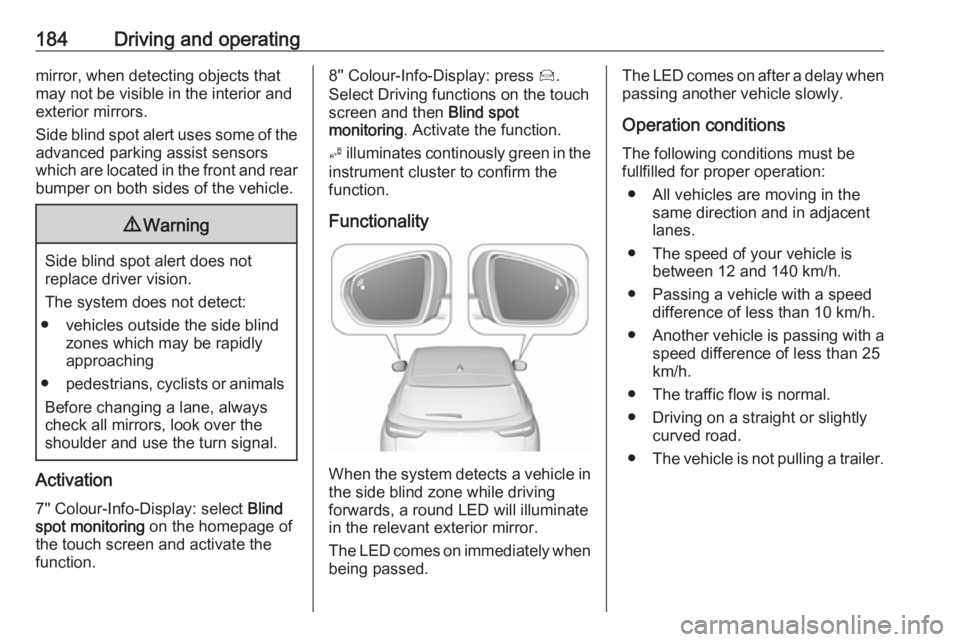
When the system detects a vehicle in the side blind zone while driving
forwards, a round LED will illuminate
in the relevant exterior mirror.
The LED comes on immediately when being passed.
The LED comes on after a delay when
passing another vehicle slowly.
Operation conditions
The following conditions must be
fullfilled for proper operation:
● All vehicles are moving in the same direction and in adjacent
lanes.
● The speed of your vehicle is between 12 and 140 km/h.
● Passing a vehicle with a speed difference of less than 10 km/h.
● Another vehicle is passing with a
speed difference of less than 25
km/h.
● The traffic flow is normal.
● Driving on a straight or slightly curved road.
● The vehicle is not pulling a trailer.
Page 190 of 265
188Driving and operatingDisplayed images may be furtheror closer than they appear. The
area displayed is limited and
objects that are close to either
edge of the bumper or under the
bumper are not displayed on the
screen.
System limitations
Caution
For optimal operation of the
system, it is important to keep the
lense of the camera in the tailgate between the number plate lightsand the lense in the front grill
below the enblem always clean. Rinse the lenses with water and
wipe with a soft cloth.
Do not clean the lenses with a
steam-jet or high-pressure jet
cleaner.
The panoramic view system may not operate properly when:
● The surrounding is dark.
● The sun or the beam of headlights is shining directly into
the camera lenses.
● During nighttime driving.
● Weather limits visibility, such as fog, rain, or snow.
● The camera lenses are blocked by snow, ice, slush, mud, dirt.
● The vehicle is towing a trailer. ● The vehicle had an accident.● There are extreme temperature changes.
Rear view camera The rear view camera assists the
driver when reversing by displaying a
view of the area behind the vehicle.
The view of the camera is displayed
in the Info-Display.9 Warning
The rear view camera does not
replace driver vision. Note that
objects that are outside the
camera's field of view and the
parking assist sensors, e.g. below
the bumper or underneath the
vehicle, are not displayed.
Do not reverse or park the vehicle
using only the rear view camera.
Always check the surrounding of
the vehicle before driving.
Switching on
Rear view camera is automatically
activated when reverse gear is
engaged.
Page 191 of 265
Driving and operating189Functionality
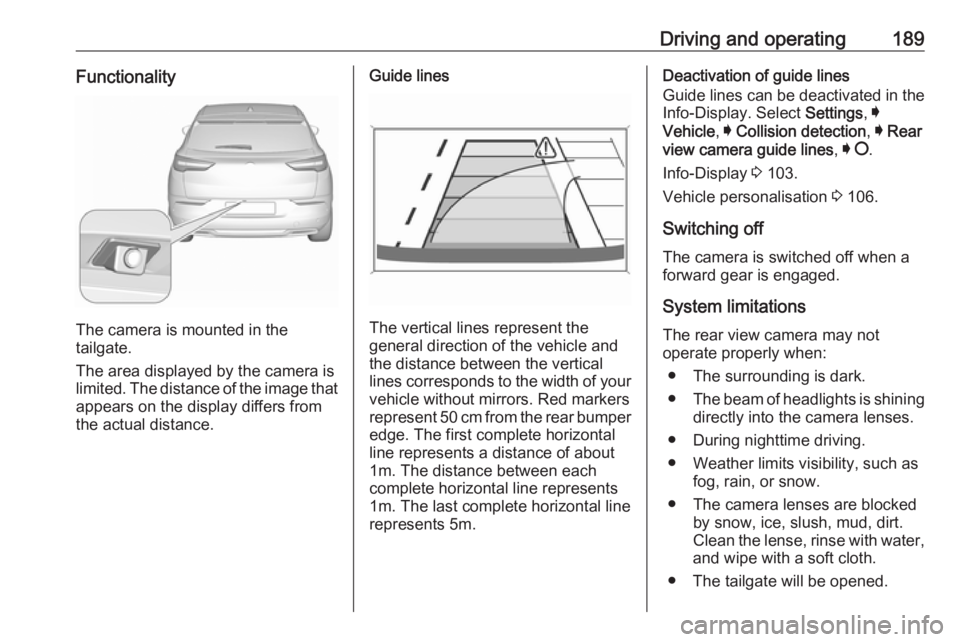
The camera is mounted in the
tailgate.
The area displayed by the camera is
limited. The distance of the image that
appears on the display differs from
the actual distance.
Guide lines
The vertical lines represent the
general direction of the vehicle and
the distance between the vertical
lines corresponds to the width of your vehicle without mirrors. Red markers
represent 50 cm from the rear bumper
edge. The first complete horizontal
line represents a distance of about
1m. The distance between each
complete horizontal line represents
1m. The last complete horizontal line
represents 5m.
Deactivation of guide lines
Guide lines can be deactivated in the Info-Display. Select Settings, I
Vehicle , I Collision detection , I Rear
view camera guide lines , I § .
Info-Display 3 103.
Vehicle personalisation 3 106.
Switching off
The camera is switched off when a
forward gear is engaged.
System limitations The rear view camera may not
operate properly when:
● The surrounding is dark.
● The beam of headlights is shining
directly into the camera lenses.
● During nighttime driving.
● Weather limits visibility, such as fog, rain, or snow.
● The camera lenses are blocked by snow, ice, slush, mud, dirt.
Clean the lense, rinse with water,
and wipe with a soft cloth.
● The tailgate will be opened.
Page 193 of 265
Driving and operating191Fault
In the event of a fault, H appears
in the instrument panel, accompanied by a display message. Contact adealer or a qualified workshop to have
the system checked.
System limitations
The system performance may not
operate properly when:
● Vehicle speed is below 60 km/h.
● Windscreen is not clean or affected by foreign items, e.g.
stickers
● Driving on winding or hilly roads.
● During nighttime driving.
● Adverse environmental conditions like heavy rain, snow,
direct sunlight or shadows.
● The sensor in the windscreen is blocked by snow, ice, slush, mud,dirt, windscreen damage or
affected by foreign items, e.g.
stickers.
● The sun is shining directly into the camera lens.
● Close vehicles ahead.● Driving on banked roads.
● Driving on road edges.
● Driving on roads with poor lane markings.
● Sudden lighting changes.
The system can not operate when no
lane marking is detected.
Lane keep assist Lane keep assist helps to avoid
crashes due to unintentional lane
departures. The front camera
observes the lane markings between
which the vehicle is driving. If the
vehicle approaches a lane marking,
the steering wheel is gently turned to
position the vehicle back into the lane. Turn steering wheel in same
direction, if system steers not
sufficient. Turn steering wheel gently
into opposite direction, if lane change
is intended.
When crossing a lane marking
significantly, lane keep assist starts a
visual and acoustic warning.Unintended lane departure is
assumed
● without using turn signal
● without braking
● without acceleration
● without active steering.
Note
The system is switched off during
detection of ambiguous lane
markings, e.g. in construction areas.
Note
The system may be switched off if it
detects lanes which are too narrow,
too wide or too curved.
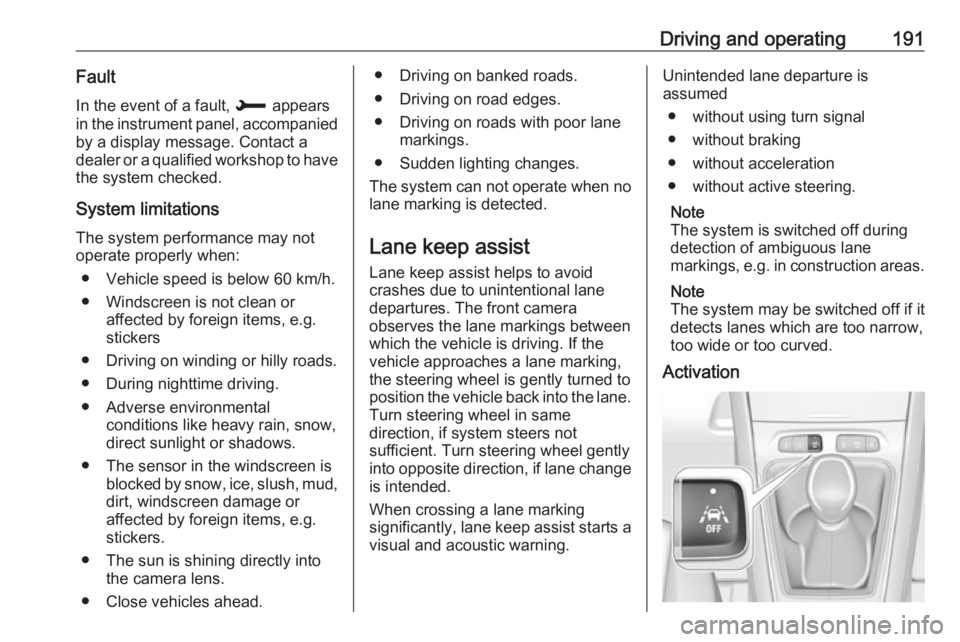
Activation
Page 194 of 265
192Driving and operatingAfter ignition is switched on, lane
keep assist is activated. If the system is activated, the LED in the button Ó
is not illuminated . To activate the
system when the system is
deactivated, press Ó.
When the control indicator a in the
instrument cluster illuminates green,
the system is ready to assist.
The system is operational at vehicle
speeds between 65 km/h and
180 km/h and if lane markings are
available. The driver must hold the
wheel with both hands. The change of trajectory is not accompanied by
operation of the direction indicators.
The ESC system must be activated.
The system makes the correction to
the trajectory necessary to return the
vehicle to its initial path if it identifies
a risk of the vehicle involuntarily
crossing one of the lane markings
detected. The driver will then notice a
turning movement of the steering
wheel.The control indicator a flashes
during trajectory correction. In the
Driver Information Centre, the line of
the corrected side will be displayed in orange.
If the driver wishes to maintain the
trajectory of the vehicle, he can
prevent the correction by keeping a
firm grip on the wheel (during an
avoiding manoeuvre, for example).
The correction is interrupted if the
direction indicators are operated.
While the direction indicators are on
and for a few seconds after switching
them off, the system considers that
any change of trajectory is voluntary
and no correction is triggered during
this period.
If the system detects that the driver is not holding the wheel firmly enoughduring an automatic correction of
trajectory, it interrupts the correction.
An alert is triggered to encourage the
driver to take back control of the
vehicle.Deactivation
The system is deactivated by
pressing Ó during a few seconds; the
LED in the button illuminates. In the
Driver Information Centre, solid grey
lines are displayed.
Fault
The system performance may be affected by:
● Windscreen not clean or affected
by foreign items, e.g. stickers
● Close vehicles ahead
● Banked roads
● Winding or hilly roads
● Road edges
● Roads with poor lane markings
● Sudden lighting changes
● Adverse environmental conditions e.g. heavy rain or
snow
● Vehicle modifications, e.g. tyres.
Page 196 of 265
194Driving and operatingmarkings. This system is particularly
suited to fast roads (speed higher
than 65 km/h).
If the trajectory of the vehicle
suggests a certain level of
drowsiness or inattention by the
driver, the system triggers the first
level of alert. The driver is notified by
a message and an audible signal is
given.
After three first level alerts, the
system triggers a new alert with a message, accompanied by a more
pronounced audible signal.
In certain driving conditions (poor
road surface or strong winds), the
system may give alerts independent of the driver's level of vigilance.
The driver drowsiness detection is
reinitialised when the ignition has
been switched off for a few minutes or the speed remains below 65 km/h for
a few minutes.System limitations
In the following situations, the system
may not operate properly or even not
operate at all:
● Poor visibility caused by inadequate lighting of the
roadway, falling snow, heavy
rain, dense fog etc.
● Dazzle caused by headlamps of an oncoming vehicles, low sun,
reflections on damp roads,
leaving a tunnel, alternating
shade and light etc.
● Windscreen area in front of the camera covered by dirt, snow,
stickers etc.
● No lane markings detected or multiple lane markings due to
roadworks
● Close vehicles ahead
● Winding roads or narrow roadsFuel
Fuel for petrol engines
Only use unleaded fuel that complies
with European standard EN 228 or E DIN 51626-1 or equivalent.
The engine is capable of running with fuel that contains up to 10% ethanol
(e.g. named E10).
Use fuel with the recommended
octane rating. A lower octane rating
can reduce engine power and torque
and slightly increases fuel
consumption.Caution
Do not use fuel or fuel additives
that contain metallic compounds
such as manganese-based
additives. This may cause engine
damage.
Page 197 of 265
Driving and operating195Caution
Use of fuel that does not comply toEN 228 or E DIN 51626-1 or
equivalent can lead to deposits or
engine damage.
Caution
Use of fuel with a lower octane
rating than the lowest possible
rating could lead to uncontrolled combustion and engine damage.
The engine specific requirements
regarding octane rating are given in
the engine data overview 3 245. A
country-specific label at the fuel filler
flap can supersede the requirement.
Fuel additives outside Europe
Fuel should contain detergent
additives that help prevent engine
and fuel system deposits from
forming. Clean fuel injectors and
intake valves will allow the emission
control system to work properly.
Some fuel does not contain sufficient
quantities of additive to keep fuel
injectors and intake valves clean.
To make up for this lack of
detergency, add Fuel System
Treatment PLUS to the fuel tank at
every engine oil change or every
10,000 km, whichever occurs first. It
is available at your workshop.
Fuels containing oxygenates such as
ethers and ethanol, as well as
reformulated fuel, are available in
some cities. If these fuels comply with the previously described
specification, then they are
acceptable to use. However, E85
(85% ethanol) and other fuels
containing more than 15% ethanol
must be used only in FlexFuel
vehicles.Caution
Do not use fuel containing
methanol. It can corrode metal
parts in the fuel system and also
damage plastic and rubber parts.
This damage would not be
covered by the vehicle warranty.
Some fuels, mainly high octane
racing fuels, can contain an octane
enhancing additive called
methylcyclopentadienyl manganese
tricarbonyl (MMT). Do not use fuels or fuel additives with MMT as they can
reduce spark plug life and affect
emission control system
performance. The malfunction
indicator light Z may turn on 3 96. If
this occurs, seek the assistance of a
workshop.
Fuel for diesel engines Only use diesel fuel that complies
with EN 590.
In countries outside the European
Union use Euro-Diesel fuel with a
sulfur concentration below 50 ppm.Caution
Use of fuel that does not comply to EN 590 or similar can lead to
engine powerloss, increased wear
or engine damage.
Page 200 of 265
198Driving and operatingGeneral information
The official fuel consumption and
specific CO 2 emission figures quoted
relate to the EU base model with
standard equipment.
Fuel consumption data and CO 2
emission data are determined
according to regulation R (EC) No.
715/2007 (in the version respectively
applicable), taking into consideration
the vehicle weight in running order, as
specified by the regulation.
The figures are provided only for the
purpose of comparison between
different vehicle variants and must not be taken as a guarantee for the
actual fuel consumption of a
particular vehicle. Additional
equipment may result in higher
results than the stated consumption
and CO 2 figures. Furthermore, fuel
consumption is dependent on
personal driving style as well as road
and traffic conditions.Trailer hitch
General information
Only use towing equipment that has
been approved for your vehicle.
Vehicles with natural gas engines
require special towing equipment.
Entrust retrofitting of towing
equipment to a workshop. It may be
necessary to make changes that
affect the cooling system, heat
shields or other equipment.
The bulb outage detection function for trailer brake light cannot detect a
partial bulb outage. E.g. in case of
4x 5 Watt bulbs, the function only
detects lamp outage when only a
single 5 Watt lamp remains or none
remain.
Fitting of towing equipment could
cover the opening of the towing eye. If this is the case use the coupling ball
bar for towing. Always keep the
coupling ball bar in the vehicle.Driving characteristics and
towing tips
Before attaching a trailer, lubricatethe coupling ball. However, do not do
so if a stabiliser, which acts on the
coupling ball, is being used to reduce snaking movements.
During trailer towing do not exceed a
speed of 80 km/h. A maximum speed
of 100 km/h is only appropriate if an
oscillation damper is used and the
permissible gross trailer weight does
not exceed the vehicle’s curb weight.
For trailers with low driving stability
and caravan trailers, the use of an
oscillation damper is strongly
recommended.
If the trailer starts snaking, drive more
slowly, do not attempt to correct the
steering and brake sharply if
necessary.
When driving downhill, drive in the
same gear as if driving uphill and
drive at a similar speed.
Adjust tyre pressure to the value
specified for full load 3 250.
Page 201 of 265
Driving and operating199Trailer towingTrailer loads
The permissible trailer loads are
vehicle and engine-dependent
maximum values which must not be
exceeded. The actual trailer load is
the difference between the actual
gross weight of the trailer and the
actual coupling socket load with the
trailer coupled.
The permissible trailer loads are
specified in the vehicle documents. In general, they are valid for gradients
up to 12%.
The permissible trailer load applies
up to the specified incline and at sea
level. Since engine power decreases
as altitude increases due to the air
becoming thinner, therefore reducing
climbing ability, the permissible gross train weight also decreases by 10%for every 1000 metres of altitude. The
gross train weight does not have to be reduced when driving on roads with
slight inclines (less than 8%, e.g.
motorways).The permissible gross train weight must not be exceeded. This weight is
specified on the identification plate
3 240.
Vertical coupling load
The vertical coupling load is the load
exerted by the trailer on the coupling
ball. It can be varied by changing the
weight distribution when loading the
trailer.
The maximum permissible vertical
coupling load (70 kg) is specified on
the towing equipment identification
plate and in the vehicle documents.
Always aim for the maximum load,
especially in the case of heavy
trailers. The vertical coupling load
should never fall below 25 kg.Rear axle load
When the trailer is coupled and the
towing vehicle fully loaded, the
permissible rear axle load (see
identification plate or vehicle
documents) may be exceeded by 60 kg , the gross vehicle weight rating
may be exceeded by 60 kg. If the
permissible rear axle load is
exceeded, a maximum speed of
100 km/h applies.
Towing equipmentCaution
When operating without a trailer,
remove the coupling ball bar.