ECU OPEL GRANDLAND X 2019.75 Manual user
[x] Cancel search | Manufacturer: OPEL, Model Year: 2019.75, Model line: GRANDLAND X, Model: OPEL GRANDLAND X 2019.75Pages: 273, PDF Size: 7.85 MB
Page 229 of 273
Vehicle care2274. When, after a wheel change, nowheel is placed in the spare wheelwell, secure the tool box by
tightening the wing nut as far as it will go and close floor cover.
5. After wheel change back to full size wheel, place the temporary
spare wheel outside up in the well
and secure with the wing nut.
Only mount one temporary spare
wheel. The permissible maximum
speed on the label on the temporary
spare wheel is only valid for the
factory-fitted tyre size.
Fitting the spare wheel
Make the following preparations and
observe the following information:
● Park the vehicle on a level, firm and non-skid surface. The front
wheels must be in the straight-
ahead position.
● If necessary, place a chock under
the wheel diagonally opposite the
wheel to be changed.
● Apply the parking brake and engage first gear, reverse gear or
P .● Remove the spare wheel.
● Never change more than one wheel at once.
● Use the jack only to change wheels in case of puncture, not
for seasonal winter or summer
tyre change.
● The jack is maintenance-free.
● If the ground on which the vehicle
is standing is soft, a solid board
(max. 1 cm thick) should be
placed under the jack.
● Take heavy objects out of the vehicle before jacking up.
● No people or animals may be in the vehicle when it is jacked-up.
● Never crawl under a jacked-up vehicle.
● Do not start the vehicle when it is
raised on the jack.
● Before screwing in the wheel bolts, clean them.9Warning
Do not grease wheel bolts.
9Warning
Ensure to use always the correct
wheel bolts if changing the
wheels. When installing the spare
wheel, the bolts for alloy wheels can also be used.
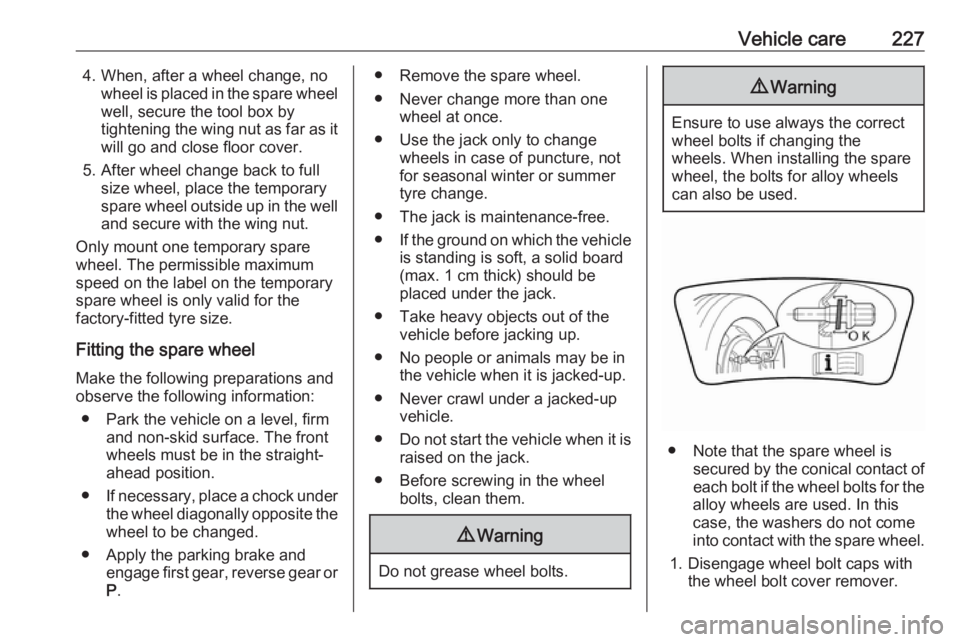
● Note that the spare wheel is secured by the conical contact ofeach bolt if the wheel bolts for the
alloy wheels are used. In this
case, the washers do not come
into contact with the spare wheel.
1. Disengage wheel bolt caps with the wheel bolt cover remover.
Page 230 of 273
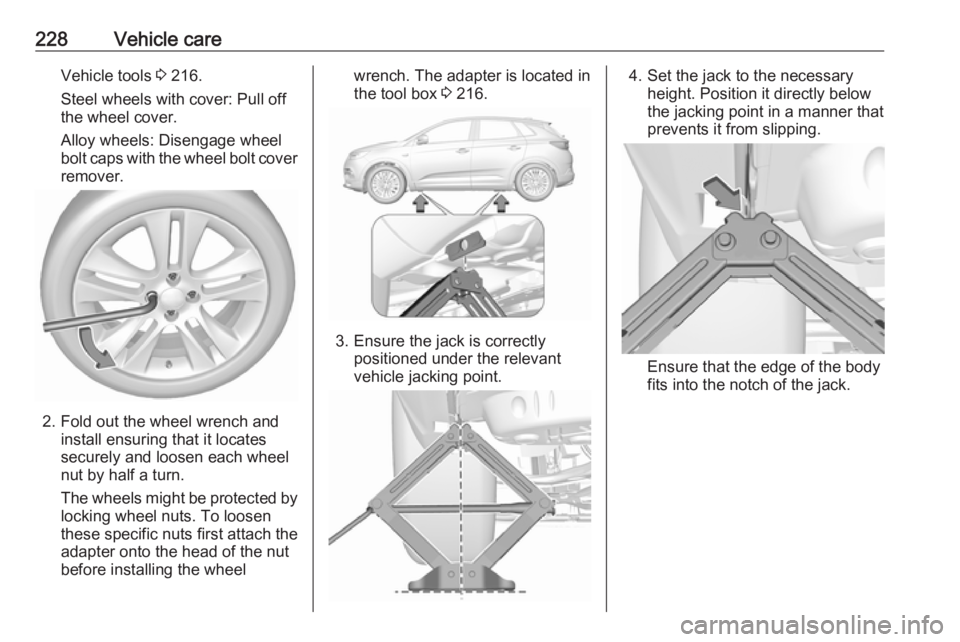
228Vehicle careVehicle tools 3 216.
Steel wheels with cover: Pull off
the wheel cover.
Alloy wheels: Disengage wheel
bolt caps with the wheel bolt cover
remover.
2. Fold out the wheel wrench and install ensuring that it locates
securely and loosen each wheel
nut by half a turn.
The wheels might be protected by
locking wheel nuts. To loosen
these specific nuts first attach the
adapter onto the head of the nut
before installing the wheel
wrench. The adapter is located in
the tool box 3 216.
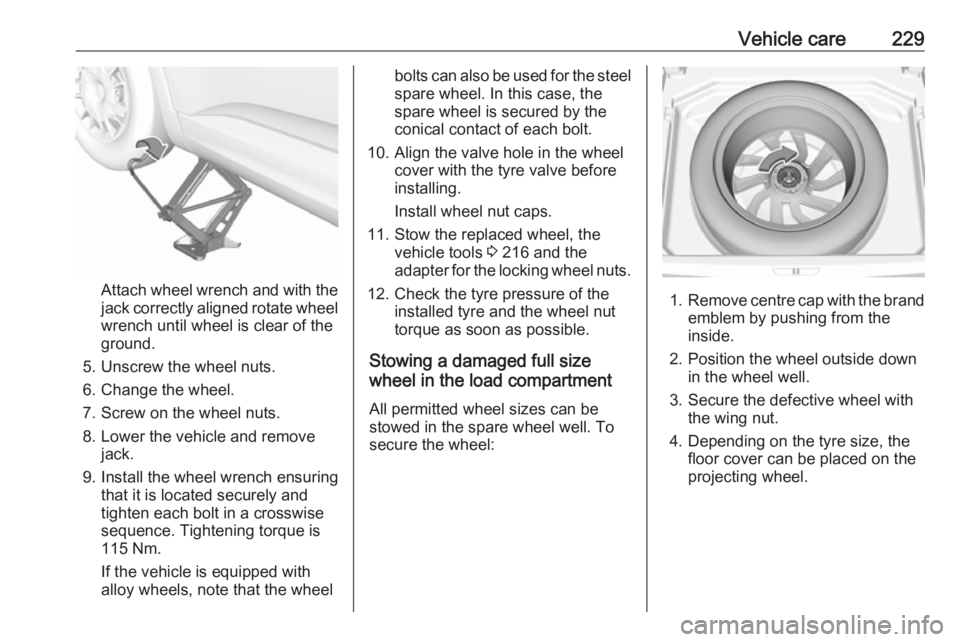
3. Ensure the jack is correctly
positioned under the relevant
vehicle jacking point.
4. Set the jack to the necessary height. Position it directly below
the jacking point in a manner that
prevents it from slipping.
Ensure that the edge of the body
fits into the notch of the jack.
Page 231 of 273
Vehicle care229
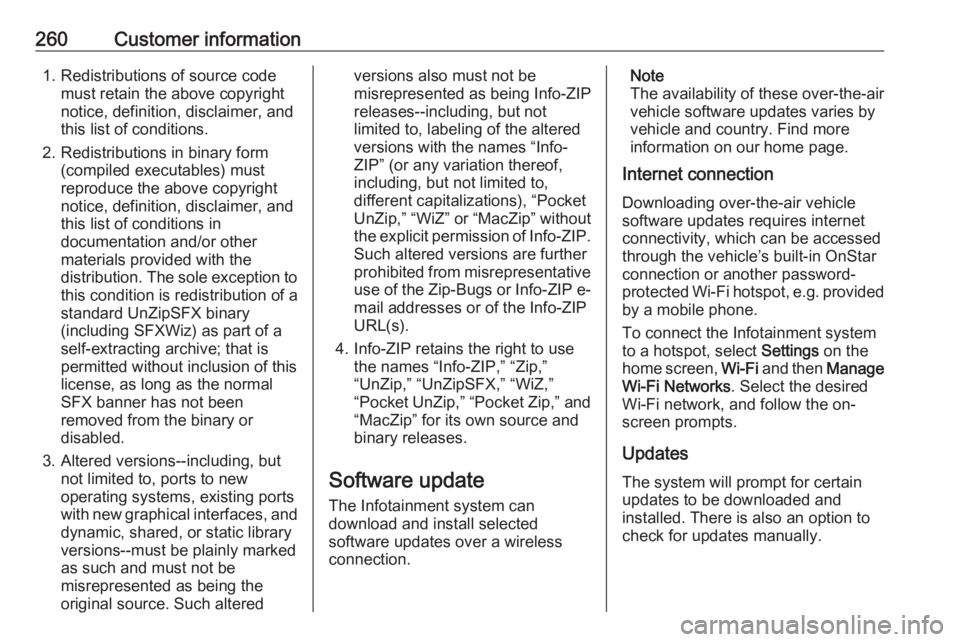
Attach wheel wrench and with the
jack correctly aligned rotate wheel wrench until wheel is clear of the
ground.
5. Unscrew the wheel nuts. 6. Change the wheel.
7. Screw on the wheel nuts.
8. Lower the vehicle and remove jack.
9. Install the wheel wrench ensuring that it is located securely and
tighten each bolt in a crosswise
sequence. Tightening torque is
115 Nm.
If the vehicle is equipped with
alloy wheels, note that the wheel
bolts can also be used for the steel spare wheel. In this case, the
spare wheel is secured by the
conical contact of each bolt.
10. Align the valve hole in the wheel cover with the tyre valve before
installing.
Install wheel nut caps.
11. Stow the replaced wheel, the vehicle tools 3 216 and the
adapter for the locking wheel nuts.
12. Check the tyre pressure of the installed tyre and the wheel nut
torque as soon as possible.
Stowing a damaged full size
wheel in the load compartment
All permitted wheel sizes can be
stowed in the spare wheel well. To
secure the wheel:
1. Remove centre cap with the brand
emblem by pushing from the
inside.
2. Position the wheel outside down in the wheel well.
3. Secure the defective wheel with the wing nut.
4. Depending on the tyre size, the floor cover can be placed on theprojecting wheel.
Page 262 of 273
260Customer information1. Redistributions of source codemust retain the above copyright
notice, definition, disclaimer, and
this list of conditions.
2. Redistributions in binary form (compiled executables) must
reproduce the above copyright
notice, definition, disclaimer, and
this list of conditions in
documentation and/or other
materials provided with the distribution. The sole exception to
this condition is redistribution of a
standard UnZipSFX binary
(including SFXWiz) as part of a
self-extracting archive; that is
permitted without inclusion of this
license, as long as the normal
SFX banner has not been
removed from the binary or
disabled.
3. Altered versions--including, but not limited to, ports to new
operating systems, existing ports
with new graphical interfaces, and dynamic, shared, or static library
versions--must be plainly marked
as such and must not be
misrepresented as being the
original source. Such alteredversions also must not be
misrepresented as being Info-ZIP
releases--including, but not
limited to, labeling of the altered
versions with the names “Info-
ZIP” (or any variation thereof,
including, but not limited to,
different capitalizations), “Pocket
UnZip,” “WiZ” or “MacZip” without
the explicit permission of Info-ZIP. Such altered versions are further
prohibited from misrepresentative
use of the Zip-Bugs or Info-ZIP e- mail addresses or of the Info-ZIP
URL(s).
4. Info-ZIP retains the right to use the names “Info-ZIP,” “Zip,”
“UnZip,” “UnZipSFX,” “WiZ,”
“Pocket UnZip,” “Pocket Zip,” and
“MacZip” for its own source and
binary releases.
Software update
The Infotainment system can
download and install selected
software updates over a wireless
connection.Note
The availability of these over-the-air
vehicle software updates varies by
vehicle and country. Find more
information on our home page.
Internet connection
Downloading over-the-air vehicle
software updates requires internet
connectivity, which can be accessed
through the vehicle’s built-in OnStar
connection or another password-
protected Wi-Fi hotspot, e.g. provided
by a mobile phone.
To connect the Infotainment system
to a hotspot, select Settings on the
home screen, Wi-Fi and then Manage
Wi-Fi Networks . Select the desired
Wi-Fi network, and follow the on-
screen prompts.
Updates
The system will prompt for certain
updates to be downloaded and
installed. There is also an option to
check for updates manually.
Page 272 of 273
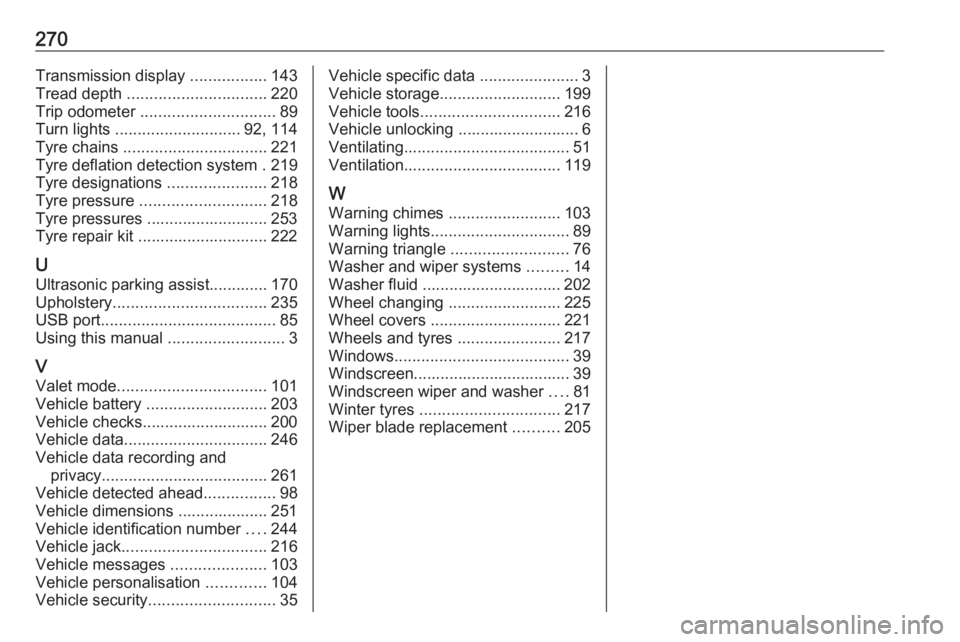
270Transmission display .................143
Tread depth ............................... 220
Trip odometer .............................. 89
Turn lights ............................ 92, 114
Tyre chains ................................ 221
Tyre deflation detection system . 219
Tyre designations ......................218
Tyre pressure ............................ 218
Tyre pressures ........................... 253
Tyre repair kit ............................. 222
U Ultrasonic parking assist............. 170
Upholstery .................................. 235
USB port ....................................... 85
Using this manual ..........................3
V Valet mode ................................. 101
Vehicle battery ........................... 203
Vehicle checks............................ 200
Vehicle data ................................ 246
Vehicle data recording and privacy ..................................... 261
Vehicle detected ahead ................98
Vehicle dimensions .................... 251
Vehicle identification number ....244
Vehicle jack ................................ 216
Vehicle messages .....................103
Vehicle personalisation .............104
Vehicle security ............................ 35Vehicle specific data ......................3
Vehicle storage ........................... 199
Vehicle tools ............................... 216
Vehicle unlocking ........................... 6 Ventilating ..................................... 51
Ventilation ................................... 119
W
Warning chimes .........................103
Warning lights ............................... 89
Warning triangle .......................... 76
Washer and wiper systems .........14
Washer fluid ............................... 202
Wheel changing .........................225
Wheel covers ............................. 221
Wheels and tyres .......................217
Windows ....................................... 39
Windscreen................................... 39
Windscreen wiper and washer ....81
Winter tyres ............................... 217
Wiper blade replacement ..........205