door lock OPEL INSIGNIA 2017 Manual user
[x] Cancel search | Manufacturer: OPEL, Model Year: 2017, Model line: INSIGNIA, Model: OPEL INSIGNIA 2017Pages: 327, PDF Size: 9.3 MB
Page 125 of 327

Instruments and controls123Auto Compartment Zone Temp:
Change between single zone or
dual zone temperature setting.
Auto Demist : Supports
windscreen dehumidification by
automatically selecting the
necessary settings and
automatic air conditioning mode.
Auto Rear Demist : Activates
automatically the heated rear
window.
● Collision / Detection Systems
Park Assist : Activates or
deactivates the ultrasonic
parking assist.
Auto Collision Preparation :
Activates or deactivates the
automatic brake functionality of
the vehicle in the event of
imminent collision danger. The
following is selectable: the
system will take over brake
control, warn by chimes only or is
deactivated completely.
Go Notifier : Activates or
deactivates the reminder function of the adaptive cruise control.Side Blind Zone Alert : Activates
or deactivates side blind zone alert.
Rear Cross Traffic Alert :
Activates or deactivates rear
cross traffic alert.
● Comfort and Convenience
Auto Memory Recall : Changes
the settings to the recall of
memorised settings for power
seat adjustment and exterior mirrors.
Easy Exit Driver Seat : Activates
or deactivates easy exit function
of the power seat.
Chime Volume : Changes the
volume of warning chimes.
Reverse Tilt Mirror : Activates or
deactivates the parking assist function of the exterior mirror on
the passenger side.
Auto Mirror Folding : Activates or
deactivates folding of the exterior
mirrors with the remote control.
Personalisation by Driver :
Activates or deactivates the
personalisation function.Rainsense Wipers : Activates or
deactivates automatic wiping
with rain sensor.
Auto Wipe in Reverse Gear :
Activates or deactivates
automatic switching on of the
rear window wiper when reverse
gear is engaged.
● Lighting
Vehicle Locator Lights : Activates
or deactivates the welcome
lighting.
Exit Lighting : Activates or
deactivates and changes the
duration of exit lighting.
Left or Right Hand Traffic :
Changes between lighting for left or right hand traffic.
Adaptive Forward Lighting :
Changes the settings of the
functions of the adaptive forward
lighting.
● Power Door Locks
Unlocked Door Anti-Lockout :
Activates or deactivates the
automatic driver's door locking
function when the door is open.
Page 126 of 327
124Instruments and controlsAuto Door Lock: Activates or
deactivates the automatic door locking function after switching
on ignition.
Auto Door Unlock : Changes the
configuration to unlock only the
driver's door or the whole vehicle
after switching off ignition.
Delayed Door Lock : Activates or
deactivates the delayed door
locking function. This feature
delays the actual locking of the
doors until all doors are closed.
● Remote Lock, Unlock, Start
Remote Unlock Light Feedback :
Activates or deactivates the
hazard warning flasher feedback whilst unlocking.
Remote Lock Feedback :
Changes what kind of feedback
is given when locking the vehicle.
Remote Door Unlock : Changes
the configuration to unlock only
the driver's door or the whole
vehicle whilst unlocking.
Relock Remote Unlocked Doors :
Activates or deactivates the
automatic relock function afterunlocking without opening the
vehicle.
Passive Door Lock : Activates or
deactivates the passive locking
function. This feature locks the
vehicle automatically after
several seconds if all doors have been closed and an electronickey has been removed from the
vehicle.
Remote Left in Vehicle Alert :
Activates or deactivates the
warning chime when the
electronic key remains in the
vehicle.
Bluetooth
See Infotainment manual.
Voice
See Infotainment manual.
Display
See Infotainment manual.
Rear Camera
Guidance Lines : Activates or
deactivates the guiding lines.Rear Park Assist Symbols : Activates
or deactivates the rear park assist symbols.
Return to Factory Settings
Restore Vehicle Settings : Resets all
settings to the default settings.
Clear All Private Data : Deletes all
private information from the vehicle.
Restore Radio Settings : Resets all
radio settings to the default settings.
See Infotainment manual.
Software Information
See Infotainment manual.
Page 141 of 327

Lighting139Lighting features
Centre console lighting Spotlight incorporated in the interior
lighting comes on when headlights
are switched on.
Entry lighting
Welcome lighting Headlights, tail lights, number plate
lights, instrument panel light, interior
lights and puddle lights are switched
on for a short time by unlocking the
vehicle with the radio remote control.
This function works only in the dark
and facilitates locating the vehicle.
The lighting switches off immediately
when the ignition is switched on.
Starting off 3 17.
This function can be activated or
deactivated in the Vehicle
personalisation.
Select the relevant setting in Settings,
I Vehicle in the Colour-Info-Display.
Colour-Info-Display 3 118.
Vehicle personalisation 3 121.The settings can be saved for the key
being used 3 24.
The following lights will additionally
switch on when the driver's door is
opened:
● illumination of all switches
● Driver Information Centre
● door pocket lights
Exit lighting The following lights switch on if the
key is removed from the ignition
switch:
● interior lights
● instrument panel light ● puddle lights
They will switch off automatically after
a delay. This function works only in
the dark. Theatre lighting is activated
if the driver's door is opened during
this time.
Path lighting
Headlights, tail lights and number
plate lights illuminate the surrounding area for an adjustable time after
leaving the vehicle.Activating
1. Switch off the ignition.
2. Remove the ignition key.
3. Open the driver's door.
4. Pull the turn signal lever.
5. Close the driver's door.
If the driver's door is not closed the
lights switch off after two minutes.
Exit lighting is switched off
immediately if the turn signal lever is
pulled while the driver's door is open.
This function can be activated or
deactivated in the Vehicle
personalisation.
Page 145 of 327
Climate control143Stop-start system 3 160.
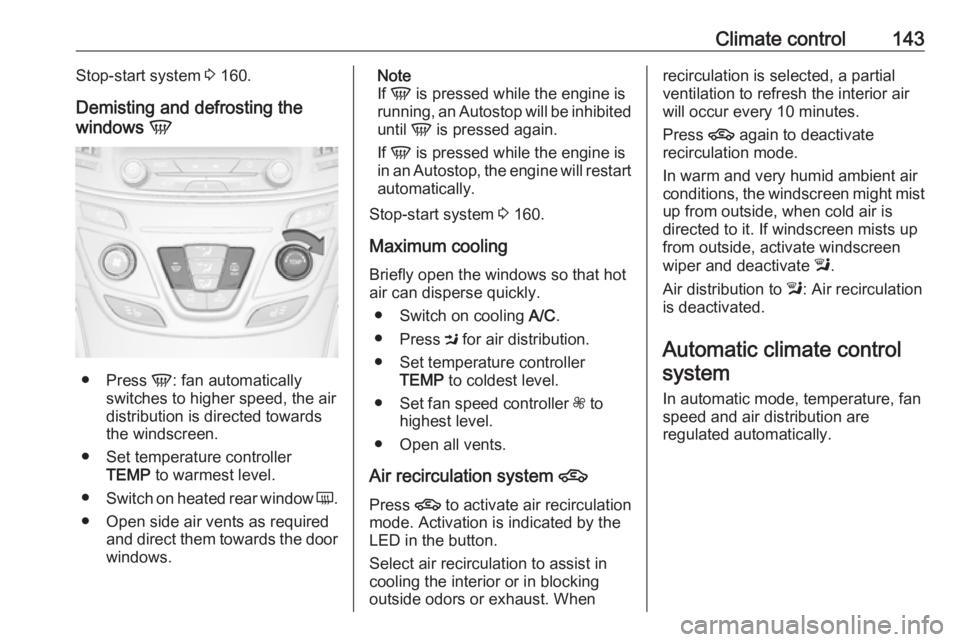
Demisting and defrosting the
windows V
●
Press V: fan automatically
switches to higher speed, the air
distribution is directed towards
the windscreen.
● Set temperature controller TEMP to warmest level.
● Switch on heated rear window Ü.
● Open side air vents as required and direct them towards the doorwindows.
Note
If V is pressed while the engine is
running, an Autostop will be inhibited
until V is pressed again.
If V is pressed while the engine is
in an Autostop, the engine will restart
automatically.
Stop-start system 3 160.
Maximum cooling
Briefly open the windows so that hot
air can disperse quickly.
● Switch on cooling A/C.
● Press M for air distribution.
● Set temperature controller TEMP to coldest level.
● Set fan speed controller Z to
highest level.
● Open all vents.
Air recirculation system 4
Press 4 to activate air recirculation
mode. Activation is indicated by the
LED in the button.
Select air recirculation to assist in
cooling the interior or in blocking
outside odors or exhaust. Whenrecirculation is selected, a partial
ventilation to refresh the interior air
will occur every 10 minutes.
Press 4 again to deactivate
recirculation mode.
In warm and very humid ambient air
conditions, the windscreen might mist up from outside, when cold air is
directed to it. If windscreen mists up
from outside, activate windscreen
wiper and deactivate l.
Air distribution to l: Air recirculation
is deactivated.
Automatic climate control
system
In automatic mode, temperature, fan
speed and air distribution are
regulated automatically.
Page 159 of 327
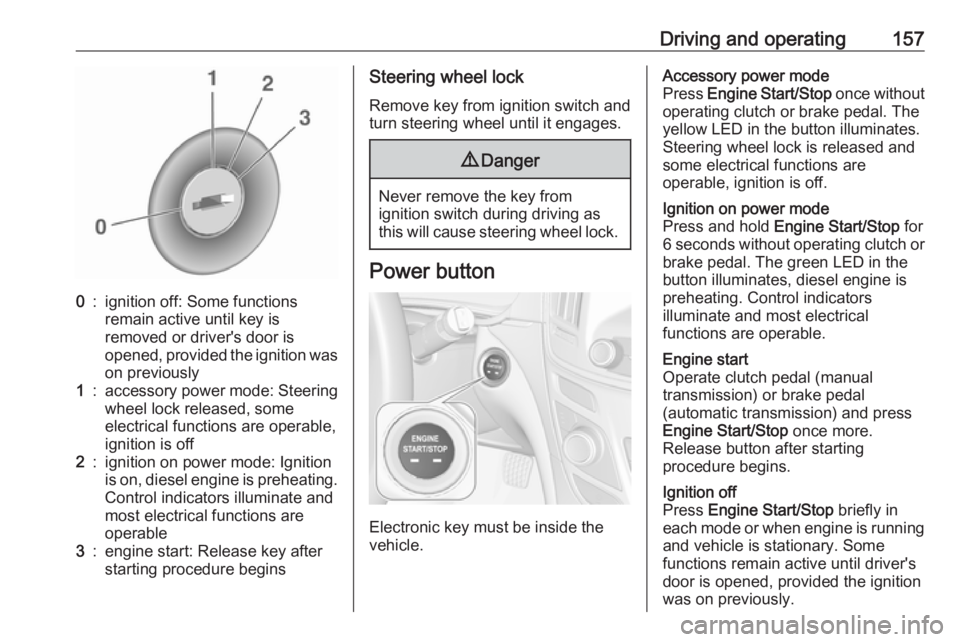
Driving and operating1570:ignition off: Some functions
remain active until key is
removed or driver's door is
opened, provided the ignition was
on previously1:accessory power mode: Steering wheel lock released, some
electrical functions are operable,
ignition is off2:ignition on power mode: Ignition
is on, diesel engine is preheating.
Control indicators illuminate and
most electrical functions are
operable3:engine start: Release key after
starting procedure beginsSteering wheel lock
Remove key from ignition switch and
turn steering wheel until it engages.9 Danger
Never remove the key from
ignition switch during driving as
this will cause steering wheel lock.
Power button
Electronic key must be inside the
vehicle.
Accessory power mode
Press Engine Start/Stop once without
operating clutch or brake pedal. The yellow LED in the button illuminates.
Steering wheel lock is released and
some electrical functions are
operable, ignition is off.Ignition on power mode
Press and hold Engine Start/Stop for
6 seconds without operating clutch or brake pedal. The green LED in the
button illuminates, diesel engine is
preheating. Control indicators
illuminate and most electrical
functions are operable.Engine start
Operate clutch pedal (manual
transmission) or brake pedal
(automatic transmission) and press
Engine Start/Stop once more.
Release button after starting
procedure begins.Ignition off
Press Engine Start/Stop briefly in
each mode or when engine is running and vehicle is stationary. Some
functions remain active until driver's
door is opened, provided the ignition
was on previously.
Page 160 of 327
158Driving and operatingEmergency shut off during driving
Press Engine Start/Stop for longer
than 2 seconds or press twice briefly
within 5 seconds 3 159.
Steering wheel lock The steering wheel lock activates
automatically when:
● The vehicle is stationary.
● The ignition has been switched off.
● The driver's door is opened.
To release steering wheel lock, open
and close driver's door and switch on accessory mode or start the engine
directly.9 Warning
If the vehicle battery is discharged,
the vehicle must not be towed,
tow-started or jump-started as the
steering wheel lock cannot be
disengaged.
Operation on vehicles with
electronic key system in case of
failure
If either the electronic key fails or the
battery of the electronic key is weak,
the Driver Information Centre may
display No Remote Detected or
Replace Battery in Remote Key when
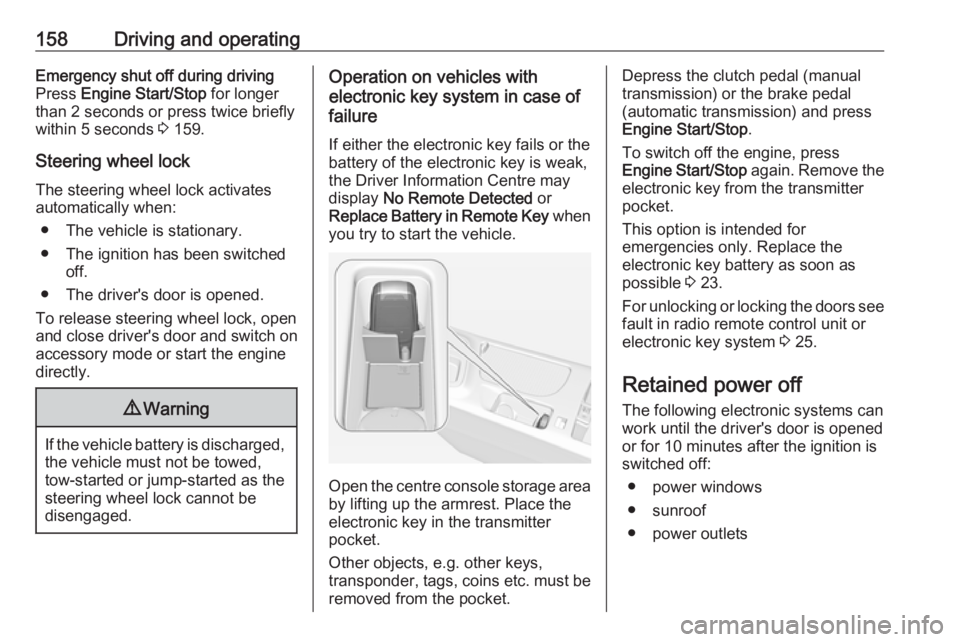
you try to start the vehicle.
Open the centre console storage area by lifting up the armrest. Place the
electronic key in the transmitter
pocket.
Other objects, e.g. other keys,
transponder, tags, coins etc. must be
removed from the pocket.
Depress the clutch pedal (manual
transmission) or the brake pedal
(automatic transmission) and press
Engine Start/Stop .
To switch off the engine, press
Engine Start/Stop again. Remove the
electronic key from the transmitter
pocket.
This option is intended for
emergencies only. Replace the
electronic key battery as soon as
possible 3 23.
For unlocking or locking the doors see
fault in radio remote control unit or
electronic key system 3 25.
Retained power off
The following electronic systems can
work until the driver's door is opened
or for 10 minutes after the ignition is
switched off:
● power windows
● sunroof
● power outlets
Page 170 of 327
168Driving and operatingThe vehicle must be parked on a levelsurface.
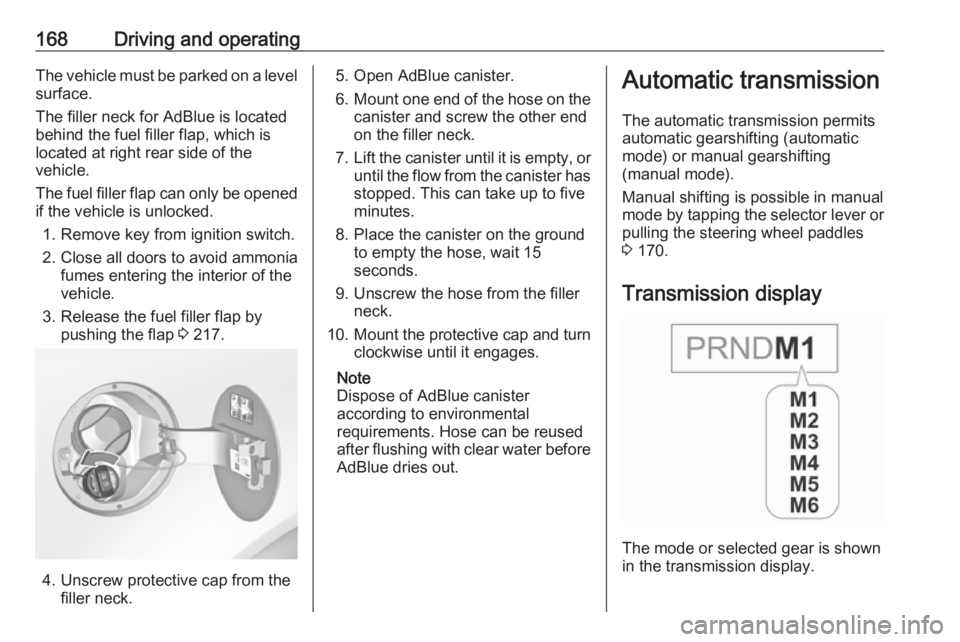
The filler neck for AdBlue is located behind the fuel filler flap, which islocated at right rear side of the
vehicle.
The fuel filler flap can only be opened
if the vehicle is unlocked.
1. Remove key from ignition switch.2. Close all doors to avoid ammonia fumes entering the interior of the
vehicle.
3. Release the fuel filler flap by pushing the flap 3 217.
4. Unscrew protective cap from the
filler neck.
5. Open AdBlue canister.
6. Mount one end of the hose on the
canister and screw the other end
on the filler neck.
7. Lift the canister until it is empty, or
until the flow from the canister has stopped. This can take up to five
minutes.
8. Place the canister on the ground to empty the hose, wait 15
seconds.
9. Unscrew the hose from the filler neck.
10. Mount the protective cap and turn
clockwise until it engages.
Note
Dispose of AdBlue canister
according to environmental
requirements. Hose can be reused
after flushing with clear water before
AdBlue dries out.Automatic transmission
The automatic transmission permits
automatic gearshifting (automatic
mode) or manual gearshifting
(manual mode).
Manual shifting is possible in manual
mode by tapping the selector lever or pulling the steering wheel paddles
3 170.
Transmission display
The mode or selected gear is shown
in the transmission display.
Page 191 of 327
Driving and operating189● The collision imminent brakingsystem is applying the brakes.
● The radar sensor is blocked by an ice or water film.
● A fault is detected in the radar, engine or brake system.
Additionally, the system is
automatically deactivated on vehicles
with automatic transmission (full
speed range adaptive cruise control)
when:
● The electric parking brake is applied.
● The vehicle is being held to a stop
by the system for more than
two minutes.
● The vehicle stops, the driver's seat belt is released and the
driver's door is opened.
When adaptive cruise control is
deactivated, the control indicator m
and C in the Driver Information
Centre changes from green to white
and a pop-up message is displayed.
The stored speed is maintained. The
system is deactivated but not
switched off.9 Warning
When adaptive cruise control is
deactivated, the driver must take
over full brake and engine control.
Switching off
Press C to switch off adaptive cruise
control. The control indicator m or C
extinguishes. The stored speed is
deleted.
Switching off the ignition also
switches off adaptive cruise control
and deletes the stored speed.
Driver's attention ● Use adaptive cruise control carefully on bends or mountain
roads, as it can lose the vehicle
ahead and need time to detect it
again.
● Do not use the system on slippery roads as it can create
rapid changes in tyre traction
(wheel spinning), so that you
could lose control of the vehicle.
● Do not use adaptive cruise control during rain, snow or
heavy dirt, as the radar sensor
can be covered by a water film,
dust, ice or snow. This reduces or suppresses completely the
visibility. In case of sensor
blockage, clean the sensor
cover.
System limits ● The system's automatic brake force does not permit hard
braking and the braking level
may not be sufficient to avoid a
collision.
● After a sudden lane change, the system needs a certain time to
detect the next preceding
vehicle. So if a new vehicle is
detected, the system may
accelerate instead of braking.
● Adaptive cruise control does ignore the oncoming traffic.
Page 229 of 327
Vehicle care227General Information
Accessories and vehicle modifications
We recommend using genuine parts
and accessories and factory
approved parts specific for your
vehicle type. We cannot assess or guarantee reliability of other products
- even if they have a regulatory or
otherwise granted approval.
Any modification, conversion or other changes made to standard vehicle
specifications (including, without
limitation, software modifications,
modifications of the electronic control
units) may invalidate the warranty
offered by Opel. Furthermore, such
changes may impact fuel
consumption, CO 2 emissions and
other emissions of the vehicle and
cause the vehicle to no longer
conform to the type approval,
impacting the validity of your vehicle
registration.Caution
When transporting the vehicle on
a train or on a recovery vehicle, the
mud flaps may be damaged.
Vehicle storage
Storage for a long period of time
If the vehicle is to be stored for several months:
● Wash and wax the vehicle.
● Have the wax in the engine compartment and underbody
checked.
● Clean and preserve rubber seals.
● Fill up fuel tank completely.
● Change engine oil.
● Drain washer fluid reservoir. ● Check coolant antifreeze and corrosion protection.
● Adjust tyre pressure to the value specified for full load.
● Park vehicle in a dry, wellventilated place. Engage first or
reverse gear or set selector lever
to P. Prevent the vehicle from
rolling.
● Do not apply parking brake.
● Open bonnet, close all doors and
lock the vehicle.
● Disconnect the clamp from the negative terminal of the vehicle
battery. Beware that all systems
are not functional, e.g. anti-theft
alarm system.
Putting back into operation When the vehicle is to be put back into
operation:
● Connect the clamp to the negative terminal of the vehicle
battery. Activate the electronics
of the power windows.
● Check tyre pressure.
● Fill up the washer fluid reservoir.
● Check the engine oil level.
● Check the coolant level.
Page 244 of 327
242Vehicle careTail lights5-door Hatchback/4-door Saloon
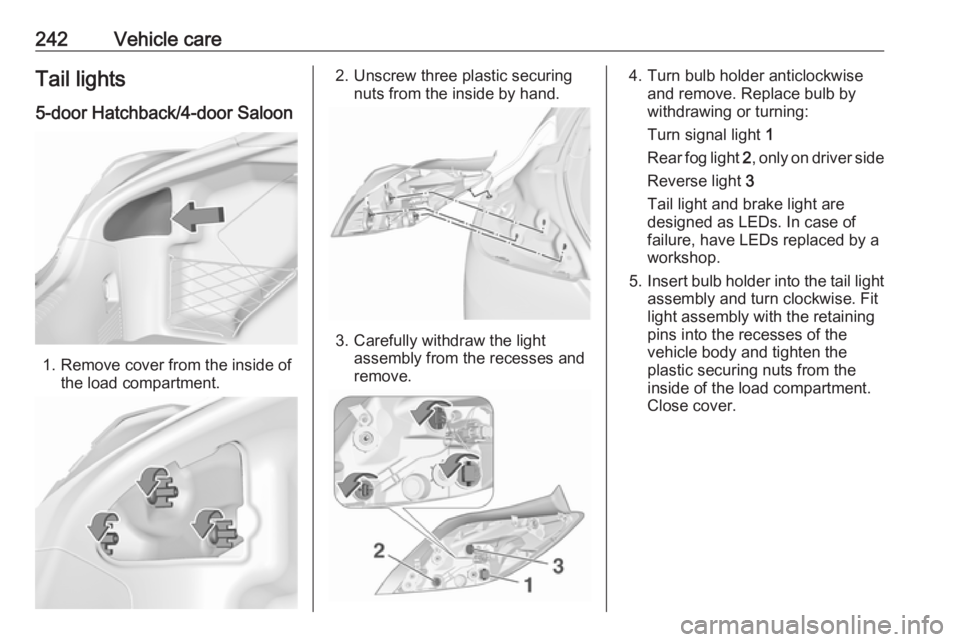
1. Remove cover from the inside of the load compartment.
2. Unscrew three plastic securingnuts from the inside by hand.
3. Carefully withdraw the lightassembly from the recesses and
remove.
4. Turn bulb holder anticlockwise and remove. Replace bulb by
withdrawing or turning:
Turn signal light 1
Rear fog light 2, only on driver side
Reverse light 3
Tail light and brake light are
designed as LEDs. In case of
failure, have LEDs replaced by a
workshop.
5. Insert bulb holder into the tail light
assembly and turn clockwise. Fit
light assembly with the retaining
pins into the recesses of the
vehicle body and tighten the
plastic securing nuts from the
inside of the load compartment.
Close cover.