trailer OPEL INSIGNIA 2018 User Guide
[x] Cancel search | Manufacturer: OPEL, Model Year: 2018, Model line: INSIGNIA, Model: OPEL INSIGNIA 2018Pages: 323, PDF Size: 9.33 MB
Page 206 of 323
204Driving and operatingIf equipped only with front camera the
system operates up to a speed of 85
km/h.9 Warning
Active emergency braking is not
designed to apply hard
autonomous braking or to
automatically avoid a collision. It is designed to reduce the vehicle
speed before a collision. It may not
react to animals. After a sudden
lane change, the system needs a
certain time to detect the next
preceding vehicle.
The complete attention of the
driver is always required while
driving. The driver must always be
ready to take action and apply the brakes and steer to avoid
collisions.
The system is designed to work with
all occupants wearing their seat belts.
Intelligent Brake Assist
If the vehicle is equipped with radar
sensor Intelligent brake assist may
activate when the brake pedal is
applied quickly by providing a boost
to braking based on the speed of
approach and distance to a vehicle
ahead.
Minor brake pedal pulsations or pedal movement during this time is normal
and the brake pedal should continue
to be applied as needed. Intelligent
brake assist will automatically
disengage only when the brake pedal is released.9 Warning
Intelligent brake assist may
increase vehicle braking in
situations when it may not be
necessary. You could block the
flow of traffic. If this occurs, take
your foot off the brake pedal and
then apply the brakes as needed.
Front pedestrian protection
3 205.
Deactivation
Active emergency braking can be
deactivated in the personalisation
menu 3 126. If deactivated a
message is displayed in the Driver
Information Centre.
System limitations In some cases, the active emergencybraking system may provide an
automatic braking in situations that
seem to be unnecessary, for instance
in parking garages, due to traffic signs
in a curve or due to vehicles in
another lane. This is normal
operation, the vehicle does not need service. Firmly apply the accelerator
pedal to override the automatic
braking if the situation and the
surroundings permit.
In the following cases, Active
emergency braking performance is limited:
● Driving on winding or hilly roads.
● Detecting all vehicles, especially vehicles with a trailer, tractors,
muddy vehicles, etc.
Page 209 of 323
Driving and operating2079Warning
Front pedestrian braking may alert
or automatically brake the vehicle
suddenly in situations where it is
unexpected and undesired. It
could falsely alert or brake for
objects similar in shape or size to
pedestrians, including shadows.
This is normal operation and the
vehicle does not need a service.
To override Automatic braking,
firmly depress the accelerator
pedal, if it is safe to do so.
9 Warning
Using the Front pedestrian braking
system while towing a trailer couldcause loss of vehicle control and
crash. Turn the system to Alert or
Off in the vehicle personalisation
when towing a trailer. Vehicle
personalisation 3 126.
System limitations
In the following cases, front
pedestrian protection may not detect
a pedestrian ahead or sensor
performance is limited:
● Vehicle speed is out of range from 8 km/h to 80 km/h in forwardgear.
● The distance to an pedestrian ahead is more than 40 metres.
● Driving on winding or hilly roads.
● During nighttime driving.
● Weather limits visibility, such as fog, rain, or snow.
● The sensor in the windscreen is blocked by snow, ice, slush, mud,dirt, windscreen damage or
affected by foreign items, e.g.
stickers.Parking assist
General information
When the trailer hitch is attached,
change the configuration settings in
the vehicle personalisation menu in
the Info-Display. Vehicle
personalisation 3 126.
When attaching a trailer or bike
carrier to the trailer hitch, the parking
assist is deactivated.
Rear parking assist9 Warning
It is the driver who bears full
responsibility for the parking
manoeuvre.
Always check the surrounding
area while reversing and using the rear parking assist system.
The rear parking assist makes
parking easier by measuring the
distance between the vehicle and
rear obstacles. It informs and warns
the driver by giving acoustic signals
and display indication.
Page 218 of 323
216Driving and operatingthe warning symbol B starts flashing
yellow as a warning not to change
lanes.
Note
If the overtaking vehicle is at least 10 km/h faster than the vehicle being
overtaken, the warning symbol B in
the relevant exterior mirror may not
illuminate.
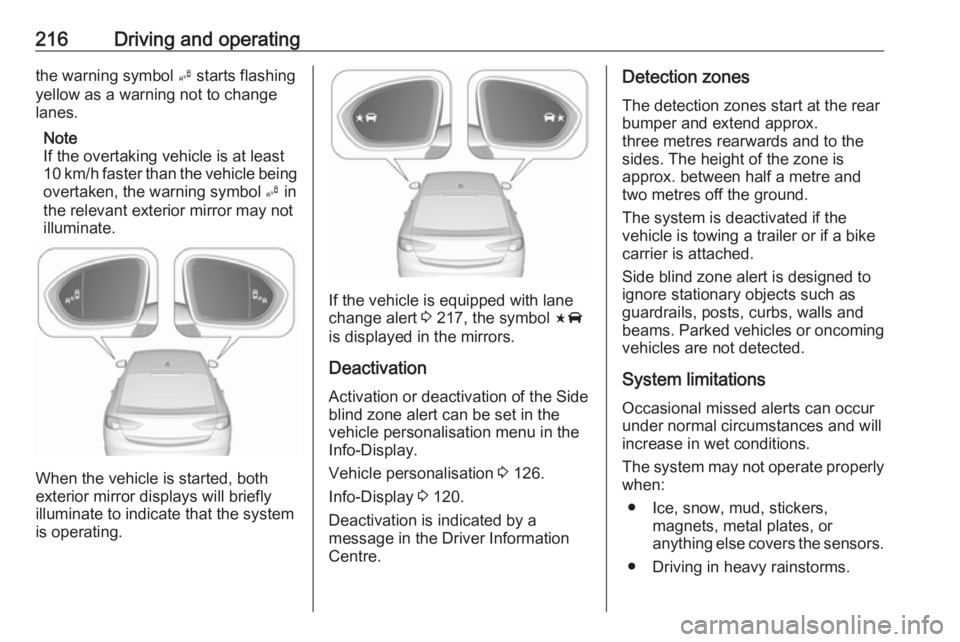
When the vehicle is started, both
exterior mirror displays will briefly illuminate to indicate that the system
is operating.
If the vehicle is equipped with lane
change alert 3 217, the symbol F
is displayed in the mirrors.
Deactivation Activation or deactivation of the Sideblind zone alert can be set in the
vehicle personalisation menu in the
Info-Display.
Vehicle personalisation 3 126.
Info-Display 3 120.
Deactivation is indicated by a
message in the Driver Information
Centre.
Detection zones
The detection zones start at the rear
bumper and extend approx.
three metres rearwards and to the
sides. The height of the zone is
approx. between half a metre and
two metres off the ground.
The system is deactivated if the
vehicle is towing a trailer or if a bike
carrier is attached.
Side blind zone alert is designed to
ignore stationary objects such as
guardrails, posts, curbs, walls and
beams. Parked vehicles or oncoming
vehicles are not detected.
System limitationsOccasional missed alerts can occur
under normal circumstances and will
increase in wet conditions.
The system may not operate properly
when:
● Ice, snow, mud, stickers, magnets, metal plates, or
anything else covers the sensors.
● Driving in heavy rainstorms.
Page 219 of 323
Driving and operating217● The vehicle had an accident or ifthe area surrounding the
detection sensor is damaged or
not properly repaired.
● There are extreme temperature changes.
● The vehicle is towing a trailer
In the event of a fault in the system or
if the system does not work due to
temporary conditions, the symbols in
the mirrors will be permanently
illuminated and a message is
displayed in the Driver Information
Centre. Seek the assistance of a
workshop.
Lane change alert
Additional to the side blind zone
assist 3 215, lane change alert
recognizes rapidly approaching
vehicles from behind on parallel lanes
next to your vehicle.
If the vehicle has lane change alert,
then side blind zone alert is always
included.
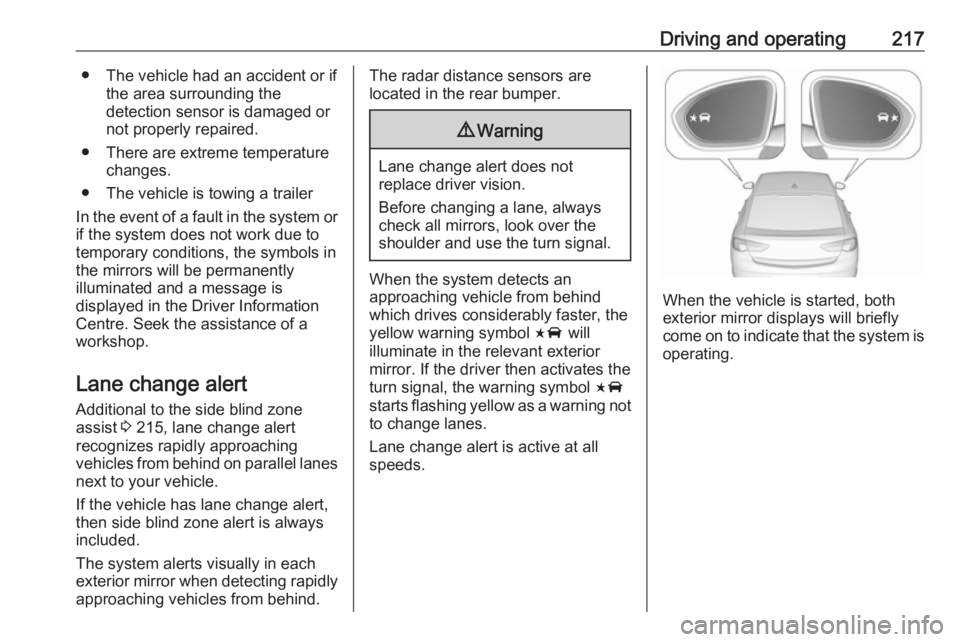
The system alerts visually in each
exterior mirror when detecting rapidly
approaching vehicles from behind.The radar distance sensors are
located in the rear bumper.9 Warning
Lane change alert does not
replace driver vision.
Before changing a lane, always
check all mirrors, look over the
shoulder and use the turn signal.
When the system detects an
approaching vehicle from behind
which drives considerably faster, the
yellow warning symbol F will
illuminate in the relevant exterior mirror. If the driver then activates the
turn signal, the warning symbol F
starts flashing yellow as a warning not to change lanes.
Lane change alert is active at all
speeds.
When the vehicle is started, both exterior mirror displays will briefly
come on to indicate that the system is
operating.
Page 220 of 323
218Driving and operatingDetection zones
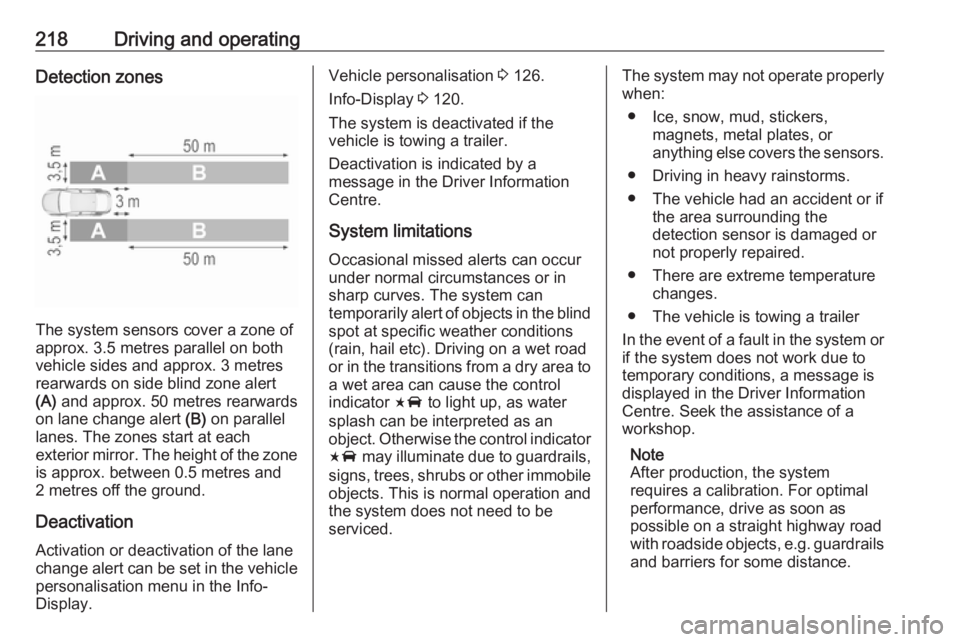
The system sensors cover a zone of
approx. 3.5 metres parallel on both
vehicle sides and approx. 3 metres
rearwards on side blind zone alert
(A) and approx. 50 metres rearwards
on lane change alert (B) on parallel
lanes. The zones start at each
exterior mirror. The height of the zone
is approx. between 0.5 metres and
2 metres off the ground.
Deactivation
Activation or deactivation of the lane
change alert can be set in the vehicle personalisation menu in the Info-
Display.
Vehicle personalisation 3 126.
Info-Display 3 120.
The system is deactivated if the
vehicle is towing a trailer.
Deactivation is indicated by a
message in the Driver Information
Centre.
System limitations Occasional missed alerts can occur
under normal circumstances or in
sharp curves. The system can
temporarily alert of objects in the blind spot at specific weather conditions(rain, hail etc). Driving on a wet road
or in the transitions from a dry area to
a wet area can cause the control
indicator F to light up, as water
splash can be interpreted as an
object. Otherwise the control indicator F may illuminate due to guardrails,
signs, trees, shrubs or other immobile
objects. This is normal operation and
the system does not need to be
serviced.The system may not operate properly
when:
● Ice, snow, mud, stickers, magnets, metal plates, or
anything else covers the sensors.
● Driving in heavy rainstorms.
● The vehicle had an accident or if the area surrounding the
detection sensor is damaged or
not properly repaired.
● There are extreme temperature changes.
● The vehicle is towing a trailer
In the event of a fault in the system or if the system does not work due to
temporary conditions, a message is
displayed in the Driver Information
Centre. Seek the assistance of a
workshop.
Note
After production, the system
requires a calibration. For optimal
performance, drive as soon as
possible on a straight highway road
with roadside objects, e.g. guardrails
and barriers for some distance.
Page 223 of 323
Driving and operating221System limitationsCaution
For optimal operation of the
system, it is important to keep the
lenses of the cameras in the front
grille, the housings of outside
mirrors and in the tailgate between the number plate lights always
clean. Rinse the lenses with water and wipe with a soft cloth.
Do not clean the lenses with a
steam-jet or high-pressure jet
cleaner.
The panoramic view system may not
operate properly when:
● The surrounding is dark.
● The sun or the beam of headlights is shining directly into
the camera lenses.
● During nighttime driving.
● Weather limits visibility, such as fog, rain, or snow.
● The camera lenses are blocked by snow, ice, slush, mud, dirt.
● The vehicle is towing a trailer.
● The vehicle had an accident.
● There are extreme temperature changes.
Rear view camera The rear view camera assists the
driver when reversing by displaying a
view of the area behind the vehicle.
The view of the camera is displayed
in the Info-Display.9 Warning
The rear view camera does not
replace driver vision. Note that
objects that are outside the
camera's field of view and the
parking assist sensors, e.g. below
the bumper or underneath the
vehicle, are not displayed.
Do not reverse or park the vehicle
using only the rear view camera.
Always check the surrounding of
the vehicle before driving.
Activation
Rear view camera is automatically
activated when reverse gear is
engaged.
Functionality
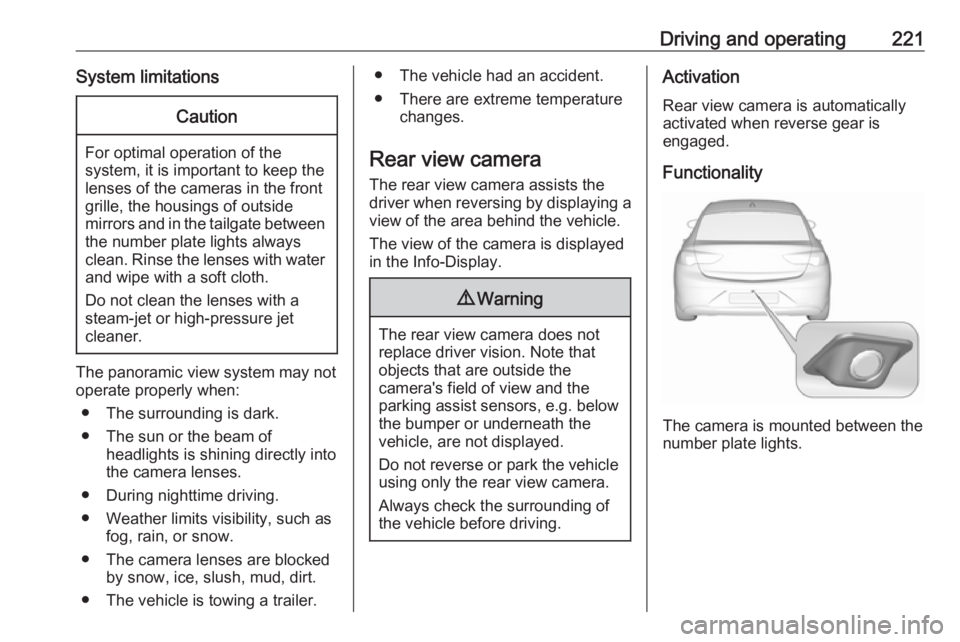
The camera is mounted between the
number plate lights.
Page 225 of 323
Driving and operating223changed in the Settings menu in the
Info-Display. Select the relevant
setting in Settings, I Rear Camera .
Info-Display 3 120.
Vehicle personalisation 3 126.
System limitations The rear view camera may not
operate properly when:
● The surrounding is dark.
● The sun or the beam of headlights is shining directly into
the camera lenses.
● During nighttime driving.
● Weather limits visibility, such as fog, rain, or snow.
● The camera lenses are blocked by snow, ice, slush, mud, dirt.Clean the lense, rinse with water,
and wipe with a soft cloth.
● The vehicle is towing a trailer.
● The vehicle had a rear end accident.
● There are extreme temperature changes.Fault messages are displayed with a
9 on the top line of the Info-Display.
Rear cross traffic alert
Additional to the rear view camera
3 221 , rear cross traffic alert warns of
cross traffic from left or right side
when driving rearwards. When cross
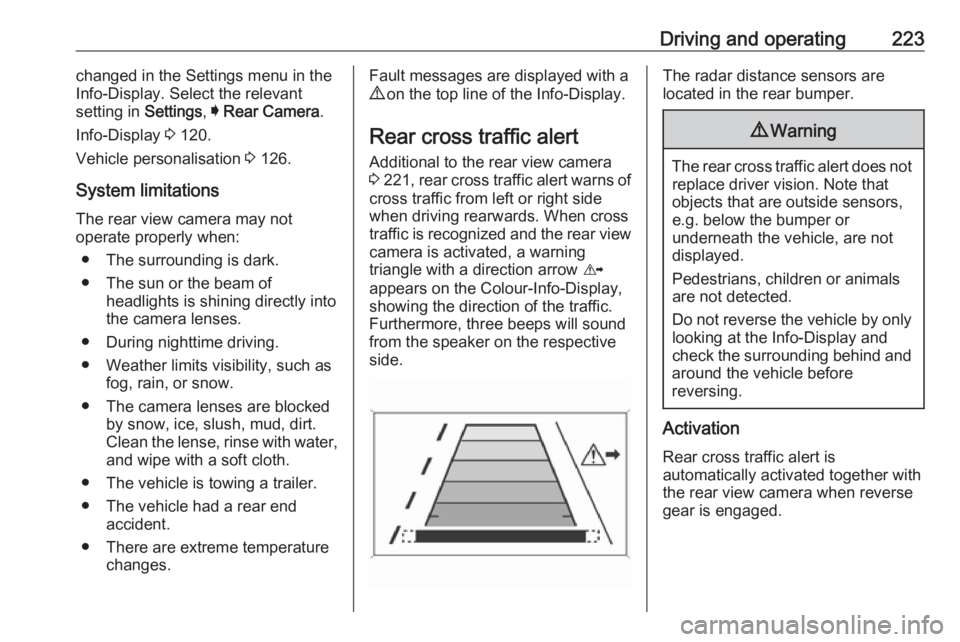
traffic is recognized and the rear view camera is activated, a warning
triangle with a direction arrow K
appears on the Colour-Info-Display,
showing the direction of the traffic.
Furthermore, three beeps will sound
from the speaker on the respective
side.The radar distance sensors are
located in the rear bumper.9 Warning
The rear cross traffic alert does not
replace driver vision. Note that
objects that are outside sensors,
e.g. below the bumper or
underneath the vehicle, are not
displayed.
Pedestrians, children or animals
are not detected.
Do not reverse the vehicle by only
looking at the Info-Display and
check the surrounding behind and
around the vehicle before
reversing.
Activation
Rear cross traffic alert is
automatically activated together with
the rear view camera when reverse
gear is engaged.
Page 226 of 323
224Driving and operatingDetection zones
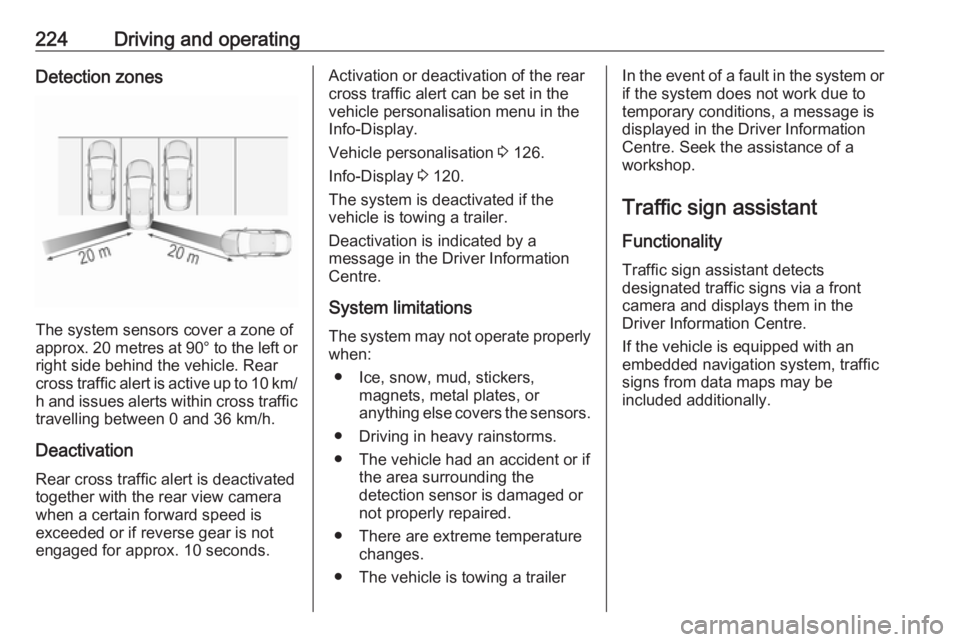
The system sensors cover a zone of
approx. 20 metres at 90° to the left or
right side behind the vehicle. Rear cross traffic alert is active up to 10 km/ h and issues alerts within cross traffic
travelling between 0 and 36 km/h.
Deactivation
Rear cross traffic alert is deactivated together with the rear view camera
when a certain forward speed is
exceeded or if reverse gear is not
engaged for approx. 10 seconds.
Activation or deactivation of the rear
cross traffic alert can be set in the
vehicle personalisation menu in the
Info-Display.
Vehicle personalisation 3 126.
Info-Display 3 120.
The system is deactivated if the
vehicle is towing a trailer.
Deactivation is indicated by a
message in the Driver Information
Centre.
System limitations The system may not operate properly
when:
● Ice, snow, mud, stickers, magnets, metal plates, or
anything else covers the sensors.
● Driving in heavy rainstorms.
● The vehicle had an accident or if the area surrounding the
detection sensor is damaged or
not properly repaired.
● There are extreme temperature changes.
● The vehicle is towing a trailerIn the event of a fault in the system or if the system does not work due to
temporary conditions, a message is
displayed in the Driver Information Centre. Seek the assistance of a
workshop.
Traffic sign assistant
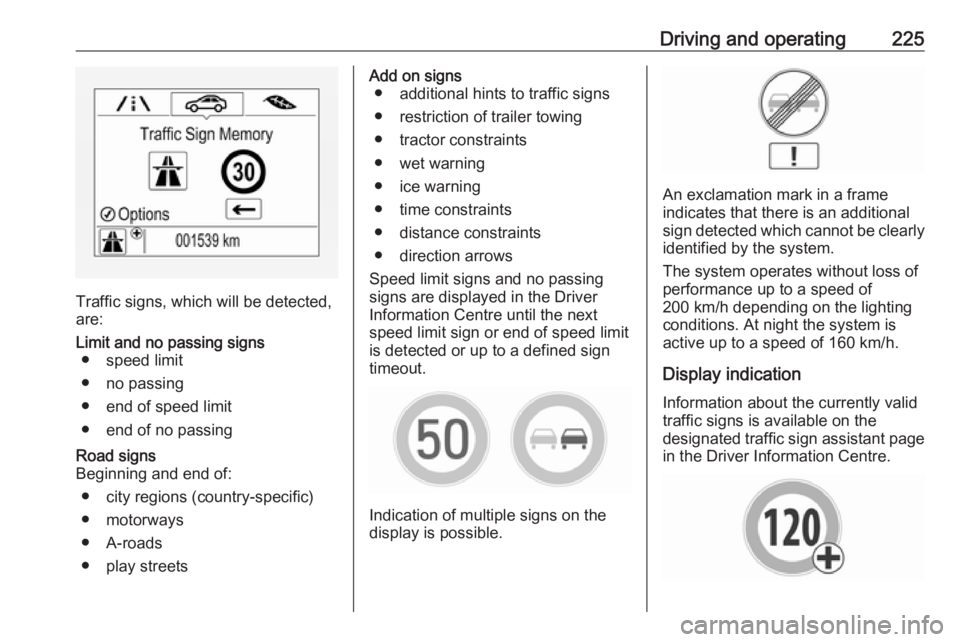
Functionality Traffic sign assistant detects
designated traffic signs via a front
camera and displays them in the
Driver Information Centre.
If the vehicle is equipped with an
embedded navigation system, traffic
signs from data maps may be
included additionally.
Page 227 of 323
Driving and operating225
Traffic signs, which will be detected,
are:
Limit and no passing signs ● speed limit
● no passing
● end of speed limit
● end of no passingRoad signs
Beginning and end of:
● city regions (country-specific)● motorways
● A-roads
● play streetsAdd on signs ● additional hints to traffic signs
● restriction of trailer towing
● tractor constraints
● wet warning
● ice warning
● time constraints
● distance constraints
● direction arrows
Speed limit signs and no passing
signs are displayed in the Driver
Information Centre until the next
speed limit sign or end of speed limit
is detected or up to a defined sign
timeout.
Indication of multiple signs on the
display is possible.
An exclamation mark in a frame
indicates that there is an additional
sign detected which cannot be clearly
identified by the system.
The system operates without loss of
performance up to a speed of
200 km/h depending on the lighting
conditions. At night the system is
active up to a speed of 160 km/h.
Display indication Information about the currently valid
traffic signs is available on the
designated traffic sign assistant page in the Driver Information Centre.
Page 232 of 323
230Driving and operatingThe system is only operable when a
lane marking is detected.
If the system only detects lane
markings on one side of the road, it
will only assist for this side.
Lane keep assist detects hands-free
driving. In this case a message in the
Driver Information Centre pops-up
and a chime sounds as long as lane
keep assist detects hands-free
driving.
Deactivation The system is deactivated by
pressing a; the LED in the button
extinguishes.
The system is deactivated
automatically when a trailer is
detected.
System limitations
The system performance may not
operate properly when:
● Vehicle speed is out of range from 60 to 180 km/h.
● Driving on winding or hilly roads.
● During nighttime driving.● Weather limits visibility, such as fog, rain, or snow.
● The sensor in the windscreen is blocked by snow, ice, slush, mud,dirt, windscreen damage or
affected by foreign items, e.g.
stickers.
● The sun is shining directly into the camera lens.
● Close vehicles ahead
● Banked roads
● Road edges
● Roads with poor lane markings
● Sudden lighting changes
● Vehicle modifications, e.g. tyres.
Switch off the system if the system is
disturbed by tar marks, shadows,
road cracks, temporary or
construction lane markings, or other
road imperfections.9 Warning
Always keep your attention on the
road and maintain proper vehicle
position within the lane, otherwise
vehicle damage, injury or death
could occur.
Lane keep assist does not
continuously steer the vehicle.
The system may not keep the
vehicle in the lane or give an alert,
even if a lane marking is detected.
The steering of the lane keep
assist may not be sufficient to
avoid a lane departure.
The system may not detect hands-
off driving due to external
influences (road condition and
surface, weather etc). The driver
has full responsibility to control the vehicle and is always required tokeep the hands on the steeringwheel while driving.
Using the system while towing a
trailer or on slippery roads could
cause loss of control of the vehicle
and a crash. Switch the system off.