ECU OPEL INSIGNIA 2018 Owner's Manual
[x] Cancel search | Manufacturer: OPEL, Model Year: 2018, Model line: INSIGNIA, Model: OPEL INSIGNIA 2018Pages: 323, PDF Size: 9.33 MB
Page 276 of 323
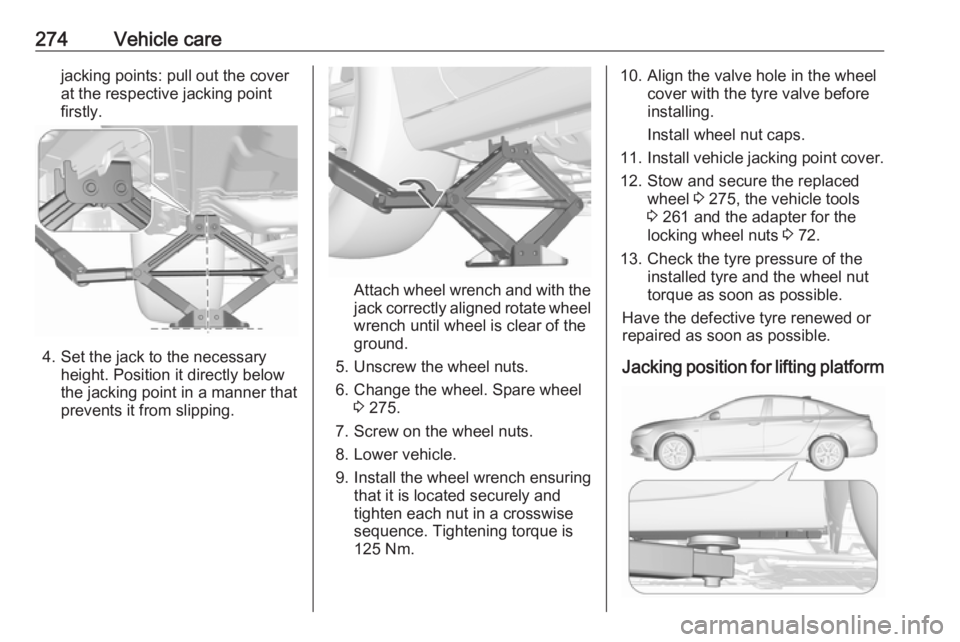
274Vehicle carejacking points: pull out the cover
at the respective jacking point
firstly.
4. Set the jack to the necessary height. Position it directly below
the jacking point in a manner that
prevents it from slipping.
Attach wheel wrench and with the
jack correctly aligned rotate wheel wrench until wheel is clear of the
ground.
5. Unscrew the wheel nuts. 6. Change the wheel. Spare wheel 3 275.
7. Screw on the wheel nuts.
8. Lower vehicle.
9. Install the wheel wrench ensuring that it is located securely and
tighten each nut in a crosswise
sequence. Tightening torque is
125 Nm.
10. Align the valve hole in the wheel cover with the tyre valve before
installing.
Install wheel nut caps.
11. Install vehicle jacking point cover.
12. Stow and secure the replaced wheel 3 275, the vehicle tools
3 261 and the adapter for the
locking wheel nuts 3 72.
13. Check the tyre pressure of the installed tyre and the wheel nut
torque as soon as possible.
Have the defective tyre renewed or
repaired as soon as possible.
Jacking position for lifting platform
Page 277 of 323
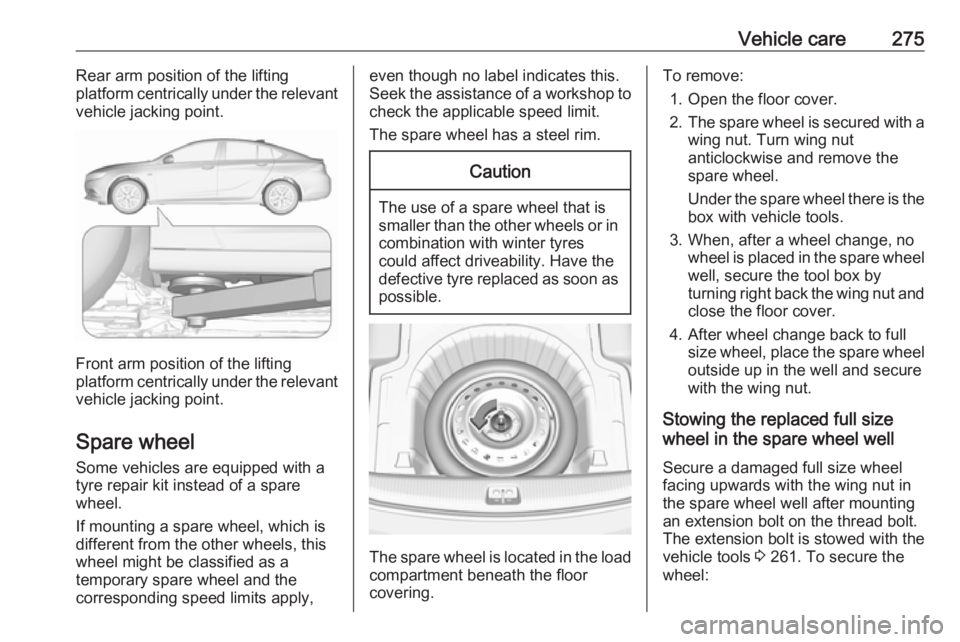
Vehicle care275Rear arm position of the lifting
platform centrically under the relevant
vehicle jacking point.
Front arm position of the lifting
platform centrically under the relevant vehicle jacking point.
Spare wheel Some vehicles are equipped with a
tyre repair kit instead of a spare
wheel.
If mounting a spare wheel, which is
different from the other wheels, this
wheel might be classified as a
temporary spare wheel and the
corresponding speed limits apply,
even though no label indicates this.
Seek the assistance of a workshop to
check the applicable speed limit.
The spare wheel has a steel rim.Caution
The use of a spare wheel that is smaller than the other wheels or in
combination with winter tyres
could affect driveability. Have the defective tyre replaced as soon as
possible.
The spare wheel is located in the load
compartment beneath the floor
covering.
To remove:
1. Open the floor cover.
2. The spare wheel is secured with a
wing nut. Turn wing nut
anticlockwise and remove the
spare wheel.
Under the spare wheel there is the box with vehicle tools.
3. When, after a wheel change, no wheel is placed in the spare wheel
well, secure the tool box by
turning right back the wing nut and close the floor cover.
4. After wheel change back to full size wheel, place the spare wheel
outside up in the well and secure
with the wing nut.
Stowing the replaced full size
wheel in the spare wheel well
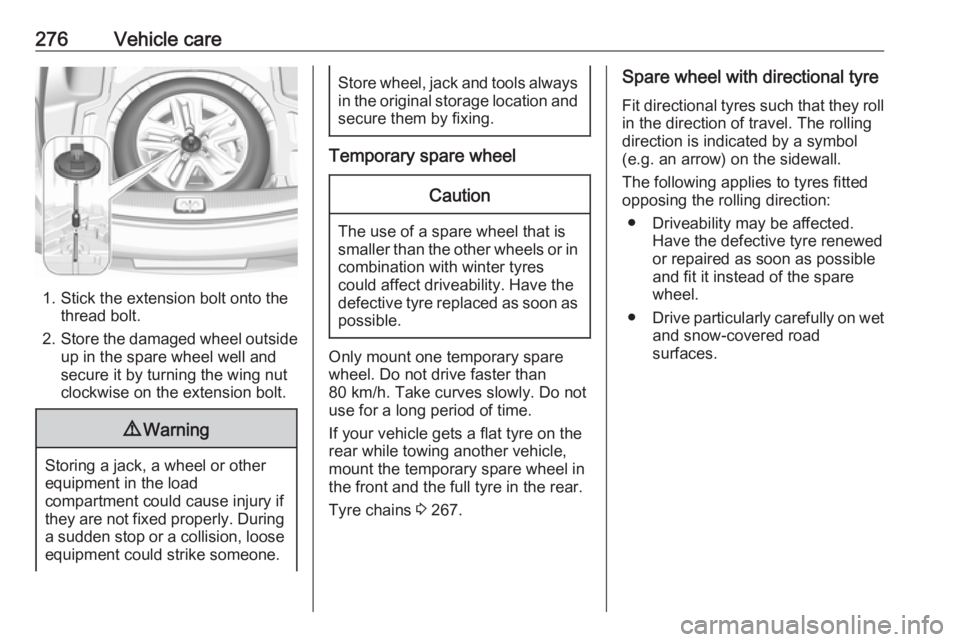
Secure a damaged full size wheel facing upwards with the wing nut in
the spare wheel well after mounting
an extension bolt on the thread bolt.
The extension bolt is stowed with the
vehicle tools 3 261. To secure the
wheel:
Page 278 of 323
276Vehicle care
1. Stick the extension bolt onto thethread bolt.
2. Store the damaged wheel outside
up in the spare wheel well and
secure it by turning the wing nut
clockwise on the extension bolt.
9 Warning
Storing a jack, a wheel or other
equipment in the load
compartment could cause injury if they are not fixed properly. During
a sudden stop or a collision, looseequipment could strike someone.
Store wheel, jack and tools always
in the original storage location and secure them by fixing.
Temporary spare wheel
Caution
The use of a spare wheel that issmaller than the other wheels or in combination with winter tyres
could affect driveability. Have the defective tyre replaced as soon as
possible.
Only mount one temporary spare
wheel. Do not drive faster than
80 km/h. Take curves slowly. Do not use for a long period of time.
If your vehicle gets a flat tyre on the
rear while towing another vehicle,
mount the temporary spare wheel in the front and the full tyre in the rear.
Tyre chains 3 267.
Spare wheel with directional tyre
Fit directional tyres such that they roll in the direction of travel. The rolling
direction is indicated by a symbol
(e.g. an arrow) on the sidewall.
The following applies to tyres fitted
opposing the rolling direction:
● Driveability may be affected. Have the defective tyre renewed
or repaired as soon as possible
and fit it instead of the spare
wheel.
● Drive particularly carefully on wet
and snow-covered road
surfaces.
Page 315 of 323
Customer information3131. Redistributions of source codemust retain the above copyright
notice, definition, disclaimer, and
this list of conditions.
2. Redistributions in binary form (compiled executables) must
reproduce the above copyright
notice, definition, disclaimer, and
this list of conditions in
documentation and/or other
materials provided with the
distribution. The sole exception to this condition is redistribution of a
standard UnZipSFX binary
(including SFXWiz) as part of a
self-extracting archive; that is
permitted without inclusion of this
license, as long as the normal
SFX banner has not been
removed from the binary or
disabled.
3. Altered versions--including, but not limited to, ports to new
operating systems, existing ports
with new graphical interfaces, and dynamic, shared, or static library
versions--must be plainly marked
as such and must not be
misrepresented as being the
original source. Such alteredversions also must not be
misrepresented as being Info-ZIP
releases--including, but not
limited to, labeling of the altered
versions with the names “Info-
ZIP” (or any variation thereof,
including, but not limited to,
different capitalizations), “Pocket UnZip,” “WiZ” or “MacZip” without
the explicit permission of Info-ZIP.
Such altered versions are further
prohibited from misrepresentative use of the Zip-Bugs or Info-ZIP e-mail addresses or of the Info-ZIP
URL(s).
4. Info-ZIP retains the right to use the names “Info-ZIP,” “Zip,”
“UnZip,” “UnZipSFX,” “WiZ,” “Pocket UnZip,” “Pocket Zip,” and
“MacZip” for its own source and
binary releases.
Software update The Infotainment system can
download and install selected
software updates over a wireless
connection.Note
The availability of these over-the-air
vehicle software updates varies by
vehicle and country. Find more
information on our home page.
Internet connection
Downloading over-the-air vehicle
software updates requires internet
connectivity, which can be accessed
through the vehicle’s built-in OnStar
connection or another password-
protected Wi-Fi hotspot, e.g. provided
by a mobile phone.
To connect the Infotainment system
to a hotspot, select Settings on the
home screen, Wi-Fi and then Manage
Wi-Fi Networks . Select the desired
Wi-Fi network, and follow the on-
screen prompts.
Updates The system will prompt for certain
updates to be downloaded and
installed. There is also an option to
check for updates manually.
Page 317 of 323
Customer information315● vehicle reactions in particulardriving situations ( e.g. inflation of
an airbag, activation of the
stability regulation system)
● environmental conditions (e.g. temperature)
These data are exclusively technical
and help identifying and correcting
errors as well as optimising vehicle
functions.
Motion profiles indicating travelled
routes cannot be created with these
data.
If services are used (e.g. repair
works, service processes, warranty
cases, quality assurance),
employees of the service network
(manufacturer included) are able to
read out this technical information
from the event and error data storage
modules applying special diagnostic
devices. If required, you will receive
further information at these
workshops. After an error has been
corrected, the data are deleted from
the error storage module or they are
constantly overwritten.When using the vehicle, situations
may occur in which these technical
data related to other information
(accident report, damages on the
vehicle, witness statements etc.) may
be associated with a specific person - possibly, with the assistance of an
expert.
Additional functions contractually
agreed upon with the client (e.g.
vehicle location in emergency cases)
allow the transmission of particular
vehicle data from the vehicle.Radio Frequency
Identification (RFID)
RFID technology is used in some
vehicles for functions such as tyre
pressure monitoring and ignition
system security. It is also used in
connection with conveniences such
as radio remote controls and
electronic keys for door locking/
unlocking and starting, and in-vehicle transmitters for garage door openers.
RFID technology in Opel vehicles
does not use or record personal
information or link with any other Opel system containing personal
information.
Page 322 of 323
320Turn and lane-change signals ...142
Turn signal ................................. 106
Tyre chains ................................ 267
Tyre designations ......................263
Tyre pressure ............................ 263
Tyre pressure monitoring system ............................. 110, 264
Tyre pressures ........................... 301
Tyre repair kit ............................. 268
U Ultrasonic parking assist............. 207
Upholstery .................................. 282
Uplevel display ........................... 113
Using this manual ..........................3
V
Valet mode ................................. 120
Vehicle battery ........................... 244
Vehicle checks............................ 240
Vehicle data ................................ 290
Vehicle data recording and privacy ..................................... 314
Vehicle detected ahead ..............112
Vehicle dimensions .................... 299
Vehicle Identification Number ....288
Vehicle jack ................................ 261
Vehicle messages .....................124
Vehicle personalisation .............126
Vehicle security ............................ 33
Vehicle specific data ......................3Vehicle storage ........................... 239
Vehicle tools ............................... 261
Vehicle unlocking ........................... 6 Vehicle weight ........................... 296
Ventilating ..................................... 53
W
Warning chimes .........................125
Warning lights ............................. 102
Warning triangle .......................... 83
Washer and wiper systems .........14
Washer fluid ............................... 243
Wheel changing .........................272
Wheel covers ............................. 267
Wheels and tyres .......................262
Windows ....................................... 39
Windscreen................................... 39
Windscreen wiper/washer ...........89
Winter tyres ............................... 262
Wiper blade replacement ..........245