lane assist OPEL INSIGNIA BREAK 2019.5 Manual user
[x] Cancel search | Manufacturer: OPEL, Model Year: 2019.5, Model line: INSIGNIA BREAK, Model: OPEL INSIGNIA BREAK 2019.5Pages: 323, PDF Size: 9.49 MB
Page 202 of 323

200Driving and operating
If Adaptive cruise control is active,
this page shows the alert sensitivity
setting instead of following distance setting 3 185.
System limitations
In the following cases, following
distance indication sensor
performance is limited:
● Driving on winding or hilly roads.
● During nighttime driving.
● Weather limits visibility, such as fog, rain, or snow.
● The sensor is blocked by snow, ice, slush, mud, dirt, windscreen
damage or affected by foreign
items, e.g. stickers.
Active emergency braking Active emergency braking is part of
the forward collision system 3 124. It
can help to reduce the damage and
injury from crashes with vehicles,
pedestrians and obstacles directly
ahead, when a collision can no longer be avoided either by manual braking
or by steering. Before the active
emergency braking applies, the driver
is warned by the Forward collision
alert 3 196 or the Front pedestrian
protection alert 3 203.
The feature uses various inputs (e.g.
camera sensor, radar sensor, brake
pressure, vehicle speed) to calculate
the probability of a frontal collision.9 Warning
This system is not intended to
replace the driver's responsibility for driving the vehicle and looking
ahead. Its function is limited to
supplemental use only to reduce
the vehicle speed before a
collision.
The system may not react to
animals. After a sudden lane
change, the system needs a
certain time to detect the next
preceding vehicle.
The driver must always be ready
to take action and apply the brakes and steer to avoid collisions.
Functionality
The system includes: ● brake preparation system
● emergency automatic braking
● forward looking brake assist
● intelligent brake assist (only with radar sensor)
● front pedestrian protection system
Page 204 of 323

202Driving and operating9Warning
Active emergency braking is not
designed to apply hard
autonomous braking or to
automatically avoid a collision. It is designed to reduce the vehicle
speed before a collision. It may not
react to animals. After a sudden
lane change, the system needs a
certain time to detect the next
preceding vehicle.
The complete attention of the
driver is always required while
driving. The driver must always be
ready to take action and apply the brakes and steer to avoid
collisions.
The system is designed to work with
all occupants wearing their seat belts.
Intelligent Brake Assist
If the vehicle is equipped with radar
sensor Intelligent brake assist may
activate when the brake pedal is
applied quickly by providing a boost
to braking based on the speed of
approach and distance to a vehicle
ahead.
Minor brake pedal pulsations or pedal movement during this time is normal
and the brake pedal should continue
to be applied as needed. Intelligent
brake assist will automatically
disengage only when the brake pedal is released.9 Warning
Intelligent brake assist may
increase vehicle braking in
situations when it may not be
necessary. You could block the
flow of traffic. If this occurs, take
your foot off the brake pedal and
then apply the brakes as needed.
Front pedestrian protection 3 203.
Deactivation Active emergency braking can be
deactivated in the personalisation
menu 3 124. If deactivated a
message is displayed in the Driver
Information Centre.
We recommend to deactivate the
system in the vehicle personalisation
in the following cases:
● when the vehicle is being towed
● before using an automatic car wash with ignition switched on
● if the windscreen has been damaged close to the camera
● if the front bumper has been damaged
System limitations In some cases, the active emergency
braking system may provide an
automatic braking in situations that
seem to be unnecessary, for instance in parking garages, due to traffic signs
in a curve or due to vehicles in
another lane. This is normal
operation, the vehicle does not need service. Firmly apply the accelerator
pedal to override the automatic
braking if the situation and the
surroundings permit.
Page 215 of 323

Driving and operating213The system may not operate properly
when:
● Ice, snow, mud, stickers, magnets, metal plates, or
anything else covers the sensors.
● Driving in heavy rainstorms. ● The vehicle had an accident or if the area surrounding the
detection sensor is damaged or
not properly repaired.
● There are extreme temperature changes.
● The vehicle is towing a trailer
In the event of a fault in the system or if the system does not work due to
temporary conditions, a message is
displayed in the Driver Information
Centre. Seek the assistance of a
workshop.
Note
Each new vehicle requires a
calibration. For optimal
performance, drive as soon as
possible on a straight motorway
road with roadside objects, e.g.
guardrails and barriers for some
distance.Lane change alert
Additional to the side blind spot alert3 212, lane change alert recognises
rapidly approaching vehicles from
behind on parallel lanes next to your
vehicle.
The system alerts visually in each
exterior mirror when detecting rapidly
approaching vehicles from behind.
The radar distance sensors are
located in the rear bumper.9 Warning
Lane change alert does not
replace driver vision.
Before changing a lane, always
check all mirrors, look over the
shoulder and use the turn light.
When the system detects an
approaching vehicle from behind
which drives considerably faster, the
yellow warning symbol F will
illuminate in the relevant exterior mirror. If the driver then activates the
turn lights, the warning symbol F
starts flashing yellow as a warning not to change lanes.
Lane change alert is active at all
speeds.
When the vehicle is started, both
exterior mirror displays will briefly come on to indicate that the system is operating.
Page 216 of 323

214Driving and operatingDetection zones
The system sensors cover a zone of
approx. 3.5 m parallel on both vehicle
sides and approx. 3 m rearwards on
side blind zone alert (A) and approx.
50 m rearwards on lane change alert (B) on parallel lanes. The zones start
at each exterior mirror. The height of
the zone is approx. between 0.5 m
and 2 m off the ground.
Deactivation Activation or deactivation of the lane
change alert can be set in the vehicle personalisation menu in the Info
Display.
Vehicle personalisation 3 124.
Info Display 3 118.
Deactivation is indicated by a
message in the Driver Information
Centre.
System limitations
Occasional missed alerts can occur
under normal circumstances or in
sharp curves. The system can
temporarily alert of objects in the blind spot at specific weather conditions
(rain, hail etc). Driving on a wet road
or in the transitions from a dry area to a wet area can cause the control
indicator F to light up, as water
splash can be interpreted as an object. Otherwise the control indicator
F may illuminate due to guardrails,
signs, trees, shrubs or other immobile
objects. This is normal operation and
the system does not need to be
serviced.The system may not operate properly
when:
● ice, snow, mud, stickers, magnets, metal plates, or
anything else covers the sensors
● driving in heavy rainstorms
● the vehicle had an accident or if the area surrounding the
detection sensor is damaged or
not properly repaired
● there are extreme temperature changes
● the vehicle is towing a trailer
In the event of a fault in the system or if the system does not work due to
temporary conditions, a message is
displayed in the Driver Information
Centre. Seek the assistance of a
workshop.
Note
Each new vehicle requires a
calibration. For optimal
performance, drive as soon as
possible on a straight motorway road with roadside objects, e.g.
guardrails and barriers for some
distance.
Page 220 of 323
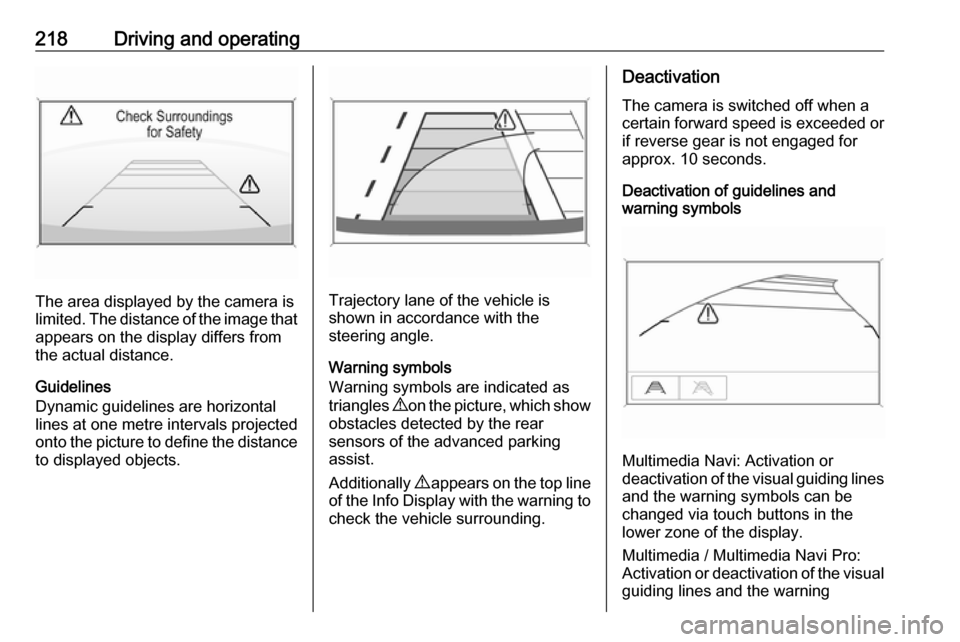
218Driving and operating
The area displayed by the camera is
limited. The distance of the image that
appears on the display differs from
the actual distance.
Guidelines
Dynamic guidelines are horizontal
lines at one metre intervals projected
onto the picture to define the distance
to displayed objects.Trajectory lane of the vehicle is
shown in accordance with the
steering angle.
Warning symbols
Warning symbols are indicated as
triangles 9 on the picture, which show
obstacles detected by the rear
sensors of the advanced parking
assist.
Additionally 9 appears on the top line
of the Info Display with the warning to check the vehicle surrounding.
Deactivation
The camera is switched off when a
certain forward speed is exceeded or
if reverse gear is not engaged for
approx. 10 seconds.
Deactivation of guidelines and
warning symbols
Multimedia Navi: Activation or
deactivation of the visual guiding lines and the warning symbols can be
changed via touch buttons in the
lower zone of the display.
Multimedia / Multimedia Navi Pro:
Activation or deactivation of the visual
guiding lines and the warning
Page 226 of 323

224Driving and operatingSystem limitations
Traffic sign assistant may not operate properly when:
● Vehicle speed is faster than 200 km/h.
● Driving on winding or hilly roads. ● During nighttime driving.
● The area of the windscreen, where the front camera is
located, is not clean or affected
by foreign items, e.g. stickers.
● Weather limits visibility, such as fog, rain, or snow.
● The sun is shining directly into the camera lens.
● Traffic signs are completely or partially covered or difficult to
discern.
● Traffic signs are incorrectly mounted or damaged.
● Traffic signs do not comply with the Vienna Convention on Road
Signs and Signals.
● The navigation map data is outdated.Caution
The system is intended to help thedriver within a defined speed
range to discern certain traffic
signs. Do not ignore traffic signs
which are not displayed by the
system.
The system does not discern any other than the conventional traffic
signs that might give or end a
speed limit.
Do not let this special feature
tempt you into taking risks when
driving.
Always adapt speed to the road
conditions.
The driver assistance systems do not relieve the driver from full
responsibility for vehicle
operation.
Lane keep assist
Lane keep assist helps to avoid
crashes due to unintentional lane
departures. The front camera
observes the lane markings between
which the vehicle is driving. If the
vehicle approaches a lane marking, the steering wheel is gently turned to
position the vehicle back into the lane. Turn steering wheel in same
direction, if system steering is not
sufficient. Turn steering wheel gently
into opposite direction, if lane change is intended.
When crossing a lane marking
significantly, lane keep assist starts a
visual and acoustic warning.
Additionally, the status of the lane
keep assist is indicated on the Driver
Assistance page in the Driver
Information Center 3 112.
Unintended lane departure is
assumed
● without using turn lights● using the turn lights in the opposite direction of the lane
departure
● without braking
● without acceleration
● without active steering.
Page 227 of 323

Driving and operating225Note
The system is switched off during
detection of ambiguous lane
markings, e.g. in construction areas.
Note
The system may be switched off if it
detects lanes which are too narrow,
too wide or too curved.
Activation
The lane keep assist is activated by
pressing a. The LED in the button
illuminates to indicate that the system
is switched on.
When the control indicator a in the
instrument cluster or in the head-up
display illuminates green, the system
is ready to assist.
The system is operational at vehicle
speeds between 60 km/h and
180 km/h and if lane markings are
available.
The system gently turns the steering
wheel and the control indicator a
changes to yellow, if the vehicle
approaches a detected lane marking
without using the turn lights in that
direction.
The system alerts by flashing a
together with three chimes, from the respective direction, if the lane is
departed significantly.
The system is only operable when a
lane marking is detected.
If the system only detects lane
markings on one side of the road, it
will only assist for this side.
Lane keep assist detects hands-free
driving. In this case a message in the
Driver Information Centre pops-up
and a chime sounds as long as lane
keep assist detects hands-free
driving.
Indication on Driver Assistance page
If the system is active but one or both
lanes are not detected, they appear
as a line of hollow dashes, as shown
on the right side of the vehicle in the
graphic above.
Page 228 of 323

226Driving and operatingIf the system detects a lane, it
appears as a green dashed line, as
shown on the right side of the vehicle in the graphic above. This dashed line
becomes amber if the vehicle
approaches a detected lane marking
without the turn lights in that direction
has been used.
If the system intervenes by steering, a short amber line appears, as shown on the left side of the vehicle in the
graphic above.
Deactivation The system is deactivated by
pressing a; the LED in the button
extinguishes.
The system is deactivated
automatically when a trailer is
detected.
System limitations The system performance may not
operate properly when:
● vehicle speed is out of range from
60 to 180 km/h
● driving on winding or hilly roads
● during nighttime driving● weather limits visibility, such as fog, rain, or snow
● the sensor in the windscreen is blocked by snow, ice, slush, mud,dirt, windscreen damage or
affected by foreign items, e.g.
stickers
● the sun is shining directly into the
camera lens
● close vehicles ahead
● banked roads
● road edges
● roads with poor lane markings
● sudden lighting changes
● vehicle modifications, e.g. tyres
Switch off the system if the system is
disturbed by tar marks, shadows,
road cracks, temporary or
construction lane markings, or other
road imperfections.9 Warning
Always keep your attention on the
road and maintain proper vehicle
position within the lane, otherwise
vehicle damage, injury or death
could occur.
Lane keep assist does not
continuously steer the vehicle.
The system may not keep the
vehicle in the lane or give an alert,
even if a lane marking is detected.
The steering of the lane keep
assist may not be sufficient to
avoid a lane departure.
The system may not detect hands-
off driving due to external
influences (road condition and
surface, weather etc). The driver
has full responsibility to control the vehicle and is always required tokeep the hands on the steeringwheel while driving.
Using the system while towing a
trailer or on slippery roads could
cause loss of control of the vehicle
and a crash. Switch the system off.
Page 320 of 323

318HHalogen headlights ....................244
Hand brake ................................. 175
Hazard warning flashers ............139
Headlight flash ........................... 137
Headlight range adjustment ......137
Headlights................................... 134
Headlights when driving abroad 137
Head restraint adjustment .............8
Head restraints ............................ 45
Head-up display.......................... 120 Heated mirrors ............................. 38
Heated rear window ..................... 42
Heated steering wheel .................88
Heated windscreen .......................42
Heating .................................. 54, 55
High beam ......................... 110, 135
High beam assist ................110, 135
Hill start assist ........................... 177
Horn ....................................... 14, 89
I
Identification plate .....................286
Immobiliser .......................... 36, 110
Indicators .................................... 101
Inductive charging ........................94
Info Display ................................. 118
Instrument cluster ........................96
Instrument panel fuse box .........258Instrument panel illumination
control .................................... 141
Instrument panel overview ........... 10
Interactive driving system ...........180
Interior care ............................... 281
Interior lighting ............................ 141
Interior lights ...................... 142, 254
Interior mirrors .............................. 39
Interruption of power supply ......173
Introduction .................................... 3
J
Jump starting ............................. 275
K Key, memorised settings ..............25
Keys ............................................. 20
Keys, locks ................................... 20
L
Lane change alert .......................213
Lane keep assist ................108, 224
Lashing eyes ............................... 80
LED headlights ...........110, 138, 246
Lighting features .........................143
Light switch ................................ 134
Load compartment ................29, 75
Load compartment cover .............78
Loading information .....................85
Low fuel ..................................... 110M
Malfunction indicator light ..........107
Manual anti-dazzle ......................39
Manual mode ............................. 171
Manual seat adjustment ...............48
Manual transmission .................. 174
Massage ....................................... 55
Memorised settings ......................25
Midlevel display .......................... 112
Mirror adjustment ........................... 8
Misted light covers .....................141
N New vehicle running-in ..............158
Number plate light .....................254
O Object detection systems ...........205
Odometer ................................... 102
Oil, engine .......................... 284, 288
OnStar ........................................ 129
Outside temperature ....................92
Overrun cut-off ........................... 162
P
Panoramic view system ..............215
Parking ................................ 19, 164
Parking assist ...................... 39, 205
Parking brake ............................ 176
Parking lights ............................. 141
Particulate filter ........................... 165