change wheel OPEL INSIGNIA BREAK 2019.5 Manual user
[x] Cancel search | Manufacturer: OPEL, Model Year: 2019.5, Model line: INSIGNIA BREAK, Model: OPEL INSIGNIA BREAK 2019.5Pages: 323, PDF Size: 9.49 MB
Page 237 of 323

Vehicle care235Vehicle careGeneral Information...................235
Accessories and vehicle modifications .......................... 235
Vehicle storage ........................236
End-of-life vehicle recovery .....236
Vehicle checks ........................... 237
Performing work ......................237
Bonnet ..................................... 237
Engine oil ................................. 238
Engine coolant ......................... 239
Washer fluid ............................ 240
Brakes ..................................... 240
Brake fluid ............................... 240
Vehicle battery ......................... 241
Diesel fuel system bleeding .....243
Wiper blade replacement ........243
Bulb replacement .......................244
Halogen headlights ..................244
LED headlights ........................ 246
Front fog lights ......................... 246
Tail lights ................................. 248
Side turn lights ......................... 253
Number plate light ...................254
Interior lights ............................ 254Electrical system........................254
Fuses ....................................... 254
Engine compartment fuse box . 255
Instrument panel fuse box .......258
Vehicle tools .............................. 259
Tools ........................................ 259
Wheels and tyres .......................260
Winter tyres ............................. 260
Tyre designations ....................261
Tyre pressure .......................... 261
Tyre pressure monitoring system .................................... 262
Tread depth ............................. 264
Changing tyre and wheel size . 265
Wheel covers ........................... 265
Tyre chains .............................. 266
Tyre repair kit .......................... 266
Wheel changing .......................271
Spare wheel ............................ 271
Jump starting ............................. 275
Towing ....................................... 277
Towing the vehicle ...................277
Towing another vehicle ...........278
Appearance care .......................279
Exterior care ............................ 279
Interior care ............................. 281General Information
Accessories and vehiclemodifications
We recommend the use of genuine
parts and accessories and factory approved parts specific for your
vehicle type. We cannot assess or guarantee reliability of other products
- even if they have a regulatory or
otherwise granted approval.
Any modification, conversion or other changes made to standard vehicle
specifications (including, without
limitation, software modifications,
modifications of the electronic control
units) may invalidate the warranty
offered by Opel. Furthermore, such
changes may affect driver assistance
systems, fuel consumption, CO 2
emissions and other emissions of the
vehicle. They may also invalidate the
vehicle operating permit.
Page 274 of 323

272Vehicle careOnly mount one temporary spare
wheel. Do not drive faster than
80 km/h. Take curves slowly. Do not
use for a long period of time.Caution
The use of a spare wheel that is smaller than the other wheels or in
combination with winter tyres
could affect driveability. Have the defective tyre replaced as soon as
possible.
Caution
If driving with a temporary spare
wheel, active emergency braking
has to deactivated.
The spare wheel is located in the load
compartment beneath the floor
covering.
To remove: 1. Open the floor cover.
2. The spare wheel is secured with a
wing nut. Unscrew the wing nut
and take out the spare wheel.
Under the spare wheel there is the
box with vehicle tools.
3. When, after a wheel change, no wheel is placed in the spare wheel
well, secure the tool box by
tightening the wing nut as far as it will go and close floor cover.
4. After wheel change back to full size wheel, place the spare wheel
outside up in the well and secure
with the wing nut.
Only mount one temporary spare
wheel. The permissible maximum
speed on the label on the temporary
spare wheel is only valid for the
factory-fitted tyre size.
Fitting the spare wheel Make the following preparations and
observe the following information:
● Park the vehicle on a level, firm and non-skid surface. The front
wheels must be in the straight-
ahead position.
● Apply the parking brake and engage first gear, reverse gear or
P .
● Remove the spare wheel.
● Never change more than one wheel at once.
Page 275 of 323

Vehicle care273● Use the jack only to changewheels in case of puncture, not
for seasonal winter or summer
tyre change.
● The jack is maintenance-free.
● If the ground on which the vehicle
is standing is soft, a solid board
(max. 1 cm thick) should be
placed under the jack.
● Take heavy objects out of the vehicle before jacking up.
● No people or animals may be in the vehicle when it is jacked-up.
● Never crawl under a jacked-up vehicle.
● Do not start the vehicle when it is
raised on the jack.
● Clean wheel nuts and thread with
a clean cloth before mounting the wheel.9 Warning
Do not grease wheel bolt, wheel
nut and wheel nut cone.
1. Steel wheels with cover: Pull off the wheel cover.
Alloy wheels: Disengage wheel
nut caps with a flat screwdriver
and remove. To protect the wheel paint and the cap, wrap a cloth
around the screwdriver tip.
2. Fold out the wheel wrench and install ensuring that it locates
securely and loosen each wheel
nut by half a turn.
The wheels might be protected by
locking wheel nuts. To loosen
these specific nuts, first attach the adapter for the locking wheel nuts
onto the head of the nut before
installing the wheel wrench. The
adapter is located in the glovebox.
3. Ensure the jack is correctly positioned under the relevant
vehicle jacking point.
Some versions have sill panels
with covered vehicle jacking
Page 276 of 323
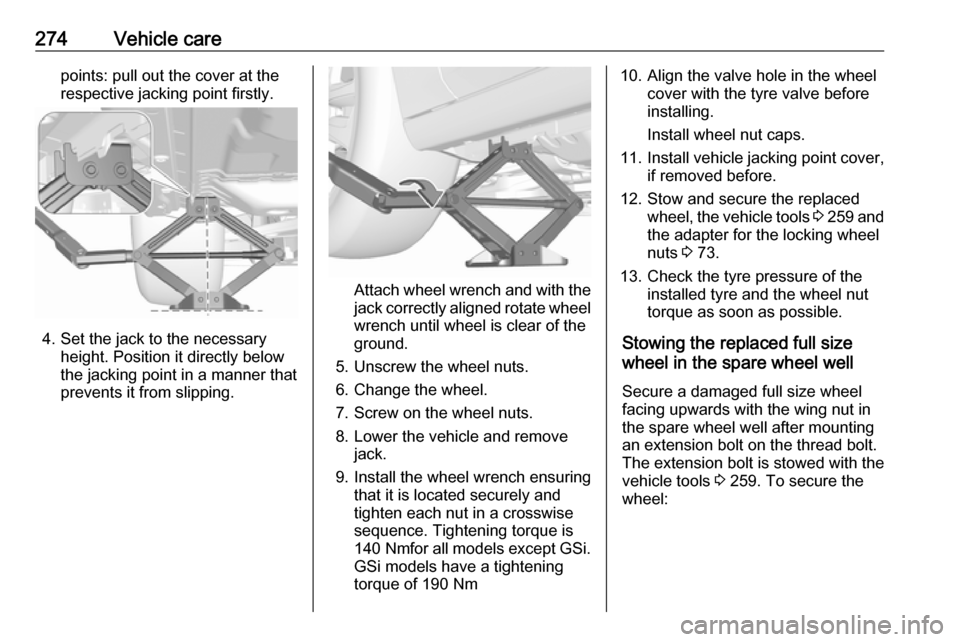
274Vehicle carepoints: pull out the cover at the
respective jacking point firstly.
4. Set the jack to the necessary height. Position it directly below
the jacking point in a manner that
prevents it from slipping.
Attach wheel wrench and with the
jack correctly aligned rotate wheel wrench until wheel is clear of the
ground.
5. Unscrew the wheel nuts. 6. Change the wheel.
7. Screw on the wheel nuts.
8. Lower the vehicle and remove jack.
9. Install the wheel wrench ensuring that it is located securely and
tighten each nut in a crosswise
sequence. Tightening torque is
140 Nm for all models except GSi.
GSi models have a tightening
torque of 190 Nm
10. Align the valve hole in the wheel cover with the tyre valve before
installing.
Install wheel nut caps.
11. Install vehicle jacking point cover,
if removed before.
12. Stow and secure the replaced wheel, the vehicle tools 3 259 and
the adapter for the locking wheel
nuts 3 73.
13. Check the tyre pressure of the installed tyre and the wheel nut
torque as soon as possible.
Stowing the replaced full size
wheel in the spare wheel well
Secure a damaged full size wheel facing upwards with the wing nut in
the spare wheel well after mounting
an extension bolt on the thread bolt.
The extension bolt is stowed with the
vehicle tools 3 259. To secure the
wheel:
Page 314 of 323

312Customer informationVerband der Automobilindustrie e.V.
AdBlue ®
is a registered trademark of
the VDA.Vehicle data recording
and privacy
Event data recorders
Electronic control units are installed in
your vehicle. Control units process
data which is received by vehicle
sensors, for example, or which they
generate themselves or exchange
amongst themselves. Some control
units are necessary for the safe
functioning of your vehicle, others
assist you while you drive (driver
assistance systems), while others
provide comfort or infotainment
functions.
The following contains general
information about data processing in
the vehicle. You will find additional
information as to which specific data
is uploaded, stored and passed on to third parties and for what purpose in
your vehicle under the key word Data Protection closely linked to the
references for the affected functional
characteristics in the relevant owner's
manual or in the general terms of
sale. These are also available online.Operating data in the vehicle
Control units process data for
operation of the vehicle.
This data includes, e.g.: ● vehicle status information (e.g. speed, movement delay, lateral
acceleration, wheel rotation rate, "seat belts fastened" display)
● ambient conditions (e.g. temperature, rain sensor,
distance sensor)
As a rule such data is transient, not
stored for longer than an operational
cycle, and only processed on board
the vehicle itself. Control units often
include data storage (including the
vehicle key). This is used to allow information to be documented
temporarily or permanently on vehicle
condition, component stress,
maintenance requirements and
technical events and errors.
Page 315 of 323

Customer information313Depending on technical equipment
level, the data stored is as follows:
● system component operating states (e.g. fill level, tyre
pressure, battery status)
● faults and defects in important system components (e.g. lights,
brakes)
● system reactions in special driving situations (e.g. triggeringof an airbag, actuation of the
stability control systems)
● information on events damaging the vehicle
● for electric vehicles the amount of
charge in the high-voltage
battery, estimated range
In special cases (e.g. if the vehicle
has detected a malfunction), it may be
necessary to save data that would
otherwise just be volatile.
When you use services (e.g. repairs,
maintenance), the operating data
saved can be read together with the
vehicle identification number and
used when necessary. Staff working
for the service network ( e.g. garages,
manufacturers) or third parties (e.g.breakdown services) can read the
data from the vehicle. The same
applies to warranty work and quality
assurance measures.
Data is generally read via the OBD
(On-Board Diagnostics) port
prescribed by law in the vehicle. The operating data which is read out,
documents the technical condition of
the vehicle or individual components
and assists with fault diagnosis,
compliance with warranty obligations
and quality improvement. This data,
in particular information on
component stress, technical events,
operator errors and other faults, is
transmitted to the manufacturer
where appropriate, together with the
vehicle identification number. The
manufacturer is also subject to
product liability. The manufacturer
potentially also uses operating data
from vehicles for product recalls. This
data can also be used to check
customer warranty and guarantee
claims.
Fault memories in the vehicle can be
reset by a service company when
carrying out servicing or repairs or at
your request.Comfort and infotainment
functions
Comfort settings and custom settings can be stored in the vehicle and
changed or reset at any time.
Depending on the equipment level in
question, these include
● seat and steering wheel position settings
● chassis and air conditioning settings
● custom settings such as interior lighting
You can input your own data in the
infotainment functions for your
vehicle as part of the selected
features.
Depending on the equipment level in
question, these include
● multimedia data such as music, videos or photos for playback in
an integrated multimedia system
● address book data for use with an
integrated hands-free system or an integrated navigation system
Page 320 of 323

318HHalogen headlights ....................244
Hand brake ................................. 175
Hazard warning flashers ............139
Headlight flash ........................... 137
Headlight range adjustment ......137
Headlights................................... 134
Headlights when driving abroad 137
Head restraint adjustment .............8
Head restraints ............................ 45
Head-up display.......................... 120 Heated mirrors ............................. 38
Heated rear window ..................... 42
Heated steering wheel .................88
Heated windscreen .......................42
Heating .................................. 54, 55
High beam ......................... 110, 135
High beam assist ................110, 135
Hill start assist ........................... 177
Horn ....................................... 14, 89
I
Identification plate .....................286
Immobiliser .......................... 36, 110
Indicators .................................... 101
Inductive charging ........................94
Info Display ................................. 118
Instrument cluster ........................96
Instrument panel fuse box .........258Instrument panel illumination
control .................................... 141
Instrument panel overview ........... 10
Interactive driving system ...........180
Interior care ............................... 281
Interior lighting ............................ 141
Interior lights ...................... 142, 254
Interior mirrors .............................. 39
Interruption of power supply ......173
Introduction .................................... 3
J
Jump starting ............................. 275
K Key, memorised settings ..............25
Keys ............................................. 20
Keys, locks ................................... 20
L
Lane change alert .......................213
Lane keep assist ................108, 224
Lashing eyes ............................... 80
LED headlights ...........110, 138, 246
Lighting features .........................143
Light switch ................................ 134
Load compartment ................29, 75
Load compartment cover .............78
Loading information .....................85
Low fuel ..................................... 110M
Malfunction indicator light ..........107
Manual anti-dazzle ......................39
Manual mode ............................. 171
Manual seat adjustment ...............48
Manual transmission .................. 174
Massage ....................................... 55
Memorised settings ......................25
Midlevel display .......................... 112
Mirror adjustment ........................... 8
Misted light covers .....................141
N New vehicle running-in ..............158
Number plate light .....................254
O Object detection systems ...........205
Odometer ................................... 102
Oil, engine .......................... 284, 288
OnStar ........................................ 129
Outside temperature ....................92
Overrun cut-off ........................... 162
P
Panoramic view system ..............215
Parking ................................ 19, 164
Parking assist ...................... 39, 205
Parking brake ............................ 176
Parking lights ............................. 141
Particulate filter ........................... 165