lights OPEL INSIGNIA BREAK 2019 Manual user
[x] Cancel search | Manufacturer: OPEL, Model Year: 2019, Model line: INSIGNIA BREAK, Model: OPEL INSIGNIA BREAK 2019Pages: 345, PDF Size: 9.73 MB
Page 181 of 345

Driving and operating179Press Engine Start/Stop briefly: an
automatic procedure operates the
starter with a short delay until the engine is running.
To switch off the engine when vehicle
is stationary, press
Engine Start/Stop briefly. Automatic
transmission: apply the parking brake
and engage P.
To start the engine during an
Autostop:
Manual transmission: during an
Autostop, the engine can be started
by depressing the clutch pedal
3 180.
Automatic transmission: during an
Autostop, the engine can be started
by releasing the brake pedal 3 180.
Emergency engine shut off during driving
If the engine needs to be switched off during driving in case of emergency,
press Engine Start/Stop for more than
two seconds or press twice briefly
within five seconds.9 Danger
Switching off the engine during
driving may cause loss of power
support for brake and steering
systems. Assistance systems and
airbag systems are disabled.
Lighting and brake lights will
extinguish. Therefore power down the engine and ignition while
driving only when required in case of emergency.
Starting the vehicle at low
temperatures
Starting the engine without additional
heaters is possible down to -25 °С for diesel engines and -30 °C for petrol
engines. Required is an engine oil
with the correct viscosity, the correct fuel, performed services and a
sufficiently charged vehicle battery.
With temperatures below -30 °C the
automatic transmission requires a
warming phase of approx.
five minutes. The selector lever must
be in position P.
Automatic Starter Control
This function controls the engine
starting procedure. The driver does
not need to hold Engine Start/Stop
pressed. Once applied, the system
will go on starting automatically until
the engine is running. Because of the checking procedure, the engine startsrunning after a short delay.
Possible reasons for a non-starting
engine:
● Clutch pedal not operated (manual transmission).
● Brake pedal not operated or selector lever not in P or N
(automatic transmission).
● Timeout occurred.
Turbo engine warm-up
Upon start-up, engine available
torque may be limited for a short time, especially when the engine
temperature is cold. The limitation is
to allow the lubrication system to fully
protect the engine.
Page 195 of 345

Driving and operating193If a service message is displayed in
the Driver Information Centre, the
system may have limited functionality
(or be completely disabled in some
cases, i.e. the vehicle switches to
Front-wheel drive). Seek the
assistance of a workshop.
Towing the vehicle 3 293.Brakes
The brake system comprises twoindependent brake circuits.
If a brake circuit fails, the vehicle can
still be braked using the other brake
circuit. However, braking effect is
achieved only when the brake pedal
is depressed firmly. Considerably
more force is needed for this. The
braking distance is extended. Seek the assistance of a workshop beforecontinuing the journey.
When the engine is not running, the
support of the brake servo unit
disappears once the brake pedal has
been depressed once or twice.
Braking effect is not reduced, but
braking requires significantly greater
force. It is especially important to bear this in mind when being towed.
Control indicator R 3 107.
Active emergency braking 3 218.
Antilock brake system Antilock brake system (ABS)
prevents the wheels from locking.ABS starts to regulate brake pressure as soon as a wheel shows a tendency
to lock. The vehicle remains
steerable, even during hard braking.
ABS control is made apparent
through a pulse in the brake pedal
and the noise of the regulation
process.
For optimum braking, keep the brake
pedal fully depressed throughout the
braking process, despite the fact that
the pedal is pulsating. Do not reduce
the pressure on the pedal.
After starting off, the system performs a self-test which may be audible.
Control indicator u 3 108.
Adaptive brake light During full braking, all three brake
lights flash for the duration of ABS
control.
Page 206 of 345

204Driving and operatingResume limit speed
Turn thumb wheel to RES/+. The
stored speed limit will be obtained
and is indicated without brackets in the Driver Information Centre.
Switching off
Press L, the speed limit indication
extinguishes in the Driver Information Centre. The stored speed is deleted.
By pressing m to activate cruise
control or adaptive cruise control,
speed limiter is also deactivated and
the stored speed is deleted.
By switching off the ignition, speed
limiter is also deactivated, but the
speed limit will be stored for next
speed limiter activation.
Adaptive cruise control
Adaptive cruise control is an
enhancement to conventional cruise
control with the additional feature of
maintaining a certain distance behind the vehicle ahead.Adaptive cruise control automatically
decelerates the vehicle when
approaching a slower moving vehicle. It then adjusts the vehicle speed to
follow the vehicle ahead at the
selected following distance. The
vehicle speed increases or decreases to follow the vehicle in front, but willnot exceed the set speed. It may
apply limited braking with activated
brake lights.
To facilitate overtaking a vehicle on
the motorway, the activation of the
turn signal reduces the following
distance for a short time. This function
is implemented only on the respective
driver's side depending on left or right
hand drive vehicle configuration.
The adaptive cruise control can store set speed over 30 km/h. On vehicles
with automatic transmissions the
system can brake until a full stop and
drive off from a stop.Adaptive cruise control uses radar
and camera sensors to detect the
vehicles ahead. If no vehicle is
detected in the driving path, the
adaptive cruise control will behave
like a conventional cruise control
3 201.
For additional information including a
video, visit us online.
Adaptive cruise control is mainly
advised to be used on long straight
roads like highways or country roads
with steady traffic. Do not use the
system if it is not advisable to
maintain a constant speed.
Control indicator A 3 111, C 3 111.
Additionally, the status of the
adaptive cruise control is indicated on
the Driver Assistance page in the
Driver Information Center 3 112.9 Warning
The complete driver attention is
always required while driving with
adaptive cruise control. The driver stays fully in control of the vehicle
because the brake pedal, the
Page 236 of 345

234Driving and operating9Warning
Displayed images may be further
or closer than they appear. The
area displayed is limited and
objects that are close to either
edge of the bumper or under the
bumper are not displayed on the
screen.
9 Warning
The panoramic view cameras
have blind spot areas and will not
display all objects near the edges
of the vehicle. Folding side mirrors that are out of position will not
display the panoramic view
correctly.
Blind spots are represented as
hatched areas in the illuminations.
Dark areas show the views displayed by the panoramic view system.
System limitationsCaution
For optimal operation of the
system, it is important to keep the
lenses of the cameras in the front
grille, the housings of outside
mirrors and in the tailgate between the number plate lights always
clean. Rinse the lenses with water and wipe with a soft cloth.
Do not clean the lenses with a
steam-jet or high-pressure jet
cleaner.
The panoramic view system may not
operate properly when:
● The surrounding is dark.
● The sun or the beam of headlights is shining directly into
the camera lenses.
● During nighttime driving.
● Weather limits visibility, such as fog, rain, or snow.
● The camera lenses are blocked by snow, ice, slush, mud, dirt.
● The vehicle is towing a trailer.
Page 237 of 345

Driving and operating235● The vehicle had an accident.
● There are extreme temperature changes.
Rear view camera The rear view camera assists the
driver when reversing by displaying a view of the area behind the vehicle.
The view of the camera is displayed
in the Info-Display.9 Warning
The rear view camera does not
replace driver vision. Note that
objects that are outside the
camera's field of view and the
parking assist sensors, e.g. below
the bumper or underneath the
vehicle, are not displayed.
Do not reverse or park the vehicle
using only the rear view camera.
Always check the surrounding of
the vehicle before driving.
Activation
Rear view camera is automatically
activated when reverse gear is
engaged.
Functionality
The camera is mounted between the
number plate lights.
The area displayed by the camera is
limited. The distance of the image that
appears on the display differs from
the actual distance.
Guidelines
Dynamic guidelines are horizontal
lines at one metre intervals projected
onto the picture to define the distance
to displayed objects.
Page 238 of 345
236Driving and operating
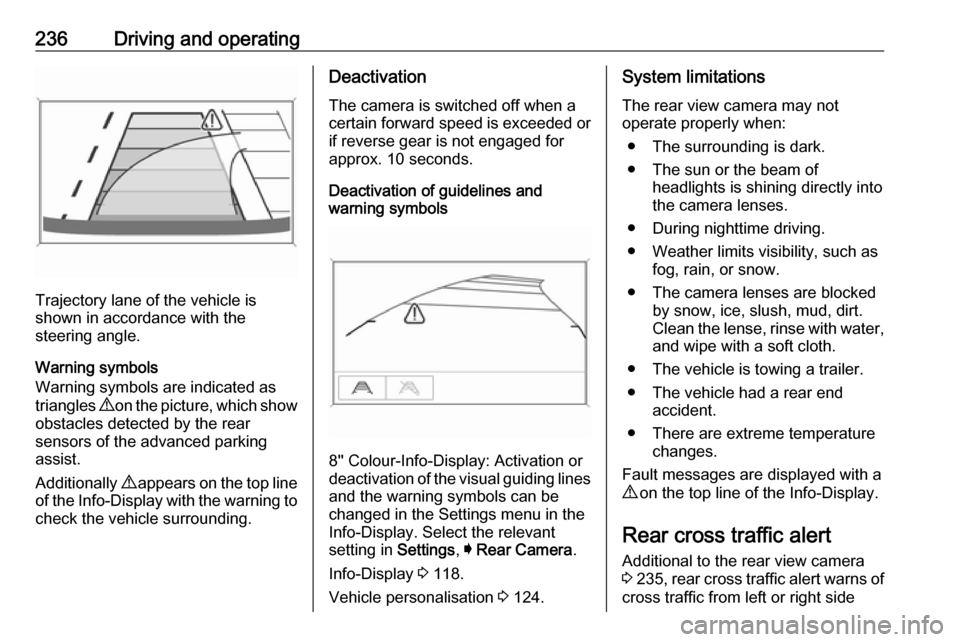
Trajectory lane of the vehicle is
shown in accordance with the
steering angle.
Warning symbols
Warning symbols are indicated as
triangles 9 on the picture, which show
obstacles detected by the rear
sensors of the advanced parking
assist.
Additionally 9 appears on the top line
of the Info-Display with the warning to
check the vehicle surrounding.
Deactivation
The camera is switched off when a
certain forward speed is exceeded or
if reverse gear is not engaged for
approx. 10 seconds.
Deactivation of guidelines and
warning symbols
8'' Colour-Info-Display: Activation or
deactivation of the visual guiding lines and the warning symbols can be
changed in the Settings menu in the
Info-Display. Select the relevant
setting in Settings, I Rear Camera .
Info-Display 3 118.
Vehicle personalisation 3 124.
System limitations
The rear view camera may not
operate properly when:
● The surrounding is dark.
● The sun or the beam of headlights is shining directly into
the camera lenses.
● During nighttime driving.
● Weather limits visibility, such as fog, rain, or snow.
● The camera lenses are blocked by snow, ice, slush, mud, dirt.
Clean the lense, rinse with water,
and wipe with a soft cloth.
● The vehicle is towing a trailer.
● The vehicle had a rear end accident.
● There are extreme temperature changes.
Fault messages are displayed with a
9 on the top line of the Info-Display.
Rear cross traffic alert
Additional to the rear view camera
3 235 , rear cross traffic alert warns of
cross traffic from left or right side
Page 254 of 345

252Vehicle careVehicle careGeneral Information...................252
Accessories and vehicle modifications .......................... 252
Vehicle storage ........................253
End-of-life vehicle recovery .....253
Vehicle checks ........................... 254
Performing work ......................254
Bonnet ..................................... 254
Engine oil ................................. 255
Engine coolant ......................... 256
Washer fluid ............................ 257
Brakes ..................................... 257
Brake fluid ............................... 257
Vehicle battery ......................... 258
Diesel fuel system bleeding .....259
Wiper blade replacement ........259
Bulb replacement .......................260
Halogen headlights ..................260
LED headlights ........................ 262
Front fog lights ......................... 262
Tail lights ................................. 264
Side turn lights ......................... 269
Number plate light ...................270
Interior lights ............................ 270
Instrument panel illumination ...270Electrical system ........................270
Fuses ....................................... 270
Engine compartment fuse box . 271
Instrument panel fuse box .......274
Vehicle tools .............................. 275
Tools ........................................ 275
Wheels and tyres .......................276
Winter tyres ............................. 276
Tyre designations ....................277
Tyre pressure .......................... 277
Tyre pressure monitoring system .................................... 278
Tread depth ............................. 281
Changing tyre and wheel size . 281
Wheel covers ........................... 281
Tyre chains .............................. 282
Tyre repair kit .......................... 282
Wheel changing .......................287
Spare wheel ............................ 288
Jump starting ............................. 291
Towing ....................................... 293
Towing the vehicle ...................293
Towing another vehicle ...........294
Appearance care .......................295
Exterior care ............................ 295
Interior care ............................. 297General Information
Accessories and vehiclemodifications
We recommend the use of genuine
parts and accessories and factory approved parts specific for your
vehicle type. We cannot assess or guarantee reliability of other products
- even if they have a regulatory or
otherwise granted approval.
Any modification, conversion or other changes made to standard vehicle
specifications (including, without
limitation, software modifications,
modifications of the electronic control
units) may invalidate the warranty
offered by Opel. Furthermore, such
changes may affect driver assistance
systems, fuel consumption, CO 2
emissions and other emissions of the
vehicle. They may also invalidate the
vehicle operating permit.
Page 262 of 345

260Vehicle careRear windowGrand Sport
Lift the wiper arm until it stays in the
raised position, press button to
disengage the wiper blade and
remove.
Attach the wiper blade slightly angled
to the wiper arm and push until it
engages.
Lower wiper arm carefully.
Sports Tourer, Country Tourer
Lift wiper arm. Disengage wiper blade as shown in illustration and remove.
Attach the wiper blade slightly angled
to the wiper arm and push until it
engages.
Lower wiper arm carefully.
Bulb replacement
Switch off the ignition and switch off
the relevant switch or close the doors.
Only hold a new bulb at the base. Do not touch the bulb glass with bare
hands.
Use only the same bulb type for
replacement.
Replace headlight bulbs from within
the engine compartment.
Bulb check
After a bulb replacement switch on
the ignition, operate and check the
lights.
Halogen headlights Halogen headlights with separate
bulbs for low beam and high beam.
Page 264 of 345
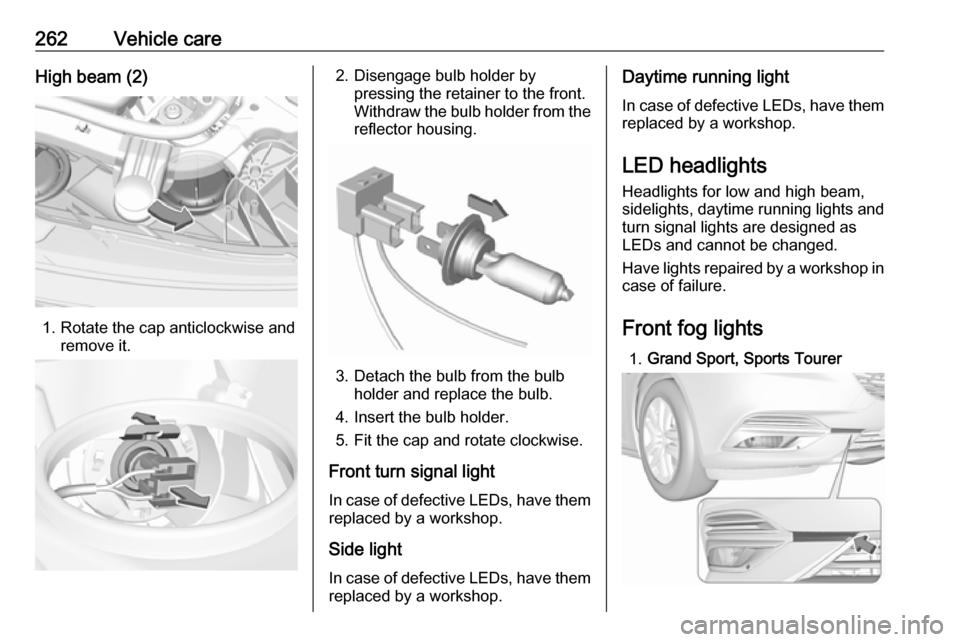
262Vehicle careHigh beam (2)
1. Rotate the cap anticlockwise andremove it.
2. Disengage bulb holder bypressing the retainer to the front.
Withdraw the bulb holder from the
reflector housing.
3. Detach the bulb from the bulb holder and replace the bulb.
4. Insert the bulb holder.
5. Fit the cap and rotate clockwise.
Front turn signal light
In case of defective LEDs, have them replaced by a workshop.
Side light
In case of defective LEDs, have them
replaced by a workshop.
Daytime running light
In case of defective LEDs, have them
replaced by a workshop.
LED headlights
Headlights for low and high beam,
sidelights, daytime running lights and turn signal lights are designed as
LEDs and cannot be changed.
Have lights repaired by a workshop in
case of failure.
Front fog lights 1. Grand Sport, Sports Tourer
Page 266 of 345
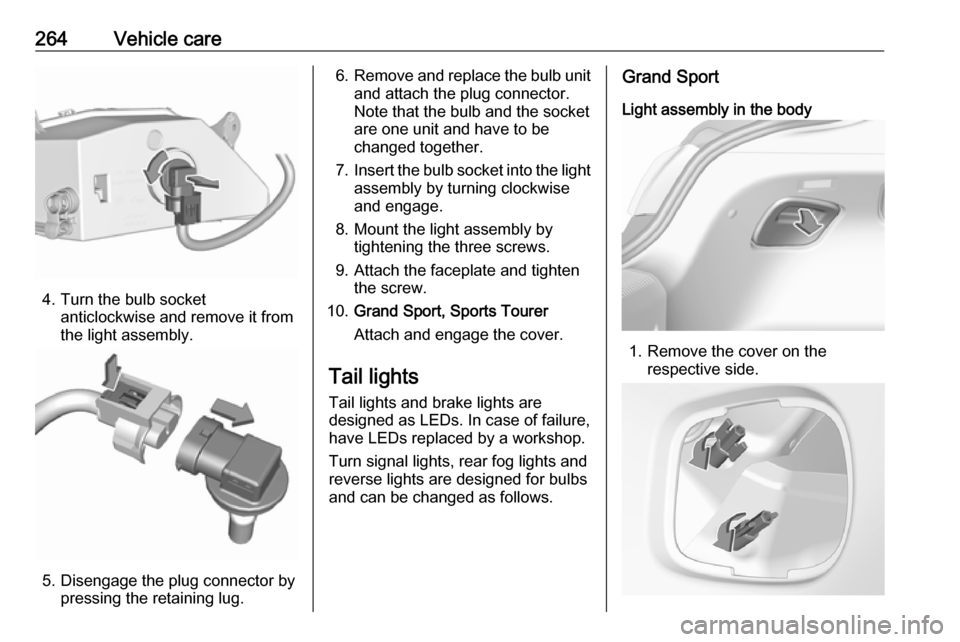
264Vehicle care
4. Turn the bulb socketanticlockwise and remove it from
the light assembly.
5. Disengage the plug connector by pressing the retaining lug.
6.Remove and replace the bulb unit
and attach the plug connector.
Note that the bulb and the socket
are one unit and have to be
changed together.
7. Insert the bulb socket into the light
assembly by turning clockwise
and engage.
8. Mount the light assembly by tightening the three screws.
9. Attach the faceplate and tighten the screw.
10. Grand Sport, Sports Tourer
Attach and engage the cover.
Tail lights Tail lights and brake lights are
designed as LEDs. In case of failure,
have LEDs replaced by a workshop.
Turn signal lights, rear fog lights and
reverse lights are designed for bulbs
and can be changed as follows.Grand Sport
Light assembly in the body
1. Remove the cover on the respective side.