interior OPEL INSIGNIA BREAK 2019 Manual user
[x] Cancel search | Manufacturer: OPEL, Model Year: 2019, Model line: INSIGNIA BREAK, Model: OPEL INSIGNIA BREAK 2019Pages: 345, PDF Size: 9.73 MB
Page 5 of 345

Introduction3Vehicle specific dataPlease enter your vehicle's data on
the previous page to keep it easily
accessible. This information is
available in the sections "Service and
maintenance" and "Technical data"
as well as on the identification plate.
Introduction
Your vehicle is a designed
combination of advanced technology, safety, environmental friendliness
and economy.
This Owner's Manual provides you
with all the necessary information to
enable you to drive your vehicle
safely and efficiently.
Make sure your passengers are
aware of the possible risk of accident
and injury which may result from
improper use of the vehicle.
You must always comply with the
specific laws and regulations of the
country that you are in. These laws
may differ from the information in this Owner's Manual.
Disregarding the description given in
this manual may affect your warranty.When this Owner's Manual refers to a
workshop visit, we recommend your
Opel Service Partner. For gas
vehicles, we recommend an Opel
Repairer authorised for servicing gas
vehicles.
All Opel Service Partners provide first-class service at reasonable
prices. Experienced mechanics
trained by Opel work according to
specific Opel instructions.
The customer literature pack should
always be kept ready to hand in the
vehicle.
Using this manual ● This manual describes all options
and features available for this
model. Certain descriptions,
including those for display and
menu functions, may not apply to
your vehicle due to model
variant, country specifications,
special equipment or
accessories.
● The "In brief" section will give you
an initial overview.● The table of contents at the beginning of this manual and
within each section shows where the information is located.
● The index will enable you to search for specific information.
● This Owner's Manual depicts left-
hand drive vehicles. Operation is similar for right-hand drive
vehicles.
● The Owner's Manual uses the engine identifier code. The
corresponding sales designation
and engineering code can be
found in the section "Technical
data".
● Directional data, e.g. left or right, or front or back, always relate to
the direction of travel.
● Displays may not support your specific language.
● Display messages and interior labelling are written in bold
letters.
Page 10 of 345
8In briefHead restraint adjustment
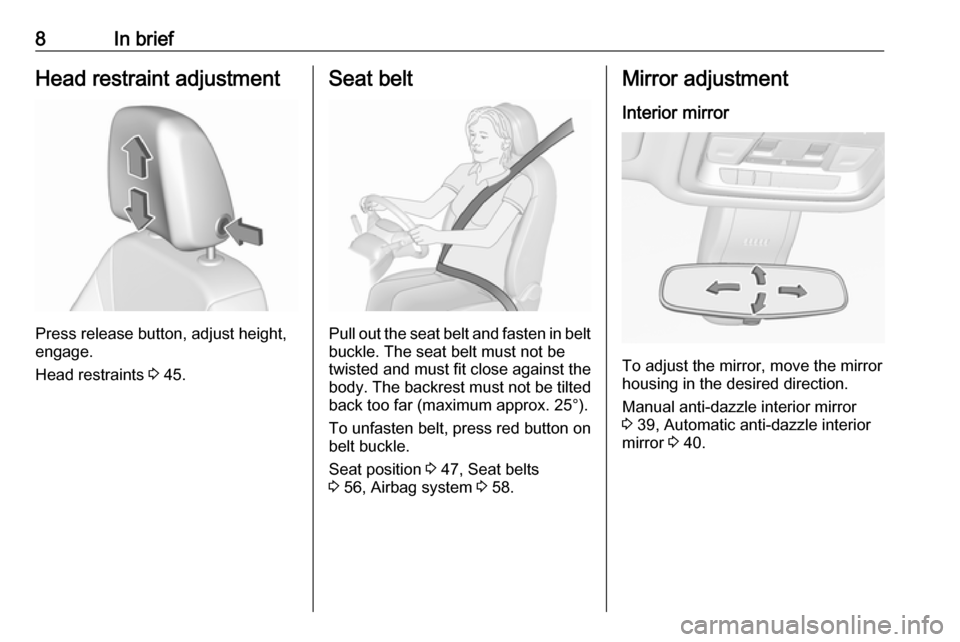
Press release button, adjust height,
engage.
Head restraints 3 45.
Seat belt
Pull out the seat belt and fasten in belt
buckle. The seat belt must not be
twisted and must fit close against the
body. The backrest must not be tilted back too far (maximum approx. 25°).
To unfasten belt, press red button on belt buckle.
Seat position 3 47, Seat belts
3 56, Airbag system 3 58.
Mirror adjustment
Interior mirror
To adjust the mirror, move the mirror
housing in the desired direction.
Manual anti-dazzle interior mirror
3 39, Automatic anti-dazzle interior
mirror 3 40.
Page 22 of 345

20Keys, doors and windowsKeys, doors and
windowsKeys, locks ................................... 20
Keys .......................................... 20
Radio remote control .................21
Electronic key system ................22
Memorised settings ...................25
Central locking system ..............25
Automatic locking ......................27
Child locks ................................. 28
Doors ........................................... 29
Load compartment ....................29
Vehicle security ............................ 34
Anti-theft locking system ...........34
Anti-theft alarm system ..............34
Immobiliser ................................ 37
Exterior mirrors ............................ 37
Convex shape ........................... 37
Electric adjustment ....................37
Folding mirrors .......................... 38
Heated mirrors ........................... 39
Automatic dimming ....................39
Parking assist ............................ 39Interior mirrors............................. 39
Manual anti-dazzle ....................39
Automatic anti-dazzle ................40
Windows ...................................... 40
Windscreen ............................... 40
Power windows ......................... 40
Heated rear window ..................42
Heated windscreen ....................43
Sun visors .................................. 43
Roof ............................................. 43
Sunroof ...................................... 43Keys, locks
Keys Replacement keys
The key number is specified on a
detachable tag.
The key number must be quoted
when ordering replacement keys as it
is a component of the immobiliser system.
Locks 3 295, Central locking 3 25,
Starting the engine 3 178.
Radio remote control 3 21.
Electronic key 3 22.
The code number of the adapter for
the locking wheel nuts is specified on
a card. It must be quoted when
ordering a replacement adapter.
Wheel changing 3 287.
Replacing battery Replace the battery as soon as the
system no longer operates properly
or the range is reduced. The need for
Page 27 of 345

Keys, doors and windows25● Overload of the central lockingsystem by operating at frequent
intervals, the power supply is
interrupted for a short time.
● Interference from higher-power radio waves from other sources.
To rectify the cause of the fault,
change the position of the electronic
key.
Manual unlocking 3 25.
Memorised settings
Whenever the ignition is switched off, some functions of the following
settings may be automatically
memorised by the remote control unit
or the electronic key:
● automatic climate control
● lighting
● Infotainment system
● central locking system
● Sport mode settings
● comfort settingsThe saved settings are automatically
used the next time the ignition is
switched on with the memorised
electronic key 3 22.
A precondition is that Personalisation
by Driver is activated in the personal
settings of the Info-Display. This must
be set for each electronic key which is
used. The status change is available
only after locking and unlocking the
vehicle.
The assigned memory position of the power seat is automatically recalled
when switching on ignition and Auto
Memory Recall is activated in the
Info-Display for the memorised
electronic key.
Power seat 3 50.
Vehicle personalisation 3 124.
Central locking system Unlocks and locks doors, load
compartment and fuel filler flap.
A pull on an interior door handle
unlocks the respective door. Pulling
the handle once more opens the door.Note
In the event of an accident in which
airbags or belt pretensioners are
deployed, the vehicle is
automatically unlocked.
Note
A short time after unlocking with the
electronic key, the doors are being
locked automatically if no door has
been opened. A precondition is that
the setting is activated in the vehicle
personalisation 3 124.
Central locking buttons
Locks or unlocks all doors, the load
compartment and fuel filler flap from
the passenger compartment via a
switch in the driver's door panel.
Page 28 of 345
26Keys, doors and windows
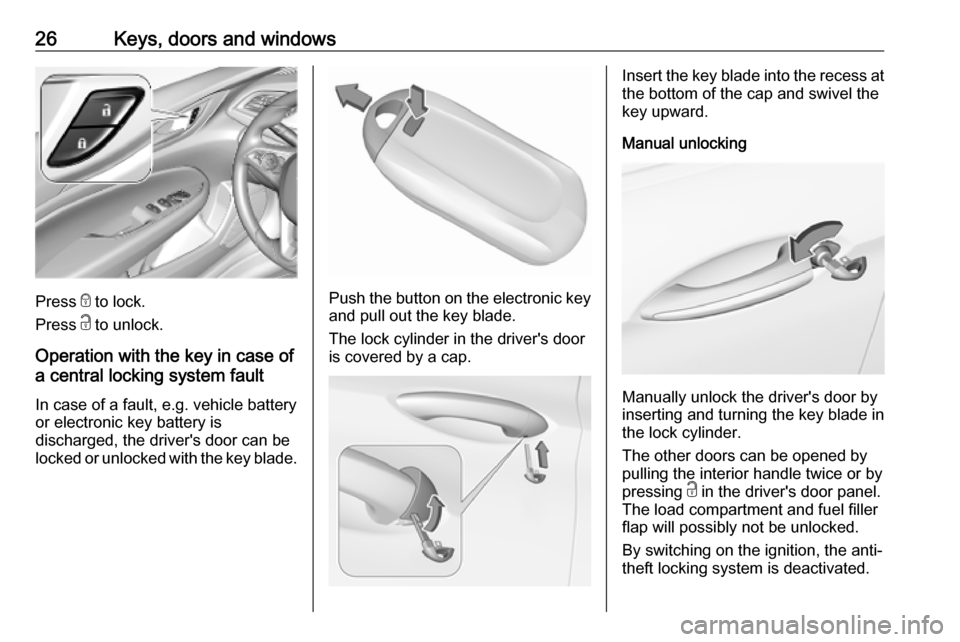
Press e to lock.
Press c to unlock.
Operation with the key in case of
a central locking system fault
In case of a fault, e.g. vehicle battery
or electronic key battery is
discharged, the driver's door can be
locked or unlocked with the key blade.Push the button on the electronic key
and pull out the key blade.
The lock cylinder in the driver's door is covered by a cap.
Insert the key blade into the recess at the bottom of the cap and swivel the
key upward.
Manual unlocking
Manually unlock the driver's door by
inserting and turning the key blade in
the lock cylinder.
The other doors can be opened by
pulling the interior handle twice or by
pressing c in the driver's door panel.
The load compartment and fuel filler
flap will possibly not be unlocked.
By switching on the ignition, the anti-
theft locking system is deactivated.
Page 31 of 345
Keys, doors and windows29Doors
Load compartment Tailgate
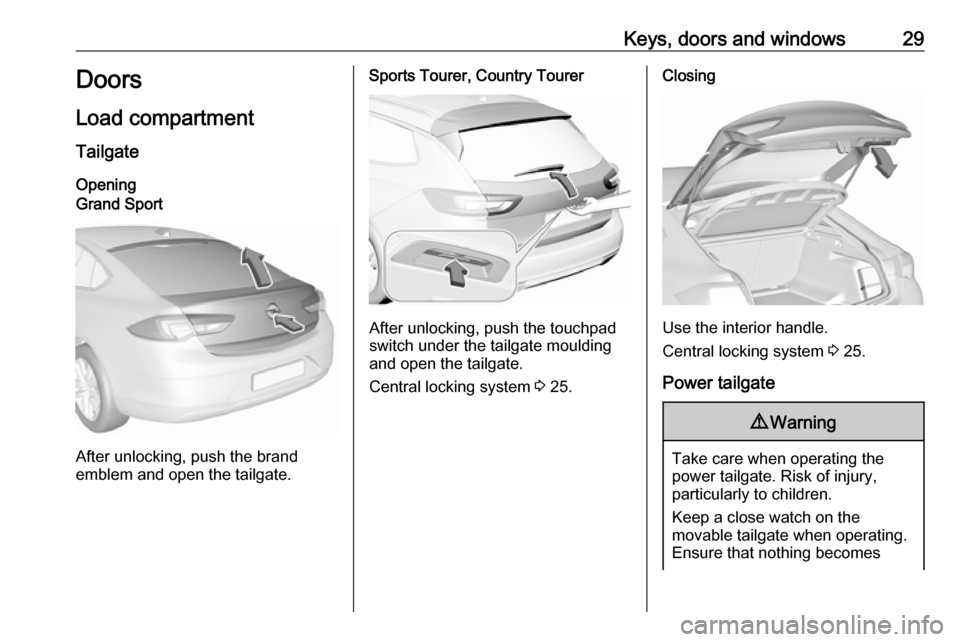
OpeningGrand Sport
After unlocking, push the brand
emblem and open the tailgate.
Sports Tourer, Country Tourer
After unlocking, push the touchpad
switch under the tailgate moulding
and open the tailgate.
Central locking system 3 25.
Closing
Use the interior handle.
Central locking system 3 25.
Power tailgate
9 Warning
Take care when operating the
power tailgate. Risk of injury,
particularly to children.
Keep a close watch on the
movable tailgate when operating.
Ensure that nothing becomes
Page 37 of 345
Keys, doors and windows35● vehicle inclination, e.g. if it israised
● ignition
Activation All doors must be closed and the
electronic key of the electronic key
system must not remain in the
vehicle. Otherwise the system cannot
be activated.
● self-activated 30 seconds after locking the vehicle by pressingthe button on any exterior door
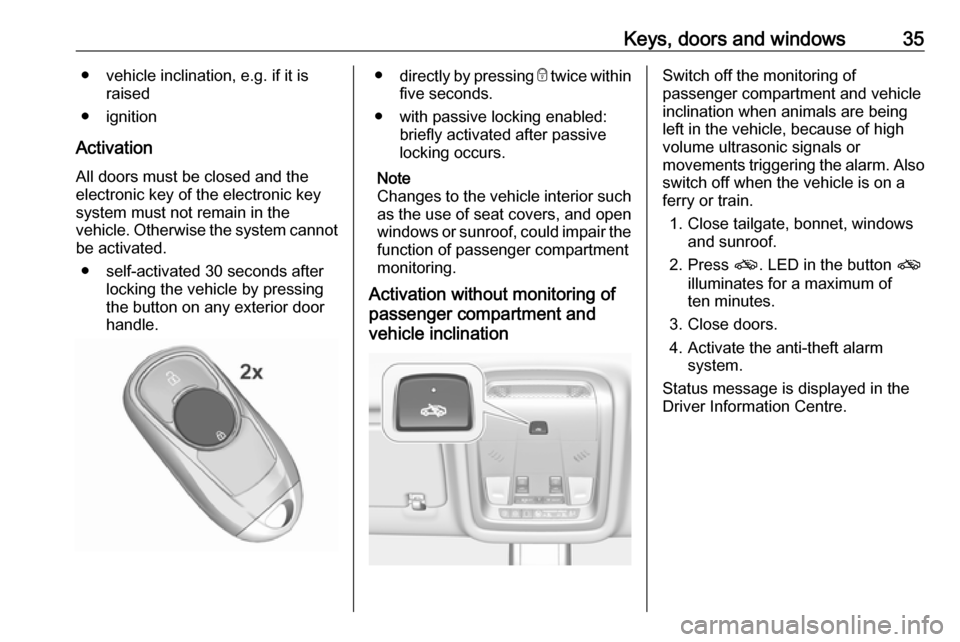
handle.● directly by pressing e twice within
five seconds.
● with passive locking enabled: briefly activated after passive
locking occurs.
Note
Changes to the vehicle interior such
as the use of seat covers, and open
windows or sunroof, could impair the
function of passenger compartment
monitoring.
Activation without monitoring of
passenger compartment and
vehicle inclinationSwitch off the monitoring of
passenger compartment and vehicle
inclination when animals are being
left in the vehicle, because of high
volume ultrasonic signals or
movements triggering the alarm. Also switch off when the vehicle is on a
ferry or train.
1. Close tailgate, bonnet, windows and sunroof.
2. Press o. LED in the button o
illuminates for a maximum of
ten minutes.
3. Close doors.
4. Activate the anti-theft alarm system.
Status message is displayed in the
Driver Information Centre.
Page 41 of 345
Keys, doors and windows39Heated mirrors
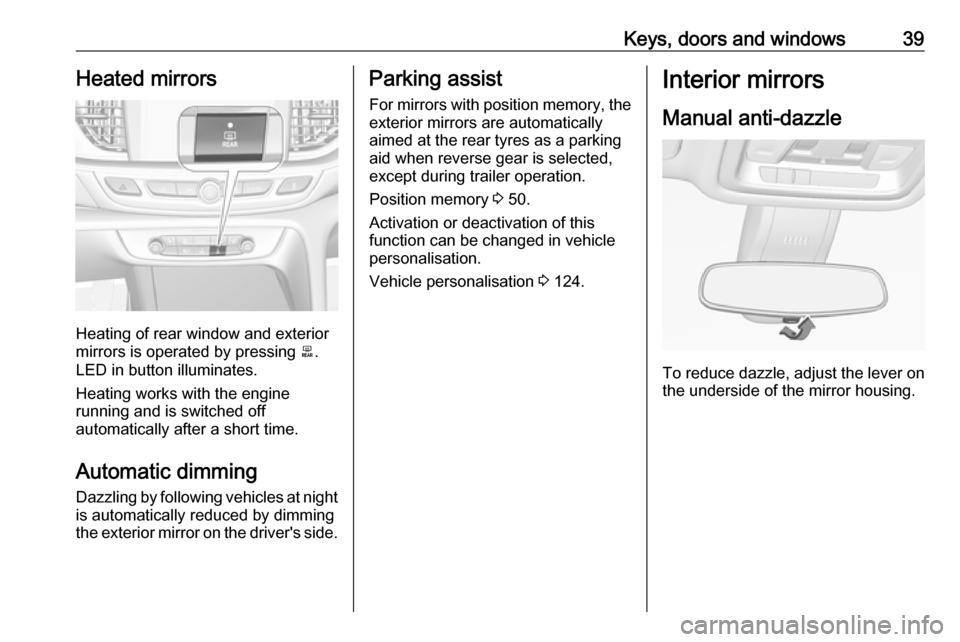
Heating of rear window and exterior
mirrors is operated by pressing b.
LED in button illuminates.
Heating works with the engine
running and is switched off
automatically after a short time.
Automatic dimming Dazzling by following vehicles at night
is automatically reduced by dimming
the exterior mirror on the driver's side.
Parking assist
For mirrors with position memory, theexterior mirrors are automatically
aimed at the rear tyres as a parking
aid when reverse gear is selected,
except during trailer operation.
Position memory 3 50.
Activation or deactivation of this
function can be changed in vehicle
personalisation.
Vehicle personalisation 3 124.Interior mirrors
Manual anti-dazzle
To reduce dazzle, adjust the lever on the underside of the mirror housing.
Page 42 of 345

40Keys, doors and windowsAutomatic anti-dazzle
Dazzle from following vehicles is
automatically reduced, when driving
in the dark.
Windows
Windscreen
Windscreen stickers
Do not attach stickers such as toll
road stickers or similar on the
windscreen in the area of the interior
mirror. Otherwise the detection zone
of the sensor and the view area of the camera in the mirror housing could be
restricted.
Windscreen replacementCaution
If the vehicle has a front-looking
camera sensor for the driver
assistance systems, it is very
important that any windscreen
replacement is performed
accurately according to Opel
specifications. Otherwise, these
systems may not work properly
and there is a risk of unexpected
behaviour and/or messages from
these systems.
Caution
If the vehicle is equipped with a
Head-up display, it is very
important that any windscreen
replacement is performed
accurately according to Opel
specifications. Otherwise, the
system may not work properly and the image may look out of focus.
Power windows
9 Warning
Take care when operating the
power windows. Risk of injury,
particularly to children.
If there are children on the rear seats, switch on the child safety
system for the power windows.
Keep a close watch on the
windows when closing them.
Ensure that nothing becomes
trapped in them as they move.
Switch on ignition to operate power
windows. Retained power off 3 178.
Page 56 of 345
54Seats, restraintsHeating
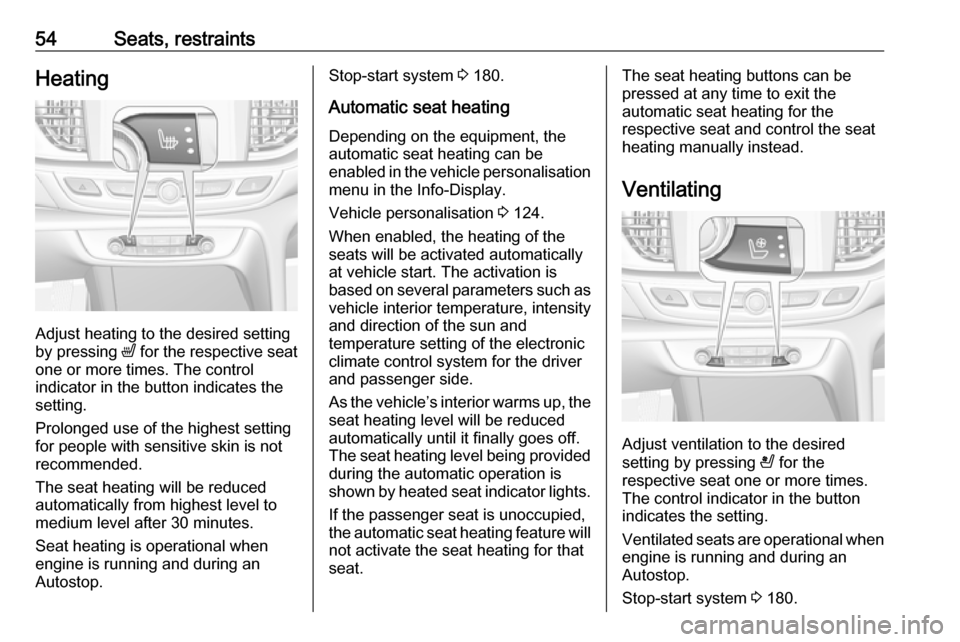
Adjust heating to the desired setting
by pressing ß for the respective seat
one or more times. The control
indicator in the button indicates the
setting.
Prolonged use of the highest setting
for people with sensitive skin is not
recommended.
The seat heating will be reduced
automatically from highest level to
medium level after 30 minutes.
Seat heating is operational when
engine is running and during an
Autostop.
Stop-start system 3 180.
Automatic seat heating Depending on the equipment, the
automatic seat heating can be
enabled in the vehicle personalisation
menu in the Info-Display.
Vehicle personalisation 3 124.
When enabled, the heating of the
seats will be activated automatically
at vehicle start. The activation is
based on several parameters such as vehicle interior temperature, intensity
and direction of the sun and
temperature setting of the electronic
climate control system for the driver
and passenger side.
As the vehicle’s interior warms up, the seat heating level will be reduced
automatically until it finally goes off. The seat heating level being provided
during the automatic operation is
shown by heated seat indicator lights.
If the passenger seat is unoccupied,
the automatic seat heating feature will not activate the seat heating for that
seat.The seat heating buttons can be
pressed at any time to exit the
automatic seat heating for the
respective seat and control the seat
heating manually instead.
Ventilating
Adjust ventilation to the desired
setting by pressing A for the
respective seat one or more times.
The control indicator in the button
indicates the setting.
Ventilated seats are operational when
engine is running and during an
Autostop.
Stop-start system 3 180.