parking brake OPEL INSIGNIA BREAK 2020 Manual user
[x] Cancel search | Manufacturer: OPEL, Model Year: 2020, Model line: INSIGNIA BREAK, Model: OPEL INSIGNIA BREAK 2020Pages: 315, PDF Size: 9.45 MB
Page 197 of 315

Driving and operating195If equipped only with front camera the
active emergency braking operates in
forward gear above walking speed up to 80 km/h.
If equipped with radar sensor, active
emergency braking operates in
forward gear at all speeds above
walking speed. Only front pedestrian
protection is active up to 80 km/h.
Activation A precondition is that Forward
Collision System and Front
pedestrian detection are not
deactivated in the vehicle
personalisation menu 3 123.
Brake preparation system When approaching a vehicle ahead
or a pedestrian so quickly that a
collision is likely, the brake
preparation system slightly
pressurises the brakes. This reduces
the response time, when a manual or
automatic braking is requested.Emergency automatic braking
After activation of brake preparation
system and just before the imminent
collision, this function automatically
applies limited braking to reduce the
impact speed of the collision or
prohibit a crash.
If active emergency braking is
applied, a message appears in the Driver Information Center and a
chime sounds.
Depending on the situation, the
vehicle may automatically brake
moderately or hard. This front
automatic braking can only occur if a
vehicle ahead is detected, indicated by the vehicle ahead indicator A
3 190. On vehicles with front
pedestrian protection, front automatic
braking can also occur when a
pedestrian ahead is detected.
Below a speed of 40 km/h the system can apply full braking.
Emergency automatic braking may slow the vehicle to a complete stop to
try to avoid a potential crash. If this
happens, emergency automatic
braking may engage the electricparking brake to hold the vehicle at a
stop. To release press the electric
parking brake button or firmly press
the accelerator pedal.9 Warning
Emergency automatic braking is
an emergency crash preparation
feature and is not designed to
avoid crashes. Do not rely on the
system to brake the vehicle.
Emergency automatic braking will
not brake outside of its operating speed range and only responds to
detected vehicles and
pedestrians.
Forward looking brake assist
In addition to the brake preparation
system and emergency automatic
braking, the forward looking brake
assist function makes the brake assist more sensitive. Therefore, pressing
the brake pedal less strongly results
in immediate hard braking. This
function helps the driver brake
quicker and harder before the
imminent collision.
Page 198 of 315

196Driving and operating9Warning
Active emergency braking is not
designed to apply hard
autonomous braking or to
automatically avoid a collision. It is designed to reduce the vehicle
speed before a collision. It may not
react to animals. After a sudden
lane change, the system needs a
certain time to detect the next
preceding vehicle.
The complete attention of the
driver is always required while
driving. The driver must always be
ready to take action and apply the brakes and steer to avoid
collisions.
The system is designed to work with
all occupants wearing their seat belts.
Intelligent Brake Assist
If the vehicle is equipped with radar
sensor Intelligent brake assist may
activate when the brake pedal is
applied quickly by providing a boost
to braking based on the speed of
approach and distance to a vehicle
ahead.
Minor brake pedal pulsations or pedal movement during this time is normal
and the brake pedal should continue
to be applied as needed. Intelligent
brake assist will automatically
disengage only when the brake pedal is released.9 Warning
Intelligent brake assist may
increase vehicle braking in
situations when it may not be
necessary. You could block the
flow of traffic. If this occurs, take
your foot off the brake pedal and
then apply the brakes as needed.
Front pedestrian protection 3 197.
Deactivation Active emergency braking can be
deactivated in the personalisation
menu 3 123. If deactivated a
message is displayed in the Driver
Information Centre.
We recommend to deactivate the
system or set it to alert only in the
following cases:
● when the vehicle is being towed
● if a trailer is attached to the vehicle
● before using an automatic car wash with ignition switched on
● if the windscreen has been damaged close to the camera
● if the front bumper has been damaged
System limitations In some cases, the active emergency
braking system may provide an
automatic braking in situations that
seem to be unnecessary, for instance in parking garages, due to traffic signs
in a curve or due to vehicles in
another lane. This is normal
operation, the vehicle does not need
service. Firmly apply the accelerator
pedal to override the automatic
braking if the situation and the
surroundings permit.
Page 200 of 315

198Driving and operatingFront pedestrian protection includes:● detecting front pedestrian ahead
● front pedestrian alert
● automatic braking
Detecting front pedestrian ahead
A pedestrian ahead up to a distance
of approx. 40 m is indicated by the
control indicator 7 in the instrument
cluster. On vehicles with head-up
display, 7 is projected on the
windscreen.
Front pedestrian alert
When approaching a detected
pedestrian too quickly, the collision
alert symbol pops up in the Driver Information Centre and the pop-upsymbol 7 in the head-up display is
projected on the windscreen in the
driver's field of view. A warning chime is provided. The brake system may
prepare for driver braking to occur
more rapidly which can cause a brief, mild deceleration. Continue to apply
the brake pedal as required.
Cruise control or Adaptive cruise
control may be disengaged when the
Front pedestrian alert occurs.
Automatic braking If a crash into a pedestrian directly
ahead is imminent, and the brakes
have not been applied, Automatic
braking may automatically brake
moderately or brake hard. This can
help to avoid some very low speed
pedestrian crashes or reduce
pedestrian injury.
Automatic braking levels may be
reduced under certain conditions,
such as higher speeds.If this happens, automatic braking
may engage the Electric parking
brake to hold the vehicle at a stop.
Release the parking brake. Pressing
the accelerator pedal will also release Automatic braking and Electric
parking brake 3 171.
This system includes Intelligent brake
assist, and the Emergency automatic braking system may also respond to
pedestrians.
Active emergency braking 3 194.
Automatic braking can be disabled in
the vehicle personalisation menu
3 123.
General information9 Warning
The driver must always be ready
to take action and apply the brakes and steer to avoid collisions.
Page 201 of 315

Driving and operating1999Warning
Front pedestrian braking may alert
or automatically brake the vehicle
suddenly in situations where it is
unexpected and undesired. It
could falsely alert or brake for
objects similar in shape or size to
pedestrians, including shadows.
This is normal operation and the
vehicle does not need a service.
To override Automatic braking,
firmly depress the accelerator
pedal, if it is safe to do so.
9 Warning
Using the Front pedestrian braking
system while towing a trailer couldcause loss of vehicle control and
crash. Turn the system to Alert or
Off in the vehicle personalisation
when towing a trailer.
Vehicle personalisation 3 123.
System limitations
In the following cases, front
pedestrian protection may not detect
a pedestrian ahead or sensor
performance is limited:
● Vehicle speed is out of range from 8 km/h to 80 km/h in forwardgear.
● The distance to an pedestrian ahead is more than 40 m.
● Driving on winding or hilly roads.
● During nighttime driving.
● Weather limits visibility, such as fog, rain, or snow.
● The sensor in the windscreen is blocked by snow, ice, slush, mud,dirt, windscreen damage or
affected by foreign items, e.g.
stickers.
Parking assist
General information When the trailer hitch is attached,
change the configuration settings in
the vehicle personalisation menu in
the Info Display.Vehicle personalisation 3 123.
When attaching a trailer or bike
carrier to the trailer hitch, the parking
assist is deactivated.
Front-rear parking assist9 Warning
The driver bears full responsibility
for the parking manoeuvre.
Always check the surrounding
area when driving backwards or
forwards while using parking
assist system.
The front-rear parking assist
measures the distance between the vehicle and obstacles in front and
behind the vehicle. It informs and
warns the driver by giving acoustic
signals and display indication.
It uses two different acoustic warning
signals for the front and rear
monitoring areas, each with a
different tone frequency.
Page 203 of 315

Driving and operating201
The distance indication can be
inhibited by vehicle messages with a higher priority. After dismissing themessage distance indication appears again.
Acoustic signal is muted when
parking brake is engaged or the
selector lever of automatic
transmission is in N.
Deactivation
The system is deactivated
automatically when vehicle speed
exceeds 11 km/h.
Manual deactivation is also possible by pressing the parking assist button
r .
When the system is deactivated
manually, the LED in the button
extinguishes and a message pops up
in the Driver Information Centre.
After a manual deactivation, the front- rear parking assist is activated again
if r is pressed.
The complete system can be
manually deactivated in the vehicle
personalisation menu in the
Info Display. It remains deactivated
during the ignition cycle or until
activation in personalisation menu
again.
Vehicle personalisation 3 123.
Fault
In the event of a fault or if the system
does not work temporarily, e.g.
because of high external noise level
or other interference factors, a
message pops-up in the Driver
Information Centre.
Vehicle messages 3 122.Advanced parking assist9 Warning
The driver bears full responsibility
for accepting the parking slot
suggested by the system and the
parking manoeuvre.
Always check the surrounding
area in all directions when using
the advanced parking assist.
The advanced parking assist
measures a suitable parking slot
while passing, calculates the
trajectory and automatically steers
the vehicle into a parallel or
perpendicular parking slot.
Instructions are given in the Driver
Information Centre 3 111 or,
depending on the version, on the Info Display 3 117 , supported by acoustic
signals.
The driver must control acceleration,
braking and gear shifting, while
steering is done automatically.
Page 206 of 315

204Driving and operatingDisplay indication
The instructions on the display show:
● General hints and warning messages.
● A hint when driving faster than 30 km/h during parking slot
searching mode.
● The demand to stop the vehicle, when a parking slot is detected.
● The direction of driving during the
parking manoeuvre.
● The demand to shift into reverse or first gear, or R or D with
automatic transmission.
● The demand to stop or to drive slowly.
● For some of the instructions a progress bar is shown in the
Driver Information Centre.
● The successful completion of the
parking manoeuvre indicated by
a pop-up symbol and a chime.
● The cancelling of a parking manoeuvre.Display priorities
Advanced parking assist indication in the Driver Information Centre can be
inhibited by vehicle messages with a
higher priority. After approving the
message 9 on the steering wheel,
advanced parking assist instructions
appear again and the parking
manoeuvre can be continued.
Deactivation
The system is deactivated by:
● a short press of (
● parking manoeuvre successfully ended
● driving faster than 30 km/h during
parking slot search
● driving faster than 8 km/h during parking guidance
● driver interference on steering wheel detected
● steep hill incline detected
● exceeding maximum number of gear changes: eight cycles when
parallel parking or five cycles
when perpendicular parking
● switching off the ignitionDeactivation by the driver or by the system during manoeuvring will beindicated by a message on the
display. Additionally, an acoustic
signal sounds.
Automatic transmission:
If advanced park assist is deactivated
during the parking manoeuvre or
manoeuvre is finished successfully,
the assist holds the vehicle in position
until one of the following conditions
occurs:
1. brake pedal is applied
2. electric parking brake is activated
3. selector lever is set to P
Fault
A message appears when:
● There is a fault in the system.● The driver did not successfully complete the parking
manoeuvre.
● The system is not operational.
● Any of the deactivation reasons described above apply.
Page 232 of 315

230Vehicle careCaution
When transporting the vehicle on
a train or on a recovery vehicle, the
mud flaps might be damaged.
Vehicle storage
Storage for a long period of time
If the vehicle is to be stored for several months:
● Wash and wax the vehicle.
● Have the wax in the engine compartment and underbody
checked.
● Clean and preserve the rubber seals.
● Fill up fuel tank completely.
● Change the engine oil.
● Drain the washer fluid reservoir.
● Check the coolant antifreeze and
corrosion protection.
● Adjust tyre pressure to the value specified for full load.
● Park the vehicle in a dry, wellventilated place. Engage first or
reverse gear or set selector lever
to P. Prevent the vehicle from
rolling.
● Do not apply the parking brake.
● Open the bonnet, close all doors and lock the vehicle.
● Disconnect the clamp from the negative terminal of the vehicle
battery. Note that all systems are
not functional, e.g. anti-theft
alarm system.
Putting back into operation
When the vehicle is to be put back into operation:
● Connect the clamp to the negative terminal of the vehicle
battery. Initialize the power
windows 3 41.
● Check tyre pressure.
● Fill up the washer fluid reservoir.
● Check the engine oil level.
● Check the coolant level.
● Fit the number plate if necessary.End-of-life vehicle recovery
Information on end-of-life vehicle
recovery centres and the recycling of
end-of-life vehicles is available on our website, where legally required. Only
entrust this work to an authorised
recycling centre.
Page 260 of 315

258Vehicle careilluminates. For the further three
wheels the system remains
operational.
The use of commercially available
liquid tyre repair kits can impair the
function of the system. Factory-
approved repair kits can be used.
Operating electronic devices or being close to facilities using similar wave
frequencies could disrupt the tyre
pressure monitoring system.
Each time the tyres are replaced, tyre
pressure monitoring system sensors
must be dismounted and serviced. For the screwed sensor, replace
valve core and sealing ring. For the
clipped sensor, replace complete
valve stem.
Vehicle loading status
Adjust tyre pressure to load condition according tyre information label or
tyre pressure chart 3 293, and select
the appropriate setting in Tyre Load
within the vehicle information menu
3 111. This setting determines the
reference pressures for the tyre
pressure warnings.The Tyre Load menu only appears
when the vehicle is at a standstill and the parking brake is applied. On
vehicles with automatic transmission
the selector lever must be in P.
Select:
● Light for comfort pressure up to
3 people.
● Eco for Eco pressure up to
3 people.
● Max for full loading.
Auto learn function After changing wheels or wheel
positions the vehicle must be
stationary for approx. 20 minutes,
before the system recalculates. The
following relearn process takes up to
10 minutes of driving in a speed range
of 40 to 100 km/h. Avoid to drive
outside of this range for a longer time.
If possible, use a country road or
similar which allows continuous
driving. During relearn process $
can be displayed or pressure values can swap in the Driver Information
Centre.
If problems occur during the relearn
process, a failure message is
displayed in the Driver Information
Centre. w will flash for 60 seconds
and then illuminate continuously.
If this happens, repeat learning
process. Keep your vehicle stationary for approx. 20 minutes and then drive
again for 10 minutes as described
above.
Tread depth
Check tread depth at regular
intervals.
Tyres should be replaced for safety
reasons at a tread depth of 2-3 mm
(4 mm for winter tyres).
Page 263 of 315

Vehicle care261●Type 2 indicated by the on/off
switch at the side of the
compressor.
If vehicle has a flat tyre:
Apply the parking brake and engage first gear, reverse gear or P.
On vehicles with audio speaker
system, the tyre repair kit is stowed together with the tools.
On other versions, the tyre repair kit
is stored in a bag.
Loosen the screw and remove the
bag.
Take the sealant bottle and the
compressor out of the box.
1. Remove the electrical connection cable and air hose from the
stowage compartments on the
underside of the compressor.
Page 267 of 315
Vehicle care265Wheel changing
Make the following preparations and observe the following information:
● Park the vehicle on a level, firm and non-skid surface. The front
wheels must be in the straight- ahead position.
● Apply the parking brake and engage first gear, reverse gear or
P .
● If the ground on which the vehicle
is standing is soft, a solid board
(max. 1 cm thick) should be
placed under the jack.
● Take heavy objects out of the vehicle before jacking up.
● No people or animals may be in the vehicle when it is jacked-up.
● Never crawl under a jacked-up vehicle.
● Do not start the vehicle when it is
raised on the jack.
● Clean wheel nuts and thread with
a clean cloth before mounting the
wheel.9 Warning
Do not grease wheel bolt, wheel
nut and wheel nut cone.
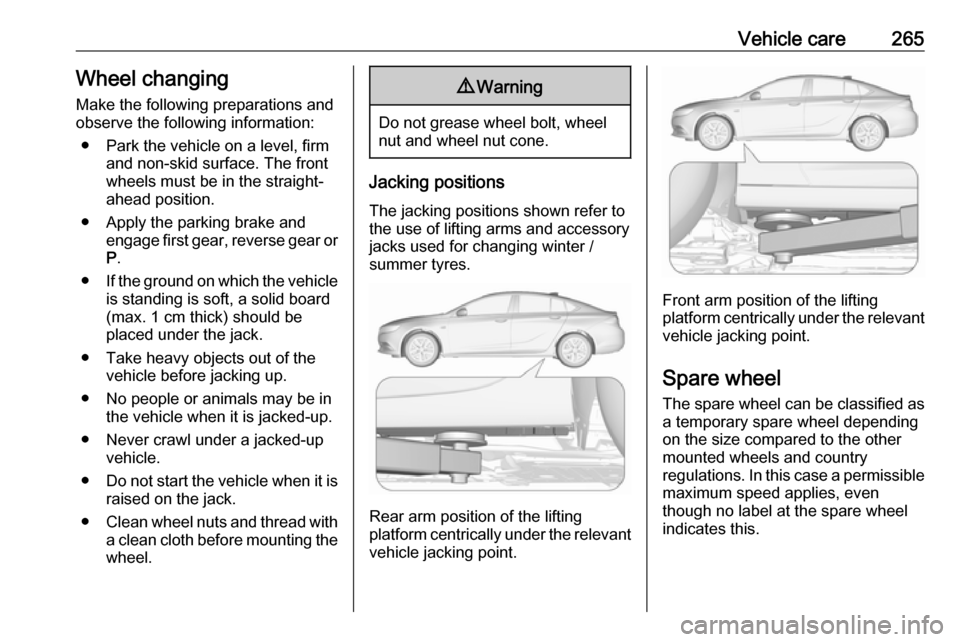
Jacking positions
The jacking positions shown refer to
the use of lifting arms and accessory
jacks used for changing winter /
summer tyres.
Rear arm position of the lifting
platform centrically under the relevant
vehicle jacking point.
Front arm position of the lifting
platform centrically under the relevant vehicle jacking point.
Spare wheel The spare wheel can be classified as
a temporary spare wheel depending
on the size compared to the other
mounted wheels and country
regulations. In this case a permissible maximum speed applies, even
though no label at the spare wheel
indicates this.