electric OPEL INSIGNIA BREAK 2020 User Guide
[x] Cancel search | Manufacturer: OPEL, Model Year: 2020, Model line: INSIGNIA BREAK, Model: OPEL INSIGNIA BREAK 2020Pages: 315, PDF Size: 9.45 MB
Page 103 of 315

Instruments and controls101OverviewOTurn lights 3 105XSeat belt reminder 3 105vAirbag and belt tensioners
3 106VAirbag deactivation 3 106pCharging system 3 106ZMalfunction indicator light
3 106RBrake and clutch system 3 107mElectric parking brake 3 107jElectric parking brake fault
3 107uAntilock brake system (ABS)
3 107RGear shifting 3 108EFollowing distance 3 108aLane keep assist 3 108nElectronic Stability Control off
3 108bElectronic Stability Control and
Traction Control system 3 108kTraction Control system off
3 108WEngine coolant temperature
3 108!Preheating 3 109uAdBlue 3 109wTyre pressure monitoring
system 3 109IEngine oil pressure 3 109YLow fuel 3 109dImmobiliser 3 1108Exterior light 3 110CHigh beam 3 110fHigh beam assist 3 110fLED headlights 3 110>Front fog lights 3 110rRear fog light 3 110mCruise control 3 110CAdaptive cruise control 3 110AVehicle detected ahead 3 1117Pedestrian detected ahead
3 111LSpeed limiter 3 111LTraffic sign assistant 3 111hDoor open 3 111
Speedometer
Indicates vehicle speed.
Page 109 of 315

Instruments and controls107The cleaning process of the exhaust
filter is potentially not possible.
Seek the assistance of a workshop
immediately.
Flashes when the engine is
running
Fault that could lead to catalytic converter damage. Ease up on the
accelerator until the flashing stops.
Seek the assistance of a workshop
immediately.
Brake and clutch system
R illuminates red.
The brake and clutch fluid level is too low.9 Warning
Stop. Do not continue your
journey. Consult a workshop.
Electric parking brake
m illuminates or flashes red.
Illuminates
Electric parking brake is applied
3 171.
Flashes
Electric parking brake is not fully applied or released. Depress the
brake pedal and attempt to reset the system by first releasing then
applying the electric parking brake. If
m remains flashing, do not drive and
seek the assistance of a workshop.
Electric parking brake fault
j illuminates or flashes yellow.
Illuminates
Electric parking brake is operating
with degraded performance 3 171.
Flashes
Electric parking brake is in service
mode. Stop vehicle, apply and
release the electric parking brake to
reset.9 Warning
Have the cause of the fault
remedied immediately by a
workshop. Avoid parking on
inclines until the cause of the fault has been remedied.
Antilock brake system
(ABS)
u illuminates yellow.
Illuminates for a few seconds after the
ignition is switched on. The system is ready for operation when the control
indicator extinguishes.
If the control indicator does not go out after a few seconds, or if it illuminates while driving, there is a fault in the
ABS. The brake system remains
operational but without ABS
regulation.
Antilock brake system 3 170.
Page 119 of 315
Instruments and controls117●Battery Voltage
Displays the vehicle battery
voltage. During engine running
voltage can vary between 12 V
and 15.5 V. Temporary voltage below 12 V is possible when high electrical load is used.
● Engine Boost
Displays the engine turbocharger
boost pressure in %.
● AdBlue
Displays the level of the Adblue
tank 3 162.
● IFE-AFE
Displays both instantaneous and
average fuel economy.
● Fuel Range
Displays average remaining
distance with remaining fuel in
the tank.
● Blank Page
Displays a blank gauge.
Software information
Displays the open source software
information.Head-Up Display
Allows rotation of the head-up display
projection 3 118.
Info Display
The Info Display is located in the
instrument panel near the instrument
cluster.
Depending on the vehicle
configuration the vehicle is equipped
with one of the following infotainment
systems:
● Multimedia
or
● Multimedia Navi
or
● Multimedia Navi Pro
or
The Info Display can indicate: ● time 3 93
● outside temperature 3 93
● date 3 93
● Infotainment system
● climate control settings 3 143
● rear view camera 3 211● panoramic view system 3 209
● parking assist instructions 3 199
● rear cross traffic 3 213
● Flex Ride visualisation menu 3 176
● navigation
● system messages
● settings for vehicle personalisation 3 123
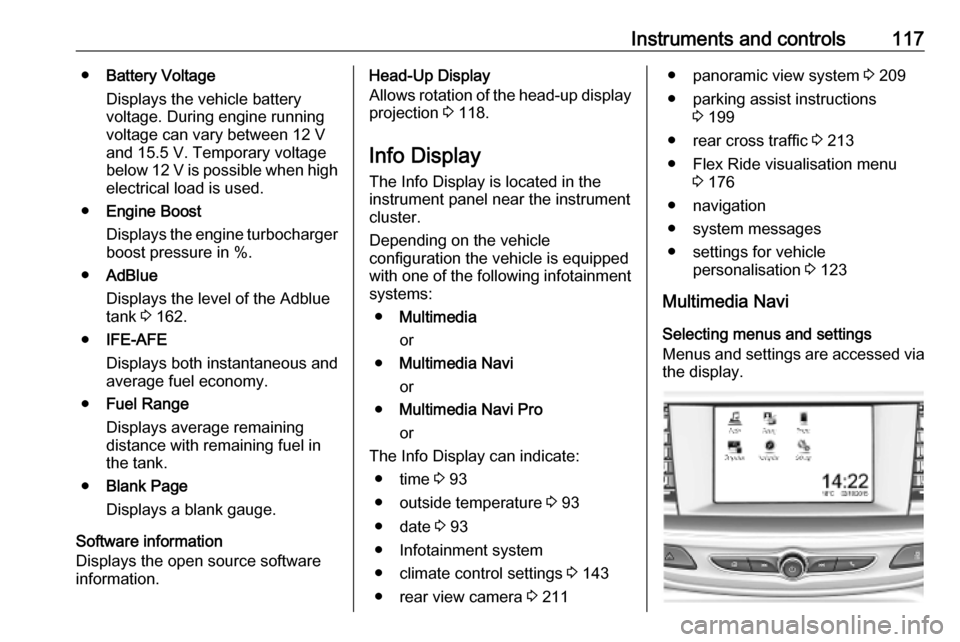
Multimedia Navi Selecting menus and settings
Menus and settings are accessed via the display.
Page 141 of 315

Lighting139Path lightingHeadlights, tail lights and number
plate lights illuminate the surrounding area for an adjustable time after
leaving the vehicle.
ActivatingHalogen headlights
1. Switch off the ignition.
2. Depending on version, remove the ignition key.
3. Open the driver's door.
4. Pull the indicator lever.
5. Close the driver's door.
If the driver's door is not closed, the
lights switch off after two minutes.
Exit lighting is switched off
immediately if the indicator lever is
pulled while the driver's door is open.LED headlights
Path lighting is activated, when the
ignition is switched off and the driver's door is opened.
This function can be activated or
deactivated in the vehicle
personalisation.
Select the relevant setting in Settings
I Vehicle in the Info Display.
Info Display 3 117.
Vehicle personalisation 3 123.
The settings can be saved for the key being used 3 26.
Battery discharge protection Switching off electric lights
To prevent discharge of the vehicle
battery when the ignition is switched off, some interior lights are switched
off automatically after some time.
Page 151 of 315

Climate control149Basic settingsFollowing settings can be changed in
the Personalisation menu in the
Info Display:
● fan speed regulation in automatic
mode
● settings of automatic rear window
heating
● settings of automatic windscreen
dehumidification
● settings of automatic seat heating
Vehicle personalisation 3 123.
Heated rear window and exterior
mirrors b 3 43.
Heated windscreen , 3 44.
Heated seats q 3 55.
Ventilated seats r 3 55.
Auxiliary heater
Air heater Quickheat is an electric auxiliary air
heater which automatically warms up
the passenger compartment more
quickly.Air vents
Adjustable air vents At least one air vent must be open
while cooling is on.
Illustration shows centre air vents in
instrument panel.
Illustration shows outer air vents in
instrument panel.
Illustration shows air vents for rear
passenger.
Page 155 of 315
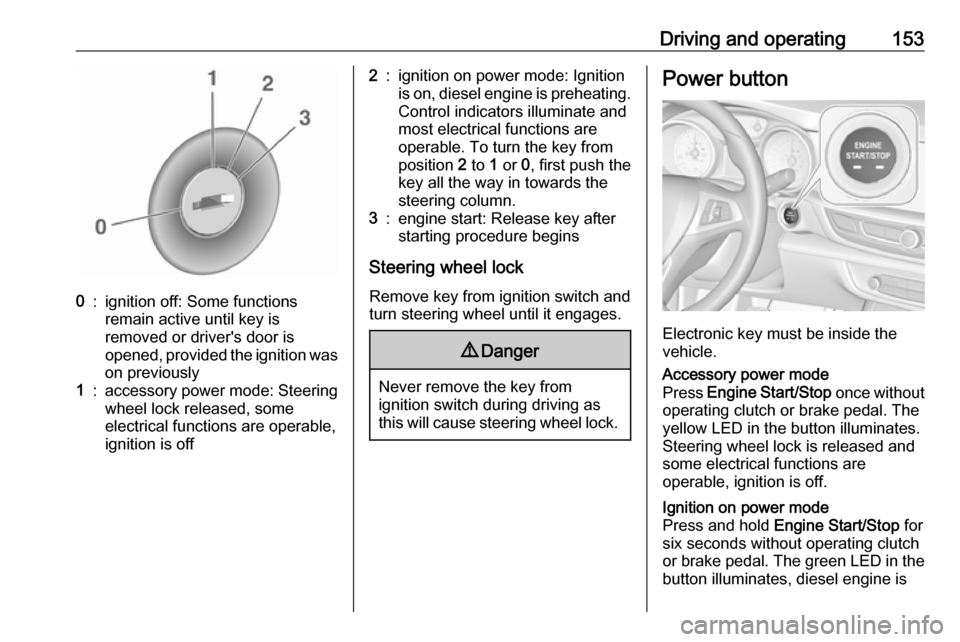
Driving and operating1530:ignition off: Some functions
remain active until key is
removed or driver's door is
opened, provided the ignition was
on previously1:accessory power mode: Steering wheel lock released, some
electrical functions are operable,
ignition is off2:ignition on power mode: Ignition
is on, diesel engine is preheating.
Control indicators illuminate and
most electrical functions are
operable. To turn the key from
position 2 to 1 or 0, first push the
key all the way in towards the steering column.3:engine start: Release key after
starting procedure begins
Steering wheel lock
Remove key from ignition switch and
turn steering wheel until it engages.
9 Danger
Never remove the key from
ignition switch during driving as
this will cause steering wheel lock.
Power button
Electronic key must be inside the
vehicle.
Accessory power mode
Press Engine Start/Stop once without
operating clutch or brake pedal. The yellow LED in the button illuminates.
Steering wheel lock is released and
some electrical functions are
operable, ignition is off.Ignition on power mode
Press and hold Engine Start/Stop for
six seconds without operating clutch
or brake pedal. The green LED in the button illuminates, diesel engine is
Page 156 of 315
154Driving and operatingpreheating. Control indicators
illuminate and most electrical
functions are operable.Engine start
Press Engine Start/Stop briefly while:
● manual transmission: operating clutch pedal,
● automatic transmission: operating brake pedal with
selector lever in P or N.
Starting the engine 3 155.Ignition off
Press Engine Start/Stop briefly when
Autostop is activated or when engine is running and vehicle is stationary.
Automatic transmission: apply the
parking brake and engage P.
Press Engine Start/Stop briefly
without operating clutch or brake pedal when in ignition on power
mode.
Some functions remain active until
driver's door is opened, provided the
ignition was on previously.Emergency engine shut off during
driving
Press Engine Start/Stop for more
than 2 seconds or press twice briefly
within 5 seconds 3 155.
Steering wheel lock The steering wheel lock activates
automatically when:
● The vehicle is stationary.
● The ignition has been switched off.
● The driver's door is opened.
To release steering wheel lock, open
and close driver's door and switch on accessory mode or start the engine
directly.9 Warning
If the vehicle battery is discharged,
the vehicle must not be towed,
tow-started or jump-started as the
steering wheel lock cannot be
disengaged.
Operation on vehicles with
electronic key system in case of
failure
If either the electronic key fails or the
battery of the electronic key is weak,
the Driver Information Centre may
display No Remote Detected or
Replace Battery in Remote Key when
you try to start the vehicle.
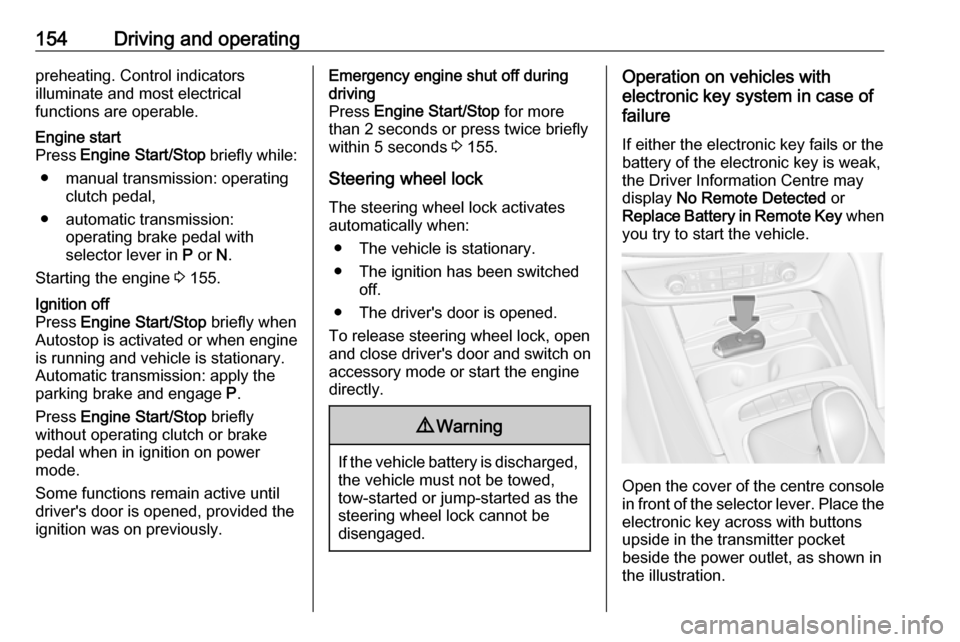
Open the cover of the centre console
in front of the selector lever. Place the
electronic key across with buttons
upside in the transmitter pocket
beside the power outlet, as shown in
the illustration.
Page 160 of 315

158Driving and operatingIndication
An Autostop is indicated by the
needle at the AUTOSTOP position in
the tachometer.
After restarting, the idle speed is
indicated.
During an Autostop, the heating and
brake performance will be
maintained.
Conditions for an Autostop
The stop-start system checks if each
of the following conditions is fulfilled:
● The stop-start system is not manually deactivated.
● The bonnet is fully closed.
● The driver's door is closed or the driver's seat belt is fastened.
● The vehicle battery is sufficiently charged and in good condition.
● The engine is warmed up.
● The engine coolant temperature is not too high.
● The engine exhaust temperature is not too high, e.g. after driving
with high engine load.
● The ambient temperature is above -5 °C.
● The climate control system allows an Autostop.
● The brake vacuum is sufficient.
● Between the last restart and a new Autostop must be about10 seconds.
● The self-cleaning function of the exhaust filter is not active.
● The vehicle was driven at least at
walking speed since the last
Autostop.
Otherwise an Autostop will be
inhibited.The stop-start system will be
deactivated on inclines of 12% or
more.
Certain settings of the climate control
system may inhibit an Autostop. See
Climate control chapter for more
details 3 140.
Immediately after motorway driving,
an Autostop may be inhibited.
New vehicle running-in 3 152.
Vehicle battery discharge protection
To ensure reliable engine restarts,
several battery discharge protection
features are implemented as part of
the stop-start system.
Power saving measures
During an Autostop, several electrical
features e.g. auxiliary electric heater
or heated rear window are disabled or switched to a power saving mode.
The fan speed of the climate control
system is reduced to save power.
Page 161 of 315

Driving and operating159Restart of the engine by the driver
Vehicles with manual transmission
All engines can be restarted in two
ways: with a conventional restart or a late restart.Conventional restart
Depress the clutch pedal without depressing the brake pedal to restart
the engine.Late restart
Late restart is only available on
inclines up to 5%.
● Depress the brake pedal.
● Depress the clutch pedal.
● Select first gear.
● Release the brake pedal to restart the engine.
Vehicles with automatic transmission Release the brake pedal or move
selector lever out of D into N or P to
restart the engine.
Restart of the engine by the stop- start system
The selector lever must be in neutral
to enable an automatic restart.
If one of the following conditions
occurs during an Autostop, the
engine will be restarted automatically
by the stop-start system:
● The stop-start system is manually deactivated.
● The bonnet is opened.
● The driver's seat belt is unfastened and the driver's door
is opened.
● The engine temperature is too low.
● The charging level of the vehicle battery is below a defined level.
● The brake vacuum is not sufficient.
● The vehicle is driven at least at walking speed.
● The climate control system requests an engine start.
● The air conditioning is manually switched on.
If the bonnet is not fully closed, a
warning message is displayed in the
Driver Information Centre.If an electrical accessory, e.g. a
portable CD player, is connected to
the power outlet, a brief power drop during the restart might be noticeable.
Note
If a trailer or a bike carrier is
attached, late restart is deactivated.
Parking9 Warning
● Do not park the vehicle on an
easily ignitable surface. The
high temperature of the
exhaust system could ignite the
surface.
● Always apply the parking brake. Pull switch m for
approx. one second and check
if the control indicator m
illuminates.
The electric parking brake is applied when control indicator
m illuminates 3 107.
● Switch off the engine.
Page 163 of 315

Driving and operating161Automatic cleaning processThe exhaust filter system filters soot
particles out of the exhaust gases.
The system includes a self-cleaning
function that runs automatically
during driving without any notification.
The filter is cleaned by periodically
burning off the soot particles at high
temperature. This process takes
place automatically under set driving
conditions and may take up to
25 minutes. Typically it needs
between 7 and 12 minutes. Autostop
is not available and fuel consumption may be higher during this period. The
emission of smells and smoke during
this process is normal.
System requires cleaning Under certain conditions, e.g. driving
short distances, the system cannot
clean itself automatically.
If cleaning of the filter is required and if previous driving conditions did not
enable automatic cleaning, it will be
indicated by a warning message in
the Driver Information Centre.A warning message appears when
exhaust filter is full. Start cleaning
process as soon as possible.
A warning message also appears
when exhaust filter has reached the
maximum filling level. Start cleaning
process immediately to avoid
damage to the engine.
Activate self-cleaning process
Cleaning process is completed more
quickly at high engine speeds and loads. Therefore, drive in lower gears
than normal, and use manual gear
selection on vehicles with automatic
transmission. Usage of electrical
consumers like air conditioning and
heated windows to increase engine
load supports cleaning process.Caution
If possible, do not interrupt
cleaning process. Drive until
cleaning is completed to avoid the
need for service or repair by a
workshop.
Vehicles with petrol engine
To activate cleaning process,
continue driving, keep engine speed
above 2500 rpm. Shift down if
necessary.
Drive dynamically at different engine
speeds. Use engine brake for
deceleration, if possible.
Keep on driving until self-cleaning
operation is complete and the display
message disappears.Vehicles with diesel engine
To activate cleaning process,
continue driving, keep engine speed
above 2000 rpm, ideally and
continuously around 2500 rpm. Shift
down if necessary.
Keep on driving until self-cleaning
operation is complete and the display message disappears.