belt OPEL KARL 2017 Manual user
[x] Cancel search | Manufacturer: OPEL, Model Year: 2017, Model line: KARL, Model: OPEL KARL 2017Pages: 203, PDF Size: 5.39 MB
Page 50 of 203

48Seats, restraintsOnly use suitable restraint systems,
e.g. those that comply with valid
UN ECE regulations.
Ensure that the child restraint system to be installed is compatible with the
vehicle type. Refer to the tables on
the following pages, the instructions
supplied with the child restraint
system and the vehicle type list of
non-universal child restraint systems.
Ensure that the mounting location of
the child restraint system within the
vehicle is correct, see following
tables.
Remove rear head restraint before
mounting a child restraint system if
required.
Allow children to enter and exit the
vehicle only on the side facing away
from the traffic.
When the child restraint system is not in use, secure the seat with a seat beltor remove it from the vehicle.
Child restraint systems could be
fastened with ISOFIX mounting
brackets, Top-tether if available,
and/or a three-point seat belt. Refer
to the following tables.Note
Do not affix anything on the child
restraint systems and do not cover
them with any other materials.
A child restraint system which has
been subjected to stress in an
accident must be replaced.
Page 51 of 203

Seats, restraints49Child restraint installation locations
Permissible options for fastening a child restraint system with a three-point seat belt
Weight class
On front passenger seat
On rear outboard seatsOn rear centre seat
activated airbagdeactivated airbagGroup 0: up to 10 kgXU 1U 2XGroup 0+: up to 13 kgXU1U2XGroup I: 9 to 18 kgXU1U2XGroup II: 15 to 25 kgXXU 2XGroup III: 22 to 36 kgXXU2XU:universal suitability in conjunction with three-point seat beltX:no child restraint system permitted in this weight class1:adjust seat backrest inclination as far as necessary to a vertical position to ensure that the belt runs forwards from
the upper anchorage point2:move the driver and/or passenger seat forwards and adjust seat backrest inclination as far as necessary to a vertical position to ensure that the child restraint system does not have any interference from the front seat backrest.
Page 57 of 203

Storage55
4.Pull the release knob on top of the
rear backrest.
5. Fold down the backrest and insert
the rear seat head restraints into
the pockets.
6. Put the seat belts for the outboard
seats into the belt guides.
7. Adjust the front seats to the desired position.
To return the backrest to the original
position:
1. Lift the backrest up and pull out the seat belt from the belt guides.
Push backrest firmly into place.
9 Warning
When folding up, ensure that
backrests are securely engaged in position before driving. Failure to
do so may result in personal injury
or damage to the load or vehicle in the event of hard braking or a
collision.
Ensure the seat belts are not
pinched by the latch.
2. Reinstall the rear head restraints.
3. Place the rear part of the seat cushion in its original position.
Note
Make sure the seat belts are not
twisted or caught under the seat
cushion.
4. Push the front part of the seat cushion down firmly until it
latches.
The centre rear seat belt may lock
when you raise the backrest. If this
happens, allow the belt to go back all the way and repeat operation.
If the seat belt is still locked, fold down the seat cushion and try again.
To return the rear seat cushion, put
the rear part of the seat cushion in its original position ensuring that the
seat belt buckle straps are not twisted
Page 58 of 203

56Storageor caught under the seat cushion,
then push the front part of the seat
cushion firmly down until it latches.Caution
When returning rear seat backrest
to the upright position, place the
rear seat belt and buckles
between the rear seat backrest
and one cushion. Make sure the
rear seat belt and buckles do not
get pinched under the rear seat
cushion.
Ensure the seat belts are not twisted or caught in the seat
backrest and are arranged in their proper position.
To remove the rear seat cushion,
push the hinges in direction of arrow.
Load compartment cover Do not place heavy objects on thecover.Removing
Unhook retaining straps from tailgate.
Lift cover at the rear and push it
upwards at the front.
Remove the cover.
Stowing
When the load compartment is fully
loaded, stow the load compartment
cover on the rear seats or remove
from vehicle.
Fitting
Engage cover in side guides and fold downwards. Attach retaining straps to
tailgate.
Page 62 of 203

60Instruments and controlsInstruments and
controlsControls ....................................... 61
Steering wheel adjustment ........61
Steering wheel controls .............61
Heated steering wheel ...............61
Horn ........................................... 62
Windscreen wiper/washer .........62
Rear window wiper/washer .......63
Outside temperature ..................63
Clock ......................................... 63
Power outlets ............................. 65
Cigarette lighter ......................... 65
Ashtrays .................................... 65
Warning lights, gauges and indi‐ cators ........................................... 65
Instrument cluster ......................65
Speedometer ............................. 65
Odometer .................................. 66
Trip odometer ............................ 66
Tachometer ............................... 66
Fuel gauge ................................ 66
Fuel selector .............................. 67
Engine coolant temperature gauge ....................................... 68
Service display .......................... 68Control indicators ......................69
Turn signal ................................. 71
Seat belt reminder .....................72
Airbag and belt tensioners .........72
Airbag deactivation ....................72
Charging system .......................73
Malfunction indicator light ..........73
Service vehicle soon .................73
Brake and clutch system ...........73
Operate pedal ............................ 73
Antilock brake system (ABS) .....74
Gear shifting .............................. 74
Power steering .......................... 74
Lane departure warning ............74
Ultrasonic parking assist ...........74
Electronic Stability Control off ...74
Electronic Stability Control and Traction Control system ...........74
Traction Control system off .......75
Engine coolant temperature ......75
Tyre pressure monitoring system ...................................... 75
Engine oil pressure ....................75
Low fuel ..................................... 76
Immobiliser ................................ 76
Reduced engine power .............76
Exterior light .............................. 76
High beam ................................. 76
Fog light ..................................... 76
Rear fog light ............................. 76Cruise control............................ 76
Speed limiter ............................. 76
Bonnet open .............................. 76
Door open .................................. 77
Information displays .....................77
Driver Information Centre ..........77
Info display ................................ 82
Vehicle messages ........................83
Warning chimes .........................85
Battery voltage .......................... 85
Vehicle personalisation ................86
Telematics service .......................88
OnStar ....................................... 88
Page 73 of 203
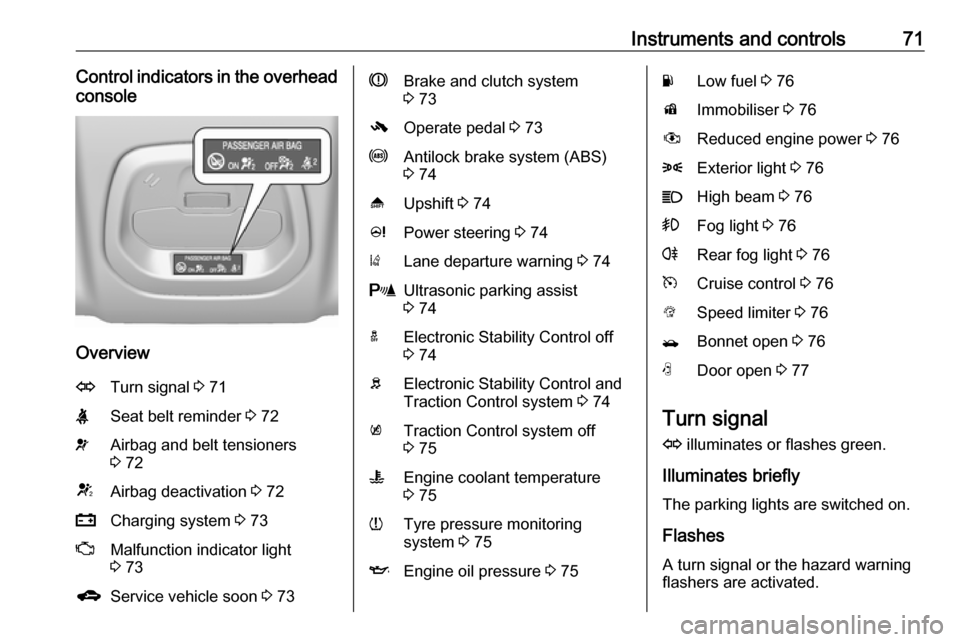
Instruments and controls71Control indicators in the overheadconsole
Overview
OTurn signal 3 71XSeat belt reminder 3 72vAirbag and belt tensioners
3 72VAirbag deactivation 3 72pCharging system 3 73ZMalfunction indicator light
3 73gService vehicle soon 3 73RBrake and clutch system
3 73-Operate pedal 3 73uAntilock brake system (ABS)
3 74[Upshift 3 74cPower steering 3 74)Lane departure warning 3 74rUltrasonic parking assist
3 74aElectronic Stability Control off
3 74bElectronic Stability Control and
Traction Control system 3 74kTraction Control system off
3 75WEngine coolant temperature
3 75wTyre pressure monitoring
system 3 75IEngine oil pressure 3 75YLow fuel 3 76dImmobiliser 3 76#Reduced engine power 3 768Exterior light 3 76CHigh beam 3 76>Fog light 3 76rRear fog light 3 76mCruise control 3 76LSpeed limiter 3 76/Bonnet open 3 76NDoor open 3 77
Turn signal
O illuminates or flashes green.
Illuminates briefly
The parking lights are switched on.
Flashes
A turn signal or the hazard warning
flashers are activated.
Page 74 of 203
72Instruments and controlsRapid flashing: failure of a turn signal
light or associated fuse.
Bulb replacement 3 145, Fuses
3 151.
Turn signals 3 95.
Seat belt reminder
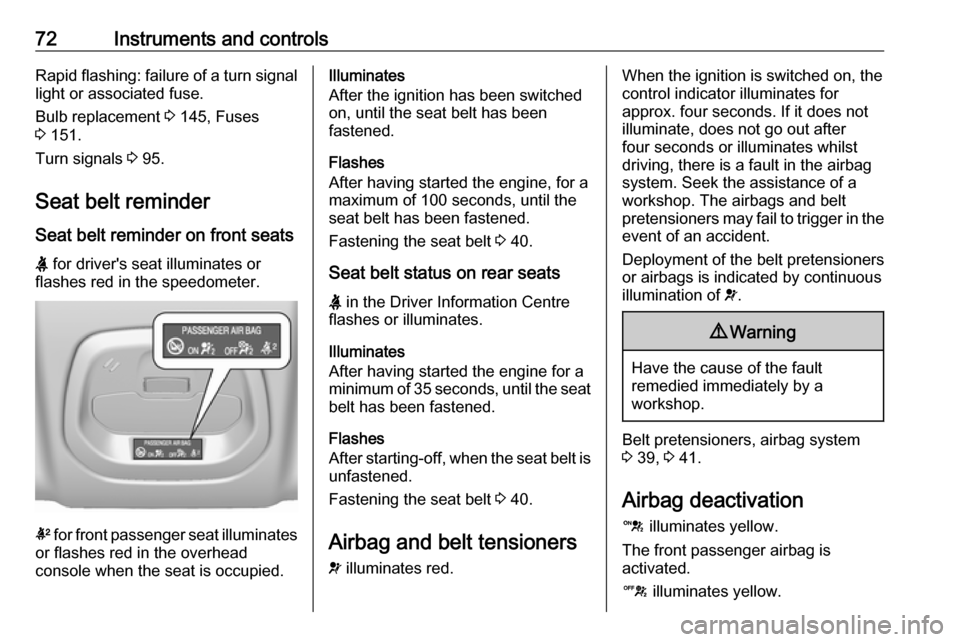
Seat belt reminder on front seats X for driver's seat illuminates or
flashes red in the speedometer.
k for front passenger seat illuminates
or flashes red in the overhead
console when the seat is occupied.
Illuminates
After the ignition has been switched on, until the seat belt has been
fastened.
Flashes
After having started the engine, for a
maximum of 100 seconds, until the
seat belt has been fastened.
Fastening the seat belt 3 40.
Seat belt status on rear seats
X in the Driver Information Centre
flashes or illuminates.
Illuminates
After having started the engine for a
minimum of 35 seconds, until the seat belt has been fastened.
Flashes
After starting-off, when the seat belt is
unfastened.
Fastening the seat belt 3 40.
Airbag and belt tensioners
v illuminates red.When the ignition is switched on, the
control indicator illuminates for
approx. four seconds. If it does not
illuminate, does not go out after
four seconds or illuminates whilst driving, there is a fault in the airbag
system. Seek the assistance of a
workshop. The airbags and belt
pretensioners may fail to trigger in the event of an accident.
Deployment of the belt pretensioners
or airbags is indicated by continuous
illumination of v.9 Warning
Have the cause of the fault
remedied immediately by a
workshop.
Belt pretensioners, airbag system
3 39, 3 41.
Airbag deactivation
d illuminates yellow.
The front passenger airbag is
activated.
c illuminates yellow.
Page 79 of 203
Instruments and controls77Door openN illuminates.
A door or the tailgate is open.Information displays
Driver Information Centre
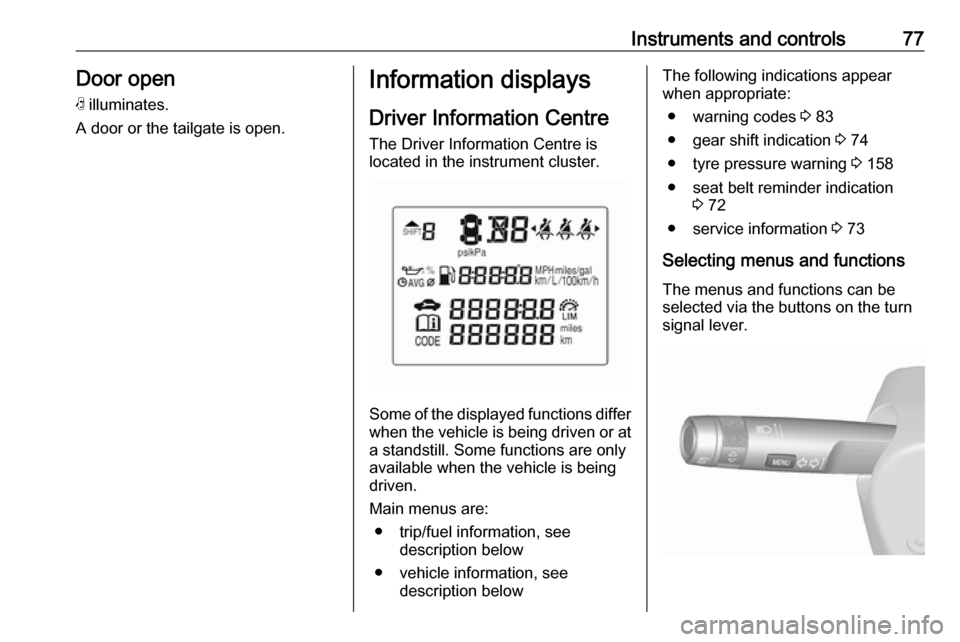
The Driver Information Centre is
located in the instrument cluster.
Some of the displayed functions differ
when the vehicle is being driven or at a standstill. Some functions are only
available when the vehicle is being
driven.
Main menus are: ● trip/fuel information, see description below
● vehicle information, see description below
The following indications appear
when appropriate:
● warning codes 3 83
● gear shift indication 3 74
● tyre pressure warning 3 158
● seat belt reminder indication 3 72
● service information 3 73
Selecting menus and functions The menus and functions can be
selected via the buttons on the turn
signal lever.
Page 86 of 203
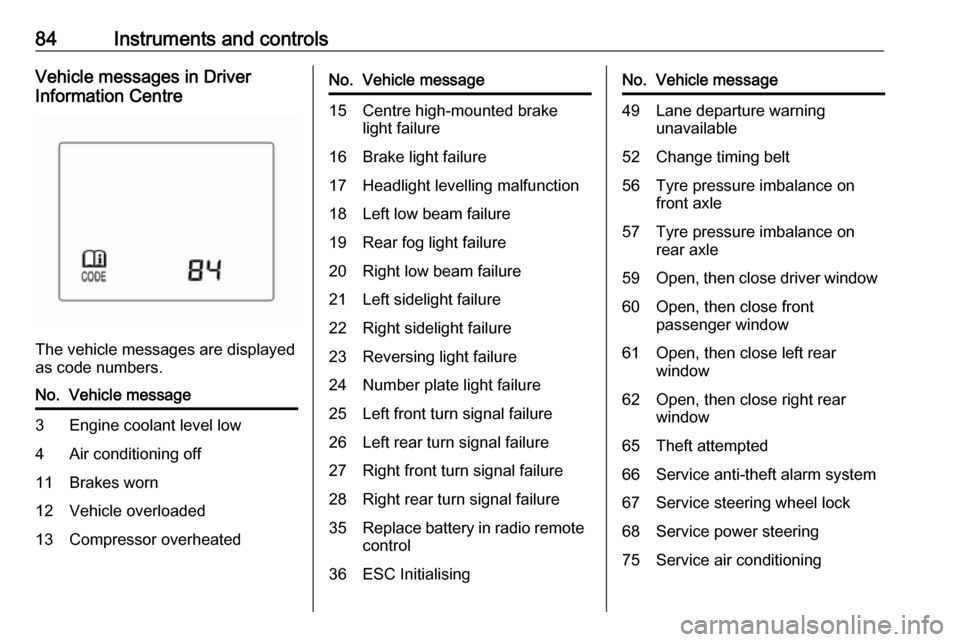
84Instruments and controlsVehicle messages in Driver
Information Centre
The vehicle messages are displayed
as code numbers.
No.Vehicle message3Engine coolant level low4Air conditioning off11Brakes worn12Vehicle overloaded13Compressor overheatedNo.Vehicle message15Centre high-mounted brake
light failure16Brake light failure17Headlight levelling malfunction18Left low beam failure19Rear fog light failure20Right low beam failure21Left sidelight failure22Right sidelight failure23Reversing light failure24Number plate light failure25Left front turn signal failure26Left rear turn signal failure27Right front turn signal failure28Right rear turn signal failure35Replace battery in radio remote
control36ESC InitialisingNo.Vehicle message49Lane departure warning unavailable52Change timing belt56Tyre pressure imbalance on
front axle57Tyre pressure imbalance on
rear axle59Open, then close driver window60Open, then close front
passenger window61Open, then close left rear
window62Open, then close right rear
window65Theft attempted66Service anti-theft alarm system67Service steering wheel lock68Service power steering75Service air conditioning
Page 87 of 203

Instruments and controls85No.Vehicle message77Service lane departure warning79Top up engine oil81Service transmission / trans‐
mission malfunction
Manual transmission auto‐
mated 3 11782Change engine oil soon84Engine power reduced89Service vehicle soon95Service airbag145Check washer fluid level151Press clutch to start174Low vehicle battery258Parking assist offVehicle messages on
Colour-Info-Display
Some important messages appear
additionally in the
Colour-Info-Display. Some
messages only pop-up for a few
seconds.
Warning chimes
When starting the engine or whilst driving
Only one warning chime will sound at a time.
The warning chime regarding
unfastened seat belts has priority
over any other warning chime.
● If seat belt is not fastened.
● If a door or the tailgate is not fully
closed when starting off.
● If a certain speed is exceeded with parking brake applied.
● If a programmed speed is exceeded.
● If a warning message appears in the Driver Information Centre orInfo-Display.● If the parking assist detects an object.
● If unintended lane change occurs.
● If a fault in the automatic locking system is detected.
When the vehicle is parked and/or the driver's door is opened
● With exterior lights on.
During an Autostop ● If the driver's door is opened.
Battery voltage
When the vehicle battery voltage is
running low, the warning code 174 will
appear in the Driver Information
Centre.
1. Switch off immediately any electrical consumers which are
not required for a safe drive, e.g.