door lock OPEL KARL 2017 Manual user
[x] Cancel search | Manufacturer: OPEL, Model Year: 2017, Model line: KARL, Model: OPEL KARL 2017Pages: 203, PDF Size: 5.39 MB
Page 62 of 203

60Instruments and controlsInstruments and
controlsControls ....................................... 61
Steering wheel adjustment ........61
Steering wheel controls .............61
Heated steering wheel ...............61
Horn ........................................... 62
Windscreen wiper/washer .........62
Rear window wiper/washer .......63
Outside temperature ..................63
Clock ......................................... 63
Power outlets ............................. 65
Cigarette lighter ......................... 65
Ashtrays .................................... 65
Warning lights, gauges and indi‐ cators ........................................... 65
Instrument cluster ......................65
Speedometer ............................. 65
Odometer .................................. 66
Trip odometer ............................ 66
Tachometer ............................... 66
Fuel gauge ................................ 66
Fuel selector .............................. 67
Engine coolant temperature gauge ....................................... 68
Service display .......................... 68Control indicators ......................69
Turn signal ................................. 71
Seat belt reminder .....................72
Airbag and belt tensioners .........72
Airbag deactivation ....................72
Charging system .......................73
Malfunction indicator light ..........73
Service vehicle soon .................73
Brake and clutch system ...........73
Operate pedal ............................ 73
Antilock brake system (ABS) .....74
Gear shifting .............................. 74
Power steering .......................... 74
Lane departure warning ............74
Ultrasonic parking assist ...........74
Electronic Stability Control off ...74
Electronic Stability Control and Traction Control system ...........74
Traction Control system off .......75
Engine coolant temperature ......75
Tyre pressure monitoring system ...................................... 75
Engine oil pressure ....................75
Low fuel ..................................... 76
Immobiliser ................................ 76
Reduced engine power .............76
Exterior light .............................. 76
High beam ................................. 76
Fog light ..................................... 76
Rear fog light ............................. 76Cruise control............................ 76
Speed limiter ............................. 76
Bonnet open .............................. 76
Door open .................................. 77
Information displays .....................77
Driver Information Centre ..........77
Info display ................................ 82
Vehicle messages ........................83
Warning chimes .........................85
Battery voltage .......................... 85
Vehicle personalisation ................86
Telematics service .......................88
OnStar ....................................... 88
Page 73 of 203
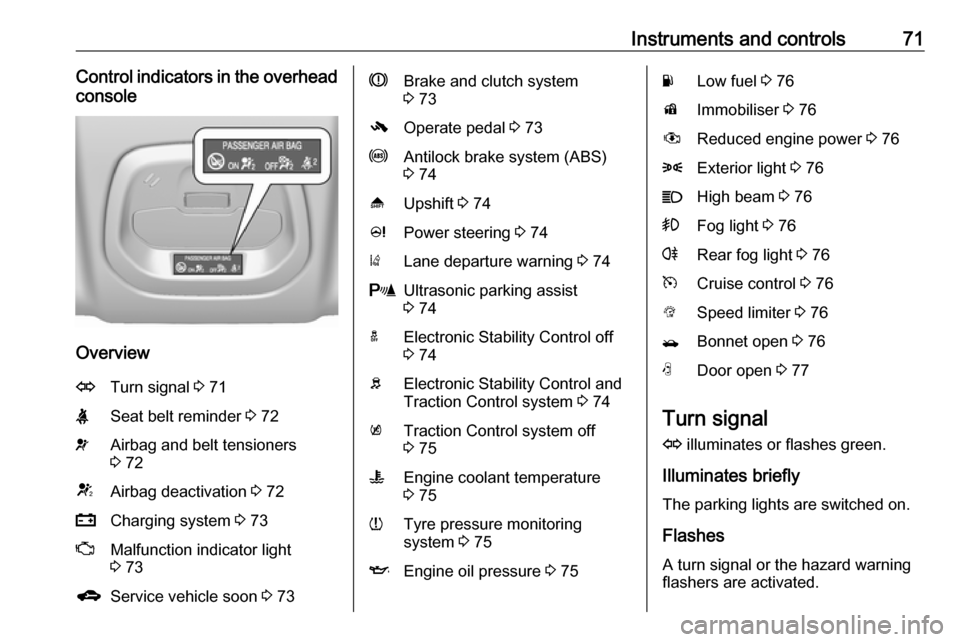
Instruments and controls71Control indicators in the overheadconsole
Overview
OTurn signal 3 71XSeat belt reminder 3 72vAirbag and belt tensioners
3 72VAirbag deactivation 3 72pCharging system 3 73ZMalfunction indicator light
3 73gService vehicle soon 3 73RBrake and clutch system
3 73-Operate pedal 3 73uAntilock brake system (ABS)
3 74[Upshift 3 74cPower steering 3 74)Lane departure warning 3 74rUltrasonic parking assist
3 74aElectronic Stability Control off
3 74bElectronic Stability Control and
Traction Control system 3 74kTraction Control system off
3 75WEngine coolant temperature
3 75wTyre pressure monitoring
system 3 75IEngine oil pressure 3 75YLow fuel 3 76dImmobiliser 3 76#Reduced engine power 3 768Exterior light 3 76CHigh beam 3 76>Fog light 3 76rRear fog light 3 76mCruise control 3 76LSpeed limiter 3 76/Bonnet open 3 76NDoor open 3 77
Turn signal
O illuminates or flashes green.
Illuminates briefly
The parking lights are switched on.
Flashes
A turn signal or the hazard warning
flashers are activated.
Page 87 of 203

Instruments and controls85No.Vehicle message77Service lane departure warning79Top up engine oil81Service transmission / trans‐
mission malfunction
Manual transmission auto‐
mated 3 11782Change engine oil soon84Engine power reduced89Service vehicle soon95Service airbag145Check washer fluid level151Press clutch to start174Low vehicle battery258Parking assist offVehicle messages on
Colour-Info-Display
Some important messages appear
additionally in the
Colour-Info-Display. Some
messages only pop-up for a few
seconds.
Warning chimes
When starting the engine or whilst driving
Only one warning chime will sound at a time.
The warning chime regarding
unfastened seat belts has priority
over any other warning chime.
● If seat belt is not fastened.
● If a door or the tailgate is not fully
closed when starting off.
● If a certain speed is exceeded with parking brake applied.
● If a programmed speed is exceeded.
● If a warning message appears in the Driver Information Centre orInfo-Display.● If the parking assist detects an object.
● If unintended lane change occurs.
● If a fault in the automatic locking system is detected.
When the vehicle is parked and/or the driver's door is opened
● With exterior lights on.
During an Autostop ● If the driver's door is opened.
Battery voltage
When the vehicle battery voltage is
running low, the warning code 174 will
appear in the Driver Information
Centre.
1. Switch off immediately any electrical consumers which are
not required for a safe drive, e.g.
Page 89 of 203
Instruments and controls87automatic switching on of the
rear window wiper when reverse
gear is engaged.
● Languages : Scroll through the list
and select the desired language.
● Lighting
Exterior lighting by unlocking :
Activates or deactivates the entry
lighting.
Exit Lighting : Activates or
deactivates exit lighting and
changes lighting duration.
● Power Door Locks
Stop door lock if door open :
Activates or deactivates the door locking function while a door is
open.
Delayed Door Lock : Activates or
deactivates the delayed door
locking function. This feature
delays the actual locking of the
doors until all doors are closed.
● Remote Lock, Unlock, and Start
Remote Unlock Feedback :
Activates or deactivates the
hazard warning flasher feedback
whilst unlocking.Remote Lock Feedback :
Changes what kind of feedback
is given when locking the vehicle.
Remote Door Unlock : Changes
the configuration to unlock only
the driver's door or the whole
vehicle whilst unlocking.
Auto Relock Doors : Activates or
deactivates the automatic relock
function after unlocking without
opening the vehicle.
● Restore Factory Settings :
Resets all settings to the default settings.
● Valet Mode :
Activated, all vehicle displays are locked and no changes may be
performed within the system.
See Infotainment manual.
Personal settings 7" Colour-Info-Display
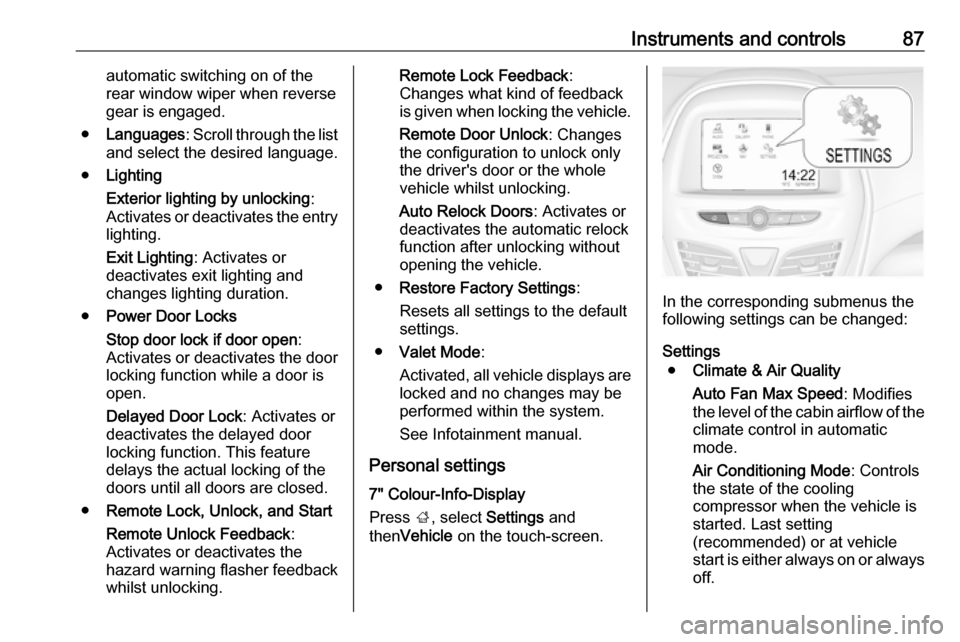
Press ;, select Settings and
then Vehicle on the touch-screen.
In the corresponding submenus the
following settings can be changed:
Settings ● Climate & Air Quality
Auto Fan Max Speed : Modifies
the level of the cabin airflow of the climate control in automatic
mode.
Air Conditioning Mode : Controls
the state of the cooling compressor when the vehicle is
started. Last setting
(recommended) or at vehicle
start is either always on or always
off.
Page 90 of 203

88Instruments and controlsAuto Defog: Supports
windscreen dehumidification by
automatically selecting the
necessary settings and
automatic air conditioning mode.
Auto Rear Defog : Automatically
activates heated rear window.
● Collision / Detection Systems
Park Assist : Activates or
deactivates the ultrasonic
parking assist.
● Comfort and Convenience
Chime Volume : Changes the
volume of warning chimes.
Personalization By Driver :
Activates or deactivates the
personalisation function.
Auto Wipe in Reverse Gear :
Activates or deactivates
automatic switching on of the
rear window wiper when reverse gear is engaged.
● Lighting
Exit Lighting : Activates or
deactivates and changes the
duration of exit lighting.● Power Door Locks
Unlocked Door Anti Lock Out :
Activates or deactivates the door
locking function while a door is open.
Delayed Door Lock : Activates or
deactivates the delayed door locking function. This feature
delays the actual locking of the
doors until all doors are closed.
● Remote Lock, Unlock, Start
Remote Unlock Light Feedback :
Activates or deactivates the
hazard warning flasher feedback whilst unlocking.
Remote Door Unlock : Changes
the configuration to unlock only
the driver's door or the whole
vehicle whilst unlocking.
Relock Remotely Unlocked
Doors : Activates or deactivates
the automatic relock function
after unlocking without opening
the vehicle.Telematics service
OnStar
OnStar is a personal connectivity and
service assistant with integrated
Wi-Fi hotspot. The OnStar service is available 24 hours a day, seven days a week.
Note
OnStar is not available for all
markets. For further information,
contact your workshop.
Note
In order to be available and
operational, OnStar needs a valid
OnStar subscription, functioning
vehicle electrics, mobile service and
GPS satellite link.
To activate the OnStar services and
set up an account, press Z and speak
with an advisor.
Page 112 of 203
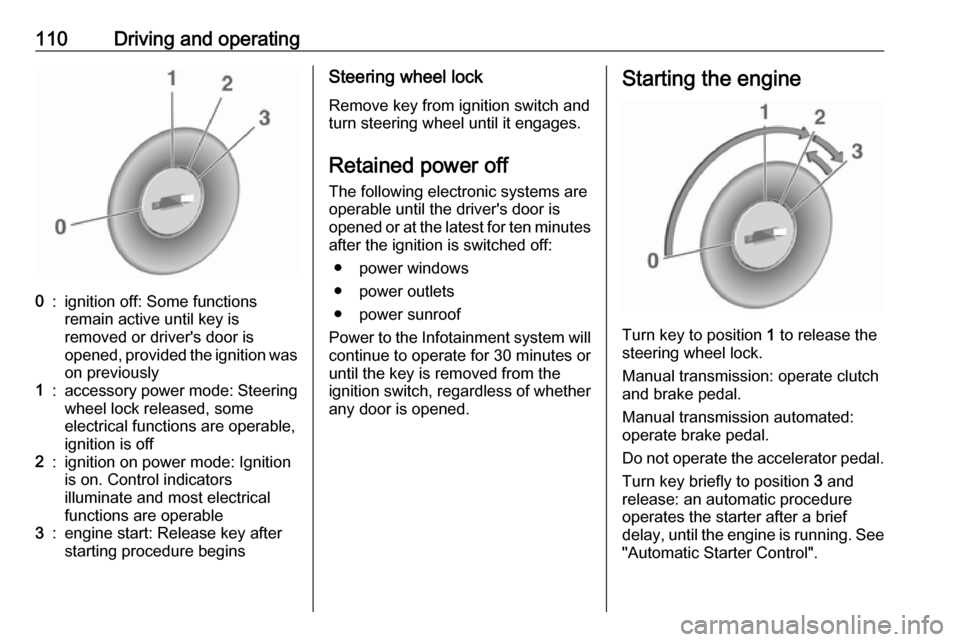
110Driving and operating0:ignition off: Some functions
remain active until key is
removed or driver's door is
opened, provided the ignition was
on previously1:accessory power mode: Steering wheel lock released, some
electrical functions are operable,
ignition is off2:ignition on power mode: Ignition
is on. Control indicators
illuminate and most electrical
functions are operable3:engine start: Release key after
starting procedure beginsSteering wheel lock
Remove key from ignition switch and
turn steering wheel until it engages.
Retained power off The following electronic systems areoperable until the driver's door is
opened or at the latest for ten minutes
after the ignition is switched off:
● power windows
● power outlets
● power sunroof
Power to the Infotainment system will continue to operate for 30 minutes or
until the key is removed from the
ignition switch, regardless of whether
any door is opened.Starting the engine
Turn key to position 1 to release the
steering wheel lock.
Manual transmission: operate clutch
and brake pedal.
Manual transmission automated:
operate brake pedal.
Do not operate the accelerator pedal. Turn key briefly to position 3 and
release: an automatic procedure
operates the starter after a brief
delay, until the engine is running. See
"Automatic Starter Control".
Page 118 of 203
116Driving and operatingCaution
It is not advisable to drive with thehand resting on the selector lever.
Upshift indication 3 74.
Stop-start system 3 111.
Manual transmission
automated
The automated manual transmission permits manual gearshifting (manual
mode) or automatic gearshifting
(automatic mode), both with
automatic clutch control.
Manual shifting is possible by tapping the selector lever in manual mode.
Note
When unlocking or opening a
vehicle door, a sound may be
audible caused by the hydraulic
system.Transmission display
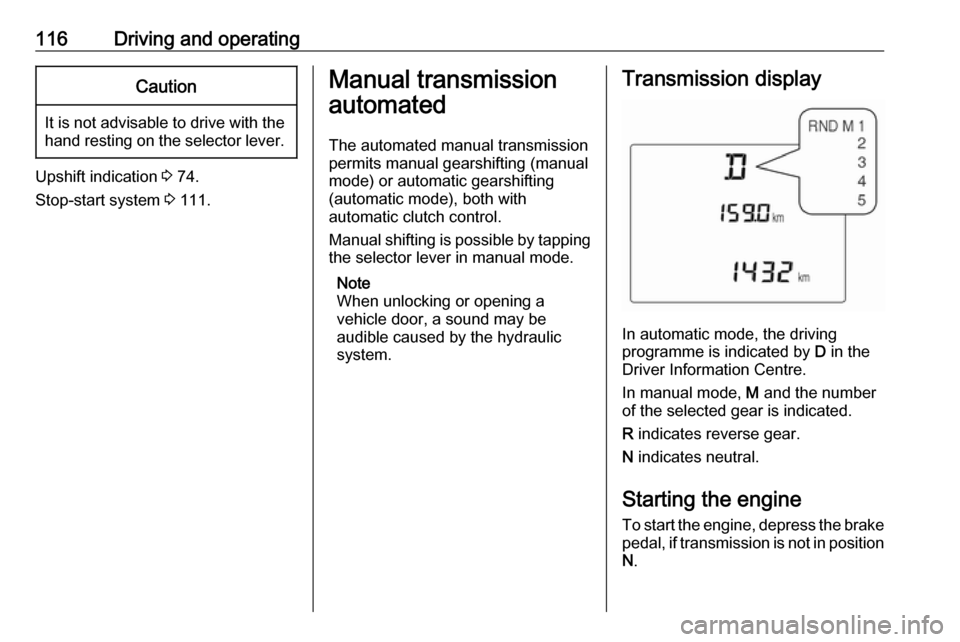
In automatic mode, the driving
programme is indicated by D in the
Driver Information Centre.
In manual mode, M and the number
of the selected gear is indicated.
R indicates reverse gear.
N indicates neutral.
Starting the engine
To start the engine, depress the brake
pedal, if transmission is not in position N .
Page 135 of 203

Driving and operating1335. After refuelling, replace cap. Turnit clockwise until you hear severalclicks.
6. Push the fuel filler flap closed until
it latches.
Note
If, in cold weather, the fuel filler door
does not open, tap the door lightly.
Then try to open it again.Caution
Wipe off any overflowing fuel
immediately.
Liquid gas refuelling
Follow the operating and safety
instructions of the filling station when
refuelling.
The filling valve for the liquid gas is
behind the fuel filler cap.
Unscrew protective cap from the filler neck.
Caution
Screw and unscrew the protectivecap by hand only.
Protective cap is magnetic. Place it on
fuel filler door while refuelling.
Screw the required adapter hand-
tight onto the filler neck.
Page 140 of 203

138Vehicle careCaution
When transporting the vehicle on
a train or on a recovery vehicle, the
mud flaps might be damaged.
Vehicle storage
Storage for a long period of time
If the vehicle is to be stored for several months:
● Wash and wax the vehicle.
● Have the wax in the engine compartment and underbody
checked.
● Clean and preserve the rubber seals.
● Fill up fuel tank completely.
● Change the engine oil.
● Drain the washer fluid reservoir.
● Check the coolant antifreeze and
corrosion protection.
● Adjust tyre pressure to the value specified for full load.
● Park the vehicle in a dry, wellventilated place. Engage first or
reverse gear. Prevent the vehicle from rolling.
● Do not apply the parking brake.
● Open the bonnet, close all doors and lock the vehicle.
● Disconnect the clamp from the negative terminal of the vehicle
battery. Beware that all systems are not functional, e.g. anti-theft
alarm system.
Putting back into operation When the vehicle is to be put back into
operation:
● Connect the clamp to the negative terminal of the vehicle
battery. Activate the electronics
of the power windows.
● Check tyre pressure.
● Fill up the washer fluid reservoir.
● Check the engine oil level.
● Check the coolant level.
● Fit the number plate if necessary.End-of-life vehicle recovery
Information on end-of-life vehicle
recovery centres and the recycling of
end-of-life vehicles is available on our
website. Only entrust this work to an
authorised recycling centre.
Gas vehicles must be recycled by a
service centre authorised for gas
vehicles.
Page 197 of 203

Customer information195● Vehicle reactions in particulardriving situations ( e.g. inflation of
an airbag, activation of the
stability regulation system).
● Environmental conditions (e.g. temperature).
These data are exclusively technical
and help identifying and correcting
errors as well as optimizing vehicle
functions.
Motion profiles indicating travelled
routes cannot be created with these
data.
If services are used (e.g. repair
works, service processes, warranty
cases, quality assurance),
employees of the service network
(manufacturer included) are able to
read out this technical information
from the event and error data storage
modules applying special diagnostic
devices. If required, you will receive
further information at these
workshops. After an error has been
corrected, the data are deleted from
the error storage module or they are
constantly overwritten.When using the vehicle, situations
may occur in which these technical
data related to other information
(accident report, damages on the
vehicle, witness statements etc.) may
be associated with a specific person - possibly, with the assistance of an
expert.
Additional functions contractually
agreed upon with the client (e.g.
vehicle location in emergency cases)
allow the transmission of particular
vehicle data from the vehicle.
Radio Frequency
Identification (RFID)
RFID technology is used in some
vehicles for functions such as tyre
pressure monitoring and ignition
system security. It is also used in
connection with conveniences such
as radio remote controls for door
locking/unlocking and starting, and in-
vehicle transmitters for garage door
openers. RFID technology in Opel
vehicles does not use or record
personal information or link with any
other Opel system containing
personal information.