air condition OPEL KARL 2018.5 Manual user
[x] Cancel search | Manufacturer: OPEL, Model Year: 2018.5, Model line: KARL, Model: OPEL KARL 2018.5Pages: 203, PDF Size: 5.64 MB
Page 107 of 203

Climate control105Manual settingsClimate control system settings can
be changed by activating the buttons
and rotary knobs as follows.
Changing a setting will deactivate
Automatic mode.
Fan speed Z
Adjust the air flow by switching the fan
to the desired speed. The selected
fan speed is indicated by the number
of segments in the display. If the fan
is switched off the air conditioning is also deactivated.
To return to Automatic mode: Press
AUTO .
Air distribution
Press appropriate button for desired
adjustment. Activation is indicated by the LED in the button.
M:to head areaL:to head area and foot wellK:to foot well, with a small amount
of air being directed to
windscreen and front door
windowsJ:to windscreen and foot well,
with a small amount of air being
directed to front door windowsV:to windscreen and front door
windows (air conditioning is
activated in the background to
help preventing windows from
fogging)
To return to Automatic mode: Press
AUTO .
Cooling A/C
Press A/C to switch on cooling. The
LED in the button illuminates to
indicate activation. Cooling is only
functional when the engine is running and climate control fan is switched on.
Page 108 of 203
106Climate controlPress A/C again to switch off cooling.
The air conditioning system cools and
dehumidifies (dries) as soon as the
outside temperature is slightly above the freezing point. Therefore
condensation may form and drip from under the vehicle.
If no cooling or drying is required,
switch off the cooling system for fuel
saving reasons.
Activated cooling might inhibit
Autostops.
Stop-start system 3 111.
Air recirculation mode 4
Press 4 to activate air recirculation
mode. The LED in the button
illuminates to indicate activation.
Press 4 again to deactivate air
recirculation mode.9 Warning
The exchange of fresh air is
reduced in air recirculation mode.
In operation without cooling, the
air humidity increases, so the
windows may mist up from inside.
The quality of the passenger
compartment air deteriorates,
which may cause the vehicle
occupants to feel drowsy.
In warm and very humid ambient air conditions, the windscreen may mist
up from outside when cold air is
directed towards it. If windscreen
mists up from outside, activate
windscreen wiper.
Maximum cooling Briefly open the windows so that hotair can disperse quickly.
● Switch on cooling A/C.
● Switch on Air recirculation system 4.
● Set temperature control to coldest level.
● Set fan speed to highest level.
● Set air distribution control to M.
● Open all vents.
Air vents
Adjustable air vents
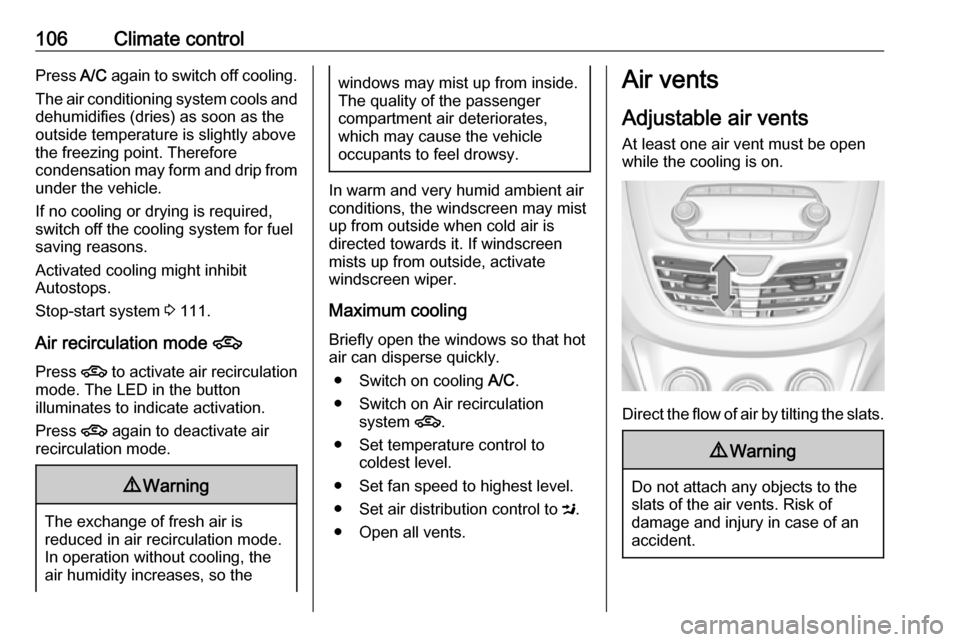
At least one air vent must be open
while the cooling is on.
Direct the flow of air by tilting the slats.
9 Warning
Do not attach any objects to the
slats of the air vents. Risk of
damage and injury in case of an
accident.
Page 109 of 203

Climate control107Fixed air ventsAdditional air vents are located
beneath the windscreen and door windows and in the foot wells.Maintenance
Air intake
The air intake in front of the
windscreen in the engine
compartment must be kept clear to
allow air intake. Remove any leaves,
dirt or snow.
Air conditioning regular
operation
In order to ensure continuously
efficient performance, cooling must
be operated for a few minutes once a
month, irrespective of the weather
and time of year. Operation with
cooling is not possible when the
outside temperature is too low.
Service For optimal cooling performance, it is recommended to annually check the
climate control system, starting
three years after initial vehicle
registration, including:
● functionality and pressure test
● heating functionality
● leakage check
● check of drive belts
● cleaning of condenser and evaporator drainage
● performance check
Note
Refrigerant R-134a contains
fluorinated greenhouse gases.
Page 115 of 203

Driving and operating113● The brake vacuum is sufficient.
● The vehicle was driven at least at
walking speed since the last
Autostop.
Otherwise an Autostop will be
inhibited.
Certain settings of the climate control
system may inhibit an Autostop. See
"Climate control" chapter for further information 3 103.
Immediately after motorway driving
an Autostop may be inhibited.
New vehicle running-in 3 109.
Vehicle battery discharge protection
To ensure reliable engine restarts,
several vehicle battery discharge
protection features are implemented
as part of the stop-start system.
Power saving measures
During an Autostop, several electrical
features, e.g., the rear window
heating, are disabled or switched into
a power saving mode. The fan speed of the climate control system is
reduced to save power.Restart of the engine by the driverVehicles with manual transmission
Depress the clutch pedal to restart the
engine.
If the selector lever is shifted out of
neutral before depressing the clutch
pedal first, control indicator -
illuminates or is shown as a symbol in the Driver Information Centre.
Control indicator - 3 74.Vehicles with manual transmission
automated
Release the brake pedal or move
selector lever out of D to restart the
engine.
Restart of the engine by the stop-
start system
The selector lever must be in neutral
to enable an automatic restart.
If one of the following conditions
occurs during an Autostop, the
engine will be restarted automatically
by the stop-start system:
● The stop-start system is manually deactivated.
● The bonnet is opened.
● The driver's seat belt is unfastened and the driver's door
is opened.
● The engine temperature is too low.
● The charging level of the vehicle battery is below a defined level.
● The brake vacuum is not sufficient.
● The vehicle is driven at least at walking speed.
● The climate control system requests an engine start.
● The air conditioning is manually switched on.
If the bonnet is not fully closed, a warning message is displayed in the
Driver Information Centre.
If an electrical accessory, e.g. a
portable CD player, is connected to
the power outlet, a brief power drop
during restart might be noticeable.
Page 120 of 203

118Driving and operatingEngine braking
Automatic mode
When driving downhill, the manual transmission automated does not
shift into higher gears until a fairly
high engine speed has been reached. It shifts down in good time when
braking.
Manual mode
To utilise the engine braking effect, select a lower gear in good time when driving downhill. Changing into
manual mode is only possible while
the engine is running.
Rocking the vehicle
Rocking the vehicle is only
permissible if the vehicle is stuck in
sand, mud or snow. Move the selector
lever between R and D in a repeat
pattern. Do not race the engine and
avoid sudden acceleration.
Parking
The most recently engaged gear (see transmission display) remains
engaged when switching off ignition.
With N, no gear is engaged.Therefore always apply the parking
brake when switching off ignition. If
parking brake is not applied, P flashes
in the transmission display and the
key cannot be removed from the
ignition switch. P stops flashing in the
transmission display as soon as the
parking brake is slightly applied.
When the ignition is switched off, the
transmission no longer responds to
movement of the selector lever.
Manual mode
If a higher gear is selected when the
engine speed is too low, or a lower
gear when the speed is too high, the
shift is not executed. This prevents
the engine from running at too low or too high an engine speed. M and the
number of the selected gear will be
flashed, then the current gear is
displayed again..
If engine speed is too low, the
transmission automatically shifts to a
lower gear.
When + or - is selected in automatic
mode, the transmission switches to
manual mode and shifts accordingly.Gear shift indication
The symbol R with a number
alongside it, is indicated when
gearshifting is recommended for fuel
saving reasons.
Shift indication appears only in
manual mode.
Electronic driving programmes
The adaptive programme tailors
gearshifting to the driving conditions, e.g. greater load or gradients.
Fault
To prevent damage to the manual
transmission automated, the clutch is engaged automatically at high clutch
temperatures.
In the event of a fault, control indicator
g illuminates. Additionally, a
warning message is displayed in the
Driver Information Centre. Vehicle
messages 3 84.
Continued driving is restricted or not
possible, depending on the fault.
Page 153 of 203

Vehicle care151No.Circuit1Tailgate2Transmission output speed
sensor3Heated rear window4Heated exterior mirror5Sunroof6Transmission control module7Engine control module8–9ABS10Body control module, voltage11Rear view camera12–13–14Engine control module/Trans‐
mission control module15Injection system/Starter16Fuel pumpNo.Circuit17Engine control module118Engine control module219Injection system/Ignition20Air conditioning system21Battery sensor22Electric steering column lock23Cooling fan low24–25Exterior mirror switch26Engine control module/Manual
transmission automated
module27Fuel system28–29Seat occupancy recognition30Headlight range adjustment31Horn32Front fog lightNo.Circuit33High beam left34High beam right35–36Rear wiper37Cornering light left38Washer system39Cornering light right40–41–42Starter 243Instrument panel44Manual transmission auto‐
mated, DC-DC converter45Starter 146ABS47Cooling fan high
Page 154 of 203

152Vehicle careNo.Circuit48Front wiper49Body control module/Retained
power off
After having changed defective fuses
close the fuse box cover and press
until it engages.
If the fuse box cover is not closed
correctly, malfunction may occur.
Instrument panel fuse box
The fuse box is located on the driver's
side behind a cover in the instrument
panel.
To open the compartment, compress
the locking tabs, fold cover down and remove.No.Circuit1Onstar2Air conditioning system3Instrument cluster4Transmission control module5Infotainment6–7Rear parking assist8Data link connection9Electric steering column lock10Sensing and Diagnostic module11DC transformer12–13–14Linear power module15Central locking system/Ignition
system16Ignition system
Page 155 of 203

Vehicle care153No.Circuit17–18Instrument cluster19–20Headlight range adjustment21Power windows, front22Power windows, rear23–24Manual transmission auto‐
mated module25Auxiliary power outlet26Sunroof27Central gateway module28Body control module 829Body control module 730Body control module 631Body control module 532Body control module 4No.Circuit33Body control module 334Body control module 235Body control module 136–37Steering wheel control LED38–39Logistic/DC transformer40Power window, driver41Blower42Seat heating, front43Air conditioning module44Heated steering wheel45–Vehicle tools
Tools
Vehicles without spare
The vehicle tools are in the
compartment under the floor cover in
the load compartment.
Page 158 of 203

156Vehicle careTemperature dependencyThe tyre pressure depends on the
temperature of the tyre. During
driving, tyre temperature and
pressure increase. Tyre pressure
values provided on the tyre
information label and tyre pressure
chart are valid for cold tyres, which means at 20 °C.
The pressure increases by nearly
10 kPa for a 10 °C temperature
increase. This must be considered
when warm tyres are checked.
The tyre pressure value displayed in
the Driver Information Centre shows
the real tyre pressure. A cooled down
tyre will show a decreased value,
which does not indicate an air leak.
Tyre pressure monitoringsystem
The tyre pressure monitoring system
checks the pressure of all four tyres
once a minute when vehicle speed
exceeds a certain limit.Caution
Tyre pressure monitoring system
warns only about low tyre pressure condition and does not replace
regular tyre maintenance by the
driver.
All wheels must be equipped with pressure sensors and the tyres must
have the prescribed pressure.
Note
In countries where the tyre pressure
monitoring system is legally
required, the use of wheels without
pressure sensors will invalidate the
vehicle operating permit.
The current tyre pressures can be
shown in the Vehicle Information
Menu in the Driver Information
Centre.
The menu can be selected by
pressing the buttons on the stalk.
Press MENU to select the Vehicle
Information Menu X.
Turn the adjuster wheel to select the
tyre pressure monitoring system.
Page 159 of 203

Vehicle care157System status and pressure warnings
are displayed by a message with the
corresponding tyre flashing in the
Driver Information Centre.
The system considers the tyre
temperature for the warnings.
Temperature dependency 3 155.
A detected low tyre pressure
condition is indicated by the control
indicator w 3 76.
If w illuminates, stop as soon as
possible and inflate the tyres as
recommended 3 186.
If
w flashes for 60-90 seconds then
illuminates continuously, there is a
fault in the system. Consult a
workshop.
After inflating, some driving may be
required to update the tyre pressure
values in the Driver Information
Centre. During this time w may
illuminate.
If w illuminates at lower temperatures
and extinguishes after some driving,
this could be an indicator for
approaching a low tyre pressure
condition. Check tyre pressure.
Vehicle messages 3 84.
If the tyre pressure must be reduced
or increased, switch off ignition.
Only mount wheels with pressure
sensors, otherwise the tyre pressure
will not be displayed and w
illuminates continuously.
A temporary spare wheel is not
equipped with pressure sensors. The
tyre pressure monitoring system is
not operational for these tyres.
Control indicator w illuminates. For
the further three tyres, the system remains operational.The use of commercially-available
liquid tyre repair kits can impair the
function of the system. Factory-
approved repair kits can be used.
Operating electronic devices or being close to facilities using similar wave
frequencies could disrupt the tyre
pressure monitoring system.
Each time the tyres are replaced, tyre
pressure monitoring system sensors
must be dismounted and serviced.
For the screwed sensor; replace
valve core and sealing ring. For the
clipped sensor; replace complete
valve stem.
Vehicle loading status
Adjust tyre pressure to load condition according to the tyre information labelor tyre pressure chart 3 186, and
select the appropriate setting in the menu Tyre Load in the Driver
Information Centre, Vehicle
Information Menu 3 78 . This setting is
the reference for the tyre pressure
warnings.