ECU OPEL KARL 2019 Manual user
[x] Cancel search | Manufacturer: OPEL, Model Year: 2019, Model line: KARL, Model: OPEL KARL 2019Pages: 191, PDF Size: 5.51 MB
Page 141 of 191
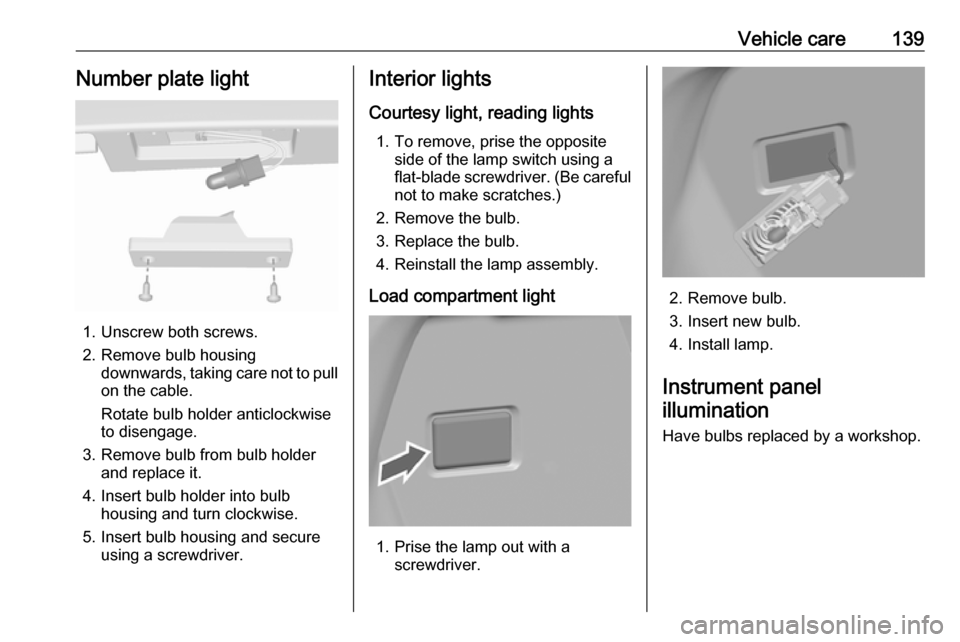
Vehicle care139Number plate light
1. Unscrew both screws.
2. Remove bulb housing downwards, taking care not to pull
on the cable.
Rotate bulb holder anticlockwise
to disengage.
3. Remove bulb from bulb holder and replace it.
4. Insert bulb holder into bulb housing and turn clockwise.
5. Insert bulb housing and secure using a screwdriver.
Interior lights
Courtesy light, reading lights 1. To remove, prise the opposite side of the lamp switch using a
flat-blade screwdriver. (Be careful not to make scratches.)
2. Remove the bulb.
3. Replace the bulb.
4. Reinstall the lamp assembly.
Load compartment light
1. Prise the lamp out with a screwdriver.
2. Remove bulb.
3. Insert new bulb.
4. Install lamp.
Instrument panel illumination
Have bulbs replaced by a workshop.
Page 157 of 191
Vehicle care155●Do not start the vehicle when it is
raised on the jack.
● Clean wheel nuts and thread with
a clean cloth before mounting the
wheel.9 Warning
Do not grease wheel bolt, wheel
nut and wheel nut cone.
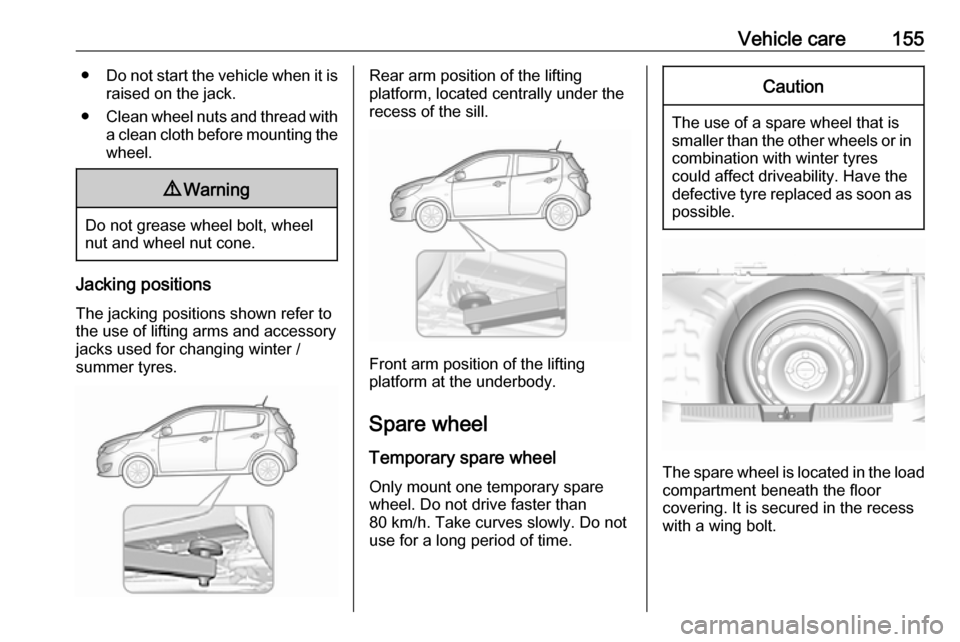
Jacking positions
The jacking positions shown refer to
the use of lifting arms and accessory
jacks used for changing winter /
summer tyres.
Rear arm position of the lifting
platform, located centrally under the
recess of the sill.
Front arm position of the lifting
platform at the underbody.
Spare wheel Temporary spare wheel
Only mount one temporary spare
wheel. Do not drive faster than
80 km/h. Take curves slowly. Do not
use for a long period of time.
Caution
The use of a spare wheel that is smaller than the other wheels or in combination with winter tyres
could affect driveability. Have the defective tyre replaced as soon as
possible.
The spare wheel is located in the load
compartment beneath the floor
covering. It is secured in the recess
with a wing bolt.
Page 158 of 191
156Vehicle careOnly mount one temporary spare
wheel. The permissible maximum
speed on the label on the temporary
spare wheel is only valid for the
factory-fitted tyre size.
Fitting the spare wheel Make the following preparations and
observe the following information:
● Park the vehicle on a level, firm and non-skid surface. The front
wheels must be in the straight-
ahead position.
● Apply the parking brake and engage first gear or reverse gear.
● Remove the spare wheel 3 155.
● Never change more than one wheel at once.
● Use the jack only to change wheels in case of puncture, not
for seasonal winter or summer
tyre change.
● The jack is maintenance-free.
● If the ground on which the vehicle
is standing is soft, a solid board
(max. 1 cm thick) should be
placed under the jack.● Take heavy objects out of the vehicle before jacking up.
● No people or animals may be in the vehicle when it is jacked-up.
● Never crawl under a jacked-up vehicle.
● Do not start the vehicle when it is
raised on the jack.
● Clean wheel nuts and thread with
a clean cloth before mounting the wheel.9 Warning
Do not grease wheel bolt, wheel
nut and wheel nut cone.
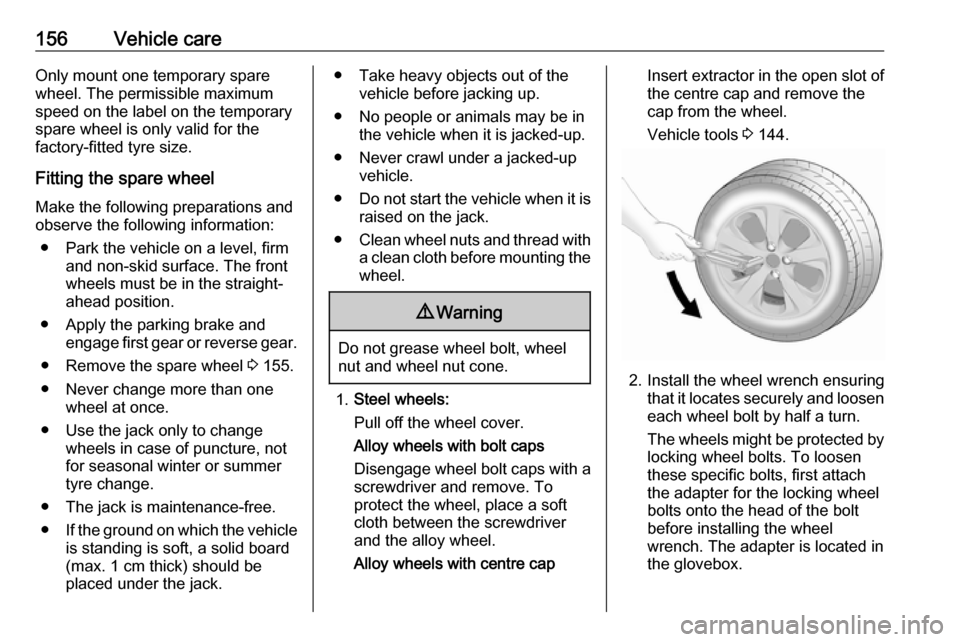
1. Steel wheels:
Pull off the wheel cover.
Alloy wheels with bolt caps
Disengage wheel bolt caps with a
screwdriver and remove. To
protect the wheel, place a soft
cloth between the screwdriver
and the alloy wheel.
Alloy wheels with centre cap
Insert extractor in the open slot of
the centre cap and remove the
cap from the wheel.
Vehicle tools 3 144.
2. Install the wheel wrench ensuring
that it locates securely and loosen
each wheel bolt by half a turn.
The wheels might be protected by
locking wheel bolts. To loosen
these specific bolts, first attach
the adapter for the locking wheel
bolts onto the head of the bolt
before installing the wheel
wrench. The adapter is located in
the glovebox.
Page 159 of 191
Vehicle care157
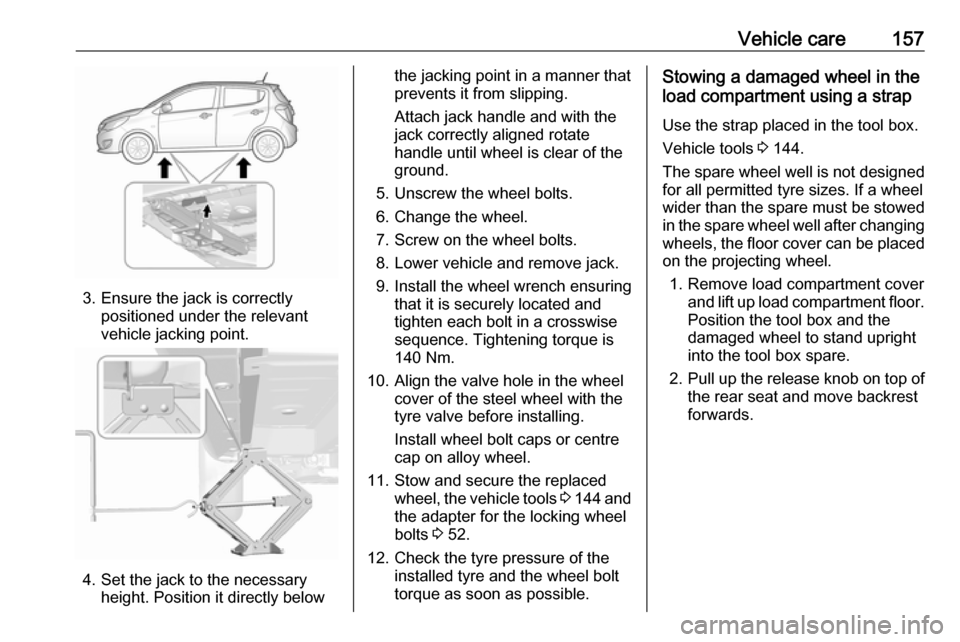
3. Ensure the jack is correctlypositioned under the relevant
vehicle jacking point.
4. Set the jack to the necessary height. Position it directly below
the jacking point in a manner that
prevents it from slipping.
Attach jack handle and with the
jack correctly aligned rotate handle until wheel is clear of theground.
5. Unscrew the wheel bolts.
6. Change the wheel.
7. Screw on the wheel bolts.
8. Lower vehicle and remove jack.
9. Install the wheel wrench ensuring that it is securely located and
tighten each bolt in a crosswise
sequence. Tightening torque is
140 Nm.
10. Align the valve hole in the wheel cover of the steel wheel with the
tyre valve before installing.
Install wheel bolt caps or centre
cap on alloy wheel.
11. Stow and secure the replaced wheel, the vehicle tools 3 144 and
the adapter for the locking wheel
bolts 3 52.
12. Check the tyre pressure of the installed tyre and the wheel bolt
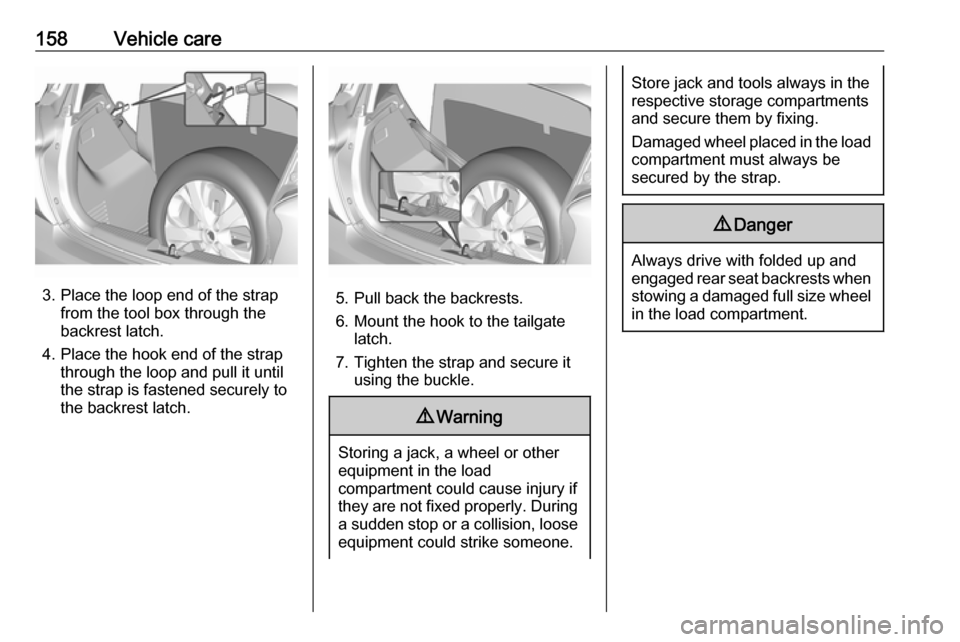
torque as soon as possible.Stowing a damaged wheel in the
load compartment using a strap
Use the strap placed in the tool box.
Vehicle tools 3 144.
The spare wheel well is not designed for all permitted tyre sizes. If a wheel
wider than the spare must be stowed
in the spare wheel well after changing
wheels, the floor cover can be placed on the projecting wheel.
1. Remove load compartment cover and lift up load compartment floor.
Position the tool box and the
damaged wheel to stand upright
into the tool box spare.
2. Pull up the release knob on top of
the rear seat and move backrest
forwards.
Page 160 of 191
158Vehicle care
3. Place the loop end of the strapfrom the tool box through the
backrest latch.
4. Place the hook end of the strap through the loop and pull it until
the strap is fastened securely to
the backrest latch.5. Pull back the backrests.
6. Mount the hook to the tailgate latch.
7. Tighten the strap and secure it using the buckle.
9 Warning
Storing a jack, a wheel or other
equipment in the load
compartment could cause injury if they are not fixed properly. During a sudden stop or a collision, loose
equipment could strike someone.
Store jack and tools always in the
respective storage compartments
and secure them by fixing.
Damaged wheel placed in the load
compartment must always be
secured by the strap.9 Danger
Always drive with folded up and
engaged rear seat backrests when
stowing a damaged full size wheel
in the load compartment.
Page 181 of 191

Customer information179This software is provided “as is,”
without warranty of any kind, express
or implied. In no event shall Info-ZIP
or its contributors be held liable for
any direct, indirect, incidental, special
or consequential damages arising out
of the use of or inability to use this
software.
Permission is granted to anyone to
use this software for any purpose,
including commercial applications,
and to alter it and redistribute it freely, subject to the following restrictions:
1. Redistributions of source code must retain the above copyright
notice, definition, disclaimer, and
this list of conditions.
2. Redistributions in binary form (compiled executables) must
reproduce the above copyright
notice, definition, disclaimer, and
this list of conditions in
documentation and/or other
materials provided with the distribution. The sole exception to this condition is redistribution of a
standard UnZipSFX binary
(including SFXWiz) as part of a
self-extracting archive; that ispermitted without inclusion of this
license, as long as the normal
SFX banner has not been
removed from the binary or
disabled.
3. Altered versions--including, but not limited to, ports to new
operating systems, existing ports
with new graphical interfaces, and dynamic, shared, or static library
versions--must be plainly marked
as such and must not be
misrepresented as being the
original source. Such altered
versions also must not be
misrepresented as being Info-ZIP
releases--including, but not
limited to, labeling of the altered
versions with the names “Info-
ZIP” (or any variation thereof,
including, but not limited to,
different capitalizations), “Pocket
UnZip,” “WiZ” or “MacZip” without
the explicit permission of Info-ZIP.
Such altered versions are further
prohibited from misrepresentativeuse of the Zip-Bugs or Info-ZIP e- mail addresses or of the Info-ZIP
URL(s).
4. Info-ZIP retains the right to use the names “Info-ZIP,” “Zip,”
“UnZip,” “UnZipSFX,” “WiZ,” “Pocket UnZip,” “Pocket Zip,” and
“MacZip” for its own source and
binary releases.
Registered trademarksApple Inc.
Apple CarPlay™ is a trademark of
Apple Inc.
App Store ®
and iTunes Store ®
are
registered trademarks of Apple Inc.
iPhone ®
, iPod ®
, iPod touch ®
, iPod
nano ®
, iPad ®
and Siri ®
are registered
trademarks of Apple Inc.Bluetooth SIG, Inc.
Bluetooth ®
is a registered trademark
of Bluetooth SIG, Inc.DivX, LLC
DivX ®
and DivX Certified ®
are
registered trademarks of DivX, LLC.