ignition OPEL KARL 2019 Manual user
[x] Cancel search | Manufacturer: OPEL, Model Year: 2019, Model line: KARL, Model: OPEL KARL 2019Pages: 191, PDF Size: 5.51 MB
Page 75 of 191

Instruments and controls73Flashes
The system is actively engaged.
Engine output may be reduced and
the vehicle may be braked
automatically to a small degree.
Illuminates
A fault in the system is present. A
warning code appears in the Driver
Information Centre. Continued driving is possible. The system is not
operational. Driving stability,
however, may deteriorate depending on road surface conditions.
Have the cause of the fault remedied
by a workshop.
Electronic Stability Control 3 115.
Traction Control system 3 114.
Traction Control system off
k illuminates yellow.
The system is deactivated.
Traction Control system 3 114.
Engine coolant temperature
W illuminates red.Illuminates when the engine is
running
Stop, switch off engine.Caution
Coolant temperature too high.
Check coolant level 3 130.
If there is sufficient coolant, consult a workshop.
Tyre pressure monitoring system
w illuminates or flashes yellow.
Illuminates
Tyre pressure loss. Stop immediately
and check tyre pressure.
Flashes
Fault in system or tyre without
pressure sensor mounted ( e.g. spare
wheel). After 60-90 seconds the
control indicator illuminates
continuously. Consult a workshop.
Tyre pressure monitoring system
3 147.
Engine oil pressure
I illuminates red.
Illuminates when the ignition is
switched on and extinguishes shortly
after the engine starts.
Illuminates when the engine is
runningCaution
Engine lubrication may be
interrupted. This may result in
damage to the engine and/or
locking of the drive wheels.
1. Depress the clutch.
2. Set selector lever to neutral.
3. Move out of the flow of traffic as quickly as possible without
impeding other vehicles.
4. Switch off the ignition.
Page 85 of 191

Instruments and controls83Warning chimesIf several warnings appear at the
same time, only one warning chime will sound.
When starting the engine or whilst driving
The warning chime regarding
unfastened seat belts has priority
over any other warning chime.
● If seat belt is not fastened.
● If a door or the tailgate is not fully
closed when starting off.
● If a certain speed is exceeded with parking brake applied.
● If a programmed speed is exceeded.
● If a warning message appears in the Driver Information Centre orInfo Display.
● If the parking assist detects an object.
● If unintended lane change occurs.
● If a fault in the automatic locking system is detected.When the vehicle is parked and/or
the driver's door is opened
● With exterior lights on.
During an Autostop ● If the driver's door is opened.
Battery voltage
When the vehicle battery voltage is
running low, the warning code 174 will
appear in the Driver Information
Centre.
1. Switch off immediately any electrical consumers which are
not required for a safe drive, e.g.
seat heating, heated windscreen
and heated rear window or other
main consumers.
2. Charge the vehicle battery by driving continuously for a while or
by using a charging device.
The warning code will disappear after the engine has been started twice
consecutively without a voltage drop.
If the vehicle battery cannot be
recharged, have the cause of the fault
remedied by a workshop.Vehicle personalisation
The vehicle's behaviour can be
personalised by changing the settings in the Info Display.
Some of the personal settings for
different drivers can be memorised
individually for each vehicle key.
Memorised settings 3 22.
Depending on vehicle equipment and
country-specific regulations some of
the functions described below may
not be available.
Some functions are only displayed or
active when the engine is running.
Personal settings Graphic Info Display
Press MENU , when ignition is on and
infotainment system is activated.
Turn the MENU button to scroll
through the menu list. Press MENU to
select the respective menu. To close a menu or to go back to previous
page, press BACK.
Select Settings , scroll through the list
and select Vehicle Settings
Page 88 of 191
86Instruments and controlsTelematics service
OnStar OnStar is a personal connectivity and
service assistant with integrated
Wi-Fi hotspot. The OnStar service is
available 24 hours a day, seven days
a week.
Note
OnStar is not available for all
markets. For further information,
contact your workshop.
Note
In order to be available and
operational, OnStar needs a valid
OnStar subscription, functioning
vehicle electrics, mobile service and GPS satellite link.
To activate the OnStar services and
set up an account, press Z and speak
with an advisor.Depending on the equipment of the vehicle, the following services are available:
● Emergency services and support
in the case of a vehicle
breakdown
● Wi-Fi hotspot
● Smartphone application
● Remote control, e.g. location of the vehicle, activation of horn and
lights, control of central locking
system
● Stolen vehicle assistance
● Vehicle diagnostics
● Destination download
Note
The OnStar module of the vehicle is
deactivated after ten days without an
ignition cycle. Functions requiring a
data connection will be available
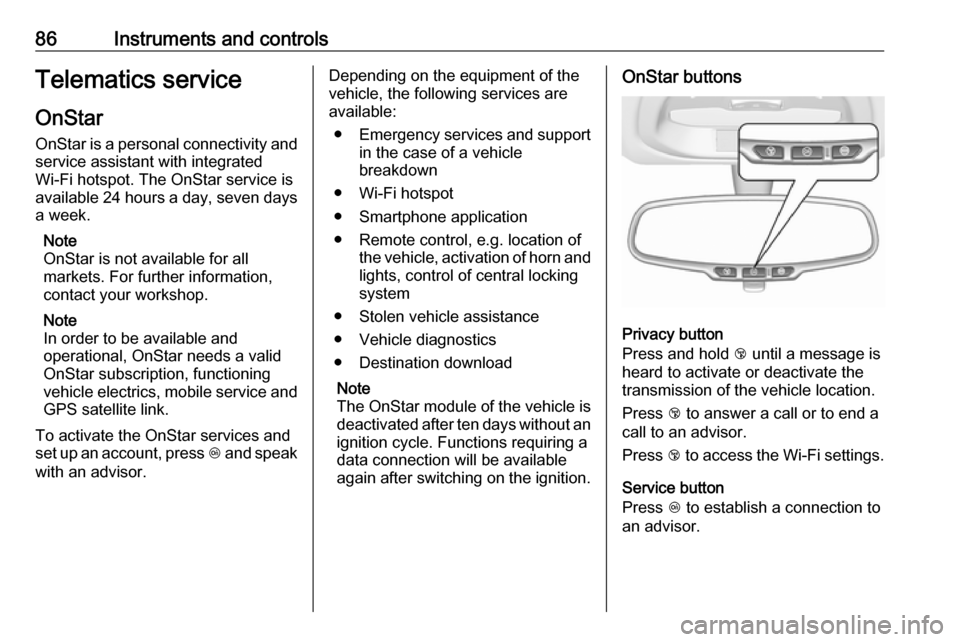
again after switching on the ignition.OnStar buttons
Privacy button
Press and hold j until a message is
heard to activate or deactivate the
transmission of the vehicle location.
Press j to answer a call or to end a
call to an advisor.
Press j to access the Wi-Fi settings.
Service button
Press Z to establish a connection to
an advisor.
Page 93 of 191
Lighting91Headlight range adjustment
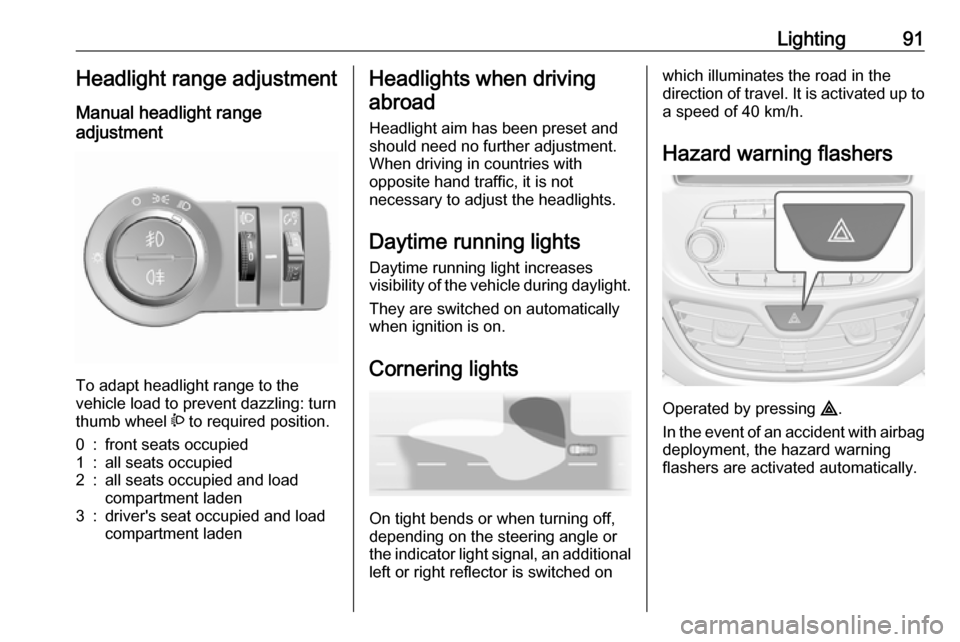
Manual headlight range
adjustment
To adapt headlight range to the
vehicle load to prevent dazzling: turn
thumb wheel ? to required position.
0:front seats occupied1:all seats occupied2:all seats occupied and load
compartment laden3:driver's seat occupied and load
compartment ladenHeadlights when driving
abroad
Headlight aim has been preset and
should need no further adjustment.
When driving in countries with
opposite hand traffic, it is not
necessary to adjust the headlights.
Daytime running lights Daytime running light increases
visibility of the vehicle during daylight.
They are switched on automatically
when ignition is on.
Cornering lights
On tight bends or when turning off,
depending on the steering angle or
the indicator light signal, an additional left or right reflector is switched on
which illuminates the road in the
direction of travel. It is activated up to
a speed of 40 km/h.
Hazard warning flashers
Operated by pressing ¨
.
In the event of an accident with airbag
deployment, the hazard warning
flashers are activated automatically.
Page 95 of 191
Lighting93Parking lights
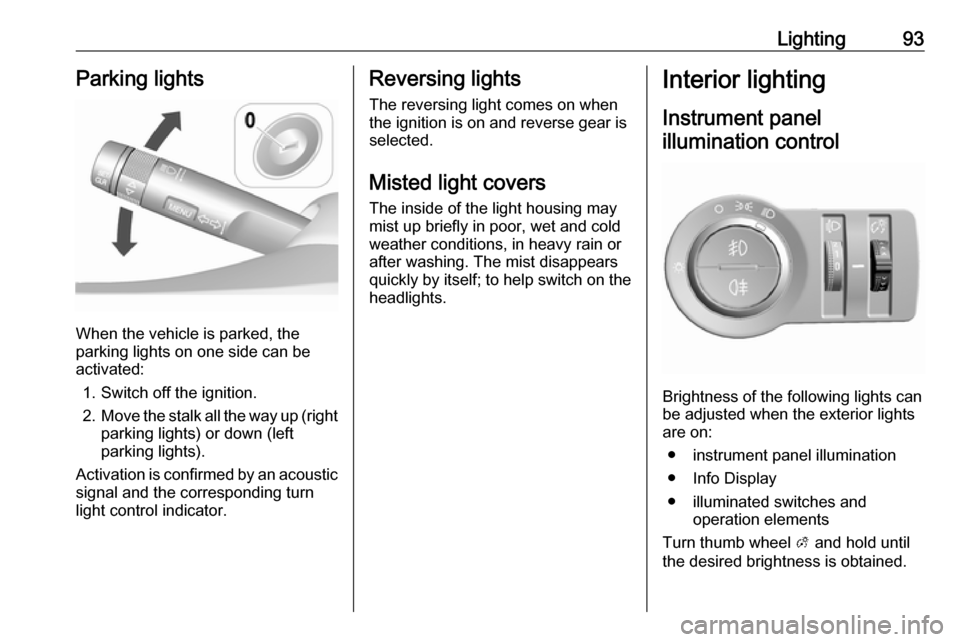
When the vehicle is parked, the
parking lights on one side can be
activated:
1. Switch off the ignition.
2. Move the stalk all the way up (right
parking lights) or down (left
parking lights).
Activation is confirmed by an acoustic
signal and the corresponding turn
light control indicator.
Reversing lights
The reversing light comes on when
the ignition is on and reverse gear is
selected.
Misted light covers
The inside of the light housing may
mist up briefly in poor, wet and cold weather conditions, in heavy rain or
after washing. The mist disappears
quickly by itself; to help switch on the
headlights.Interior lighting
Instrument panel illumination control
Brightness of the following lights can
be adjusted when the exterior lights
are on:
● instrument panel illumination
● Info Display
● illuminated switches and operation elements
Turn thumb wheel A and hold until
the desired brightness is obtained.
Page 96 of 191
94LightingInterior lights
When opening a door, the courtesy
light automatically switches on and
then off after a delay.
When exterior lighting has been on,
courtesy light will turn on when
ignition is switched off.
Note
In the event of an accident with
airbag deployment, the courtesy lights are turned on automatically.
Courtesy lightOperate rocker switch:centre
position w:automatic switching on
when opening a door,
turns off after a delaypress d:permanently onpress K:permanently off
Reading lights
Operated by pressing the buttons in
front.
Lighting features
Exit lighting
Path lighting Headlights, tail lights and number
plate lights illuminate the surrounding area for an adjustable time after
leaving the vehicle.
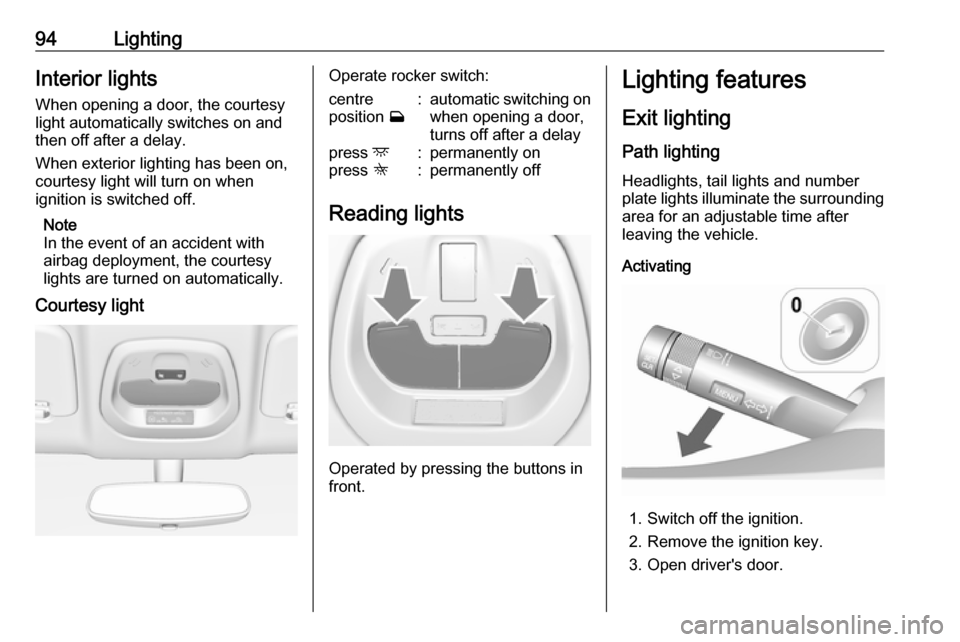
Activating
1. Switch off the ignition.
2. Remove the ignition key.
3. Open driver's door.
Page 97 of 191

Lighting954. Pull the stalk.
5. Close the driver's door.
If the driver's door is not closed the
lights switch off after 2 minutes.
Exit lighting is switched off
immediately if the stalk is pulled while
the driver's door is open.
Activation, deactivation and duration of this function can be changed in the
Info Display.
Vehicle personalisation 3 83.
The settings can be saved for the key being used 3 22.
Battery discharge protection Switching off electric lights
To prevent discharge of the vehicle
battery when the ignition is switched
off, some interior lights are switched
off automatically after some time.
Page 106 of 191

104Driving and operatingDriving and
operatingDriving hints ............................... 104
Control of the vehicle ...............104
Steering ................................... 105
Starting and operating ...............105
New vehicle running-in ............105
Ignition switch positions ...........105
Retained power off ..................106
Starting the engine ..................107
Overrun cut-off ........................ 107
Stop-start system ....................107
Parking .................................... 109
Engine exhaust .......................... 110
Catalytic converter ...................110
Manual transmission ..................111
Brakes ........................................ 112
Antilock brake system .............112
Parking brake .......................... 113
Brake assist ............................. 113
Hill start assist ......................... 113
Ride control systems .................114
Traction Control system ..........114
Electronic Stability Control ......115
City mode ................................ 115Driver assistance systems .........117
Cruise control .......................... 117
Speed limiter ........................... 118
Parking assist .......................... 119
Lane departure warning ..........121
Fuel ............................................ 122
Fuel for petrol engines .............122
Refuelling ................................ 123Driving hints
Control of the vehicle Never coast with engine not
running
Many systems will not function in this
situation (e.g. brake servo unit, power steering). Driving in this manner is a
danger to yourself and others.
All systems function during an
Autostop.
Stop-start system 3 107.
Idle boost
If charging of the vehicle battery is
required due to battery condition, the
power output of the generator must
be increased. This will be achieved by an idle boost which may be audible.
A message appears in the Driver
Information Centre.
Pedals
To ensure the pedal travel is
uninhibited, there must be no mats in
the area of the pedals.
Page 107 of 191

Driving and operating105Use only floor mats, which fit properly
and are fixed by the retainers on the
driver side.
Driving downhill
Engage a gear when driving downhill
to ensure that sufficient brake
pressure is available.
Steering If power steering assist is lost
because the engine stops or due to a
system malfunction, the vehicle can
be steered but may require increased
effort.
Control indicator c 3 72.Caution
Vehicle equipped with electric
power steering:
If the steering wheel is turned until it reaches the end of its travel and
is held against that position for an
extended period of time, power
steering assistance may be
reduced.
If the steering assistance is used
for an extended period of time,
power assistance may be
reduced.
Power steering assistance should
return back to normal when the
system has cooled down.Starting and operating
New vehicle running-in Do not brake unnecessarily hard for
the first few journeys.
During the first drive, smoke may
occur because of wax and oil
evaporating off the exhaust system.
Park the vehicle in the open for a
while after the first drive and avoid
inhaling the fumes.
During the running-in period, fuel and engine oil consumption may be
higher.
Autostop may be inhibited to allow for
charging of the vehicle battery.
Ignition switch positions
Turn key:
Page 108 of 191
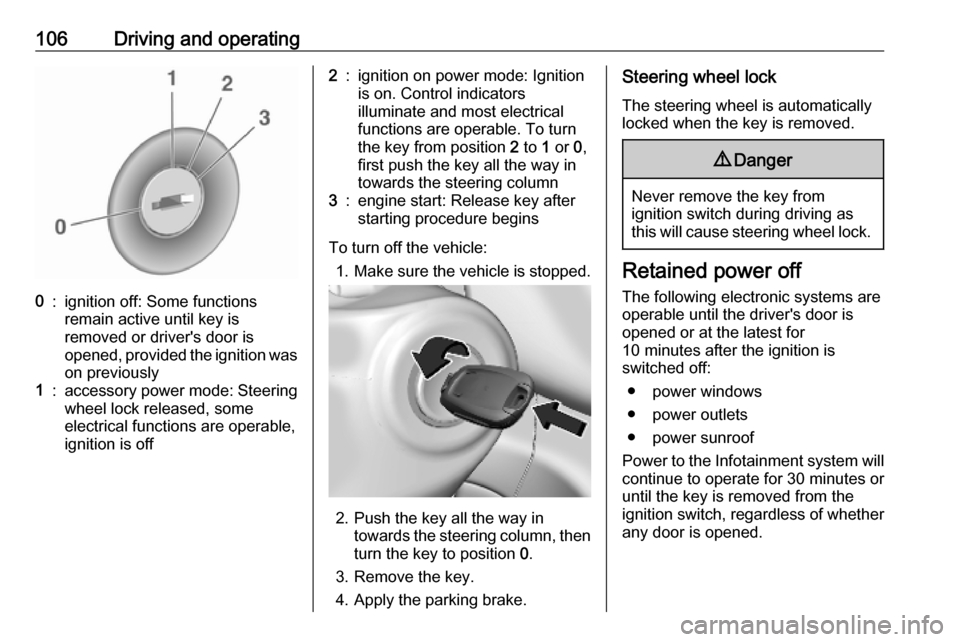
106Driving and operating0:ignition off: Some functions
remain active until key is
removed or driver's door is
opened, provided the ignition was
on previously1:accessory power mode: Steering wheel lock released, some
electrical functions are operable,
ignition is off2:ignition on power mode: Ignition
is on. Control indicators
illuminate and most electrical
functions are operable. To turn
the key from position 2 to 1 or 0,
first push the key all the way in
towards the steering column3:engine start: Release key after
starting procedure begins
To turn off the vehicle:
1. Make sure the vehicle is stopped.
2. Push the key all the way in
towards the steering column, then
turn the key to position 0.
3. Remove the key.
4. Apply the parking brake.
Steering wheel lock
The steering wheel is automatically
locked when the key is removed.9 Danger
Never remove the key from
ignition switch during driving as
this will cause steering wheel lock.
Retained power off
The following electronic systems are
operable until the driver's door is
opened or at the latest for
10 minutes after the ignition is
switched off:
● power windows
● power outlets
● power sunroof
Power to the Infotainment system will continue to operate for 30 minutes oruntil the key is removed from theignition switch, regardless of whether
any door is opened.