lock OPEL KARL 2019 Manual user
[x] Cancel search | Manufacturer: OPEL, Model Year: 2019, Model line: KARL, Model: OPEL KARL 2019Pages: 191, PDF Size: 5.51 MB
Page 61 of 191

Instruments and controls59Instruments and
controlsControls ....................................... 60
Steering wheel adjustment ........60
Steering wheel controls .............60
Heated steering wheel ...............60
Horn ........................................... 61
Windscreen wiper and washer ..61
Rear window wiper and washer ...................................... 62
Outside temperature ..................62
Clock ......................................... 62
Power outlets ............................. 64
Cigarette lighter ......................... 64
Ashtrays .................................... 64
Warning lights, gauges and indi‐ cators ........................................... 64
Instrument cluster ......................64
Speedometer ............................. 64
Odometer .................................. 65
Trip odometer ............................ 65
Tachometer ............................... 65
Fuel gauge ................................ 65
Engine coolant temperature gauge ....................................... 66
Service display .......................... 66Control indicators ......................67
Turn lights .................................. 69
Seat belt reminder .....................70
Airbag and belt tensioners .........70
Airbag deactivation ....................70
Charging system .......................71
Malfunction indicator light ..........71
Service vehicle soon .................71
Brake and clutch system ...........71
Operate pedal ............................ 71
Antilock brake system (ABS) .....72
Gear shifting .............................. 72
Power steering .......................... 72
Lane departure warning ............72
Parking assist ............................ 72
Electronic Stability Control off ...72
Electronic Stability Control and Traction Control system ...........72
Traction Control system off .......73
Engine coolant temperature ......73
Tyre pressure monitoring system ...................................... 73
Engine oil pressure ....................73
Low fuel ..................................... 74
Immobiliser ................................ 74
Reduced engine power .............74
Exterior light .............................. 74
High beam ................................. 74
Front fog lights ........................... 74
Rear fog light ............................. 74Cruise control............................ 74
Speed limiter ............................. 74
Bonnet open .............................. 74
Door open .................................. 75
Displays ....................................... 75
Driver Information Centre ..........75
Info Display ................................ 80
Vehicle messages ........................81
Warning chimes .........................83
Battery voltage .......................... 83
Vehicle personalisation ................83
Telematics service .......................86
OnStar ....................................... 86
Page 62 of 191
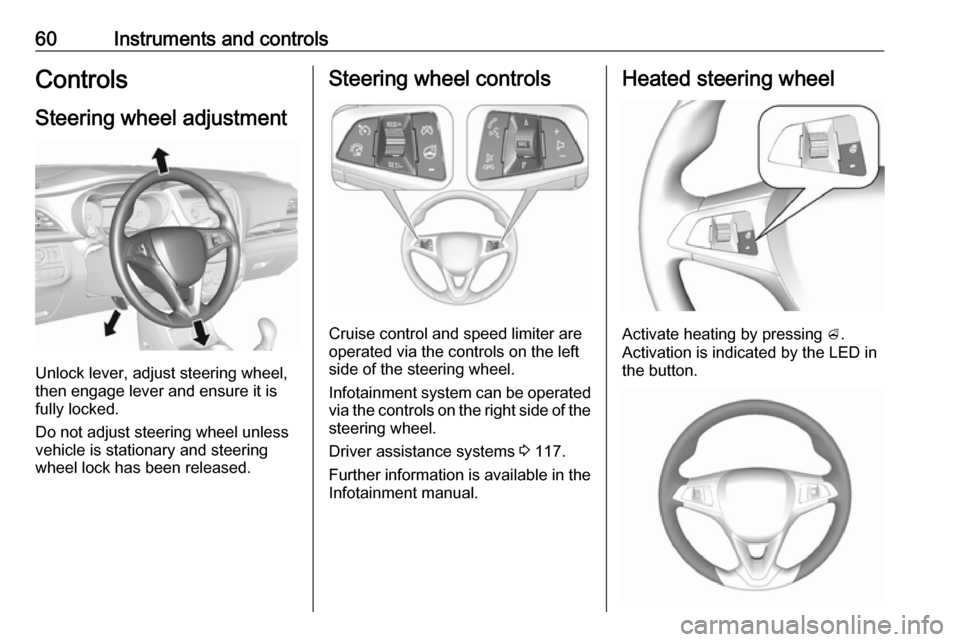
60Instruments and controlsControlsSteering wheel adjustment
Unlock lever, adjust steering wheel,
then engage lever and ensure it is fully locked.
Do not adjust steering wheel unless
vehicle is stationary and steering
wheel lock has been released.
Steering wheel controls
Cruise control and speed limiter are
operated via the controls on the left
side of the steering wheel.
Infotainment system can be operated
via the controls on the right side of the
steering wheel.
Driver assistance systems 3 117.
Further information is available in the
Infotainment manual.
Heated steering wheel
Activate heating by pressing A.
Activation is indicated by the LED in
the button.
Page 64 of 191
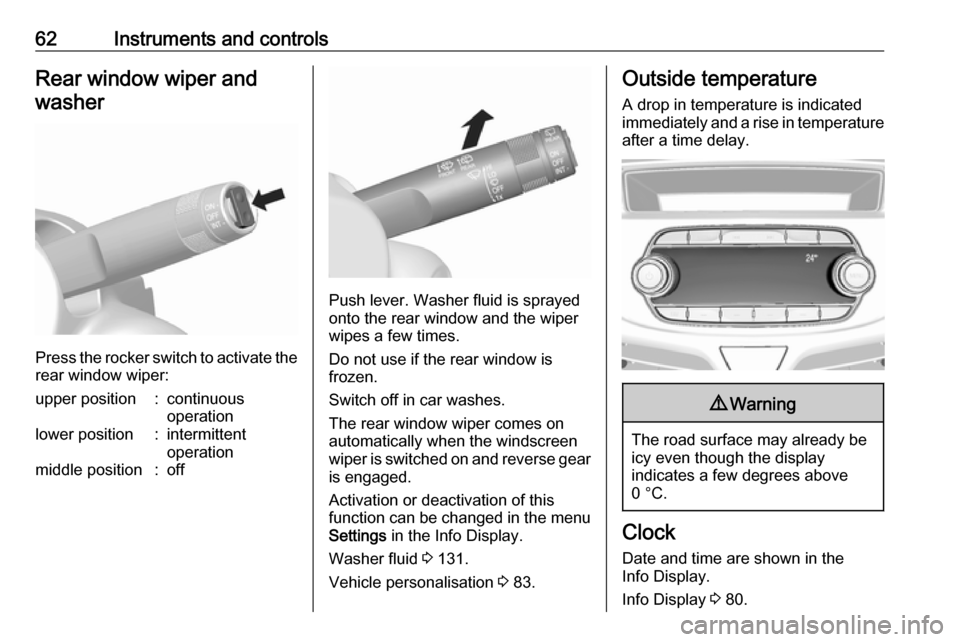
62Instruments and controlsRear window wiper andwasher
Press the rocker switch to activate the
rear window wiper:
upper position:continuous
operationlower position:intermittent
operationmiddle position:off
Push lever. Washer fluid is sprayed
onto the rear window and the wiper
wipes a few times.
Do not use if the rear window is
frozen.
Switch off in car washes.
The rear window wiper comes on
automatically when the windscreen
wiper is switched on and reverse gear
is engaged.
Activation or deactivation of this
function can be changed in the menu Settings in the Info Display.
Washer fluid 3 131.
Vehicle personalisation 3 83.
Outside temperature
A drop in temperature is indicated
immediately and a rise in temperature
after a time delay.9 Warning
The road surface may already be
icy even though the display
indicates a few degrees above
0 °C.
Clock
Date and time are shown in the
Info Display.
Info Display 3 80.
Page 71 of 191
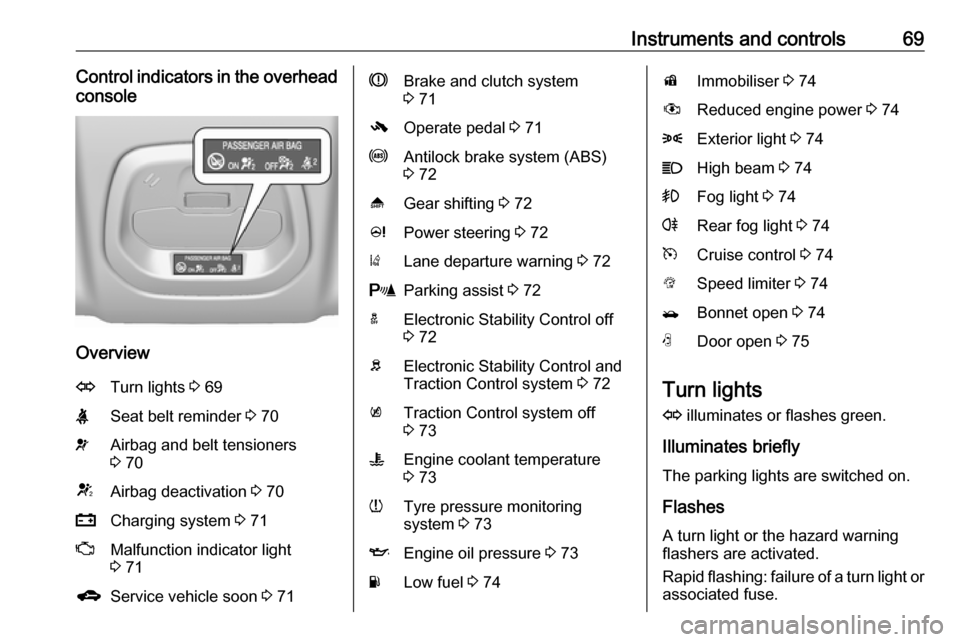
Instruments and controls69Control indicators in the overheadconsole
Overview
OTurn lights 3 69XSeat belt reminder 3 70vAirbag and belt tensioners
3 70VAirbag deactivation 3 70pCharging system 3 71ZMalfunction indicator light
3 71gService vehicle soon 3 71RBrake and clutch system
3 71-Operate pedal 3 71uAntilock brake system (ABS)
3 72[Gear shifting 3 72cPower steering 3 72)Lane departure warning 3 72rParking assist 3 72aElectronic Stability Control off
3 72bElectronic Stability Control and
Traction Control system 3 72kTraction Control system off
3 73WEngine coolant temperature
3 73wTyre pressure monitoring
system 3 73IEngine oil pressure 3 73YLow fuel 3 74dImmobiliser 3 74#Reduced engine power 3 748Exterior light 3 74CHigh beam 3 74>Fog light 3 74rRear fog light 3 74mCruise control 3 74LSpeed limiter 3 74/Bonnet open 3 74NDoor open 3 75
Turn lights
O illuminates or flashes green.
Illuminates briefly The parking lights are switched on.
Flashes
A turn light or the hazard warning flashers are activated.
Rapid flashing: failure of a turn light or associated fuse.
Page 74 of 191

72Instruments and controlsFlashes
Pedal must be depressed to start the engine with the key 3 107.
Antilock brake system
(ABS)
u illuminates yellow.
Illuminates for a few seconds after the ignition is switched on. The system is
ready for operation when the control
indicator extinguishes.
If the control indicator does not go out after a few seconds, or if it illuminates while driving, there is a fault in the
ABS. The brake system remains
operational but without ABS
regulation.
Antilock brake system 3 112.
Gear shifting [ with the number of a higher gear is
indicated, when upshifting is
recommended for fuel saving
reasons.Power steering
c illuminates yellow.
Illuminates with power steering disabled
Failure in the power steering system.
Consult a workshop.
Illumination of c and b
simultaneously
Seek the assistance of a workshop.
Lane departure warning
) illuminates green or flashes yellow.
Illuminates green
System is switched on and ready to
operate.
Flashes yellow
System recognises an unintended
lane change.
Lane departure warning 3 121.
Parking assist
r illuminates yellow.Fault in system
or
Fault due to sensors that are dirty or
covered by ice or snow
or
Interference due to external sources
of ultrasound. Once the source of
interference is removed, the system
will operate normally.
Have the cause of the fault in the
system remedied by a workshop.
Parking assist 3 119.
Electronic Stability Control
off
t illuminates yellow.
The system is deactivated.
Electronic Stability Control 3 115.
Electronic Stability Control
and Traction Control system
b flashes or illuminates yellow.
Page 75 of 191
Instruments and controls73Flashes
The system is actively engaged.
Engine output may be reduced and
the vehicle may be braked
automatically to a small degree.
Illuminates
A fault in the system is present. A
warning code appears in the Driver
Information Centre. Continued driving is possible. The system is not
operational. Driving stability,
however, may deteriorate depending on road surface conditions.
Have the cause of the fault remedied
by a workshop.
Electronic Stability Control 3 115.
Traction Control system 3 114.
Traction Control system off
k illuminates yellow.
The system is deactivated.
Traction Control system 3 114.
Engine coolant temperature
W illuminates red.Illuminates when the engine is
running
Stop, switch off engine.Caution
Coolant temperature too high.
Check coolant level 3 130.
If there is sufficient coolant, consult a workshop.
Tyre pressure monitoring system
w illuminates or flashes yellow.
Illuminates
Tyre pressure loss. Stop immediately
and check tyre pressure.
Flashes
Fault in system or tyre without
pressure sensor mounted ( e.g. spare
wheel). After 60-90 seconds the
control indicator illuminates
continuously. Consult a workshop.
Tyre pressure monitoring system
3 147.
Engine oil pressure
I illuminates red.
Illuminates when the ignition is
switched on and extinguishes shortly
after the engine starts.
Illuminates when the engine is
runningCaution
Engine lubrication may be
interrupted. This may result in
damage to the engine and/or
locking of the drive wheels.
1. Depress the clutch.
2. Set selector lever to neutral.
3. Move out of the flow of traffic as quickly as possible without
impeding other vehicles.
4. Switch off the ignition.
Page 76 of 191

74Instruments and controls9Warning
When the engine is off,
considerably more force is needed
to brake and steer.
During an Autostop, the brake
servo unit will still be operational.
Do not remove key until vehicle is stationary, otherwise the steeringwheel lock could engage
unexpectedly.
Keep engine turned off and let the
vehicle be towed to a workshop.
Low fuel Y illuminates or flashes yellow.
Illuminates
Level in fuel tank is too low.
Flashes
Fuel used up. Refuel immediately.
Never run the fuel tank dry.
Refuelling 3 123.
Catalytic converter 3 110.
Immobiliser
d flashes yellow.
Fault in the immobiliser system. The
engine cannot be started.
Immobiliser 3 27.
Reduced engine power
# illuminates yellow.
The engine power is limited. Consult
a workshop.
Exterior light
8 illuminates green.
The exterior lights are on 3 90.
High beam C illuminates blue.
Illuminated when high beam is on or
during headlight flash 3 90.
Front fog lights
> illuminates green.
The front fog lights are on 3 92.Rear fog light
r illuminates yellow.
The rear fog light is on 3 92.
Cruise control
m illuminates white or green.
Illuminates white The system is on.
Illuminates green
Cruise control is active.
Cruise control 3 117.
Speed limiter
L illuminates in the Driver
Information Centre when Speed
limiter is active. Set speed is indicated
alongside L symbol.
Speed limiter 3 118.
Bonnet open / illuminates yellow.
Illuminates when the bonnet is open.
Stop-start system 3 107.
Page 84 of 191

82Instruments and controlsNo.Vehicle message15Centre high-mounted brake
light failure16Brake light failure17Headlight levelling malfunction18Left low beam failure19Rear fog light failure20Right low beam failure21Left sidelight failure22Right sidelight failure23Reversing light failure24Number plate light failure25Left front turn light failure26Left rear turn light failure27Right front turn light failure28Right rear turn light failure35Replace battery in radio remote
control36ESC InitialisingNo.Vehicle message49Lane departure warning unavailable52Change timing belt56Tyre pressure imbalance on
front axle57Tyre pressure imbalance on
rear axle59Open, then close driver window60Open, then close front
passenger window61Open, then close left rear
window62Open, then close right rear
window65Theft attempted66Service anti-theft alarm system67Service steering wheel lock68Service power steering75Service air conditioningNo.Vehicle message77Service lane departure warning79Top up engine oil81Service transmission / trans‐
mission malfunction82Change engine oil soon84Engine power reduced89Service vehicle soon90Service brake assist95Service airbag145Check washer fluid level151Press clutch to start174Low vehicle battery258Parking assist off
Vehicle messages on
Colour Info Display
Some important messages appear
additionally in the
Colour Info Display. Some messages only pop-up for a few seconds.
Page 85 of 191

Instruments and controls83Warning chimesIf several warnings appear at the
same time, only one warning chime will sound.
When starting the engine or whilst driving
The warning chime regarding
unfastened seat belts has priority
over any other warning chime.
● If seat belt is not fastened.
● If a door or the tailgate is not fully
closed when starting off.
● If a certain speed is exceeded with parking brake applied.
● If a programmed speed is exceeded.
● If a warning message appears in the Driver Information Centre orInfo Display.
● If the parking assist detects an object.
● If unintended lane change occurs.
● If a fault in the automatic locking system is detected.When the vehicle is parked and/or
the driver's door is opened
● With exterior lights on.
During an Autostop ● If the driver's door is opened.
Battery voltage
When the vehicle battery voltage is
running low, the warning code 174 will
appear in the Driver Information
Centre.
1. Switch off immediately any electrical consumers which are
not required for a safe drive, e.g.
seat heating, heated windscreen
and heated rear window or other
main consumers.
2. Charge the vehicle battery by driving continuously for a while or
by using a charging device.
The warning code will disappear after the engine has been started twice
consecutively without a voltage drop.
If the vehicle battery cannot be
recharged, have the cause of the fault
remedied by a workshop.Vehicle personalisation
The vehicle's behaviour can be
personalised by changing the settings in the Info Display.
Some of the personal settings for
different drivers can be memorised
individually for each vehicle key.
Memorised settings 3 22.
Depending on vehicle equipment and
country-specific regulations some of
the functions described below may
not be available.
Some functions are only displayed or
active when the engine is running.
Personal settings Graphic Info Display
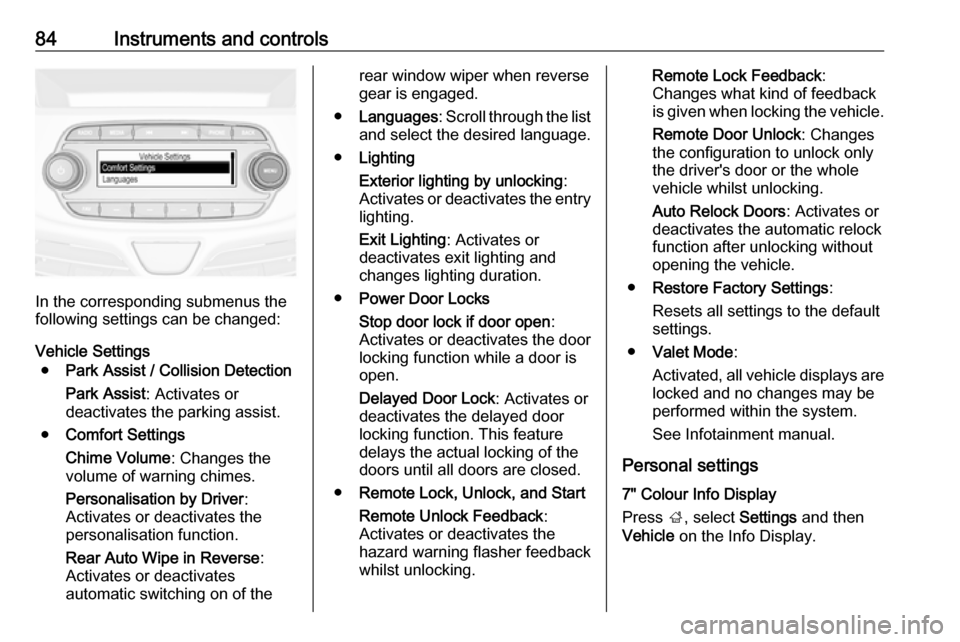
Press MENU , when ignition is on and
infotainment system is activated.
Turn the MENU button to scroll
through the menu list. Press MENU to
select the respective menu. To close a menu or to go back to previous
page, press BACK.
Select Settings , scroll through the list
and select Vehicle Settings
Page 86 of 191
84Instruments and controls
In the corresponding submenus the
following settings can be changed:
Vehicle Settings ● Park Assist / Collision Detection
Park Assist : Activates or
deactivates the parking assist.
● Comfort Settings
Chime Volume : Changes the
volume of warning chimes.
Personalisation by Driver :
Activates or deactivates the
personalisation function.
Rear Auto Wipe in Reverse :
Activates or deactivates
automatic switching on of the
rear window wiper when reverse gear is engaged.
● Languages : Scroll through the list
and select the desired language.
● Lighting
Exterior lighting by unlocking :
Activates or deactivates the entry lighting.
Exit Lighting : Activates or
deactivates exit lighting and
changes lighting duration.
● Power Door Locks
Stop door lock if door open :
Activates or deactivates the door
locking function while a door is open.
Delayed Door Lock : Activates or
deactivates the delayed door
locking function. This feature
delays the actual locking of the
doors until all doors are closed.
● Remote Lock, Unlock, and Start
Remote Unlock Feedback :
Activates or deactivates the
hazard warning flasher feedback
whilst unlocking.Remote Lock Feedback :
Changes what kind of feedback
is given when locking the vehicle.
Remote Door Unlock : Changes
the configuration to unlock only
the driver's door or the whole
vehicle whilst unlocking.
Auto Relock Doors : Activates or
deactivates the automatic relock
function after unlocking without
opening the vehicle.
● Restore Factory Settings :
Resets all settings to the default settings.
● Valet Mode :
Activated, all vehicle displays are locked and no changes may be
performed within the system.
See Infotainment manual.
Personal settings
7" Colour Info Display
Press ;, select Settings and then
Vehicle on the Info Display.