stop start OPEL MERIVA 2009 Owners Manual
[x] Cancel search | Manufacturer: OPEL, Model Year: 2009, Model line: MERIVA, Model: OPEL MERIVA 2009Pages: 248, PDF Size: 4.46 MB
Page 89 of 248
83
Instruments, Controls
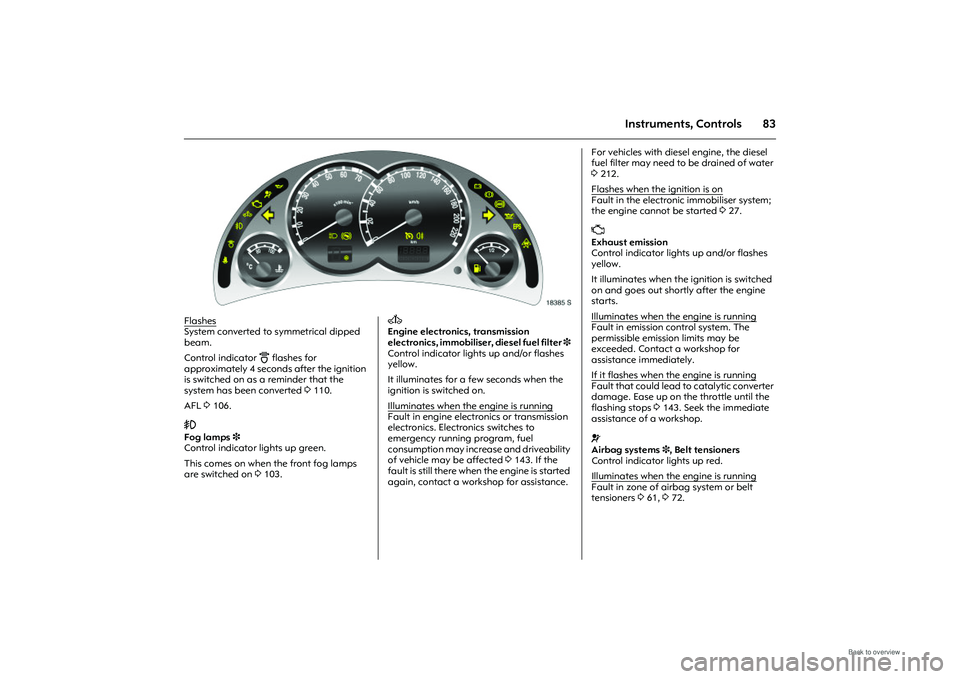
Picture no: 18385s.tif
Flashes
System converted to symmetrical dipped
beam.
Control indicator
B
flashes for
approximately 4 seconds after the ignition
is switched on as a reminder that the
system has been converted 3110.
AFL 3106.
>
Fog lamps 3
Control indicator lights up green.
This comes on when the front fog lamps
are switched on 3103.
Picture no:
A
Engine electronics, transmission
electronics, immo biliser, diesel fuel filter 3
Control indicator lights up and/or flashes
yellow.
It illuminates for a few seconds when the
ignition is switched on.
Illuminates when the engine is running
Fault in engine electronics or transmission
electronics. Electr onics switches to
emergency running program, fuel
consumption may increase and driveability
of vehicle may be affected 3143. If the
fault is still there when the engine is started
again, contact a workshop for assistance.
For vehicles with diesel engine, the diesel
fuel filter may need to be drained of water
3 212.
Flashes when the ignition is onFault in the electronic immobiliser system;
the engine cannot be started 327. Z
Exhaust emission
Control indicator lights up and/or flashes
yellow.
It illuminates when the ignition is switched
on and goes out shortly after the engine
starts.
Illuminates when the engine is running
Fault in emission control system. The
permissible emission limits may be
exceeded. Contact a workshop for
assistance immediately.
If it flashes when the engine is runningFault that could lead to catalytic converter
damage. Ease up on the throttle until the
flashing stops 3143. Seek the immediate
assistance of a workshop. v
Airbag systems 3, Belt tensioners
Control indicator lights up red.
Illuminates when the engine is runningFault in zone of airbag system or belt
tensioners 361, 372.
Page 91 of 248
85
Instruments, Controls
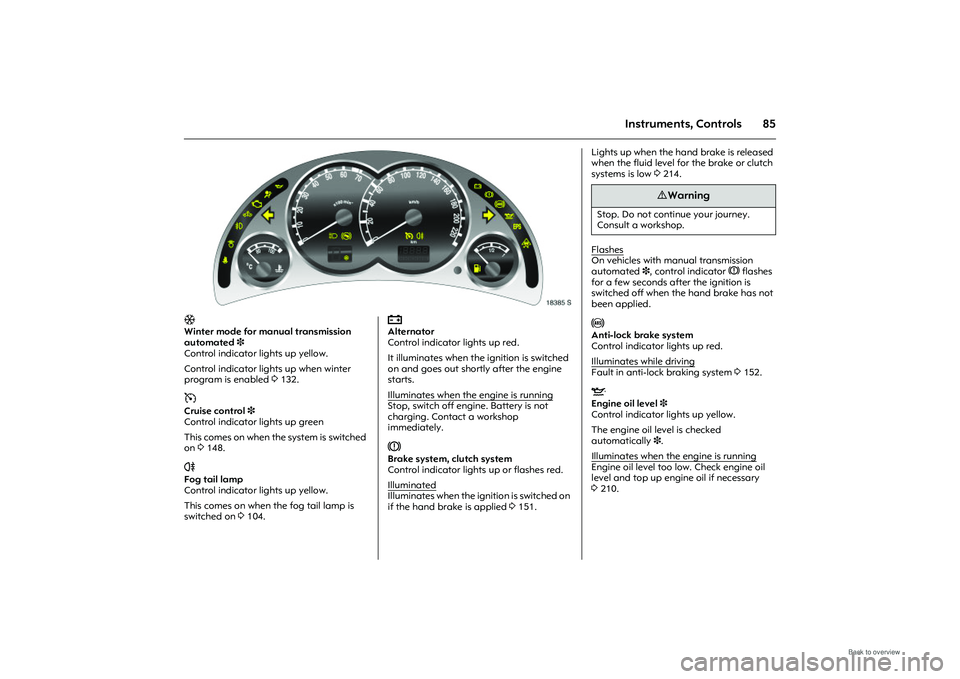
Picture no: 18385s.tif
T
Winter mode for manual transmission
automated 3
Control indicator lights up yellow.
Control indicator lights up when winter
program is enabled 3132. m
Cruise control 3
Control indicator lights up green
This comes on when the system is switched
on 3148.
r
Fog tail lamp
Control indicator lights up yellow.
This comes on when the fog tail lamp is
switched on 3104.
Picture no:
p
Alternator
Control indicator lights up red.
It illuminates when the ignition is switched
on and goes out shortly after the engine
starts.
Illuminates when the engine is running
Stop, switch off engine. Battery is not
charging. Contact a workshop
immediately. R
Brake system, clutch system
Control indicator lights up or flashes red.
Illuminated
Illuminates when the ignition is switched on
if the hand brake is applied 3151.
Lights up when the hand brake is released
when the fluid level for the brake or clutch
systems is low 3214.
FlashesOn vehicles with manual transmission
automated 3, control indicator R flashes
for a few seconds after the ignition is
switched off when the hand brake has not
been applied. u
Anti-lock brake system
Control indicator lights up red.
Illuminates while driving
Fault in anti-lock braking system 3152. S
Engine oil level 3
Control indicator lights up yellow.
The engine oil level is checked
automatically 3.
Illuminates when the engine is running
Engine oil level too lo w. Check engine oil
level and top up engine oil if necessary
3 210.
9 Warning
Stop. Do not continue your journey.
Consult a workshop.
Page 104 of 248
98 Instruments, ControlsDistance travelled
Display of distance travelled. The
measurement can be reset at any time.
Average speed
Display of average speed. The
measurement can be reset at any time.
Stoppages in the journey with the ignition
off are not included in the calculations.
Effective consumption
Display of fuel consumed. The
measurement can be reset at any time.
Average consumption
Display of average consumption. The
measurement can be reset at any time.
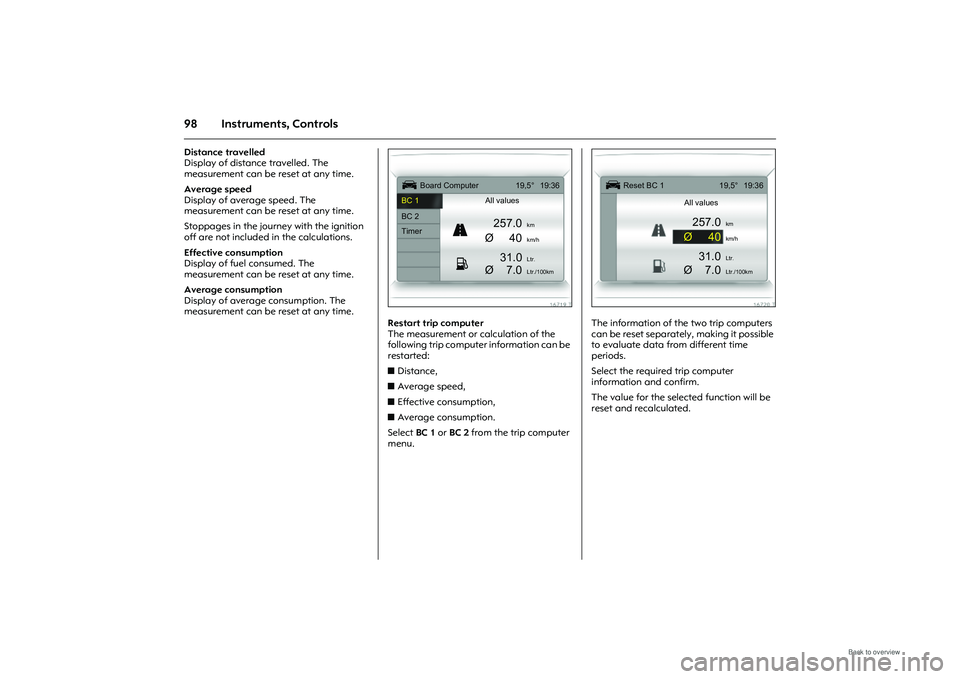
Picture no: 16719t.tif
Restart trip computer
The measurement or calculation of the
following trip computer information can be
restarted:
zDistance,
z Average speed,
z Effective consumption,
z Average consumption.
Select BC 1 or BC 2 from the trip computer
menu.
Picture no: 16720t.tif
The information of the two trip computers
can be reset separately, making it possible
to evaluate data from different time
periods.
Select the required trip computer
information and confirm.
The value for the selected function will be
reset and recalculated.
Ü
Board Computer 19,5° 19:36
BC 1 All values
BC 2
257.0
km
Timer
Ø40
km/h
31.0
Ltr.
Ø
7.0
Ltr./100km
1
8
Ü
Reset BC 1 19,5° 19:36
All values
257.0
km
Ø40
km/h
31.0
Ltr.
Ø
7.0
Ltr./100km
Page 105 of 248
99
Instruments, Controls
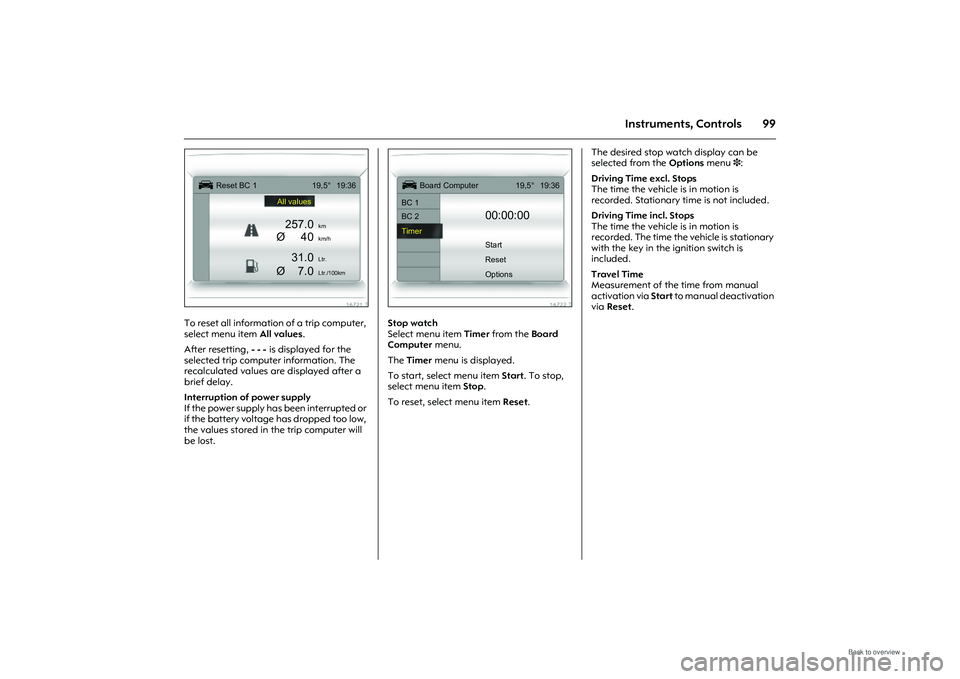
Picture no: 16721t.tif
To reset all information of a trip computer,
select menu item All values.
After resetting, - - - is displayed for the
selected trip comput er information. The
recalculated values are displayed after a
brief delay.
Interruption of power supply
If the power supply has been interrupted or
if the battery voltage has dropped too low,
the values stored in the trip computer will
be lost.
Picture no: 16722t.tif
Stop watch
Select menu item Timer from the Board
Computer menu.
The Timer menu is displayed.
To start, select menu item Start. To stop,
select menu item Stop.
To reset, select menu item Reset. The desired stop watch display can be
selected from the Options
menu 3:
Driving Time excl. Stops
The time the vehicle is in motion is
recorded. Stationary ti me is not included.
Driving Time incl. Stops
The time the vehicle is in motion is
recorded. The time the vehicle is stationary
with the key in the ignition switch is
included.
Travel Time
Measurement of the time from manual
activation via Start to manual deactivation
via Reset .
Ü
Reset BC 1 19,5° 19:36
All values
257.0
km
Ø40
km/h
31.0
Ltr.
Ø
7.0
Ltr./100km
Ü
Board Computer 19,5° 19:36
BC 1
BC 2
00:00:00
Timer Start
Reset
Options
Page 136 of 248
130 Driving and operation
Picture no: 18386s.tif
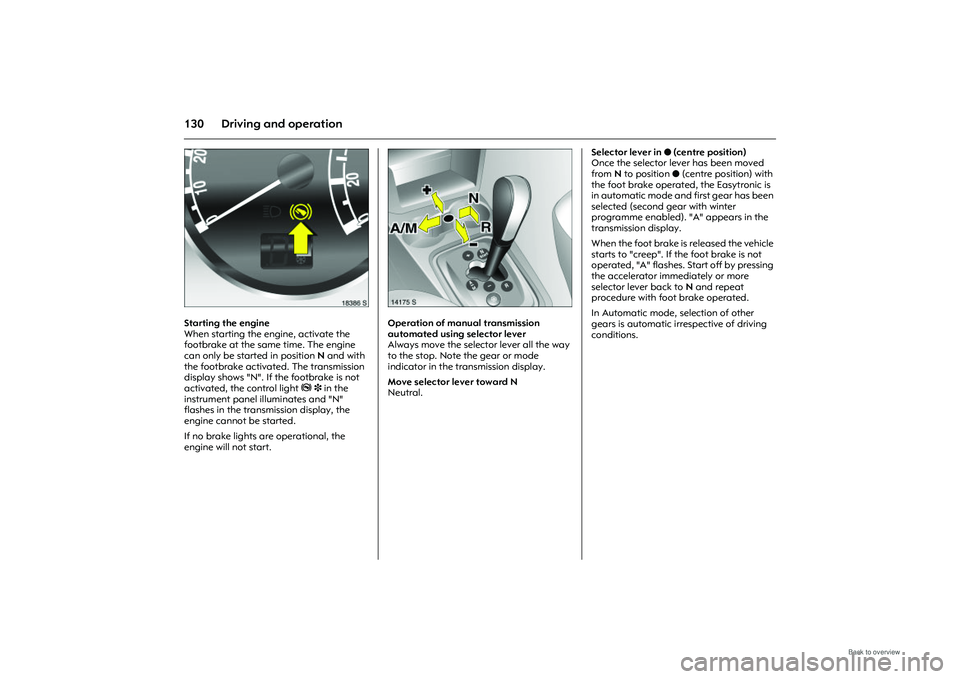
Starting the engine
When starting the engine, activate the
footbrake at the same time. The engine
can only be started in position N and with
the footbrake activated. The transmission
display shows "N". If the footbrake is not
activated, the control light j 3 in the
instrument panel illuminates and "N"
flashes in the transmission display, the
engine cannot be started.
If no brake lights are operational, the
engine will not start.
Picture no: 14175s.tif
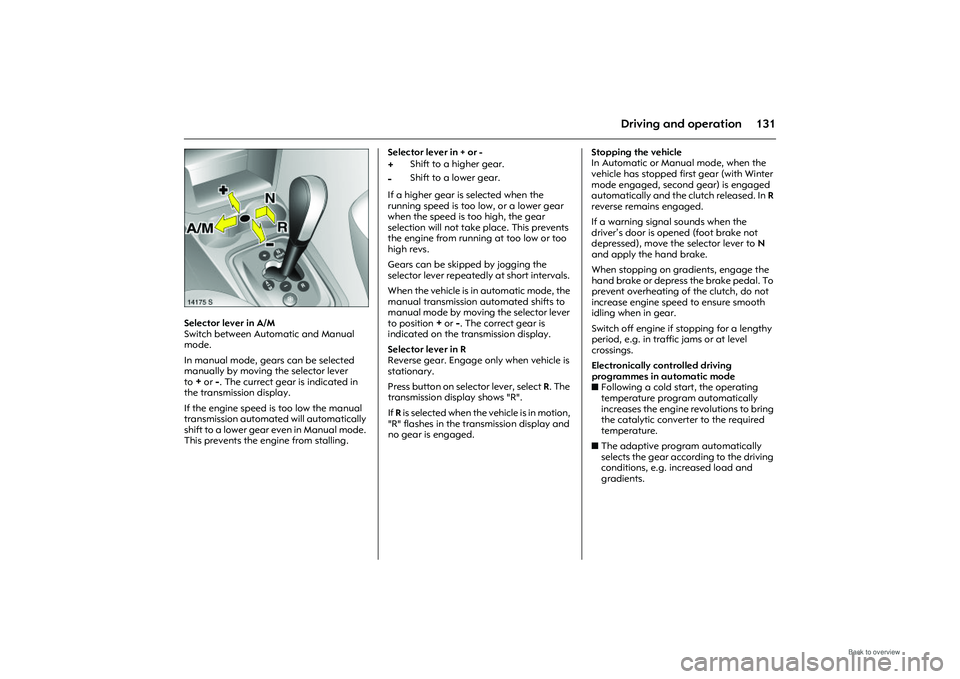
Operation of manual transmission
automated using selector lever
Always move the selector lever all the way
to the stop. Note the gear or mode
indicator in the transmission display.
Move selector lever toward N
Neutral. Selector lever in
o (centre position)
Once the selector lever has been moved
from N to position o (centre position) with
the foot brake operated, the Easytronic is
in automatic mode and first gear has been
selected (second gear with winter
programme enabled). "A" appears in the
transmission display.
When the foot brake is released the vehicle
starts to "creep". If the foot brake is not
operated, "A" flashes. Start off by pressing
the accelerator immediately or more
selector lever back to N and repeat
procedure with foot brake operated.
In Automatic mode, selection of other
gears is automatic irrespective of driving
conditions.
Page 137 of 248
131
Driving and operation
Picture no: 14175s.tif
Selector lever in A/M
Switch between Automatic and Manual
mode.
In manual mode, gears can be selected
manually by moving the selector lever
to
+or
-. The currect gear is indicated in
the transmission display.
If the engine speed is too low the manual
transmission automated will automatically
shift to a lower gear even in Manual mode.
This prevents the engine from stalling. Selector lever in + or -
If a higher gear is selected when the
running speed is too low, or a lower gear
when the speed is too high, the gear
selection will not take place. This prevents
the engine from running at too low or too
high revs.
Gears can be skipped by jogging the
selector lever repeatedly
at short intervals.
When the vehicle is in automatic mode, the
manual transmission automated shifts to
manual mode by moving the selector lever
to position
+ or
-. The correct gear is
indicated on the transmission display.
Selector lever in R
Reverse gear. Engage only when vehicle is
stationary.
Press button on selector lever, select R. The
transmission display shows "R".
If R is selected when the vehicle is in motion,
"R" flashes in the transmission display and
no gear is engaged. Stopping the vehicle
In Automatic or Manual mode, when the
vehicle has stopped first gear (with Winter
mode engaged, second gear) is engaged
automatically and the
clutch released. In R
reverse remains engaged.
If a warning signal sounds when the
driver’s door is opened (foot brake not
depressed), move the selector lever to N
and apply the hand brake.
When stopping on gradients, engage the
hand brake or depress the brake pedal. To
prevent overheating of the clutch, do not
increase engine speed to ensure smooth
idling when in gear.
Switch off engine if stopping for a lengthy
period, e.g. in traffic jams or at level
crossings.
Electronically controlled driving
programmes in automatic mode
z Following a cold start, the operating
temperature program automatically
increases the engine revolutions to bring
the catalytic converter to the required
temperature.
z The adaptive program automatically
selects the gear according to the driving
conditions, e.g. increased load and
gradients.
+
Shift to a higher gear.
-
Shift to a lower gear.
Page 142 of 248
136 Driving and operationSave energy – more kilometres
Please observe the running-in hints on the
previous page and the tips for energy
saving on the following pages.
Good, technically correct and economical
driving ensures maximum durability and
performance for your vehicle.
Overrun cut-off
The fuel supply is automatically cut off
during overrun, e.g. when the vehicle is
driven with a gear engaged but no throttle
application. Overrun cut-off is deactivated
if catalytic converter temperature is high.
Vehicles with turbocharged engine
3
Flow-generated noises may be audible if
the accelerator is released quickly on
account of air flow in the turbocharger.
Engine speed
Drive in a low engine speed range for each
gear as much as possible. Warming up
Allow the engine to wa
rm up while driving.
Do not warm it up by letting it ru n at idling
speed. Do not apply full throttle until the
engine has reached operating
temperature.
After a cold start, the manual transmission
automated 3 does not switch to higher
gears until the speed increases when it is in
automatic mode. This allows the catalytic
converter to reach th e temperature quickly
which is required for optimum emission
reduction.
Correct gear selection
Do not race your engine whilst in neutral or
with a low gear selected. Driving too fast in
individual gears as well as stop-and-go
traffic increases engine wear and fuel
consumption.
Change down
When decreasing speed, shift down into
the next lowest gear. Do not slip the clutch
with a high-revving engine. This is
especially important when hill climbing. Cooling fan
The cooling fan is controlled via a
thermoswitch and therefore only runs if
necessary.
The cooling fan automatically switches on
when the diesel particle filter is being
cleaned
3 depending on the engine.
Pedals
Do not place any objects in the foot well
which could slip under the pedals and
inhibit the pedal travel.
To ensure the pedal travel is uninhibited,
there must be no mats in the area of the
pedals.
Battery care
When driving slowly or when the vehicle is
stationary, e.g. in slow urban traffic, stop-
and-go traffic or traffic jams, turn off all
unnecessary electrical loads where
possible (e.g. heated rear window, heated
front seats, etc.).
Declutch when starting in order to relieve
the strain on the starter and the battery.
Page 143 of 248
137
Driving and operation
Saving fuel, protecting the
environmentTrend-setting technology
Environmentally friendly and mainly
recyclable materials were used when your
vehicle was being developed and
manufactured. The production methods
used to make your vehicle are also
environmentally-compatible.
Recycling of production wastes keeps the
circulation of material closed. Reduction of
energy and water requirements also helps
to conserve natural resources.
A highly advanced design means that your
vehicle can be easily disassembled at the
end of its working life, and the individual
materials separated for subsequent re-use.
Materials such as asbestos and cadmium
are not used. The refrigerant in the air
conditioning system 3 is CFC-free.
New painting techniques employ water as
a solvent. End-of-life vehicle recovery
Information on end-of-life vehicle recovery
centres and the recycling of end-of-life
vehicles is availabl
e at www.opel.com.
Energy and environment-conscious
driving
z High noise levels and exhaust emissions
are often a result of driving without due
attention to saving energy and
protecting the environment.
z You should therefore drive with energy in
mind: "more miles – less fuel".
Reduce the noise level and exhaust
emissions by adopting an environment-
conscious driving style. This is extremely
worthwhile and improves the quality of
life.
Fuel consumption depends to a great
extent on your own personal driving
style. The following hints are intended to
help you consume fuel at a rate that is as
close as possible to the specified levels
3224.
Check your vehicle’s fuel consumption
every time you refuel. This facilitates
early detection of any irregularities
causing increased fuel consumption. Warming up
z
Full throttle and warming up at idle
speed increase wear, fuel consumption,
exhaust emission, the amount of
pollutant in the exhaust and the amount
of noise.
z Drive off immediately after starting.
Warm up the engine by running it at
moderate engine speeds.
Uniform speed
z Hectic driving significantly increases fuel
consumption, the exhaust emissions, the
proportion of pollutant in the exhaust
gas and the noise level.
z Do not accelerate and brake
unnecessarily. Drive at uniform speed,
watching the road.
Avoid frequent starting off and stopping
e.g. at traffic lights, in short distance
traffic and in queues of traffic by means
of clever planning. Select roads with
good traffic flow.
Idling
z The engine also consumes fuel when
idling.
z If you have to wait for more than one
minute, it is worthwhile switching off the
engine. Five minutes of idling
corresponds to approximately one
kilometre of driving.
Page 149 of 248
143
Driving and operation
Picture no: 17891s.tif
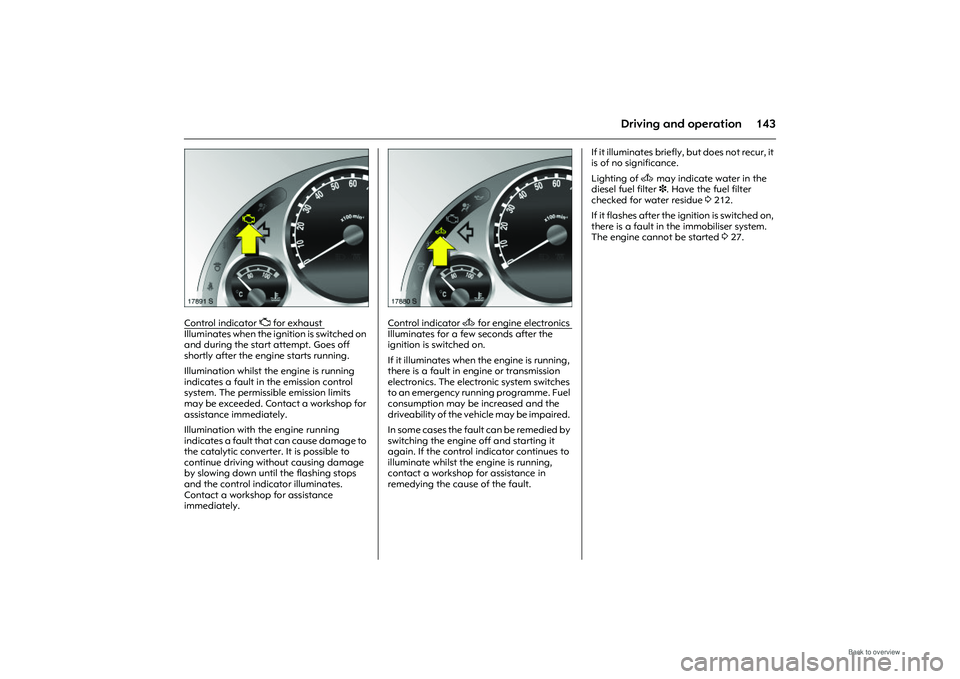
Control indicator
Z for exhaust
Illuminates when the ignition is switched on
and during the start attempt. Goes off
shortly after the engine starts running.
Illumination whilst the engine is running
indicates a fault in the emission control
system. The permissible emission limits
may be exceeded. Contact a workshop for
assistance immediately.
Illumination with the engine running
indicates a fault that can cause damage to
the catalytic converter. It is possible to
continue driving without causing damage
by slowing down until the flashing stops
and the control indicator illuminates.
Contact a workshop for assistance
immediately.
Picture no: 17880s.tif
Control indicator
A
for engine electronics
Illuminates for a few seconds after the
ignition is switched on.
If it illuminates when the engine is running,
there is a fault in engine or transmission
electronics. The electr onic system switches
to an emergency runni ng programme. Fuel
consumption may be increased and the
driveability of the vehicle may be impaired.
In some cases the fault can be remedied by
switching the engine off and starting it
again. If the control indicator continues to
illuminate whilst the en gine is running,
contact a workshop for assistance in
remedying the cause of the fault. If it illuminates briefly, but does not recur, it
is of no significance.
Lighting of
A may indicate water in the
diesel fuel filter 3. Have the fuel filter
checked for water residue 3212.
If it flashes after the ignition is switched on,
there is a fault in the immobiliser system.
The engine cannot be started 327.
Page 212 of 248
206 Service and maintenanceAdditional service workAdditional work ⊕
Additional work is not always necessary at
each service, but can be carried out at the
same time as a regular service.
T h e c o s t o f th i s t y p e o f w o r k i s n o t i n c l ud e d
in the charge for a regular service and will
be invoiced separately. It is, however, more
c o s t - e f f e c t i v e t o h a v e t h i s w o r k d o n e a t t h e
same time as a scheduled service rather
than have it done separately.
Hard driving conditions o
Conditions are considered hard when one
or more of the following situations occurs
more frequently:
z cold start,
z stop and go,
z caravan/trailer towing,
z inclines or steep climbs,
z poor road conditions,
z sand and dust,
z extreme temperature fluctuations.
Police vehicles, taxis and driving school
vehicles are classified as being subjected to
hard driving conditions. With hard driving conditions it might be
necessary to carry out certain service work
more frequently than the scheduled
intervals.
We recommend seeking technical advice
with regard to servic
ing requirements for
your particular driving circumstances.
Recommended fluids and
lubricants Only use products which have been tested
and approved. Damage caused by using
operating materials which have not been
approved is not covere d by the guarantee.
9 Warning
Operating materials are dangerous and
must be handled carefully. If swallowed,
seek medical help immediately. Do not
breath in fumes and avoid contact with
the skin. Keep away from children.
These materials are forbidden to
contaminate waste water, surface
water, groundwater or soil. Dispose of
empty containers correctly. Always
remember that operating materials are
dangerous.