door lock OPEL MOKKA 2017 User Guide
[x] Cancel search | Manufacturer: OPEL, Model Year: 2017, Model line: MOKKA, Model: OPEL MOKKA 2017Pages: 233, PDF Size: 6.69 MB
Page 73 of 233
Instruments and controls71Instruments and
controlsControls ....................................... 72
Steering wheel adjustment ........72
Steering wheel controls .............72
Heated steering wheel ...............72
Horn ........................................... 73
Windscreen wiper/washer .........73
Rear window wiper/washer .......75
Outside temperature ..................75
Clock ......................................... 76
Power outlets ............................. 77
Warning lights, gauges and indi‐
cators ........................................... 78
Speedometer ............................. 78
Odometer .................................. 78
Trip odometer ............................ 78
Tachometer ............................... 79
Fuel gauge ................................ 79
Fuel selector .............................. 79
Engine coolant temperature gauge ....................................... 80
Service display .......................... 80
Control indicators ......................81
Turn signal ................................. 84
Seat belt reminder .....................84Airbag and belt tensioners .........84
Airbag deactivation ....................84
Charging system .......................85
Malfunction indicator light ..........85
Service vehicle soon .................85
Brake and clutch system ...........85
Operate pedal ............................ 85
Antilock brake system (ABS) .....85
Upshift ....................................... 86
Descent control system .............86
Power steering .......................... 86
Lane departure warning ............86
Ultrasonic parking assist ...........86
Electronic Stability Control off ...86
Electronic Stability Control and Traction Control system ...........87
Traction Control system off .......87
Preheating ................................. 87
Diesel particle filter ....................87
Tyre pressure monitoring system ...................................... 87
Engine oil pressure ....................87
Low fuel ..................................... 88
Immobiliser ................................ 88
Exterior light .............................. 88
High beam ................................. 88
Adaptive forward lighting ...........88
Fog light ..................................... 89
Rear fog light ............................. 89
Cruise control ............................ 89Vehicle detected ahead .............89
Bonnet open .............................. 89
Door open .................................. 89
Information displays .....................89
Driver Information Centre ..........89
Graphic-Info-Display, Colour- Info-Display .............................. 93
Vehicle messages ........................94
Warning chimes .........................96
Battery voltage .......................... 96
Trip computer ............................... 97
Vehicle personalisation ..............100
OnStar ....................................... 103
Page 103 of 233
Instruments and controls101Duration upon exit of vehicle:
Activates or deactivates and
changes the duration of exit
lighting.
● Power door locks
Auto door lock : Activates or
deactivates the automatic door
unlocking function after switching off ignition. Activates or
deactivates the automatic door
locking function after driving-off.
Stop door lock if door open :
Activates or deactivates the
automatic door locking function
while a door is open.
Delayed door lock : Activates or
deactivates the delayed door
locking function.
● Remote locking, unlocking,
starting
Remote unlock feedback :
Activates or deactivates the
hazard warning flasher feedback whilst unlocking.
Remote door unlock : Changes
the configuration to unlock onlythe driver's door or the whole
vehicle whilst unlocking.
● Restore factory settings :
Resets all settings to the default
settings.
Settings in the Colour-Info-
Display
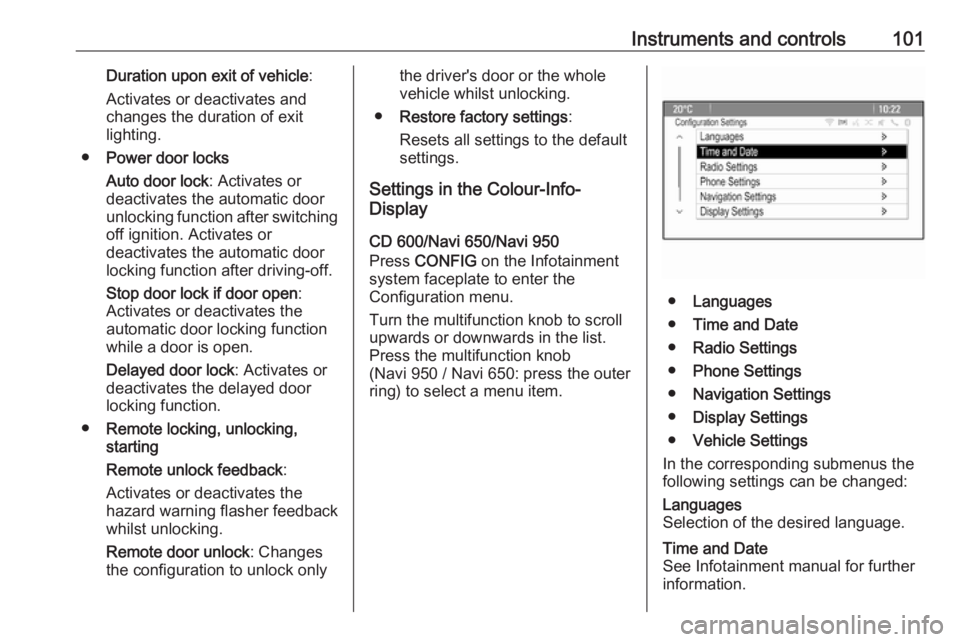
CD 600/Navi 650/Navi 950
Press CONFIG on the Infotainment
system faceplate to enter the
Configuration menu.
Turn the multifunction knob to scroll
upwards or downwards in the list.
Press the multifunction knob
(Navi 950 / Navi 650: press the outer
ring) to select a menu item.
● Languages
● Time and Date
● Radio Settings
● Phone Settings
● Navigation Settings
● Display Settings
● Vehicle Settings
In the corresponding submenus the
following settings can be changed:
Languages
Selection of the desired language.Time and Date
See Infotainment manual for further information.
Page 104 of 233
102Instruments and controlsRadio Settings
See Infotainment manual for further information.Phone Settings
See Infotainment manual for further
information.Navigation Settings
See Infotainment manual for further
information.Display Settings ● Home Page Menu :
See Infotainment manual for
further information.
● Rear Camera Options :
Press to adjust the rear camera options 3 146.
● Display Off :
See Infotainment manual for
further information.
● Map Settings :
See Infotainment manual for
further information.Vehicle Settings ● Climate and Air Quality
Auto Fan Speed : Modifies the fan
speed regulation. Changedsetting will be active after
switching the ignition off and on
again.
Air Conditioning Mode : Activates
or deactivates cooling when
switching on the ignition or uses the last chosen setting.
Auto Demist : Activates or
deactivates auto demist.
Auto Rear Demist : Activates the
heated rear window
automatically.
● Comfort and Convenience
Chime Volume : Changes the
volume of warning chimes.
Personalisation by Driver :
Activates or deactivates the
personalisation function.
Auto Reverse Gear Wiper :
Activates or deactivates
automatic switching on of the
rear window wiper when reverse gear is engaged.
● Collision Detection Systems
Park Assist : Activates or
deactivates the ultrasonic
sensors.● Lighting
Vehicle Locator Lights : Activates
or deactivates the entry lighting.
Exit Lighting : Activates or
deactivates and changes the
duration of exit lighting.
● Power Door Locks
Open Door Anti Lock Out :
Activates or deactivates the
automatic door locking function
while a door is open.
Auto Door Lock : Activates or
deactivates the automatic door
unlocking function after switching
off ignition. Activates or
deactivates the automatic door
locking function after driving-off.
Delay Door Lock : Activates or
deactivates the delayed door
locking function.
● Remote Lock/Unlock/Start
Remote Lock Feedback :
Activates or deactivates the
hazard warning light feedback
whilst locking.
Remote Unlock Feedback :
Activates or deactivates the
Page 105 of 233
Instruments and controls103hazard warning flasher feedback
whilst unlocking.
Remote Door Unlock : Changes
the configuration to unlock only
the driver's door or the entire vehicle whilst unlocking.
Relock Remotely Unlocked
Doors : Activates or deactivates
the automatic relock function
after unlocking without opening the vehicle.
● Return to Factory Settings? :
Resets all settings to the default settings.OnStar
OnStar is a personal connectivity and
service assistant with integrated
Wi-Fi hotspot. The OnStar service is
available 24 hours a day, seven days
a week.
Note
OnStar is not available for all
markets. For further information,
contact your workshop.
Note
In order to be available and
operational, OnStar needs a valid
OnStar subscription, functioning
vehicle electrics, mobile service and
GPS satellite link.
To activate the OnStar services and
set up an account, press Z and speak
with an advisor.
Depending on the equipment of the vehicle, the following services areavailable:
● Emergency services and support
in the case of a vehicle
breakdown
● Wi-Fi hotspot● Smartphone application
● Remote control, e.g. location of the vehicle, activation of horn and
lights, control of central locking
system
● Stolen vehicle assistance
● Vehicle diagnostics
● Destination download
Note
The OnStar module of the vehicle is
deactivated after ten days without an
ignition cycle. Functions requiring a
data connection will be available
again after switching on the ignition.
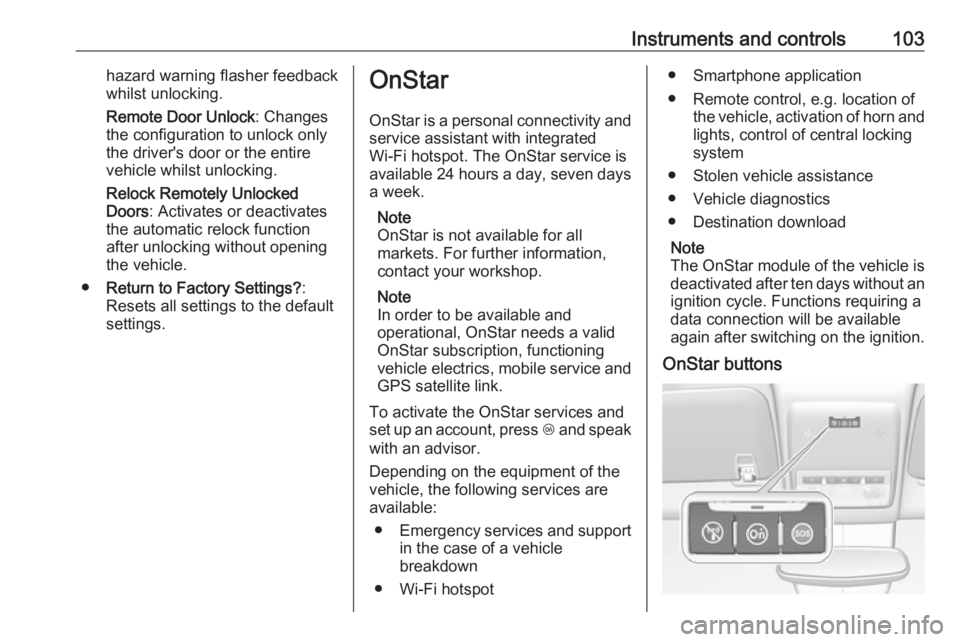
OnStar buttons
Page 117 of 233

Lighting115Rear
Operate rocker switch:
⃒:onw:automatic switching on and off§:offReading lights
The front reading lights are located inthe overhead console.
Press s and t to turn each light on
or off.
Glove box lighting Illuminates when the glovebox is
opened.
Sunvisor lights Illuminates when the cover is opened.
Lighting features
Entry lighting
Welcome lighting Following lights are switched on for a
short time by unlocking the vehicle
with the radio remote control:
● low beam
● sidelights
● tail lights
● number plate lights
● instrument panel light
● interior lights
This function works only in the dark
and facilitates locating the vehicle.
Activation or deactivation of this
function can be changed in the
vehicle settings. Vehicle
personalisation 3 100.
The following lights will additionally switch on when driver's door is
opened:
● illumination of some switches
● some interior lights
Page 166 of 233

164Vehicle careGeneral Information
Accessories and vehicle modifications
We recommend the use of genuine
parts and accessories and factory
approved parts specific for your
vehicle type. We cannot assess or guarantee reliability of other products
- even if they have a regulatory or
otherwise granted approval.
Do not make any modifications to the electrical system, e.g. changes of
electronic control units (chip tuning).Caution
When transporting the vehicle on
a train or on a recovery vehicle, the
mud flaps might be damaged.
Vehicle storage
Storage for a long period of time
If the vehicle is to be stored for several months:
● Wash and wax the vehicle.
● Have the wax in the engine compartment and underbody
checked.
● Clean and preserve the rubber seals.
● Fill up fuel tank completely.
● Change the engine oil.
● Drain the washer fluid reservoir.
● Check the coolant antifreeze and
corrosion protection.
● Adjust tyre pressure to the value specified for full load.
● Park the vehicle in a dry, well ventilated place. Engage first or
reverse gear or set selector lever
to P. Prevent the vehicle from
rolling.
● Do not apply the parking brake.● Open the bonnet, close all doors and lock the vehicle.
● Disconnect the clamp from the negative terminal of the vehicle
battery. Beware that all systems
are not functional, e.g. anti-theft
alarm system.
Putting back into operation
When the vehicle is to be put back into
operation:
● Connect the clamp to the negative terminal of the vehicle
battery. Activate the electronics
of the power windows.
● Check tyre pressure.
● Fill up the washer fluid reservoir.
● Check the engine oil level.
● Check the coolant level.
● Fit the number plate if necessary.
End-of-life vehicle recovery
Information on end-of-life vehicle
recovery centres and the recycling of
end-of-life vehicles is available on our
Page 178 of 233

176Vehicle care2. Push bulb into socket slightly,rotate anticlockwise, remove and
renew bulb.
3. Insert bulb holder in reflector, rotate clockwise to engage.
Tail lights Left-hand side
1. Disengage both covers at the respective outer side by inserting
a screwdriver. Remove both
covers and unscrew screws.
Remove the panel.
2. First disengage cover by inserting
a screwdriver at the recess. Then
disengage cover at the front and
upper side. Remove cover.
Right-hand side
1. Remove the storage door and the
tyre repair kit.
2. Remove the cover.
Page 204 of 233

202Vehicle careCaution
Drive slowly. Do not drive jerkily.
Excessive tractive force can
damage the vehicle.
After towing, unscrew the towing eye.
Insert cap at the bottom and engage
cap.
Appearance care
Exterior care
Locks The locks are lubricated at the factoryusing a high quality lock cylinder
grease. Use de-icing agent only when
absolutely necessary, as this has a
degreasing effect and impairs lock function. After using a de-icing agent, have the locks regreased by a
workshop.
Washing The paintwork of your vehicle is
exposed to environmental influences. Wash and wax your vehicle regularly.
When using automatic vehicle
washes, select a programme that
includes waxing.
Bird droppings, dead insects, resin,
pollen and the like should be cleaned
off immediately, as they contain
aggressive constituents which can
cause paint damage.If using a vehicle wash, comply with
the vehicle wash manufacturer's
instructions. The windscreen wiper
and rear window wiper must be
switched off. Remove antenna and
external accessories such as roof
racks etc.
If you wash your vehicle by hand,
make sure that the insides of the
wheel housings are also thoroughly
rinsed out.
Clean edges and folds on opened
doors and the bonnet as well as the
areas they cover.Caution
Always use a cleaning agent with
a pH value of 4 to 9.
Do not use cleaning agents on hot surfaces.
Have the door hinges of all doors
greased by a workshop.
Do not clean the engine compartment with a steam-jet or high-pressure jet
cleaner.
Page 227 of 233

Customer information225When using the vehicle, situations
may occur in which these technical
data related to other information
(accident report, damages on the
vehicle, witness statements etc.) may
be associated with a specific person - possibly, with the assistance of an
expert.
Additional functions contractually
agreed upon with the client (e.g.
vehicle location in emergency cases)
allow the transmission of particular vehicle data from the vehicle.
Radio Frequency
Identification (RFID)
RFID technology is used in some
vehicles for functions such as tyre
pressure monitoring and ignition
system security. It is also used in
connection with conveniences such
as radio remote controls for door
locking/unlocking and starting, and in-
vehicle transmitters for garage door
openers. RFID technology in Opel
vehicles does not use or record
personal information or link with any
other Opel system containing
personal information.
Page 229 of 233
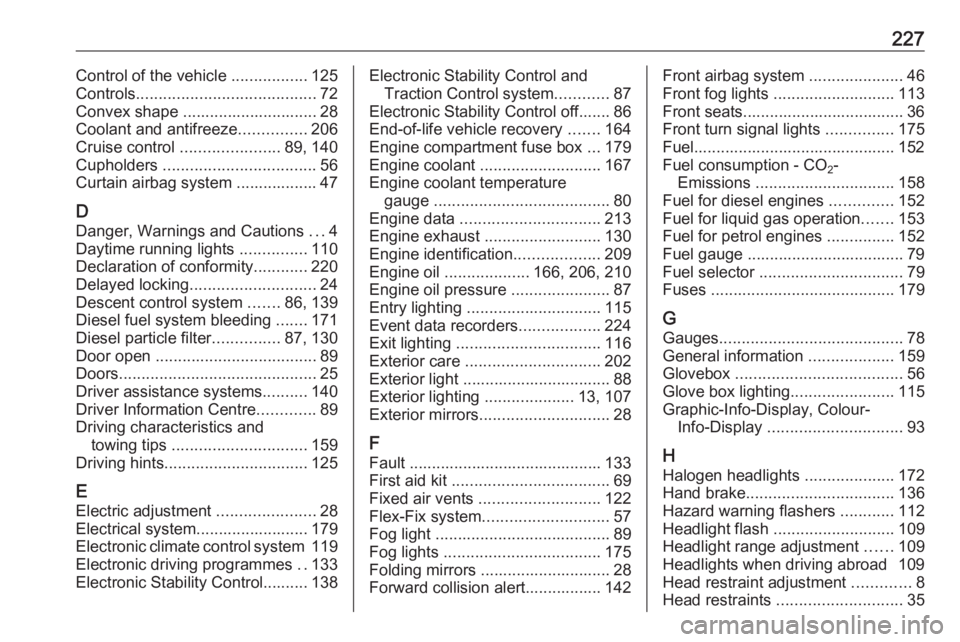
227Control of the vehicle .................125
Controls ........................................ 72
Convex shape .............................. 28
Coolant and antifreeze ...............206
Cruise control ...................... 89, 140
Cupholders .................................. 56
Curtain airbag system .................. 47
D Danger, Warnings and Cautions ...4
Daytime running lights ...............110
Declaration of conformity ............220
Delayed locking ............................ 24
Descent control system .......86, 139
Diesel fuel system bleeding .......171
Diesel particle filter ...............87, 130
Door open .................................... 89
Doors ............................................ 25
Driver assistance systems ..........140
Driver Information Centre .............89
Driving characteristics and towing tips .............................. 159
Driving hints ................................ 125
E Electric adjustment ......................28
Electrical system......................... 179
Electronic climate control system 119
Electronic driving programmes ..133
Electronic Stability Control.......... 138Electronic Stability Control and Traction Control system ............87
Electronic Stability Control off....... 86 End-of-life vehicle recovery .......164
Engine compartment fuse box ...179
Engine coolant ........................... 167
Engine coolant temperature gauge ....................................... 80
Engine data ............................... 213
Engine exhaust .......................... 130
Engine identification ...................209
Engine oil ................... 166, 206, 210
Engine oil pressure ......................87
Entry lighting .............................. 115
Event data recorders ..................224
Exit lighting ................................ 116
Exterior care .............................. 202
Exterior light ................................. 88
Exterior lighting ....................13, 107
Exterior mirrors ............................. 28
F Fault ........................................... 133
First aid kit ................................... 69
Fixed air vents ........................... 122
Flex-Fix system ............................ 57
Fog light ....................................... 89
Fog lights ................................... 175
Folding mirrors ............................. 28
Forward collision alert................. 142Front airbag system .....................46
Front fog lights ........................... 113
Front seats.................................... 36
Front turn signal lights ...............175
Fuel............................................. 152
Fuel consumption - CO 2-
Emissions ............................... 158
Fuel for diesel engines ..............152
Fuel for liquid gas operation .......153
Fuel for petrol engines ...............152
Fuel gauge ................................... 79
Fuel selector ................................ 79
Fuses ......................................... 179
G Gauges ......................................... 78
General information ...................159
Glovebox ..................................... 56
Glove box lighting .......................115
Graphic-Info-Display, Colour- Info-Display .............................. 93
H
Halogen headlights ....................172
Hand brake ................................. 136
Hazard warning flashers ............112
Headlight flash ........................... 109
Headlight range adjustment ......109
Headlights when driving abroad 109
Head restraint adjustment .............8
Head restraints ............................ 35