light OPEL MOKKA 2017 User Guide
[x] Cancel search | Manufacturer: OPEL, Model Year: 2017, Model line: MOKKA, Model: OPEL MOKKA 2017Pages: 233, PDF Size: 6.69 MB
Page 66 of 233
64StorageTo increase visibility, the tail lights of
the vehicle are activated when the
rear carrier system is folded back.9 Warning
When folding the rear carrier
system forwards again, take care that the system is engaged
securely.
Removing bicycles
Undo strap retainers on both bicycle
tyres.
Turn knob anticlockwise and remove
mounting brackets.
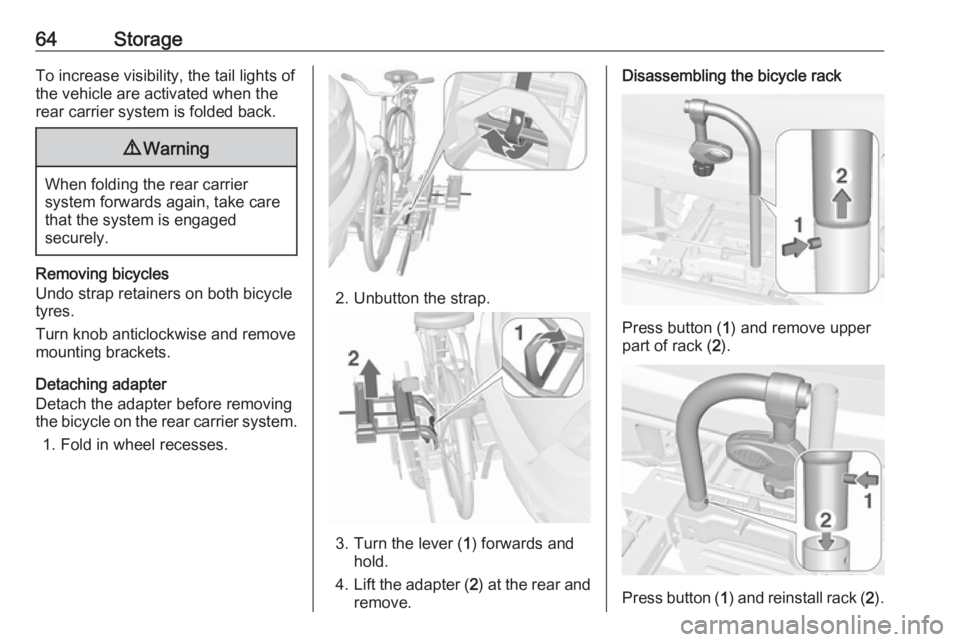
Detaching adapter
Detach the adapter before removing
the bicycle on the rear carrier system.
1. Fold in wheel recesses.
2. Unbutton the strap.
3. Turn the lever ( 1) forwards and
hold.
4. Lift the adapter ( 2) at the rear and
remove.
Disassembling the bicycle rack
Press button ( 1) and remove upper
part of rack ( 2).
Press button ( 1) and reinstall rack ( 2).
Page 68 of 233

66StorageRetracting the rear carrier systemCaution
Take care that all foldable parts,
e.g. wheel recesses and mounting
brackets, are stowed accurately.
Otherwise the rear carrier system
may get damaged when trying to
retract it.
Push the release lever up and hold.
Lift the system slightly and push it into
the bumper until it engages.
Release lever must return to original
position.
9 Warning
If the system cannot be correctly
engaged, please seek the
assistance of a workshop.
Load compartment
Load compartment extensionCaution
First fold down the rear seat
cushion before folding the rear
seat backrest.
Disregard may lead to damage to
the rear seat.
1. Push head restraints down by pressing the catch.
Note
To ensure sufficient room for rear
seat cushion operation, slide the
front seat forward and move the front seat backrest upright.
Page 73 of 233
Instruments and controls71Instruments and
controlsControls ....................................... 72
Steering wheel adjustment ........72
Steering wheel controls .............72
Heated steering wheel ...............72
Horn ........................................... 73
Windscreen wiper/washer .........73
Rear window wiper/washer .......75
Outside temperature ..................75
Clock ......................................... 76
Power outlets ............................. 77
Warning lights, gauges and indi‐
cators ........................................... 78
Speedometer ............................. 78
Odometer .................................. 78
Trip odometer ............................ 78
Tachometer ............................... 79
Fuel gauge ................................ 79
Fuel selector .............................. 79
Engine coolant temperature gauge ....................................... 80
Service display .......................... 80
Control indicators ......................81
Turn signal ................................. 84
Seat belt reminder .....................84Airbag and belt tensioners .........84
Airbag deactivation ....................84
Charging system .......................85
Malfunction indicator light ..........85
Service vehicle soon .................85
Brake and clutch system ...........85
Operate pedal ............................ 85
Antilock brake system (ABS) .....85
Upshift ....................................... 86
Descent control system .............86
Power steering .......................... 86
Lane departure warning ............86
Ultrasonic parking assist ...........86
Electronic Stability Control off ...86
Electronic Stability Control and Traction Control system ...........87
Traction Control system off .......87
Preheating ................................. 87
Diesel particle filter ....................87
Tyre pressure monitoring system ...................................... 87
Engine oil pressure ....................87
Low fuel ..................................... 88
Immobiliser ................................ 88
Exterior light .............................. 88
High beam ................................. 88
Adaptive forward lighting ...........88
Fog light ..................................... 89
Rear fog light ............................. 89
Cruise control ............................ 89Vehicle detected ahead .............89
Bonnet open .............................. 89
Door open .................................. 89
Information displays .....................89
Driver Information Centre ..........89
Graphic-Info-Display, Colour- Info-Display .............................. 93
Vehicle messages ........................94
Warning chimes .........................96
Battery voltage .......................... 96
Trip computer ............................... 97
Vehicle personalisation ..............100
OnStar ....................................... 103
Page 80 of 233
78Instruments and controlsCaution
Do not connect any current
delivering accessories, e.g.
electrical charging devices or
batteries.
Do not damage the outlets by
using unsuitable plugs.
Warning lights, gauges
and indicators
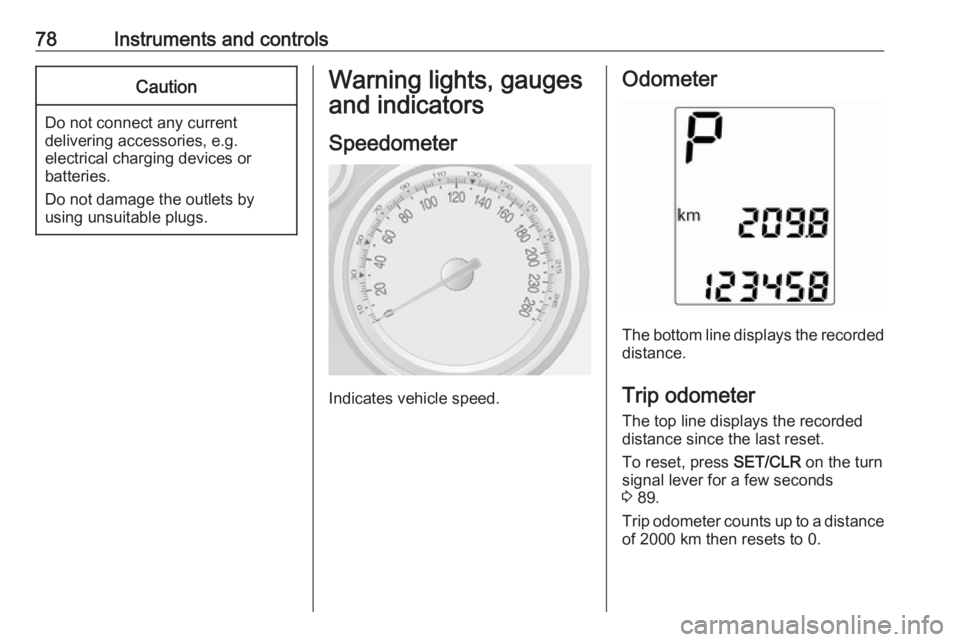
Speedometer
Indicates vehicle speed.
Odometer
The bottom line displays the recordeddistance.
Trip odometer The top line displays the recorded
distance since the last reset.
To reset, press SET/CLR on the turn
signal lever for a few seconds
3 89.
Trip odometer counts up to a distance
of 2000 km then resets to 0.
Page 85 of 233
Instruments and controls83Control indicators in the centre
console
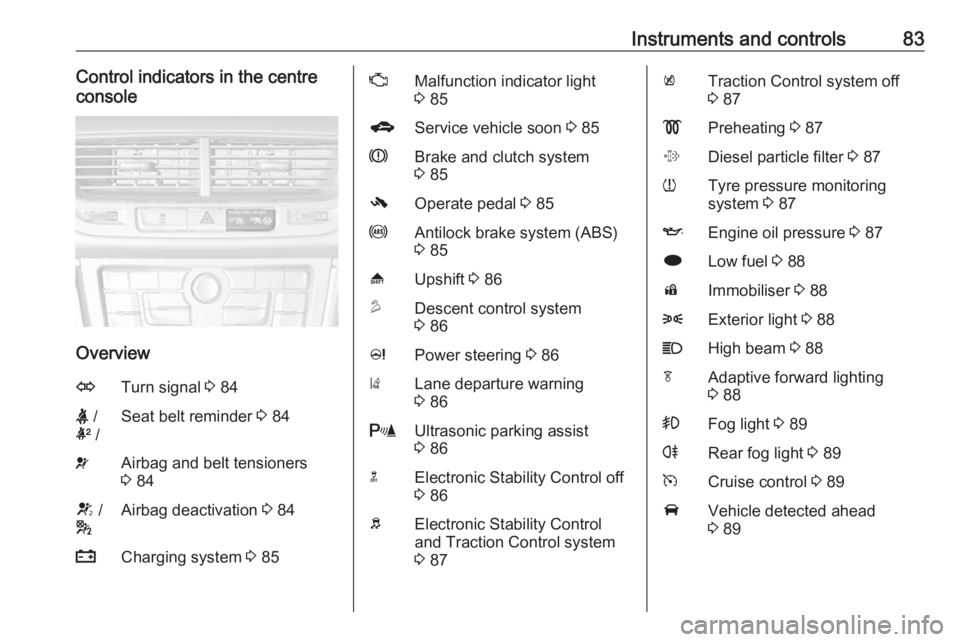
Overview
OTurn signal 3 84X /
k /Seat belt reminder 3 84vAirbag and belt tensioners
3 84V /
*Airbag deactivation 3 84pCharging system 3 85ZMalfunction indicator light
3 85gService vehicle soon 3 85RBrake and clutch system
3 85-Operate pedal 3 85uAntilock brake system (ABS)
3 85[Upshift 3 86uDescent control system
3 86cPower steering 3 86)Lane departure warning
3 86rUltrasonic parking assist
3 86nElectronic Stability Control off
3 86bElectronic Stability Control
and Traction Control system
3 87kTraction Control system off
3 87!Preheating 3 87%Diesel particle filter 3 87wTyre pressure monitoring
system 3 87IEngine oil pressure 3 87iLow fuel 3 88dImmobiliser 3 888Exterior light 3 88CHigh beam 3 88fAdaptive forward lighting
3 88>Fog light 3 89rRear fog light 3 89mCruise control 3 89AVehicle detected ahead
3 89
Page 86 of 233
84Instruments and controls/Bonnet open 3 89hDoor open 3 89
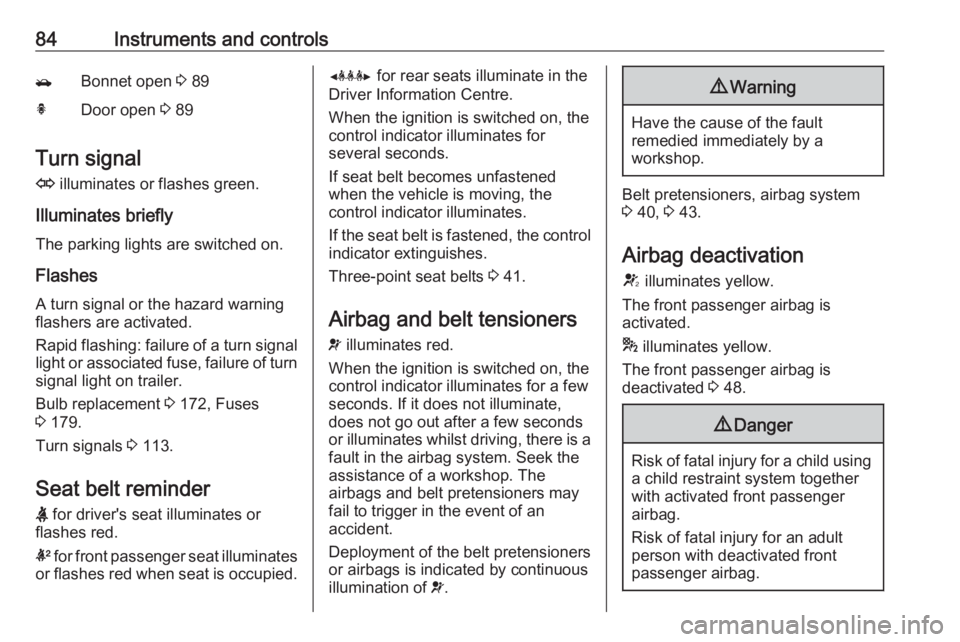
Turn signal
O illuminates or flashes green.
Illuminates briefly The parking lights are switched on.
Flashes
A turn signal or the hazard warning flashers are activated.
Rapid flashing: failure of a turn signal light or associated fuse, failure of turn
signal light on trailer.
Bulb replacement 3 172, Fuses
3 179.
Turn signals 3 113.
Seat belt reminder X for driver's seat illuminates or
flashes red.
k for front passenger seat illuminates
or flashes red when seat is occupied.
Y for rear seats illuminate in the
Driver Information Centre.
When the ignition is switched on, the
control indicator illuminates for
several seconds.
If seat belt becomes unfastened
when the vehicle is moving, the
control indicator illuminates.
If the seat belt is fastened, the control
indicator extinguishes.
Three-point seat belts 3 41.
Airbag and belt tensioners v illuminates red.
When the ignition is switched on, the
control indicator illuminates for a few
seconds. If it does not illuminate,
does not go out after a few seconds
or illuminates whilst driving, there is a
fault in the airbag system. Seek the
assistance of a workshop. The
airbags and belt pretensioners may
fail to trigger in the event of an
accident.
Deployment of the belt pretensioners
or airbags is indicated by continuous
illumination of v.9
Warning
Have the cause of the fault
remedied immediately by a
workshop.
Belt pretensioners, airbag system
3 40, 3 43.
Airbag deactivation
V illuminates yellow.
The front passenger airbag is
activated.
* illuminates yellow.
The front passenger airbag is
deactivated 3 48.
9 Danger
Risk of fatal injury for a child using
a child restraint system together
with activated front passenger
airbag.
Risk of fatal injury for an adult
person with deactivated front
passenger airbag.
Page 87 of 233
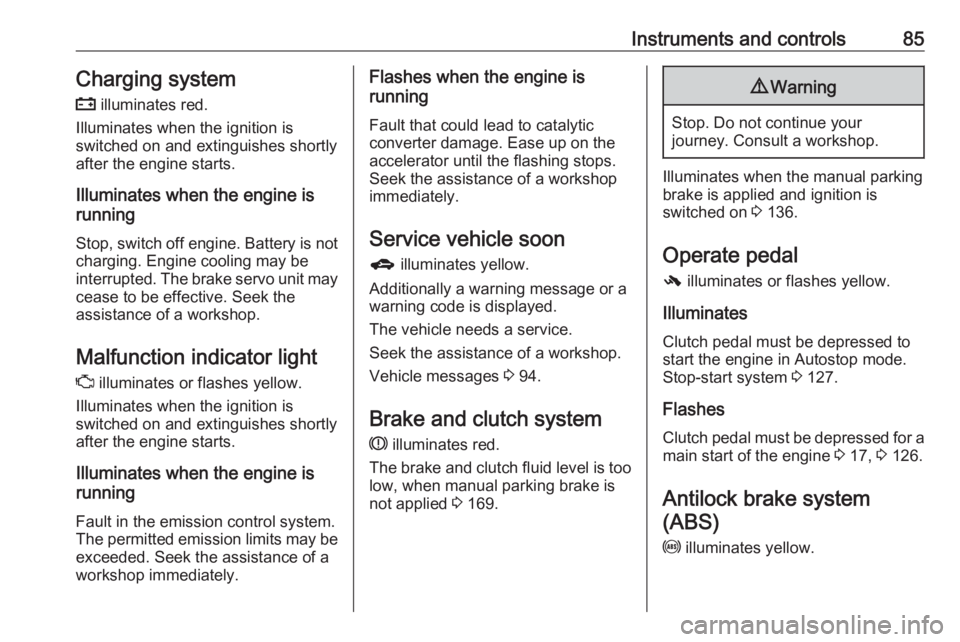
Instruments and controls85Charging system
p illuminates red.
Illuminates when the ignition is
switched on and extinguishes shortly
after the engine starts.
Illuminates when the engine is
running
Stop, switch off engine. Battery is not
charging. Engine cooling may be
interrupted. The brake servo unit may
cease to be effective. Seek the
assistance of a workshop.
Malfunction indicator light Z illuminates or flashes yellow.
Illuminates when the ignition is
switched on and extinguishes shortly
after the engine starts.
Illuminates when the engine is
running
Fault in the emission control system. The permitted emission limits may be exceeded. Seek the assistance of a
workshop immediately.Flashes when the engine is
running
Fault that could lead to catalytic
converter damage. Ease up on the
accelerator until the flashing stops.
Seek the assistance of a workshop
immediately.
Service vehicle soon
g illuminates yellow.
Additionally a warning message or a
warning code is displayed.
The vehicle needs a service.
Seek the assistance of a workshop.
Vehicle messages 3 94.
Brake and clutch system
R illuminates red.
The brake and clutch fluid level is too low, when manual parking brake is
not applied 3 169.9 Warning
Stop. Do not continue your
journey. Consult a workshop.
Illuminates when the manual parking
brake is applied and ignition is
switched on 3 136.
Operate pedal - illuminates or flashes yellow.
Illuminates
Clutch pedal must be depressed to
start the engine in Autostop mode.
Stop-start system 3 127.
Flashes
Clutch pedal must be depressed for a main start of the engine 3 17, 3 126.
Antilock brake system
(ABS)
u illuminates yellow.
Page 90 of 233
88Instruments and controlsIlluminates when the engine is
runningCaution
Engine lubrication may be
interrupted. This may result in
damage to the engine and/or
locking of the drive wheels.
1. Depress clutch.
2. Select neutral gear, set selector lever to N.
3. Move out of the flow of traffic as quickly as possible without
impeding other vehicles.
4. Switch off ignition.
9 Warning
When the engine is off,
considerably more force is needed
to brake and steer. During an
Autostop the brake servo unit will still be operational.
Do not remove key until vehicle is
stationary, otherwise the steeringwheel lock could engage
unexpectedly.
Check oil level before seeking the
assistance of a workshop 3 166.
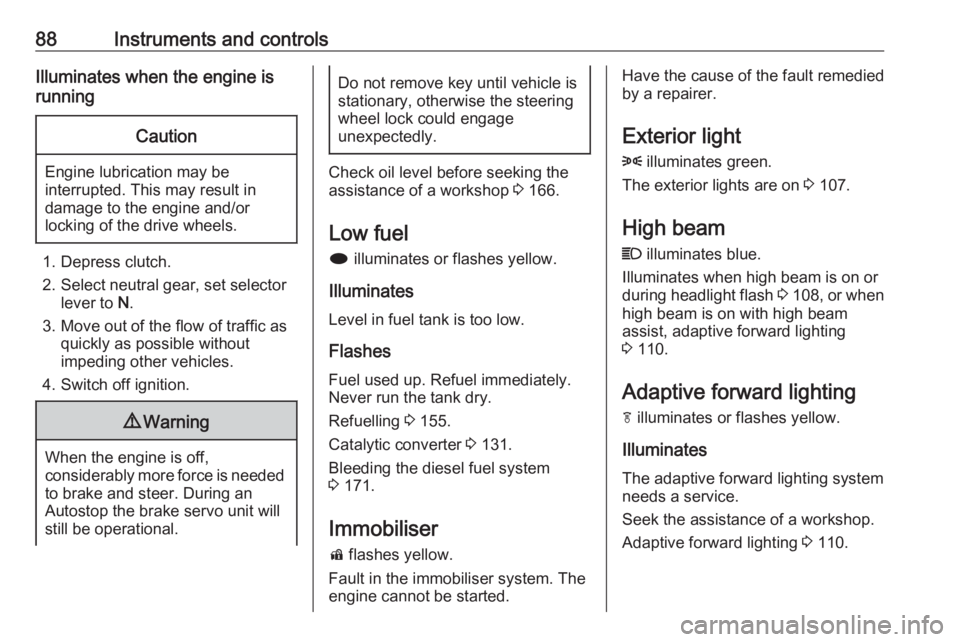
Low fuel
i illuminates or flashes yellow.
Illuminates
Level in fuel tank is too low.
Flashes
Fuel used up. Refuel immediately.
Never run the tank dry.
Refuelling 3 155.
Catalytic converter 3 131.
Bleeding the diesel fuel system
3 171.
Immobiliser d flashes yellow.
Fault in the immobiliser system. The
engine cannot be started.
Have the cause of the fault remedied
by a repairer.
Exterior light
8 illuminates green.
The exterior lights are on 3 107.
High beam
C illuminates blue.
Illuminates when high beam is on or
during headlight flash 3 108 , or when
high beam is on with high beam
assist, adaptive forward lighting
3 110.
Adaptive forward lighting f illuminates or flashes yellow.
Illuminates
The adaptive forward lighting system
needs a service.
Seek the assistance of a workshop. Adaptive forward lighting 3 110.
Page 91 of 233
Instruments and controls89Flashes
System switched to symmetrical low
beam.
Control indicator f flashes for approx.
4 seconds after the ignition is switched on as a reminder that the
system has been activated 3 109.
Automatic light control 3 108.
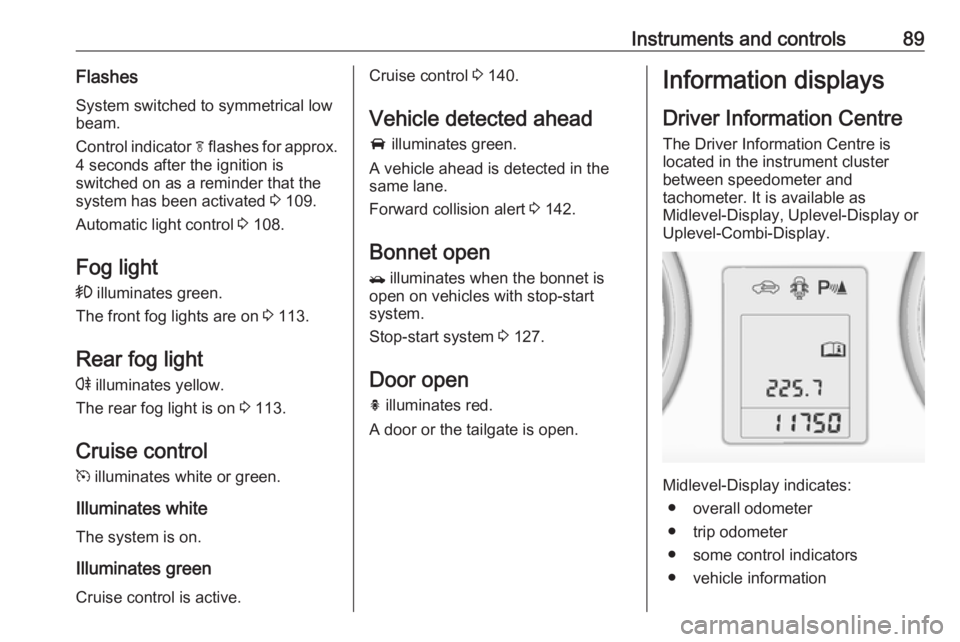
Fog light > illuminates green.
The front fog lights are on 3 113.
Rear fog light r illuminates yellow.
The rear fog light is on 3 113.
Cruise control
m illuminates white or green.
Illuminates white The system is on.
Illuminates green Cruise control is active.Cruise control 3 140.
Vehicle detected ahead
A illuminates green.
A vehicle ahead is detected in the
same lane.
Forward collision alert 3 142.
Bonnet open / illuminates when the bonnet is
open on vehicles with stop-start
system.
Stop-start system 3 127.
Door open
h illuminates red.
A door or the tailgate is open.Information displays
Driver Information Centre
The Driver Information Centre is
located in the instrument cluster
between speedometer and
tachometer. It is available as
Midlevel-Display, Uplevel-Display or
Uplevel-Combi-Display.
Midlevel-Display indicates:
● overall odometer
● trip odometer
● some control indicators
● vehicle information
Page 93 of 233

Instruments and controls91
Turn the adjuster wheel to highlight a
menu option or to set a numeric value.
Press SET/CLR to select a function or
to confirm a message.
Vehicle Information Menu
Press MENU to select the Vehicle
Information Menu , or on Uplevel-
Combi-Display select X.
Turn the adjuster wheel to select a
submenu. Press SET/CLR to confirm.
Follow the instructions given in the
submenus.
Possible submenus can be,
depending on version:
● Unit : displayed units can be
changed
● Tyre Pressure System : checks
tyre pressure of all wheels during
driving 3 186
● Tyre Load : select tyre pressure
category according to the actual tyre inflation pressure 3 186
● Remaining Oil Life : indicates
when to change the engine oil
and filter 3 80
● Traffic Sign Assistant : displays
detected traffic signs for the
current route section 3 148
● Speed Warning : if exceeding the
preset speed a warning chime
will be activatedSelection and indication can be
different between Midlevel-Display,
Uplevel-Display and Uplevel-Combi-
Display.
Trip/Fuel Information Menu
Press MENU to select the Trip/Fuel
Information Menu , or select W on
Uplevel-Combi-Display.
Turn the adjuster wheel to select a
submenu. Press SET/CLR to confirm.
● trip odometer 1
● trip odometer 2
● digital speed
Trip odometer 2 and digital speed are
only available on vehicles with
Uplevel-Display or Uplevel-Combi-
Display.
On vehicles with trip computer more
submenus are available.
Selection and indication can be
different between Midlevel-, Uplevel-,
and Uplevel-Combi-Display.
Trip/Fuel Information Menu, Trip
Computer 3 97.