park assist OPEL MOKKA X 2018.5 Infotainment system
[x] Cancel search | Manufacturer: OPEL, Model Year: 2018.5, Model line: MOKKA X, Model: OPEL MOKKA X 2018.5Pages: 255, PDF Size: 6.79 MB
Page 123 of 255
Lighting121Activation
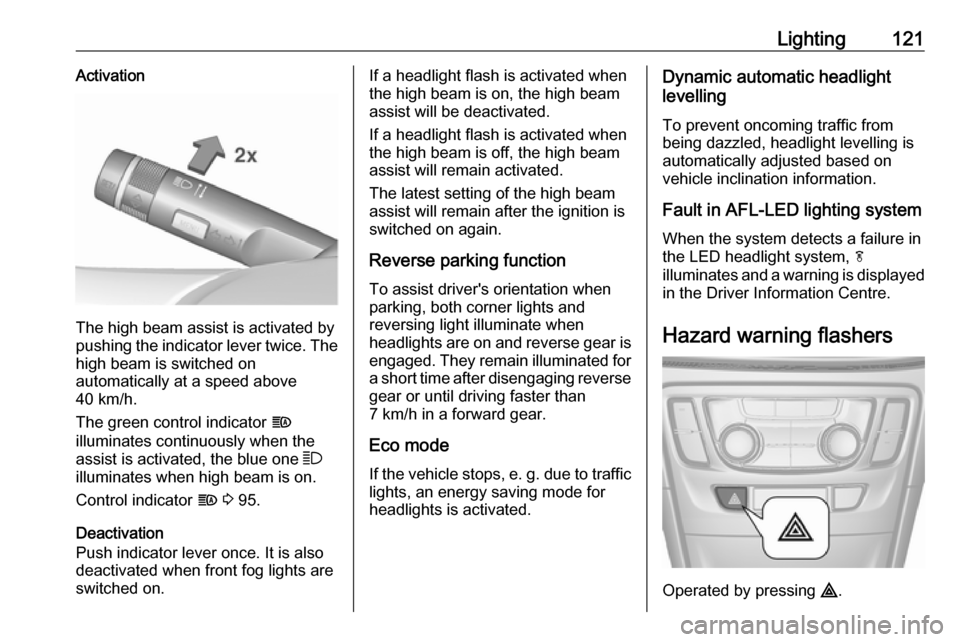
The high beam assist is activated by
pushing the indicator lever twice. The high beam is switched on
automatically at a speed above
40 km/h.
The green control indicator f
illuminates continuously when the
assist is activated, the blue one 7
illuminates when high beam is on.
Control indicator f 3 95.
Deactivation
Push indicator lever once. It is also
deactivated when front fog lights are
switched on.
If a headlight flash is activated when
the high beam is on, the high beam
assist will be deactivated.
If a headlight flash is activated when
the high beam is off, the high beam
assist will remain activated.
The latest setting of the high beam
assist will remain after the ignition is
switched on again.
Reverse parking function
To assist driver's orientation when
parking, both corner lights and
reversing light illuminate when
headlights are on and reverse gear is engaged. They remain illuminated for
a short time after disengaging reverse gear or until driving faster than
7 km/h in a forward gear.
Eco mode
If the vehicle stops, e. g. due to traffic lights, an energy saving mode for
headlights is activated.Dynamic automatic headlight
levelling
To prevent oncoming traffic from being dazzled, headlight levelling is
automatically adjusted based on
vehicle inclination information.
Fault in AFL-LED lighting system
When the system detects a failure in
the LED headlight system, f
illuminates and a warning is displayed
in the Driver Information Centre.
Hazard warning flashers
Operated by pressing ¨.
Page 135 of 255

Driving and operating133Driving and
operatingDriving hints ............................... 134
Control of the vehicle ...............134
Steering ................................... 134
Starting and operating ...............134
New vehicle running-in ............134
Ignition switch positions ...........135
Power button ........................... 135
Retained power off ..................136
Starting the engine ..................137
Overrun cut-off ........................ 138
Stop-start system ....................138
Parking .................................... 140
Engine exhaust .......................... 141
Diesel particle filter ..................142
Catalytic converter ...................142
AdBlue ..................................... 143
Automatic transmission ..............146
Transmission display ...............146
Selector lever .......................... 146
Manual mode ........................... 147
Electronic driving programmes 147
Fault ........................................ 148
Interruption of power supply ....148Manual transmission ..................149
Drive systems ............................ 150
All-wheel drive ......................... 150
Brakes ........................................ 150
Antilock brake system .............150
Parking brake .......................... 151
Brake assist ............................. 151
Hill start assist ......................... 152
Ride control systems .................152
Traction Control system ..........152
Electronic Stability Control ......153
Descent control system ...........154
Driver assistance systems .........155
Cruise control .......................... 155
Speed limiter ........................... 156
Forward collision alert .............158
Following distance indication ...160
Parking assist .......................... 161
Rear view camera ...................162
Traffic sign assistant ................164
Lane departure warning ..........168
Fuel ............................................ 169
Fuel for petrol engines .............169
Fuel for diesel engines ............170
Fuel for liquid gas operation ....171
Refuelling ................................ 171
Trailer hitch ................................ 176
General information .................176Driving characteristics and
towing tips .............................. 176
Trailer towing ........................... 176
Towing equipment ...................177
Page 136 of 255

134Driving and operatingDriving hints
Control of the vehicle
Never coast with engine not
running (except during Autostop)
Many systems will not function in this
situation (e.g. brake servo unit, power steering). Driving in this manner is a
danger to yourself and others. All
systems function during an Autostop,
but there will be a controlled reduction
in power steering assist and vehicle
speed is reduced.
Stop-start system 3 138.
Pedals
To ensure the pedal travel is
uninhibited, there must be no mats in the area of the pedals.
Use only floor mats, which fit properly
and are fixed by the retainers on the
driver side.Steering
If power steering assist is lost
because the engine stops or due to a system malfunction, the vehicle can
be steered but may require increased
effort.
A vehicle message will be displayed
in the Info Display.Caution
Vehicles equipped with hydraulic
power steering:
If the steering wheel is turned until it reaches the end of its travel, and
is held in that position for more
than 10 seconds, damage may
occur to the power steering
system and there may be loss of
power steering assist.
Starting and operating
New vehicle running-in
Do not brake unnecessarily hard for
the first few journeys.
During the first drive, smoke may
occur because of wax and oil
evaporating off the exhaust system.
Park the vehicle in the open for a
while after the first drive and avoid
inhaling the fumes.
During the running-in period fuel and engine oil consumption may be
higher and the cleaning process of the diesel particle filter may take
place more often. Autostop may be
inhibited to allow for charging the
battery.
Diesel particle filter 3 142.
Page 153 of 255

Driving and operating151ABS starts to regulate brake pressure
as soon as a wheel shows a tendency to lock. The vehicle remains
steerable, even during hard braking.
ABS control is made apparent
through a pulse in the brake pedal
and the noise of the regulation
process.
For optimum braking, keep the brake
pedal fully depressed throughout the
braking process, despite the fact that
the pedal is pulsating. Do not reduce
the pressure on the pedal.
After starting-off the system performs a self-test which may be audible.
Control indicator u 3 93.
Adaptive brake light
During full braking, all three brake
lights flash for the duration of ABS
control.Fault9 Warning
If there is a fault in the ABS, the
wheels may be liable to lock due
to braking that is heavier than
normal. The advantages of ABS are no longer available. During
hard braking, the vehicle can no longer be steered and may
swerve.
Have the cause of the fault remedied
by a workshop.
Parking brake
9 Warning
Always apply parking brake firmly
without operating the release
button, and apply as firmly as
possible on a downhill or uphill
slope.
To release the parking brake, pull
the lever up slightly, press the
release button and fully lower the
lever.
To reduce the operating forces of
the parking brake, depress the
brake pedal at the same time.
Control indicator R 3 92.
Brake assist
If the brake pedal is depressed
quickly and forcefully, maximum
brake force is automatically applied
(full braking).
Maintain steady pressure on the
brake pedal for as long as full braking is required. Maximum brake force is
automatically reduced when the
brake pedal is released.
Page 163 of 255

Driving and operating161Parking assist
The parking assist makes parking
easier by measuring the distance between the vehicle and obstacles,
and giving acoustic signals. It is the
driver, however, who bears full
responsibility for the parking
manoeuvre.
The system consists of four ultrasonic parking sensors in the rear bumper. If
the vehicle is equipped with a front
parking assist the system consists of
four additional ultrasonic parking
sensors in the front bumper.
Activation
After ignition is switched on, the rear
parking assist is activated.
The front parking assist can also be activated at a low speed by pressing
r .
An illuminated LED in the parking
assist button indicates that the
system is ready to operate.
An obstacle is indicated by a buzzing
sound. The interval between the sounds becomes shorter as the
vehicle gets closer to the obstacle.
When the distance is less than
30 cm, the buzzing is continuous.
If r is pressed once within an
ignition cycle, the front parking assist
is reactivated if the vehicle speed
goes below a certain value and if the
vehicle speed has not exceeded
25 km/h beforehand.
Deactivation
Deactivate the system by pressing
r .
The LED in the button will go out and
Park Assist Off will be displayed in the
Driver Information Centre.
If the parking assist is deactivated
manually, it will be reactivated
automatically the next time the
ignition is switched on.
The system is deactivated
automatically at a certain speed.
Fault
In the event of a fault in the system, a
vehicle message is displayed in the Driver Information Centre.
Additionally, a vehicle message is
displayed in the Driver Information
Centre if a malfunction of the system
due to temporary conditions, e.g.
snow covered sensors is detected.
Page 164 of 255

162Driving and operatingVehicle messages 3 103.
Important hints for using the
parking assist systems9 Warning
Under certain circumstances,
various reflective surfaces on
objects or clothing as well as
external noise sources may cause the system to fail to detect
obstacles.
Special attention has to be paid to
low obstacles which can damage
the lower part of the bumper. If
such obstacles leave the detection area of the sensors during
approach of the vehicle, a
continuous warning tone will
sound.
Caution
Performance of the system can be reduced when sensors are
covered, e.g. by ice or snow.
Performance of the parking assist
system can be reduced due to
heavy loading.
Special conditions apply if there
are taller vehicles in the vicinity
(e.g. off-road vehicles, mini vans,
vans). Object identification and correct distance indication in the
upper part of these vehicles
cannot be guaranteed.
Objects with a very small reflection
cross-section, e.g. objects of
narrow size or soft materials, may
not be detected by the system.
Parking assist systems do not
detect objects outside the
detection range.
Note
The parking assist system
automatically detects factory-fitted
towing equipment. It is deactivated
when the connector is plugged in.
The sensor may detect a non-
existent object (echo disturbance)
caused by external acoustic or
mechanical disturbances.
Note
The parking assist is deactivated
when the rear carrier system is
extended.
Rear view camera The rear view camera assists the
driver when reversing by displaying a view of the area behind the vehicle.
The view of the camera is displayed
in the Info Display.9 Warning
The rear view camera does not
replace driver vision. Note that
objects that are outside the
camera's field of view and the
Page 165 of 255

Driving and operating163parking assist sensors, e.g. below
the bumper or underneath the
vehicle, are not displayed.
Do not reverse or park the vehicle using only the rear view camera.
Always check the surrounding of
the vehicle before driving.
Activation
Rear view camera is automatically
activated when reverse gear is
engaged.
Functionality
The camera is mounted in the tailgate handle and has a viewing angle of
130°.
Due to the high position of the
camera, the rear bumper can be seen on the display as a guide to position.
The area displayed by the camera is
limited. The distance of the image that
appears on the display differs from
the actual distance.
Guiding lines
Dynamic guiding lines are horizontal
lines at 1 m intervals projected on the
picture to define the distance to
displayed objects.
Trajectory lane of the vehicle is
shown in accordance with the
steering angle.
Warning symbols
Warning symbols are indicated as
triangles 9 on the picture which show
obstacles detected by the rear
sensors of the advanced parking
assist.
Additionally 9 appears on the top line
of the Info Display with the warning to check the vehicle surrounding.
Page 172 of 255

170Driving and operatingFuel additives outside Europe
Fuel should contain detergent
additives that help prevent engine
and fuel system deposits from
forming. Clean fuel injectors and
intake valves will allow the emission
control system to work properly.
Some fuel does not contain sufficient
quantities of additive to keep fuel
injectors and intake valves clean.
To make up for this lack of
detergency, add Fuel System
Treatment PLUS to the fuel tank at
every engine oil change or every
15,000 km, whichever occurs first. It
is available at your workshop.
Fuels containing oxygenates such as
ethers and ethanol, as well as
reformulated fuel, are available in
some cities. If these fuels comply with
the previously described
specification, then they are
acceptable to use. However, E85
(85% ethanol) and other fuels
containing more than 15% ethanol
must be used only in FlexFuel
vehicles.Caution
Do not use fuel containing
methanol. It can corrode metal
parts in the fuel system and also
damage plastic and rubber parts.
This damage would not be
covered by the vehicle warranty.
Some fuels, mainly high octane
racing fuels, can contain an octane
enhancing additive called
methylcyclopentadienyl manganese
tricarbonyl (MMT). Do not use fuels or fuel additives with MMT as they can
reduce spark plug life and affect
emission control system
performance. The malfunction
indicator light Z may illuminate 3 92.
If this occurs, seek the assistance of
a workshop.
Fuel for diesel engines
Only use diesel fuel that complies
with EN 590 and which has a sulphur
concentration of max. 10 ppm.
Fuels with a biodiesel (compliant with
EN 14214) content of max. 7% by
volume may be used (e.g. named
B7).
If travelling in countries outside the
European Union occasional use of Euro-Diesel fuel with a sulphur
concentration below 50 ppm is
possible.
Caution
Frequent usage of diesel fuel
containing more than 15 ppm
sulphur will cause severe engine
damage.
Page 189 of 255
Vehicle care187when using a battery charger.
Otherwise the vehicle battery may be damaged.
Jump starting 3 214.
Warning label
Meaning of symbols: ● No sparks, naked flames or smoking.
● Always shield eyes. Explosive gases can cause blindness or
injury.
● Keep the vehicle battery out of reach of children.
● The vehicle battery containssulphuric acid which could cause
blindness or serious burn
injuries.
● See the Owner's Manual for further information.
● Explosive gas may be present in the vicinity of the vehicle battery.
Diesel fuel system bleeding If the tank has been run dry, the diesel
fuel system must be bled. Switch on
the ignition three times for
15 seconds at a time. Then crank the
engine for a maximum of 40 seconds. Repeat this process after
no less than 5 seconds. If the engine fails to start, seek the assistance of a
workshop.Wiper blade replacement
Windscreen
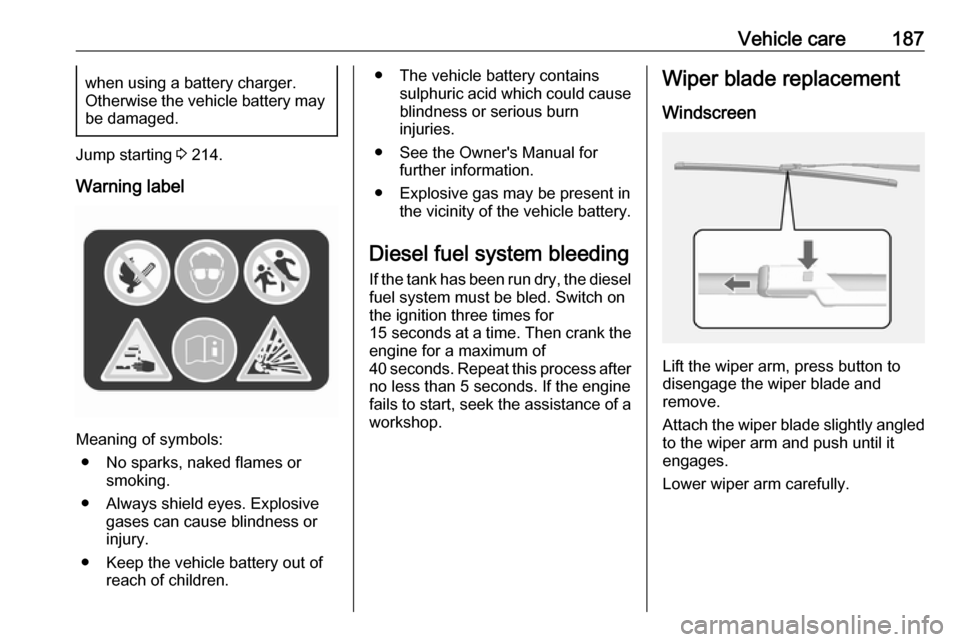
Lift the wiper arm, press button to
disengage the wiper blade and
remove.
Attach the wiper blade slightly angled
to the wiper arm and push until it
engages.
Lower wiper arm carefully.
Page 199 of 255

Vehicle care197No.Circuit16Adaptive forward lighting17Column lock18Ultrasonic park assist module19Body control module / Regu‐
lated voltage control20Steering wheel21–22Cigarette lighter / DC accessory
power outlet (front)23Cigarette lighter / DC accessory
power outlet (rear center
console)24Spare25Telematics service module26Heated steering wheel27Instrument panel cluster / Info‐
tainment system / Auxiliary
heater switch28Trailer socketNo.Circuit29Info Display / Infotainment
system30Transmission control module31Instrument panel cluster32Infotainment system33Trailer socket34Passive entry / Passive start
module
S/B Fuses
No.Circuit01Power seat switch02Spare03Power windows front04Power windows rear05Logistic mode06Power seat switchNo.Circuit07Spare08Spare
Midi Fuse
No.CircuitM01PTC
Load compartment fuse box
Located in the left side of rear
compartment.
To access the fuses, remove the cover.