tyre pressure OPEL MOKKA X 2019.5 Manual user
[x] Cancel search | Manufacturer: OPEL, Model Year: 2019.5, Model line: MOKKA X, Model: OPEL MOKKA X 2019.5Pages: 247, PDF Size: 6.86 MB
Page 19 of 247
In brief17Transmission
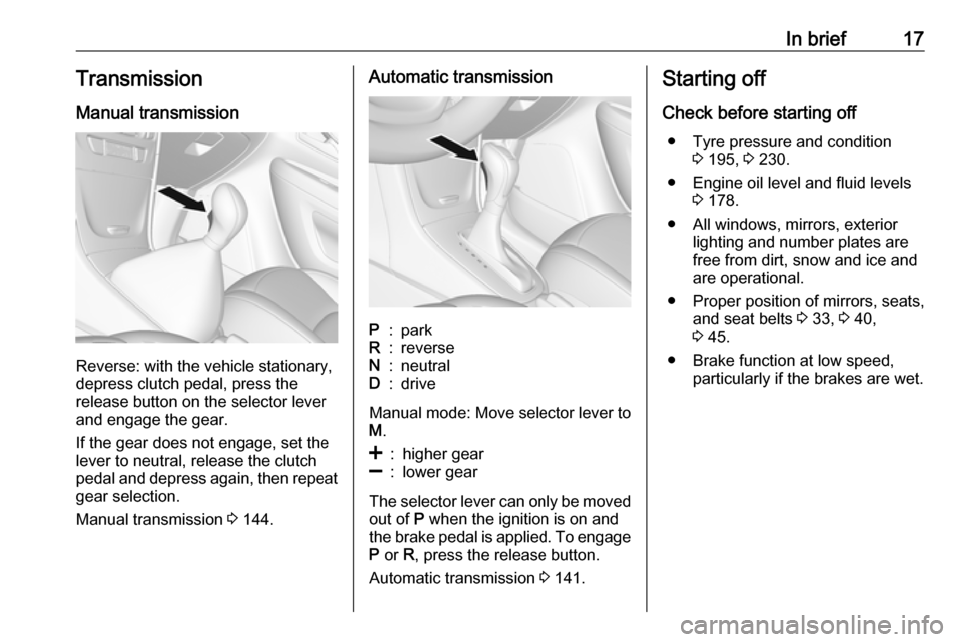
Manual transmission
Reverse: with the vehicle stationary,
depress clutch pedal, press the
release button on the selector lever
and engage the gear.
If the gear does not engage, set the
lever to neutral, release the clutch
pedal and depress again, then repeat
gear selection.
Manual transmission 3 144.
Automatic transmissionP:parkR:reverseN:neutralD:drive
Manual mode: Move selector lever to
M .
<:higher gear]:lower gear
The selector lever can only be moved
out of P when the ignition is on and
the brake pedal is applied. To engage P or R, press the release button.
Automatic transmission 3 141.
Starting off
Check before starting off ● Tyre pressure and condition 3 195, 3 230.
● Engine oil level and fluid levels 3 178.
● All windows, mirrors, exterior lighting and number plates are
free from dirt, snow and ice and
are operational.
● Proper position of mirrors, seats, and seat belts 3 33, 3 40,
3 45.
● Brake function at low speed, particularly if the brakes are wet.
Page 77 of 247

Storage75●Driving with a roof load increases
the sensitivity of the vehicle to
cross-winds and has a
detrimental effect on vehicle
handling due to the vehicle’s
higher centre of gravity.
Distribute the load evenly and
secure it properly with retaining
straps. Adjust the tyre pressure
and vehicle speed according to
the load conditions. Check and
retighten the straps frequently.
Do not drive faster than
120 km/h.
● The permissible roof load is 75 kg. The roof load is the
combined weight of the roof rack and the load.
Page 78 of 247

76Instruments and controlsInstruments and
controlsControls ....................................... 77
Steering wheel adjustment ........77
Steering wheel controls .............77
Heated steering wheel ...............77
Horn ........................................... 78
Windscreen wiper and washer ..78
Rear window wiper and washer ...................................... 80
Outside temperature ..................80
Clock ......................................... 81
Power outlets ............................. 83
Warning lights, gauges and indi‐ cators ........................................... 84
Speedometer ............................. 84
Odometer .................................. 84
Trip odometer ............................ 84
Tachometer ............................... 85
Fuel gauge ................................ 85
Fuel selector .............................. 86
Engine coolant temperature gauge ....................................... 87
Service display .......................... 87
Control indicators ......................88
Turn lights .................................. 92Seat belt reminder.....................92
Airbag and belt tensioners .........92
Airbag deactivation ....................93
Charging system .......................93
Malfunction indicator light ..........93
Brake and clutch system ...........93
Antilock brake system (ABS) .....94
Gear shifting .............................. 94
Descent control system .............94
Lane departure warning ............94
Electronic Stability Control off ...94
Electronic Stability Control and Traction Control system ...........94
Traction Control system off .......95
Preheating ................................. 95
AdBlue ....................................... 95
Tyre pressure monitoring system ...................................... 95
Engine oil pressure ....................95
Low fuel ..................................... 95
Immobiliser ................................ 96
Exterior light .............................. 96
High beam ................................. 96
High beam assist .......................96
Adaptive forward lighting ...........96
Front fog lights ........................... 96
Rear fog light ............................. 96
Cruise control ............................ 96
Vehicle detected ahead .............97
Speed limiter ............................. 97Traffic sign assistant ..................97
Door open .................................. 97
Displays ....................................... 97
Driver Information Centre ..........97
Info Display .............................. 102
Vehicle messages ......................104
Warning chimes .......................105
Battery voltage ........................ 105
Vehicle personalisation ..............106
Page 93 of 247
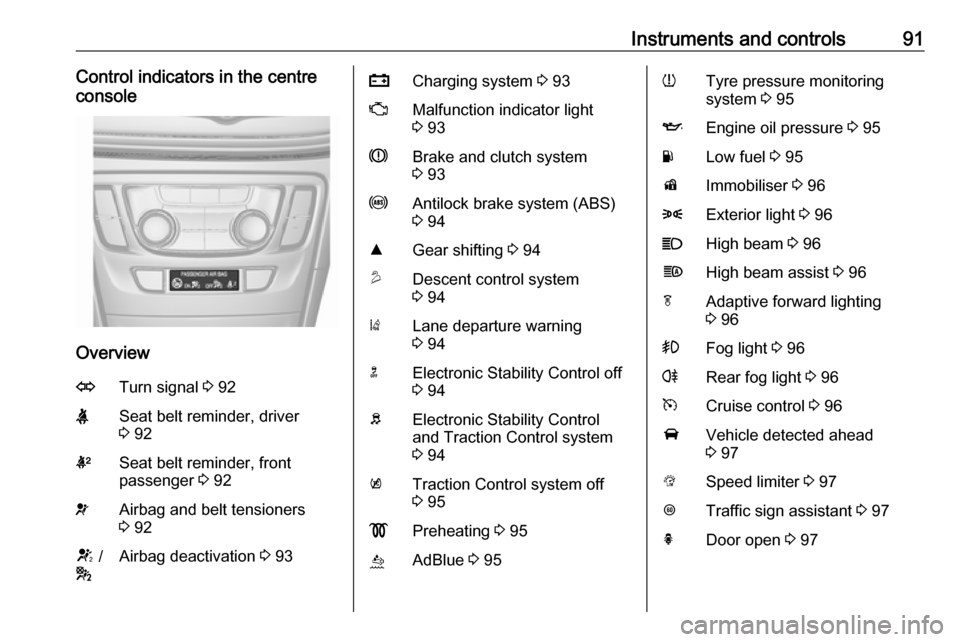
Instruments and controls91Control indicators in the centre
console
Overview
OTurn signal 3 92XSeat belt reminder, driver
3 92kSeat belt reminder, front
passenger 3 92vAirbag and belt tensioners
3 92V /
*Airbag deactivation 3 93pCharging system 3 93ZMalfunction indicator light
3 93RBrake and clutch system
3 93uAntilock brake system (ABS)
3 94RGear shifting 3 94uDescent control system
3 94)Lane departure warning
3 94nElectronic Stability Control off
3 94bElectronic Stability Control
and Traction Control system
3 94kTraction Control system off
3 95!Preheating 3 95ùAdBlue 3 95wTyre pressure monitoring
system 3 95IEngine oil pressure 3 95YLow fuel 3 95dImmobiliser 3 968Exterior light 3 96CHigh beam 3 96fHigh beam assist 3 96fAdaptive forward lighting
3 96>Fog light 3 96rRear fog light 3 96mCruise control 3 96AVehicle detected ahead
3 97LSpeed limiter 3 97LTraffic sign assistant 3 97hDoor open 3 97
Page 97 of 247
Instruments and controls95Traction Control system off
k illuminates yellow.
The system is deactivated.
Preheating
! illuminates yellow.
Preheating of diesel engine is
activated. Only activates when
outside temperature is low.
AdBlue
ù flashes yellow.
AdBlue level is low. Refill AdBlue soon to avoid prevention of the
engine start.
AdBlue 3 139.
Tyre pressure monitoring system
w illuminates or flashes yellow.
Illuminates
Tyre pressure loss. Stop immediately and check tyre pressure.Flashes
Fault in system or tyre without
pressure sensor mounted (e.g. spare
wheel). After 60-90 seconds the
control indicator illuminates
continuously. Consult a workshop.
Tyre pressure monitor system
3 196.
Engine oil pressure
I illuminates red.
Illuminates when the ignition is
switched on and extinguishes shortly
after the engine starts.
Illuminates when the engine is
runningCaution
Engine lubrication may be
interrupted. This may result in
damage to the engine and/or
locking of the drive wheels.
1. Depress clutch.
2. Select neutral gear, set selector lever to N.
3. Move out of the flow of traffic as
quickly as possible without
impeding other vehicles.
4. Switch off ignition.9 Warning
When the engine is off,
considerably more force is needed
to brake and steer. During an
Autostop the brake servo unit will still be operational.
Do not remove key until vehicle is stationary, otherwise the steeringwheel lock could engage
unexpectedly.
Keep engine turned off and let the
vehicle be towed to a workshop
3 178.
Low fuel Y illuminates or flashes yellow.
Illuminates
Level in fuel tank is too low.
Page 101 of 247
Instruments and controls99Selecting menus and functions
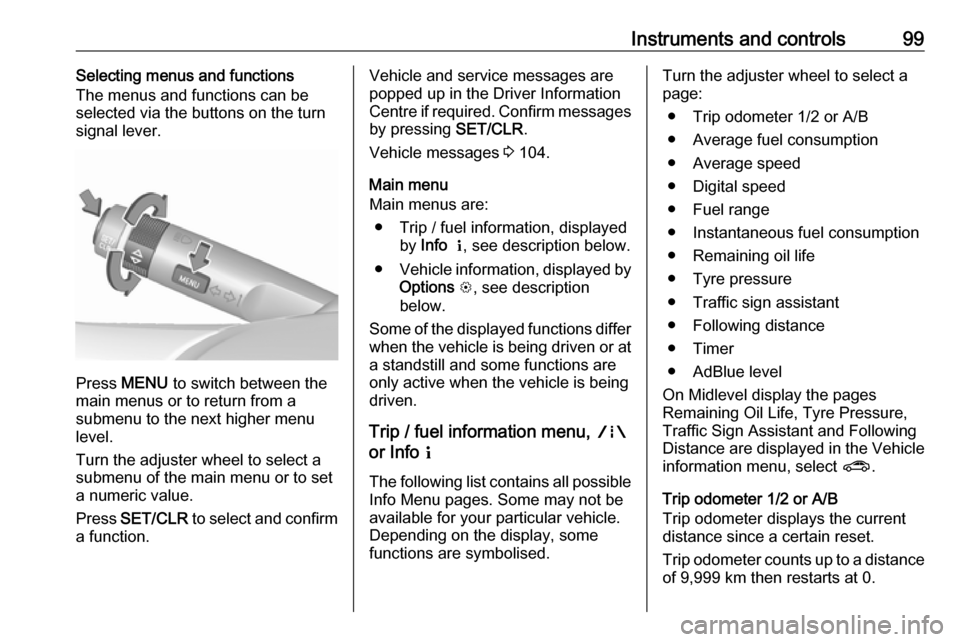
The menus and functions can be
selected via the buttons on the turn signal lever.
Press MENU to switch between the
main menus or to return from a
submenu to the next higher menu
level.
Turn the adjuster wheel to select a
submenu of the main menu or to set
a numeric value.
Press SET/CLR to select and confirm
a function.
Vehicle and service messages are
popped up in the Driver Information
Centre if required. Confirm messages
by pressing SET/CLR.
Vehicle messages 3 104.
Main menu
Main menus are:
● Trip / fuel information, displayed by Info Q , see description below.
● Vehicle information, displayed by
Options L, see description
below.
Some of the displayed functions differ when the vehicle is being driven or at
a standstill and some functions are
only active when the vehicle is being
driven.
Trip / fuel information menu, ;
or Info Q
The following list contains all possible Info Menu pages. Some may not be
available for your particular vehicle.
Depending on the display, some
functions are symbolised.Turn the adjuster wheel to select a
page:
● Trip odometer 1/2 or A/B
● Average fuel consumption
● Average speed
● Digital speed
● Fuel range
● Instantaneous fuel consumption
● Remaining oil life
● Tyre pressure
● Traffic sign assistant
● Following distance
● Timer
● AdBlue level
On Midlevel display the pages
Remaining Oil Life, Tyre Pressure,
Traffic Sign Assistant and Following
Distance are displayed in the Vehicle information menu, select ?.
Trip odometer 1/2 or A/B
Trip odometer displays the current
distance since a certain reset.
Trip odometer counts up to a distance
of 9,999 km then restarts at 0.
Page 102 of 247

100Instruments and controlsTo reset press SET/CLR for a few
seconds.
The information of trip odometer page
1/A and 2/B can be reset separately
while the respective display is active.
Average Fuel Consumption
Display of average consumption. The measurement can be reset at any
time and starts with a default value.
To reset press SET/CLR for a few
seconds.
Average speed
Display of average speed. The
measurement can be reset at any
time.
To reset press SET/CLR for a few
seconds.
Digital speed
Digital display of the instantaneous
speed.
Fuel range
Range is calculated from current fuel
level and current consumption. The
display shows average values.After refuelling, the range is updated
automatically after a brief delay.
When the level in the fuel tank is low,
a message appears on the display
and the control indicator Y in the fuel
gauge illuminates.
When the fuel tank must be refuelled immediately, a warning message
appears and remains on the display.
Additionally, the control indicator Y in
the fuel gauge flashes 3 95.
Instantaneous Fuel Consumption
Display of the instantaneous
consumption.
Remaining Oil Life
Indicates an estimate of the oil's
useful life. The number in percentage means the remainder of current oil life 3 87.
Tyre Pressure
Checks tyre pressure of all wheels
during driving 3 196.
Traffic sign assistant
Displays the detected traffic signs for
the current route section 3 160.Following Distance
Displays the distance in seconds to a preceding moving vehicle 3 155.
Timer
To start and stop follow the
instructions on the display. To reset,
press SET/CLR .
AdBlue
Displays the AdBlue level.
Additionally the AdBlue range can be
displayed.
Eco information menu, @
● Top consumers
● Economy trend
● Eco index
On Uplevel display the pages Top
Consumers, Economy Trend and Eco index, are displayed in the Trip/fuel
information menu, select Info.
Top Consumers
List of top comfort consumers
currently switched on is displayed in
descending order. Fuel saving
potential is indicated.
Page 104 of 247
102Instruments and controlsSpeed warning
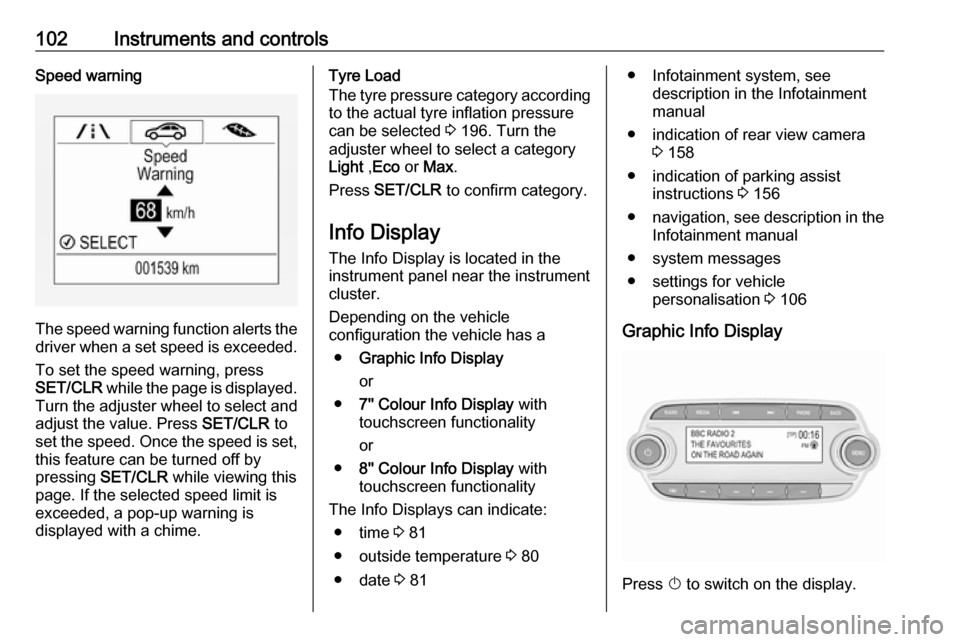
The speed warning function alerts thedriver when a set speed is exceeded.
To set the speed warning, press
SET/CLR while the page is displayed.
Turn the adjuster wheel to select and
adjust the value. Press SET/CLR to
set the speed. Once the speed is set, this feature can be turned off by
pressing SET/CLR while viewing this
page. If the selected speed limit is
exceeded, a pop-up warning is
displayed with a chime.
Tyre Load
The tyre pressure category according
to the actual tyre inflation pressure
can be selected 3 196. Turn the
adjuster wheel to select a category Light ,Eco or Max .
Press SET/CLR to confirm category.
Info Display The Info Display is located in the
instrument panel near the instrument
cluster.
Depending on the vehicle
configuration the vehicle has a
● Graphic Info Display
or
● 7'' Colour Info Display with
touchscreen functionality
or
● 8'' Colour Info Display with
touchscreen functionality
The Info Displays can indicate: ● time 3 81
● outside temperature 3 80
● date 3 81● Infotainment system, see
description in the Infotainment
manual
● indication of rear view camera 3 158
● indication of parking assist instructions 3 156
● navigation, see description in the
Infotainment manual
● system messages
● settings for vehicle personalisation 3 106
Graphic Info Display
Press X to switch on the display.
Page 149 of 247
Driving and operating1479Warning
Always apply parking brake firmly
without operating the release
button, and apply as firmly as
possible on a downhill or uphill
slope.
To release the parking brake, pull
the lever up slightly, press the
release button and fully lower the
lever.
To reduce the operating forces of
the parking brake, depress the
brake pedal at the same time.
Control indicator R 3 93.
Brake assist
If the brake pedal is depressed
quickly and forcefully, maximum
brake force is automatically applied
(full braking).
Maintain steady pressure on the
brake pedal for as long as full braking is required. Maximum brake force is
automatically reduced when the
brake pedal is released.
Hill start assist
The system helps prevent unintended movement when driving away on
inclines.
When releasing the brake pedal after
stopping on an incline, the brakes
remain on for a further two seconds.
The brakes release automatically as
soon as the vehicle begins to
accelerate.
The hill start assist is not active during
an Autostop.
Stop-start system 3 134.Ride control systems
Traction Control system The Traction Control system (TC) is a component of the Electronic Stability
Control (ESC) 3 148.
TC improves driving stability when necessary, regardless of the type of
road surface or tyre grip, by
preventing the drive wheels from
spinning.
As soon as the drive wheels starts to spin, engine output is reduced and
the wheel spinning the most is braked
individually. This considerably
improves the driving stability of the
vehicle on slippery road surfaces.
TC is operational after each engine
start as soon as the control indicator
b extinguishes.
When TC operates b flashes.
Page 173 of 247

Driving and operating171Fit protective cap to prevent the
penetration of foreign bodies into the
filler opening and the system.9 Warning
Due to the system design, an
escape of liquid gas after
releasing the locking lever is
unavoidable. Avoid inhaling.
9 Warning
The liquid gas tank should only be
filled to 80% capacity, for safety
reasons.
The multivalve on the liquid gas tank
automatically limits the fill quantity. If
a larger quantity is added, we
recommend not exposing the vehicle
to the sun until the excess amount
has been used up.
Fuel filler cap
Only use genuine fuel filler caps. Diesel-engined vehicles have special fuel filler caps.
Trailer hitch
General information
Only use towing equipment that has
been approved for your vehicle.
Entrust retrofitting of towing
equipment to a workshop. It may be
necessary to make changes that
affect the cooling system, heat
shields or other equipment.
The bulb outage detection function for
trailer brake light cannot detect a
partial bulb outage. E.g. in case of
four bulbs with a power of 5 W each,
the function only detects lamp outage when only a single 5 W lamp remains
or none remain.
Fitting of towing equipment could
cover the opening of the towing eye.
If this is the case, use the coupling ball
bar for towing. Always keep the
coupling ball bar in the vehicle when
not in use.Driving characteristics and
towing tips
Before attaching a trailer, lubricate the coupling ball. However, do not do
so if a stabiliser, which acts on the
coupling ball, is being used to reduce snaking movements.
For trailers with low driving stability
and caravan trailers with a permitted
gross vehicle weight of more than
1000 kg, a speed of 80 km/h must not
be exceeded. The use of a stabiliser
is recommended.
If the trailer starts snaking, drive more slowly, do not attempt to correct the
steering and brake sharply if
necessary.
When driving downhill, drive in the
same gear as if driving uphill and
drive at a similar speed.
Adjust tyre pressure to the value
specified for full load 3 230.