infotainment OPEL MOVANO_B 2017.5 Infotainment system
[x] Cancel search | Manufacturer: OPEL, Model Year: 2017.5, Model line: MOVANO_B, Model: OPEL MOVANO_B 2017.5Pages: 129, PDF Size: 1.95 MB
Page 78 of 129
78Navigationupdates. Consult a workshop to
purchase a new SD card with updated
digital map.
Note
To avoid possible technical issues,
only use a compatible SD card for
operating the Navigation system. Do not insert SD card in any other
device (e.g. digital camera, mobile phone, etc.), or in another vehicle.
Usage
USB memory stick
NAVI 50 IntelliLinkInserting the USB memory stick
Switch off the Navigation system and
insert the USB memory stick in the
USB slot on the Infotainment system
fascia. The USB memory stick is
fragile; treat it with care.Removing the USB memory stick
Switch off the Navigation system and
remove the USB memory stick from
the USB slot on the Infotainment
system fascia.SD card
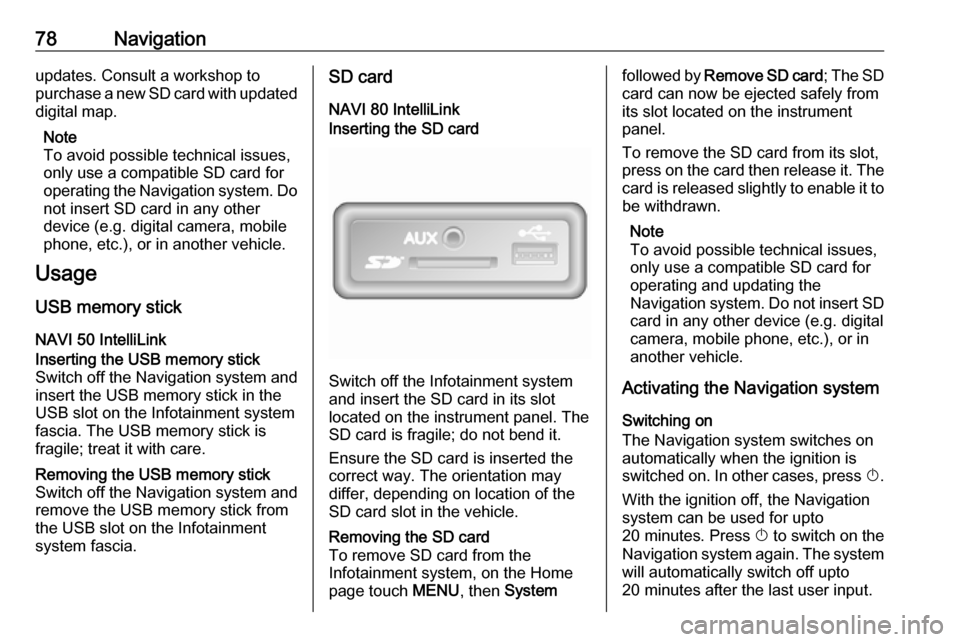
NAVI 80 IntelliLinkInserting the SD card
Switch off the Infotainment system
and insert the SD card in its slot
located on the instrument panel. The
SD card is fragile; do not bend it.
Ensure the SD card is inserted the
correct way. The orientation may
differ, depending on location of the
SD card slot in the vehicle.
Removing the SD card
To remove SD card from the
Infotainment system, on the Home
page touch MENU, then Systemfollowed by Remove SD card ; The SD
card can now be ejected safely from its slot located on the instrument
panel.
To remove the SD card from its slot,
press on the card then release it. The
card is released slightly to enable it to be withdrawn.
Note
To avoid possible technical issues,
only use a compatible SD card for
operating and updating the
Navigation system. Do not insert SD
card in any other device (e.g. digital
camera, mobile phone, etc.), or in
another vehicle.
Activating the Navigation system
Switching on
The Navigation system switches on
automatically when the ignition is
switched on. In other cases, press X.
With the ignition off, the Navigation
system can be used for upto
20 minutes. Press X to switch on the
Navigation system again. The system
will automatically switch off upto
20 minutes after the last user input.
Page 79 of 129
Navigation79Switching off
With the ignition off, the Navigation
system switches off automatically
when the driver's door is opened.
With the ignition on, press X to switch
off the Navigation system.
Switching between Navigation
system and Infotainment system
menusNAVI 50 IntelliLink
With the Navigation system active,
touch 7 or touch and hold q/r to
return to the Infotainment system
Home page.NAVI 80 IntelliLink
With the Navigation system active,
touch r (one or more times) to return
to the Infotainment system Home page.
Information on the display
NAVI 50 IntelliLink (Type A) -
Information on the display
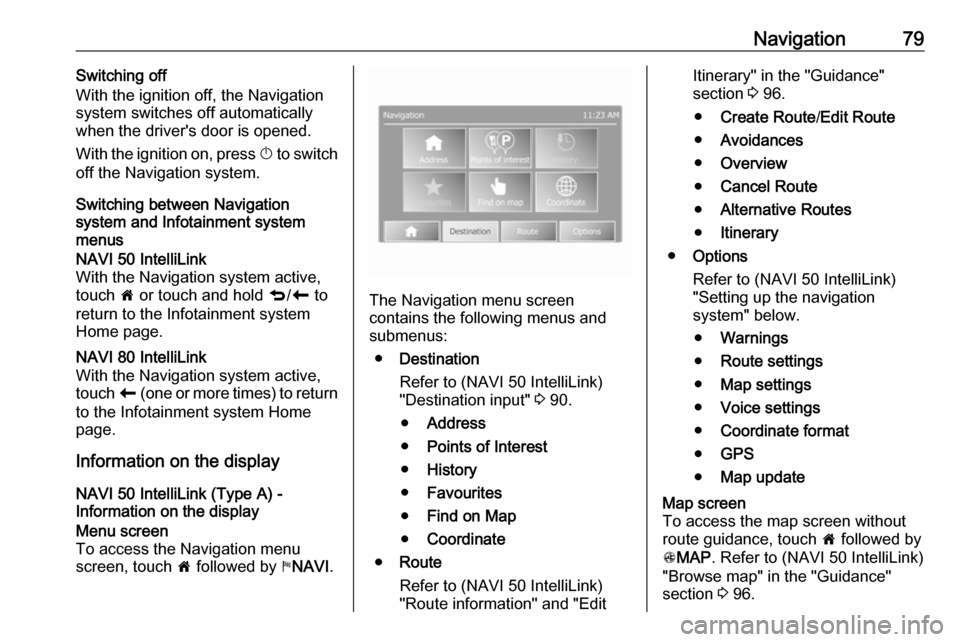
Menu screen
To access the Navigation menu
screen, touch 7 followed by yNAVI .
The Navigation menu screen
contains the following menus and
submenus:
● Destination
Refer to (NAVI 50 IntelliLink)
"Destination input" 3 90.
● Address
● Points of Interest
● History
● Favourites
● Find on Map
● Coordinate
● Route
Refer to (NAVI 50 IntelliLink)
"Route information" and "Edit
Itinerary" in the "Guidance"
section 3 96.
● Create Route /Edit Route
● Avoidances
● Overview
● Cancel Route
● Alternative Routes
● Itinerary
● Options
Refer to (NAVI 50 IntelliLink)
"Setting up the navigation
system" below.
● Warnings
● Route settings
● Map settings
● Voice settings
● Coordinate format
● GPS
● Map updateMap screen
To access the map screen without
route guidance, touch 7 followed by
s MAP . Refer to (NAVI 50 IntelliLink)
"Browse map" in the "Guidance"
section 3 96.
Page 104 of 129

104Voice recognitionVoice recognitionGeneral information...................104
Navigation control ......................105
Phone control ............................ 106General information
The voice recognition function allows
you to operate certain functions via
voice input.
To ensure that conversations held
inside the vehicle do not start
unintentional calls to a saved contact, the voice recognition function must
first be activated via 5 on the steering
wheel/column controls.
Control elements overview 3 6.
NAVI 50 IntelliLink
Available depending on version, the
voice recognition function of the
handsfree phone system allows you
to operate certain functions of a
compatible smartphone via voice
input.
Refer to "Phone control" in this
section 3 106.
To confirm that a paired and
connected smartphone is compatible with the voice recognition function,
touch 7 followed by ÿSetting(s) .Then select Bluetooth followed by
View Bluetooth device list . The list
shows the paired devices and 5
appears alongside the name of the
smartphone to indicate compatibility.
Note
If supported, the language set on
your smartphone will automatically
be used by the Infotainment system for voice recognition.
The navigation system can also be
operated using voice controls. Refer
to "Navigation control" in this section
3 105.
Prerequisites
The following prerequisites must be
met:
● The Bluetooth function of the Infotainment system must be
activated.
Refer to "Bluetooth connection"
in the "Phone" section 3 111.
● The Bluetooth function of the Bluetooth-enabled smartphone
must be activated and the
smartphone must have a 3G, 4G
Page 105 of 129

Voice recognition105or wi-fi connection (see
smartphone operating
instructions).
● Dependent upon the smartphone, it may be required
to set the device to "visible" (see
smartphone operating
instructions).
● The smartphone must be paired and connected to the
Infotainment system.
Help
For information and help with
activating and operating voice
controls, touch 7 followed by
ÿ Setting(s) then Bluetooth .
Select Smartphone from the list (use
S /R to search list), then select l to
access help.
A series of screens are displayed,
explaining how to use the voice
recognition function and information
on the following:
● switching on/off with steering wheel/column controls
● compatible phones
● operation methods● available functions and descriptions
● conditions of use
NAVI 80 IntelliLink
The voice recognition function allows
you to operate certain functions via
voice input, including:
● Navigation
Refer to "Navigation control" in this section 3 105.
● Phone
Refer to "Phone control" in this section 3 106.
Press 5 on the steering wheel/column
controls to open the Voice control
main menu. After the tone, say the
name of the menu you wish to access.
When activated, the Voice control
main menu is displayed and the voice
recognition indicator in the top right
corner indicates system status and
optimisation levels:Green:optimal voice recognitionOrange:good voice recognitionRed:average voice recognitionMicrophone é:System is ready to
receive a voice
commandLoudspeaker
l:Voice instructions
are currently being
given by the systemLoading icon:Data currently
loading
Navigation control
NAVI 50 IntelliLink
Activating voice recognition
To activate the voice recognition
function during navigation:
Press 5 on the steering wheel/column
controls; 5 appears, alongside the
audio system information, in the
bottom right corner of the display.
Note
During use of the voice recognition
function, audio source playback is
interrupted.
For a guide to using voice commands, refer to (NAVI 50 IntelliLink) "Help" in
the "General information" section 3 104.
Page 107 of 129

Phone107PhoneGeneral information...................107
Connection ................................. 109 Bluetooth connection .................111
Emergency call .......................... 114
Operation ................................... 115
Mobile phones and CB radio
equipment .................................. 122General information
The handsfree phone system
provides you with the possibility of
having mobile phone conversations
via the vehicle's microphone and
loudspeakers, as well as operating
the most important mobile phone
functions via the Infotainment system.
To be able to use the handsfree
phone system, the mobile phone
must be connected with it via
Bluetooth .
Not all handsfree phone system
functions are supported by every
mobile phone. The possible phone functions depend on the relevant
mobile phone and network provider.
Refer to the operating instructions for
your mobile phone or consult your
network provider.Important information for
operation and traffic safety9 Warning
Use of the handsfree phone
system while driving can be
dangerous as your concentration
is reduced when telephoning. Park the vehicle before using the
handsfree phone system.
Follow the regulations of the
country in which you are driving.
Also follow the special regulations
that apply in specific areas and
always switch off the mobile
phone if the use of mobile phones is prohibited, if interference is
caused by the mobile phone or if
dangerous situations can occur.
9 Warning
Mobile phones have effects on
your environment. For this reason,
safety regulations have been
Page 108 of 129

108Phoneprepared which you should makeyourself familiar with before youuse the telephone.
Bluetooth
The Phone portal is certified by the
Bluetooth Special Interest Group
(SIG).
You will find further information about the specification on the Internet at
http://www.bluetooth.com
Phone controlsControls on Infotainment system or
steering column:
● 6TEL
- or -
● TEL
- or -
● yPHONE on the 7 Home page
screen (NAVI 50 IntelliLink)
- or -
g PHONE in the Main menu
screen (NAVI 80 IntelliLink)
Select Phone to open the menu.
Controls on steering column:
● 7, 8 : Take call, end/reject call.
- or -
● MODE/OK : Take call, end/reject
call, confirm an action.
● 5: Activate/deactivate voice
recognition.
Depending on Infotainment system,
some features of the handsfree
phone system can also be operated
via voice recognition 3 106.
Display screen operation
R15 BT USB, R16 BT USB,
CD16 BT USB, CD18 BT USB -
Display screen operation
● To move up/down in the display: Turn OK.
● To confirm actions: Press OK.
● To cancel actions (and return to previous menu): Press /.
NAVI 50 IntelliLink - Display screen operation
To access the Phone menu screen, select 7 followed by yPhone .The following submenus are
available:
● Phone book
● Calling Lists
● Dial
To switch between submenus, touch
S in top left corner.
● To move up/down in the display: Touch R or S.
● To confirm actions: Select OK.
● To cancel actions (and return to previous menu/Home page):
Touch r/7 .
For further information, refer to
"Touchscreen operation" 3 39.
NAVI 80 IntelliLink - Display screen
operation
To access the "Phone" menu from the Home page, select MENU followed by
g Phone .
The following submenus are
available:
● Phonebook
● Call logs
● Dial a number
Page 109 of 129

Phone109●Voice mail
● Settings
● To move up/down in the display: Touch ↑ or ↓.
● To cancel actions (and/or return to previous menu): Touch r.
● To open a pop-up menu (e.g. to add contacts to a list of
favourites): Touch <.
Note
Favourites can be accessed at any
time by pressing f on the Home
page.
For further information, refer to
"Touchscreen operation" 3 39.
Operating keyboards in the
display
R15 BT USB, R16 BT USB,
CD16 BT USB, CD18 BT USB -
Operating keyboards in the display
To move within and to enter
characters in the numerical keyboard
shown on the display screen: Turn
and press OK.
Entries can be corrected during input with the ← keyboard character.Press / to stop using the keyboard
and return to the previous screen.
NAVI 50 IntelliLink,
NAVI 80 IntelliLink - Operating
keyboards in the display
To move within and to enter
characters in the numerical keyboard, make the appropriate selection by
touching the display screen.
Entries can be corrected during input
with the k keyboard character.
Touch r to stop using the keyboard
and return to the previous screen.
For further information, refer to
"Touchscreen operation" 3 39.
Connection
A mobile phone must be connected to the handsfree phone system in orderto control its functions via the
Infotainment system.
No phone can be connected to the
system unless it has first been paired.
Refer to the Bluetooth connection
section ( 3 111) for pairing a mobile
phone to the handsfree phone system via Bluetooth.When the ignition is switched on, the
handsfree phone system searches for
paired phones in the vicinity.
Bluetooth must be activated on the
mobile phone for the phone to be
recognised by the handsfree phone
system. Searching continues until a
paired phone is found. A display message indicates that the phone is
connected.
Note
When a Bluetooth connection is
active, using the handsfree phone
system will discharge the mobile phone battery more rapidly.
Automatic connection
For your phone to connect
automatically when the system is
switched on, it may be necessary to
activate the automatic Bluetooth
connection function on your mobile
phone; refer to the mobile phone
operating instructions.
Note
Depending on Infotainment system, when reconnecting to a paired
phone, or when two paired phones
are within range of the handsfree
Page 111 of 129

Phone111R15 BT USB, R16 BT USB,
CD16 BT USB, CD18 BT USB -
Disconnecting a phone
To disconnect a phone from the
Infotainment system, press TEL (or
the SETUP ) and select Bluetooth
connection . Select the desired device
from the device list then select Disconnect the device by turning and
pressing OK. A display message
confirms phone disconnection.
NAVI 50 IntelliLink - Disconnecting a phone
Depending on version, to disconnect
a phone from the Infotainment
system, touch 7 followed by
ÿ SETTING(S) then Bluetooth (or
select yPhone from the Home page).
Then select View Bluetooth device
list . Select the connected phone
shown in the displayed list to
disconnect; I appears alongside the
phone, to indicate disconnection.NAVI 80 IntelliLink - Disconnecting a
phone
To disconnect a phone from the
Infotainment system, from the Home
page, touch MENU then gPhone
followed by Settings.
Then select Manage devices . Select
the connected phone in the displayed list to disconnect.
Defining the priority phone
R15 BT USB, R16 BT USB,
CD16 BT USB, CD18 BT USB -
Defining the priority phone
The priority phone is the last
connected phone.
When the ignition is switched on, the handsfree phone system searches
first for the priority paired phone.
Searching continues until a paired
phone is found.
Bluetooth connection
Bluetooth is a radio standard for the
wireless connection of, e.g., a
telephone with other devices.Information such as a mobile phone
contact list and call lists can be
transferred. The functionality can be
restricted depending on the phone
model.
Prerequisites The following prerequisites must be
met, in order to control a Bluetooth-
enabled mobile phone via the
Infotainment system:
● The Bluetooth function of the Infotainment system must be
activated.
● The Bluetooth function of the Bluetooth-enabled mobile phone
must be activated (see mobile
phone operating instructions).
● Dependent upon the mobile phone, it may be required to set
the device to "visible" (see mobile
phone operating instructions).
● The mobile phone must be paired
and connected to the
Infotainment system.
Page 112 of 129

112PhoneActivating Bluetooth function of
the Infotainment system
R15 BT USB, R16 BT USB,
CD16 BT USB, CD18 BT USB -
Activating Bluetooth
To enable the Infotainment system to recognise and operate a Bluetooth-
enabled mobile phone, the Bluetooth
function must first be activated.
Deactivate the function if not
required.
Press TEL and select Bluetooth by
turning and pressing OK.
Select ON or OFF and confirm by
pressing the knob.
NAVI 50 IntelliLink - Activating
Bluetooth
Touch 7 followed by ÿSETTING(S) .
Select Bluetooth to display the
following options:
● View Bluetooth device list
● Search for Bluetooth device
● External device authorisation●Change passkey
● Smartphone
Available depending on version.
For help with activating and
operating voice controls - refer to
"Voice recognition" 3 104).
When the Bluetooth screen is
displayed, Bluetooth-enabled
devices can be paired to the
Infotainment system.
NAVI 80 IntelliLink - Activating
Bluetooth
To access the Phone settings menu
from the Home page, touch MENU
then gPhone followed by Settings.
The following options are displayed: ● Manage devices
● Sound levels
● Voice mail
● Activate Bluetooth
● Automatically download phone
data (on/off)
Select Turn Bluetooth on to tick the
box ☑ alongside it. Bluetooth-enabled
devices can now be paired to the
Infotainment system.Refer to (NAVI 80 IntelliLink) "Phone
settings" in the "Operation" section for further information 3 115.
Pairing a mobile phone to the
handsfree phone system
In order to use your handsfree phone system, a connection must be set up
between the mobile phone and the system via Bluetooth, i.e. the mobile
phone must be paired to the vehicle before using it. For this purpose, the
mobile phone must support
Bluetooth. Refer to the operating
instructions for your mobile phone.
To set up a Bluetooth connection, the handsfree phone system must be
switched on and Bluetooth must be activated on the mobile phone.
Note
If another phone is automatically
connected during a new pairing
procedure, it will automatically be
disconnected, to allow the new
pairing procedure to continue.
Pairing enables the handsfree phone
system to recognise and store a
mobile phone in the device list. A
Page 113 of 129

Phone113maximum of 5 mobile phones can be
paired and stored in the device list,
but only one can be connected at a
time.
Note
Depending on version of
NAVI 50 IntelliLink, a maximum of
eight mobile phones can be paired.
When pairing is completed, a
message with the name of the paired
phone is shown on the Infotainment
system display screen and the phone is automatically connected to the
handsfree phone system. The mobile phone can then be operated via the
Infotainment system controls.
Note
When a Bluetooth connection is
active, using the handsfree phone
system will discharge the mobile phone battery more rapidly.R15 BT USB, R16 BT USB,
CD16 BT USB, CD18 BT USB -
Pairing a mobile phone
To pair a phone to the handsfree
phone system, press TEL and select
Pair device by turning and pressing
OK . The Ready to Pair screen is
displayed.
On the mobile phone, search for
Bluetooth equipment in the vicinity of the device.
Select My Radio (i.e. the name of the
handsfree phone system) from the list on the mobile phone, then, on the
mobile phone keypad, enter the
pairing code shown on the
Infotainment system display screen.
If pairing fails, the system returns to
the previous menu and a
corresponding message is displayed.
Repeat procedure if necessary.
NAVI 50 IntelliLink - Pairing a mobile
phone
Touch 7 followed by ÿSETTING(S) .
Select Bluetooth then either Search
for Bluetooth device or External
device authorisation .Alternatively, when in the Phone
menu screen, touch y.
On the mobile phone, search for
Bluetooth equipment in the vicinity of
the device.
Select the name of the handsfree
phone system (e.g. MEDIA-NAV)
from the list on the mobile phone, then (if required), on the mobile phone
keypad, enter the pairing code shown
on the Infotainment system display
screen.
Note
The pairing code may only be shown
on the Infotainment system display
for a limited time.
The default pairing code is 0000. To
change this pairing code before the
pairing procedure is started, select
Change passkey to update.
If pairing fails, repeat procedure if
necessary.
NAVI 80 IntelliLink - Pairing a mobile
phone
To access the Phone settings menu
from the Home page, touch MENU
then gPhone followed by Settings.