remote control OPEL MOVANO_B 2017.5 Manual user
[x] Cancel search | Manufacturer: OPEL, Model Year: 2017.5, Model line: MOVANO_B, Model: OPEL MOVANO_B 2017.5Pages: 261, PDF Size: 6.26 MB
Page 36 of 261

34Keys, doors and windowsVehicle security
Anti-theft locking system9 Warning
Do not use the system if there are
people in the vehicle! The doorscannot be unlocked from the
inside.
The system deadlocks the doors. All
doors must be closed or the system
cannot be activated.
Note
The anti-theft locking system cannot be activated when the hazard
warning lights or sidelights are
switched on.
Activation and deactivation are not
possible with the central locking
switch.
Activation
Press e twice within three seconds.
Hazard warning lights flash
five times as confirmation.
Deactivation Unlock the doors by pressing c on the
remote control.
Anti-theft alarm system The anti-theft alarm system is
operated in conjunction with the
central locking system.
It monitors:
● doors, tailgate, bonnet
● passenger compartment
● load compartment
● ignition
● interruption of alarm siren power supply
Activation
All doors and the bonnet must be
closed.
Press e to activate anti-theft alarm
system. Hazard warning lights flash
twice to confirm activation.
Page 37 of 261

Keys, doors and windows35If the hazard warning lights do not
flash upon activation, a door or the bonnet is not fully closed.
Note
Changes to the vehicle interior, e.g. the use of seat covers, and open
windows, could impair the function
of passenger compartment
monitoring.
Deactivation
Unlocking the vehicle or switching on
the ignition deactivates the anti-theft
alarm system. Hazard warning lights
flash once to confirm deactivation.
Note
If the alarm has been triggered,
unlocking the vehicle with the key
will not stop the alarm siren. To stop the siren, switch on the ignition. The hazard warning lights will not flash
upon deactivation if the alarm has
been triggered.
Activation without monitoring of
passenger compartment
Switch off monitoring of the
passenger compartment when
people or animals are being left in thevehicle, or if the auxiliary heater
3 123 is set for a timed or remote
controlled start.
Depending on vehicle configuration:
● press and hold e, or
● switch ignition on and off twice quickly, then close doors and
activate the anti-theft alarm
system
An audible signal will sound as
confirmation.
The status will remain until the doors
are unlocked.
Alarm
When triggered, the alarm sounds via a separate battery-backed power
sounder, and the hazard warning
lights flash simultaneously. The
number and duration of alarm signals
are stipulated by legislation.
If the vehicle battery is disconnected
or its power supply is interrupted, the
alarm siren will be triggered. First
deactivate the anti-theft alarm system if the vehicle battery must be
disconnected.
To silence the alarm siren (if
triggered) and therefore deactivate
the anti-theft alarm system, reconnect vehicle battery and unlock vehicle
with remote control button c (or
switch on the ignition).
Immobiliser
The system is part of the ignition
switch and checks whether the
vehicle is allowed to be started with
the key being used.
Page 115 of 261
Lighting113Interior lighting
Interior lights
Courtesy lights illuminate when the vehicle is unlocked with the remote
control or the front doors are opened.
When the doors are closed, the
courtesy light extinguishes after a
delay or immediately after the ignition
is switched on.
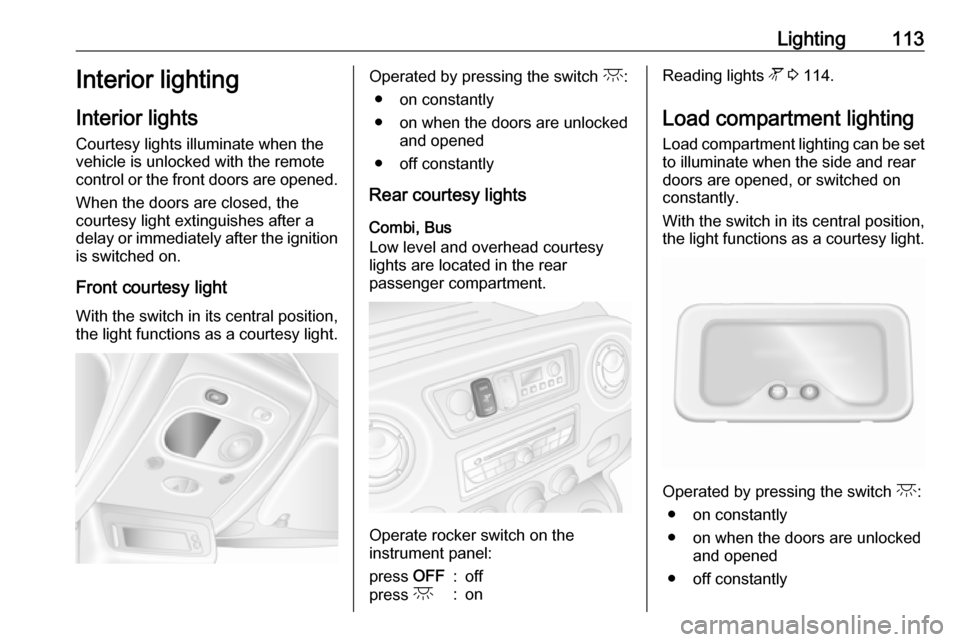
Front courtesy light
With the switch in its central position,
the light functions as a courtesy light.Operated by pressing the switch c:
● on constantly
● on when the doors are unlocked and opened
● off constantly
Rear courtesy lights
Combi, Bus
Low level and overhead courtesy
lights are located in the rear
passenger compartment.
Operate rocker switch on the
instrument panel:
press OFF:offpress c:onReading lights l 3 114.
Load compartment lighting Load compartment lighting can be setto illuminate when the side and rear
doors are opened, or switched on
constantly.
With the switch in its central position,
the light functions as a courtesy light.
Operated by pressing the switch c:
● on constantly
● on when the doors are unlocked and opened
● off constantly
Page 126 of 261
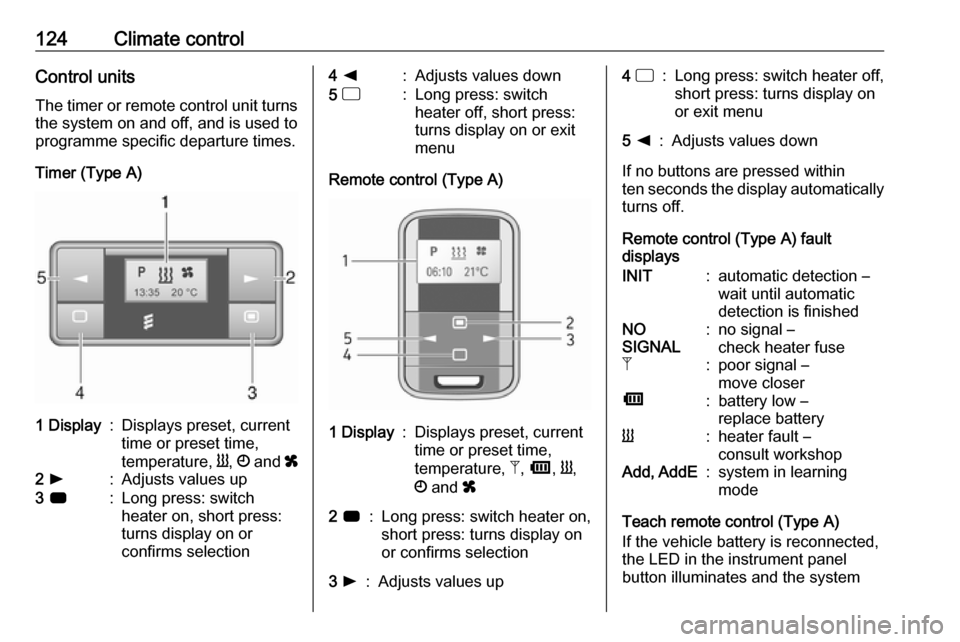
124Climate controlControl unitsThe timer or remote control unit turns
the system on and off, and is used to
programme specific departure times.
Timer (Type A)1 Display:Displays preset, current
time or preset time,
temperature, Y, Ö and x2 l:Adjusts values up3 7:Long press: switch
heater on, short press:
turns display on or
confirms selection4 k:Adjusts values down5 d:Long press: switch
heater off, short press:
turns display on or exit
menu
Remote control (Type A)
1 Display:Displays preset, current
time or preset time,
temperature, Z, Ü , Y ,
Ö and x2 7:Long press: switch heater on,
short press: turns display on
or confirms selection3 l:Adjusts values up4 d:Long press: switch heater off,
short press: turns display on
or exit menu5 k:Adjusts values down
If no buttons are pressed within
ten seconds the display automatically
turns off.
Remote control (Type A) fault
displays
INIT:automatic detection –
wait until automatic
detection is finishedNO
SIGNAL:no signal –
check heater fuseZ:poor signal –
move closerÜ:battery low –
replace batteryY:heater fault –
consult workshopAdd, AddE:system in learning
mode
Teach remote control (Type A)
If the vehicle battery is reconnected,
the LED in the instrument panel
button illuminates and the system
Page 127 of 261
Climate control125configures the remote control menu
automatically. If the LED flashes,
select Add or AddE and confirm.
Additional remote control units may
also be configured. Press the button
until LED flashes, switch on the
remote control, select Add and
confirm.
AddE teaches the current remote
control unit exclusively and blocks all
previously configured units. Add
teaches up to four remote control
units, but only one unit can operate the system at any one time.
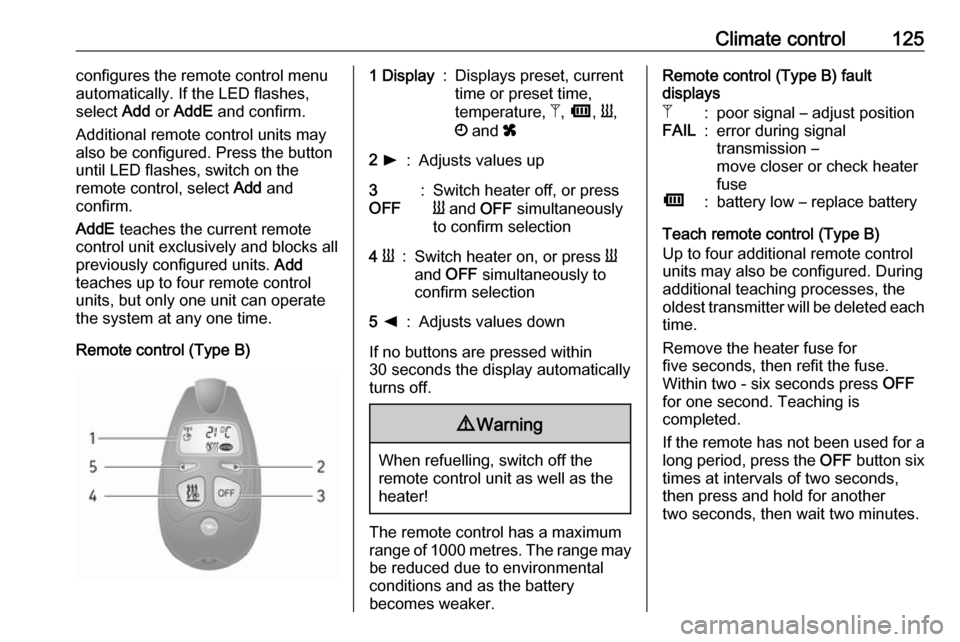
Remote control (Type B)1 Display:Displays preset, current
time or preset time,
temperature, Z, Ü , Y ,
Ö and x2 l:Adjusts values up3
OFF:Switch heater off, or press
Y and OFF simultaneously
to confirm selection4 Y:Switch heater on, or press Y
and OFF simultaneously to
confirm selection5 k:Adjusts values down
If no buttons are pressed within
30 seconds the display automatically
turns off.
9 Warning
When refuelling, switch off the
remote control unit as well as the
heater!
The remote control has a maximum
range of 1000 metres. The range may
be reduced due to environmental
conditions and as the battery
becomes weaker.
Remote control (Type B) fault
displaysZ:poor signal – adjust positionFAIL:error during signal
transmission –
move closer or check heater
fuseÜ:battery low – replace battery
Teach remote control (Type B)
Up to four additional remote control
units may also be configured. During
additional teaching processes, the
oldest transmitter will be deleted each
time.
Remove the heater fuse for
five seconds, then refit the fuse.
Within two - six seconds press OFF
for one second. Teaching is
completed.
If the remote has not been used for a long period, press the OFF button six
times at intervals of two seconds,
then press and hold for another
two seconds, then wait two minutes.
Page 128 of 261
126Climate controlManual control
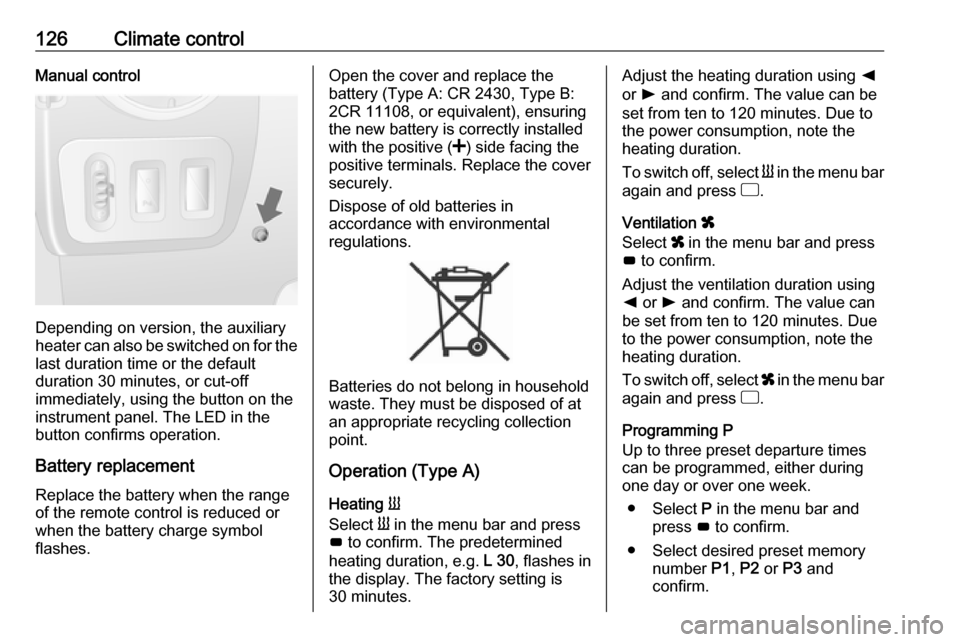
Depending on version, the auxiliary
heater can also be switched on for the
last duration time or the default
duration 30 minutes, or cut-off
immediately, using the button on the
instrument panel. The LED in the
button confirms operation.
Battery replacement
Replace the battery when the range
of the remote control is reduced or
when the battery charge symbol
flashes.
Open the cover and replace the
battery (Type A: CR 2430, Type B:
2CR 11108, or equivalent), ensuring
the new battery is correctly installed
with the positive ( <) side facing the
positive terminals. Replace the cover
securely.
Dispose of old batteries in
accordance with environmental
regulations.
Batteries do not belong in household
waste. They must be disposed of at
an appropriate recycling collection
point.
Operation (Type A)
Heating Y
Select Y in the menu bar and press
G to confirm. The predetermined
heating duration, e.g. L 30, flashes in
the display. The factory setting is 30 minutes.
Adjust the heating duration using k
or l and confirm. The value can be
set from ten to 120 minutes. Due to
the power consumption, note the
heating duration.
To switch off, select Y in the menu bar
again and press d.
Ventilation x
Select x in the menu bar and press
G to confirm.
Adjust the ventilation duration using k or l and confirm. The value can
be set from ten to 120 minutes. Due
to the power consumption, note the
heating duration.
To switch off, select x in the menu bar
again and press d.
Programming P
Up to three preset departure times
can be programmed, either during
one day or over one week.
● Select P in the menu bar and
press G to confirm.
● Select desired preset memory number P1, P2 or P3 and
confirm.
Page 129 of 261

Climate control127● Select F and confirm.
● Select weekday or weekday group and confirm.
● Select hour and confirm.
● Select minutes and confirm.
● Select Y or x and confirm.
● Select ECO or HIGH and confirm.
● Select duration and confirm. ● Press d to exit.
Repeat the procedure to programme
the other preset memory numbers if
required.
To activate a desired preset memory
number select P1, P2 or P3, then
select On and confirm.
When a program is activated P and
Y will be displayed together.
To deactivate a preset memory,
select P1, P2 or P3, then select Off
and confirm.
Heating stops automatically
five minutes after the programmed
departure time.Note
The remote control system features
a temperature sensor which
calculates the runtime according to
the ambient temperature and the desired heating level (ECO or
HIGH). The system starts
automatically between five and
60 minutes prior to the programmed
departure time.
Set time and weekday Þ
If the vehicle battery is disconnected
or its voltage is too low, the unit will
need to be reset.
● Select F in the menu bar and
confirm.
● Select Þ in the menu bar and
confirm.
● Adjust using k or l to change
the hour and confirm.
● Adjust using k or l to change
the minutes and confirm.
● Press d to exit.
● Select F in the menu bar and
confirm.
● Select Mo in the menu bar and
confirm.● Adjust using k or l to change
the weekday and confirm.
● Press d to exit.
Heating level
The preferred heating level for
programmed departure times can be
set to either ECO or HIGH.
● Select Y in the menu bar and
confirm.
● Select ECO or HIGH and confirm.
● Press d to exit.
Operation (Type B)
Heating Y or Ventilation x
Select the operating mode Y or x, if
necessary.
● Press l three times.
● Press Y and OFF
simultaneously, Y or x flashes.
● Adjust using k or l to select Y
or x.
● Press Y and OFF simultaneously
to confirm.
Page 142 of 261
140Driving and operating● Close the windows.
● Turn the ignition key to position
0 and remove it. Turn the
steering wheel until the
steering wheel lock is felt to
engage.
Lock the vehicle 3 24 and activate the
anti-theft locking system 3 34 and
anti-theft alarm system 3 34.
Air suspension
Operates automatically when the
vehicle is driven. The air suspension
system constantly adjusts the ride
height according to the vehicle load.
Caution
To ensure safe operation of the air
suspension system, do not exceed the maximum permissible gross
vehicle weight rating. Refer to
identification plate 3 225 or the
vehicle documents.
For further information on the air
suspension system, refer to the
operating instructions supplied.
Master switchCaution
The air suspension system must
be switched off when the vehicle is being towed, jump‐started, raised
off the ground or transported.
Do not switch off the air
suspension system when driving.
Jump starting 3 213, Towing the
vehicle 3 215.
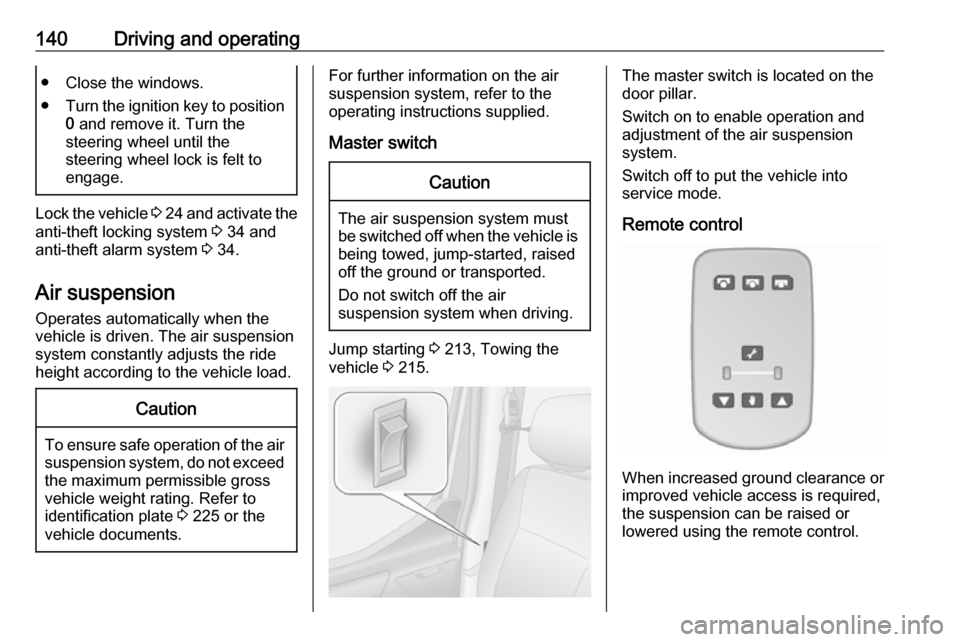
The master switch is located on the
door pillar.
Switch on to enable operation and
adjustment of the air suspension
system.
Switch off to put the vehicle into
service mode.
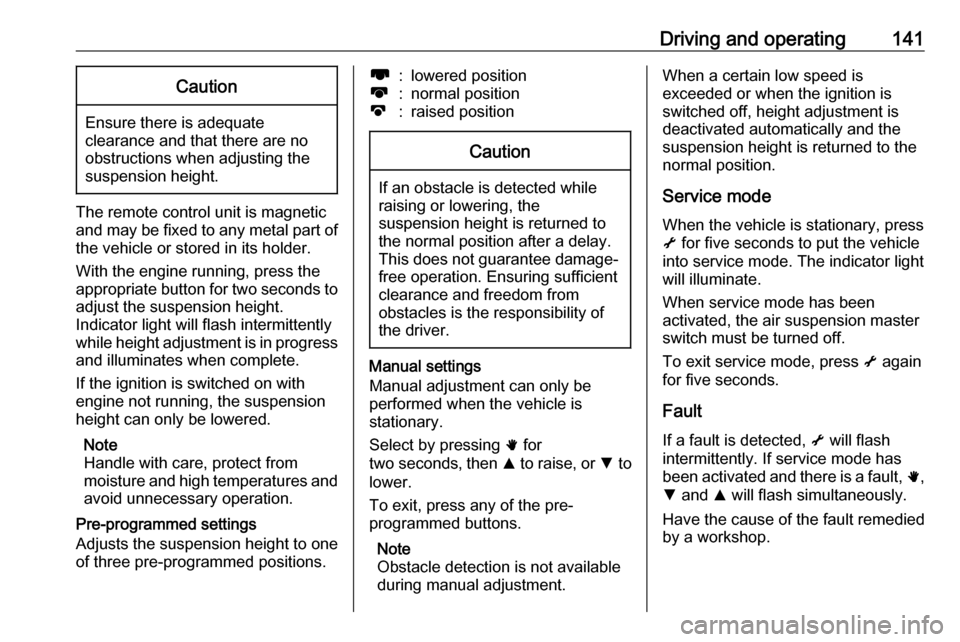
Remote control
When increased ground clearance or improved vehicle access is required,the suspension can be raised or
lowered using the remote control.
Page 143 of 261
Driving and operating141Caution
Ensure there is adequate
clearance and that there are no
obstructions when adjusting the
suspension height.
The remote control unit is magnetic
and may be fixed to any metal part of the vehicle or stored in its holder.
With the engine running, press the appropriate button for two seconds to
adjust the suspension height.
Indicator light will flash intermittently
while height adjustment is in progress
and illuminates when complete.
If the ignition is switched on with
engine not running, the suspension
height can only be lowered.
Note
Handle with care, protect from
moisture and high temperatures and
avoid unnecessary operation.
Pre-programmed settings
Adjusts the suspension height to one
of three pre-programmed positions.
l:lowered positionk:normal positionj:raised positionCaution
If an obstacle is detected while
raising or lowering, the
suspension height is returned to the normal position after a delay.
This does not guarantee damage- free operation. Ensuring sufficient
clearance and freedom from
obstacles is the responsibility of the driver.
Manual settings
Manual adjustment can only be
performed when the vehicle is
stationary.
Select by pressing h for
two seconds , then R to raise, or S to
lower.
To exit, press any of the pre-
programmed buttons.
Note
Obstacle detection is not available
during manual adjustment.
When a certain low speed is
exceeded or when the ignition is
switched off, height adjustment is deactivated automatically and the
suspension height is returned to the
normal position.
Service modeWhen the vehicle is stationary, press
i for five seconds to put the vehicle
into service mode. The indicator light
will illuminate.
When service mode has been
activated, the air suspension master
switch must be turned off.
To exit service mode, press i again
for five seconds.
Fault
If a fault is detected, i will flash
intermittently. If service mode has been activated and there is a fault, h,
S and R will flash simultaneously.
Have the cause of the fault remedied
by a workshop.
Page 253 of 261

Customer information251● Vehicle reactions in particulardriving situations (e.g. inflation ofan airbag, activation of the
stability regulation system).
● Environmental conditions (e.g. temperature).
These data are exclusively technical
and help identifying and correcting
errors as well as optimizing vehicle
functions.
Motion profiles indicating travelled
routes cannot be created with these
data.
If services are used (e.g. repair
works, service processes, warranty
cases, quality assurance),
employees of the service network
(manufacturer included) are able to
read out this technical information
from the event and error data storage
modules applying special diagnostic
devices. If required, you will receive
further information at these
workshops. After an error has been
corrected, the data are deleted from
the error storage module or they are
constantly overwritten.When using the vehicle, situations
may occur in which these technical
data related to other information
(accident report, damages on the
vehicle, witness statements etc.) may
be associated with a specific person - possibly, with the assistance of an
expert.
Additional functions contractually
agreed upon with the client (e.g.
vehicle location in emergency cases)
allow the transmission of particular
vehicle data from the vehicle.
Radio Frequency
Identification (RFID)
RFID technology is used in some
vehicles for functions such as tyre
pressure monitoring and ignition
system security. It is also used in
connection with conveniences such
as radio remote controls for door
locking/unlocking and starting, and in-
vehicle transmitters for garage door
openers. RFID technology in Opel
vehicles does not use or record
personal information or link with any
other Opel system containing
personal information.