air condition OPEL MOVANO_B 2020 Manual user
[x] Cancel search | Manufacturer: OPEL, Model Year: 2020, Model line: MOVANO_B, Model: OPEL MOVANO_B 2020Pages: 353, PDF Size: 9.4 MB
Page 232 of 353

230Driving and operating● the vehicle battery is sufficientlycharged and in good condition
● the engine is warmed up
● the engine coolant temperature is
not too high
● the ambient temperature is not too low
● the altitude is not too high
● the slope is not too steep
● the defrosting function is not activated
● the parking assist is not in operation
● the climate control system does not inhibit an Autostop
● the rear air conditioning system is
not activated
● the brake vacuum is sufficient
● the self-cleaning function of the diesel particle filter is not active
3 233
● the vehicle has moved since the last Autostop
Otherwise an Autostop will be
inhibited.An Autostop may become
unavailable as the ambient
temperature approaches freezing
point.
Certain settings of the climate control
system may also inhibit an Autostop.
See "Climate control" chapter for
further information 3 208.
Immediately after motorway driving
an Autostop may be inhibited.
New vehicle running-in 3 226.
Vehicle battery discharge protection
To ensure reliable engine restarts, several vehicle battery discharge
protection features are implemented
as part of the stop-start system.
Restart of the engine by the driverManual transmission
With the selector lever in neutral,
depress the clutch pedal to restart the
engine.
Note
If any gear is selected, the clutch
pedal must be fully depressed to
restart the engine.If the engine does not restart first
time, depress clutch pedal fully again.Manual transmission automated
With the selector lever in position D,
M or N and the parking brake
released, release the brake pedal to
restart the engine.
Engaging reverse gear or depressing the accelerator pedal may also restart
the engine.
The control indicator Ï will extinguish
in the instrument cluster when the
engine is restarted. If certain
conditions are not fulfilled, a restart will not take place. Start using the
ignition key.
Starting the engine 3 227.
Bus
The engine is restarted automatically
when operating the power sliding
door switch on the instrument panel
during an Autostop.
Sliding door 3 30.
Page 233 of 353

Driving and operating231Restart of the engine by the stop-start system
If one of the conditions for an
Autostop is not fulfilled anymore or
the vehicle starts to move, the engine
may be restarted automatically by the
stop-start system.
An automatic engine restart may not
be possible if a door or the bonnet is
open.
If an electrical accessory, e.g. a
portable CD player, is connected to
the power outlet, a brief power drop
during restart might be noticeable.
If the Infotainment system is active,
audio sound may briefly be reduced
or interrupted during the restart.
Fault
If the LED illuminates in deactivation
button ) without first being pressed
to deactivate the system, there is a
fault in the stop-start system and it is
deactivated. A corresponding
message also appears in the Driver
Information Centre 3 105.
Seek the assistance of a workshop.Parking9 Warning
● Do not park the vehicle on an
easily ignitable surface. The
high temperature of the
exhaust system could ignite the
surface.
● Always apply parking brake without pressing release
button. Apply as firmly as
possible on a downhill slope or
uphill slope. Depress brake
pedal at the same time to
reduce operating force.
● Switch off the engine.
● If the vehicle is on a level surface or uphill slope, engage
first gear. On an uphill slope,
turn the front wheels away from
the kerb.
If the vehicle is on a downhill
slope, engage reverse gear.
Turn the front wheels towards the kerb.
● Close the windows.
● Turn the ignition key to position
0 and remove it. Turn the
steering wheel until the
steering wheel lock is felt to
engage.
Lock the vehicle 3 24 and activate the
anti-theft locking system 3 35 and
anti-theft alarm system 3 36.
Air suspension
Operates automatically when the
vehicle is driven. The air suspension
system constantly adjusts the ride
height according to the vehicle load.
Caution
To ensure safe operation of the air
suspension system, do not exceed the maximum permissible gross
vehicle weight rating. Refer to
identification plate 3 316 or the
vehicle documents.
Page 288 of 353
286Vehicle care
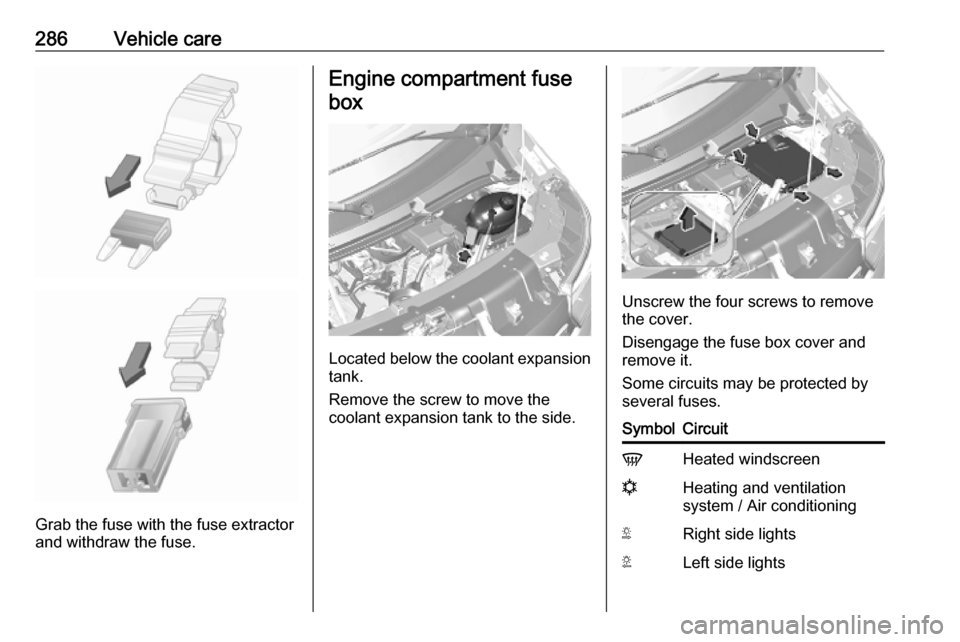
Grab the fuse with the fuse extractor
and withdraw the fuse.
Engine compartment fuse
box
Located below the coolant expansion tank.
Remove the screw to move the
coolant expansion tank to the side.
Unscrew the four screws to remove
the cover.
Disengage the fuse box cover and
remove it.
Some circuits may be protected by
several fuses.
SymbolCircuitVHeated windscreennHeating and ventilation
system / Air conditioningSRight side lightsTLeft side lights
Page 289 of 353

Vehicle care287SymbolCircuitWRight low beamaLeft low beam>Front fog lightsLLeft high beamNRight high beamuABSKWindscreen wiperQPneumatic suspension
Instrument panel fuse box
Located behind the trim panel. Pull
upper part of trim panel to remove.
Do not store any objects behind this
panel.
Some circuits may be protected by
several fuses.SymbolCircuitSRight-hand side lightTLeft-hand side lightxClimate control fan&TachographÍPreheatingZInfotainment system / Seat
heating / Driver Information
Centre / Audio connec‐
tions / AlarmlHands-free connectionADPAdditional adaptationsPTOPower take-offUHeated seatsMElectronic immobiliserSymbolCircuitRWindscreen washer,Power windows / Body
control modulenRight heated rear windowmLeft heated rear windowIBody control module /
Power windows / Heating
and ventilation system / Air
conditioningSTOPBrake lightZBody control moduledInterior lights / Brake lightsuABS / Electronic Stability
ControljHorn0Interior lightsOTurn lights / Rear fog light /
Body control moduleUCentral locking
Page 314 of 353

312Service and maintenanceInternational service intervals
Albania, Bosnia-Herzegovina,
Kosovo, North Macedonia,
Montenegro, Serbia, Romania,
Bulgaria, Moldova, Cyprus:
Maintenance of your vehicle is
required every 30,000 km or after
two years, whichever occurs first,
unless otherwise indicated by the
service display.
Turkey, Morocco:
Maintenance of your vehicle is
required every 20,000 km or after
one year, whichever occurs first,
unless otherwise indicated by the service display.
Russia, Ukraine, Belarus,
Kazakhstan, Malta:
Maintenance of your vehicle is
required every 15,000 km or after
one year, whichever occurs first,
unless otherwise indicated by the
service display.Algeria, Tunisia:
Maintenance of your vehicle is
required every 10,000 km or after
one year, whichever occurs first,
unless otherwise indicated by the service display.
Severe operating conditions exist if
one or more of the following
circumstances occur frequently: Cold
starting, stop and go operation, trailer operation, mountain driving, driving
on poor and sandy road surfaces,
increased air pollution, presence of
airborne sand and high dust content,
driving at high altitude and large
variations of temperature. Under
these severe operating conditions,
certain service work may be required more frequently than the regular
service interval.
Confirmations
Confirmation of service is recorded in the Service and warranty booklet.
The date and mileage is completed
with the stamp and signature of the servicing workshop.Make sure that the Service and
warranty booklet is completed
correctly as continuous proof of
service is essential if any warranty or goodwill claims are to be met, and is
also a benefit when selling the
vehicle.
Service display The service interval is based on
several parameters depending on
usage.
The service display, located in the
Driver Information Centre, indicates
when the next service is due. Seek
the assistance of a workshop.
Service display 3 94.
Page 326 of 353

324Customer informationOperating data in the vehicleControl units process data for
operation of the vehicle.
This data includes, e.g.: ● vehicle status information (e.g. speed, movement delay, lateral
acceleration, wheel rotation rate, "seat belts fastened" display)
● ambient conditions (e.g. temperature, rain sensor,
distance sensor)
As a rule such data is transient, not
stored for longer than an operational
cycle, and only processed on board the vehicle itself. Control units often
include data storage (including the
vehicle key). This is used to allow
information to be documented
temporarily or permanently on vehicle
condition, component stress,
maintenance requirements and
technical events and errors.Depending on technical equipment
level, the data stored is as follows:
● system component operating states (e.g. fill level, tyre
pressure, battery status)
● faults and defects in important system components (e.g. lights,
brakes)
● system reactions in special driving situations (e.g. triggering
of an airbag, actuation of the
stability control systems)
● information on events damaging the vehicle
● for electric vehicles the amount of
charge in the high-voltage
battery, estimated range
In special cases (e.g. if the vehicle
has detected a malfunction), it may be
necessary to save data that would
otherwise just be volatile.
When you use services (e.g. repairs,
maintenance), the operating data
saved can be read together with the
vehicle identification number and
used when necessary. Staff working
for the service network ( e.g. garages,
manufacturers) or third parties (e.g.breakdown services) can read the
data from the vehicle. The same
applies to warranty work and quality
assurance measures.
Data is generally read via the OBD
(On-Board Diagnostics) port
prescribed by law in the vehicle. The operating data which is read out,
documents the technical condition of
the vehicle or individual components
and assists with fault diagnosis,
compliance with warranty obligations
and quality improvement. This data,
in particular information on
component stress, technical events,
operator errors and other faults, is
transmitted to the manufacturer
where appropriate, together with the
vehicle identification number. The
manufacturer is also subject to
product liability. The manufacturer
potentially also uses operating data
from vehicles for product recalls. This
data can also be used to check
customer warranty and guarantee
claims.
Fault memories in the vehicle can be
reset by a service company when
carrying out servicing or repairs or at
your request.
Page 327 of 353

Customer information325Comfort and infotainment
functions
Comfort settings and custom settings
can be stored in the vehicle and
changed or reset at any time.
Depending on the equipment level in
question, these include
● seat and steering wheel position settings
● chassis and air conditioning settings
● custom settings such as interior lighting
You can input your own data in the
infotainment functions for your
vehicle as part of the selected
features.
Depending on the equipment level in
question, these include
● multimedia data such as music, videos or photos for playback in
an integrated multimedia system
● address book data for use with an
integrated hands-free system or an integrated navigation system● input destinations
● data on the use of online services
This data for comfort and
infotainment functions can be stored
locally in the vehicle or be kept on a
device that you have connected to the
vehicle ( e.g. a smartphone, USB stick
or MP3 player). Data that you have input yourself can be deleted at any
time.
This data can only be transmitted out
of the vehicle at your request,
particularly when using online
services in accordance with the
settings selected by you.
Smartphone integration, e.g.
Android Auto or Apple CarPlay
If your vehicle is equipped
accordingly, you can connect your
smartphone or another mobile device
to the vehicle so that you can control
it via the controls integrated in the
vehicle. The smartphone image and
sound can be output via the
multimedia system in this case. At the same time, specific information is
transmitted to your smartphone.
Depending on the type of integration,this includes data such as position
data, day / night mode and other
general vehicle information. For more
information, please see the operating
instructions for the vehicle /
infotainment system.
Integration allows selected
smartphone apps to be used, such as navigation or music playback. No
further integration is possible
between smartphone and vehicle, in
particular active access to vehicle
data. The nature of further data
processing is determined by the
provider of the app used. Whether
you can define settings, and if so
which ones, is dependent on the app
in question and your smartphone's
operating system.
Page 344 of 353

342IndexAAbsorptive Glass Mat battery .....274
Accessories and vehicle modifications .......................... 269
ACC files..................................... 153
Activating Bluetooth function ......197
Activating the navigation system 166
Activating voice recognition ........192
Active emergency braking ..104, 253
Adaptation volume km/h .............138
AdBlue ........................ 101, 234, 313
AdBlue gauge ............................... 93
AdBlue tank ................................ 317
Add a favourite destination .........177
Adding contacts to the phonebook .............................. 201
Adjustable air vents ...................221
AF (Alternative Frequency)......... 148
Airbag and belt tensioners ...........98
Airbag deactivation ................63, 98
Airbag label................................... 59 Airbag system .............................. 59
Air conditioning regular operation ................................ 223
Air conditioning system .............. 209
Air intake .................................... 223
Air suspension ........................... 231
Air suspension system................ 306
Air vents...................................... 221
Antifreeze ................................... 272Antilock brake system ................ 244
Antilock brake system (ABS) .....100
Anti-theft alarm system ................36
Anti-theft bolts............................. 299
Anti-theft locking system .............. 35
Anti-theft security lock ..................23
Appearance care ........................308
Armrest ........................................ 51
Ashtrays ....................................... 91
AST (Autostore list) ....................147
Audio players .............................. 129
Audio settings ............................. 137
Automatic call waiting .................201
Automatic light control ...............110
Automatic locking ...................24, 29
Automatic phone connection ......195
Automatic station search ............145
Automatic station storing ............147
Automatic switch-off ...................129
Automatic zoom .......................... 166
Autostop ....................... 18, 227, 228
Autostore lists ............................. 147
Auxiliary heater ........................... 216
AUX input ................................... 151
AUX input usage ........................152
Avoid part of route ......................183
B Balance....................................... 137
Bass............................................ 137
Page 349 of 353

347Oil pressure................................ 102
Onboard computer...................... 129
Operation ............................ 156, 201
Outside temperature ....................87
Overcab storage ..................76, 338
Overhead console .......................75
Overrun cut-off ........................... 228
P Pairing a mobile phone ...............197
Pairing an audio device ..............156
Park Assist.................................. 129
Parking ................................ 19, 231
Parking assist ............................ 255
Parking brake ..................... 100, 245
Parking distance control .............255
Parking ticket holder .....................43
Particulate filter ........................... 233
Pedals......................................... 225
Performing work ........................270
Phone ......................................... 193
Phonebook ................................. 201
Phone connection .......................195
Phone control ............................. 193
Phone controls............................ 193
Phone installation instructions ....207
Phone menu ............................... 201
Phone operating guidelines ........207
Phone projection ........................163
Phone settings ............................ 201Photos........................................ 161
Pictures....................................... 161
Planning preferences .................166
Playing movies ........................... 162
Playing music via Bluetooth .......156
Playing saved audio files ............154
POI categories ............................ 177
Points of interest .........................129
Points of Interest (POI) ...............177
POIs.................................... 129, 177
Portable CD players ...................152
Power door locks ..........................28
Power outlets ............................... 88
Power side step ............................ 30
Power sliding door ........................30
Power steering fluid ....................273
Power take-off ............................ 266
Power windows ............................ 41
Preheating ......................... 101, 227
Prepare route in advance ...........177
PTY (Program type).................... 148
Puncture ............................. 296, 299
Q
Quick menu ................................ 166
R
Radio .......................................... 144
DAB ......................................... 151
Digital Audio Broadcasting ......151
Radio controls............................. 144Radio data system (RDS) ..........148
Radio Frequency Identification (RFID) ..................................... 326
Radio functions ...................147, 148
Radio reception .......................... 144
Radio remote control ...................21
Radio station name search .........145
Radio text ................................... 148
Rain sensor .................................. 86
RDS ............................................ 148
REACH ....................................... 323
Reading lights ............................ 116
Rear air conditioning system .....215
Rear bench seat storage ..............75
Rear camera ............................... 129
Rear camera view settings .........129
Rear courtesy light...................... 114
Rear doors ................................... 33
Rear fog light .............103, 114, 280
Rear heating system .................. 213
Rear OFF.................................... 137
Rear reading light .......................116
Rear reversing lens ......................42
Rear seats ................................... 52
Bus ............................................ 52
Installing .................................... 52
Rear seat access ......................52
Removing .................................. 52
Rear storage ................................. 76
Rear view camera ...................... 259