buttons OPEL MOVANO_B 2020 Manual user
[x] Cancel search | Manufacturer: OPEL, Model Year: 2020, Model line: MOVANO_B, Model: OPEL MOVANO_B 2020Pages: 353, PDF Size: 9.4 MB
Page 131 of 353

Infotainment system129Note
If equipped, the voice recognition
button 5 may be located on the
steering column controls.
Usage
Infotainment controls The Infotainment system is operated
via buttons, rotary knobs and/or
display menus.
Inputs are made via:
● the central control unit in the instrument panel 3 122, or
● the controls on the steering column 3 122
● the voice recognition system (if available) 3 191
● the touchscreen (NAVI 50 IntelliLink,
NAVI 80 IntelliLink) 3 136
Note
Only the most direct ways for menu
operation are described in the
subsequent chapters. In some
cases, there may be other options.Switching the Infotainment
system on or off
Press X to switch the Infotainment
system on.
The previously used audio source is
active.
Press X (or, depending on
Infotainment system, press and hold)
to switch the Infotainment system off.
Note
The clock and/or outside
temperature may be displayed when
the Infotainment system is switched
off (depending on version).NAVI 50 IntelliLink:
The Infotainment system
automatically switches on/off when
the ignition is switched on/off. Press
X instead, if required.
Press and hold X for 5 seconds to
restart the system.NAVI 80 IntelliLink:
The Infotainment system switches on automatically when the ignition is
switched on (depending on version).
Press X instead, if required.The following options may be
displayed (depending on version):
● Change settings (to authorise or
reject data sharing)
The system displays a screen to
confirm the authorisation of data
sharing after touching Change
settings .
Note
When data sharing is switched off,
certain features may not operate
correctly.
● Language (to change the system
language)
● Done (to continue to the Home
page)
● Help (to see more detailed
information)
The Infotainment system
automatically switches off when the
ignition is switched off and the driver's door is opened. Press X instead, if
required.
Automatic switch-off
With the ignition off, if the
Infotainment system is switched on
with X, it will switch-off automatically
Page 146 of 353

144Infotainment systemRadioUsage
Radio reception Radio reception may be disrupted by
static, noise, distortion or loss of
reception due to:
● changes in distance from the transmitter
● multi-path reception due to reflection
● shadowing
Radio 15 USB - Controls The most important buttons for
control of the radio are:
● RADIO : Activate radio, change
waveband
● 2 3 : Station search
● OK: Change frequency
● Station buttons 1...6: Preset station buttons●SETUP : System settings,
automatic station storing
● TEXT : Display radio text
information
Activating the radio
Press RADIO to switch the audio
source to radio.
The station previously selected will be
received.
Selecting the waveband
Press RADIO repeatedly to switch
between the available wavebands (e.g. FM1, FM2, AM).
The station previously selected in that
waveband will be received.
NAVI 50 IntelliLink - Controls Use the touchscreen to operate the
radio.
The main controls are: ● FM/AM /DAB (depending on
version): Switch between FM and
AM wavebands.
● * /' : Start automatic
search for next/previous radio station.● ;/: : Change to next/previous
frequency in increments of 0.5.
● R/S : Scroll through a list of
stations.
Activating the radio
To activate the radio at any time,
touch 7 followed by ñRadio . The
station previously selected will be
received.
The following submenus are
displayed at the bottom of the screen:
● Main : Radio station/frequency is
displayed.
● List: Displays an alphabetical list
of available radio stations
(maximum 50 stations).
Note
Radio stations without RDS: Only
the frequency is displayed. These
stations appear at the end of the list.
● Presets : Displays stored
favourite radio stations.
● Options :
The following settings can be
changed, depending on selected
waveband:
Page 160 of 353

158Infotainment systemDisconnect the device by turning and
pressing OK. A display message
confirms disconnection.
Switching off the audio device or
deactivating the Bluetooth function on the audio device also disconnects the
device from the Infotainment system.
Unpairing an auxiliary audio device
from the Infotainment system
If the list of paired audio devices is full, a new device can only be paired if an
existing device is unpaired.
To unpair, i.e. to delete an audio
device from the system memory,
press TEL and select Delete device .
Select the desired audio device from
the list and press OK to confirm
deletion when prompted.
Operation via Infotainment system
When paired and connected
wirelessly, audio playback begins
automatically.
The audio device can then be
operated via the Infotainment system
function buttons, rotary knobs and
display menus.The range of accessible functions
that can be operated via the
Infotainment system depends on the
type of audio player.
NAVI 50 IntelliLink
Bluetooth connection
A connection must be set up between the audio device and the Infotainmentsystem via Bluetooth, i.e. the device
must be paired to the vehicle before
using it.
Refer to (NAVI 50 IntelliLink)
"Bluetooth connection" in the "Phone"
section 3 197.
● A maximum of five audio devices
can be paired and saved in the
device list, but only one can be
connected at a time (depending
on version, up to eight audio
devices may be paired).● If the device has both audio player and telephone functions,
both functions will be paired.
Pairing a mobile phone 3 195.
● Phone functions will remain active while the audio player is inuse, and audio playback will be
suspended during phone use.
Pairing an auxiliary audio device to the Infotainment system
To pair the audio device, touch 7
followed by ÿSettings .
Select Connectivity then either
Search for Bluetooth device or
External device authorization .
On the audio device, search for Bluetooth equipment in the vicinity of the device.
Select the name of the Infotainment
system (e.g. Media Nav Evolution )
from the list on the audio device, then (if required), on the audio device
keypad, enter the pairing code shown
on the Infotainment system display
screen.
Page 213 of 353
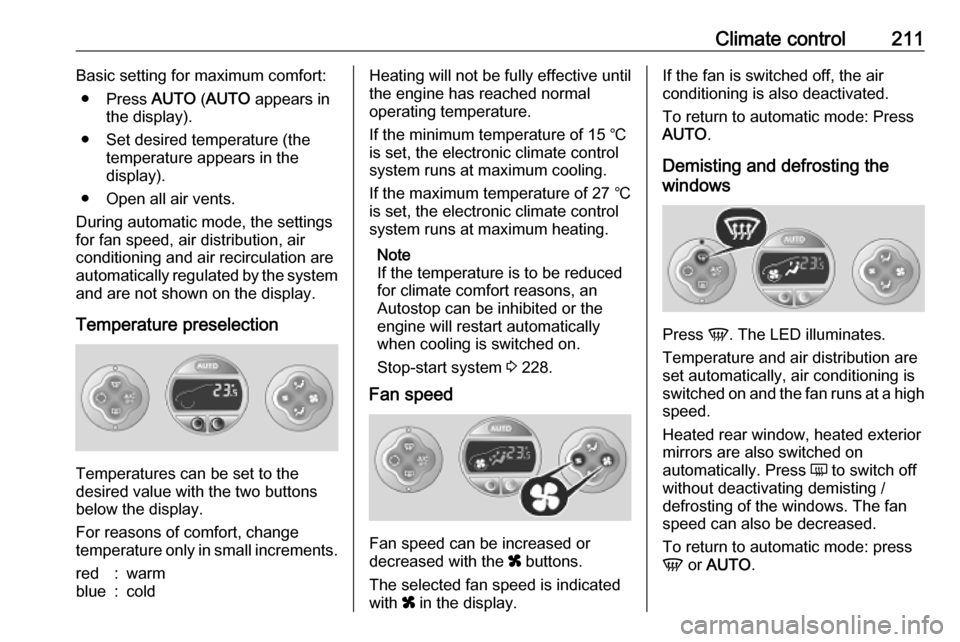
Climate control211Basic setting for maximum comfort:● Press AUTO (AUTO appears in
the display).
● Set desired temperature (the temperature appears in the
display).
● Open all air vents.
During automatic mode, the settings for fan speed, air distribution, air
conditioning and air recirculation are
automatically regulated by the system
and are not shown on the display.
Temperature preselection
Temperatures can be set to the
desired value with the two buttons
below the display.
For reasons of comfort, change
temperature only in small increments.
red:warmblue:coldHeating will not be fully effective until
the engine has reached normal
operating temperature.
If the minimum temperature of 15 ℃
is set, the electronic climate control
system runs at maximum cooling.
If the maximum temperature of 27 ℃
is set, the electronic climate control
system runs at maximum heating.
Note
If the temperature is to be reduced
for climate comfort reasons, an
Autostop can be inhibited or the
engine will restart automatically
when cooling is switched on.
Stop-start system 3 228.
Fan speed
Fan speed can be increased or
decreased with the x buttons.
The selected fan speed is indicated
with x in the display.
If the fan is switched off, the air
conditioning is also deactivated.
To return to automatic mode: Press AUTO .
Demisting and defrosting the
windows
Press V. The LED illuminates.
Temperature and air distribution are
set automatically, air conditioning is
switched on and the fan runs at a high
speed.
Heated rear window, heated exterior
mirrors are also switched on
automatically. Press Ü to switch off
without deactivating demisting /
defrosting of the windows. The fan speed can also be decreased.
To return to automatic mode: press
V or AUTO .
Page 219 of 353
Climate control2174 k:Adjusts values down5 d:Long press: switch
heater off, short press:
turns display on or exit
menu
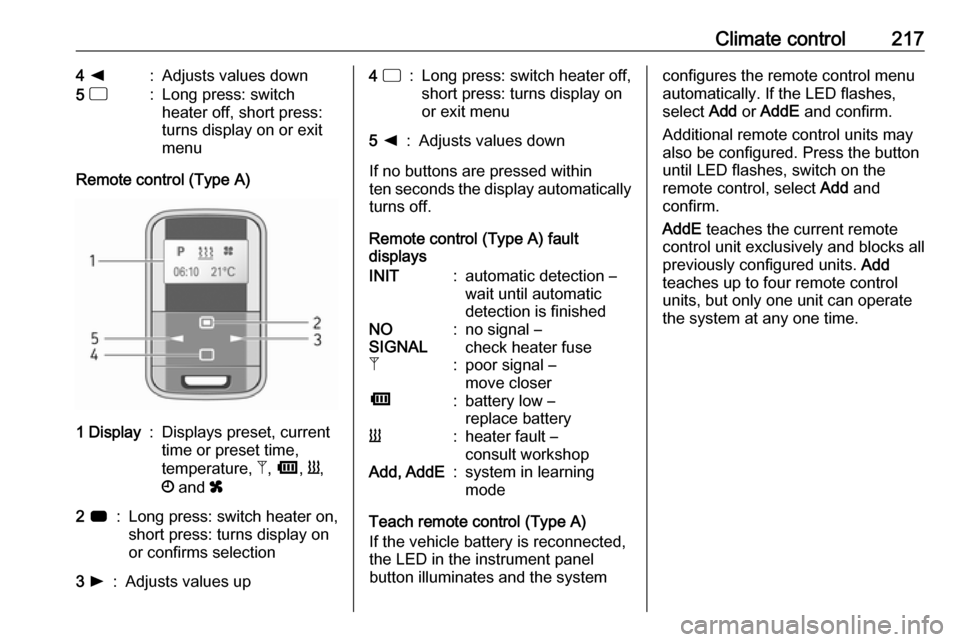
Remote control (Type A)
1 Display:Displays preset, current
time or preset time,
temperature, Z, Ü , Y ,
Ö and x2 7:Long press: switch heater on,
short press: turns display on
or confirms selection3 l:Adjusts values up4 d:Long press: switch heater off,
short press: turns display on
or exit menu5 k:Adjusts values down
If no buttons are pressed within
ten seconds the display automatically
turns off.
Remote control (Type A) fault
displays
INIT:automatic detection –
wait until automatic
detection is finishedNO
SIGNAL:no signal –
check heater fuseZ:poor signal –
move closerÜ:battery low –
replace batteryY:heater fault –
consult workshopAdd, AddE:system in learning
mode
Teach remote control (Type A)
If the vehicle battery is reconnected,
the LED in the instrument panel
button illuminates and the system
configures the remote control menu
automatically. If the LED flashes,
select Add or AddE and confirm.
Additional remote control units may
also be configured. Press the button
until LED flashes, switch on the
remote control, select Add and
confirm.
AddE teaches the current remote
control unit exclusively and blocks all
previously configured units. Add
teaches up to four remote control
units, but only one unit can operate
the system at any one time.
Page 220 of 353
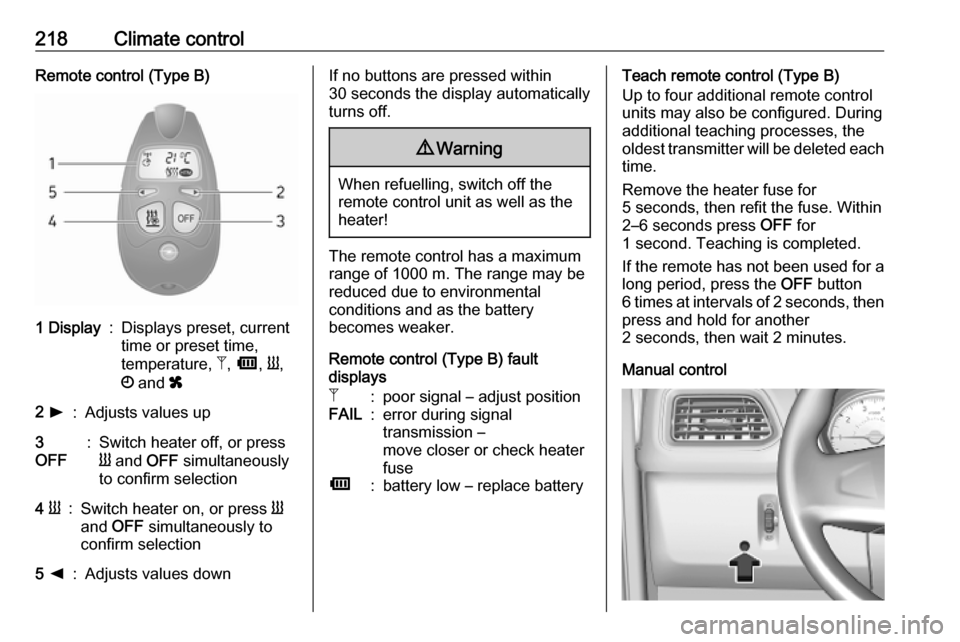
218Climate controlRemote control (Type B)1 Display:Displays preset, current
time or preset time,
temperature, Z, Ü , Y ,
Ö and x2 l:Adjusts values up3
OFF:Switch heater off, or press
Y and OFF simultaneously
to confirm selection4 Y:Switch heater on, or press Y
and OFF simultaneously to
confirm selection5 k:Adjusts values downIf no buttons are pressed within
30 seconds the display automatically
turns off.9 Warning
When refuelling, switch off the
remote control unit as well as the
heater!
The remote control has a maximum
range of 1000 m. The range may be
reduced due to environmental
conditions and as the battery
becomes weaker.
Remote control (Type B) fault
displays
Z:poor signal – adjust positionFAIL:error during signal
transmission –
move closer or check heater
fuseÜ:battery low – replace batteryTeach remote control (Type B)
Up to four additional remote control
units may also be configured. During
additional teaching processes, the
oldest transmitter will be deleted each
time.
Remove the heater fuse for
5 seconds, then refit the fuse. Within 2–6 seconds press OFF for
1 second. Teaching is completed.
If the remote has not been used for a long period, press the OFF button
6 times at intervals of 2 seconds, then
press and hold for another
2 seconds, then wait 2 minutes.
Manual control
Page 235 of 353
Driving and operating233l:lowered positionk:normal positionj:raised positionCaution
If an obstacle is detected while
raising or lowering, the
suspension height is returned to the normal position after a delay.
This does not guarantee damage- free operation. Ensuring sufficient
clearance and freedom from
obstacles is the responsibility of the driver.
Manual settings
Manual adjustment can only be
performed when the vehicle is
stationary.
Select by pressing h for 2 seconds,
then R to raise, or S to lower.
To exit, press any of the pre-
programmed buttons.
Note
Obstacle detection is not available
during manual adjustment.
When a certain low speed is
exceeded or when the ignition is
switched off, height adjustment is deactivated automatically and the
suspension height is returned to the
normal position.
Service mode
When the vehicle is stationary, press
i for 5 seconds to put the vehicle into
service mode. The indicator light will
illuminate.
When service mode has been
activated, the air suspension master
switch must be turned off.
To exit service mode, press i again
for 5 seconds.
Fault
If a fault is detected, i will flash
intermittently. If service mode has been activated and there is a fault, h,
S and R will flash simultaneously.
Have the cause of the fault remedied
by a workshop.Engine exhaust9 Danger
Engine exhaust gases contain
poisonous carbon monoxide,
which is colourless and odourless and could be fatal if inhaled.
If exhaust gases enter the interior
of the vehicle, open the windows.
Have the cause of the fault
rectified by a workshop.
Avoid driving with an open load
compartment, otherwise exhaust
gases could enter the vehicle.
Diesel particle filter
The diesel particle filter system filters
soot particles out of the exhaust
gases. The system includes a self-
cleaning function that runs
automatically during driving without
any notification.
The filter is cleaned by periodically
burning off the soot particles at high
temperature. This process takes
place automatically under set driving
Page 256 of 353
254Driving and operatingThe indicator light l and the chimes
stop when the system detects that a
collision is not imminent anymore.
Just before the imminent collision, the
system brakes automatically to
reduce the impact speed of the
collision or prohibit a crash.9 Warning
Do not rely on the system to brake
the vehicle. Active emergency
braking will not brake outside of its
operating speed range and only
responds to detected vehicles.
Deactivation and re-activation
Active emergency braking can be
deactivated with the vehicle
stationary and the ignition switched
on:
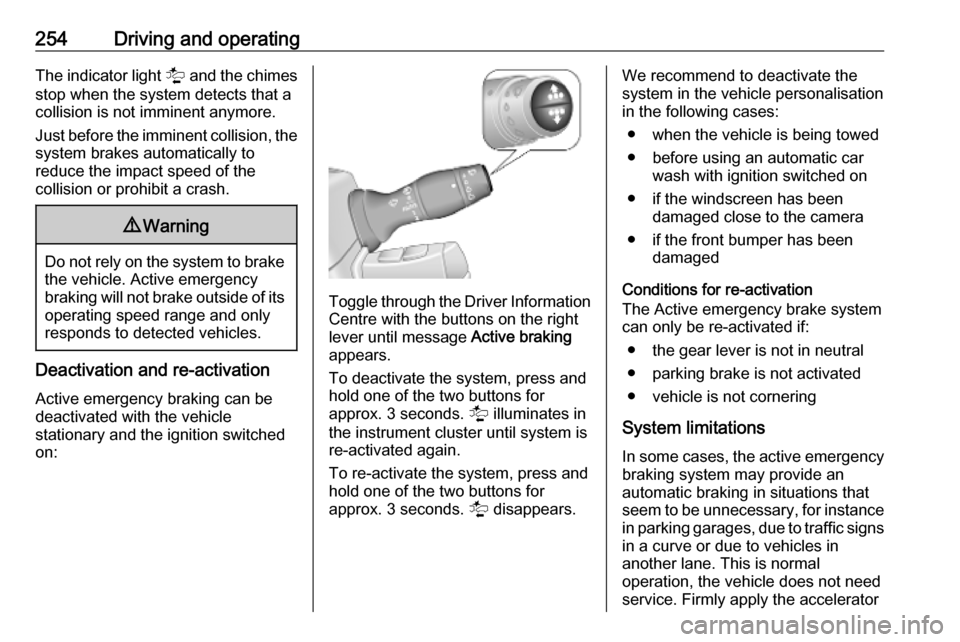
Toggle through the Driver Information
Centre with the buttons on the right
lever until message Active braking
appears.
To deactivate the system, press and
hold one of the two buttons for
approx. 3 seconds. l illuminates in
the instrument cluster until system is
re-activated again.
To re-activate the system, press and hold one of the two buttons for
approx. 3 seconds. l disappears.
We recommend to deactivate the
system in the vehicle personalisation
in the following cases:
● when the vehicle is being towed
● before using an automatic car wash with ignition switched on
● if the windscreen has been damaged close to the camera
● if the front bumper has been damaged
Conditions for re-activation
The Active emergency brake system
can only be re-activated if:
● the gear lever is not in neutral
● parking brake is not activated
● vehicle is not cornering
System limitations In some cases, the active emergency
braking system may provide an
automatic braking in situations that
seem to be unnecessary, for instance in parking garages, due to traffic signs
in a curve or due to vehicles in
another lane. This is normal
operation, the vehicle does not need
service. Firmly apply the accelerator