fuel OPEL MOVANO_B 2020 Manual user
[x] Cancel search | Manufacturer: OPEL, Model Year: 2020, Model line: MOVANO_B, Model: OPEL MOVANO_B 2020Pages: 353, PDF Size: 9.4 MB
Page 136 of 353

134Infotainment system●My preferred trips
Displays changes in driving style
(when journey data has been
saved).
The 'Summary' tab for each
journey type (e.g. Home/work)
displays the following: Total route distance, distance covered, date
of information update and
average driving economy rating
out of 100.
The 'Detailed report'/'Details' tab
displays journey record
information.
● Eco-coaching
Displays advice for reducing fuel consumption.
Scroll through the pages and
familiarise yourself with the
advice.Onboard computer
Displays the following information
since the last reset:
● start date of calculation
● total distance
● average speed● average fuel consumption
● total fuel consumption
To reset onboard computer and
instrument panel trip computer
information, touch Reset then Yes to
confirm.
For further information, refer to "Trip
computer" in the Owner's Manual.Settings
The following settings can be
changed:
● Park assist
● Volume :
Touch < or ] alongside the
volume bar to change volume of the ultrasonic parking
assist system. For further
information, refer to "Parking
assist" in the Owner's
Manual.
● Rear camera view settings
(available depending on
version):
Select to switch rear view
camera on/off, change
guidelines (static/dynamic)
and adjust image settings(e.g. brightness, colour and
contrast).
Touch Done to save
changes. For further
information, refer to "Rear view camera" in the Owner's
Manual.
● < (pop-up menu):
Touch < in the Park Assist
menu or submenus followed
by Reset to the default
values to restore default
factory settings for all or
current park assist options.
● Image settings (available
depending on version)
To adjust e.g., brightness, colour
and contrast.
● The following options (depending
on vehicle) can also be adjusted:
● Daytime running lights (switch on/off).
● Unlock the driver's door only when opening the door
(switch on/off).
● Easy access (switch on/off).
Page 137 of 353

Infotainment system135● Driving style indicator (fueleconomy gauge) (switch on/
off).
● Eco score (switch on/off).
● Show report after trip (switch on/off).
After the settings are changed, touch
Done to confirm.
Services (NAVI 80 IntelliLink)
To access the Services menu from
the Home page, touch MENU
followed by Services.
The following menus are displayed: ● Navigation services
● SettingsNavigation services
In addition to the navigation services
(e.g. traffic information, fixed speed
cameras), extra features can be
added by subscribing to LIVE
services.
Refer to (NAVI 80 IntelliLink) "LIVE
services" in the "Navigation" section
3 166.Settings
The following menus are displayed:
● Applications manager
Select to manage Bluetooth
auxiliary devices.
● Navigation services
Select to access navigation
related features, e.g. traffic,
speed cameras, local search,
My TomTom LIVE, weather.
Refer to (NAVI 80 IntelliLink)
"LIVE services" in the
"Navigation" section 3 166.
Note
A compatible SD card must be
inserted to access LIVE services.
● Update applications
Select to update current
applications.
● Data sharing settings
Select to switch data sharing on/
off.
Note
When data sharing is switched off, certain features may not operate
correctly.Favourites (NAVI 80 IntelliLink)
When the Home page is displayed,
touch f to view, add or delete
favourites for the following features:
● ⇑ Navigation 3 164.
● ª Multimedia - refer to "Radio"
3 144.
● g Phone 3 193.
● ¯ Services 3 166.Navigation favourites
Select an empty slot in the display or
touch < (to open a pop-up menu),
then select Add Favourite .
Choose from the displayed list to add a saved destination to the favourites.
For further information, refer to
(NAVI 80 IntelliLink) "Destination
input" in the "Navigation" section
3 177.Multimedia favourites
Select an empty slot in the display or
touch < (to open a pop-up menu),
then Add Favourite .
Choose from the displayed list to add
a preset FM radio station to the
favourites.
Page 178 of 353

176Infotainment systemCoordinate format
Select Coordinate format to change
the format of co-ordinate entries to one of the following options:
● DD.DDDDD
● DD MM.MMM
● DD MM SS.SGPS
Select GPS to view the GPS
information, e.g. available satellites,
their location and signal strength.Map update
Select Map update to display the
following digital map content and
latest update information:
● Alert Points
● Junction View
● Maps
● Places
● Traffic Service
● Address Points
Specific content or all map content
can be updated. Select one of the
options first or touch Options then
Update . Wait for the update to
complete.Refer to "USB memory stick"
(NAVI 50 IntelliLink), "Updating the
USB memory stick and navigation
system" in the "General information"
section 3 164.Traffic
Select Traffic to change the following
traffic information settings:
● Traffic info (On/Off)
● Detour
● Event types
Traffic info : Warnings are given for
incidents that occur along the route.
Detour : Save time by using an
alternative route when a traffic jam or
an incident occurs along the current
route. Select 'On'/'Off' alongside
"Confirm offered route?" as required.
If necessary, update the time value
for the option "Offer detour if the
calculated route saves more than:"
(e.g. five minutes) by touching k/l .
Event types : Select the type of events
to be displayed during route
guidance, e.g. all events, traffic flow
events, closures and blockages,
accidents.NAVI 80 IntelliLink
To access the navigation settings
menu from the Home page, touch
MENU then Navigation , followed by
Settings . The following settings
submenus are displayed:
● Turn off voice guidance :
Switch on/off voice guidance
during navigation.
● Route planning :
Settings for route type, toll roads,
ferries, route summary, carpool
lanes and unpaved roads.
Select a planning preference type; "Fastest route" is
recommended. The eco-route is
designed to save the most fuel.
Then switch on/off "iQ routes™" as required. iQ routes™ enables
routes to be calculated according to average traffic levels during aparticular day and time, and alsothe best route according to actual
traffic speeds.
● Show POI on map :
Show or hide categories of POI
markers on the map.
Page 191 of 353

Infotainment system189This menu option contains the
following information:
● speed limits
● phone country code (International dialling code, e.g.
+49)
● emergency number (e.g. 112)
● legal restrictions, e.g.: ● vehicle equipment requirements, e.g. warning
triangle, first aid kit, fire
extinguisher, spare bulbs,
high-visibility jacket etc.
● headlights legislation
● maximum blood alcohol level
● snow chains legislation
● winter tyres legislationHelp Nearby
This function allows you to search for
assistance near the current location.
When the Where am I? screen is
displayed, touch Help Nearby.This menu option contains the
following information:
● Car repair around here (Vehicle
repair services)
● Health around here (Medical and
emergency services)
● Police around here (Police
stations)
● Petrol station around here (Fuel
stations)
Select the appropriate option to
access a list of local Points of Interest (POI).
For information on Points of Interest
(POI), refer to (NAVI 50 IntelliLink)
"Destination input" 3 177.
Traffic information NAVI 50 IntelliLink
Available depending on version, up-
to-date traffic information from local
sources can be received. Information
is provided for the current route or for
the current vehicle location.
During route guidance, touch
Options then select Current traffic , or
touch the traffic icon Ö on the mapscreen. Traffic incidents along the
route and estimated delay times are
displayed.
The following options are available: ● Event list : Select to change event
display settings.
● Offer detour : Create an
alternative route to the selected
destination.
● Options : Access traffic options.
To access these traffic options at any time, touch 7 followed by yNAVI /
ý Nav then Options . Then select
Ö Traffic .
Touch q to return to route guidance.
NAVI 80 IntelliLink
Allows up-to-date traffic information from local sources to be received.
From the Home page, touch MENU
then Navigation , followed by
Navigation Services . Then select
Traffic /HD Traffic .
The navigation system indicates
traffic incidents with voice messages, the traffic information bar and also by
displaying symbols on the map.
Page 211 of 353
Climate control209J:to windscreen, front door
windows and foot wellV:to windscreen and front door
windows
Intermediate settings are possible.
Demisting and defrosting the
windows
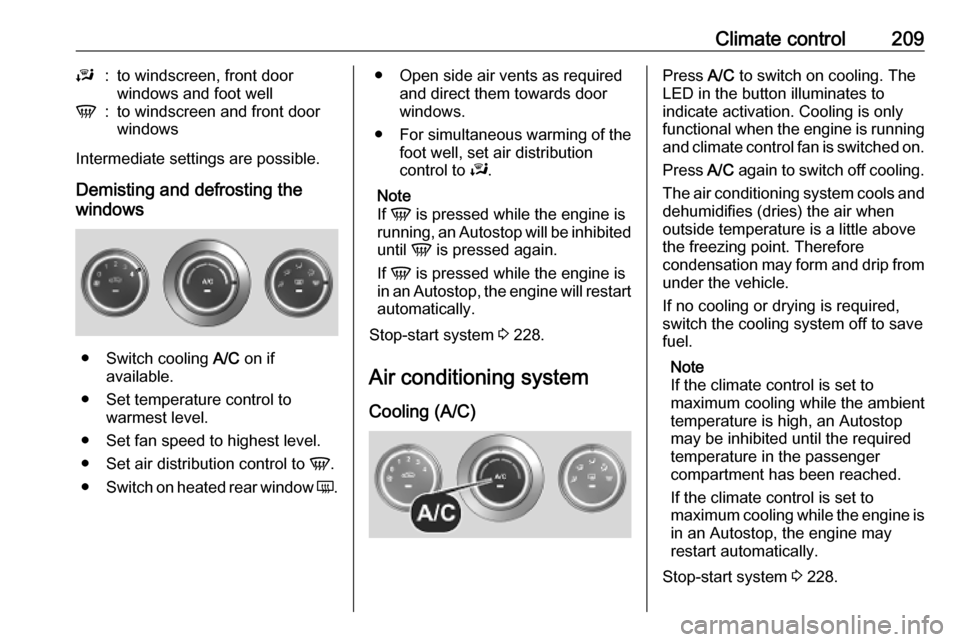
● Switch cooling A/C on if
available.
● Set temperature control to warmest level.
● Set fan speed to highest level.
● Set air distribution control to V.
● Switch on heated rear window Ü.
● Open side air vents as required
and direct them towards door
windows.
● For simultaneous warming of the
foot well, set air distribution
control to J.
Note
If V is pressed while the engine is
running, an Autostop will be inhibited
until V is pressed again.
If V is pressed while the engine is
in an Autostop, the engine will restart automatically.
Stop-start system 3 228.
Air conditioning system
Cooling (A/C)Press A/C to switch on cooling. The
LED in the button illuminates to
indicate activation. Cooling is only
functional when the engine is running and climate control fan is switched on.
Press A/C again to switch off cooling.
The air conditioning system cools and
dehumidifies (dries) the air when
outside temperature is a little above
the freezing point. Therefore
condensation may form and drip from under the vehicle.
If no cooling or drying is required,
switch the cooling system off to save
fuel.
Note
If the climate control is set to
maximum cooling while the ambient temperature is high, an Autostop
may be inhibited until the required
temperature in the passenger
compartment has been reached.
If the climate control is set to
maximum cooling while the engine is in an Autostop, the engine may
restart automatically.
Stop-start system 3 228.
Page 214 of 353
212Climate controlNote
If V is pressed while the engine is
running, an Autostop will be inhibited
until V is pressed again.
If V is pressed while the engine is
in an Autostop, the engine will restart
automatically.
Stop-start system 3 228.
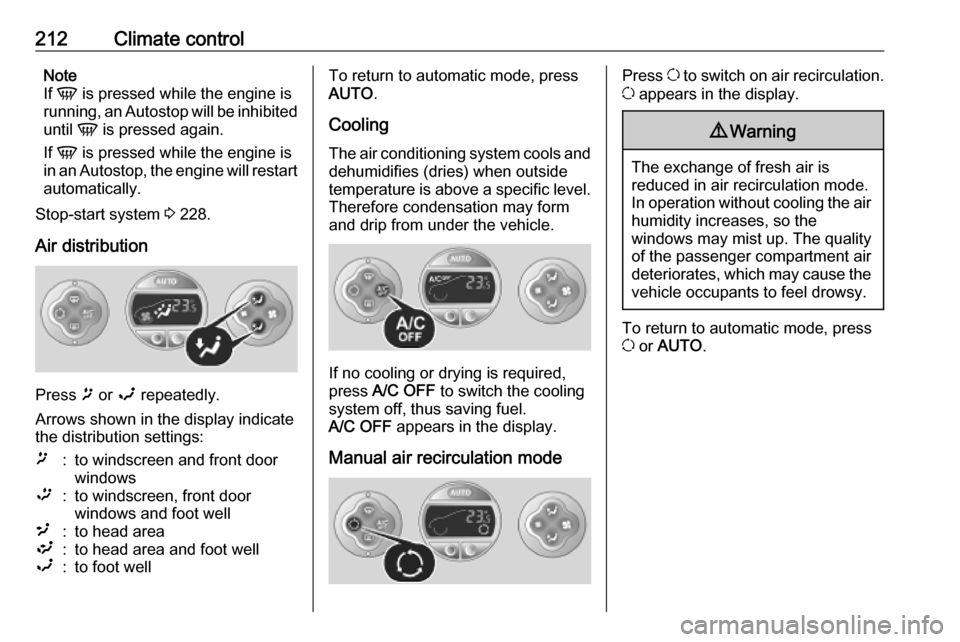
Air distribution
Press ï or î repeatedly.
Arrows shown in the display indicate
the distribution settings:
ï:to windscreen and front door
windows™:to windscreen, front door
windows and foot well²:to head area³:to head area and foot wellî:to foot wellTo return to automatic mode, press
AUTO .
Cooling
The air conditioning system cools and
dehumidifies (dries) when outside
temperature is above a specific level. Therefore condensation may form
and drip from under the vehicle.
If no cooling or drying is required,
press A/C OFF to switch the cooling
system off, thus saving fuel.
A/C OFF appears in the display.
Manual air recirculation mode
Press u to switch on air recirculation.
u appears in the display.9 Warning
The exchange of fresh air is
reduced in air recirculation mode.
In operation without cooling the air humidity increases, so the
windows may mist up. The quality
of the passenger compartment air
deteriorates, which may cause the vehicle occupants to feel drowsy.
To return to automatic mode, press
u or AUTO .
Page 215 of 353
Climate control213Rear heating system
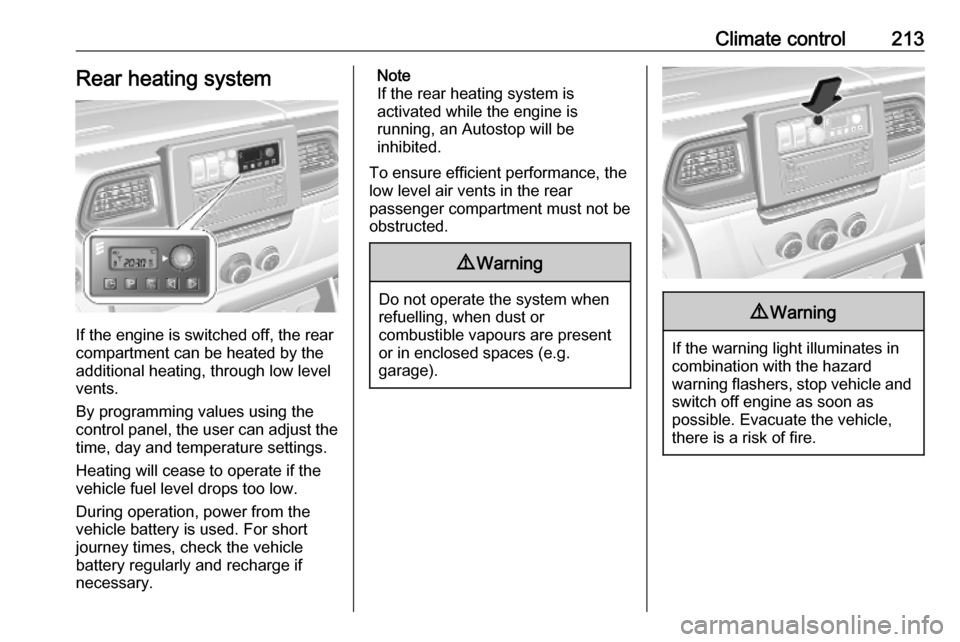
If the engine is switched off, the rear
compartment can be heated by the
additional heating, through low level
vents.
By programming values using the
control panel, the user can adjust the
time, day and temperature settings.
Heating will cease to operate if the
vehicle fuel level drops too low.
During operation, power from the
vehicle battery is used. For short
journey times, check the vehicle
battery regularly and recharge if
necessary.
Note
If the rear heating system is
activated while the engine is
running, an Autostop will be
inhibited.
To ensure efficient performance, the
low level air vents in the rear
passenger compartment must not be
obstructed.9 Warning
Do not operate the system when
refuelling, when dust or
combustible vapours are present
or in enclosed spaces (e.g.
garage).
9 Warning
If the warning light illuminates in
combination with the hazard
warning flashers, stop vehicle and switch off engine as soon as
possible. Evacuate the vehicle, there is a risk of fire.
Page 218 of 353
216Climate controlCombi
Additional air conditioning is supplied to the rear passenger compartment
via the air vents located above the
driver and front passenger
compartment.
With the front passenger
compartment air conditioning system
switched on, adjust the air flow to
select the desired speed.
Ensure the air vents are open when in use, to prevent ice forming in the
system due to lack of air movement.
Auxiliary heater Coolant heater
The engine-independent, fuel-
powered coolant heater provides rapid heating of the engine coolant to
enable heating of the vehicle interior
without the engine running.
Note
Depending on version, an additional
coolant heater may be switched on
automatically to speed up heating
when the ignition is on and the
outside temperature is below 5 ℃.9 Warning
Do not operate the system when
refuelling, when dust or
combustible vapours are present
or in enclosed spaces (e.g.
garage).
Before starting or programming the
system to start, turn the vehicle's
climate control system to heat, set the
air distribution to V and turn the fan
on.
Switch off when not required. Heating stops automatically after the
programmed runtime. It will also
cease to operate if the vehicle fuel
level drops too low.
During operation, power from the
vehicle battery is used. The driving
time should therefore be at least as
long as the heating time. For short
journey times, check the vehicle
battery regularly and recharge if
necessary.
To ensure efficient performance,
briefly operate the auxiliary heater
once a month.
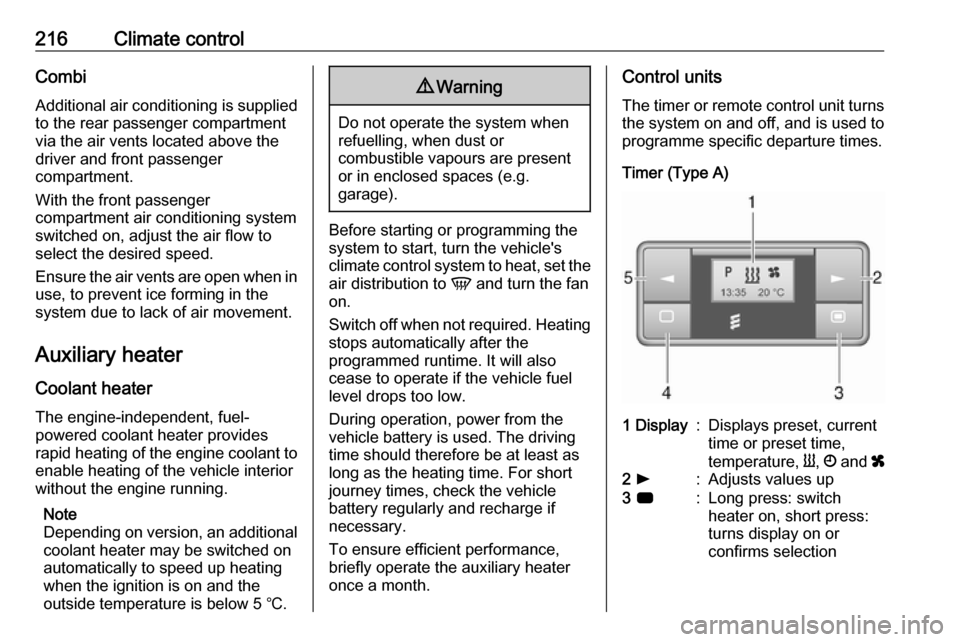
Control units
The timer or remote control unit turns the system on and off, and is used to
programme specific departure times.
Timer (Type A)1 Display:Displays preset, current
time or preset time,
temperature, Y, Ö and x2 l:Adjusts values up3 7:Long press: switch
heater on, short press:
turns display on or
confirms selection
Page 220 of 353
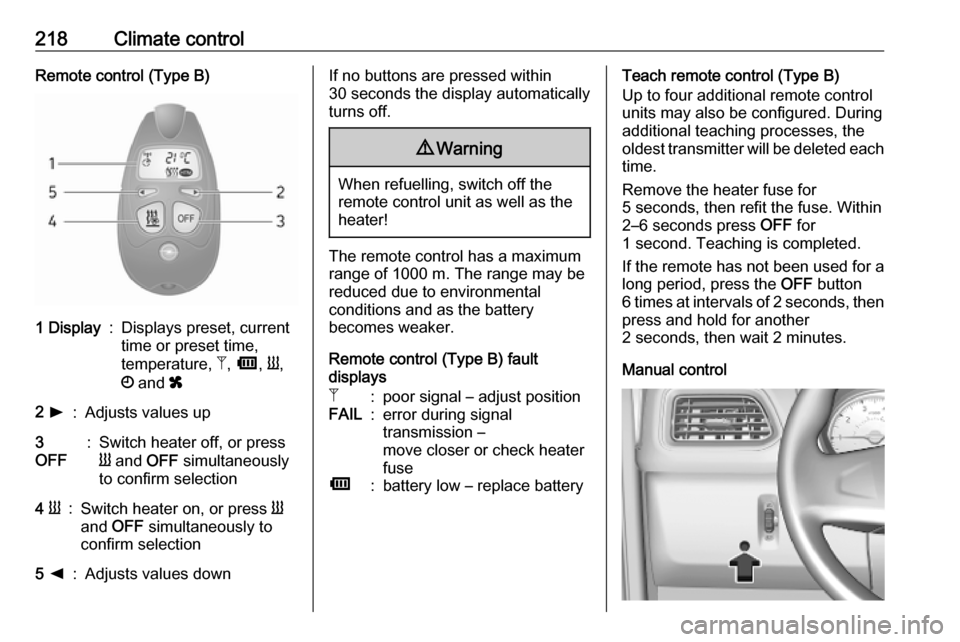
218Climate controlRemote control (Type B)1 Display:Displays preset, current
time or preset time,
temperature, Z, Ü , Y ,
Ö and x2 l:Adjusts values up3
OFF:Switch heater off, or press
Y and OFF simultaneously
to confirm selection4 Y:Switch heater on, or press Y
and OFF simultaneously to
confirm selection5 k:Adjusts values downIf no buttons are pressed within
30 seconds the display automatically
turns off.9 Warning
When refuelling, switch off the
remote control unit as well as the
heater!
The remote control has a maximum
range of 1000 m. The range may be
reduced due to environmental
conditions and as the battery
becomes weaker.
Remote control (Type B) fault
displays
Z:poor signal – adjust positionFAIL:error during signal
transmission –
move closer or check heater
fuseÜ:battery low – replace batteryTeach remote control (Type B)
Up to four additional remote control
units may also be configured. During
additional teaching processes, the
oldest transmitter will be deleted each
time.
Remove the heater fuse for
5 seconds, then refit the fuse. Within 2–6 seconds press OFF for
1 second. Teaching is completed.
If the remote has not been used for a long period, press the OFF button
6 times at intervals of 2 seconds, then
press and hold for another
2 seconds, then wait 2 minutes.
Manual control
Page 226 of 353

224Driving and operatingDriving and
operatingDriving hints ............................... 225
Driving economically ...............225
Control of the vehicle ...............225
Steering ................................... 225
Starting and operating ...............226
New vehicle running-in ............226
Ignition switch positions ...........226
Starting the engine ..................227
Idle speed control ....................228
Overrun cut-off ........................ 228
Stop-start system ....................228
Parking .................................... 231
Air suspension ......................... 231
Engine exhaust .......................... 233
Diesel particle filter ..................233
Catalytic converter ...................234
AdBlue ..................................... 234
Manual transmission ..................241
Manual transmission automa‐ ted .............................................. 241
Transmission display ...............241
Starting the engine ..................242
Selector lever .......................... 242Manual mode........................... 243
Electronic driving programmes 243
Fault ........................................ 244
Interruption of power supply ....244
Brakes ........................................ 244
Antilock brake system .............244
Parking brake .......................... 245
Brake assist ............................. 246
Hill start assist ......................... 246
Ride control systems .................247
Traction Control system ..........247
Electronic Stability Control ......248
Limited-slip rear axle ...............249
Driver assistance systems .........249
Cruise control .......................... 249
Speed limiter ........................... 251
Active emergency braking .......253
Parking assist .......................... 255
Side blind spot alert .................257
Rear view camera ...................259
Lane departure warning ..........261
Fuel ............................................ 262
Fuel for diesel engines ............262
Refuelling ................................ 263
Trailer hitch ................................ 265
General information .................265
Driving characteristics and towing tips .............................. 265
Trailer towing ........................... 265Towing equipment ...................266
Trailer stability assist ...............266
Auxiliary features .......................266
Power take-off ......................... 266