headlights OPEL MOVANO_B 2020 Manual user
[x] Cancel search | Manufacturer: OPEL, Model Year: 2020, Model line: MOVANO_B, Model: OPEL MOVANO_B 2020Pages: 353, PDF Size: 9.4 MB
Page 143 of 353

Infotainment system141Note
Navigation maps for the current
country must be installed on the
system to ensure the local time is
correct.
● Factory settings
The following settings can be
reset to the factory default:
● All
● Phone - Smartphone
● Navigation
● Audio-Media-Radio-System
● Navigation (On/Off)
● System version (displays
Infotainment system software
version number)
When system setting adjustments
have been made, touch 7 (and select
another menu on the display) to exit
the settings menu and save changes.
The system also saves and exits
automatically after a delay.
NAVI 80 IntelliLink To access the system settings menufrom the Home page, touch MENU
followed by System.The following settings submenus are
displayed:
● Language
● Display
● Sound
● Clock
● Safety warnings
● Home screen
● Keyboards
● Set units
● Status & Information
● Remove SD-card
● Restore factory settings
● Android Auto Settings ™
After system settings are changed,
touch Done to confirm.Language
To change Infotainment system
language then voice type (depending on version).Display
The following settings are displayed:
● Daytime brightness : Change
screen brightness to suit external light levels (daylight).During low external light levels,
the display screen is easier to
view when the display is not too
bright.
● Nighttime brightness /Night
brightness : Change screen
brightness to suit external light
levels (night light).
During low external light levels,
the display screen is easier to
view when the display is not too
bright.
● Automatic day/night mode /
Change to night colours : To
activate automatic switching
between daytime/night
brightness.
Night mode is activated during
low external light levels and when
the headlights are switched on.
● Force night mode /Use night
colours : To activate night mode.
Page 191 of 353

Infotainment system189This menu option contains the
following information:
● speed limits
● phone country code (International dialling code, e.g.
+49)
● emergency number (e.g. 112)
● legal restrictions, e.g.: ● vehicle equipment requirements, e.g. warning
triangle, first aid kit, fire
extinguisher, spare bulbs,
high-visibility jacket etc.
● headlights legislation
● maximum blood alcohol level
● snow chains legislation
● winter tyres legislationHelp Nearby
This function allows you to search for
assistance near the current location.
When the Where am I? screen is
displayed, touch Help Nearby.This menu option contains the
following information:
● Car repair around here (Vehicle
repair services)
● Health around here (Medical and
emergency services)
● Police around here (Police
stations)
● Petrol station around here (Fuel
stations)
Select the appropriate option to
access a list of local Points of Interest (POI).
For information on Points of Interest
(POI), refer to (NAVI 50 IntelliLink)
"Destination input" 3 177.
Traffic information NAVI 50 IntelliLink
Available depending on version, up-
to-date traffic information from local
sources can be received. Information
is provided for the current route or for
the current vehicle location.
During route guidance, touch
Options then select Current traffic , or
touch the traffic icon Ö on the mapscreen. Traffic incidents along the
route and estimated delay times are
displayed.
The following options are available: ● Event list : Select to change event
display settings.
● Offer detour : Create an
alternative route to the selected
destination.
● Options : Access traffic options.
To access these traffic options at any time, touch 7 followed by yNAVI /
ý Nav then Options . Then select
Ö Traffic .
Touch q to return to route guidance.
NAVI 80 IntelliLink
Allows up-to-date traffic information from local sources to be received.
From the Home page, touch MENU
then Navigation , followed by
Navigation Services . Then select
Traffic /HD Traffic .
The navigation system indicates
traffic incidents with voice messages, the traffic information bar and also by
displaying symbols on the map.
Page 262 of 353
260Driving and operatingInfo Display
In vehicles without interior mirror
display, the rear view camera screen
is shown on the Info Display.
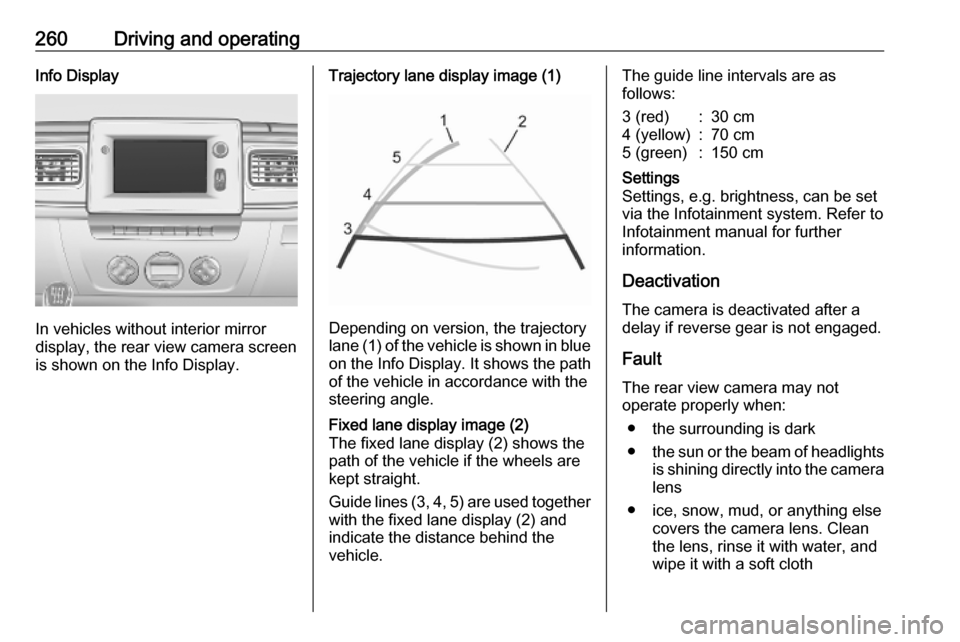
Trajectory lane display image (1)
Depending on version, the trajectory
lane (1) of the vehicle is shown in blue
on the Info Display. It shows the path of the vehicle in accordance with the
steering angle.
Fixed lane display image (2)
The fixed lane display (2) shows the
path of the vehicle if the wheels are
kept straight.
Guide lines (3, 4, 5) are used together
with the fixed lane display (2) and
indicate the distance behind the
vehicle.The guide line intervals are as
follows:3 (red):30 cm4 (yellow):70 cm5 (green):150 cmSettings
Settings, e.g. brightness, can be set
via the Infotainment system. Refer to
Infotainment manual for further
information.
Deactivation
The camera is deactivated after a
delay if reverse gear is not engaged.
Fault
The rear view camera may not
operate properly when:
● the surrounding is dark
● the sun or the beam of headlights
is shining directly into the camera lens
● ice, snow, mud, or anything else covers the camera lens. Clean
the lens, rinse it with water, and
wipe it with a soft cloth
Page 270 of 353

268Vehicle careVehicle careGeneral Information...................269
Accessories and vehicle modifications .......................... 269
Vehicle storage ........................269
End-of-life vehicle recovery .....270
Vehicle checks ........................... 270
Performing work ......................270
Bonnet ..................................... 270
Engine oil ................................. 271
Engine coolant ......................... 272
Power steering fluid .................273
Washer fluid ............................ 273
Brakes ..................................... 274
Brake fluid ............................... 274
Vehicle battery ......................... 274
Diesel fuel system bleeding .....276
Wiper blade replacement ........277
Bulb replacement .......................277
Headlights ............................... 278
Front fog lights ......................... 279
Front turn lights .......................279
Tail lights ................................. 280
Side turn lights ......................... 282
Centre high-mounted brake light ......................................... 282Number plate light...................283
Interior lights ............................ 284
Instrument panel illumination ...285
Electrical system ........................285
Fuses ....................................... 285
Engine compartment fuse box . 286
Instrument panel fuse box .......287
Load compartment fuse box ....288
Vehicle tools .............................. 290
Tools ........................................ 290
Wheels and tyres .......................291
Tyres ....................................... 291
Winter tyres ............................. 291
Tyre designations ....................291
Tyre pressure .......................... 291
Tyre pressure monitoring system .................................... 292
Tread depth ............................. 294
Changing tyre and wheel size . 295
Wheel covers ........................... 295
Tyre chains .............................. 295
Tyre repair kit .......................... 296
Wheel changing .......................299
Spare wheel ............................ 301
Jump starting ............................. 304
Towing ....................................... 306
Towing the vehicle ...................306
Towing another vehicle ...........307Appearance care .......................308
Exterior care ............................ 308
Interior care ............................. 310
Page 279 of 353
Vehicle care277If the engine cannot be started after
several attempts to bleed the diesel
fuel system, seek the assistance of a
workshop.
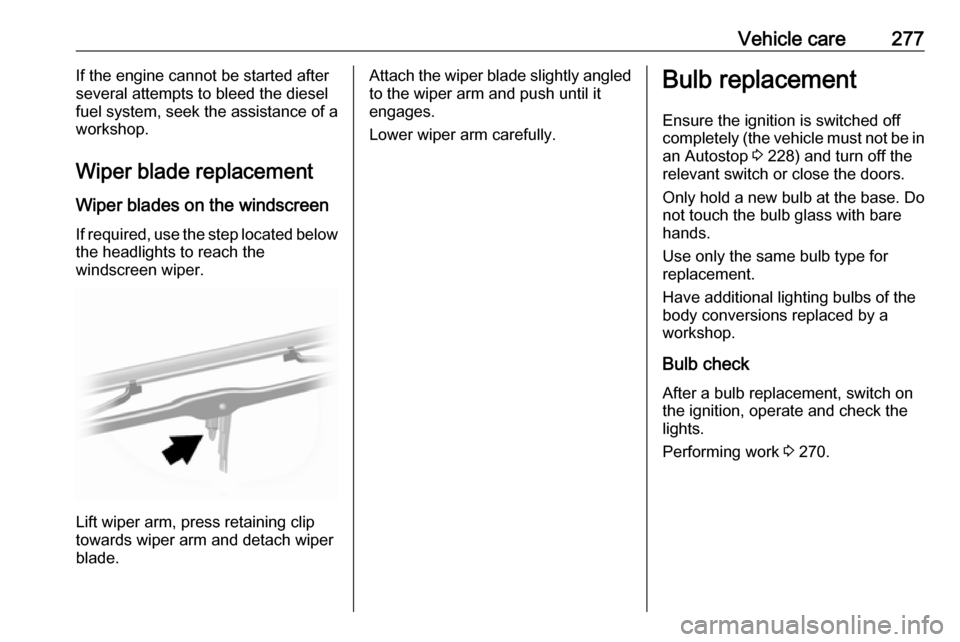
Wiper blade replacement Wiper blades on the windscreen
If required, use the step located below
the headlights to reach the
windscreen wiper.
Lift wiper arm, press retaining clip
towards wiper arm and detach wiper
blade.
Attach the wiper blade slightly angled
to the wiper arm and push until it
engages.
Lower wiper arm carefully.Bulb replacement
Ensure the ignition is switched off
completely (the vehicle must not be in
an Autostop 3 228) and turn off the
relevant switch or close the doors.
Only hold a new bulb at the base. Do not touch the bulb glass with bare
hands.
Use only the same bulb type for
replacement.
Have additional lighting bulbs of the
body conversions replaced by a
workshop.
Bulb check
After a bulb replacement, switch on
the ignition, operate and check the
lights.
Performing work 3 270.
Page 280 of 353
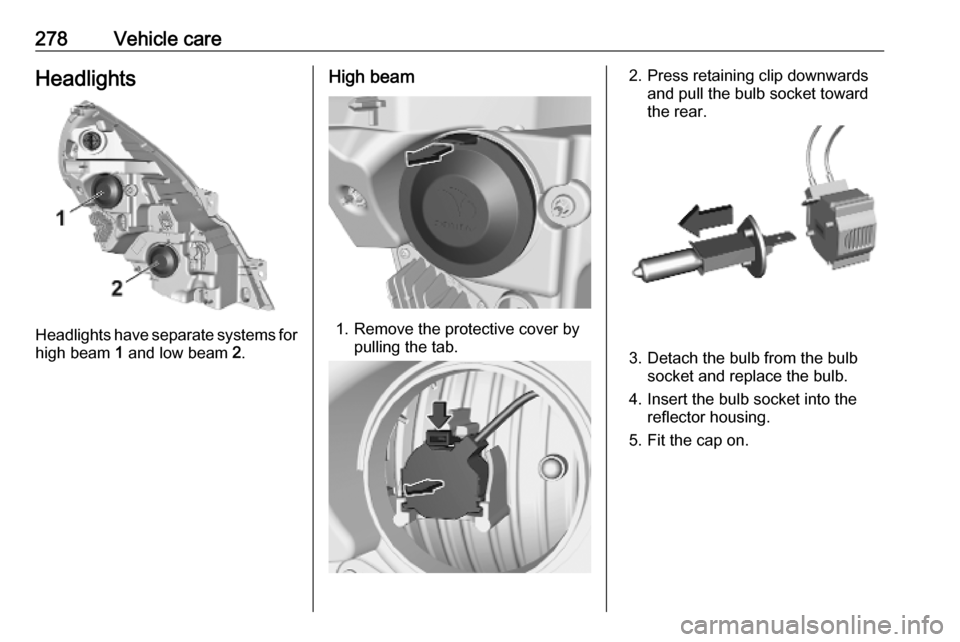
278Vehicle careHeadlights
Headlights have separate systems forhigh beam 1 and low beam 2.
High beam
1. Remove the protective cover by
pulling the tab.
2. Press retaining clip downwardsand pull the bulb socket toward
the rear.
3. Detach the bulb from the bulb socket and replace the bulb.
4. Insert the bulb socket into the reflector housing.
5. Fit the cap on.
Page 308 of 353
306Vehicle care
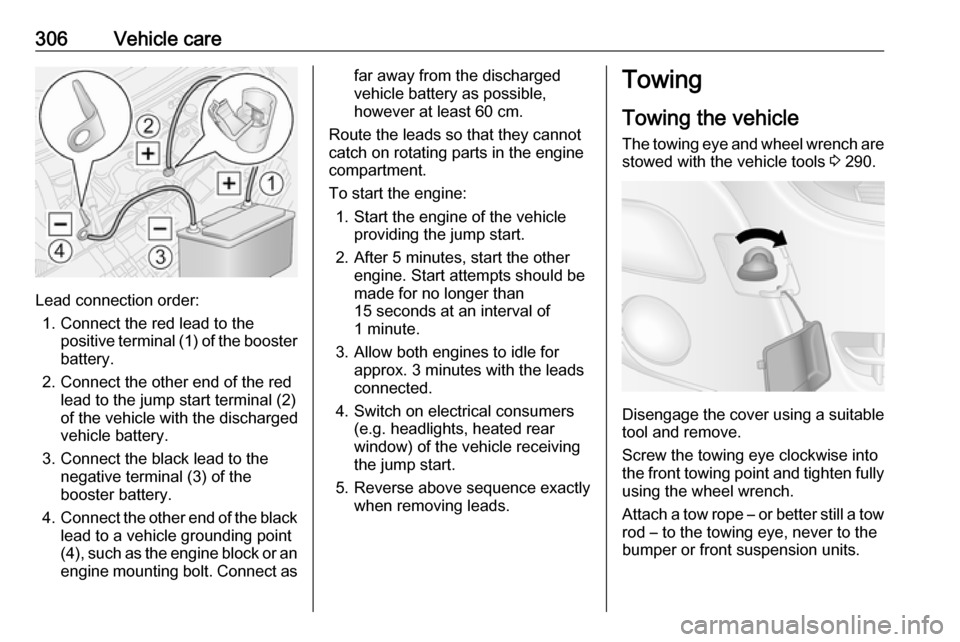
Lead connection order:1. Connect the red lead to the positive terminal (1) of the booster
battery.
2. Connect the other end of the red lead to the jump start terminal (2)
of the vehicle with the discharged
vehicle battery.
3. Connect the black lead to the negative terminal (3) of the
booster battery.
4. Connect the other end of the black
lead to a vehicle grounding point
(4), such as the engine block or an
engine mounting bolt. Connect as
far away from the discharged
vehicle battery as possible,
however at least 60 cm.
Route the leads so that they cannot
catch on rotating parts in the engine
compartment.
To start the engine: 1. Start the engine of the vehicle providing the jump start.
2. After 5 minutes, start the other engine. Start attempts should be
made for no longer than
15 seconds at an interval of
1 minute.
3. Allow both engines to idle for approx. 3 minutes with the leads
connected.
4. Switch on electrical consumers (e.g. headlights, heated rear
window) of the vehicle receiving
the jump start.
5. Reverse above sequence exactly when removing leads.Towing
Towing the vehicle The towing eye and wheel wrench are
stowed with the vehicle tools 3 290.
Disengage the cover using a suitable
tool and remove.
Screw the towing eye clockwise into
the front towing point and tighten fully using the wheel wrench.
Attach a tow rope – or better still a tow
rod – to the towing eye, never to the
bumper or front suspension units.
Page 347 of 353

345Functions during a telephone call201
Fuse box ..................... 286, 287, 288
Fuses ......................................... 285
G Gauges ......................................... 91
Gear shifting ............................... 100
General information ...118, 151,
153, 156, 164, 191, 193, 265
Glass panel .................................. 44 Glovebox ..................................... 74
Glovebox cooler ......................... 222
GPS (Global Positioning System) 164
Grab handles ................................ 76
Ground clearance .......................231
Guidance ................................... 183
H Hand brake - see Parking brake. 245
Handsfree phone system ...........201
Hazard warning flashers ............113
HD Traffic ................................... 166
Headlight flash ........................... 112
Headlight range adjustment ......112
Headlights .................. 110, 111, 278
Headlights when driving abroad 112
Head restraint adjustment .............8
Head restraints ............................ 45
Heated exterior mirrors .................16
Heated mirrors ............................. 39
Heated rear window ...............16, 43Heating ........................................ 52
Heating and ventilation system . 208
Help! ................................... 183, 191
High beam ......................... 103, 111
High beam assist ................103, 111
Hill start assist ........................... 246
Home address ............................ 177
Home location............................. 166
Horn ....................................... 15, 85
Hub cap hook ............................. 290
Hydraulic oil level........................ 333
I
i-Announcement ......................... 148
Identification plate .....................316
Idle speed control .......................228
Ignition switch positions .............226
Image settings ............................ 129
Image viewer .............................. 166
Immobiliser .................................. 38
Indicators ...................................... 91
Inductive charging ........................90
i-News service ............................ 148
Info Display ................................. 105
Information displays.................... 105
Information on the display ..136, 166
Infotainment controls ..................129
Infotainment system ...................105
Switching on/off .......................129
Initial drive information.................... 6Instrument cluster ........................91
Instrument panel controls ...........122
Instrument panel fuse box .........287
Instrument panel illumination .....285
Instrument panel overview ........... 11
Instrument panel storage ..............73
Interior care ............................... 310
Interior lighting ....................114, 339
Interior lights ...................... 114, 284
Interior mirrors .............................. 40
Interruption of power supply ......244
Intersection view .........................166
Introduction .................................... 3
iPod .................................... 153, 154
ISOFIX .......................................... 65
Isolation switch ........................... 330
i-Traffic service ........................... 148
J
Jack ............................................ 290
Jack plug .................................... 152
Journey record............................ 105
Jump starting ............................. 304
K Keyboards in the display ....166, 193
Keys ..................................... 20, 336
Keys, locks ................................... 20