heating OPEL MOVANO_B 2020 Manual user
[x] Cancel search | Manufacturer: OPEL, Model Year: 2020, Model line: MOVANO_B, Model: OPEL MOVANO_B 2020Pages: 353, PDF Size: 9.4 MB
Page 213 of 353
Climate control211Basic setting for maximum comfort:● Press AUTO (AUTO appears in
the display).
● Set desired temperature (the temperature appears in the
display).
● Open all air vents.
During automatic mode, the settings for fan speed, air distribution, air
conditioning and air recirculation are
automatically regulated by the system
and are not shown on the display.
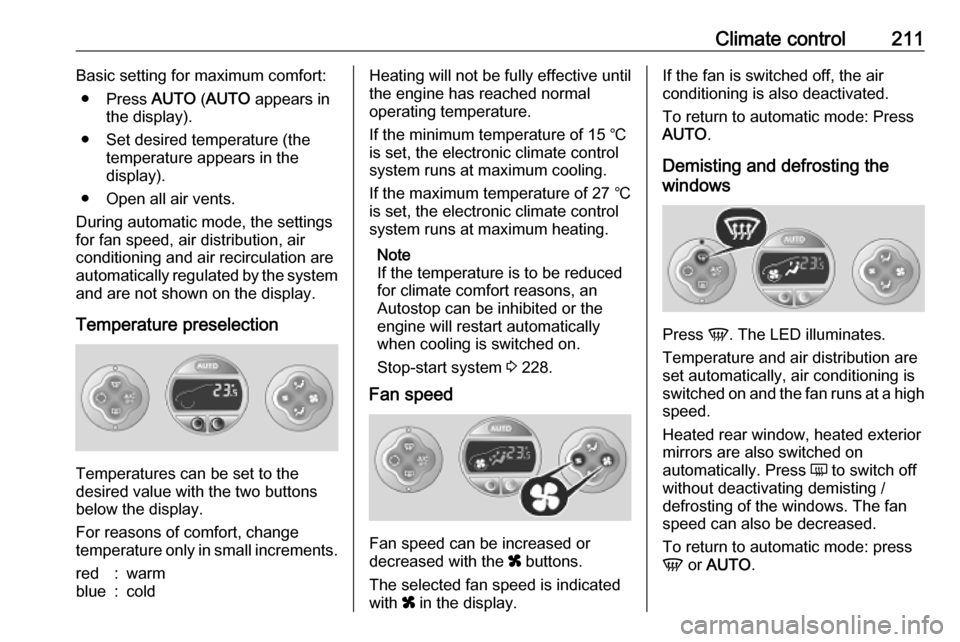
Temperature preselection
Temperatures can be set to the
desired value with the two buttons
below the display.
For reasons of comfort, change
temperature only in small increments.
red:warmblue:coldHeating will not be fully effective until
the engine has reached normal
operating temperature.
If the minimum temperature of 15 ℃
is set, the electronic climate control
system runs at maximum cooling.
If the maximum temperature of 27 ℃
is set, the electronic climate control
system runs at maximum heating.
Note
If the temperature is to be reduced
for climate comfort reasons, an
Autostop can be inhibited or the
engine will restart automatically
when cooling is switched on.
Stop-start system 3 228.
Fan speed
Fan speed can be increased or
decreased with the x buttons.
The selected fan speed is indicated
with x in the display.
If the fan is switched off, the air
conditioning is also deactivated.
To return to automatic mode: Press AUTO .
Demisting and defrosting the
windows
Press V. The LED illuminates.
Temperature and air distribution are
set automatically, air conditioning is
switched on and the fan runs at a high
speed.
Heated rear window, heated exterior
mirrors are also switched on
automatically. Press Ü to switch off
without deactivating demisting /
defrosting of the windows. The fan speed can also be decreased.
To return to automatic mode: press
V or AUTO .
Page 215 of 353
Climate control213Rear heating system
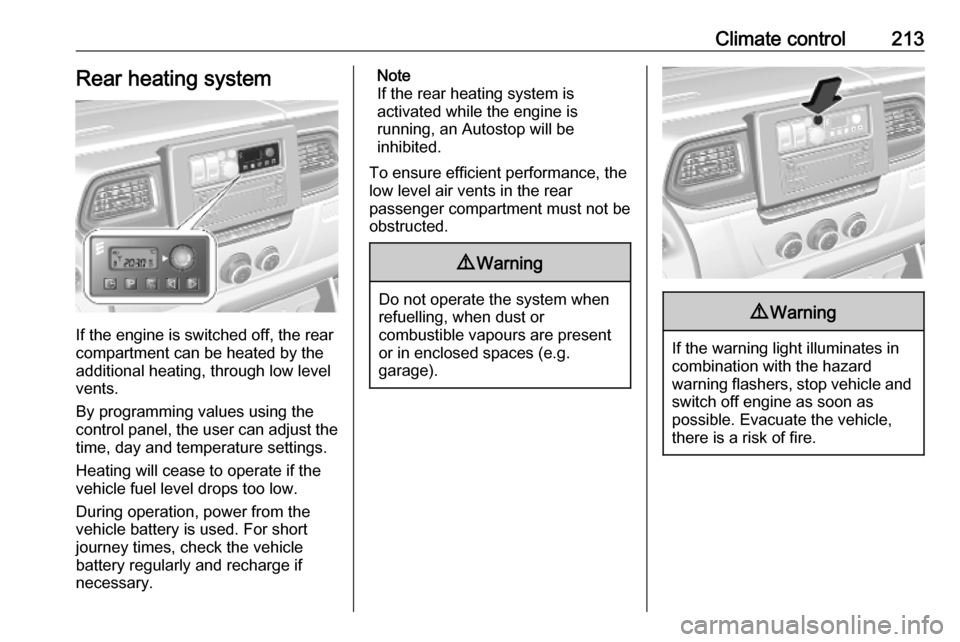
If the engine is switched off, the rear
compartment can be heated by the
additional heating, through low level
vents.
By programming values using the
control panel, the user can adjust the
time, day and temperature settings.
Heating will cease to operate if the
vehicle fuel level drops too low.
During operation, power from the
vehicle battery is used. For short
journey times, check the vehicle
battery regularly and recharge if
necessary.
Note
If the rear heating system is
activated while the engine is
running, an Autostop will be
inhibited.
To ensure efficient performance, the
low level air vents in the rear
passenger compartment must not be
obstructed.9 Warning
Do not operate the system when
refuelling, when dust or
combustible vapours are present
or in enclosed spaces (e.g.
garage).
9 Warning
If the warning light illuminates in
combination with the hazard
warning flashers, stop vehicle and switch off engine as soon as
possible. Evacuate the vehicle, there is a risk of fire.
Page 216 of 353
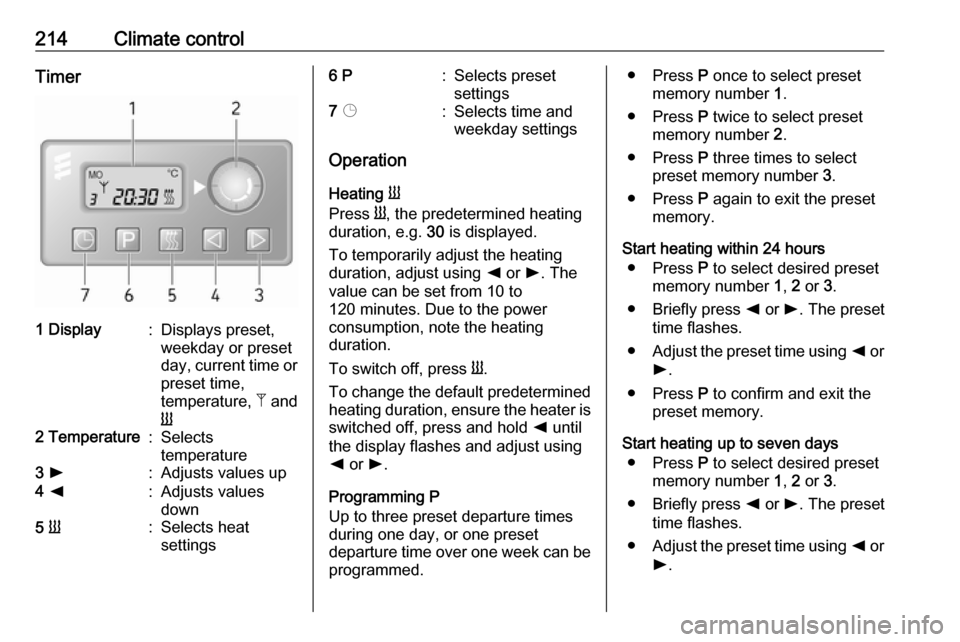
214Climate controlTimer1 Display:Displays preset,
weekday or preset
day, current time or preset time,
temperature, Z and
Y2 Temperature:Selects
temperature3 l:Adjusts values up4 k:Adjusts values
down5 Y:Selects heat
settings6 P:Selects preset
settings7 Þ:Selects time and
weekday settings
Operation
Heating Y
Press Y, the predetermined heating
duration, e.g. 30 is displayed.
To temporarily adjust the heating
duration, adjust using k or l. The
value can be set from 10 to
120 minutes. Due to the power
consumption, note the heating
duration.
To switch off, press Y.
To change the default predetermined heating duration, ensure the heater is switched off, press and hold k until
the display flashes and adjust using
k or l.
Programming P
Up to three preset departure times during one day, or one preset
departure time over one week can be programmed.
● Press P once to select preset
memory number 1.
● Press P twice to select preset
memory number 2.
● Press P three times to select
preset memory number 3.
● Press P again to exit the preset
memory.
Start heating within 24 hours ● Press P to select desired preset
memory number 1, 2 or 3.
● Briefly press k or l. The preset
time flashes.
● Adjust the preset time using k or
l .
● Press P to confirm and exit the
preset memory.
Start heating up to seven days ● Press P to select desired preset
memory number 1, 2 or 3.
● Briefly press k or l. The preset
time flashes.
● Adjust the preset time using k or
l .
Page 217 of 353

Climate control215● After 5 seconds the preset dayflashes.
● Adjust the preset day using k or
l .
● The preset time and day are set once the display changes to the
current time.
Set time and weekday Þ
If the vehicle battery is disconnected
or its voltage is too low, the unit will
need to be reset.
● Press Þ until the time flashes.
● Press k or l to change the
current time.
● Time is stored when the display stops flashing.
● Wait for weekday to flash.
● Press k or l to change the
weekday.
● Weekday is stored when the display stops flashing.
Heating level
The preferred heating level for
programmed departure times can be set between 10 to 30 ℃.To adjust the temperature of theheating, turn the rotary knob located
on the control panel.turn clockwise:increase
temperatureturn anticlock‐
wise:decrease
temperature
Rear air conditioning
system
The rear air conditioning system is
activated in conjunction with the front
passenger compartment air
conditioning system.
Bus
Fan speed
Adjust the air flow to select the
desired speed.
turn clockwise:increase air flowturn anticlock‐
wise:decrease air flow
Note
Rear air conditioning cannot be
switched on during an Autostop.
Stop-start system 3 228.
Page 218 of 353
216Climate controlCombi
Additional air conditioning is supplied to the rear passenger compartment
via the air vents located above the
driver and front passenger
compartment.
With the front passenger
compartment air conditioning system
switched on, adjust the air flow to
select the desired speed.
Ensure the air vents are open when in use, to prevent ice forming in the
system due to lack of air movement.
Auxiliary heater Coolant heater
The engine-independent, fuel-
powered coolant heater provides rapid heating of the engine coolant to
enable heating of the vehicle interior
without the engine running.
Note
Depending on version, an additional
coolant heater may be switched on
automatically to speed up heating
when the ignition is on and the
outside temperature is below 5 ℃.9 Warning
Do not operate the system when
refuelling, when dust or
combustible vapours are present
or in enclosed spaces (e.g.
garage).
Before starting or programming the
system to start, turn the vehicle's
climate control system to heat, set the
air distribution to V and turn the fan
on.
Switch off when not required. Heating stops automatically after the
programmed runtime. It will also
cease to operate if the vehicle fuel
level drops too low.
During operation, power from the
vehicle battery is used. The driving
time should therefore be at least as
long as the heating time. For short
journey times, check the vehicle
battery regularly and recharge if
necessary.
To ensure efficient performance,
briefly operate the auxiliary heater
once a month.
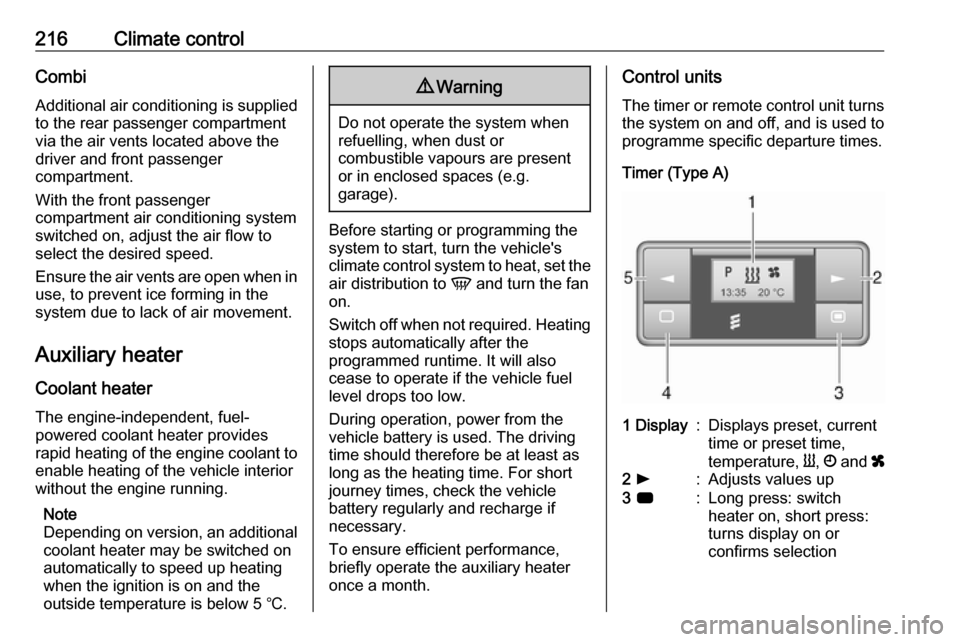
Control units
The timer or remote control unit turns the system on and off, and is used to
programme specific departure times.
Timer (Type A)1 Display:Displays preset, current
time or preset time,
temperature, Y, Ö and x2 l:Adjusts values up3 7:Long press: switch
heater on, short press:
turns display on or
confirms selection
Page 221 of 353

Climate control219Depending on version, the auxiliary
heater can also be switched on for the
last duration time or the default
duration 30 minutes, or cut-off
immediately, using the button on the
instrument panel. The LED in the
button confirms operation.
Battery replacement Replace the battery when the range
of the remote control is reduced or
when the battery charge symbol
flashes.
Open the cover and replace the
battery (Type A: CR 2430, Type B:
2CR 11108, or equivalent), ensuring
the new battery is correctly installed
with the positive ( <) side facing the
positive terminals. Replace the cover
securely.
Dispose of old batteries in
accordance with environmental
regulations.Batteries do not belong in household
waste. They must be disposed of at
an appropriate recycling collection
point.
Operation (Type A)
Heating Y
Select Y in the menu bar and press
G to confirm. The predetermined
heating duration, e.g. L 30, flashes in
the display. The factory setting is 30 minutes.
Adjust the heating duration using k
or l and confirm. The value can be
set from 10 to 120 minutes. Due to the
power consumption, note the heating duration.
To switch off, select Y in the menu bar
again and press d.
Ventilation x
Select x in the menu bar and press
G to confirm.
Adjust the ventilation duration using k or l and confirm. The value can
be set from 10 to 120 minutes. Due to the power consumption, note the
heating duration.To switch off, select x in the menu bar
again and press d.
Programming P
Up to three preset departure times
can be programmed, either during
one day or over one week.
● Select P in the menu bar and
press G to confirm.
● Select desired preset memory number P1, P2 or P3 and
confirm.
● Select F and confirm.
● Select weekday or weekday group and confirm.
● Select hour and confirm.
● Select minutes and confirm.
● Select Y or x and confirm.
● Select ECO or HIGH and confirm.
● Select duration and confirm.
● Press d to exit.
Repeat the procedure to programme
the other preset memory numbers if
required.
Page 222 of 353

220Climate controlTo activate a desired preset memory
number select P1, P2 or P3, then
select On and confirm.
When a program is activated P and
Y will be displayed together.
To deactivate a preset memory,
select P1, P2 or P3, then select Off
and confirm.
Heating stops automatically
5 minutes after the programmed
departure time.
Note
The remote control system features
a temperature sensor which
calculates the runtime according to
the ambient temperature and the
desired heating level (ECO or
HIGH). The system starts
automatically between
5 and 60 minutes prior to the
programmed departure time.
Set time and weekday Þ
If the vehicle battery is disconnected or its voltage is too low, the unit will
need to be reset.● Select F in the menu bar and
confirm.
● Select Þ in the menu bar and
confirm.
● Adjust using k or l to change
the hour and confirm.
● Adjust using k or l to change
the minutes and confirm.
● Press d to exit.
● Select F in the menu bar and
confirm.
● Select Mo in the menu bar and
confirm.
● Adjust using k or l to change
the weekday and confirm.
● Press d to exit.
Heating level
The preferred heating level for
programmed departure times can be
set to either ECO or HIGH.
● Select Y in the menu bar and
confirm.
● Select ECO or HIGH and confirm.
● Press d to exit.Operation (Type B)
Heating Y or Ventilation x
Select the operating mode Y or x, if
necessary.
● Press l three times.
● Press Y and OFF
simultaneously, Y or x flashes.
● Adjust using k or l to select Y
or x.
● Press Y and OFF simultaneously
to confirm.
To switch on, press Y for 1 second.
The predetermined heating duration,
e.g. 30, is displayed. The factory
setting is 30 minutes.
The heating duration can be set in
increments of 10 minutes. Due to the
power consumption, note the heating duration.
● Press l four times.
● Press Y and OFF
simultaneously, Y/x flashes.
● Adjust using k or l to select the
desired heating duration.
● Press Y and OFF simultaneously
to confirm.
Page 223 of 353

Climate control221To switch off, press OFF.
Programming y
The system calculates the operating
time of the heater depending on the
temperature inside the vehicle.
● Press k twice.
● Press Y and OFF
simultaneously, y flashes.
● Adjust using k or l to select the
departure time.
● Press Y and OFF simultaneously
to confirm.
To switch on, press Y for one second ,
HTM is displayed.
Heating stops automatically after the
programmed departure time, or can
be manually switched off.
● Press k twice.
● Press OFF for 1 second, HTM
goes out.
Set time
If the vehicle battery is disconnected
or its voltage is too low, the time will
need to be reset.● Press l once.
● Press Y and OFF
simultaneously, Ö flashes.
● Adjust using k or l to set the
time.
● Press Y and OFF simultaneously
to confirm.
Heating level
The preferred heating level for
programmed departure times can be set to between C1 and C5.
● Press k three times.
● Press Y and OFF
simultaneously, Y flashes.
● Adjust using k or l to set the
heating level.
● Press Y and OFF simultaneously
to confirm.
To display the passenger
compartment temperature, press l
twice.Air vents
Adjustable air vents At least one air vent must be open
while cooling is on in order to prevent
the evaporator from icing up due to lack of air movement.
Centre air vents
Direct the flow of air by tilting and
swivelling the slats.
To close the vent, swivel the slat
towards the outside of the vehicle.
Page 225 of 353
Climate control223Maintenance
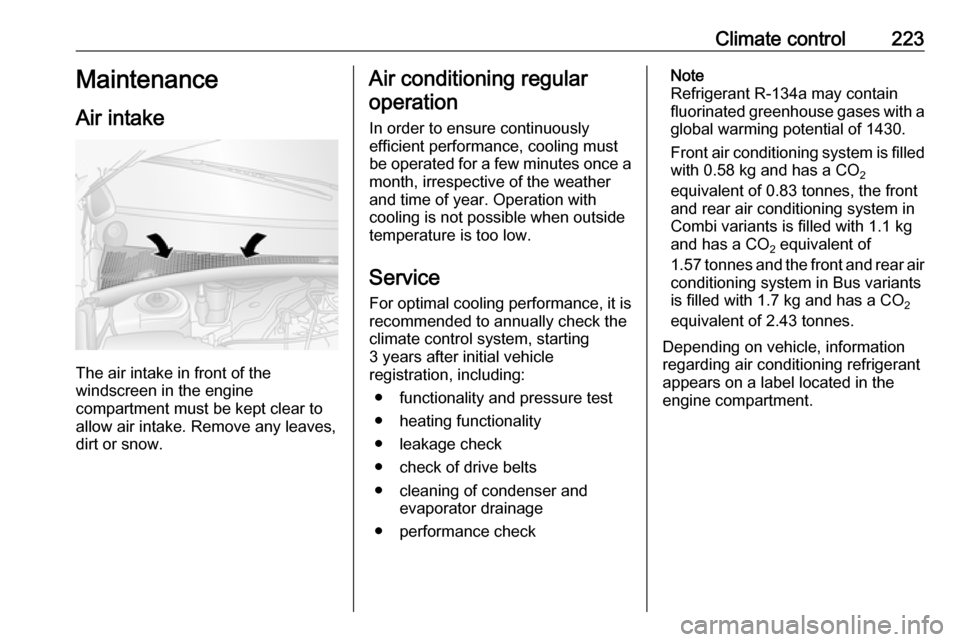
Air intake
The air intake in front of the
windscreen in the engine
compartment must be kept clear to
allow air intake. Remove any leaves,
dirt or snow.
Air conditioning regular
operation
In order to ensure continuously
efficient performance, cooling must
be operated for a few minutes once a
month, irrespective of the weather
and time of year. Operation with
cooling is not possible when outside
temperature is too low.
ServiceFor optimal cooling performance, it is
recommended to annually check the
climate control system, starting
3 years after initial vehicle
registration, including:
● functionality and pressure test
● heating functionality
● leakage check
● check of drive belts
● cleaning of condenser and evaporator drainage
● performance checkNote
Refrigerant R-134a may contain
fluorinated greenhouse gases with a global warming potential of 1430.
Front air conditioning system is filled
with 0.58 kg and has a CO 2
equivalent of 0.83 tonnes, the front
and rear air conditioning system in
Combi variants is filled with 1.1 kg
and has a CO 2 equivalent of
1.57 tonnes and the front and rear air
conditioning system in Bus variants
is filled with 1.7 kg and has a CO 2
equivalent of 2.43 tonnes.
Depending on vehicle, information
regarding air conditioning refrigerant
appears on a label located in the
engine compartment.
Page 227 of 353
Driving and operating225Driving hints
Driving economically
ECO mode ECO mode is a function that
optimises fuel consumption. It affects
engine power and torque,
acceleration, gear shift indication,
heating, air conditioning and electrical consumers.
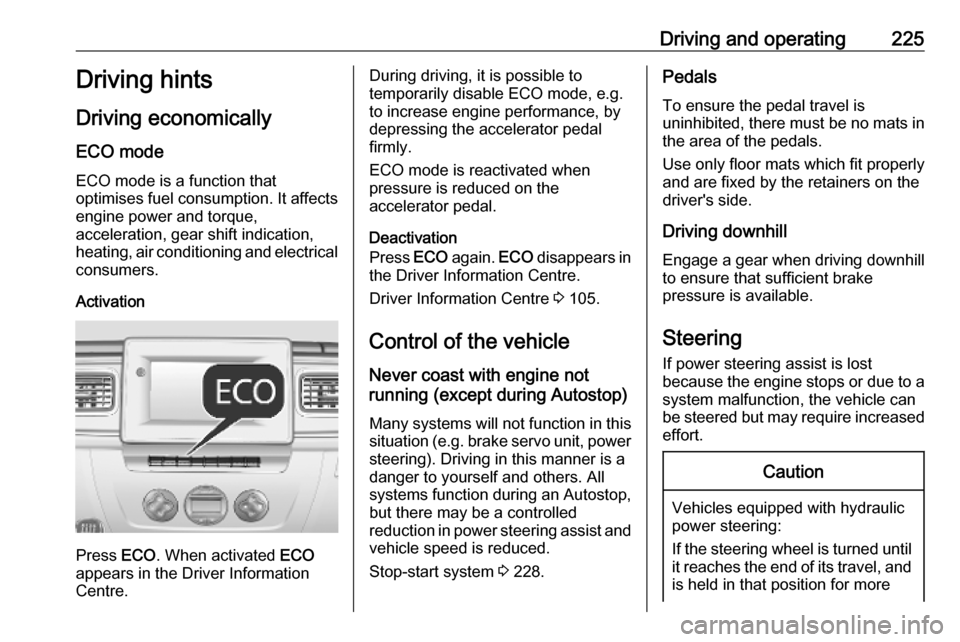
Activation
Press ECO. When activated ECO
appears in the Driver Information
Centre.
During driving, it is possible to
temporarily disable ECO mode, e.g. to increase engine performance, by
depressing the accelerator pedal
firmly.
ECO mode is reactivated when
pressure is reduced on the
accelerator pedal.
Deactivation
Press ECO again. ECO disappears in
the Driver Information Centre.
Driver Information Centre 3 105.
Control of the vehicle
Never coast with engine not
running (except during Autostop)
Many systems will not function in this
situation (e.g. brake servo unit, power steering). Driving in this manner is a
danger to yourself and others. All
systems function during an Autostop,
but there may be a controlled
reduction in power steering assist and
vehicle speed is reduced.
Stop-start system 3 228.Pedals
To ensure the pedal travel is
uninhibited, there must be no mats in the area of the pedals.
Use only floor mats which fit properly
and are fixed by the retainers on the
driver's side.
Driving downhill
Engage a gear when driving downhill
to ensure that sufficient brake
pressure is available.
Steering If power steering assist is lost
because the engine stops or due to a
system malfunction, the vehicle can
be steered but may require increased
effort.Caution
Vehicles equipped with hydraulic
power steering:
If the steering wheel is turned until it reaches the end of its travel, and
is held in that position for more