steering wheel OPEL MOVANO_B 2020 Manual user
[x] Cancel search | Manufacturer: OPEL, Model Year: 2020, Model line: MOVANO_B, Model: OPEL MOVANO_B 2020Pages: 353, PDF Size: 9.4 MB
Page 105 of 353

Instruments and controls1039Warning
When the engine is off,
considerably more force is needed
to brake and steer. During an
Autostop the brake servo unit will still be operational.
Do not remove key until vehicle is stationary, otherwise the steeringwheel lock could engage
unexpectedly.
Check engine oil level 3 271.
Keep engine turned off and let the
vehicle be towed to a workshop.
Low fuel Y illuminates yellow.
Illuminates when the ignition is
switched on and extinguishes shortly
after the engine starts.
Illuminates when the engine is
running
Fuel level in the tank is too low. Refuel
immediately.
Never run the tank dry.
Refuelling 3 263.
Catalytic converter 3 234.
Bleeding the diesel fuel system
3 276.
Stop-start system \ illuminates when an Autostop is
inhibited when certain conditions are
not fulfilled.
Ï illuminates during an Autostop.
Ï flashes if the clutch is not released
sufficiently.
Stop-start system 3 228.
Exterior light
F illuminates green.
Illuminated when the side lights are
on 3 110.
Low beam
9 illuminates or flashes green.
Illuminates
Illuminated when the headlights are on 3 110.Flashes
Fault in the lighting.
High beam P illuminates blue.
Illuminated when high beam is on and during headlight flash 3 111.
High beam assist f illuminates when the high beam
assist is activated 3 111.
Front fog lights
> illuminates green.
Illuminated when the front fog lights
are on 3 113.
Rear fog light ø illuminates yellow.
Illuminated when the rear fog light is on 3 114.
Cruise control
U , m illuminate green.
Page 115 of 353
Lighting113Daytime running lightsDaytime running lights increase
visibility of the vehicle during daylight.
The lights operate automatically
when the ignition is switched on.
If the vehicle is equipped with the
automatic light control function, the
system switches between daytime
running lights and headlights
automatically depending on the
lighting conditions.
Automatic light control 3 110.
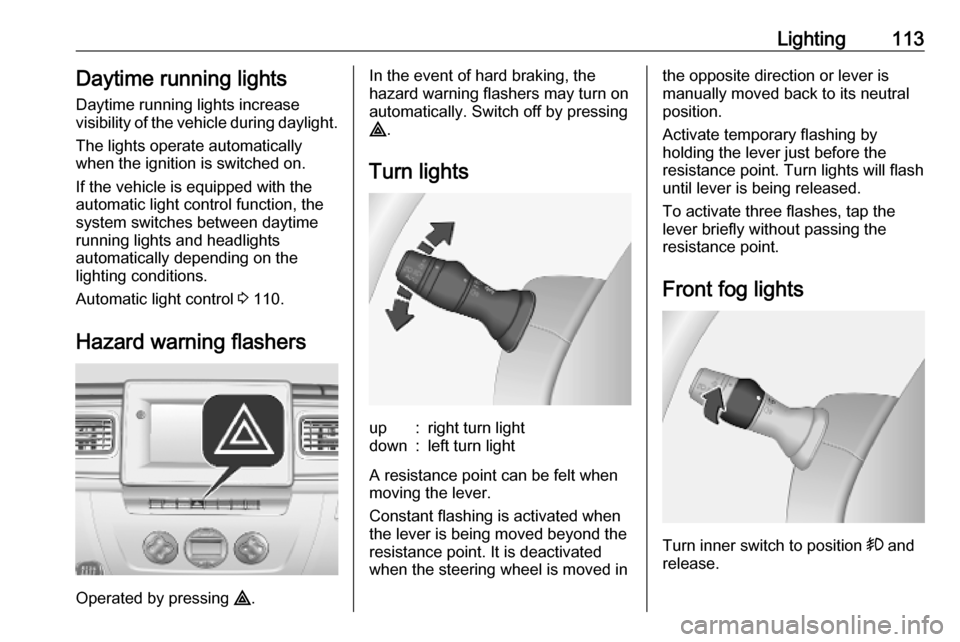
Hazard warning flashers
Operated by pressing ¨.
In the event of hard braking, the
hazard warning flashers may turn on automatically. Switch off by pressing
¨ .
Turn lightsup:right turn lightdown:left turn light
A resistance point can be felt when
moving the lever.
Constant flashing is activated when
the lever is being moved beyond the
resistance point. It is deactivated
when the steering wheel is moved in
the opposite direction or lever is
manually moved back to its neutral
position.
Activate temporary flashing by
holding the lever just before the
resistance point. Turn lights will flash
until lever is being released.
To activate three flashes, tap the
lever briefly without passing the
resistance point.
Front fog lights
Turn inner switch to position > and
release.
Page 118 of 353
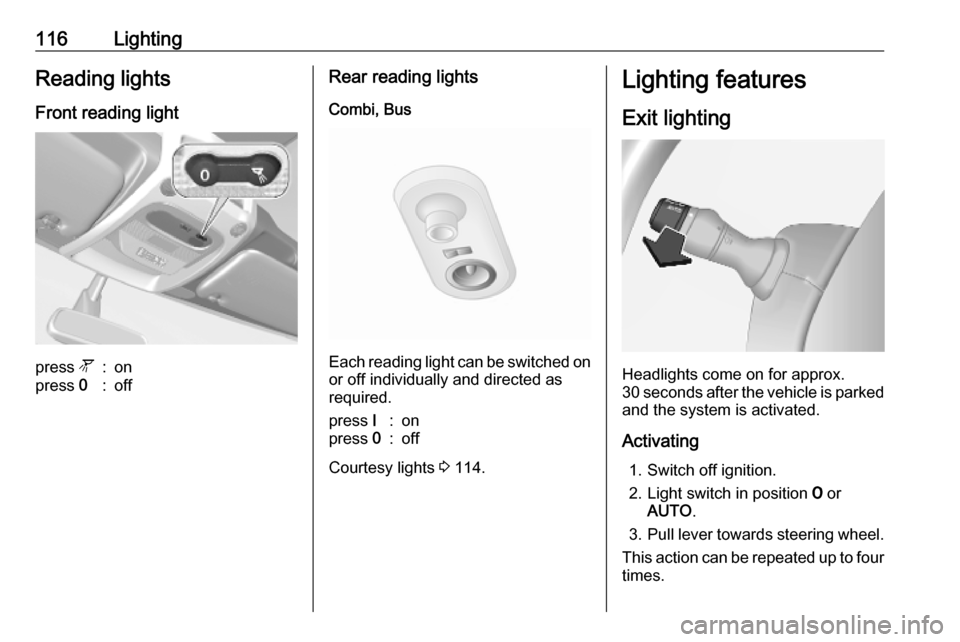
116LightingReading lightsFront reading lightpress l:onpress 0:offRear reading lights
Combi, Bus
Each reading light can be switched on
or off individually and directed as
required.
press I:onpress 0:off
Courtesy lights 3 114.
Lighting features
Exit lighting
Headlights come on for approx.
30 seconds after the vehicle is parked
and the system is activated.
Activating 1. Switch off ignition.
2. Light switch in position 7 or
AUTO .
3. Pull lever towards steering wheel.
This action can be repeated up to four
times.
Page 193 of 353

Infotainment system191Voice recognition
General information
The voice recognition function allows
to operate certain functions via voice
input.
To ensure that conversations held
inside the vehicle do not start
unintentional calls to a saved contact, the voice recognition function must
first be activated via 5 on the column
controls.
Control elements overview 3 122.
NAVI 50 IntelliLink Available depending on version, the
voice recognition function of the
handsfree phone system allows you
to operate certain functions of a
compatible smartphone via voice
input.
Refer to "Phone control" in this
section 3 193.
To confirm that a paired and
connected smartphone is compatible
with the voice recognition function,
touch 7 followed by ÿSetting(s) .Then select Connectivity followed by
View Bluetooth device list . The list
shows the paired devices and 5
appears alongside the name of the
smartphone to indicate compatibility.
Note
If supported, the language set on the
smartphone will automatically be
used by the Infotainment system for
voice recognition.
The navigation system can also be
operated using voice controls. Refer
to "Navigation control" in this section
3 192.
Prerequisites
The following prerequisites must be
met:
● The Bluetooth function of the Infotainment system must be
activated.
Refer to "Bluetooth connection"
in the "Phone" section 3 197.
● The Bluetooth function of the Bluetooth-enabled smartphone
must be activated and the
smartphone must have a 3G, 4Gor wi-fi connection (see
smartphone operating
instructions).
● Dependent upon the smartphone, it may be required
to set the device to "visible" (see
smartphone operating
instructions).
● The smartphone must be paired and connected to the
Infotainment system.
Help
For information and help with
activating and operating voice
controls, touch 7 followed by
ÿ Setting(s) then Connectivity .
Select Smartphone from the list (use
S /R to search list), then select l to
access help.
A series of screens are displayed,
explaining how to use the voice
recognition function and information
on the following:
● switching on/off with steering wheel/column controls
● compatible phones
● operation methods
Page 227 of 353
Driving and operating225Driving hints
Driving economically
ECO mode ECO mode is a function that
optimises fuel consumption. It affects
engine power and torque,
acceleration, gear shift indication,
heating, air conditioning and electrical consumers.
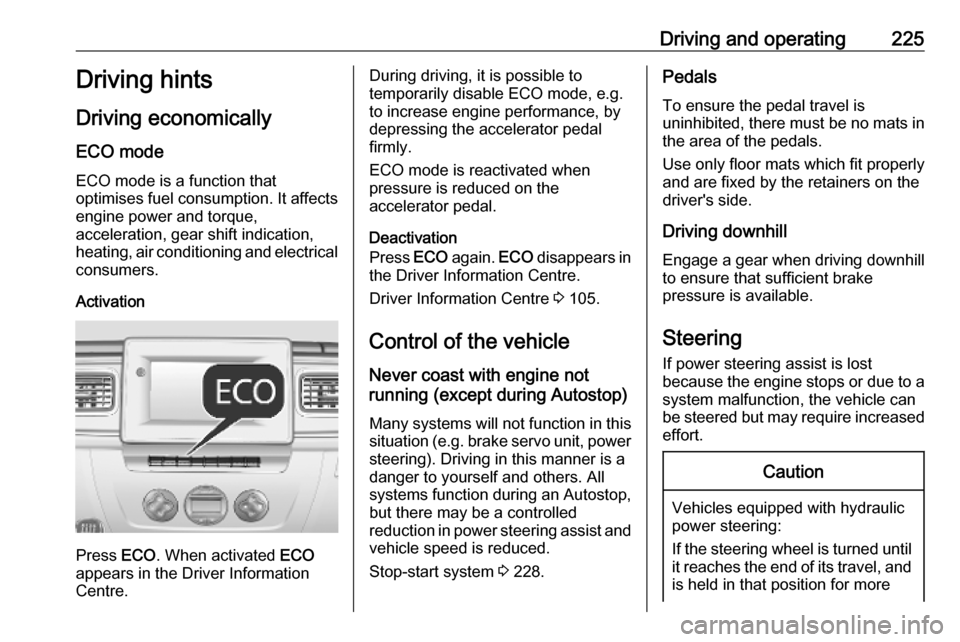
Activation
Press ECO. When activated ECO
appears in the Driver Information
Centre.
During driving, it is possible to
temporarily disable ECO mode, e.g. to increase engine performance, by
depressing the accelerator pedal
firmly.
ECO mode is reactivated when
pressure is reduced on the
accelerator pedal.
Deactivation
Press ECO again. ECO disappears in
the Driver Information Centre.
Driver Information Centre 3 105.
Control of the vehicle
Never coast with engine not
running (except during Autostop)
Many systems will not function in this
situation (e.g. brake servo unit, power steering). Driving in this manner is a
danger to yourself and others. All
systems function during an Autostop,
but there may be a controlled
reduction in power steering assist and
vehicle speed is reduced.
Stop-start system 3 228.Pedals
To ensure the pedal travel is
uninhibited, there must be no mats in the area of the pedals.
Use only floor mats which fit properly
and are fixed by the retainers on the
driver's side.
Driving downhill
Engage a gear when driving downhill
to ensure that sufficient brake
pressure is available.
Steering If power steering assist is lost
because the engine stops or due to a
system malfunction, the vehicle can
be steered but may require increased
effort.Caution
Vehicles equipped with hydraulic
power steering:
If the steering wheel is turned until it reaches the end of its travel, and
is held in that position for more
Page 228 of 353

226Driving and operatingthan 15 seconds, damage may
occur to the power steering
system and there may be loss of
power steering assist.Starting and operating
New vehicle running-in Do not brake unnecessarily hard for
the first few journeys and after new
disc brake pads have been fitted.
During the first drive, smoke may
occur because of wax and oil
evaporating off the exhaust system. Park the vehicle in the open for a
while after the first drive and avoid
inhaling the fumes.
Limit the engine speed to 2,500/min for the first 1,500 km.
During the running-in period fuel and engine oil consumption may be
higher and the cleaning process of
the diesel particle filter may take
place more often. Autostop may be
inhibited to allow for charging the
vehicle battery.
Stop-start system 3 228.
Diesel particle filter 3 233.
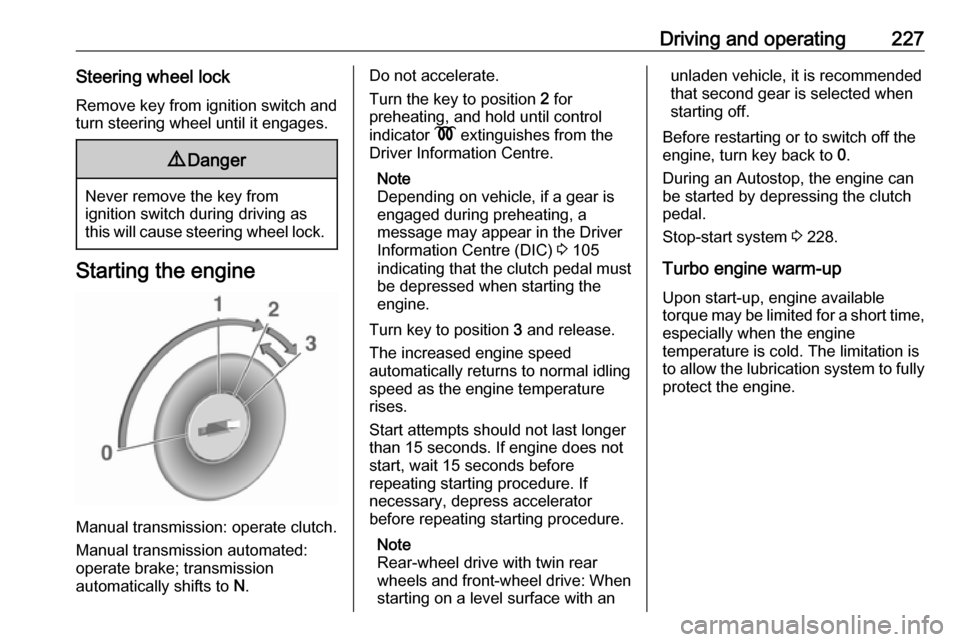
Ignition switch positions Turn key:0:ignition off: Some functions
remain active until key is
removed or driver's door is
opened, provided the ignition was
on previously1:accessory power mode: Steering wheel lock released, some
electrical functions are operable,
ignition is off2:ignition is on, diesel engine is
preheating. Control indicators
illuminate and most electrical
functions are operable3:engine start: Release key after
starting procedure begins
Page 229 of 353
Driving and operating227Steering wheel lockRemove key from ignition switch and
turn steering wheel until it engages.9 Danger
Never remove the key from
ignition switch during driving as
this will cause steering wheel lock.
Starting the engine
Manual transmission: operate clutch.
Manual transmission automated:
operate brake; transmission
automatically shifts to N.
Do not accelerate.
Turn the key to position 2 for
preheating, and hold until control
indicator N extinguishes from the
Driver Information Centre.
Note
Depending on vehicle, if a gear is
engaged during preheating, a
message may appear in the Driver
Information Centre (DIC) 3 105
indicating that the clutch pedal must be depressed when starting the
engine.
Turn key to position 3 and release.
The increased engine speed
automatically returns to normal idling
speed as the engine temperature
rises.
Start attempts should not last longer
than 15 seconds. If engine does not
start, wait 15 seconds before
repeating starting procedure. If
necessary, depress accelerator
before repeating starting procedure.
Note
Rear-wheel drive with twin rear
wheels and front-wheel drive: When
starting on a level surface with anunladen vehicle, it is recommended
that second gear is selected when
starting off.
Before restarting or to switch off the
engine, turn key back to 0.
During an Autostop, the engine can
be started by depressing the clutch
pedal.
Stop-start system 3 228.
Turbo engine warm-up
Upon start-up, engine available
torque may be limited for a short time, especially when the engine
temperature is cold. The limitation is
to allow the lubrication system to fully
protect the engine.
Page 233 of 353
Driving and operating231Restart of the engine by the stop-start system
If one of the conditions for an
Autostop is not fulfilled anymore or
the vehicle starts to move, the engine
may be restarted automatically by the
stop-start system.
An automatic engine restart may not
be possible if a door or the bonnet is
open.
If an electrical accessory, e.g. a
portable CD player, is connected to
the power outlet, a brief power drop
during restart might be noticeable.
If the Infotainment system is active,
audio sound may briefly be reduced
or interrupted during the restart.
Fault
If the LED illuminates in deactivation
button ) without first being pressed
to deactivate the system, there is a
fault in the stop-start system and it is
deactivated. A corresponding
message also appears in the Driver
Information Centre 3 105.
Seek the assistance of a workshop.Parking9 Warning
● Do not park the vehicle on an
easily ignitable surface. The
high temperature of the
exhaust system could ignite the
surface.
● Always apply parking brake without pressing release
button. Apply as firmly as
possible on a downhill slope or
uphill slope. Depress brake
pedal at the same time to
reduce operating force.
● Switch off the engine.
● If the vehicle is on a level surface or uphill slope, engage
first gear. On an uphill slope,
turn the front wheels away from
the kerb.
If the vehicle is on a downhill
slope, engage reverse gear.
Turn the front wheels towards the kerb.
● Close the windows.
● Turn the ignition key to position
0 and remove it. Turn the
steering wheel until the
steering wheel lock is felt to
engage.
Lock the vehicle 3 24 and activate the
anti-theft locking system 3 35 and
anti-theft alarm system 3 36.
Air suspension
Operates automatically when the
vehicle is driven. The air suspension
system constantly adjusts the ride
height according to the vehicle load.
Caution
To ensure safe operation of the air
suspension system, do not exceed the maximum permissible gross
vehicle weight rating. Refer to
identification plate 3 316 or the
vehicle documents.
Page 262 of 353
260Driving and operatingInfo Display
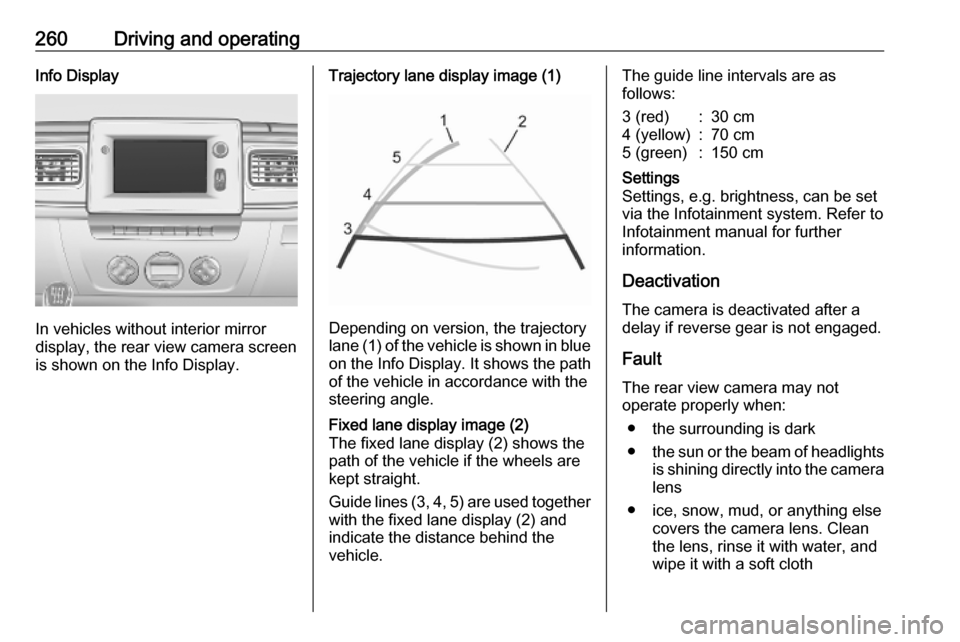
In vehicles without interior mirror
display, the rear view camera screen
is shown on the Info Display.
Trajectory lane display image (1)
Depending on version, the trajectory
lane (1) of the vehicle is shown in blue
on the Info Display. It shows the path of the vehicle in accordance with the
steering angle.
Fixed lane display image (2)
The fixed lane display (2) shows the
path of the vehicle if the wheels are
kept straight.
Guide lines (3, 4, 5) are used together
with the fixed lane display (2) and
indicate the distance behind the
vehicle.The guide line intervals are as
follows:3 (red):30 cm4 (yellow):70 cm5 (green):150 cmSettings
Settings, e.g. brightness, can be set
via the Infotainment system. Refer to
Infotainment manual for further
information.
Deactivation
The camera is deactivated after a
delay if reverse gear is not engaged.
Fault
The rear view camera may not
operate properly when:
● the surrounding is dark
● the sun or the beam of headlights
is shining directly into the camera lens
● ice, snow, mud, or anything else covers the camera lens. Clean
the lens, rinse it with water, and
wipe it with a soft cloth
Page 268 of 353
266Driving and operatingIn the case of trailer loads of
1200 kg or more, the vertical coupling load should not be less than 50 kg.
Rear axle load When the trailer is coupled and the
towing vehicle fully loaded (including all occupants), the permissible rear
axle load (see identification plate or
vehicle documents) can be exceeded by 15%. If the permissible rear axle
load is exceeded, a maximum speed
of 80 km/h applies and the tyre
pressure must be increased by 20
kPA / 0.2 bar.
Towing equipment For vehicles fitted with towing
equipment, when connected to a
trailer the pitch of the audible warning
changes upon operation of the turn
lights.
The pitch of the audible warning will
change if a turn light on the trailer or
the towing vehicle fails.Trailer stability assist
If the system detects snaking
movements, engine power is reduced
and the vehicle / trailer combination is
selectively braked until the snaking
ceases. While the system is working,
keep steering wheel as still as
possible.
Trailer stability assist is a function of
the Electronic Stability Control (ESC)
3 248.Auxiliary features
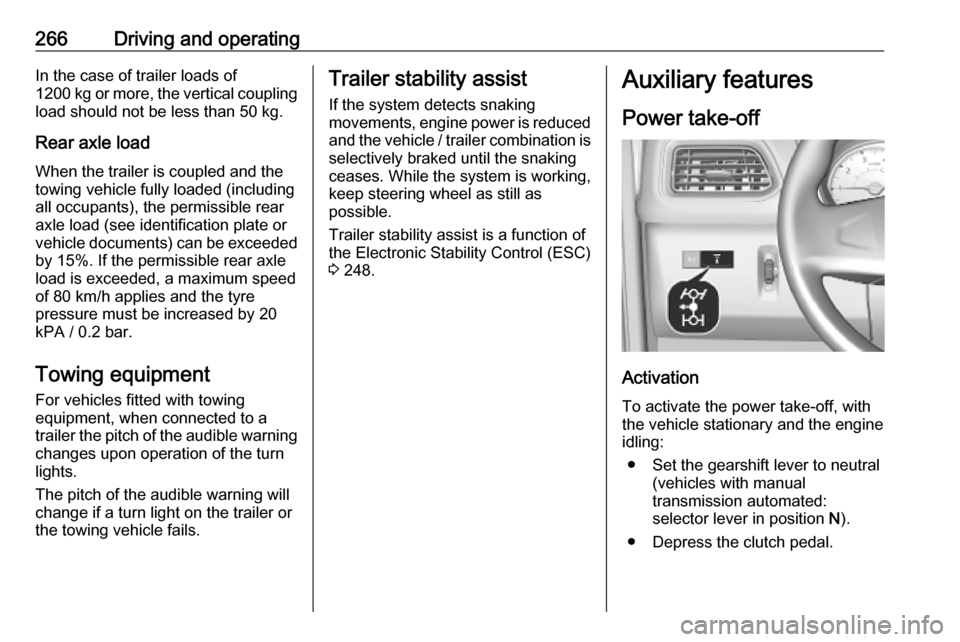
Power take-off
Activation
To activate the power take-off, with
the vehicle stationary and the engine
idling:
● Set the gearshift lever to neutral (vehicles with manual
transmission automated:
selector lever in position N).
● Depress the clutch pedal.