wheel OPEL MOVANO_B 2020 Manual user
[x] Cancel search | Manufacturer: OPEL, Model Year: 2020, Model line: MOVANO_B, Model: OPEL MOVANO_B 2020Pages: 353, PDF Size: 9.4 MB
Page 86 of 353

84Instruments and controlsInstruments and
controlsControls ....................................... 85
Steering wheel adjustment ........85
Steering wheel controls .............85
Horn ........................................... 85
Steering column controls ...........85
Windscreen wiper and washer ..86
Outside temperature ..................87
Clock ......................................... 88
Power outlets ............................. 88
Inductive charging .....................90
Cigarette lighter ......................... 91
Ashtrays .................................... 91
Warning lights, gauges and indi‐ cators ........................................... 91
Instrument cluster ......................91
Speedometer ............................. 91
Odometer .................................. 92
Trip odometer ............................ 92
Tachometer ............................... 92
Fuel gauge ................................ 93
AdBlue gauge ............................ 93
Engine coolant temperature gauge ....................................... 93
Service display .......................... 94Transmission display .................94
Control indicators ......................95
Turn lights .................................. 98
Seat belt reminder .....................98
Airbag and belt tensioners .........98
Airbag deactivation ....................98
Charging system .......................99
Malfunction indicator light ..........99
Service vehicle soon .................99
Stop engine ............................. 100
Brake system ........................... 100
Parking brake .......................... 100
Antilock brake system (ABS) ...100
Gear shifting ............................ 100
Variable effort steering ............100
Lane departure warning ..........101
Electronic Stability Control ......101
Engine coolant temperature ....101
Preheating ............................... 101
AdBlue ..................................... 101
Tyre pressure monitoring system .................................... 102
Engine oil pressure ..................102
Low fuel ................................... 103
Stop-start system ....................103
Exterior light ............................ 103
Low beam ................................ 103
High beam ............................... 103
High beam assist .....................103
Front fog lights ......................... 103Rear fog light........................... 103
Cruise control .......................... 103
Active emergency braking .......104
Speed warning ........................ 104
Speed limiter ........................... 104
Tachograph ............................. 104
Door open ................................ 104
Displays ..................................... 105
Driver Information Centre ........105
Info Display .............................. 105
Vehicle messages ......................106
Warning chimes .......................107
Trip computer ............................. 108
Tachograph ................................ 109
Page 87 of 353
Instruments and controls85Controls
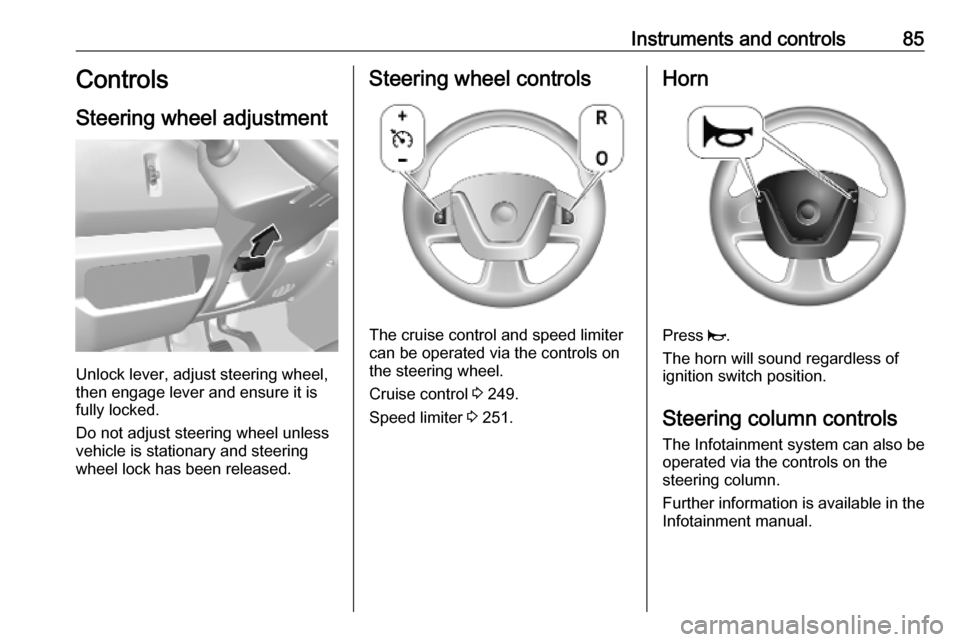
Steering wheel adjustment
Unlock lever, adjust steering wheel,
then engage lever and ensure it is
fully locked.
Do not adjust steering wheel unless
vehicle is stationary and steering
wheel lock has been released.
Steering wheel controls
The cruise control and speed limiter
can be operated via the controls on
the steering wheel.
Cruise control 3 249.
Speed limiter 3 251.
Horn
Press j.
The horn will sound regardless of
ignition switch position.
Steering column controls The Infotainment system can also be
operated via the controls on the
steering column.
Further information is available in the
Infotainment manual.
Page 88 of 353
86Instruments and controlsWindscreen wiper andwasher
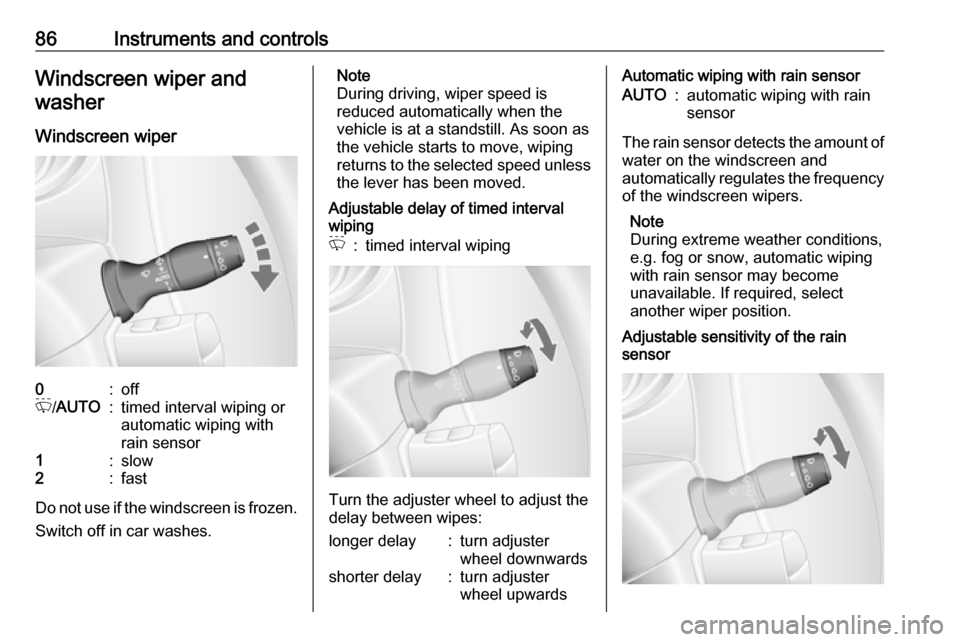
Windscreen wiper0:offP /AUTO:timed interval wiping or
automatic wiping with
rain sensor1:slow2:fast
Do not use if the windscreen is frozen.
Switch off in car washes.
Note
During driving, wiper speed is
reduced automatically when the
vehicle is at a standstill. As soon as
the vehicle starts to move, wiping
returns to the selected speed unless the lever has been moved.
Adjustable delay of timed interval
wipingP:timed interval wiping
Turn the adjuster wheel to adjust the
delay between wipes:
longer delay:turn adjuster
wheel downwardsshorter delay:turn adjuster
wheel upwardsAutomatic wiping with rain sensorAUTO:automatic wiping with rain
sensor
The rain sensor detects the amount of water on the windscreen and
automatically regulates the frequency
of the windscreen wipers.
Note
During extreme weather conditions,
e.g. fog or snow, automatic wiping
with rain sensor may become
unavailable. If required, select
another wiper position.
Adjustable sensitivity of the rain
sensor
Page 89 of 353
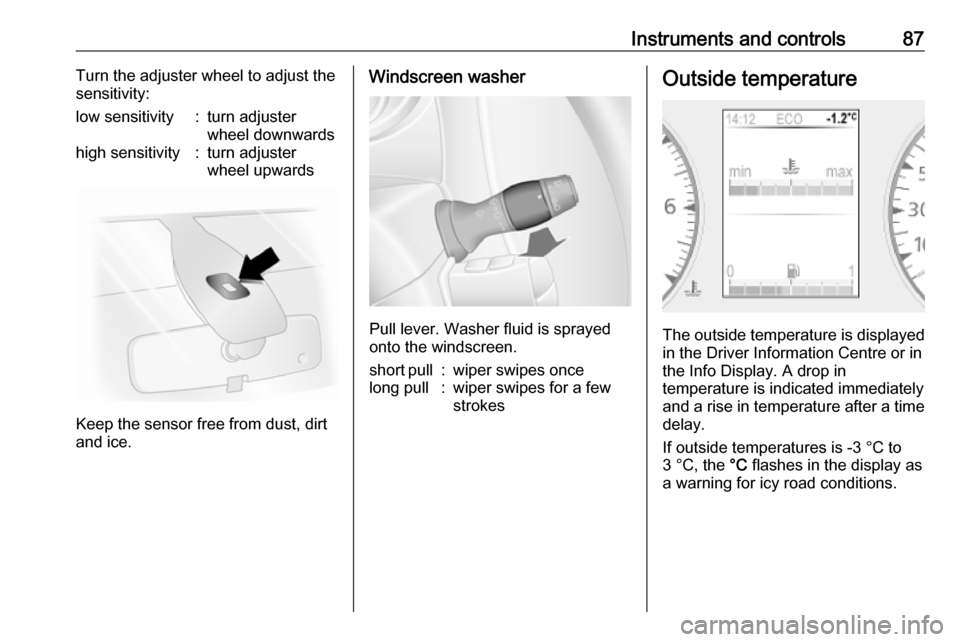
Instruments and controls87Turn the adjuster wheel to adjust the
sensitivity:low sensitivity:turn adjuster
wheel downwardshigh sensitivity:turn adjuster
wheel upwards
Keep the sensor free from dust, dirt
and ice.
Windscreen washer
Pull lever. Washer fluid is sprayed
onto the windscreen.
short pull:wiper swipes oncelong pull:wiper swipes for a few
strokesOutside temperature
The outside temperature is displayed
in the Driver Information Centre or in
the Info Display. A drop in
temperature is indicated immediately
and a rise in temperature after a time
delay.
If outside temperatures is -3 °C to
3 °C, the °C flashes in the display as
a warning for icy road conditions.
Page 104 of 353

102Instruments and controlsAdBlue level is low. Refill AdBlue as
soon as possible, to avoid prevention
of engine starts.
Illuminates together with control
indicator j to indicate a system
failure or as a warning that engine
starting may not be possible after a
certain distance. Seek the assistance
of a workshop immediately.
A corresponding message may
appear in the Driver Information
Centre 3 105.
AdBlue 3 234.
Tyre pressure monitoring system
w illuminates or flashes yellow.
Illuminates briefly when the ignition is
switched on.
Illuminates
Tyre pressure loss. Stop immediately
and check tyre pressure.
Control indicator w illuminates
together with C 3 100 and a
corresponding message appears inthe Driver Information Centre when a puncture or severely under-inflated
tyre is detected.
Flashes
Fault in system. After a delay the
control indicator illuminates
continuously. Consult a workshop.
Control indicator w illuminates
together with j 3 99 and a
corresponding message appears in
the Driver Information Centre when a
tyre without a pressure sensor is
mounted (e.g. spare wheel).
Tyre pressure monitoring system
3 292.
Engine oil pressure I illuminates red.
Illuminates briefly when the ignition is
switched on.Illuminates when the engine is
runningCaution
Engine lubrication may be
interrupted. This may result in
damage to the engine and/or
locking of the drive wheels.
1. Depress clutch.
2. Select neutral gear, set selector lever to N.
3. Move out of the flow of traffic as quickly as possible without
impeding other vehicles.
4. Switch off ignition.
Page 105 of 353

Instruments and controls1039Warning
When the engine is off,
considerably more force is needed
to brake and steer. During an
Autostop the brake servo unit will still be operational.
Do not remove key until vehicle is stationary, otherwise the steeringwheel lock could engage
unexpectedly.
Check engine oil level 3 271.
Keep engine turned off and let the
vehicle be towed to a workshop.
Low fuel Y illuminates yellow.
Illuminates when the ignition is
switched on and extinguishes shortly
after the engine starts.
Illuminates when the engine is
running
Fuel level in the tank is too low. Refuel
immediately.
Never run the tank dry.
Refuelling 3 263.
Catalytic converter 3 234.
Bleeding the diesel fuel system
3 276.
Stop-start system \ illuminates when an Autostop is
inhibited when certain conditions are
not fulfilled.
Ï illuminates during an Autostop.
Ï flashes if the clutch is not released
sufficiently.
Stop-start system 3 228.
Exterior light
F illuminates green.
Illuminated when the side lights are
on 3 110.
Low beam
9 illuminates or flashes green.
Illuminates
Illuminated when the headlights are on 3 110.Flashes
Fault in the lighting.
High beam P illuminates blue.
Illuminated when high beam is on and during headlight flash 3 111.
High beam assist f illuminates when the high beam
assist is activated 3 111.
Front fog lights
> illuminates green.
Illuminated when the front fog lights
are on 3 113.
Rear fog light ø illuminates yellow.
Illuminated when the rear fog light is on 3 114.
Cruise control
U , m illuminate green.
Page 114 of 353
112LightingGeneral information
Performance of the system can be
affected due to the following:
● Extreme weather conditions, e.g.
heavy rain, fog or snow.
● The front camera or the windscreen is obstructed, e.g. bya portable navigation system.
● Oncoming or preceding vehicle lights are not detected.
● Headlights are not adjusted correctly.
● Various reflective surfaces may also cause the system to fail to
detect other vehicles.
Headlight flash
To activate the headlight flash, pull
the lever briefly without passing the
resistance point.
High beam 3 111.Headlight range adjustment
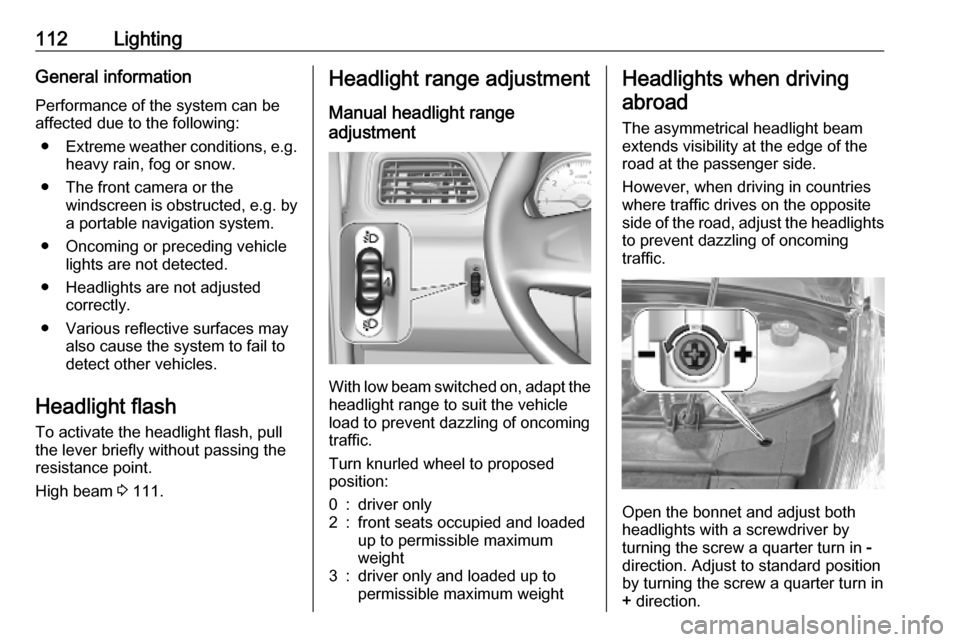
Manual headlight range
adjustment
With low beam switched on, adapt the
headlight range to suit the vehicle
load to prevent dazzling of oncoming
traffic.
Turn knurled wheel to proposed
position:
0:driver only2:front seats occupied and loaded
up to permissible maximum
weight3:driver only and loaded up to
permissible maximum weightHeadlights when driving
abroad
The asymmetrical headlight beam
extends visibility at the edge of the
road at the passenger side.
However, when driving in countries
where traffic drives on the opposite
side of the road, adjust the headlights to prevent dazzling of oncoming
traffic.
Open the bonnet and adjust both
headlights with a screwdriver by
turning the screw a quarter turn in -
direction. Adjust to standard position
by turning the screw a quarter turn in
+ direction.
Page 115 of 353
Lighting113Daytime running lightsDaytime running lights increase
visibility of the vehicle during daylight.
The lights operate automatically
when the ignition is switched on.
If the vehicle is equipped with the
automatic light control function, the
system switches between daytime
running lights and headlights
automatically depending on the
lighting conditions.
Automatic light control 3 110.
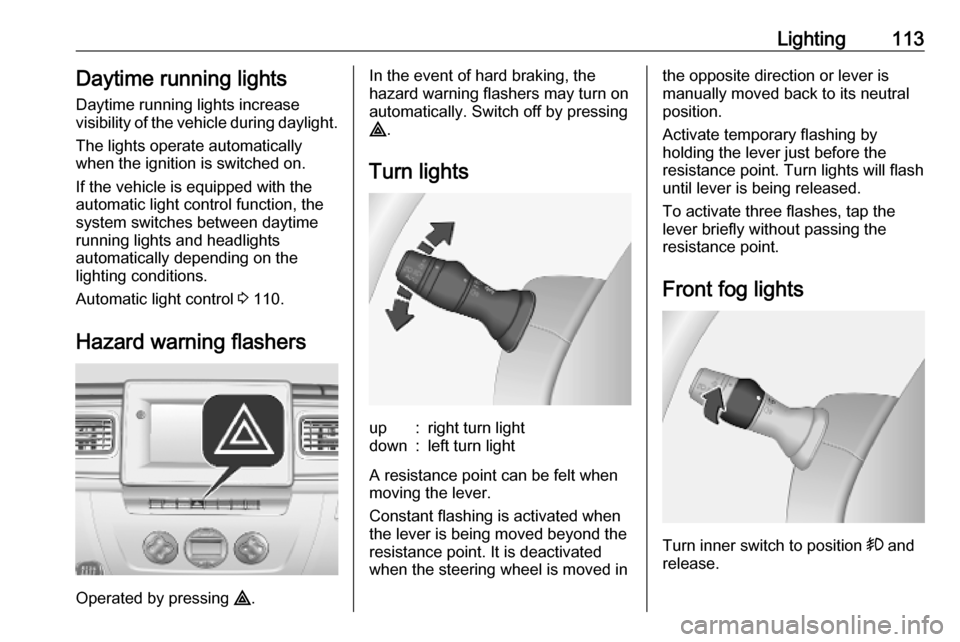
Hazard warning flashers
Operated by pressing ¨.
In the event of hard braking, the
hazard warning flashers may turn on automatically. Switch off by pressing
¨ .
Turn lightsup:right turn lightdown:left turn light
A resistance point can be felt when
moving the lever.
Constant flashing is activated when
the lever is being moved beyond the
resistance point. It is deactivated
when the steering wheel is moved in
the opposite direction or lever is
manually moved back to its neutral
position.
Activate temporary flashing by
holding the lever just before the
resistance point. Turn lights will flash
until lever is being released.
To activate three flashes, tap the
lever briefly without passing the
resistance point.
Front fog lights
Turn inner switch to position > and
release.
Page 118 of 353
116LightingReading lightsFront reading lightpress l:onpress 0:offRear reading lights
Combi, Bus
Each reading light can be switched on
or off individually and directed as
required.
press I:onpress 0:off
Courtesy lights 3 114.
Lighting features
Exit lighting
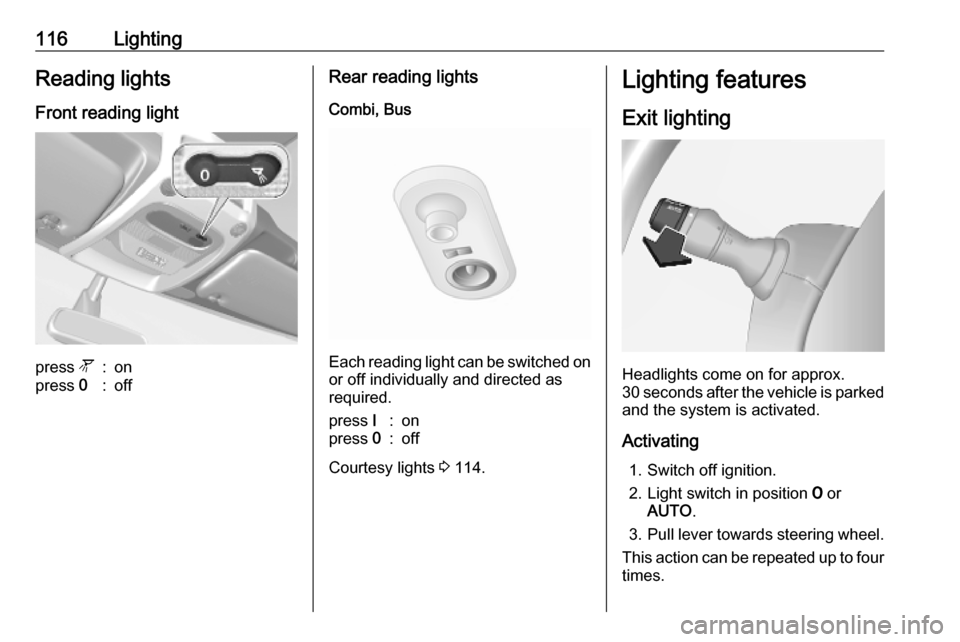
Headlights come on for approx.
30 seconds after the vehicle is parked
and the system is activated.
Activating 1. Switch off ignition.
2. Light switch in position 7 or
AUTO .
3. Pull lever towards steering wheel.
This action can be repeated up to four
times.
Page 193 of 353

Infotainment system191Voice recognition
General information
The voice recognition function allows
to operate certain functions via voice
input.
To ensure that conversations held
inside the vehicle do not start
unintentional calls to a saved contact, the voice recognition function must
first be activated via 5 on the column
controls.
Control elements overview 3 122.
NAVI 50 IntelliLink Available depending on version, the
voice recognition function of the
handsfree phone system allows you
to operate certain functions of a
compatible smartphone via voice
input.
Refer to "Phone control" in this
section 3 193.
To confirm that a paired and
connected smartphone is compatible
with the voice recognition function,
touch 7 followed by ÿSetting(s) .Then select Connectivity followed by
View Bluetooth device list . The list
shows the paired devices and 5
appears alongside the name of the
smartphone to indicate compatibility.
Note
If supported, the language set on the
smartphone will automatically be
used by the Infotainment system for
voice recognition.
The navigation system can also be
operated using voice controls. Refer
to "Navigation control" in this section
3 192.
Prerequisites
The following prerequisites must be
met:
● The Bluetooth function of the Infotainment system must be
activated.
Refer to "Bluetooth connection"
in the "Phone" section 3 197.
● The Bluetooth function of the Bluetooth-enabled smartphone
must be activated and the
smartphone must have a 3G, 4Gor wi-fi connection (see
smartphone operating
instructions).
● Dependent upon the smartphone, it may be required
to set the device to "visible" (see
smartphone operating
instructions).
● The smartphone must be paired and connected to the
Infotainment system.
Help
For information and help with
activating and operating voice
controls, touch 7 followed by
ÿ Setting(s) then Connectivity .
Select Smartphone from the list (use
S /R to search list), then select l to
access help.
A series of screens are displayed,
explaining how to use the voice
recognition function and information
on the following:
● switching on/off with steering wheel/column controls
● compatible phones
● operation methods