AUX OPEL MOVANO_B 2020 Manual user
[x] Cancel search | Manufacturer: OPEL, Model Year: 2020, Model line: MOVANO_B, Model: OPEL MOVANO_B 2020Pages: 353, PDF Size: 9.4 MB
Page 161 of 353

Infotainment system159The default pairing code is 0000. To
change this pairing code before the pairing procedure is started, select
Change passkey to update.
Note
If the audio device does not have a
screen, enter the default pairing
code on the device, then on the
Infotainment system. Refer to the
operating instructions for this default
audio device pairing code, usually
0000 . Depending on the device, the
pairing code may need to be entered
in reverse order, i.e. on the
Infotainment system first.
If pairing fails, repeat procedure if
necessary.
Note
When a Bluetooth connection is
active, controlling the audio device
via the Infotainment system will
discharge the audio device battery
more rapidly.
Connecting an audio device
Audio devices are automatically
connected to the Infotainment system after the pairing procedure is
completed.To change the audio device
connected, touch 7 followed by
ÿ Settings .
Then select Connectivity followed by
View Bluetooth device list . The device
list shows the audio devices already paired.
Select the desired audio device from
the list and confirm by touching OK.
Disconnecting an audio device Switching off the audio device or
deactivating the Bluetooth function on
the audio device disconnects the
device from the Infotainment system.
Unpairing an auxiliary audio device
from the Infotainment system
If the list of paired audio devices is full, a new device can only be paired if an
existing device is unpaired.
To unpair, i.e. to delete an audio
device from the system memory,
touch 7 followed by ÿSettings .
Select Connectivity then View
Bluetooth device list .
Select the desired audio device from
the list, then touch ë to delete the
device. If required, delete all devicesin the list by selecting Options
followed by Delete all. Confirm with
OK .
Operation via Infotainment system
When paired and connected
wirelessly, audio playback begins
automatically.
The audio device can then be
operated via the Infotainment system
display options.
The range of accessible functions
that can be operated via the
Infotainment system depends on the
type of audio player.
The operation of the audio device when connected wirelessly is similarto the operations for playing saved
audio files via the USB socket. Refer
to (NAVI 50 IntelliLink) "Playing music
via USB socket" in the "USB port"
section 3 154.
Page 162 of 353

160Infotainment systemNAVI 80 IntelliLink
Bluetooth connection
A connection must be set up between the audio device and the Infotainmentsystem via Bluetooth, i.e. the device
must be paired to the vehicle before
using it.
● There is a maximum number of audio devices that can be paired
and saved in the device list, but
only one can be connected at a
time.
● If the device has both audio player and telephone functions,
both functions will be paired. Pairing a mobile phone 3 195.
● Phone functions will remain active while the audio player is inuse, and audio playback will be
suspended during phone use.
Pairing an auxiliary audio device to the Infotainment system
From the Home page, touch MENU
then Multimedia , followed by
Settings .Select Media to access the media
settings menu, then select the "Manage Bluetooth
devices"/"Configure Bluetooth
connection" option.
The pairing procedure is similar to
pairing a mobile phone. Refer to
(NAVI 80 IntelliLink) "Bluetooth
connection" in the "Phone" section
3 197.
Connecting an audio device
Audio devices are automatically
connected to the Infotainment system
after the pairing procedure is
completed.
At any time, change the audio source to Bluetooth mode to playback files
from a connected Bluetooth device.
From the Home page, select MENU
then Multimedia , followed by Media.
Depending on version, touch < (to
open a pop-up menu). Select Bluetooth /Bluetooth connection to
change the audio source to
Bluetooth.Disconnecting an audio device
Switching off the audio device or
deactivating the Bluetooth function on
the audio device disconnects the
device from the Infotainment system.
Unpairing an auxiliary audio device
from the Infotainment system
To unpair, i.e. to delete a device from
the system memory:
From the Home page, touch MENU
then Multimedia , followed by
Settings .
Select Media to access the media
settings menu, then select the "Manage Bluetooth
devices"/"Configure Bluetooth
connection" option.
Press < to open a pop-up menu. The
following options are available:
● Disable Bluetooth : Select to
deactivate the Bluetooth function
on the Infotainment system.
● Set TomTom visible : Select to
make the Infotainment system
"visible" to other Bluetooth
devices, allowing them to be paired to the system.
Page 210 of 353
208Climate controlClimate controlClimate control systems.............208
Heating and ventilation system 208
Air conditioning system ...........209
Electronic climate control system .................................... 210
Rear heating system ...............213
Rear air conditioning system ...215
Auxiliary heater ........................216
Air vents ..................................... 221
Adjustable air vents .................221
Fixed air vents ......................... 222
Glovebox cooler ......................222
Maintenance .............................. 223
Air intake ................................. 223
Air conditioning regular operation ................................ 223
Service .................................... 223Climate control systems
Heating and ventilation system
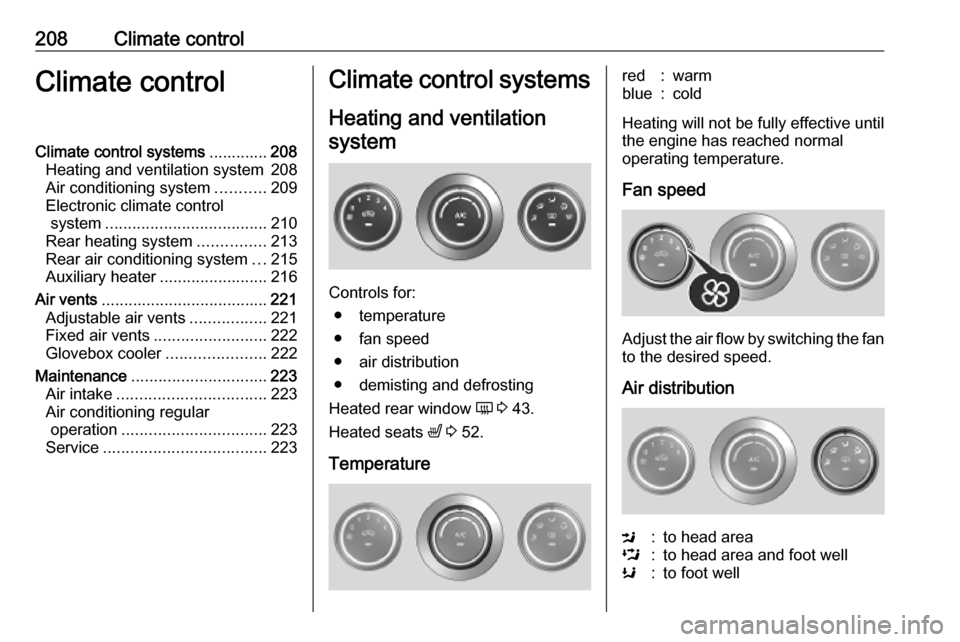
Controls for: ● temperature
● fan speed
● air distribution
● demisting and defrosting
Heated rear window Ü 3 43.
Heated seats ß 3 52.
Temperature
red:warmblue:cold
Heating will not be fully effective until
the engine has reached normal
operating temperature.
Fan speed
Adjust the air flow by switching the fan
to the desired speed.
Air distribution
M:to head areaL:to head area and foot wellK:to foot well
Page 218 of 353
216Climate controlCombi
Additional air conditioning is supplied to the rear passenger compartment
via the air vents located above the
driver and front passenger
compartment.
With the front passenger
compartment air conditioning system
switched on, adjust the air flow to
select the desired speed.
Ensure the air vents are open when in use, to prevent ice forming in the
system due to lack of air movement.
Auxiliary heater Coolant heater
The engine-independent, fuel-
powered coolant heater provides rapid heating of the engine coolant to
enable heating of the vehicle interior
without the engine running.
Note
Depending on version, an additional
coolant heater may be switched on
automatically to speed up heating
when the ignition is on and the
outside temperature is below 5 ℃.9 Warning
Do not operate the system when
refuelling, when dust or
combustible vapours are present
or in enclosed spaces (e.g.
garage).
Before starting or programming the
system to start, turn the vehicle's
climate control system to heat, set the
air distribution to V and turn the fan
on.
Switch off when not required. Heating stops automatically after the
programmed runtime. It will also
cease to operate if the vehicle fuel
level drops too low.
During operation, power from the
vehicle battery is used. The driving
time should therefore be at least as
long as the heating time. For short
journey times, check the vehicle
battery regularly and recharge if
necessary.
To ensure efficient performance,
briefly operate the auxiliary heater
once a month.
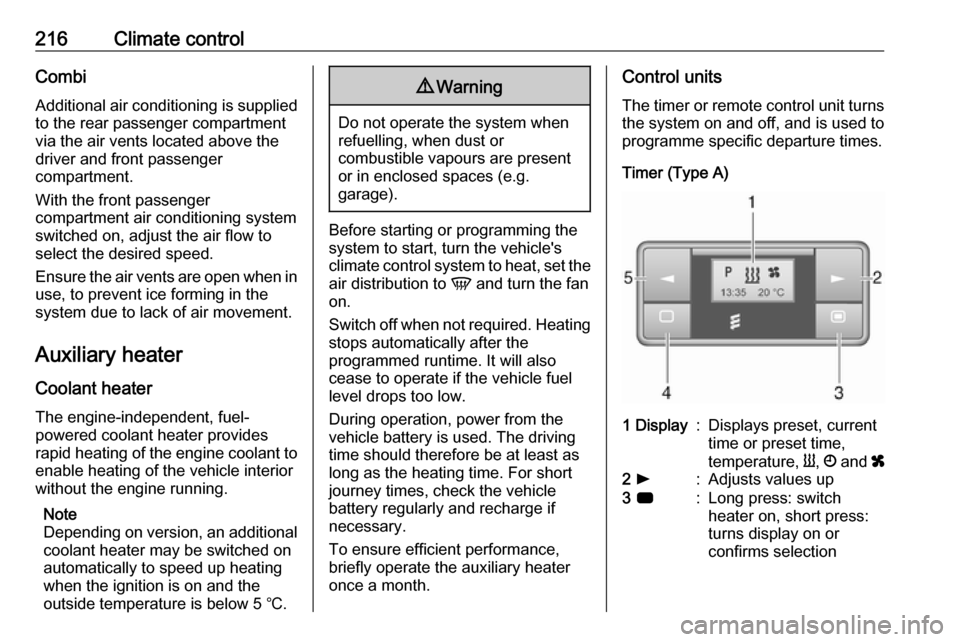
Control units
The timer or remote control unit turns the system on and off, and is used to
programme specific departure times.
Timer (Type A)1 Display:Displays preset, current
time or preset time,
temperature, Y, Ö and x2 l:Adjusts values up3 7:Long press: switch
heater on, short press:
turns display on or
confirms selection
Page 221 of 353

Climate control219Depending on version, the auxiliary
heater can also be switched on for the
last duration time or the default
duration 30 minutes, or cut-off
immediately, using the button on the
instrument panel. The LED in the
button confirms operation.
Battery replacement Replace the battery when the range
of the remote control is reduced or
when the battery charge symbol
flashes.
Open the cover and replace the
battery (Type A: CR 2430, Type B:
2CR 11108, or equivalent), ensuring
the new battery is correctly installed
with the positive ( <) side facing the
positive terminals. Replace the cover
securely.
Dispose of old batteries in
accordance with environmental
regulations.Batteries do not belong in household
waste. They must be disposed of at
an appropriate recycling collection
point.
Operation (Type A)
Heating Y
Select Y in the menu bar and press
G to confirm. The predetermined
heating duration, e.g. L 30, flashes in
the display. The factory setting is 30 minutes.
Adjust the heating duration using k
or l and confirm. The value can be
set from 10 to 120 minutes. Due to the
power consumption, note the heating duration.
To switch off, select Y in the menu bar
again and press d.
Ventilation x
Select x in the menu bar and press
G to confirm.
Adjust the ventilation duration using k or l and confirm. The value can
be set from 10 to 120 minutes. Due to the power consumption, note the
heating duration.To switch off, select x in the menu bar
again and press d.
Programming P
Up to three preset departure times
can be programmed, either during
one day or over one week.
● Select P in the menu bar and
press G to confirm.
● Select desired preset memory number P1, P2 or P3 and
confirm.
● Select F and confirm.
● Select weekday or weekday group and confirm.
● Select hour and confirm.
● Select minutes and confirm.
● Select Y or x and confirm.
● Select ECO or HIGH and confirm.
● Select duration and confirm.
● Press d to exit.
Repeat the procedure to programme
the other preset memory numbers if
required.
Page 226 of 353

224Driving and operatingDriving and
operatingDriving hints ............................... 225
Driving economically ...............225
Control of the vehicle ...............225
Steering ................................... 225
Starting and operating ...............226
New vehicle running-in ............226
Ignition switch positions ...........226
Starting the engine ..................227
Idle speed control ....................228
Overrun cut-off ........................ 228
Stop-start system ....................228
Parking .................................... 231
Air suspension ......................... 231
Engine exhaust .......................... 233
Diesel particle filter ..................233
Catalytic converter ...................234
AdBlue ..................................... 234
Manual transmission ..................241
Manual transmission automa‐ ted .............................................. 241
Transmission display ...............241
Starting the engine ..................242
Selector lever .......................... 242Manual mode........................... 243
Electronic driving programmes 243
Fault ........................................ 244
Interruption of power supply ....244
Brakes ........................................ 244
Antilock brake system .............244
Parking brake .......................... 245
Brake assist ............................. 246
Hill start assist ......................... 246
Ride control systems .................247
Traction Control system ..........247
Electronic Stability Control ......248
Limited-slip rear axle ...............249
Driver assistance systems .........249
Cruise control .......................... 249
Speed limiter ........................... 251
Active emergency braking .......253
Parking assist .......................... 255
Side blind spot alert .................257
Rear view camera ...................259
Lane departure warning ..........261
Fuel ............................................ 262
Fuel for diesel engines ............262
Refuelling ................................ 263
Trailer hitch ................................ 265
General information .................265
Driving characteristics and towing tips .............................. 265
Trailer towing ........................... 265Towing equipment ...................266
Trailer stability assist ...............266
Auxiliary features .......................266
Power take-off ......................... 266
Page 268 of 353
266Driving and operatingIn the case of trailer loads of
1200 kg or more, the vertical coupling load should not be less than 50 kg.
Rear axle load When the trailer is coupled and the
towing vehicle fully loaded (including all occupants), the permissible rear
axle load (see identification plate or
vehicle documents) can be exceeded by 15%. If the permissible rear axle
load is exceeded, a maximum speed
of 80 km/h applies and the tyre
pressure must be increased by 20
kPA / 0.2 bar.
Towing equipment For vehicles fitted with towing
equipment, when connected to a
trailer the pitch of the audible warning
changes upon operation of the turn
lights.
The pitch of the audible warning will
change if a turn light on the trailer or
the towing vehicle fails.Trailer stability assist
If the system detects snaking
movements, engine power is reduced
and the vehicle / trailer combination is
selectively braked until the snaking
ceases. While the system is working,
keep steering wheel as still as
possible.
Trailer stability assist is a function of
the Electronic Stability Control (ESC)
3 248.Auxiliary features
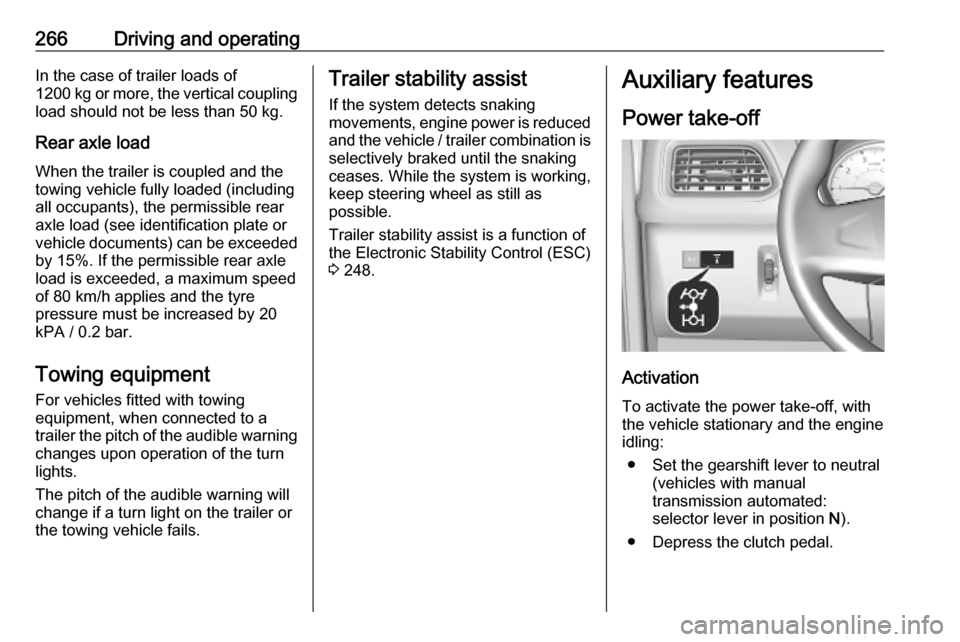
Power take-off
Activation
To activate the power take-off, with
the vehicle stationary and the engine
idling:
● Set the gearshift lever to neutral (vehicles with manual
transmission automated:
selector lever in position N).
● Depress the clutch pedal.
Page 278 of 353
276Vehicle careWarning label
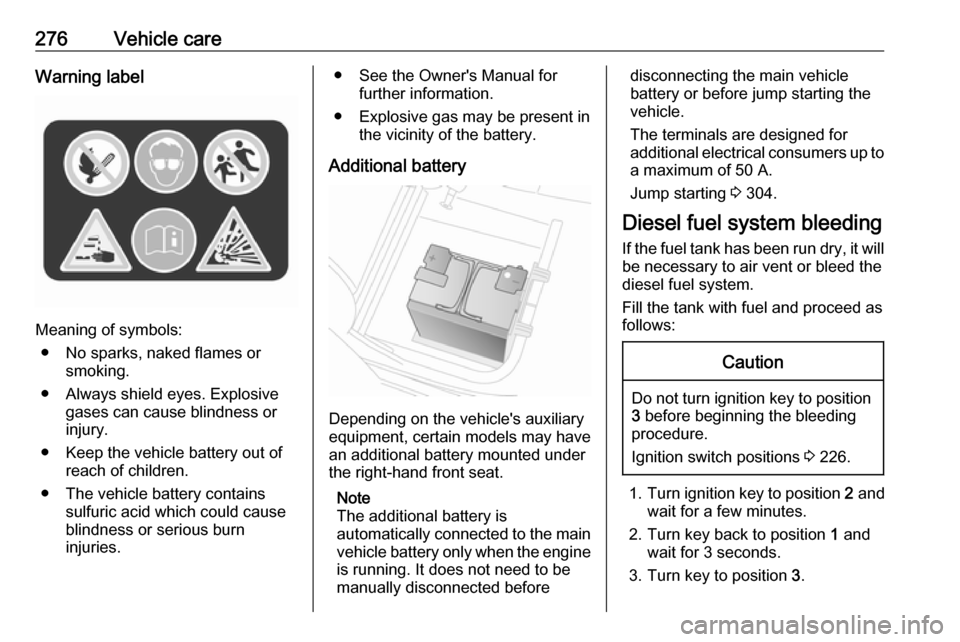
Meaning of symbols:● No sparks, naked flames or smoking.
● Always shield eyes. Explosive gases can cause blindness or
injury.
● Keep the vehicle battery out of reach of children.
● The vehicle battery contains sulfuric acid which could cause
blindness or serious burn
injuries.
● See the Owner's Manual for further information.
● Explosive gas may be present in the vicinity of the battery.
Additional battery
Depending on the vehicle's auxiliary
equipment, certain models may have
an additional battery mounted under
the right-hand front seat.
Note
The additional battery is
automatically connected to the main vehicle battery only when the engine
is running. It does not need to be
manually disconnected before
disconnecting the main vehicle
battery or before jump starting the vehicle.
The terminals are designed for
additional electrical consumers up to
a maximum of 50 A.
Jump starting 3 304.
Diesel fuel system bleeding If the fuel tank has been run dry, it will
be necessary to air vent or bleed the
diesel fuel system.
Fill the tank with fuel and proceed as
follows:Caution
Do not turn ignition key to position 3 before beginning the bleeding
procedure.
Ignition switch positions 3 226.
1. Turn ignition key to position 2 and
wait for a few minutes.
2. Turn key back to position 1 and
wait for 3 seconds.
3. Turn key to position 3.
Page 321 of 353

Customer information319Customer
informationCustomer information ................319
Declaration of conformity .........319
REACH .................................... 323
Registered trademarks ............323
Vehicle data recording and pri‐ vacy ........................................... 323
Event data recorders ...............323
Radio Frequency Identification (RFID) ..................................... 326Customer information
Declaration of conformity
Radio transmission systems
This vehicle has systems that
transmit and / or receive radio waves
subject to Directive 2014/53/EU. The
manufacturers of the systems listed
below declare conformity with
Directive 2014/53/EU. The full text of
the EU declaration of conformity for each system is available at the
following internet address:
www.opel.com/conformity.
Importer is
Opel / Vauxhall, Bahnhofsplatz,
65423 Ruesselsheim am Main,
Germany.
Radio remote control receiver Visteon Electronics
04 Rue Nelson Mandela, Zone
Industrielle Borj Cedria, 2055 Bir El
Bey, Tunisia
Operation frequency: 433 MHz
Maximum output: 10 mW ERPRadio remote control transmitter
Visteon Electronics
04 Rue Nelson Mandela, Zone
Industrielle Borj Cedria, 2055 Bir El
Bey, Tunisia
Operation frequency: 433 MHz
Maximum output: 10 mW ERP
Electronic key transmitter
ALPS ELECTRIC EUROPE GmbH
Ohmstrasse 4, 85716
Unterschleissheim, Germany
Operation frequency: 433 MHz
Maximum output: 10 mW ERP
Immobiliser
Visteon Electronics
04 Rue Nelson Mandela, Zone
Industrielle Borj Cedria, 2055 Bir El
Bey, Tunisia
Operation frequency: 125 kHz
Maximum output:
42 dBμA/m @ 10 m
Immobiliser
ALPS ELECTRIC EUROPE GmbH
Page 344 of 353

342IndexAAbsorptive Glass Mat battery .....274
Accessories and vehicle modifications .......................... 269
ACC files..................................... 153
Activating Bluetooth function ......197
Activating the navigation system 166
Activating voice recognition ........192
Active emergency braking ..104, 253
Adaptation volume km/h .............138
AdBlue ........................ 101, 234, 313
AdBlue gauge ............................... 93
AdBlue tank ................................ 317
Add a favourite destination .........177
Adding contacts to the phonebook .............................. 201
Adjustable air vents ...................221
AF (Alternative Frequency)......... 148
Airbag and belt tensioners ...........98
Airbag deactivation ................63, 98
Airbag label................................... 59 Airbag system .............................. 59
Air conditioning regular operation ................................ 223
Air conditioning system .............. 209
Air intake .................................... 223
Air suspension ........................... 231
Air suspension system................ 306
Air vents...................................... 221
Antifreeze ................................... 272Antilock brake system ................ 244
Antilock brake system (ABS) .....100
Anti-theft alarm system ................36
Anti-theft bolts............................. 299
Anti-theft locking system .............. 35
Anti-theft security lock ..................23
Appearance care ........................308
Armrest ........................................ 51
Ashtrays ....................................... 91
AST (Autostore list) ....................147
Audio players .............................. 129
Audio settings ............................. 137
Automatic call waiting .................201
Automatic light control ...............110
Automatic locking ...................24, 29
Automatic phone connection ......195
Automatic station search ............145
Automatic station storing ............147
Automatic switch-off ...................129
Automatic zoom .......................... 166
Autostop ....................... 18, 227, 228
Autostore lists ............................. 147
Auxiliary heater ........................... 216
AUX input ................................... 151
AUX input usage ........................152
Avoid part of route ......................183
B Balance....................................... 137
Bass............................................ 137