navigation OPEL MOVANO_B 2020 Manual user
[x] Cancel search | Manufacturer: OPEL, Model Year: 2020, Model line: MOVANO_B, Model: OPEL MOVANO_B 2020Pages: 353, PDF Size: 9.4 MB
Page 173 of 353
Infotainment system171●Change map colours
● Car symbol
● Advanced
6. NAVIGATION SERVICES
Refer to (NAVI 80 IntelliLink)
"LIVE services" below.
● Traffic
● Speed Cameras
● Local search /TomTom
places
● My TomTom live
● Weather
7. ITINERARIES
Refer to (NAVI 80 IntelliLink) "Edit Itinerary" in the "Guidance"
section 3 183.
8. r : Return to previous screenMap screen
To access the map screen without navigation, on the Home page touch
MENU , then Navigation followed by
View Map .Touch anywhere on the map. The
cursor indicates the current selected
position. To scroll within the map,
drag the cursor in the required
direction.
To access the map screen with
navigation, on the Home page touch
MENU followed by Navigation and
enter a destination. Refer to
(NAVI 80 IntelliLink) "Destination
input" 3 177.
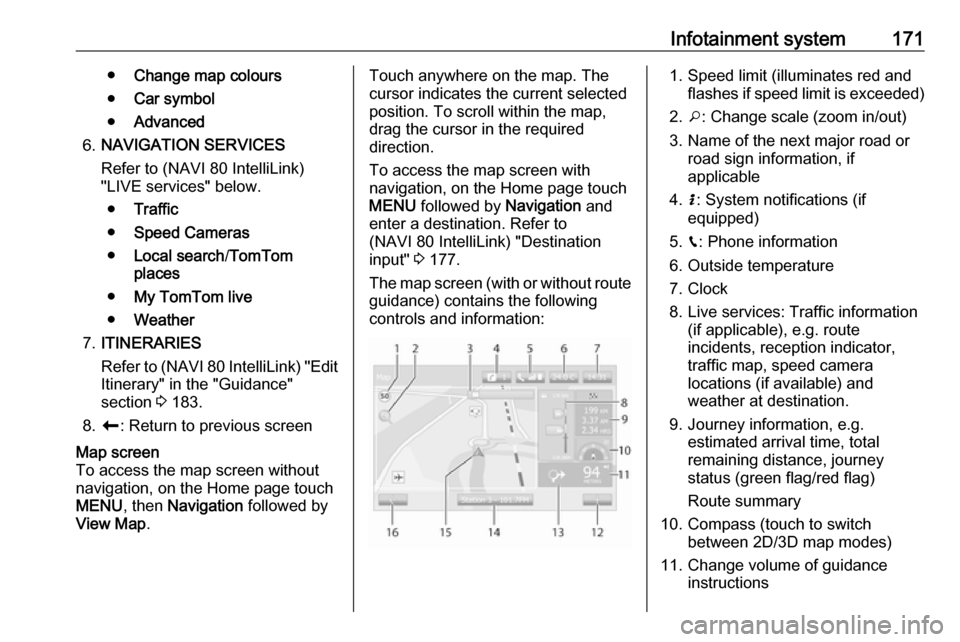
The map screen (with or without route
guidance) contains the following
controls and information:1. Speed limit (illuminates red and flashes if speed limit is exceeded)
2. o: Change scale (zoom in/out)
3. Name of the next major road or road sign information, if
applicable
4. H: System notifications (if
equipped)
5. g: Phone information
6. Outside temperature
7. Clock
8. Live services: Traffic information (if applicable), e.g. route
incidents, reception indicator,
traffic map, speed camera
locations (if available) and
weather at destination.
9. Journey information, e.g. estimated arrival time, total
remaining distance, journey
status (green flag/red flag)
Route summary
10. Compass (touch to switch between 2D/3D map modes)
11. Change volume of guidance instructions
Page 174 of 353

172Infotainment system12.<: Pop-up menu
13. Direction and distance to next change of direction
14. Audio system information
15. K: Current location (cursor)
Route calculated and direction
changes
16. r: Return to previous screenLane images
During route guidance, before each
major road change, a 3D view of the
junction (with a turn arrow and road
signs) is automatically displayed. The
normal view is resumed after passing the junction.
To switch off the lane images view,
refer to (NAVI 80 IntelliLink)
"Advanced Settings" in "Setting up
the navigation system" below.Automatic zoom
During route guidance, before each
change of direction a close-up view of
the junction is automatically
displayed. The normal view is
resumed after passing the junction.To switch off the automatic zoom
feature, refer to (NAVI 80 IntelliLink)
"Advanced Settings" in "Setting up the navigation system" below.
Operating keyboards in the
display
NAVI 50 IntelliLink
To move within and to enter
characters in both the alphabetical and numerical keyboards, make the
appropriate selection by touching the
display screen.
● Select Options to change the
keyboard type (e.g. QWERTY,
ABC).
● Select 1^& to switch to numbers
and symbols.
● Select the drop down menu icon ó to display a list of results for the
current operation (e.g.
destination input).
● Entries can be corrected during input with the k keyboard
character.
● Touch r to stop using the
keyboard and return to the
previous screen.Note
When making an entry, certain
letters and numbers are unavailable for selection (greyed-out) based on
the information stored in the
navigation system.
For further information, refer to
"Touchscreen operation" 3 136.
NAVI 80 IntelliLink
To move within and to enter
characters in both the alphabetical and numerical keyboards, make the
appropriate selection by touching the
display screen.
● Entries can be corrected during input with the k keyboard
character.
● Touch r to stop using the
keyboard and return to the
previous screen.
For further information, refer to
"Touchscreen operation" 3 136.
Page 175 of 353

Infotainment system173Live servicesNAVI 80 IntelliLink
In addition to the navigation services
(e.g. traffic information, fixed speed
cameras), extra features can be
added by subscribing to LIVE
services.
LIVE services include up-to-date
traffic information with "HD Traffic™ ",
updates and locations of fixed and
mobile speed cameras, local search,
weather forecast and the "My
TomTom LIVE" subscription status.
Note
LIVE services are not available in
some countries or regions.
The first owner of the vehicle has to
activate this service within 14 days,
otherwise this service is disabled.
Touch Activate my services and then
accept the displayed terms and
conditions.
From the Home page, touch MENU
then Navigation , followed by
Navigation Services .The following menus are displayed:
● Traffic /HD Traffic
Select to receive up-to-date, real-
time traffic information.
Note
The HD Traffic service is named
Traffic if a subscription has not been
activated.
● Speed cameras
Displays alerts and location of
mobile speed cameras in real-
time, fixed speed cameras and accident blackspots.
Switch function off via the "Speed Cameras" menu in "LIVE
services", if required.
Report speed camera location, fixed or mobile.
Note
In certain countries it is illegal to
download and activate the camera warning option and this could lead to prosecution.
● Local search /TomTom places
This service allows you to use a keyword to quickly find any Pointof Interest (POI) and set it as a
destination.
● My TomTom LIVE
Displays expiry date of
subscribed services.
● Weather
The weather forecast service
provides up to five days of
weather reports for your current
location and your chosen
destination.
Setting up the navigation system
NAVI 50 IntelliLink
Touch 7 followed by yNAVI / ýNav
then Options . This menu screen
allows you to check and update the
following map and navigation
settings:
● Warnings
● Route settings
● Map settings
● Voice settings
● Coordinate format
● GPS
Page 178 of 353

176Infotainment systemCoordinate format
Select Coordinate format to change
the format of co-ordinate entries to one of the following options:
● DD.DDDDD
● DD MM.MMM
● DD MM SS.SGPS
Select GPS to view the GPS
information, e.g. available satellites,
their location and signal strength.Map update
Select Map update to display the
following digital map content and
latest update information:
● Alert Points
● Junction View
● Maps
● Places
● Traffic Service
● Address Points
Specific content or all map content
can be updated. Select one of the
options first or touch Options then
Update . Wait for the update to
complete.Refer to "USB memory stick"
(NAVI 50 IntelliLink), "Updating the
USB memory stick and navigation
system" in the "General information"
section 3 164.Traffic
Select Traffic to change the following
traffic information settings:
● Traffic info (On/Off)
● Detour
● Event types
Traffic info : Warnings are given for
incidents that occur along the route.
Detour : Save time by using an
alternative route when a traffic jam or
an incident occurs along the current
route. Select 'On'/'Off' alongside
"Confirm offered route?" as required.
If necessary, update the time value
for the option "Offer detour if the
calculated route saves more than:"
(e.g. five minutes) by touching k/l .
Event types : Select the type of events
to be displayed during route
guidance, e.g. all events, traffic flow
events, closures and blockages,
accidents.NAVI 80 IntelliLink
To access the navigation settings
menu from the Home page, touch
MENU then Navigation , followed by
Settings . The following settings
submenus are displayed:
● Turn off voice guidance :
Switch on/off voice guidance
during navigation.
● Route planning :
Settings for route type, toll roads,
ferries, route summary, carpool
lanes and unpaved roads.
Select a planning preference type; "Fastest route" is
recommended. The eco-route is
designed to save the most fuel.
Then switch on/off "iQ routes™" as required. iQ routes™ enables
routes to be calculated according to average traffic levels during aparticular day and time, and alsothe best route according to actual
traffic speeds.
● Show POI on map :
Show or hide categories of POI
markers on the map.
Page 179 of 353

Infotainment system177●Manage POIs :
Add, change or delete POIs or
POI categories.
● Voice (depending on version):
Select synthesised voice or a
male or female human voice (for
the voice instructions) from the
available list.
Human voices provide more
simplified voice guidance
instructions and are not available when using the Voice recognition
function 3 191.
● Set home location :
Change the home or most used
destination address.
● Manage saved locations :
Delete or rename saved destination addresses.
To rename, select an address
from the displayed list, select
Rename then enter a new name.
Touch Done to confirm. To delete
a selected address, touch
Delete and confirm when
prompted.● Switch map :
If more than one map is installed on the SD card, use this option to switch between the saved maps.
Select "Change map" then
choose the desired map from the options available.
● Change map colours :
Change day and night colours
used on navigation map.
For downloaded new colours;
choose a new colour, select
additional colour scheme, then
choose the desired colour from
the options available.
● Car symbol :
Change the vehicle icon used on
the 3D navigation map.
● Advanced :
Select from the following
advanced options:
● Map information :
Show/hide information
displayed on the map, e.g. address number before
street name, street names/current street name, name of street after current street.
● Map behaviour :
Change how the map
operates with the following
options:
Show lane images (e.g. at
motorway junctions), rotate
map with vehicle direction
(2D mode only), switch to 3D
mode automatically during
guidance, zoom
automatically (2D mode, 3D
mode).
● Traffic source :
Choose a traffic information
source from the available list.
Destination input
NAVI 50 IntelliLink Select a destination
Touch 7 followed by ýNav then
Destination .
Page 180 of 353

178Infotainment systemThe following menu options are
available for entering a destination:
● Address
Enter an address using the
keyboard.
● Points of Interest
Select Points of Interest (POI),
e.g. petrol station, restaurant, parking.
● History
Select from a list of previous destinations.
● Favourites
Select from a saved list of
favourite destinations.
● Find on map
Select a destination by using the
digital map.
● Coordinate
Enter the co-ordinates of the
destination.
After a destination has been entered,
wait for the ten second countdown to
expire or touch OK to begin route
guidance immediately.Enter an address
Select Address and enter part or all of
an address, e.g.:
● Country
● Town or Postcode
● Street
● Number
● Intersecting street
Note
Full addresses can only be entered
if they are recognised by the
navigation system.
When entering an address for the first
time, touch Country, then use the
keyboard to enter the name of the
country required. Alternatively, use
the drop down menu icon ó and select
from a list of suggested countries.
Note
When entering an address, certain
letters and numbers are unavailable
for selection (greyed-out) based on
the addresses recognised by the
navigation system.
Proceed in the same way to enter
details for Town or Postcode , Street ,
Number and Intersecting street .Note
If a Postcode consists of several
parts, insert a space after the first
part of the postcode.
The address is automatically stored in the memory, available for future
selection.
For keyboard operation, refer to
(NAVI 50 IntelliLink) "Operating
keyboards in the display" in the
"Usage" section 3 166.
Note
Number and Intersecting Street are
only available after a Street has
been entered.
When entering a Street, it is not
necessary to specify the type of road (street, avenue, boulevard etc.).Select Points of Interest (POI)
POIs can be selected as a destination
using the following search options:
● preset POI list
● POI categories
● quick search for POIs via the map
Page 183 of 353

Infotainment system181For keyboard operation, refer to
(NAVI 50 IntelliLink) "Operating
keyboards in the display" in the
"Usage" section 3 166.
Delete a favourite
When a favourite has been selected,
touch Options before starting route
guidance followed by Delete
Favourite and confirm deletion.
To delete all favourite destinations,
select the menu Destination then
Favourites followed by Options then
Delete all and confirm deletion.
NAVI 80 IntelliLink
Select a destination
From the Home page, touch MENU
then Navigation followed by Drive
to... .
Select a destination from the
following options on the display:
● Home
● Saved locations
● Address
● Recent destinations
● Local search /TomTom places● Point of Interest
● Point on Map
● Latitude LongitudeHome
Guides to the home address.
To store the home address, from the
Home page, touch MENU then
Navigation , followed by Settings.
Select Set home location and enter
an address.
Refer to (NAVI 80 IntelliLink) "Setting up the navigation system" in the
"Usage" section 3 166.Saved locations
Select from a list of previously saved
destinations.
To delete or rename saved
destinations, from the Home page,
touch MENU then Navigation ,
followed by Settings.
Then select Manage saved locations
and update the selected destination
as required.
Refer to (NAVI 80 IntelliLink) "Setting
up the navigation system" in the
"Usage" section 3 166.Address
Enter part or all of an address using
the keyboard, e.g.:
● Country
● Postcode
● Town/City
● Street
● House number
Note
Full addresses can only be entered
if they are recognised by the
navigation system.
When entering an address for the first
time, the country of the destination
will be requested. Use the keyboard
to enter the name of the country
required.
Suggestions may be shown on the
display during input. Touch to select
a destination shown in the display, or
touch List to access the full list for the
current part of the address.
Page 184 of 353

182Infotainment systemNote
When entering an address, certain
letters and numbers are unavailable
for selection (greyed-out) based on
the addresses recognised by the
navigation system.
Proceed in the same way to enter a Postcode or enter details for Town/
City , Street and Number .
Note
If a Postcode consists of several
parts, insert a space after the first
part of the postcode.
The address is automatically stored in the memory, available for future
selection.
For keyboard operation, refer to
(NAVI 80 IntelliLink) "Operating keyboards in the display" in the
"Usage" section 3 166.Recent destinations
Select from a list of previous
destinations that have been
automatically stored.Local search/TomTom places
Select a nearby Point of Interest (POI)
by entering key words using the
keyboard.Note
This feature is only available by
subscribing to LIVE services.
For further information, refer to
(NAVI 80 IntelliLink) "LIVE services"
in the "Usage" section 3 166.Point of Interest
POIs can be selected as a destination
using the following search options:
● POI categories: Select a POI category type (e.g.petrol station, restaurant,
parking), then select a search area (e.g. POI nearby , POI in
town , POI at home .
Enter a town/city name and touch Done to confirm selection.
● POI names: Enter name of a POI and select
to begin a search.Point on Map
Select a destination by using the
digital map.
To scroll within the map, drag the
cursor in the required direction, then
confirm the position as a destination.Latitude Longitude
Enter the co-ordinates of the
destination.
Confirm the destination
When a destination has been
selected, the route appears on the
map and a route summary is provided in the y tab.
Select the LIVE tab to view real-time traffic information. For further
information, refer to
(NAVI 80 IntelliLink) "LIVE services"
in the "Usage" section 3 166.
Touch Done to confirm the route.
Add and save a favouriteAdd to saved locations
From the Home page, touch MENU
then Navigation followed by Drive
to... .
Select Recent destinations and
choose a destination from the
displayed list.
Touch < (to open a pop-up menu)
then Add to saved locations , give a
name to the destination using the
keyboard, then touch Next.
Page 185 of 353

Infotainment system183A message is displayed asking if the
saved address should be set as the
Home address. Select Yes or No. A
message is displayed confirming that
the address has been saved.Add Favourite
On the Home page, touch f to open
the favourites menu and select
Navigation .
To set a saved destination as a
favourite, touch < (to open a pop-up
menu), then Add Favourite .
Choose from the displayed list to add
a saved destination to the favourites.
For further information, refer to
(NAVI 80 IntelliLink) "Favourites" in
the "Introduction" section 3 129.
Delete a favourite
On the Home page, touch f to open
the favourites menu and select
Navigation .
Touch < and select Remove all
Favourites or select a favourite from
the displayed list then select Remove
a Favourite . A confirmation message
is displayed. Touch Delete to confirm.
For further information, refer to
(NAVI 80 IntelliLink) "Favourites" in
the "Introduction" section 3 129.
Guidance
Route information
NAVI 50 IntelliLink
To view the route before guidance
begins, touch 7 followed by yNAVI /
ý Nav then Route after a destination
has been entered.
For the various methods of entering a
destination, refer to
(NAVI 50 IntelliLink) "Destination
input" 3 177.
The following options are available: ● Create Route /Edit Route
Refer to (NAVI 50 IntelliLink)
"Edit Itinerary" below.
● Avoidances
Refer to (NAVI 50 IntelliLink)
"Edit Itinerary" below.
● Overview
See below.● Cancel Route
Refer to (NAVI 50 IntelliLink)
"Deactivating guidance" below.
● Alternative Routes
Refer to (NAVI 50 IntelliLink)
"Edit Itinerary" below.
● Itinerary
Refer to (NAVI 50 IntelliLink)
"Edit Itinerary" below.Overview
When the Route screen is displayed,
touch Overview to get a detailed plan
for the current route and a bird's eye
view of the route on the map.
This menu option contains the
following information:
● name and/or address of the destination
● total time of the route
● total distance of the route
● special points and sections of the
route (e.g. toll roads, motorways,
etc.)
● alternative routes (e.g. Short, Fast, Economical)
Page 186 of 353

184Infotainment systemWhen the Overview screen is
displayed, touch Options to access
the following submenus:
● Alternative routes
Refer to (NAVI 50 IntelliLink)
"Edit Itinerary" below.
● Itinerary
Refer to (NAVI 50 IntelliLink)
"Edit Itinerary" below.
● Route settings
Refer to (NAVI 50 IntelliLink)
"Setting up the navigation
system" 3 166.
● Simulate navigation
See below.
Note
These options can also be accessed
during route guidance by touching
on the 'Journey information' (e.g.
estimated arrival time, total
remaining distance) area of the
display screen.
Refer to (NAVI 50 IntelliLink)
"Information on the display" in the
"Usage" section 3 166.Simulate navigation
This function enables to see a rapid view of the suggested route.
The following options are available:r:Start or pause the route simulationf:Move to previous
manoeuvree:Move to next
manoeuvre1x / 4x / 8x:Increase the speed of
the route simulationr /q:Return to previous
screen
NAVI 80 IntelliLink
To view the route before guidance
begins, touch < (to open a pop-up
menu), then select Route details after
a destination has been entered.
The following options are available: ● Display instructions :
Displays the route plan.
The following details are shown: ● direction change arrows
● road types
● road names
● distance before a fork in the road (km/miles)
● Display route map :
View a map of the route.
● Display route demo :
View a demonstration of the
route.
● Route summary :
Return to the previous screen.
The details of the journey time, distance and the type of journey
are displayed. Refer to
(NAVI 80 IntelliLink)
"IQ routes™" in the "Destination
input" section 3 177.
● Display destination :
View changes in direction as images.
● Display traffic on route :
Displays an overview of all traffic
incidents affecting the current
journey, with a detailed incident
by incident view.
With a subscription to LIVE
services, the "Live" tab provides