alarm OPEL VIVARO 2015 Owners Manual
[x] Cancel search | Manufacturer: OPEL, Model Year: 2015, Model line: VIVARO, Model: OPEL VIVARO 2015Pages: 205, PDF Size: 4.47 MB
Page 22 of 205
20In briefParking9Warning
■ Do not park the vehicle on an
easily ignitable surface. The
high temperature of the exhaust system could ignite the surface.
■ Always apply parking brake without pressing release button.Apply as firmly as possible on a
downhill slope or uphill slope.
Depress foot brake at the same
time to reduce operating force.
■ Switch off the engine.
■ If the vehicle is on a level surface or uphill slope, engage
first gear. On an uphill slope,
turn the front wheels away from the kerb.
If the vehicle is on a downhill
slope, engage reverse gear.
Turn the front wheels towards
the kerb.
■ Turn the ignition key to position St
and remove it. Turn the steering wheel until the steering wheel lock
is felt to engage.
■ Close the windows.
■ Lock the vehicle with button e on
the remote control 3 25.
Activate the anti-theft alarm system
3 35.
■ The engine cooling fans may run after the engine has been switchedoff 3 139.
■ After running at high engine speeds
or with high engine loads, operate
the engine briefly at a low load or
run in neutral for approx.
30 seconds before switching off, in
order to protect the turbocharger.
Keys, locks 3 21, Laying the vehicle
up for a long period of time 3 138.
Page 23 of 205
Keys, doors and windows21Keys, doors and
windowsKeys, locks ................................... 21
Doors ........................................... 31
Vehicle security ............................ 34
Exterior mirrors ............................ 38
Interior mirrors ............................. 39
Windows ...................................... 40Keys, locks
Keys Replacement keys
The key number is specified on the
key or on a detachable tag.
The key number must be quoted
when ordering replacement keys as it
is a component of the immobiliser
system.
Locks 3 171, Radio remote control
3 21, Electronic key system 3 23,
Central locking 3 25, Starting the
engine 3 116.
Car Pass
The Car Pass contains security
related vehicle data and should
therefore be kept in a safe place.
When the vehicle is taken to a
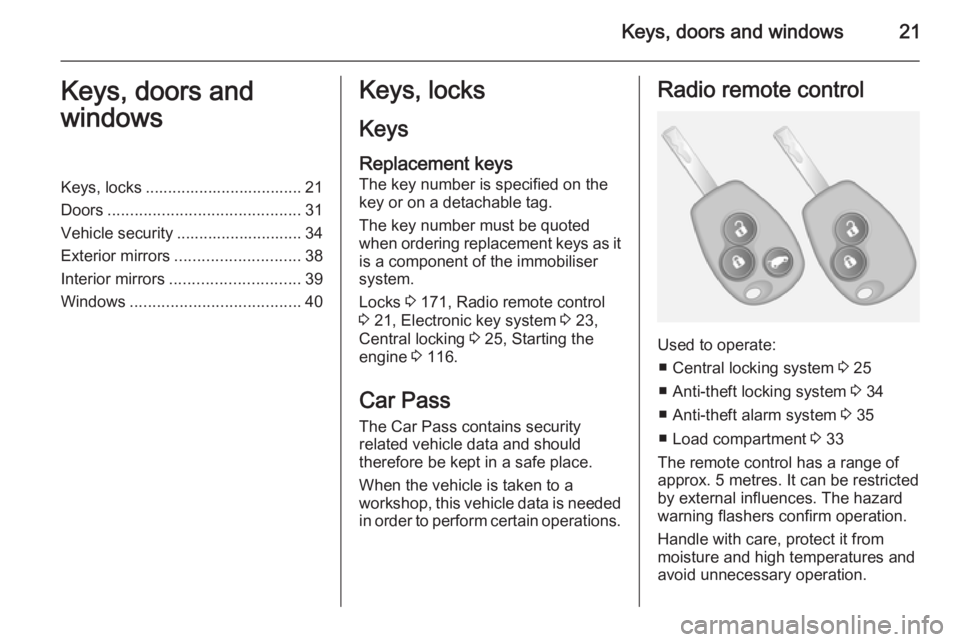
workshop, this vehicle data is needed in order to perform certain operations.Radio remote control
Used to operate:
■ Central locking system 3 25
■ Anti-theft locking system 3 34
■ Anti-theft alarm system 3 35
■ Load compartment 3 33
The remote control has a range of
approx. 5 metres. It can be restricted
by external influences. The hazard
warning flashers confirm operation.
Handle with care, protect it from
moisture and high temperatures and
avoid unnecessary operation.
Page 28 of 205
26Keys, doors and windows
Unlocking with 3-button remote
control
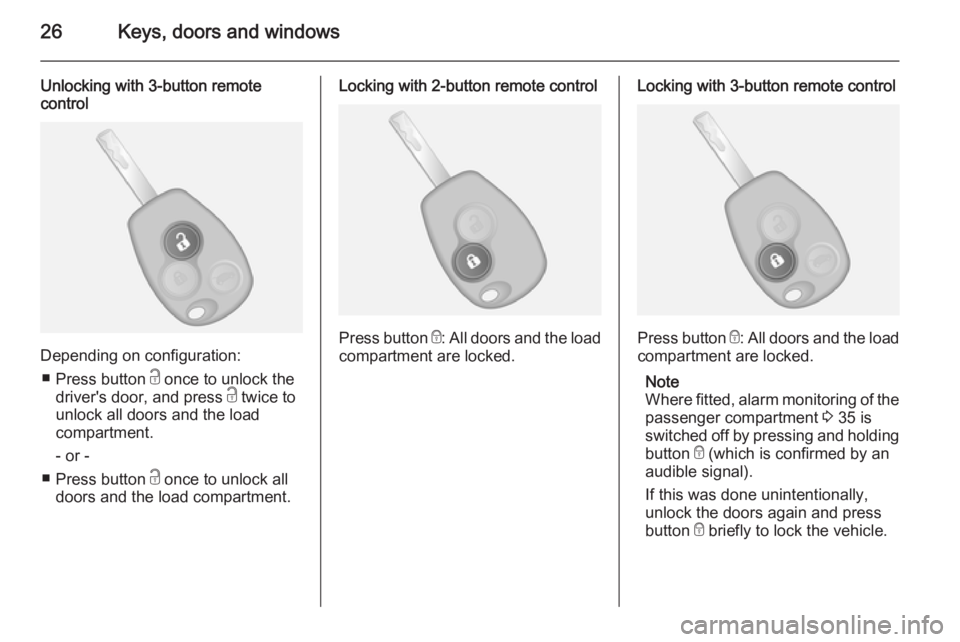
Depending on configuration:
■ Press button c once to unlock the
driver's door, and press c twice to
unlock all doors and the load
compartment.
- or -
■ Press button c once to unlock all
doors and the load compartment.
Locking with 2-button remote control
Press button e: All doors and the load
compartment are locked.
Locking with 3-button remote control
Press button e: All doors and the load
compartment are locked.
Note
Where fitted, alarm monitoring of the passenger compartment 3 35 is
switched off by pressing and holding
button e (which is confirmed by an
audible signal).
If this was done unintentionally,
unlock the doors again and press
button e briefly to lock the vehicle.
Page 37 of 205

Keys, doors and windows35
Deactivation
Unlock the doors by pressing button
c on the remote control or by turning
the manual key in driver's door lock
towards front of vehicle.
Electronic key system operation
Operation is confirmed by the hazard warning flashers.
Activation
For handsfree operation, the
electronic key must be outside the
vehicle, within a range of approx.
one metre of the front doors or load
compartment.Press the button twice on any exterior
door handle.
- or -
Press electronic key button e twice.
Deactivation
Unlock the doors by pressing the
button on any exterior door handle or
press electronic key button c.
Handsfree operation is automatically
disabled when the electronic key
buttons have been operated (or the
central locking switch e is pressed).
To re-enable handsfree operation,
restart the engine.
Central locking system 3 25.
Electronic key system 3 23.
Anti-theft alarm system
The anti-theft alarm system is
operated in conjunction with the
central locking system 3 25.
It monitors: ■ Doors, tailgate, bonnet
■ Passenger compartment
■ Load compartment
■ Ignition
■ Interruption of alarm siren power supply
Activation
All doors and the bonnet must be
closed.
Hazard warning lights flash to confirm activation. If the hazard warning lights do not flash upon activation, a door or
the bonnet is not fully closed.
Page 38 of 205

36Keys, doors and windows
2-button and 3-button remote control
Press button e to activate the anti-
theft alarm system.
Electronic key
For handsfree operation, the
electronic key must be outside the
vehicle, within a range of approx.
one metre of the front doors or load
compartment.
Press the button on any exterior door
handle.
- or -
Press electronic key button e to
activate the anti-theft alarm system.
Electronic key system 3 23.
Deactivation
Unlocking the vehicle (with button c
or the button on any exterior door
handle) or switching on the ignition
deactivates the anti-theft alarm
system. Hazard warning lights flash to
confirm deactivation.
The system is not deactivated when
unlocking the driver's door with the
key or with the central locking switch in the passenger compartment.
Note
If the alarm has been triggered,
unlocking the vehicle with the key
will not stop the alarm siren. To stop the siren, switch on the ignition. The
hazard warning lights will not flash
upon deactivation if the alarm has
been triggered.
Page 39 of 205
Keys, doors and windows37
Activation without monitoring of
passenger compartment
Disable monitoring of the passenger
compartment, e.g. when animals are
being left in the vehicle, or if the
auxiliary heater has been set for a
timed or remote controlled start
3 106.
Press and hold button e on the
remote control or electronic key; an
audible signal will sound as
confirmation.
The status will remain until the doors
are unlocked.
AlarmWhen triggered, the alarm sounds via
a separate battery-backed power
sounder, and the hazard warning
lights flash simultaneously. The
number and duration of alarm signals are stipulated by legislation.
If the vehicle battery is disconnected
or its power supply is interrupted, the
alarm siren will be triggered. First
deactivate the anti-theft alarm system
if the vehicle battery must be
disconnected.To silence the alarm siren (if
triggered) and therefore deactivate
the anti-theft alarm system, reconnect vehicle battery and unlock the vehicle
or switch on the ignition.
Immobiliser
The immobiliser is part of the ignition
switch and checks whether the
vehicle is allowed to be started with
the key being used.
The immobiliser is activated
automatically after the key has been
removed from the ignition switch and
also if the key is left in the ignition
switch when the engine is turned off.
If the engine cannot be started, switch off the ignition and remove key, wait
approx. 2 seconds and then repeat
the start attempt. If start attempt is
unsuccessful, attempt to start the
engine using the spare key and seek
the assistance of a workshop.Note
The immobiliser does not lock the doors. You should always lock the
vehicle after leaving it and switch on the anti-theft alarm system 3 25,
3 35.
Page 121 of 205
Driving and operating119
■ the self-cleaning function of thediesel particle filter is not active
3 120.
■ the vehicle has moved since the last Autostop.
Otherwise an Autostop will be
inhibited.
Restart of the engine by the
driver
Depress the clutch pedal to restart the
engine.
Control indicator Ï 3 89 extinguishes
in the instrument cluster when the
engine is restarted.
Restart of the engine by the
stop-start system
The selector lever must be in neutral to enable an automatic restart.
If one of the following conditions
occurs during an Autostop, the
engine will be restarted automatically
by the stop-start system:
■ The stop-start system is manually deactivated.
■ the bonnet is opened.■ the vehicle battery is discharged.
■ the engine temperature is too low.
■ the brake vacuum is not sufficient.
■ the vehicle starts to move.
■ the defrosting function is activated 3 103.
If an electrical accessory, e.g. a
portable CD player, is connected to
the power outlet, a brief power drop during engine restart may be
noticeable.
Fault If a fault occurs in the stop-start
system, the LED in button Î
illuminates, and a corresponding
message appears in the Driver
Information Centre 3 90. Seek the
assistance of a workshop.
Vehicle messages 3 91.
Warning chimes 3 91.Parking9 Warning
■ Do not park the vehicle on an
easily ignitable surface. The
high temperature of the exhaust system could ignite the surface.
■ Always apply parking brake without pressing release button.Apply as firmly as possible on a
downhill slope or uphill slope.
Depress foot brake at the same
time to reduce operating force.
■ Switch off the engine.
■ If the vehicle is on a level surface or uphill slope, engage
first gear. On an uphill slope,
turn the front wheels away from the kerb.
If the vehicle is on a downhill
slope, engage reverse gear.
Turn the front wheels towards
the kerb.
Lock the vehicle 3 25 and activate the
anti-theft locking system 3 34 and
anti-theft alarm system 3 35.
Page 133 of 205
Driving and operating131
ActivationWhen reverse gear is engaged, the
system switches itself on
automatically. Readiness for
operation is indicated by a brief
acoustic signal.
An obstacle is indicated by buzzers
and, depending on vehicle, is also
indicated in the Info-Display. The
interval between the buzzers
becomes shorter as the vehicle gets
closer to the obstacle. When the
distance is less than 30 cm, the buzzer is continuous.
Note
In versions with Info-Display
indication, the volume of the buzzer
can be adjusted via the Infotainment
system. Refer to Infotainment
system manual for further
information.9 Warning
Under certain circumstances,
various reflective surfaces on
objects or clothing as well as
external noise sources may cause the system to fail to detect
obstacles.
Deactivation
Deactivate the system by pressing
the r button on the instrument
panel with the ignition on. LED
illuminates in the button when
deactivated. When reverse gear is
selected, no acoustic signal will
sound.
Note
In versions with Info-Display
indication, the function can be
deactivated via the Infotainment
system. Refer to Infotainment
system manual for further
information.
The function is reactivated by
pressing button r again or the next
time the ignition is switched on.
Fault If the system detects an operating
fault, when selecting reverse gear a
continuous acoustic alarm will sound
for approx. 5 seconds, a
corresponding message appears in
the Driver Information Centre 3 90
and F illuminates in the instrument
cluster 3 86. Consult a workshop to
have the cause of the fault remedied.
Page 141 of 205
Vehicle care139
■ Open the bonnet, close all doorsand lock the vehicle.
■ Disconnect the clamp from the negative terminal of the vehicle
battery. Beware that all systems are
not functional, e.g. anti-theft alarm
system.
Putting back into operation
When the vehicle is to be put back into
operation:
■ Connect the clamp to the negative terminal of the vehicle battery.
Activate the electronics of the
power windows.
■ Check tyre pressure.
■ Fill up the washer fluid reservoir.
■ Check the engine oil level.
■ Check the coolant level.
■ Fit the number plate, if necessary.End-of-life vehicle
recovery
Information on end-of-life vehicle
recovery centres and the recycling of
end-of-life vehicles is available on our website. Only entrust this work to an
authorised recycling centre.Vehicle checks
Performing work9 Warning
Only perform engine compartment
checks when the ignition is off.
The cooling fan may start
operating even if the ignition is off.
9 Danger
The ignition system generates
extremely high voltages. Do not
touch.
The caps for topping up the engine oil, the coolant, the washer fluid and the
oil dipstick handle are yellow for ease
of identification.
Page 157 of 205
Vehicle care155
No.Circuit1Vehicle battery (with electronic
key system)2APC battery backup (with elec‐
tronic key system)3Heating and ventilation system4Adaptations5Adaptations6Heating and ventilation system7Additional heating and ventila‐
tion, air conditioning system8Supplementary heating and
ventilation system9Electric exterior mirrors, addi‐
tional adaptations10Heated exterior mirrors11Radio, multimedia, electric exte‐ rior mirrors, diagnostic socket12Multimedia, trailer hitchNo.Circuit13Courtesy lights, battery
discharge protection14Fuel injection system, tyre pres‐ sure monitoring system, elec‐
tronic key system15Hazard warning flashers, turn and lane-change signals16Central locking17Left-hand high beam, right-hand
low beam, tail lights, left-hand
daytime running light18Front fog lights, rear fog lights,
number plate lighting19Alarm, horn, lighting, wiper20Instrument cluster21Light switch22Rear window wiper, windscreen
washer pump, horn23APC general battery24Reversing lightsNo.Circuit25Brake switch26Fuel injection, starter27Airbag, steering column lock28Passenger power window29Power steering30Brake lights31APC battery backup (with elec‐
tronic key system)32Service display33Cigarette lighter, power outlet34Right-hand high beam, left-
hand low beam, sidelights,
right-hand daytime running light35Brake lights, ABS, immobiliser36Interior lighting, air conditioning37Starting with electronic key
system38Rear window wiper