phone OPEL VIVARO B 2017.5 Infotainment system
[x] Cancel search | Manufacturer: OPEL, Model Year: 2017.5, Model line: VIVARO B, Model: OPEL VIVARO B 2017.5Pages: 129, PDF Size: 1.95 MB
Page 72 of 129

72Bluetooth music●Disconnect all devices : Select to
disconnect all currently connected devices from the
Infotainment system without
deleting/unpairing them.
● Delete device(s) : Select to unpair
a device from the Infotainment
system.
The unpairing procedure is similar to
unpairing a mobile phone. Refer to
(NAVI 80 IntelliLink) "Bluetooth
connection" in the "Phone" section
3 111.
Operation via Infotainment system When paired and connected
wirelessly, audio playback may begin automatically.
The audio device can then be
operated via the Infotainment system
display options.
The range of accessible functions
that can be operated via the
Infotainment system depends on the
type of audio player.
The operation of the audio device
when connected wirelessly is similar
to the operations for playing saved
audio files via the USB socket. Referto (NAVI 80 IntelliLink) "Playing music via USB socket" in the "USB port"
section 3 64.
Page 76 of 129

76NavigationAfter the entry of the destination
address or point of interest (nearest
petrol station, hotel, etc.) the route is
calculated from the current location to the selected destination.
Route guidance is provided by voice
output and the display screen.9 Warning
Areas such as one-way streets
and pedestrian zones are not
marked on the navigation system map. In such areas, the system
may issue a warning that must be
accepted. Therefore, pay
particular attention to one-way
streets and other roads and
entrances that must not be driven
into.
Note
Depending on Infotainment system, radio reception may be interrupted
during voice guidance and before
each change of direction.
USB memory stick
(NAVI 50 IntelliLink)
A USB memory stick is required for
the Navigation system, to contain,
among other things, a digital map of
the towns and roads in your country.
Note
Use a USB memory stick, formatted to FAT32 format, with a minimum
4 GB and maximum 32 GB of
storage capacity.
After delivery of a new vehicle, there
is a maximum of 90 days in which to
update the digital map for free. After
this time has elapsed, a fee is
charged for map updates.
Note
To avoid possible technical issues,
only use a compatible USB memory
stick for operating and updating the
Navigation system. Do not insert USB memory stick in any other
device (e.g. digital camera, mobile
phone, etc.), or in another vehicle.Software installation
To update the digital maps and to
benefit from exclusive downloadable
services, an account must be created
on the opel.naviextras.com website
and the free software must be
installed.Creating an account
Create your internet account via the
opel.naviextras.com website. Select
e.g., the "Register" option on the web
page and enter the appropriate
details.Installing the software
Install the software on your computer
by downloading from
opel.naviextras.com.
Follow the on-screen instructions to
install the software and launch the
online application.Registering the Navigation system The Navigation system must be
registered with your new internet
account.
Insert an empty USB memory stick in the Navigation system's USB slot.
Touch 7 then select yNAVI / ýNav ,
followed by Options then Map update .
Page 78 of 129
78Navigationupdates. Consult a workshop to
purchase a new SD card with updated
digital map.
Note
To avoid possible technical issues,
only use a compatible SD card for
operating the Navigation system. Do not insert SD card in any other
device (e.g. digital camera, mobile phone, etc.), or in another vehicle.
Usage
USB memory stick
NAVI 50 IntelliLinkInserting the USB memory stick
Switch off the Navigation system and
insert the USB memory stick in the
USB slot on the Infotainment system
fascia. The USB memory stick is
fragile; treat it with care.Removing the USB memory stick
Switch off the Navigation system and
remove the USB memory stick from
the USB slot on the Infotainment
system fascia.SD card
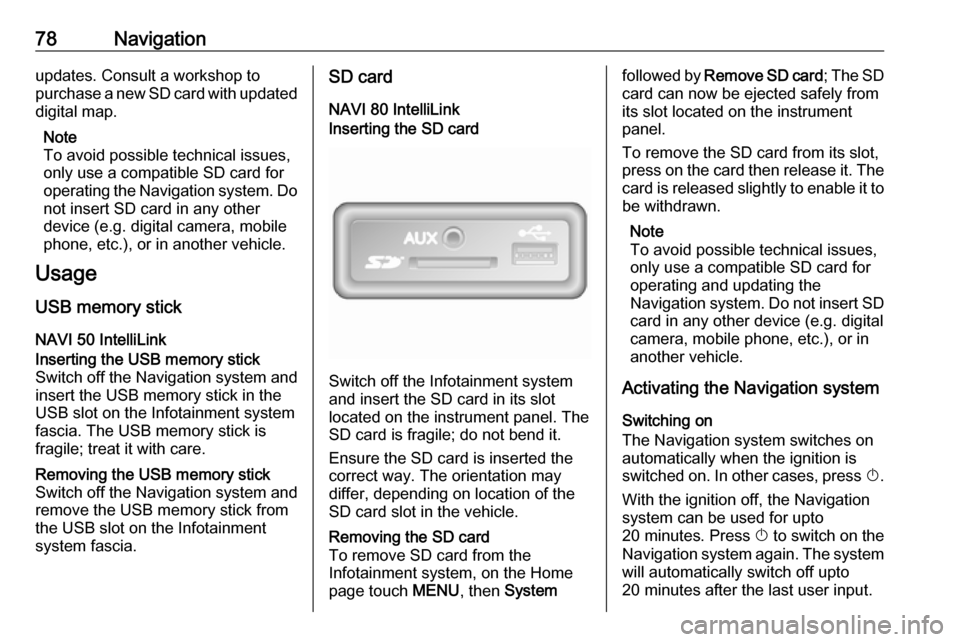
NAVI 80 IntelliLinkInserting the SD card
Switch off the Infotainment system
and insert the SD card in its slot
located on the instrument panel. The
SD card is fragile; do not bend it.
Ensure the SD card is inserted the
correct way. The orientation may
differ, depending on location of the
SD card slot in the vehicle.
Removing the SD card
To remove SD card from the
Infotainment system, on the Home
page touch MENU, then Systemfollowed by Remove SD card ; The SD
card can now be ejected safely from its slot located on the instrument
panel.
To remove the SD card from its slot,
press on the card then release it. The
card is released slightly to enable it to be withdrawn.
Note
To avoid possible technical issues,
only use a compatible SD card for
operating and updating the
Navigation system. Do not insert SD
card in any other device (e.g. digital
camera, mobile phone, etc.), or in
another vehicle.
Activating the Navigation system
Switching on
The Navigation system switches on
automatically when the ignition is
switched on. In other cases, press X.
With the ignition off, the Navigation
system can be used for upto
20 minutes. Press X to switch on the
Navigation system again. The system
will automatically switch off upto
20 minutes after the last user input.
Page 84 of 129
84Navigation●Change map colours
● Car symbol
● Advanced
6. NAVIGATION SERVICES
Refer to (NAVI 80 IntelliLink)
"LIVE services" below.
● Traffic
● Speed Cameras
● Local search /TomTom
places
● My TomTom live
● Weather
7. ITINERARIES
Refer to (NAVI 80 IntelliLink) "Edit Itinerary" in the "Guidance"
section 3 96.
8. r : Return to previous screenMap screen
To access the map screen without
navigation, on the Home page touch
MENU , then Navigation followed by
View Map .Touch anywhere on the map. The
cursor indicates the current selected
position. To scroll within the map,
drag the cursor in the required
direction.
To access the map screen with
navigation, on the Home page touch
MENU followed by Navigation and
enter a destination. Refer to
(NAVI 80 IntelliLink) "Destination
input" 3 90.
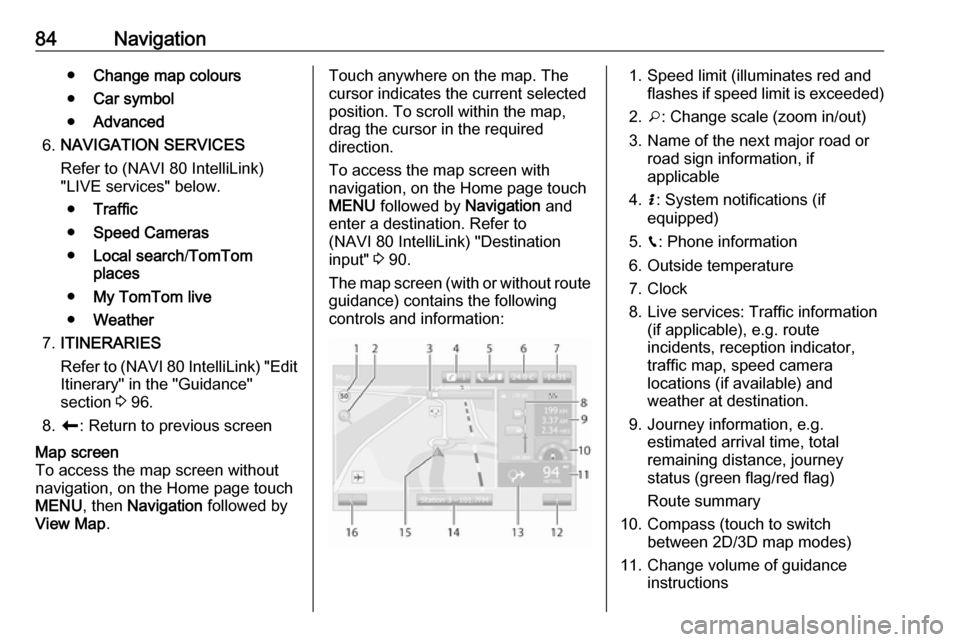
The map screen (with or without route
guidance) contains the following
controls and information:1. Speed limit (illuminates red and flashes if speed limit is exceeded)
2. o: Change scale (zoom in/out)
3. Name of the next major road or road sign information, if
applicable
4. H: System notifications (if
equipped)
5. g: Phone information
6. Outside temperature
7. Clock
8. Live services: Traffic information (if applicable), e.g. route
incidents, reception indicator,
traffic map, speed camera
locations (if available) and
weather at destination.
9. Journey information, e.g. estimated arrival time, total
remaining distance, journey
status (green flag/red flag)
Route summary
10. Compass (touch to switch between 2D/3D map modes)
11. Change volume of guidance instructions
Page 93 of 129

Navigation93Select from Favourites list
Select Favourites to access a list of
saved favourite destinations.
When the list of favourites is
displayed, they can be sorted or
displayed on the map. Touch
Options to display the following:
● Sort by name
● Sort by distance
● Show all on map
● Delete all
Alternatively, touch Find and use the
keyboard to search for a favourite by name.Select a destination by using the map
Select Find on Map to begin a search
for a destination by scrolling the map.
Touch anywhere on the map. The
cursor indicates the current selected
position. To scroll within the map,
drag the cursor in the required
direction.
Touch OK to select the position as a
destination.Enter the co-ordinates of the
destination
Select Coordinate to begin a search
for a destination by entering its co-
ordinates.
To change the format of the co-
ordinates, touch Options and select
from the following:
● Latitude/Longitude
Values can be entered in any of
the following formats:
● decimal degrees
● degrees and decimal minutes
● degrees, minutes and decimal seconds
● UTM (Universal Transverse
Mercator)
Confirm the destination
When a destination has been
selected, the route appears on the
map. Touch OK and set as a New
route .
If route guidance is active, the
destination can be set as a
Waypoint along the route.Add and save a favourite
When a destination has been
selected, touch Options to display the
following:
● Add to Favourites : Save the
destination in the favourites list.
● Current traffic : Provides
information on traffic incidents
(depending on version).
Refer to (NAVI 50 IntelliLink)
"Traffic information" in the
"Guidance" section 3 96.
● Info /News : Displays information
(e.g. address) for the selected
POI.
Shows the location (address) of
the position selected, provides
the GPS coordinates (latitude/
longitude) and also, if applicable,
displays the phone number of a
selected POI.
● Back to car : Return to current
vehicle location.
Before saving a favourite, the name
of the favourite can be changed by
using the keyboard.
Page 102 of 129

102NavigationThis menu option contains the
following information:
● speed limits
● phone country code (International dialling code, e.g.
+49)
● emergency number (e.g. 112)
● legal restrictions, e.g.: ● vehicle equipment requirements, e.g. warning
triangle, first aid kit, fire
extinguisher, spare bulbs,
high-visibility jacket etc.
● headlights legislation
● maximum blood alcohol level
● snow chains legislation
● winter tyres legislationHelp Nearby
This function allows you to search for
assistance near your current location.
When the Where am I? screen is
displayed, touch Help Nearby.This menu option contains the
following information:
● Car repair around here (Vehicle
repair services)
● Health around here (Medical and
emergency services)
● Police around here (Police
stations)
● Petrol station around here (Fuel
stations)
Select the appropriate option to
access a list of local Points of Interest (POI).
For information on Points of Interest
(POI), refer to (NAVI 50 IntelliLink)
"Destination input" 3 90.
Traffic information NAVI 50 IntelliLink - Traffic
information
Available depending on version, up-
to-date traffic information from local
sources can be received. Information is provided for the current route or for
the current vehicle location.During route guidance, touch
Options then select Current traffic , or
touch the traffic icon Ö on the map
screen. Traffic incidents along the route and estimated delay times are
displayed.
The following options are available: ● Event list : Select to change event
display settings.
● Offer detour : Create an
alternative route to the selected
destination.
● Options : Access traffic options.
To access these traffic options at any
time, touch 7 followed by yNAVI /
ý Nav then Options . Then select
Ö Traffic .
Touch q to return to route guidance.
NAVI 80 IntelliLink - Traffic
information
Allows up-to-date traffic information
from local sources to be received.
From the Home page, touch MENU
then Navigation , followed by
Navigation Services . Then select
Traffic /HD Traffic .
Page 104 of 129

104Voice recognitionVoice recognitionGeneral information...................104
Navigation control ......................105
Phone control ............................ 106General information
The voice recognition function allows
you to operate certain functions via
voice input.
To ensure that conversations held
inside the vehicle do not start
unintentional calls to a saved contact, the voice recognition function must
first be activated via 5 on the steering
wheel/column controls.
Control elements overview 3 6.
NAVI 50 IntelliLink
Available depending on version, the
voice recognition function of the
handsfree phone system allows you
to operate certain functions of a
compatible smartphone via voice
input.
Refer to "Phone control" in this
section 3 106.
To confirm that a paired and
connected smartphone is compatible with the voice recognition function,
touch 7 followed by ÿSetting(s) .Then select Bluetooth followed by
View Bluetooth device list . The list
shows the paired devices and 5
appears alongside the name of the
smartphone to indicate compatibility.
Note
If supported, the language set on
your smartphone will automatically
be used by the Infotainment system for voice recognition.
The navigation system can also be
operated using voice controls. Refer
to "Navigation control" in this section
3 105.
Prerequisites
The following prerequisites must be
met:
● The Bluetooth function of the Infotainment system must be
activated.
Refer to "Bluetooth connection"
in the "Phone" section 3 111.
● The Bluetooth function of the Bluetooth-enabled smartphone
must be activated and the
smartphone must have a 3G, 4G
Page 105 of 129

Voice recognition105or wi-fi connection (see
smartphone operating
instructions).
● Dependent upon the smartphone, it may be required
to set the device to "visible" (see
smartphone operating
instructions).
● The smartphone must be paired and connected to the
Infotainment system.
Help
For information and help with
activating and operating voice
controls, touch 7 followed by
ÿ Setting(s) then Bluetooth .
Select Smartphone from the list (use
S /R to search list), then select l to
access help.
A series of screens are displayed,
explaining how to use the voice
recognition function and information
on the following:
● switching on/off with steering wheel/column controls
● compatible phones
● operation methods● available functions and descriptions
● conditions of use
NAVI 80 IntelliLink
The voice recognition function allows
you to operate certain functions via
voice input, including:
● Navigation
Refer to "Navigation control" in this section 3 105.
● Phone
Refer to "Phone control" in this section 3 106.
Press 5 on the steering wheel/column
controls to open the Voice control
main menu. After the tone, say the
name of the menu you wish to access.
When activated, the Voice control
main menu is displayed and the voice
recognition indicator in the top right
corner indicates system status and
optimisation levels:Green:optimal voice recognitionOrange:good voice recognitionRed:average voice recognitionMicrophone é:System is ready to
receive a voice
commandLoudspeaker
l:Voice instructions
are currently being
given by the systemLoading icon:Data currently
loading
Navigation control
NAVI 50 IntelliLink
Activating voice recognition
To activate the voice recognition
function during navigation:
Press 5 on the steering wheel/column
controls; 5 appears, alongside the
audio system information, in the
bottom right corner of the display.
Note
During use of the voice recognition
function, audio source playback is
interrupted.
For a guide to using voice commands, refer to (NAVI 50 IntelliLink) "Help" in
the "General information" section 3 104.
Page 106 of 129

106Voice recognitionNAVI 80 IntelliLink
Activating voice recognition
To activate the voice recognition
function:
Press 5 on the steering wheel/column
controls to open the Voice control
main menu.
After the tone, say " Destination" to
enter a new address. Say " Address"
then say the full destination of a new
address (number, street name,
destination town/city).
The address recognised by the
system is displayed. Confirm
destination when prompted to begin
guidance.
Alternatively, after the tone say
" Recent destinations " to access a list
of the most recent destinations
entered and select the desired
destination.
Note
A compatible SD card must be
inserted for the Voice recognition to operate the Navigation system.For further information, refer to
(NAVI 80 IntelliLink) "Destination
input" in the "Navigation" section 3 90.
Phone control
NAVI 50 IntelliLink Activating voice recognition
To activate the voice recognition
function:
Press 5 on the steering wheel/column
controls to open the Smartphone
menu; a beep sounds and 5 appears
on the display, indicating activation.
To use voice recognition, touch 5 on
the display (or press 5).
Note
During operation of the voice
recognition function, Radio and
Media functions are not available for
use.
To deactivate, touch and hold 5 on
the display (or press 5).For a guide to using voice commands,
refer to (NAVI 50 IntelliLink) "Help" in
the "General information" section 3 104.
NAVI 80 IntelliLink
Activating voice recognition
To activate the voice recognition
function:
Press 5 on the steering wheel/column
controls to open the Voice control
main menu.
After the tone, say " Phone" to access
the Phone menu. Say the name of a
saved contact or a telephone number. The desired contact appears in the
display when registered by the
system.
Say " Call" to start the dialling process.
Say " Delete " to cancel input and retry.
Alternatively, to initiate a call directly
from the Voice control main menu,
touch 5 and say the name of a saved
contact or a telephone number.
Page 107 of 129

Phone107PhoneGeneral information...................107
Connection ................................. 109 Bluetooth connection .................111
Emergency call .......................... 114
Operation ................................... 115
Mobile phones and CB radio
equipment .................................. 122General information
The handsfree phone system
provides you with the possibility of
having mobile phone conversations
via the vehicle's microphone and
loudspeakers, as well as operating
the most important mobile phone
functions via the Infotainment system.
To be able to use the handsfree
phone system, the mobile phone
must be connected with it via
Bluetooth .
Not all handsfree phone system
functions are supported by every
mobile phone. The possible phone functions depend on the relevant
mobile phone and network provider.
Refer to the operating instructions for
your mobile phone or consult your
network provider.Important information for
operation and traffic safety9 Warning
Use of the handsfree phone
system while driving can be
dangerous as your concentration
is reduced when telephoning. Park the vehicle before using the
handsfree phone system.
Follow the regulations of the
country in which you are driving.
Also follow the special regulations
that apply in specific areas and
always switch off the mobile
phone if the use of mobile phones is prohibited, if interference is
caused by the mobile phone or if
dangerous situations can occur.
9 Warning
Mobile phones have effects on
your environment. For this reason,
safety regulations have been