driver OPEL VIVARO B 2017.5 Manual user
[x] Cancel search | Manufacturer: OPEL, Model Year: 2017.5, Model line: VIVARO B, Model: OPEL VIVARO B 2017.5Pages: 233, PDF Size: 5.43 MB
Page 101 of 233

Instruments and controls99If R illuminates together with control
indicator C and a warning chime,
there is a fault in the braking system.
A corresponding message also
appears in the Driver Information
Centre 3 102 . Seek the assistance of
a workshop immediately.
Brake system 3 146.
Antilock brake system (ABS)
u illuminates yellow.
Illuminates briefly after the ignition is
switched on. The system is ready for
operation when u extinguishes.
If control indicator u does not go out
after a few seconds, or if it illuminates while driving, there is a fault in the
ABS. Control indicator F may also
illuminate in the instrument cluster
together a corresponding message in the Driver Information Centre 3 102.
The brake system remains
operational but without ABS
regulation.
If control indicators u, F , R and C
illuminate, there is a fault in the
braking system. A correspondingmessage appears in the Driver
Information Centre. Seek the
assistance of a workshop
immediately.
Antilock brake system (ABS) 3 146.
Upshift k or j illuminates.
It is recommended to shift gear when
illuminated to improve fuel economy.
Electronic Stability Program
R flashes or illuminates yellow.
Illuminates briefly when the ignition is
switched on.
Flashing during driving
The system is actively engaged.
Engine output may be reduced and
the vehicle may be braked
automatically to a small degree.
Illuminates while driving The system is not available. A
corresponding message also
appears in the Driver Information
Centre 3 102.ESP® Plus
3 149, Traction Control
system 3 148.
Electronic Stability Program off
Ø illuminates green.
If ESP ®Plus
has been deactivated with
Ø on the instrument panel, control
indicator Ø illuminates and a
corresponding message appears in
the Driver Information Centre 3 102.
ESP® Plus
3 149, Traction Control
system 3 148.
Engine coolant temperature
W illuminates blue or red.
Illuminates red briefly when the
ignition is switched on, then turns
blue.
Illuminates red when the engine is
running
Stop, switch off engine.
Page 102 of 233

100Instruments and controlsCaution
Coolant temperature too high.
Check coolant level 3 167.
If there is sufficient coolant, consult a workshop.
The control indicator must be blue
before continuing driving.
Preheating
! illuminates yellow.
Preheating is activated. Only
activates when outside temperature
is low.
AdBlue Y illuminates yellow.
AdBlue level is low. Refill AdBlue as
soon as possible, to avoid prevention
of engine starts.
Illuminates together with control
indicator F to indicate a system
failure or as a warning that engine
starting may not be possible after a
certain distance. Seek the assistance
of a workshop immediately.
A corresponding message appears in the Driver Information Centre 3 102.
AdBlue percentage remaining can
also be checked by pressing button
repeatedly on end of wiper lever. Trip
computer 3 105.
AdBlue 3 139.
Tyre pressure monitoring
system
w illuminates or flashes yellow.
Illuminates briefly when the ignition is
switched on.
Illuminates
Tyre pressure loss. Stop immediately
and check tyre pressure.
Control indicator w illuminates
together with C 3 98 and a
corresponding message appears in
the Driver Information Centre when a puncture or severely under-inflated
tyre is detected.Flashes
Fault in system. After a delay the
control indicator illuminates
continuously. Consult a workshop.
Control indicator w illuminates
together with A 3 98 and a
corresponding message appears in
the Driver Information Centre when a
tyre without a pressure sensor is
mounted (e.g. spare wheel).
Tyre pressure monitoring system
3 186.
Engine oil pressure
I illuminates red.
Illuminates briefly when the ignition is
switched on.
Illuminates when the engine is
running
If control indicator I illuminates
when the engine is running (together
with control indicator C and a
warning chime): Stop, switch off
engine.
Page 104 of 233

102Instruments and controlsCruise controlm , U illuminates green or yellow.
m illuminates green when a certain
speed is stored.
U illuminates green when the system
is on.
Speed limiter U illuminates yellow.
U illuminates yellow when the
system is on.
Cruise control and speed limiter
3 150.
Tachograph & illuminates when there is a fault
3 107.
Door open y illuminates red.
Illuminates when a door is not fully
closed.
A corresponding message also
appears in the Driver Information
Centre 3 102.Information displays
Driver Information Centre
Depending on vehicle configuration,
the following items appear in the
display:
● outside temperature 3 87
● clock 3 88
● odometer 3 91
● trip odometer 3 91
● service display 3 93
● vehicle messages 3 103
● trip computer 3 105
Info display
The central display in the
Infotainment system displays the time (and/or outside temperature,
depending on version) and
Infotainment system information.
Press X to switch the Infotainment
system on. Alternatively, it automatically switches on when the
ignition is switched on.
Depending on system, the
Infotainment system is operated via
buttons and rotary knobs on the
Infotainment system fascia, the
Page 105 of 233

Instruments and controls103steering column controls, the voice
recognition system (if available) or via
the touchscreen display.
Touchscreen operation Make the appropriate selection from
the available menus and options by
touching the display screen with the
finger.
For further information, refer to the
Infotainment manual.Vehicle messages
Messages are displayed in the Driver
Information Centre and may be
accompanied by illumination of
control indicator F or C in the
instrument cluster.
Information messages
Information messages regarding, e.g. engine starting conditions, stop-start
system, parking brake application,
central locking, steering wheel lock
etc. provide the current status of
certain vehicle functions and
instructions for use.
Fault messages
Fault messages regarding, e.g. fuel
filter, airbags, exhaust emissions etc.
are displayed together with control
indicator F. Drive with caution and
seek the assistance of a workshop as soon as possible.
To remove fault messages, e.g.
" CHECK INJECTION ", from the
display, press button on end of wiper lever. After a few seconds themessage may disappear
automatically and F remains
illuminated. The fault will then be
stored in the on board system.
Warning messages
Warning messages regarding, e.g.
engine, battery or brake system
failure, are displayed together with
control indicator C and may be
accompanied by a warning chime.
Stop engine immediately and seek
the assistance of a workshop.
Warning messages, e.g. " BATTERY
CHARGING FAULT " disappear from
the display automatically when the
cause of the fault has been remedied.
Fuel economy messages
Fuel economy messages provide tips to improve fuel efficiency. Journeys
can be saved in the system memory,
enabling you to compare
performances.
Refer to Infotainment manual for
further information.
Fuel economy rating 3 105.
Page 106 of 233

104Instruments and controlsWarning chimesOnly one warning chime will sound at a time.
A corresponding message may also
appear in the Driver Information
Centre when a warning chime is
sounded.
When starting the engine or whilst driving:
● If seat belt is not fastened 3 55.
● If the parking assist detects an object 3 154.
● If the vehicle speed briefly exceeds a set limit 3 150,
3 153.
● If a door or the bonnet is not properly closed when vehicle
exceeds a certain speed.
● During activation and deactivation of alarm monitoring
of vehicle inclination 3 38.
● If there is a fault in the brake system 3 98.
● If the vehicle battery is not charging 3 98.● If engine lubrication is interrupted
3 100.
● If AdBlue needs to be refilled or a
fault is present 3 139.
● If the electronic key is outside of the detection range.
Electronic key system 3 24,
Power button 3 131.
When the vehicle is parked and/or
the driver's door is opened:
● If the key has been left in the ignition.
● If the electronic key has been left
in the card reader.
Electronic key system 3 24,
Power button 3 131.
● If the vehicle is in an Autostop. Stop-start system 3 135.
● If the exterior lights are on 3 108.Engine oil level
If the minimum engine oil level is
reached, a message is displayed in
the Driver Information Centre 3 102
for 30 seconds after the engine is
started.
Check oil level 3 165.
Page 111 of 233

Lighting109off and when the driver's door is
opened as a reminder that the lights
are still on.
Tail lights
Tail lights are illuminated together
with low beam and sidelights.
Automatic light controlAUTO:automatic light control
When the automatic light control
function is activated and the engine is
running, the system switches
between daytime running lights and headlights depending on the external lighting conditions.
For reasons of safety, it is advisable
to have the automatic light control
function activated.
Automatic headlight activation During poor lighting conditions the
headlights are switched on.
Daytime running lights 3 110.
High beam
To switch from low to high beam,
push lever.
To switch back to low beam, push
lever again or pull.
Headlight flash
To activate the headlight flash, pull
lever.
Headlight range adjustment Manual headlight range
adjustment
Adapt headlight range to the vehicle
load to prevent dazzling of oncoming
traffic.
Page 112 of 233
110LightingTurn thumb wheel ? to required
position:0:No load4:Loaded up to permissible
maximum weight
Headlights when driving
abroad
The asymmetrical headlight beam
extends visibility at the edge of the
road at the passenger side.
However, when driving in countries
where traffic drives on the opposite
side of the road, adjust the headlights to prevent dazzling of oncoming
traffic.
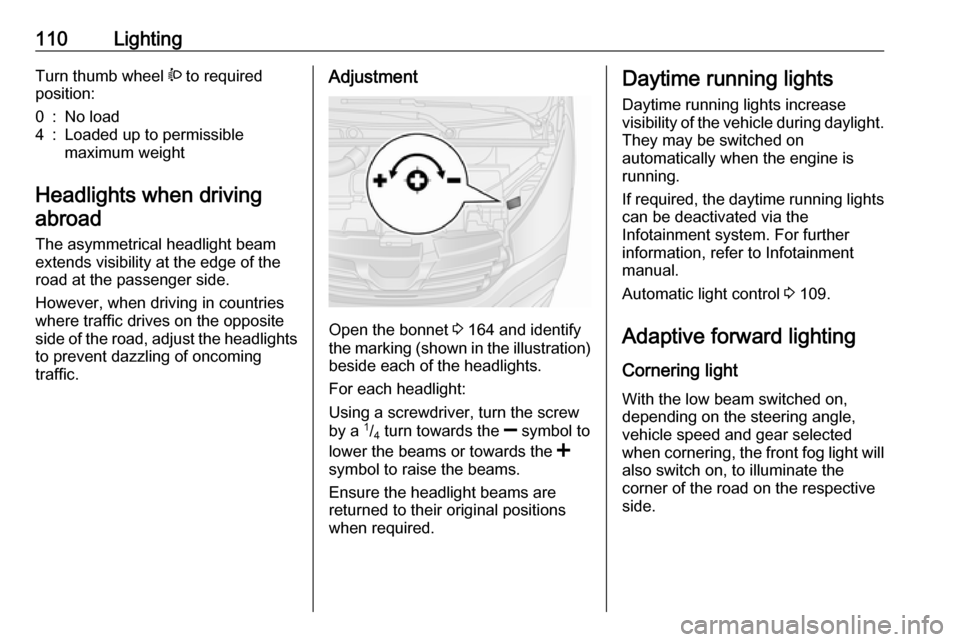
Adjustment
Open the bonnet 3 164 and identify
the marking (shown in the illustration)
beside each of the headlights.
For each headlight:
Using a screwdriver, turn the screw
by a 1
/4 turn towards the
] symbol to
lower the beams or towards the <
symbol to raise the beams.
Ensure the headlight beams are
returned to their original positions
when required.
Daytime running lights
Daytime running lights increase
visibility of the vehicle during daylight.
They may be switched on
automatically when the engine is
running.
If required, the daytime running lights can be deactivated via the
Infotainment system. For further
information, refer to Infotainment
manual.
Automatic light control 3 109.
Adaptive forward lighting Cornering light
With the low beam switched on,
depending on the steering angle,
vehicle speed and gear selected
when cornering, the front fog light will also switch on, to illuminate the
corner of the road on the respective
side.
Page 116 of 233

114LightingOperate rocker switch:press 7:offpress l:on
Glove box lighting
The glovebox light comes on when
the glovebox is opened.
Lighting features
Entry lighting
Welcome lighting Vehicle lights are switched on for a
short time to facilitate locating the
vehicle when it is dark.
Remote control operation
Lights switch on when unlocking the
vehicle with the remote control.
Electronic key system operation
Press t. Press again to switch off.
Exit lighting
If equipped, headlights come on for
approx. 30 seconds after the vehicle
is parked and the system is activated.
Activating 1. Switch off lights (position 7).
2. Switch off ignition.
3. Remove ignition key.
4. Open driver's door.
5. Pull turn signal lever towards steering wheel.
A corresponding message may
appear in the Driver Information
Centre 3 102.
Page 131 of 233

Driving and operating129Driving and
operatingDriving hints ............................... 129
Driving economically ...............129
Control of the vehicle ...............130
Steering ................................... 130
Starting and operating ...............131
New vehicle running-in ............131
Ignition switch positions ...........131
Power button ........................... 131
Starting the engine ..................133
Idle speed control ....................134
Vehicle shutdown ....................134
Overrun cut-off ........................ 135
Stop-start system ....................135
Parking .................................... 138
Engine exhaust .......................... 138
Diesel particle filter ..................138
Catalytic converter ...................139
AdBlue ..................................... 139
Manual transmission ..................145
Brakes ........................................ 146
Antilock brake system .............146
Parking brake .......................... 147Brake assist............................. 147
Hill start assist ......................... 147
Ride control systems .................148
Traction Control system ..........148
Electronic stability program .....149
Driver assistance systems .........150
Cruise control .......................... 150
Speed limiter ........................... 153
Parking assist .......................... 154
Rear view camera ...................156
Fuel ............................................ 158
Fuel for diesel engines ............158
Refuelling ................................ 158
Fuel consumption - CO 2-
Emissions ............................... 160
Trailer hitch ................................ 160
General information .................160
Driving characteristics and towing tips .............................. 160
Trailer towing ........................... 161
Trailer stability assist ...............161Driving hints
Driving economically
ECO mode ECO mode is a function that
optimises fuel consumption. It affects
engine power and torque,
acceleration, gear shift indication,
heating, air conditioning and electrical consumers.
Activation
Press ECO. Control indicator ECO
illuminates in the instrument cluster when activated.
Page 132 of 233

130Driving and operatingNote
The use of ECO mode may affect the performance of the climate control
system 3 116.
During driving, it is possible to
temporarily disable ECO mode, e.g.
to increase engine performance, by
depressing the accelerator pedal
firmly.
ECO mode is reactivated when
pressure is reduced on the
accelerator pedal.
Deactivation
Press ECO again. Control indicator
ECO extinguishes in the instrument
cluster.
Control of the vehicle
Never coast with engine not
running (except during Autostop)
Many systems will not function in this
situation (e.g. brake servo unit, power steering). Driving in this manner is a
danger to yourself and others. All
systems function during an Autostop,
but there may be a controlled
reduction in power steering assist and
vehicle speed is reduced.
Stop-start system 3 135.
Pedals
To ensure the pedal travel is
uninhibited, there must be no mats in the area of the pedals.
Use only floor mats which fit properly and are fixed by the retainers on the
driver's side.
Driving downhill
Engage a gear when driving downhill
to ensure that sufficient brake
pressure is available.Steering
If power steering assist is lost
because the engine stops or due to a
system malfunction, the vehicle can
be steered but may require increased
effort.Caution
Vehicles equipped with hydraulic
power steering:
If the steering wheel is turned until it reaches the end of its travel, and
is held in that position for more
than 15 seconds, damage may
occur to the power steering
system and there may be loss of
power steering assist.