fuel OPEL VIVARO B 2018.5 Manual user
[x] Cancel search | Manufacturer: OPEL, Model Year: 2018.5, Model line: VIVARO B, Model: OPEL VIVARO B 2018.5Pages: 241, PDF Size: 5.58 MB
Page 107 of 241

Instruments and controls105automatically and j remains
illuminated. The fault will then be
stored in the on board system.
Warning messages
Warning messages regarding, e.g.
engine, battery or brake system
failure, are displayed together with
control indicator C and may be
accompanied by a warning chime.
Stop engine immediately and seek
the assistance of a workshop.
Warning messages, e.g. " BATTERY
CHARGING FAULT " disappear from
the display automatically when the cause of the fault has been remedied.
Fuel economy messages
Fuel economy messages provide tips to improve fuel efficiency. Journeys
can be saved in the system memory,
enabling you to compare
performances.
Refer to Infotainment manual for
further information.
Fuel economy rating 3 106.Warning chimes
If several warnings appear at thesame time, only one warning chime
will sound.
When starting the engine or whilst driving:
The warning chime regarding
unfastened seat belts has priority
over any other warning chime.
● If seat belt is not fastened 3 55.
● If the parking assist detects an object 3 156.
● If the vehicle speed briefly exceeds a set limit 3 153,
3 155.
● If a door or the bonnet is not properly closed when vehicle
exceeds a certain speed.
● During activation and deactivation of alarm monitoring
of vehicle inclination 3 38.
● If there is a fault in the brake system 3 99.
● If the vehicle battery is not charging 3 99.● If engine lubrication is interrupted
3 101.
● If AdBlue needs to be refilled or a
fault is present 3 142.
● If the electronic key is outside of the detection range.
Electronic key system 3 23.
Power button 3 133.
When the vehicle is parked and / or the driver's door is opened:
● If the key has been left in the ignition.
● If the electronic key has been left
in the card reader.
Electronic key system 3 23.
Power button 3 133.
● If the vehicle is in an Autostop. Stop-start system 3 137.
● If the exterior lights are on 3 110.
Page 108 of 241
106Instruments and controlsEngine oil levelIf the minimum engine oil level is
reached, a message is displayed in
the Driver Information Centre 3 103
for 30 seconds after the engine is
started.
Check oil level 3 168.Trip computer
The trip computer provides
information on driving data, which is
continually recorded and evaluated
electronically.
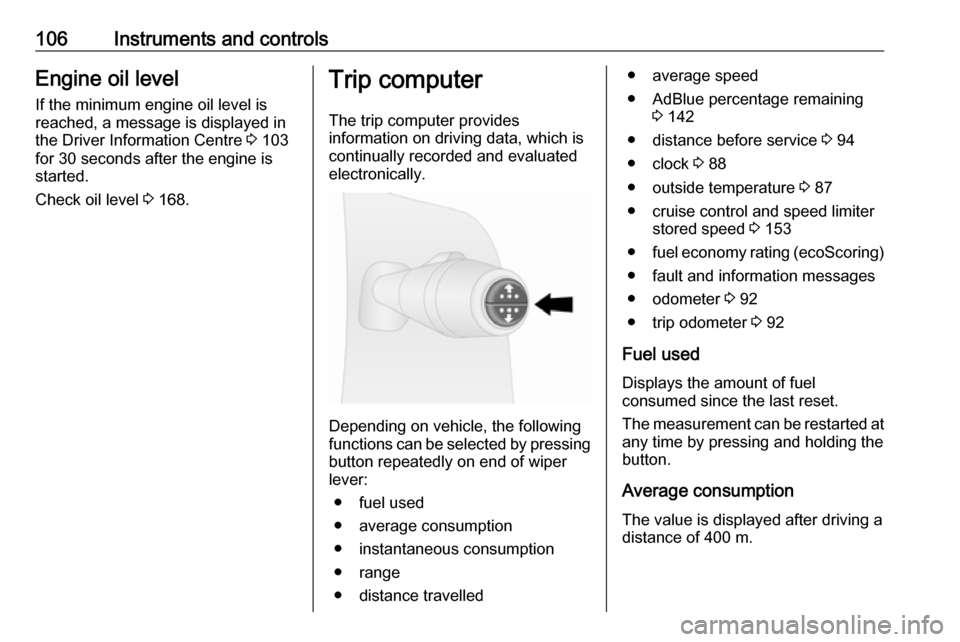
Depending on vehicle, the following
functions can be selected by pressing button repeatedly on end of wiper
lever:
● fuel used
● average consumption
● instantaneous consumption
● range
● distance travelled
● average speed
● AdBlue percentage remaining 3 142
● distance before service 3 94
● clock 3 88
● outside temperature 3 87
● cruise control and speed limiter stored speed 3 153
● fuel economy rating (ecoScoring)
● fault and information messages
● odometer 3 92
● trip odometer 3 92
Fuel used Displays the amount of fuel
consumed since the last reset.
The measurement can be restarted at
any time by pressing and holding the
button.
Average consumption The value is displayed after driving a
distance of 400 m.
Page 109 of 241

Instruments and controls107Average consumption is displayed,
taking into consideration the distance
travelled and the fuel used since the
last reset.
The measurement can be restarted at
any time.
Instantaneous consumption The value is displayed after reachinga speed of 30 km/h.
Range The value is displayed after driving adistance of 400 m.
The range is calculated from the
current contents of the fuel tank and
the average consumption since the
last reset.
The range will not be displayed if
control indicator Y is illuminated in the
Driver Information Centre 3 102.
Distance travelled
Displays the distance driven since the
last reset.
The measurement can be restarted at
any time.Average speed
The value is displayed after driving adistance of 400 m.
The average speed since the last
reset is displayed.
The measurement can be restarted at
any time.
Interruptions in the journey with the
ignition off are not included in the
calculations.
Reset trip computer information To reset the trip computer, select one
of its functions then press and hold
the button on the end of the wiper
lever.
The following trip computer
information can be reset:
● fuel used
● average consumption
● distance travelled
● average speed
The trip computer will reset
automatically when the maximum
value of any of the parameters is
exceeded.Fuel economy rating (ecoScoring)
If equipped, a rating of 0 to 100 is
shown in the Driver Information
Centre to help evaluate fuel
efficiency, based on your driving
style.
Higher ratings indicate better fuel
economy.
Tips to improve fuel economy are also
given in the Driver Information
Centre. Journeys can be saved in the system memory, enabling you to
compare performances. Refer to Infotainment manual for further
information.
Vehicle messages 3 104.
Journey record
When the engine is switched off, a
record of the last journey may be
shown in the Driver Information
Centre.
The following information is
displayed:
● average fuel consumption
● total fuel consumption
Page 110 of 241

108Instruments and controls● trip odometer
● fuel saved in km
Unit of measurement To change the unit of measurement
for the duration of a journey:
Vehicles with power button:
With ignition off, simultaneously press and hold button on end of wiper lever
and press the power button 3 133.
The Driver Information Centre flashes
for approx. 10 seconds until the new
unit is displayed. Release button on end of wiper lever when the display
stops flashing.
Vehicles without power button:
With ignition off, simultaneously press and hold button on end of wiper lever
and switch on the ignition. The Driver Information Centre flashes for
approx. 10 seconds until the new unit
is displayed. Release button on end
of wiper lever when the display stops
flashing.
When the engine is switched off, the
trip computer automatically returns to
the original unit of measurement.Interruption of power supply
If the power supply has been
interrupted or if the vehicle battery
voltage has dropped too low, the
values stored in the trip computer will be lost.Tachograph
The tachograph is operated as
described in the operating
instructions supplied. Observe
regulations regarding use.
Depending on equipment, the
tachograph may be fitted in a console located above the Infotainment
system in the instrument panel.
Page 121 of 241

Climate control119● Open side air vents as requiredand direct them towards door
windows.
● For simultaneous warming of the
foot well, set air distribution
control to J.
Heated rear window 3 45.
Air conditioning system
In addition to the heating and
ventilation system, the air
conditioning system has controls for:A/C:cooling4:air recirculation
Heated seats 3 50.
Cooling (A/C)
Press A/C to switch on cooling.
Activation is indicated by illumination
of the LED in the button. Cooling is
only functional when the engine is
running and climate control fan is switched on.
Press A/C again to switch off cooling.
The air conditioning system cools and
dehumidifies (dries) the air when
outside temperature is above a
specific level. Therefore
condensation may form and drip from under the vehicle.
If no cooling or drying is required,
switch off the cooling system for fuel
saving reasons. Activated cooling
may inhibit an Autostop.
Stop-start system 3 137.
Note
Air conditioning performance is
reduced when ECO mode has been
activated 3 131.
Air recirculation system 4
Press 4
to activate air recirculation
mode. Activation is indicated by
illumination of the LED in the button.
Press 4 again to deactivate air
recirculation mode.
Page 124 of 241

122Climate controlCooling A/C
The air conditioning system cools and
dehumidifies (dries) the air when
outside temperature is above a
specific level. Therefore
condensation may form and drip from under the vehicle.
Note
Air conditioning performance is
reduced when ECO mode has been
activated 3 131.
If no cooling or drying is required
press A/C OFF to switch the cooling
system off, thus saving fuel. LED
illuminates in the button.
To return to Automatic mode: Press
AUTO button.
Air recirculation mode u
Activate or deactivate manual air recirculation mode with u. LED
illuminates in the button when
activated.9 Warning
The exchange of fresh air is
reduced in air recirculation mode.
In operation without cooling the air humidity increases, so the
windows may mist up from inside.
The quality of the passenger
compartment air deteriorates,
which may cause the vehicle
occupants to feel drowsy.
To return to Automatic mode: Press
AUTO button.
Rear heating system
The rear passenger compartment
heating fan assists air flow to the rear
passenger compartment via the rear
air vents.
The rate of air flow is determined by
the fan. Air temperature is controlled
using the temperature control on the
instrument panel.
Page 126 of 241
124Climate controlSet the fan < to regulate the amount
of cooled air to be flown into the rear
passenger compartment.
Auxiliary heater Coolant heater
The engine-independent, fuel-
powered coolant heater provides
rapid heating of the engine coolant to
enable heating of the vehicle interior
without the engine running.9 Warning
Do not operate the system when
refuelling, when dust or
combustible vapours are present
or in enclosed spaces (e.g.
garage).
Before starting or programming the
system to start, turn the vehicle's
climate control system to heat, set the
air distribution to V and turn the fan
on.
Switch off when not required. Heating stops automatically after the
programmed runtime. It will also
cease to operate if the vehicle fuel
level drops too low.
During operation, power from the
vehicle battery is used. The driving
time should therefore be at least as
long as the heating time. For short
journey times, check the vehicle
battery regularly and recharge if
necessary.
To ensure efficient performance,
briefly operate the auxiliary heater
once a month.
Control units
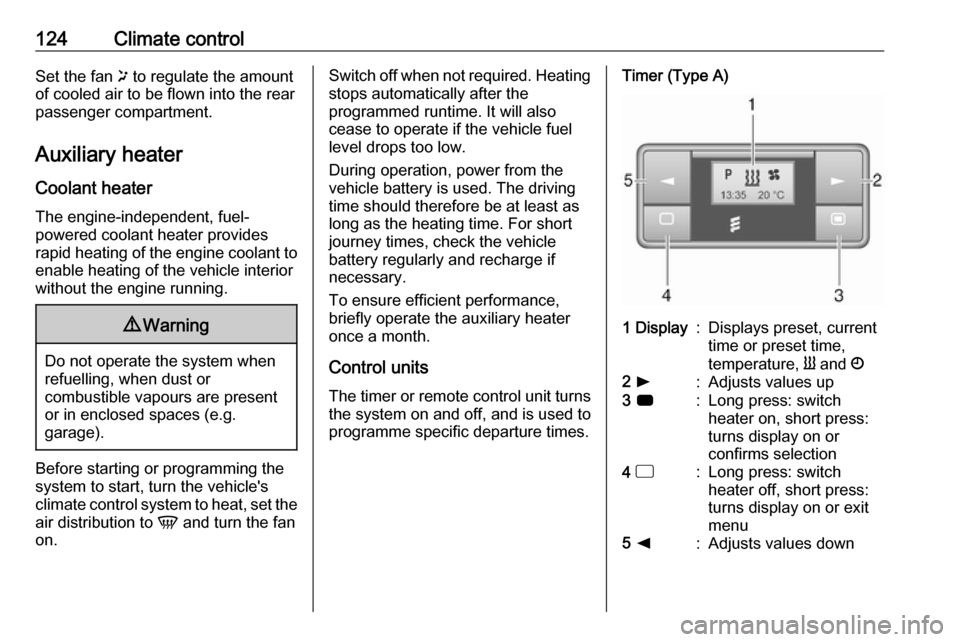
The timer or remote control unit turns the system on and off, and is used to
programme specific departure times.Timer (Type A)1 Display:Displays preset, current
time or preset time,
temperature, Y and Ö2 l:Adjusts values up3 7:Long press: switch
heater on, short press:
turns display on or
confirms selection4 d:Long press: switch
heater off, short press:
turns display on or exit
menu5 k:Adjusts values down
Page 128 of 241

126Climate control2 l:Adjusts values up3
OFF:Switch heater off, or press
Y and OFF simultaneously
to confirm selection4 Y:Switch heater on, or press Y
and OFF simultaneously to
confirm selection5 k:Adjusts values down
If no buttons are pressed within
30 seconds the display automatically
turns off.
9 Warning
When refuelling, switch off the
remote control unit as well as the
heater!
The remote control has a maximum
range of 1000 m. The range may be
reduced due to environmental
conditions and as the battery
becomes weaker.
Remote control (Type B) fault
displaysZ:poor signal – adjust positionFAIL:error during signal
transmission –
move closer or check heater
fuseÜ:battery low – replace battery
Teach remote control (Type B)
Up to four additional remote control
units may also be configured. During
additional teaching processes, the
oldest transmitter will be deleted each
time.
Remove the heater fuse for
5 seconds, then refit the fuse. Within
2–6 seconds press OFF for
1 second. Teaching is completed.
If the remote has not been used for a long period, press the OFF button six
times at intervals of 2 seconds, then
press and hold for another
2 seconds, then wait 2 minutes.
Manual control
Depending on version, the auxiliary
heater can also be switched on for the
last duration time or the default
duration 30 minutes, or cut-off
immediately, using the button on the
lower part of the instrument panel,
beside the steering wheel.
The LED in the button confirms
operation.
Battery replacement
Replace the battery when the range
of the remote control is reduced or when the battery charge symbol
flashes.
Page 133 of 241

Driving and operating131Driving and
operatingDriving hints ............................... 131
Driving economically ...............131
Control of the vehicle ...............132
Steering ................................... 132
Starting and operating ...............133
New vehicle running-in ............133
Ignition switch positions ...........133
Power button ........................... 133
Starting the engine ..................135
Idle speed control ....................136
Vehicle shutdown ....................136
Overrun cut-off ........................ 137
Stop-start system ....................137
Parking .................................... 140
Engine exhaust .......................... 141
Diesel particle filter ..................141
Catalytic converter ...................141
AdBlue ..................................... 142
Manual transmission ..................147
Brakes ........................................ 148
Antilock brake system .............148
Parking brake .......................... 149Brake assist............................. 149
Hill start assist ......................... 149
Ride control systems .................150
Traction Control system ..........150
Electronic stability program .....151
Driver assistance systems .........153
Cruise control .......................... 153
Speed limiter ........................... 155
Parking assist .......................... 156
Rear view camera ...................158
Fuel ............................................ 161
Fuel for diesel engines ............161
Refuelling ................................ 161
Trailer hitch ................................ 163
General information .................163
Driving characteristics and towing tips .............................. 163
Trailer towing ........................... 163
Trailer stability assist ...............164Driving hints
Driving economically ECO mode
ECO mode is a function that
optimises fuel consumption. It affects engine power and torque,
acceleration, gear shift indication,
heating, air conditioning and electrical consumers.
Activation
Press ECO. Control indicator ECO
illuminates in the instrument cluster when activated.
Page 135 of 241
Driving and operating133Starting and operating
New vehicle running-in
Do not brake unnecessarily hard for
the first few journeys and after new
disc brake pads have been fitted.
During the first drive, smoke may
occur because of wax and oil
evaporating off the exhaust system.
Park the vehicle in the open for a
while after the first drive and avoid
inhaling the fumes.
During the running-in period, fuel and engine oil consumption may be
higher and the cleaning process of
the diesel particle filter may take
place more often. Autostop may be
inhibited to allow for charging the
vehicle battery.
Stop-start system 3 137.
Diesel particle filter 3 141.
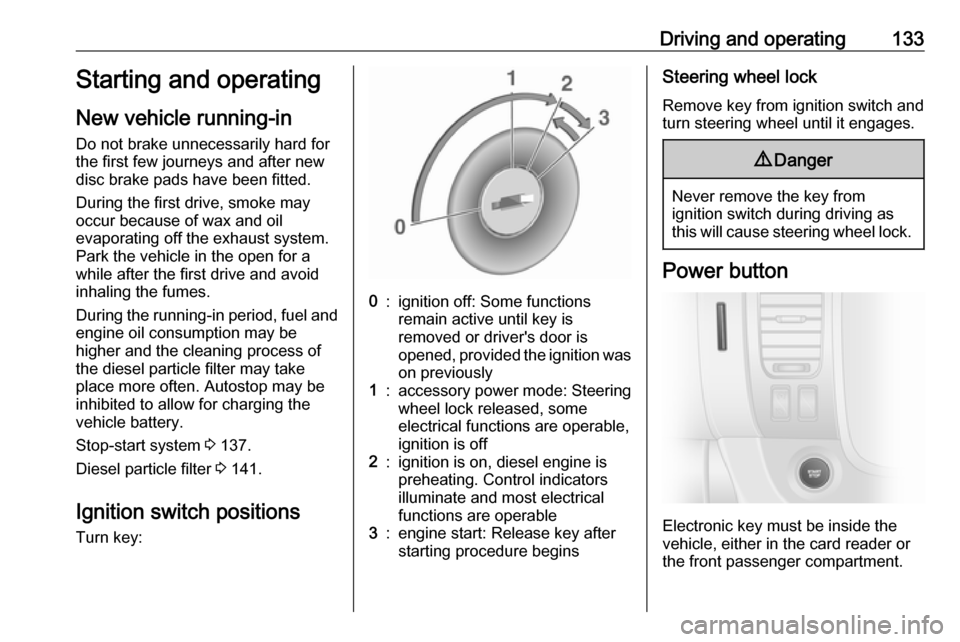
Ignition switch positions
Turn key:0:ignition off: Some functions
remain active until key is
removed or driver's door is
opened, provided the ignition was on previously1:accessory power mode: Steeringwheel lock released, some
electrical functions are operable,
ignition is off2:ignition is on, diesel engine is
preheating. Control indicators
illuminate and most electrical
functions are operable3:engine start: Release key after
starting procedure beginsSteering wheel lock
Remove key from ignition switch and
turn steering wheel until it engages.9 Danger
Never remove the key from
ignition switch during driving as
this will cause steering wheel lock.
Power button
Electronic key must be inside the
vehicle, either in the card reader or
the front passenger compartment.