lock OPEL VIVARO B 2018.5 Manual user
[x] Cancel search | Manufacturer: OPEL, Model Year: 2018.5, Model line: VIVARO B, Model: OPEL VIVARO B 2018.5Pages: 241, PDF Size: 5.58 MB
Page 104 of 241

102Instruments and controlsIlluminates when the engine is
running
If control indicator I illuminates
when the engine is running (together
with control indicator C and a
warning chime): Stop, switch off
engine.Caution
Engine lubrication may be
interrupted. This may result in
damage to the engine and / or
locking of the drive wheels.
1. Depress clutch.
2. Select neutral gear (or move selector lever to N).
3. Move out of the flow of traffic as quickly as possible without
impeding other vehicles.
4. Switch off ignition.
9 Warning
When the engine is off,
considerably more force is needed
to brake and steer.
Do not remove key until vehicle is stationary, otherwise the steeringwheel lock could engage
unexpectedly.
Check oil level before seeking
assistance of a workshop 3 168.
Fuel economy mode
ECO illuminates green when ECO
mode is engaged to reduce fuel
consumption.
ECO mode, driving economically
3 131.
Low fuel Y illuminates yellow.
Illuminates briefly when the ignition is
switched on.
Illuminates when level in fuel tank is
low (range of approx. 50 km). Refuel immediately 3 161.
Catalytic converter 3 141.
Diesel fuel system bleeding 3 174.
Stop-start system D illuminates when engine is in an
Autostop.
\ illuminates when an Autostop is
inhibited when certain conditions are
not fulfilled.
Stop-start system 3 137.
Exterior light
9 illuminates green.
Illuminated when the headlights are
on.
8 illuminates green.
Illuminated when the sidelights are
on.
Lighting 3 110.
High beam
P illuminates blue.
Illuminated when high beam is on and during headlight flash 3 111.
Page 105 of 241

Instruments and controls103Fog light> illuminates green.
Illuminated when the front fog lights are on 3 113.
Rear fog light ø illuminates yellow.
Illuminated when the rear fog light is
on 3 114.
Cruise control
m , U illuminates green or yellow.
m illuminates green when a certain
speed is stored.
U illuminates green when the system
is on.
Cruise control 3 153.
Speed limiter
U illuminates yellow.
Illuminates when the system is on. Speed limiter 3 155.Tachograph
& illuminates when there is a fault
3 108.
Door open
y illuminates red.
Illuminates when a door is not fully
closed.
A corresponding message also
appears in the Driver Information
Centre 3 103.Displays
Driver Information Centre
Depending on vehicle configuration,
the following items appear in the
display:
● outside temperature 3 87
● clock 3 88
● odometer 3 92
● trip odometer 3 92
● service display 3 94
● vehicle messages 3 104
● trip computer 3 106
Page 106 of 241
104Instruments and controlsInfo Display
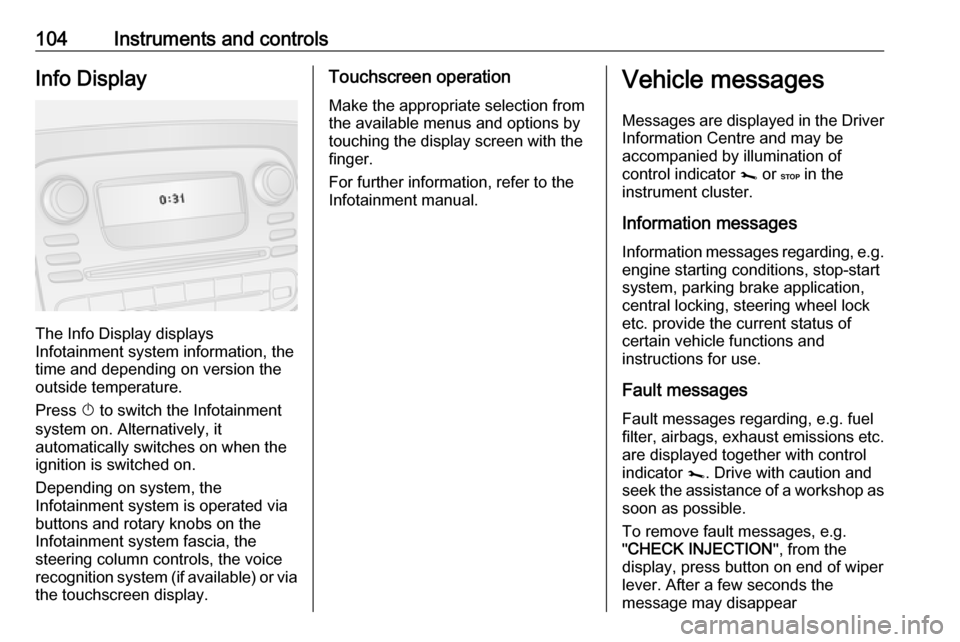
The Info Display displays
Infotainment system information, the
time and depending on version the
outside temperature.
Press X to switch the Infotainment
system on. Alternatively, it
automatically switches on when the
ignition is switched on.
Depending on system, the
Infotainment system is operated via
buttons and rotary knobs on the
Infotainment system fascia, the
steering column controls, the voice
recognition system (if available) or via
the touchscreen display.
Touchscreen operation
Make the appropriate selection from
the available menus and options by
touching the display screen with the
finger.
For further information, refer to the
Infotainment manual.Vehicle messages
Messages are displayed in the Driver Information Centre and may be
accompanied by illumination of
control indicator j or C in the
instrument cluster.
Information messages Information messages regarding, e.g.
engine starting conditions, stop-start
system, parking brake application,
central locking, steering wheel lock
etc. provide the current status of
certain vehicle functions and
instructions for use.
Fault messages Fault messages regarding, e.g. fuel
filter, airbags, exhaust emissions etc.
are displayed together with control
indicator j. Drive with caution and
seek the assistance of a workshop as
soon as possible.
To remove fault messages, e.g.
" CHECK INJECTION ", from the
display, press button on end of wiper
lever. After a few seconds the
message may disappear
Page 108 of 241
106Instruments and controlsEngine oil levelIf the minimum engine oil level is
reached, a message is displayed in
the Driver Information Centre 3 103
for 30 seconds after the engine is
started.
Check oil level 3 168.Trip computer
The trip computer provides
information on driving data, which is
continually recorded and evaluated
electronically.
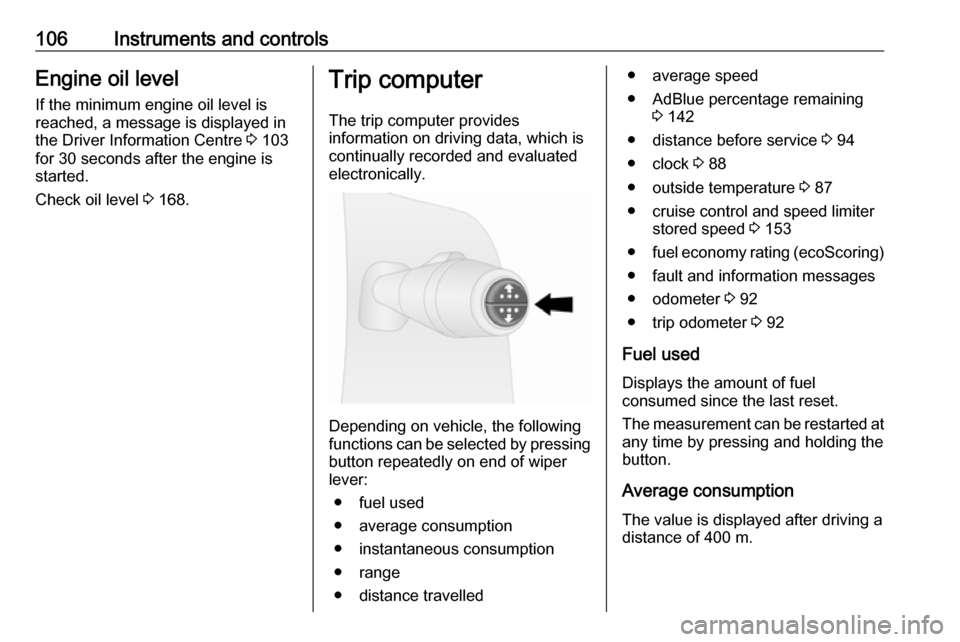
Depending on vehicle, the following
functions can be selected by pressing button repeatedly on end of wiper
lever:
● fuel used
● average consumption
● instantaneous consumption
● range
● distance travelled
● average speed
● AdBlue percentage remaining 3 142
● distance before service 3 94
● clock 3 88
● outside temperature 3 87
● cruise control and speed limiter stored speed 3 153
● fuel economy rating (ecoScoring)
● fault and information messages
● odometer 3 92
● trip odometer 3 92
Fuel used Displays the amount of fuel
consumed since the last reset.
The measurement can be restarted at
any time by pressing and holding the
button.
Average consumption The value is displayed after driving a
distance of 400 m.
Page 118 of 241

116LightingLoad compartment lighting
The lower load compartment lights
come on when the load compartment is opened.
Reading lights Front reading light
Operate rocker switch:
press 7:offpress l:on
Glove box lighting
The glovebox light comes on when
the glovebox is opened.
Lighting features
Entry lighting
Welcome lighting
Vehicle lights are switched on for a
short time to facilitate locating the
vehicle when it is dark.
Remote control operation
Lights switch on when unlocking the
vehicle with the remote control.
Electronic key system operation
Press t. Press again to switch off.
Exit lighting
If equipped, headlights come on for
approx. 30 seconds after the vehicle
is parked and the system is activated.
Activating 1. Switch off lights (position 7).
2. Switch off ignition.
3. Remove ignition key.
4. Open driver's door.
5. Pull stalk towards steering wheel.
A corresponding message may
appear in the Driver Information
Centre 3 103.
Page 127 of 241
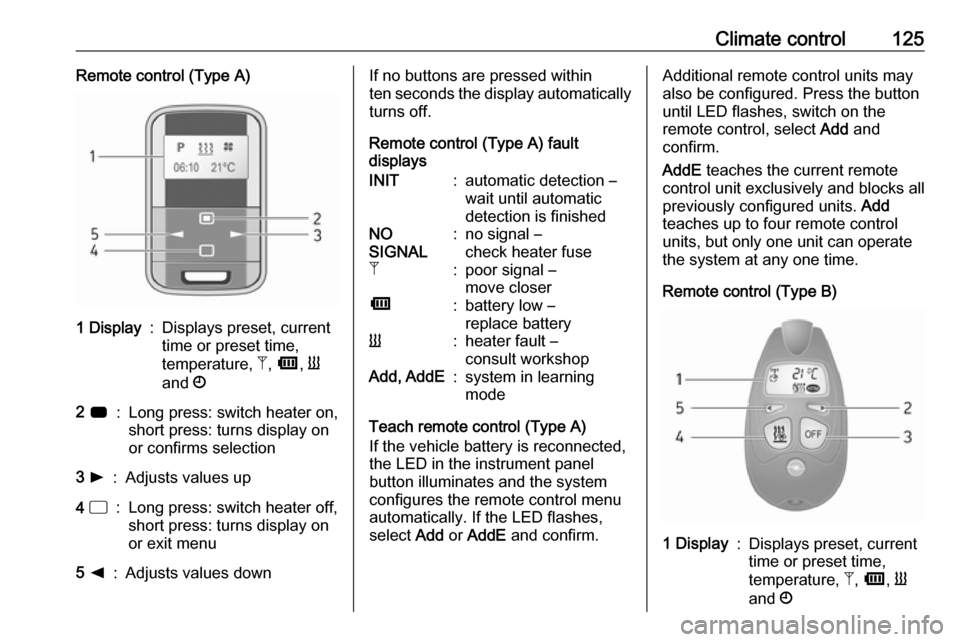
Climate control125Remote control (Type A)1 Display:Displays preset, current
time or preset time,
temperature, Z, Ü , Y
and Ö2 7:Long press: switch heater on,
short press: turns display on
or confirms selection3 l:Adjusts values up4 d:Long press: switch heater off,
short press: turns display on
or exit menu5 k:Adjusts values downIf no buttons are pressed within
ten seconds the display automatically
turns off.
Remote control (Type A) fault
displaysINIT:automatic detection –
wait until automatic
detection is finishedNO
SIGNAL:no signal –
check heater fuseZ:poor signal –
move closerÜ:battery low –
replace batteryY:heater fault –
consult workshopAdd, AddE:system in learning
mode
Teach remote control (Type A)
If the vehicle battery is reconnected, the LED in the instrument panel
button illuminates and the system
configures the remote control menu
automatically. If the LED flashes,
select Add or AddE and confirm.
Additional remote control units may
also be configured. Press the button
until LED flashes, switch on the
remote control, select Add and
confirm.
AddE teaches the current remote
control unit exclusively and blocks all
previously configured units. Add
teaches up to four remote control
units, but only one unit can operate
the system at any one time.
Remote control (Type B)1 Display:Displays preset, current
time or preset time,
temperature, Z, Ü , Y
and Ö
Page 133 of 241

Driving and operating131Driving and
operatingDriving hints ............................... 131
Driving economically ...............131
Control of the vehicle ...............132
Steering ................................... 132
Starting and operating ...............133
New vehicle running-in ............133
Ignition switch positions ...........133
Power button ........................... 133
Starting the engine ..................135
Idle speed control ....................136
Vehicle shutdown ....................136
Overrun cut-off ........................ 137
Stop-start system ....................137
Parking .................................... 140
Engine exhaust .......................... 141
Diesel particle filter ..................141
Catalytic converter ...................141
AdBlue ..................................... 142
Manual transmission ..................147
Brakes ........................................ 148
Antilock brake system .............148
Parking brake .......................... 149Brake assist............................. 149
Hill start assist ......................... 149
Ride control systems .................150
Traction Control system ..........150
Electronic stability program .....151
Driver assistance systems .........153
Cruise control .......................... 153
Speed limiter ........................... 155
Parking assist .......................... 156
Rear view camera ...................158
Fuel ............................................ 161
Fuel for diesel engines ............161
Refuelling ................................ 161
Trailer hitch ................................ 163
General information .................163
Driving characteristics and towing tips .............................. 163
Trailer towing ........................... 163
Trailer stability assist ...............164Driving hints
Driving economically ECO mode
ECO mode is a function that
optimises fuel consumption. It affects engine power and torque,
acceleration, gear shift indication,
heating, air conditioning and electrical consumers.
Activation
Press ECO. Control indicator ECO
illuminates in the instrument cluster when activated.
Page 135 of 241
Driving and operating133Starting and operating
New vehicle running-in
Do not brake unnecessarily hard for
the first few journeys and after new
disc brake pads have been fitted.
During the first drive, smoke may
occur because of wax and oil
evaporating off the exhaust system.
Park the vehicle in the open for a
while after the first drive and avoid
inhaling the fumes.
During the running-in period, fuel and engine oil consumption may be
higher and the cleaning process of
the diesel particle filter may take
place more often. Autostop may be
inhibited to allow for charging the
vehicle battery.
Stop-start system 3 137.
Diesel particle filter 3 141.
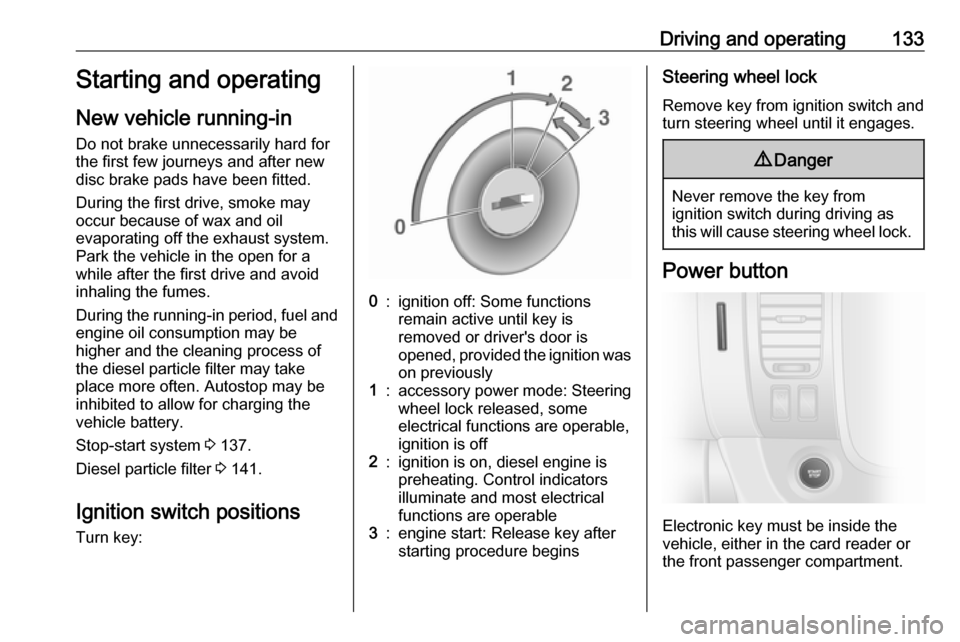
Ignition switch positions
Turn key:0:ignition off: Some functions
remain active until key is
removed or driver's door is
opened, provided the ignition was on previously1:accessory power mode: Steeringwheel lock released, some
electrical functions are operable,
ignition is off2:ignition is on, diesel engine is
preheating. Control indicators
illuminate and most electrical
functions are operable3:engine start: Release key after
starting procedure beginsSteering wheel lock
Remove key from ignition switch and
turn steering wheel until it engages.9 Danger
Never remove the key from
ignition switch during driving as
this will cause steering wheel lock.
Power button
Electronic key must be inside the
vehicle, either in the card reader or
the front passenger compartment.
Page 136 of 241

134Driving and operatingIf the electronic key is not inside the
vehicle, a corresponding message appears in the Driver Information
Centre 3 103.
Note
Do not put the electronic key in the
load compartment during driving, as
this is outside of the detection zone
(indicated by a warning chime at low
speed 3 105 and a message in the
Driver Information Centre 3 104).
Note
In the event the electronic key is kept in the front passenger compartment
and a message appears in the Driver
Information Centre (possibly
accompanied by a warning chime)
indicating that it is out of reception
range, we recommend inserting the
electronic key in the card reader.
Some functions, e.g. Infotainment
system, are available for use as soon
as you enter the vehicle.Accessory power mode
Press START/STOP without
operating clutch or brake pedal to
enable further electrical functions to
be operated.
These functions switch off
automatically after a delay.
Engine start
Operate clutch and brake pedal and press START/STOP . Release button
after starting procedure begins.
If a gear is engaged, the engine can
be started only by operating the clutch pedal and pressing the
START/STOP button.
In some cases, it may be necessary
to move the steering wheel slightly
while pressing START/STOP to
release the steering wheel lock. A
corresponding message appears in
the Driver Information Centre 3 103.
At very low outside temperatures (e.g. below -10 °C) keep the clutch pedal
depressed while pressing
START/STOP until the engine starts.If one of the starting conditions is not
applied, a corresponding message appears in the Driver Information
Centre 3 103.
Vehicle messages 3 104.
Engine stop
Electronic key must be inside the
vehicle, either in the card reader or
the front passenger compartment.
With the vehicle stationary, press
START/STOP to stop the engine. The
steering wheel lock is engaged when
the driver's door is opened and the
vehicle is locked.
If the electronic key is not detected, a corresponding message appears in
the Driver Information Centre 3 103.
In this event, press START/STOP for
2 seconds to stop the engine.
Central locking system 3 26.
Retained power off Press START/STOP for more than
2 seconds. The engine is stopped
while some functions, e.g.
Infotainment system, are available for
use for approx. 10 minutes.
Page 137 of 241

Driving and operating135These functions stop working when
the driver's door is opened and the vehicle is locked.
Note
Always take the electronic key with
you when exiting the vehicle.
The electronic key being left in the
card reader is indicated by a warning
chime 3 105 and a message in the
Driver Information Centre 3 104
when the driver's door is opened.9 Danger
Never leave an electronic key
inside the vehicle when children or animals are left in the vehicle, to
avoid unintended operation of
windows, doors or engine. Risk of
fatal injury.
Fault
If the engine cannot be started, the
cause may be one of the following:
● Fault in electronic key.
● Electronic key out of reception range.
● Battery voltage too low.
● Overload of the central locking system by operating at frequentintervals, the power supply is
interrupted for a short time.
● Interference from higher-power radio waves from other sources.
Battery replacement 3 22.
Central locking system 3 26.
Electronic key system 3 23.
Starting the engine
Manual transmission: operate clutch.
Do not accelerate.
Diesel engines: turn the key to
position 2 for preheating until control
indicator ! extinguishes in the
instrument cluster 3 101.
Turn key to position 3 and release.
The increased engine speed
automatically returns to normal idling
speed as the engine temperature
rises.
Start attempts should not last longer
than 15 seconds. If engine does not
start, wait 15 seconds before
repeating starting procedure. If
necessary, depress accelerator
before repeating starting procedure.
Before restarting or to switch off the
engine, turn key back to 0.
During an Autostop, the engine can
be started by depressing the clutch
pedal.
Stop-start system 3 137.