key battery OPEL VIVARO B 2018 Manual user
[x] Cancel search | Manufacturer: OPEL, Model Year: 2018, Model line: VIVARO B, Model: OPEL VIVARO B 2018Pages: 237, PDF Size: 5.57 MB
Page 24 of 237
22Keys, doors and windowsCar Pass
The Car Pass contains security
related vehicle data and should
therefore be kept in a safe place.
When the vehicle is taken to a
workshop, this vehicle data is needed
in order to perform certain operations.
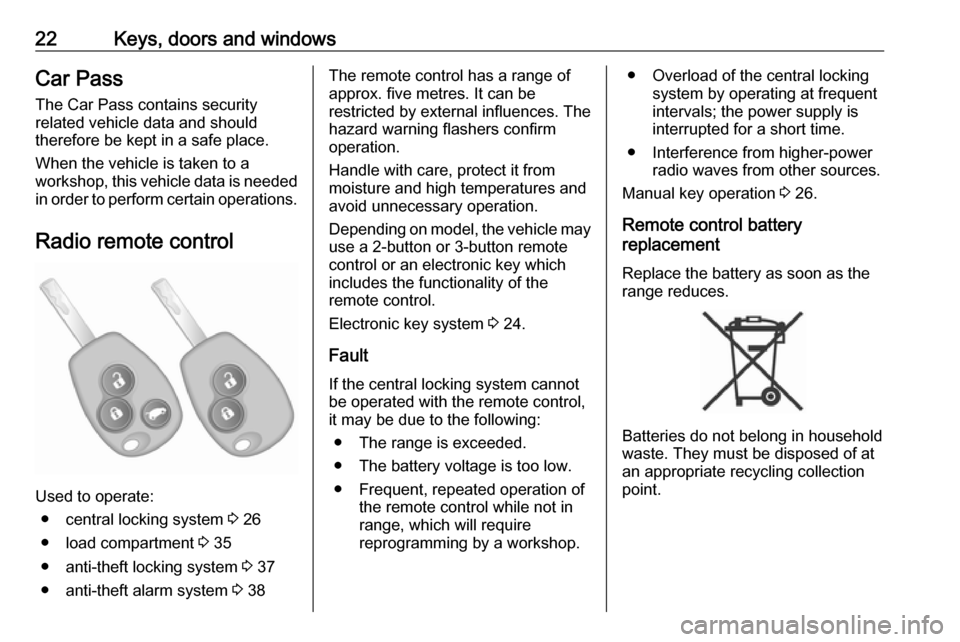
Radio remote control
Used to operate: ● central locking system 3 26
● load compartment 3 35
● anti-theft locking system 3 37
● anti-theft alarm system 3 38
The remote control has a range of
approx. five metres. It can be
restricted by external influences. The
hazard warning flashers confirm
operation.
Handle with care, protect it from
moisture and high temperatures and
avoid unnecessary operation.
Depending on model, the vehicle may
use a 2-button or 3-button remote
control or an electronic key which
includes the functionality of the
remote control.
Electronic key system 3 24.
Fault
If the central locking system cannot
be operated with the remote control,
it may be due to the following:
● The range is exceeded.
● The battery voltage is too low.
● Frequent, repeated operation of the remote control while not in
range, which will require
reprogramming by a workshop.● Overload of the central locking system by operating at frequent
intervals; the power supply is
interrupted for a short time.
● Interference from higher-power radio waves from other sources.
Manual key operation 3 26.
Remote control battery
replacement
Replace the battery as soon as the
range reduces.
Batteries do not belong in household
waste. They must be disposed of at
an appropriate recycling collection
point.
Page 25 of 237
Keys, doors and windows232-button and 3-button remote control
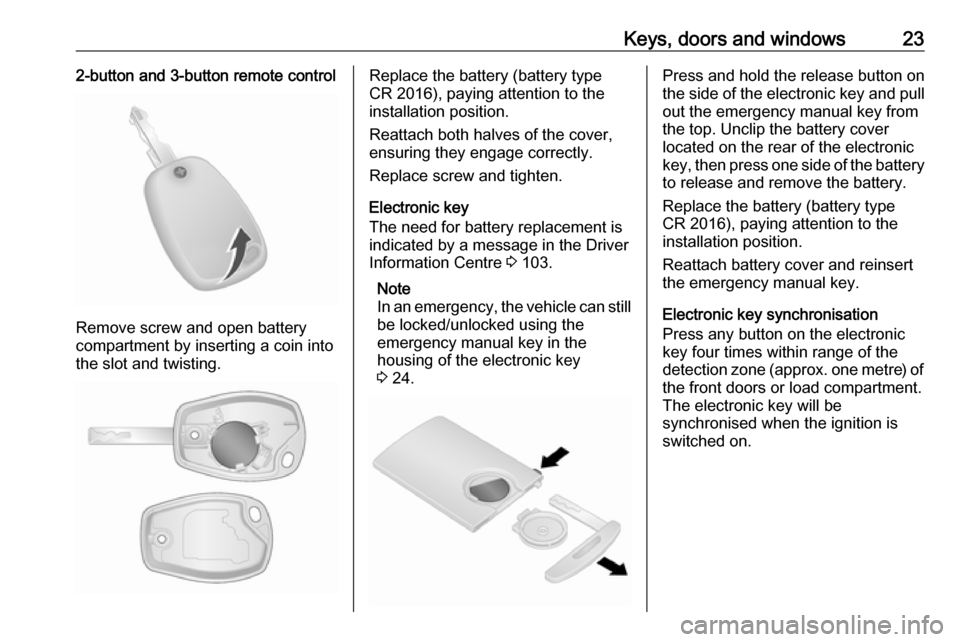
Remove screw and open battery
compartment by inserting a coin into
the slot and twisting.
Replace the battery (battery type
CR 2016), paying attention to the
installation position.
Reattach both halves of the cover,
ensuring they engage correctly.
Replace screw and tighten.
Electronic key
The need for battery replacement is
indicated by a message in the Driver
Information Centre 3 103.
Note
In an emergency, the vehicle can still be locked/unlocked using the
emergency manual key in the
housing of the electronic key
3 24.Press and hold the release button on
the side of the electronic key and pull out the emergency manual key from
the top. Unclip the battery cover
located on the rear of the electronic
key, then press one side of the battery
to release and remove the battery.
Replace the battery (battery type
CR 2016), paying attention to the
installation position.
Reattach battery cover and reinsert
the emergency manual key.
Electronic key synchronisation
Press any button on the electronic
key four times within range of the
detection zone (approx. one metre) of the front doors or load compartment.
The electronic key will be
synchronised when the ignition is
switched on.
Page 27 of 237
Keys, doors and windows25Handsfree operation is automatically
disabled when the electronic key buttons have been operated or the
central locking switch e 3 26 is
pressed. To re-enable handsfree
operation, restart the engine.
Power button 3 132.
Replacing battery in electronic
key
Replace the battery as soon as the
system no longer operates properly or the range is reduced. The need for
battery replacement is indicated by a
message in the Driver Information
Centre 3 103.
Battery replacement, see 'Radio
remote control' 3 22.
Fault
If the central locking system cannot
be operated or the engine cannot be
started, the cause may be one of the
following:
● fault in electronic key
● electronic key out of reception range
● battery voltage too low● overload of the central locking system by operating at frequent
intervals, the power supply is
interrupted for a short time
● interference from higher-power radio waves from other sources
Emergency manual key
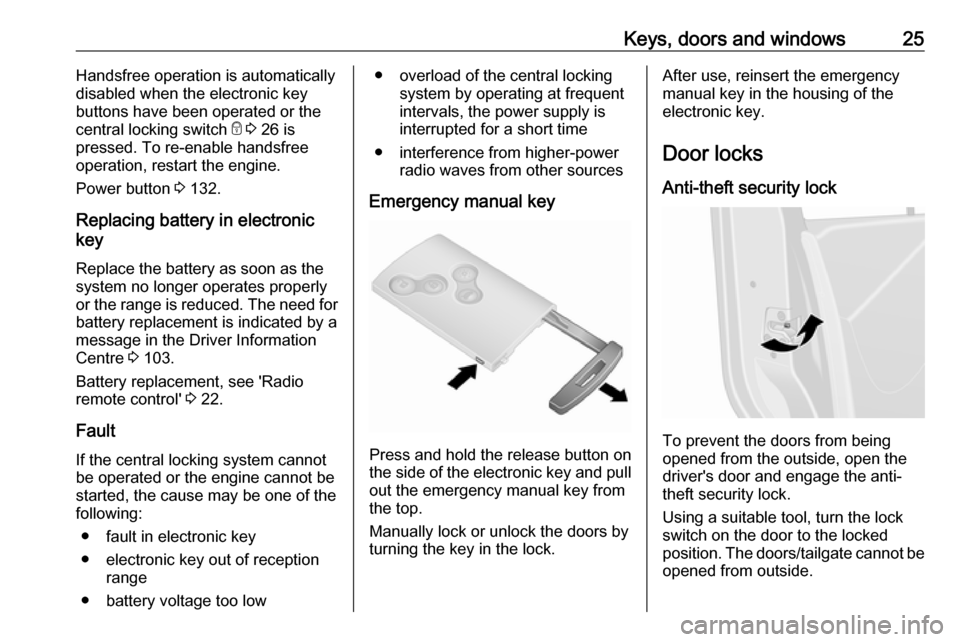
Press and hold the release button on
the side of the electronic key and pull out the emergency manual key from
the top.
Manually lock or unlock the doors by turning the key in the lock.
After use, reinsert the emergency
manual key in the housing of the
electronic key.
Door locks Anti-theft security lock
To prevent the doors from being
opened from the outside, open the
driver's door and engage the anti-
theft security lock.
Using a suitable tool, turn the lock
switch on the door to the locked
position. The doors/tailgate cannot be opened from outside.
Page 33 of 237
Keys, doors and windows31Press G to lock / unlock the rear
doors/tailgate (and sliding side
doors).
Electronic key system 3 24.
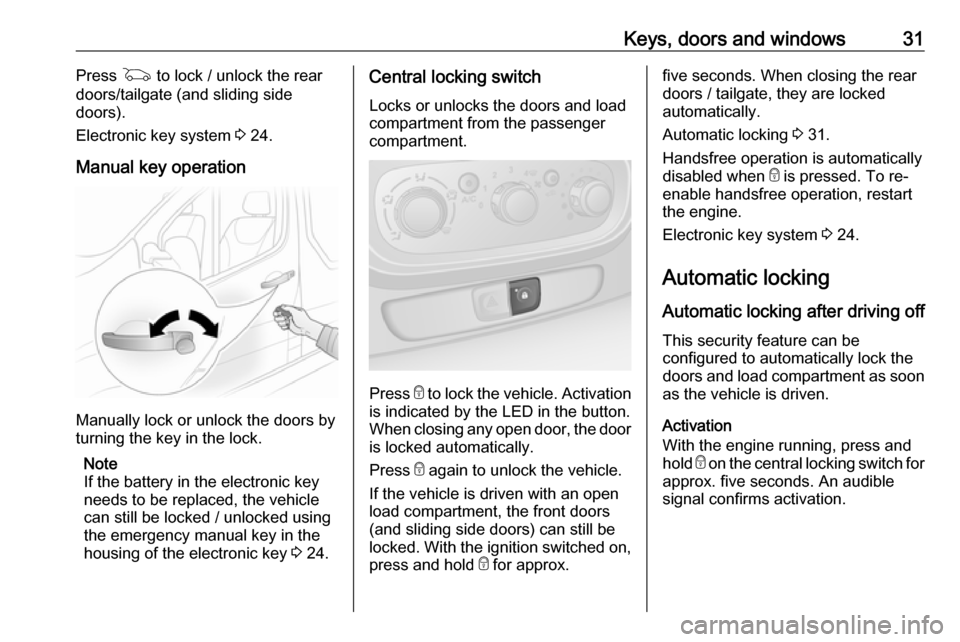
Manual key operation
Manually lock or unlock the doors by
turning the key in the lock.
Note
If the battery in the electronic key
needs to be replaced, the vehicle
can still be locked / unlocked using
the emergency manual key in the
housing of the electronic key 3 24.
Central locking switch
Locks or unlocks the doors and loadcompartment from the passenger
compartment.
Press e to lock the vehicle. Activation
is indicated by the LED in the button.
When closing any open door, the door is locked automatically.
Press e again to unlock the vehicle.
If the vehicle is driven with an open
load compartment, the front doors
(and sliding side doors) can still be
locked. With the ignition switched on,
press and hold e for approx.
five seconds. When closing the rear
doors / tailgate, they are locked
automatically.
Automatic locking 3 31.
Handsfree operation is automatically
disabled when e is pressed. To re-
enable handsfree operation, restart
the engine.
Electronic key system 3 24.
Automatic locking Automatic locking after driving off This security feature can be
configured to automatically lock the
doors and load compartment as soon as the vehicle is driven.
Activation
With the engine running, press and hold e on the central locking switch for
approx. five seconds. An audible
signal confirms activation.
Page 41 of 237
Keys, doors and windows39
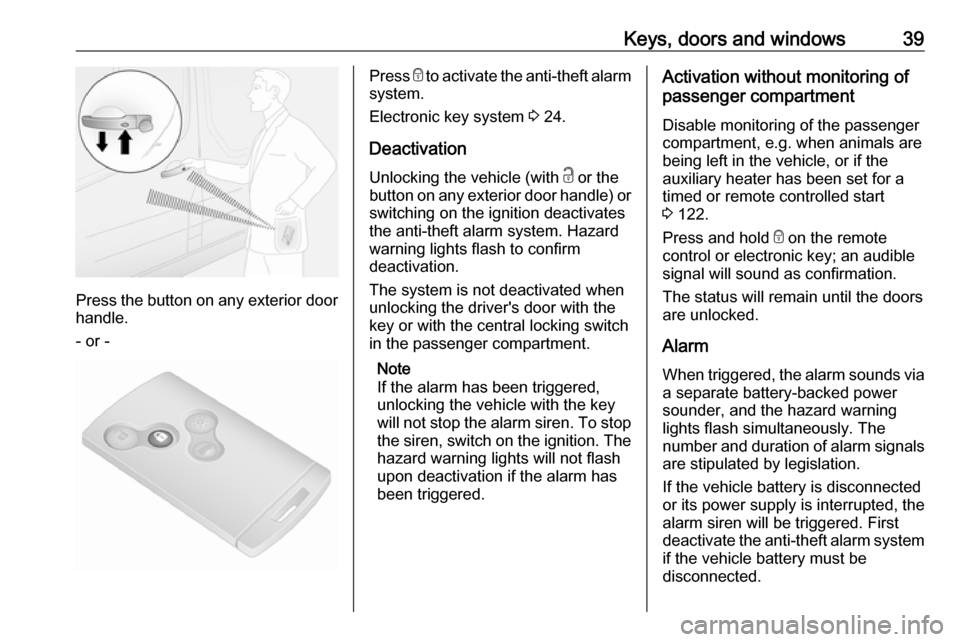
Press the button on any exterior door
handle.
- or -
Press e to activate the anti-theft alarm
system.
Electronic key system 3 24.
Deactivation
Unlocking the vehicle (with c or the
button on any exterior door handle) or switching on the ignition deactivates
the anti-theft alarm system. Hazard
warning lights flash to confirm
deactivation.
The system is not deactivated when
unlocking the driver's door with the
key or with the central locking switch
in the passenger compartment.
Note
If the alarm has been triggered,
unlocking the vehicle with the key
will not stop the alarm siren. To stop the siren, switch on the ignition. The
hazard warning lights will not flash
upon deactivation if the alarm has
been triggered.Activation without monitoring of
passenger compartment
Disable monitoring of the passenger
compartment, e.g. when animals are
being left in the vehicle, or if the
auxiliary heater has been set for a
timed or remote controlled start
3 122.
Press and hold e on the remote
control or electronic key; an audible
signal will sound as confirmation.
The status will remain until the doors
are unlocked.
Alarm When triggered, the alarm sounds via a separate battery-backed power
sounder, and the hazard warning
lights flash simultaneously. The
number and duration of alarm signals
are stipulated by legislation.
If the vehicle battery is disconnected
or its power supply is interrupted, the
alarm siren will be triggered. First
deactivate the anti-theft alarm system if the vehicle battery must be
disconnected.
Page 42 of 237
40Keys, doors and windowsTo silence the alarm siren (if
triggered) and therefore deactivate
the anti-theft alarm system, reconnect vehicle battery and unlock the vehicle
or switch on the ignition.
Immobiliser
The immobiliser is part of the ignition
switch and checks whether the
vehicle is allowed to be started with the key being used.
The immobiliser is activated
automatically after the key has been removed from the ignition switch and
also if the key is left in the ignition
switch when the engine is turned off.
If the engine cannot be started, switch off the ignition and remove key, wait
approx. two seconds and then repeat
the start attempt. If start attempt is
unsuccessful, attempt to start the
engine using the spare key and seek
the assistance of a workshop.Note
Radio Frequency Identification
(RFID) tags may cause interference with the key. Do not have it placednear the key when starting the
vehicle.
Note
The immobiliser does not lock the doors. You should always lock the
vehicle after leaving it and switch on the anti-theft alarm system 3 26,
3 38.Exterior mirrors
Convex shape The convex exterior mirror contains
an aspherical area and reduces blind spots. The shape of the mirror makes
objects appear smaller, which will affect the ability to estimate
distances.
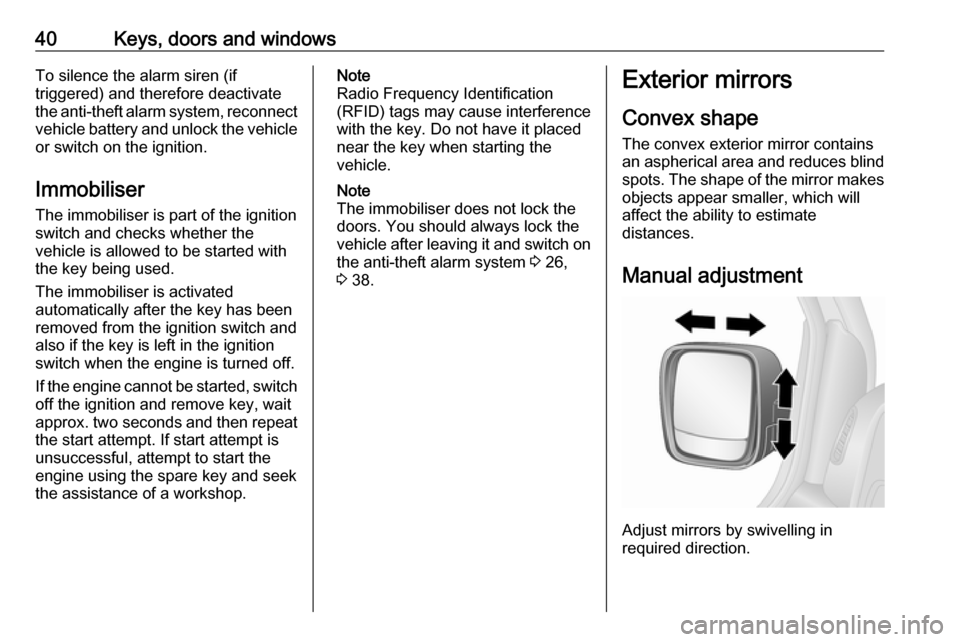
Manual adjustment
Adjust mirrors by swivelling in
required direction.
Page 106 of 237

104Instruments and controlsWarning chimesOnly one warning chime will sound at a time.
A corresponding message may also
appear in the Driver Information
Centre when a warning chime is
sounded.
When starting the engine or whilst driving:
● If seat belt is not fastened 3 55.
● If the parking assist detects an object 3 155.
● If the vehicle speed briefly exceeds a set limit 3 152,
3 155.
● If a door or the bonnet is not properly closed when vehicle
exceeds a certain speed.
● During activation and deactivation of alarm monitoring
of vehicle inclination 3 38.
● If there is a fault in the brake system 3 98.
● If the vehicle battery is not charging 3 98.● If engine lubrication is interrupted
3 100.
● If AdBlue needs to be refilled or a
fault is present 3 141.
● If the electronic key is outside of the detection range.
Electronic key system 3 24.
Power button 3 132.
When the vehicle is parked and / or the driver's door is opened:
● If the key has been left in the ignition.
● If the electronic key has been left
in the card reader.
Electronic key system 3 24.
Power button 3 132.
● If the vehicle is in an Autostop. Stop-start system 3 136.
● If the exterior lights are on 3 108.Engine oil level
If the minimum engine oil level is
reached, a message is displayed in
the Driver Information Centre 3 102
for 30 seconds after the engine is
started.
Check oil level 3 167.
Page 134 of 237
132Driving and operatingStarting and operating
New vehicle running-in
Do not brake unnecessarily hard for
the first few journeys and after new
disc brake pads have been fitted.
During the first drive, smoke may
occur because of wax and oil
evaporating off the exhaust system.
Park the vehicle in the open for a
while after the first drive and avoid
inhaling the fumes.
During the running-in period, fuel and engine oil consumption may be
higher and the cleaning process of
the diesel particle filter may take
place more often. Autostop may be
inhibited to allow for charging the
vehicle battery.
Stop-start system 3 136.
Diesel particle filter 3 140.
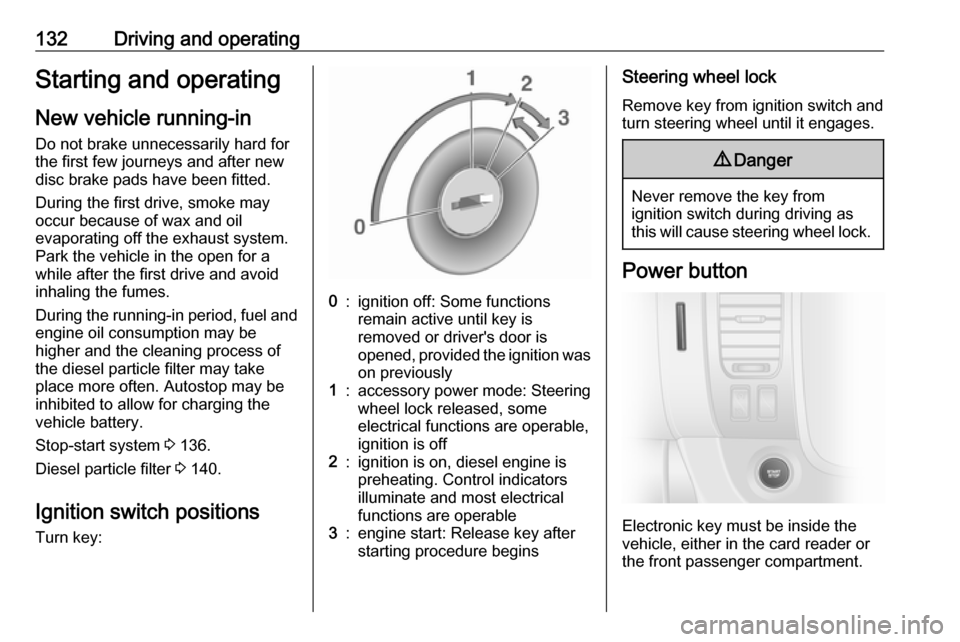
Ignition switch positions
Turn key:0:ignition off: Some functions
remain active until key is
removed or driver's door is
opened, provided the ignition was on previously1:accessory power mode: Steering
wheel lock released, some
electrical functions are operable,
ignition is off2:ignition is on, diesel engine is
preheating. Control indicators
illuminate and most electrical
functions are operable3:engine start: Release key after
starting procedure beginsSteering wheel lock
Remove key from ignition switch and
turn steering wheel until it engages.9 Danger
Never remove the key from
ignition switch during driving as
this will cause steering wheel lock.
Power button
Electronic key must be inside the
vehicle, either in the card reader or
the front passenger compartment.
Page 136 of 237
134Driving and operatingThese functions stop working when
the driver's door is opened and the
vehicle is locked.
Note
Always take the electronic key with you when exiting the vehicle.
The electronic key being left in the
card reader is indicated by a warning
chime 3 104 and a message in the
Driver Information Centre 3 103
when the driver's door is opened.9 Danger
Never leave an electronic key
inside the vehicle when children or animals are left in the vehicle, to
avoid unintended operation of
windows, doors or engine. Risk of
fatal injury.
Fault
If the engine cannot be started, the
cause may be one of the following:
● Fault in electronic key.
● Electronic key out of reception range.
● Battery voltage too low.
● Overload of the central locking system by operating at frequentintervals, the power supply is
interrupted for a short time.
● Interference from higher-power radio waves from other sources.
Battery replacement 3 22.
Central locking system 3 26.
Electronic key system 3 24.
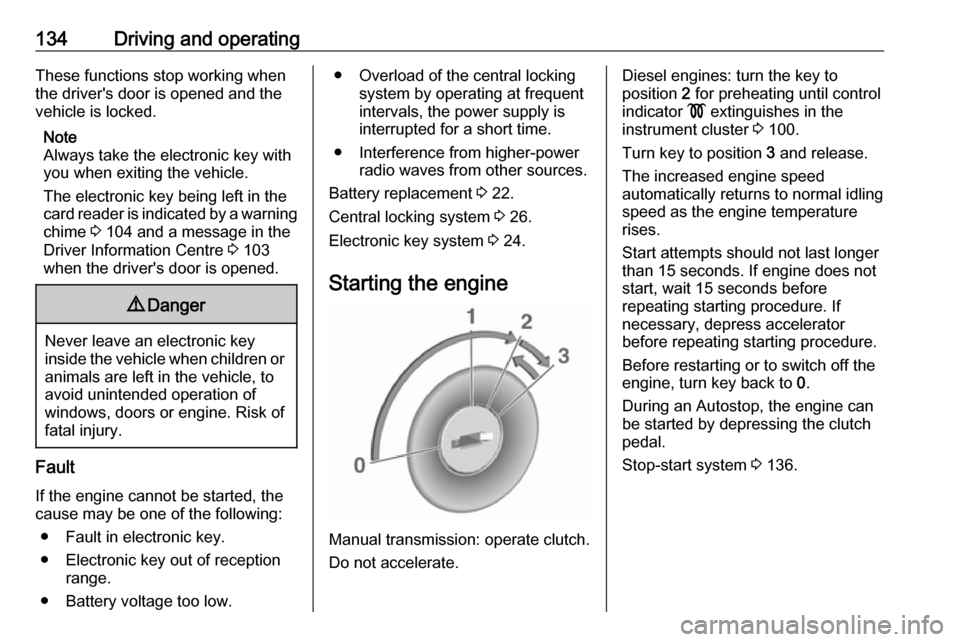
Starting the engine
Manual transmission: operate clutch.
Do not accelerate.
Diesel engines: turn the key to
position 2 for preheating until control
indicator ! extinguishes in the
instrument cluster 3 100.
Turn key to position 3 and release.
The increased engine speed
automatically returns to normal idling
speed as the engine temperature
rises.
Start attempts should not last longer
than 15 seconds. If engine does not
start, wait 15 seconds before
repeating starting procedure. If
necessary, depress accelerator
before repeating starting procedure.
Before restarting or to switch off the
engine, turn key back to 0.
During an Autostop, the engine can
be started by depressing the clutch
pedal.
Stop-start system 3 136.
Page 138 of 237

136Driving and operatingResetting with electronic key
system
To reset the fuel cut-off system and
enable the vehicle to be driven:
1. Insert the electronic key in the card reader 3 132.
2. Press START/STOP without
depressing any pedals.
3. Wait a few minutes to allow the fuel system to be reset.
If the engine does not start, repeat the
procedure.
Electronic key system 3 24.
Power button 3 132.
Refuelling 3 160.
Overrun cut-off
The fuel supply is automatically cut off
during overrun, i.e. when the vehicle
is driven with a gear engaged but
accelerator pedal is released.
Depending on driving conditions, the
overrun cut-off may be deactivated.Stop-start system
The stop-start system helps to save
fuel and to reduce the exhaust
emissions. When conditions allow, it
switches off the engine as soon as the
vehicle is at a low speed or at a
standstill, e.g. at a traffic light or in a
traffic jam. It restarts the engine
automatically as soon as the clutch
pedal is depressed.
A vehicle battery sensor ensures that an Autostop is only performed if thevehicle battery is sufficiently charged
for a restart.
Activation
The stop-start system is available as
soon as the engine is started, the
vehicle starts-off and the conditions
as stated below in this section are
fulfilled.
If the below conditions are not
fulfilled, an Autostop is prohibited and
control indicator \ illuminates in the
instrument cluster 3 101.Deactivation
Deactivate the stop-start system
manually by pressing Î. LED in the
button illuminates to indicate
deactivation and a corresponding message appears in the Driver
Information Centre 3 102.
If deactivated manually, it is possible to reactivate the stop-start system by
pressing Î again; LED extinguishes
in the button and a corresponding
message appears in the Driver
Information Centre. The system is
reactivated automatically the next
time the ignition is switched on.
Vehicle messages 3 103.