key battery OPEL VIVARO B 2019 Manual user
[x] Cancel search | Manufacturer: OPEL, Model Year: 2019, Model line: VIVARO B, Model: OPEL VIVARO B 2019Pages: 235, PDF Size: 5.67 MB
Page 139 of 235

Driving and operating137Resetting with electronic key
system
To reset the fuel cut-off system and
enable the vehicle to be driven:
1. Insert the electronic key in the card reader 3 133.
2. Press START/STOP without
depressing any pedals.
3. Wait a few minutes to allow the fuel system to be reset.
If the engine does not start, repeat the procedure.
Electronic key system 3 23.
Power button 3 133.
Refuelling 3 162.
Overrun cut-off The fuel supply is automatically cut off
during overrun, i.e. when the vehicle
is driven with a gear engaged but
accelerator pedal is released.
Depending on driving conditions, the
overrun cut-off may be deactivated.Stop-start system
The stop-start system helps to save
fuel and to reduce the exhaust
emissions. When conditions allow, it
switches off the engine as soon as the
vehicle is at a low speed or at a
standstill, e.g. at a traffic light or in a
traffic jam. It restarts the engine
automatically as soon as the clutch pedal is depressed.
A vehicle battery sensor ensures that
an Autostop is only performed if the
vehicle battery is sufficiently charged
for a restart.
Switch off engine and ignition before
exiting the vehicle.
Activation
The stop-start system is available as
soon as the engine is started, the
vehicle starts-off and the conditions
as stated below in this section are
fulfilled.
If the below conditions are not
fulfilled, an Autostop is prohibited and
control indicator \ illuminates in the
instrument cluster 3 102.Deactivation
Deactivate the stop-start system
manually by pressing Î. LED in the
button illuminates to indicate
deactivation and a corresponding message appears in the Driver
Information Centre 3 103.
If deactivated manually, it is possible to reactivate the stop-start system by
pressing Î again. The LED
extinguishes in the button and a
corresponding message appears in
the Driver Information Centre. The
system is reactivated automatically
the next time the ignition is switched
on.
Page 177 of 235
Vehicle care175disconnecting the main vehicle
battery or before jump starting the vehicle.
The terminals are designed for
additional electrical consumers up to
a maximum of 50 A.
Jump starting 3 199.
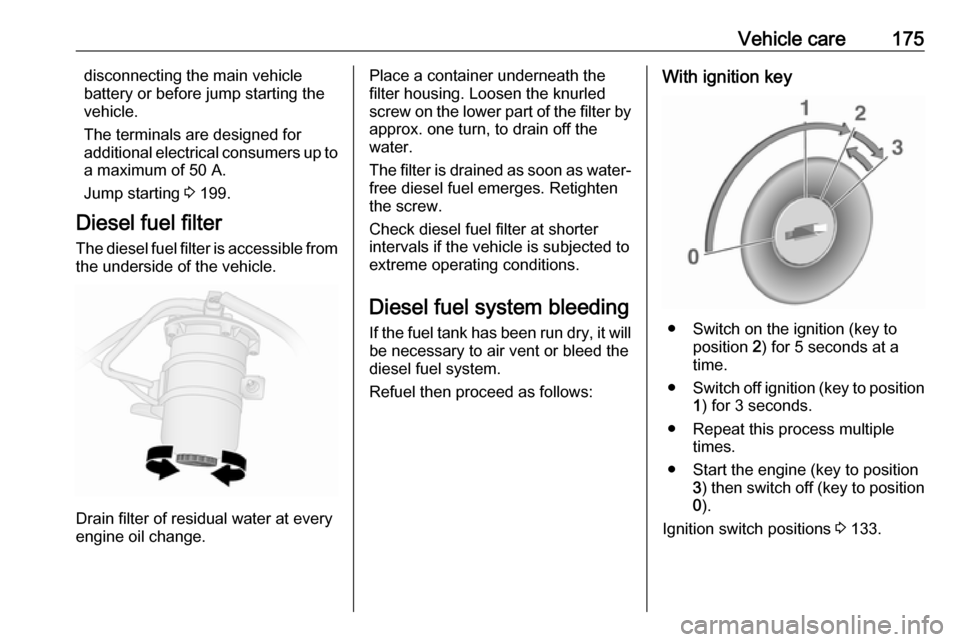
Diesel fuel filter The diesel fuel filter is accessible from the underside of the vehicle.
Drain filter of residual water at every
engine oil change.
Place a container underneath the
filter housing. Loosen the knurled
screw on the lower part of the filter by approx. one turn, to drain off the
water.
The filter is drained as soon as water-
free diesel fuel emerges. Retighten
the screw.
Check diesel fuel filter at shorter
intervals if the vehicle is subjected to
extreme operating conditions.
Diesel fuel system bleeding
If the fuel tank has been run dry, it will be necessary to air vent or bleed the
diesel fuel system.
Refuel then proceed as follows:With ignition key
● Switch on the ignition (key to position 2) for 5 seconds at a
time.
● Switch off ignition (key to position
1 ) for 3 seconds.
● Repeat this process multiple times.
● Start the engine (key to position 3) then switch off (key to position
0 ).
Ignition switch positions 3 133.
Page 188 of 235

186Vehicle careNo.Circuit1Battery backup (with electronic
key system)2Adaptations3Adaptations4Vehicle battery (with electronic
key system)5Additional heating and ventila‐
tion / Air conditioning system6Supplementary heating and
ventilation system7Electric exterior mirrors / Addi‐
tional adaptations8Heated exterior mirrors9Radio / Multimedia / Electric
exterior mirrors / Diagnostic
socket10Multimedia / Trailer hitch11Courtesy lights / Battery
discharge protectionNo.Circuit12Right-hand high beam / Left-
hand low beam / Sidelights /
Right-hand daytime running
light13Hazard warning flashers / Turn
lights14Central locking15Left-hand high beam / Right-
hand low beam / Tail lights /
Left-hand daytime running light16Front fog lights / Rear fog lights /
Number plate lighting17Alarm / Horn / Lighting / Wiper18Instrument cluster19Heating and ventilation system20Rear window wiper / Wind‐
screen washer pump / Horn21General battery22Reversing lights23Brake switchNo.Circuit24Fuel injection / Starter25Airbag / Steering column lock26Passenger power window27Power steering28Brake lights29Battery backup (with electronic
key system)30Service display31Cigarette lighter / Power outlet32Heating and ventilation system33Brake lights / ABS / Immobiliser34Interior lighting / Air conditioning35Starting with electronic key
system36Rear window wiper37Warning chimes38Load compartment power outlet39Driver power window
Page 224 of 235

222Customer informationOperating data in the vehicleControl units process data for
operation of the vehicle.
This data includes, e.g.: ● vehicle status information (e.g. speed, movement delay, lateral
acceleration, wheel rotation rate, "seat belts fastened" display)
● ambient conditions (e.g. temperature, rain sensor,
distance sensor)
As a rule such data is transient, not
stored for longer than an operational
cycle, and only processed on board the vehicle itself. Control units often
include data storage (including the
vehicle key). This is used to allow
information to be documented
temporarily or permanently on vehicle
condition, component stress,
maintenance requirements and
technical events and errors.Depending on technical equipment
level, the data stored is as follows:
● system component operating states (e.g. fill level, tyre
pressure, battery status)
● faults and defects in important system components (e.g. lights,
brakes)
● system reactions in special driving situations (e.g. triggering
of an airbag, actuation of the
stability control systems)
● information on events damaging the vehicle
● for electric vehicles the amount of
charge in the high-voltage
battery, estimated range
In special cases (e.g. if the vehicle
has detected a malfunction), it may be
necessary to save data that would
otherwise just be volatile.
When you use services (e.g. repairs,
maintenance), the operating data
saved can be read together with the
vehicle identification number and
used when necessary. Staff working
for the service network ( e.g. garages,
manufacturers) or third parties (e.g.breakdown services) can read the
data from the vehicle. The same
applies to warranty work and quality
assurance measures.
Data is generally read via the OBD
(On-Board Diagnostics) port
prescribed by law in the vehicle. The operating data which is read out,
documents the technical condition of
the vehicle or individual components
and assists with fault diagnosis,
compliance with warranty obligations
and quality improvement. This data,
in particular information on
component stress, technical events,
operator errors and other faults, is
transmitted to the manufacturer
where appropriate, together with the
vehicle identification number. The
manufacturer is also subject to
product liability. The manufacturer
potentially also uses operating data
from vehicles for product recalls. This
data can also be used to check
customer warranty and guarantee
claims.
Fault memories in the vehicle can be
reset by a service company when
carrying out servicing or repairs or at
your request.