instrument panel OPEL ZAFIRA 2009 Owners Manual
[x] Cancel search | Manufacturer: OPEL, Model Year: 2009, Model line: ZAFIRA, Model: OPEL ZAFIRA 2009Pages: 228, PDF Size: 7.3 MB
Page 11 of 228
In brief
11
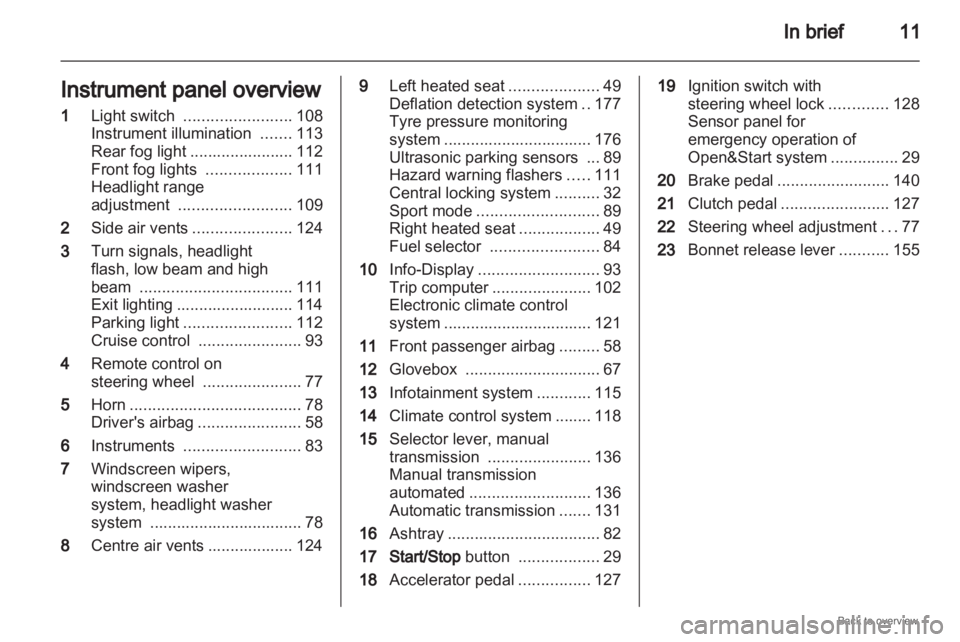
Instrument panel overview
1 Light switch ........................ 108
Instrument illumination .......113
Rear fog light
....................... 112
Front fog lights ...................111
Headlight range
adjustment ......................... 109
2 Side air vents ...................... 124
3 Turn signals, headlight
flash, low beam and high
beam .................................. 111
Exit lighting .......................... 114
Parking light ........................ 112
Cruise control ....................... 93
4 Remote control on
steering wheel ......................77
5 Horn ...................................... 78
Driver's airbag ....................... 58
6 Instruments .......................... 83
7 Windscreen wipers,
windscreen washer
system, headlight washer
system .................................. 78
8 Centre air vents ................... 124 9
Left heated seat ....................49
Deflation detection system ..177
Tyre pressure monitoring
system
................................. 176
Ultrasonic parking sensors ... 89
Hazard warning flashers .....111
Central locking system ..........32
Sport mode ........................... 89
Right heated seat ..................49
Fuel selector ........................ 84
10 Info-Display ........................... 93
Trip computer ...................... 102
Electronic climate control
system ................................. 121
11 Front passenger airbag .........58
12 Glovebox .............................. 67
13 Infotainment system ............115
14 Climate control system ........ 118
15 Selector lever, manual
transmission ....................... 136
Manual transmission
automated ........................... 136
Automatic transmission .......131
16 Ashtray .................................. 82
17 Start/Stop button ..................29
18 Accelerator pedal ................127 19
Ignition switch with
steering wheel lock .............128
Sensor panel for
emergency operation of
Open&Start system ...............29
20 Brake pedal ......................... 140
21 Clutch pedal ........................ 127
22 Steering wheel adjustment ...77
23 Bonnet release lever ...........155
Page 29 of 228

Keys, doors and windows
29
Radio remote control
synchronisation
After replacing the battery, unlock the
door with the key in the lock. The radio
remote control will be synchronised
when you switch on the ignition.
Memorised settings
When locking the vehicle the last
settings are automatically saved
specifically for the used key:
■ Electronic climate control,
■ Info-Display,
■ Infotainment system,
■ Instrument panel illumination.
The saved settings are automatically
remembered when that key is used
for unlocking. Open&Start system
Makes operation of the following
possible without the use of the
mechanical key
■
Central locking system,
■ Anti-theft locking system,
■ Anti-theft alarm system,
■ Power windows,
■ Ignition and starter.
The electronic key simply needs to be
on the driver's person. Press the Start/Stop button. The
ignition
is switched on. The electronic
immobiliser and steering wheel lock
are deactivated.
To start the engine depress the brake
and clutch pedals then press and hold
the Start/Stop button.
With automatic transmission, only
start with the vehicle in P or N.
The engine and the ignition are
switched off by pressing the Start/
Stop button again. The vehicle must
be stationary. The immobiliser is
activated at the same time.
Page 58 of 228

58
Seats, restraints
Note
The airbag systems and belt
tensioner control electronics are
located in the centre console area.
Do not put any magnetic objects in
this area.
Do not stick anything on the airbag
covers and do not cover them with
other materials.
Each airbag is triggered only once.
Have deployed airbags replaced by
a workshop.
Do not make any modifications to
the airbag system as this will
invalidate the vehicle type approval.
Having the steering wheel, the
instrument
panel, all panelling parts,
the door seals, the handles and the
seats removed by a workshop.
Control indicator v for airbag systems
3 87. Front airbag system
The front airbag system consists of
one airbag in the steering wheel and
one in the instrument panel. These
can be identified by the word
AIRBAG. There is also a warning label on the
side of the instrument panel, visible
when the passenger door is open.
Page 75 of 228
Storage
75
Fasten the roof rack at the fastening
points.
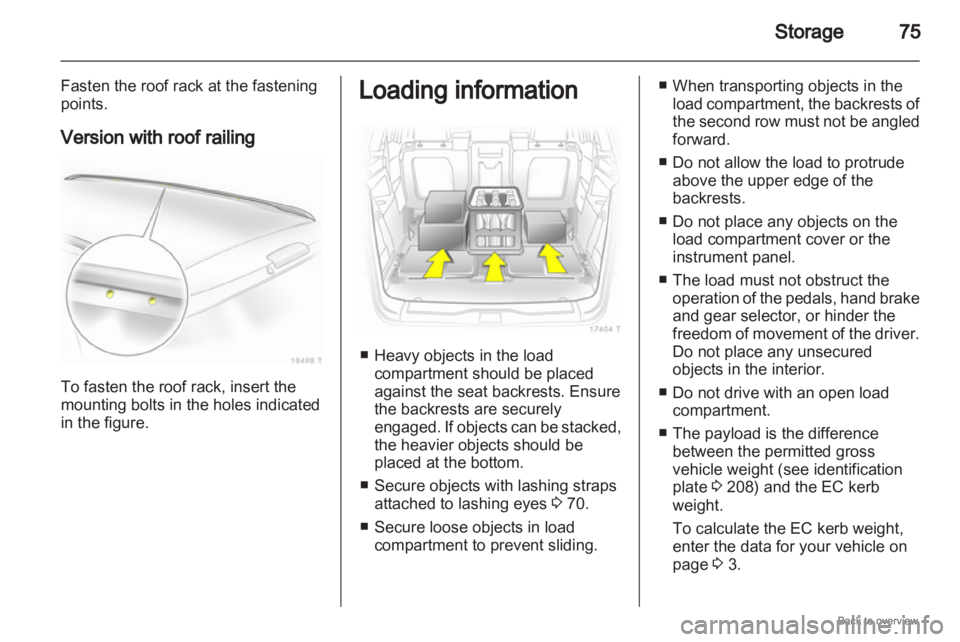
Version with roof railing To fasten the roof rack, insert the
mounting bolts in the holes indicated
in the figure. Loading information
■ Heavy objects in the load
compartment should be placed
against the seat backrests. Ensure
the backrests are securely
engaged.
If objects can be stacked,
the heavier objects should be
placed at the bottom.
■ Secure objects with lashing straps attached to lashing eyes 3 70.
■ Secure loose objects in load compartment to prevent sliding. ■ When transporting objects in the
load
compartment, the backrests of
the second row must not be angled
forward.
■ Do not allow the load to protrude above the upper edge of the
backrests.
■ Do not place any objects on the load compartment cover or the
instrument panel.
■ The load must not obstruct the operation of the pedals, hand brake
and gear selector, or hinder the
freedom of movement of the driver.
Do not place any unsecured
objects in the interior.
■ Do not drive with an open load compartment.
■ The payload is the difference between the permitted gross
vehicle weight (see identification
plate 3 208) and the EC kerb
weight.
To calculate the EC kerb weight,
enter the data for your vehicle on
page 3 3.
Page 100 of 228
100
Instruments and controls
Always day design: black or coloured
text on light background.
Always night design: white or
coloured text on dark background.
Selection is indicated by a o in front
of the menu item.
Ignition logic
See infotainment system manual. Vehicle messages
Messages are given via the
instrument panel display or as
warning and signal buzzers. Check
control messages appear on the
Info-Display. Some appear in an
abbreviated form. Confirm warning
messages 3 93, 3 96.
Warning chimes
When starting the engine or
whilst driving
■
If the electronic key is not presentor is not recognised.
■ If seat belt is not fastened.
■ If a door or the tailgate is not fully closed when starting off.
■ If a certain speed is exceeded with the hand brake applied.
■ If the speed programmed at the factory is exceeded.
■ If the vehicle has automated manual transmission and the
driver's door is opened when the engine is running, a gear is
engaged and the foot brake is not
depressed.
When the vehicle is parked and
the driver's door is opened ■
When the key is in the ignition switch.
■ With exterior lights on.
■ With Open&Start system and automatic transmission, if the
selector lever is not in P.
■ For automated manual transmission, if the hand brake is
not applied and no gear is engaged
when the engine is switched off.
Battery voltage
Low battery voltage in remote control
or electronic key. On vehicles without
check control, the message InSP3
appears in the instrument panel
display. Replace the battery 3 28,
3 29.
Page 101 of 228
Instruments and controls
101
Brake light switch
Brake light does not come on during
braking. Have the cause of the fault
remedied immediately by
a workshop.
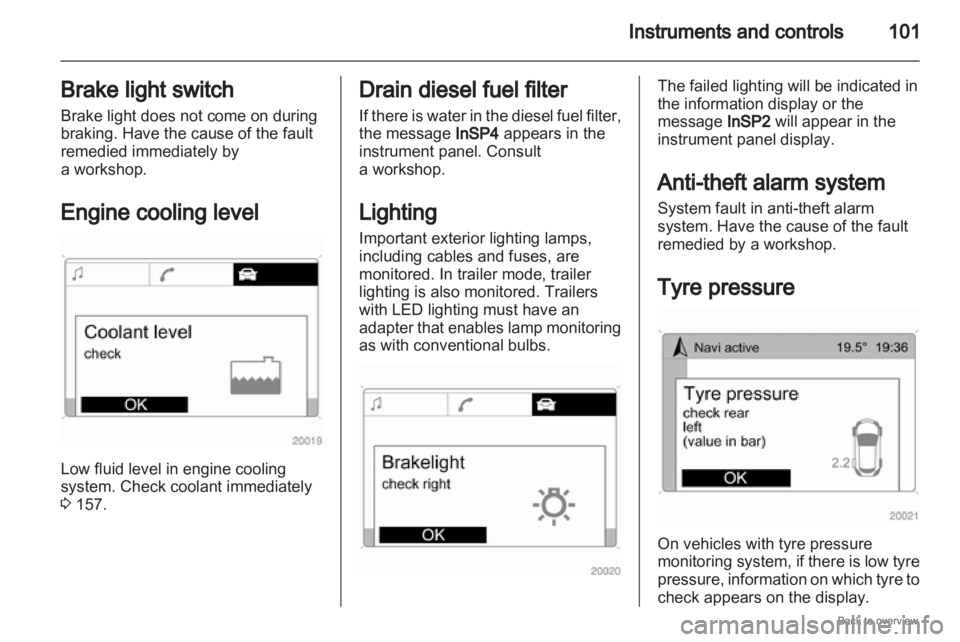
Engine cooling level Low fluid level in engine cooling
system. Check coolant immediately
3 157. Drain diesel fuel filter
If
there is water in the diesel fuel filter,
the message InSP4 appears in the
instrument panel. Consult
a workshop.
Lighting
Important exterior lighting lamps,
including cables and fuses, are
monitored. In trailer mode, trailer
lighting is also monitored. Trailers
with LED lighting must have an
adapter that enables lamp monitoring
as with conventional bulbs. The failed lighting will be indicated in
the information display or the
message InSP2 will appear in the
instrument panel display.
Anti-theft alarm system
System fault in anti-theft alarm
system. Have the cause of the fault
remedied by a workshop.
Tyre pressure On vehicles with tyre pressure
monitoring
system, if there is low tyre
pressure, information on which tyre to
check appears on the display.
Page 113 of 228
Lighting
113
Interior lighting
Instrument panel
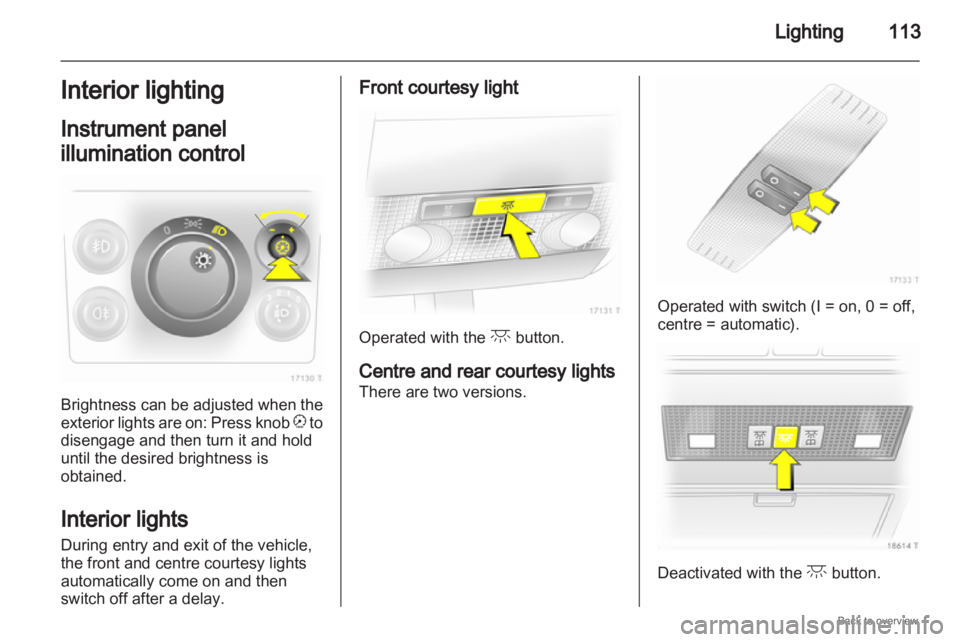
illumination control Brightness can be adjusted when the
exterior
lights are on: Press knob k to
disengage and then turn it and hold
until the desired brightness is
obtained.
Interior lights
During entry and exit of the vehicle,
the front and centre courtesy lights
automatically come on and then
switch off after a delay. Front courtesy light
Operated with the c button.
Centre and rear courtesy lights
There are two versions. Operated with switch (I = on, 0 = off,
centre = automatic).
Deactivated with the
c button.
Page 114 of 228
114
Lighting
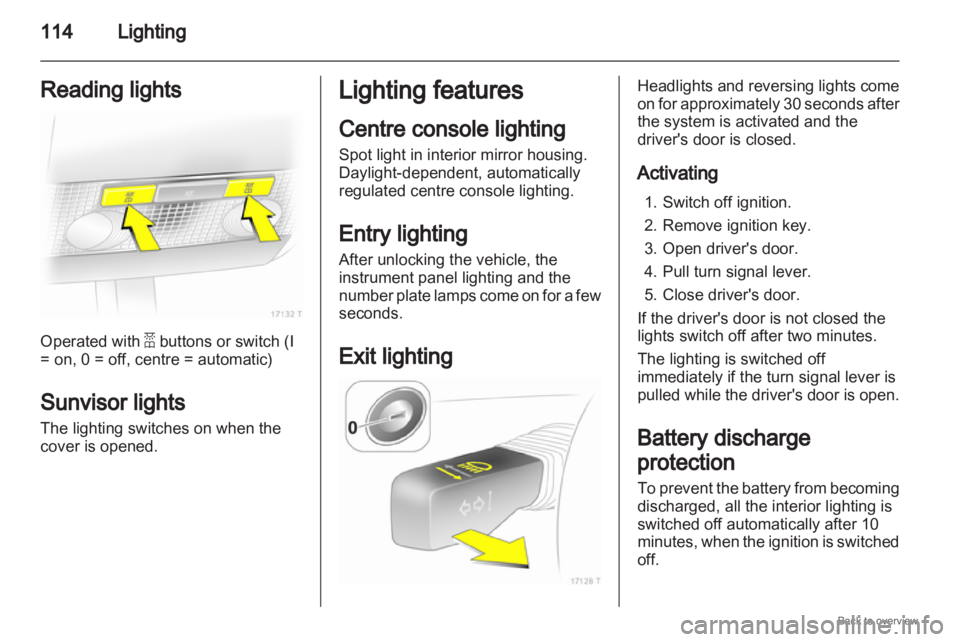
Reading lights Operated with a buttons or switch (I
= on, 0 = off, centre = automatic)
Sunvisor lights
The lighting switches on when the
cover is opened. Lighting features
Centre console lighting
Spot light in interior mirror housing.
Daylight-dependent, automatically
regulated centre console lighting.
Entry lighting
After unlocking the vehicle, the
instrument panel lighting and the
number
plate lamps come on for a few
seconds.
Exit lighting Headlights and reversing lights come
on
for approximately 30 seconds after
the system is activated and the
driver's door is closed.
Activating
1. Switch off ignition.
2. Remove ignition key.
3. Open driver's door.
4. Pull turn signal lever.
5. Close driver's door.
If the driver's door is not closed the
lights switch off after two minutes.
The lighting is switched off
immediately if the turn signal lever is
pulled while the driver's door is open.
Battery discharge
protection
To prevent the battery from becoming
discharged, all the interior lighting is
switched off automatically after 10
minutes, when the ignition is switched
off.
Page 122 of 228
122
Climate control
Heated rear window Ü 3 42.
The preselected temperature is
automatically regulated. In the
automatic
mode the fan speed and air
distribution automatically regulate the
air flow.
The system can be manually adapted
by use of air distribution and air flow
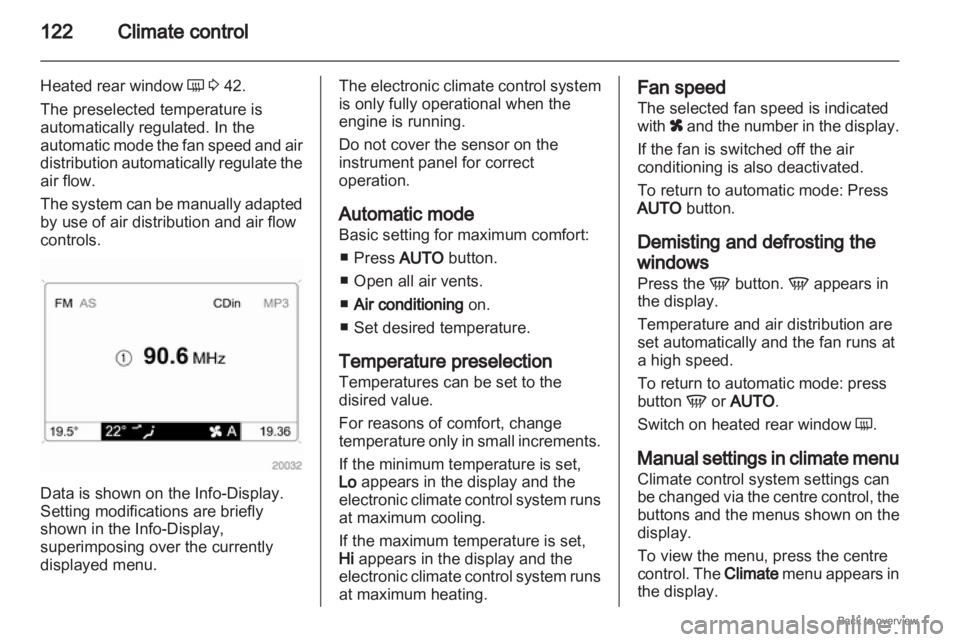
controls. Data is shown on the Info-Display.
Setting modifications are briefly
shown in the Info-Display
,
superimposing over the currently
displayed menu. The electronic climate control system
is only fully operational when the
engine is running.
Do not cover the sensor on the
instrument panel for correct
operation.
Automatic mode
Basic setting for maximum comfort:
■
Press AUTO button.
■ Open all air vents.
■ Air conditioning on.
■ Set desired temperature.
Temperature preselection
Temperatures can be set to the
disired value.
For reasons of comfort, change
temperature only in small increments.
If the minimum temperature is set,
Lo appears in the display and the
electronic climate control system runs
at maximum cooling.
If the maximum temperature is set,
Hi appears in the display and the
electronic climate control system runs
at maximum heating. Fan speed
The selected fan speed is indicated
with
x
and the number in the display.
If the fan is switched off the air
conditioning is also deactivated.
To return to automatic mode: Press
AUTO button.
Demisting and defrosting the
windows
Press the V button. V appears in
the display.
Temperature and air distribution are
set automatically and the fan runs at
a high speed.
To return to automatic mode: press
button V or AUTO.
Switch on heated rear window Ü.
Manual settings in climate menu
Climate control system settings can
be changed via the centre control, the
buttons and the menus shown on the
display.
To view the menu, press the centre
control. The Climate menu appears in
the display.
Page 167 of 228
Vehicle care
167
2. Press bulb slightly towards spring clip and remove.
3. Insert new bulb.
4. Install lamp.
Instrument panel
illumination
Have bulbs replaced by a workshop. Electrical system
Fuses
Data on the replacement fuse must
match
the data on the defective fuse.
The vehicle has two fuse boxes: one
behind a cover on the left side of the
load compartment and one in the front
left of the engine compartment. Store spare fuses in the load
compartment fuse box version B.
Open the cover 3 171.
Before replacing a fuse, turn off the
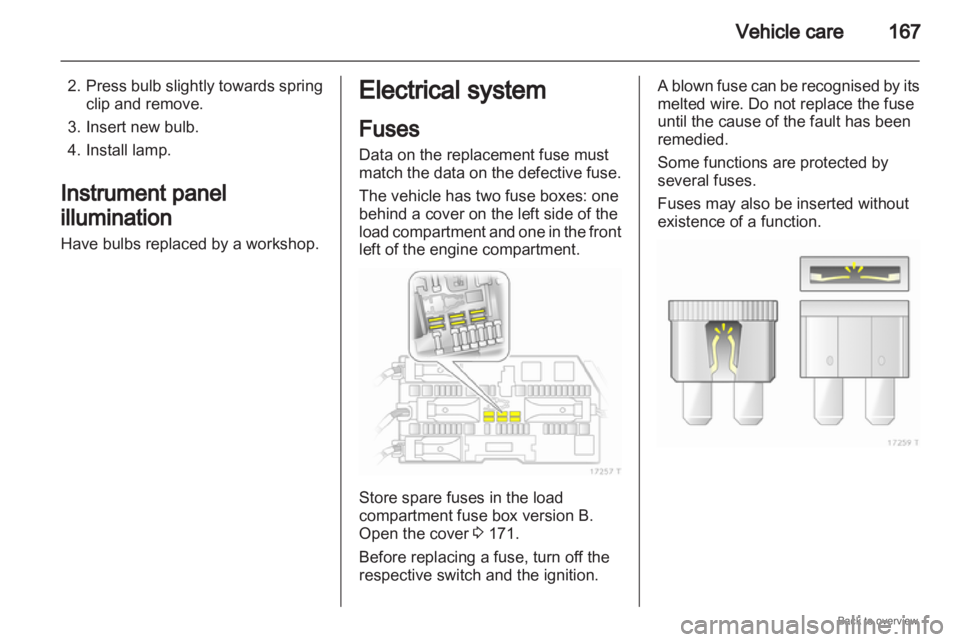
respective switch and the ignition. A blown fuse can be recognised by its
melted wire. Do not replace the fuse
until the cause of the fault has been
remedied.
Some functions are protected by
several fuses.
Fuses may also be inserted without
existence of a function.