USB OPEL ZAFIRA C 2018.5 Manual user
[x] Cancel search | Manufacturer: OPEL, Model Year: 2018.5, Model line: ZAFIRA C, Model: OPEL ZAFIRA C 2018.5Pages: 341, PDF Size: 10.22 MB
Page 168 of 341

166Infotainment systemfollowed. If a navigation instruction
contradicts traffic regulations, the traffic regulations always apply.
Functioning of the navigation
system
The position and movement of the vehicle are detected by the navigation
system using sensors. The travelled
distance is determined by the
vehicle’s speedometer signal, turning movements on bends by a sensor.
The position is determined by theGPS (Global Positioning System)
satellites.
By comparing the sensor signals with the digital maps, it is possible to
determine the position with an
accuracy of approx. 10 metres.
The system will also work with poor
GPS reception. However, the
accuracy of the determination of the
position will be reduced.
After the entry of the destination
address or point of interest (nearest
petrol station, hotel, etc.), the route is
calculated from the current location to
the destination selected.
Route guidance is provided by voice
output and an arrow, as well as with
the aid of a multi-colour map display.
Important information
TMC traffic information system and
dynamic route guidance
The TMC traffic information system
receives all current traffic information from TMC radio stations. This
information is included in the
calculation of the overall route. During
this process, the route is planned so
that traffic problems related to pre-
selected criteria are avoided.
If there is a traffic problem during
active route guidance, depending on
the pre-settings, a message appears as to whether the route should be
changed.
TMC traffic information is displayed in
the map display as symbols or as
detailed text on the TMC messages
menu.
To be able to use TMC traffic
information, the system must receive
TMC stations in the relevant region.The TMC traffic stations can be
selected in the navigation menu
3 167.
Map data
All required map data is stored within
the Infotainment system.
To update the navigation map data,
purchase new data at the Opel Dealer or on our home page http://
opel.navigation.com/. You are
provided with a USB device
containing the update.
Connect the USB device to the USB
port and follow the instructions on the screen. The vehicle must be turned
on during the update process.
Note
The vehicle remains operational
during the update process. If the
vehicle is turned off, the update can
be paused. The navigation
application, Bluetooth and other
external devices are unavailable
until the update process is finished.
Page 181 of 341

Infotainment system179If you want to be consulted when a
route is modified, activate Always
ask .
If you do not want routes to be
modified, activate Never.
Route settings Parameters for road and route
selection can be set.
Road types
If desired, certain road types can be
avoided.
Select L on the map to display the
Options menu. Select Avoid on
Route and then activate the road
types you want to be avoided.
Note
If route guidance is active when
changing the road settings, the route
is recalculated according to the new
settings.
Route type
To set the route type, select L on the
map to display the Options menu.
Select Navigation Settings , Routing
options and then Route type .Activate the desired option:
● Fastest for the fastest route
● Eco-friendly for a route that
allows ecologically friendly
drivingSpeech recognition
General information
The voice pass-thru application of the Infotainment system allows access tothe speech recognition commands on
your smartphone. See your
smartphone manufacturer's
operating instructions to find out
whether your smartphone supports this feature.
In order to use the voice pass-thru
application, the smartphone must be
connected to the Infotainment system via USB cable 3 159 or via Bluetooth
3 181.
Usage
Activating speech recognition Press and hold g on the control panel
or qw on the steering wheel to start
a speech recognition session. A voice
command message is displayed on
the screen.
Page 183 of 341
Infotainment system181interference is caused by the
mobile phone or if dangerous
situations can occur.
Bluetooth
The phone function is certified by theBluetooth Special Interest Group
(SIG).
You can find further information about the specification on the internet at
http://www.bluetooth.com.
Bluetooth connection
Bluetooth is a radio standard for the
wireless connection of e.g. mobile
phones, smartphones or other
devices.
The pairing and connecting of the
Bluetooth devices to the Infotainment
system are carried out via the
Bluetooth menu. Pairing is the PIN
code exchange between the
Bluetooth device and the
Infotainment system.
Bluetooth menu
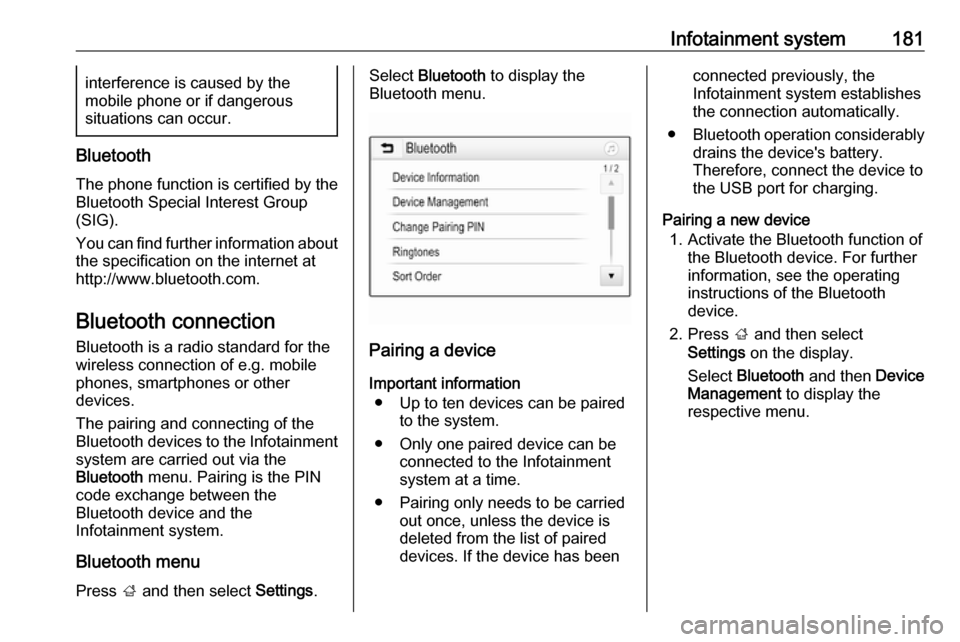
Press ; and then select Settings.
Select Bluetooth to display the
Bluetooth menu.
Pairing a device
Important information ● Up to ten devices can be paired to the system.
● Only one paired device can be connected to the Infotainment
system at a time.
● Pairing only needs to be carried out once, unless the device is
deleted from the list of paired
devices. If the device has been
connected previously, the
Infotainment system establishes
the connection automatically.
● Bluetooth operation considerably
drains the device's battery.
Therefore, connect the device to
the USB port for charging.
Pairing a new device 1. Activate the Bluetooth function of the Bluetooth device. For further
information, see the operating
instructions of the Bluetooth
device.
2. Press ; and then select
Settings on the display.
Select Bluetooth and then Device
Management to display the
respective menu.
Page 188 of 341

186Infotainment systemContacts settings
The contacts list can be sorted by last name or first name.
Press ; and then select Settings to
display the respective menu.
Select Bluetooth and then Sort
Order . Activate the desired option.
Using the call history
All incoming, outgoing, or missed calls are registered.
Press ; and then select Phone.
Select Call History in the phone main
menu.
Select q for outgoing calls, r for
missed calls, s for incoming calls
and p for all calls. The respective call
list is displayed.
Select the desired entry to initiate a
call.
Redialling a number
The last dialled phone number can be
redialled.
Press ; and then select Phone.
Select v on the screen or press qw
on the steering wheel.
Using speed dial numbers
Speed dial numbers that are stored
on the mobile phone can also be
dialled using the keypad of the phone
main menu.
Press ; and then select Phone.
Touch and hold the respective digit on the keypad to initiate the call.
Incoming phone call
Taking a call
If an audio mode, e.g. the radio or
USB mode, is active at the moment a
call comes in, the audio source is
muted and stays muted until the call
ends.
A message with the caller's phone
number or name (if available) is
displayed.
Page 332 of 341

330Customer informationDepending on the equipment level in
question, these include
● Seat and steering wheel position settings,
● Chassis and air conditioning settings,
● Custom settings such as interior lighting.
You can input your own data in the
infotainment functions for your
vehicle as part of the selected
features.
Depending on the equipment level in
question, these include
● Multimedia data such as music, videos or photos for playback in
an integrated multimedia system,
● Address book data for use with an integrated hands-free system
or an integrated navigation
system,
● Input destinations,
● Data on the use of online services.
This data for comfort and
infotainment functions can be stored
locally in the vehicle or be kept on adevice that you have connected to the
vehicle ( e.g. a smartphone, USB stick
or MP3 player). Data that you have
input yourself can be deleted at any
time.
This data can only be transmitted out
of the vehicle at your request,
particularly when using online
services in accordance with the
settings selected by you.
Smartphone integration, e.g.
Android Auto or Apple CarPlay
If your vehicle is equipped
accordingly, you can connect your
smartphone or another mobile device to the vehicle so that you can control
it via the controls integrated in the
vehicle. The smartphone image and
sound can be output via the
multimedia system in this case. At the
same time, specific information is
transmitted to your smartphone.
Depending on the type of integration,
this includes data such as position
data, day / night mode and other
general vehicle information. For moreinformation, please see the operating instructions for the vehicle /
infotainment system.
Integration allows selected
smartphone apps to be used, such as
navigation or music playback. No
further integration is possible
between smartphone and vehicle, in
particular active access to vehicle
data. The nature of further data
processing is determined by the
provider of the app used. Whether
you can define settings, and if so
which ones, is dependent on the app
in question and your smartphone's
operating system.
Page 334 of 341

332IndexAAccessories and vehicle modifications .......................... 259
Activating Bluetooth music .........161
Activating phone .........................184
Activating radio ........................... 153
Activating the navigation system 167
Activating USB audio ..................161
Activating USB movie .................163
Activating USB picture ................162
Active Emergency Braking .........233
Active head restraints ...................37
Adaptive cruise control .......117, 222
AdBlue ........................ 115, 206, 304
Adjustable air vents ...................195
Airbag and belt tensioners .........111
Airbag deactivation ..............59, 112
Airbag label................................... 54 Airbag system .............................. 54
Air conditioning regular operation ................................ 196
Air conditioning system .............. 190
Air intake .................................... 196
Air vents...................................... 195
Antilock brake system ................ 213
Antilock brake system (ABS) .....113
Anti-theft alarm system ................26
Anti-theft locking system .............. 26
Appearance care ........................300
Armrest ......................................... 42Armrest storage ........................... 69
Ashtrays ..................................... 102
Audio files ................................... 159
Automatic anti-dazzle ..................30
Automatic light control ...............131
Automatic locking ........................24
Automatic transmission .............209
Autostop ..................................... 201
Auto volume................................ 150
Auxiliary heater ........................... 195
B Basic operation ........................... 147
Battery discharge protection ......139
Battery voltage ........................... 123
Bicycle rack .................................. 70
BlueInjection ............................... 206
Bluetooth Bluetooth connection ..............181
Bluetooth music menu ............161
Connecting device ..................159
General information ................159
Pairing ..................................... 181
Phone ...................................... 184
Bluetooth connection ..................181
Bonnet ....................................... 260
Brake and clutch fluid .................304
Brake and clutch system ...........112
Brake assist ............................... 215
Brake fluid .................................. 264
Page 336 of 341

334Entry lighting .............................. 138
Event data recorders ..................328
Exhaust filter ....................... 115, 204
Exit lighting ................................ 138
Exterior care .............................. 300
Exterior light ............................... 116
Exterior lighting ....................13, 130
Exterior mirrors ............................. 29
F Fault ........................................... 211
Favourite lists ............................. 155
Retrieving stations................... 155
Storing stations .......................155
Favourites ................................... 171
File formats Audio files................................ 159
Movie files ............................... 159
Picture files.............................. 159
First aid kit ................................... 92
Fixed air vents ........................... 196
Flex-Fix system ............................ 70
Fog light ..................................... 116
Fog lights ................................... 269
Folding mirrors ............................. 29
Folding tray .................................. 92
Following distance ......................114
Following distance indication ......232
Forward collision alert................. 229
Front airbag system .....................57Front fog lights ........................... 135
Front seats.................................... 38
Front storage ................................ 68
Fuel............................................. 245
Fuel for diesel engines ..............246
Fuel for liquid gas operation .......247
Fuel for natural gas operation ...247
Fuel for petrol engines ...............245
Fuel gauge ................................. 104
Fuel selector .............................. 105
Funnel......................................... 248
Fuses ......................................... 274
G Gauges ....................................... 103
Gear shifting ............................... 114
General information ...159, 165,
179, 180, 253
Bluetooth ................................. 159
DAB ......................................... 157
Infotainment system ................140
Navigation ............................... 165
Phone ...................................... 180
Smartphone applications ........159
USB ......................................... 159
Glass panel .................................. 34
Glovebox ..................................... 66
Guidance ................................... 176H
Halogen headlights ....................267
Hand brake ................................. 213
Hazard warning flashers ............135
Headlight flash ........................... 132
Headlight range adjustment ......132
Headlights................................... 130
Headlights when driving abroad 133
Head restraint adjustment .............8
Head restraints ............................ 36
Heated mirrors ............................. 30
Heated rear window ..................... 33
Heated steering wheel .................97
Heating ........................................ 43
Heating and ventilation system . 189
High beam ......................... 116, 131
High beam assist ................116, 131
Hill start assist ........................... 215
Home menu ................................ 147
Horn ....................................... 14, 98
I
Identification plate .....................306
Ignition switch positions .............198
Immobiliser .......................... 28, 116
Indicators .................................... 103
Info Display ................................. 121
Information displays.................... 117
Infotainment control panel ..........142
Instrument cluster ......................103
Page 339 of 341

337Seat belts ..................................... 50
Seat heating ................................. 43
Seat position ................................ 38
Second row seats ........................44
Selective catalytic reduction .......206
Selector lever ............................. 209
Service ............................... 196, 303
Service display .......................... 107
Service information ....................303
Side airbag system ......................58
Side blind spot alert ....................237
Sidelights .................................... 130
Side turn lights ........................... 273
Smartphone ................................ 159
Phone projection .....................164
Software acknowledgement .......326
Spare wheel ............................... 293
Speech recognition .....................179
Speed dial numbers ...................184
Speed limiter....................... 117, 221
Speedometer ............................. 103
Starting and operating ................198
Starting off ................................... 17
Starting the engine ....................199
Station search............................. 154
Steering ...................................... 198
Steering wheel adjustment ......9, 97
Steering wheel audio controls ....142
Steering wheel controls ...............97
Stop-start system........................ 201Storage ......................................... 66
Storage compartments .................66
Storing stations ........................... 155
Sunvisor lights ........................... 138
Sun visors .................................... 33
Switching the Infotainment system on ................................ 145
Symbols ......................................... 4
System settings .......................... 151
T Tachometer ............................... 104
Tail lights ................................... 270
Theft-deterrent feature ..............141
Third row seats ............................ 48
Three-point seat belt .................... 51
TMC stations .............................. 165
Tone settings .............................. 149
Tools .......................................... 281
Touch beep volume ....................150
Tow bar....................................... 253
Towing ................................ 253, 298
Towing another vehicle .............299
Towing equipment .....................254
Towing the vehicle .....................298
TP volume .................................. 150
Traction Control system ............. 216
Traction Control system off......... 114
Traffic incidents .......................... 176
Traffic sign assistant ...........117, 240Trailer coupling ........................... 253
Trailer stability assist .................256
Trailer towing ............................. 253
Transmission ............................... 16
Transmission display .................209
Tread depth ............................... 286
Trip odometer ............................ 103
Turn lights .......................... 110, 135
Turn list ....................................... 176
Tyre chains ................................ 287
Tyre designations ......................281
Tyre pressure ............................ 282
Tyre pressure monitoring system ............................. 115, 283
Tyre pressures ........................... 319
Tyre repair kit ............................. 287
U Ultrasonic parking assist............. 234
Underseat storage .......................68
Upholstery .................................. 302
Usage ................. 145, 153, 167, 179
Bluetooth ................................. 159
Menu ....................................... 147
Navigation system ...................167
Phone ...................................... 184
Radio ....................................... 153
USB ......................................... 159
Page 340 of 341

338USBConnecting device ..................159
General information ................159
USB audio menu .....................161
USB movie menu ....................163
USB picture menu ...................162
Using smartphone applications ..164
Using this manual ..........................3
V Vehicle battery ........................... 264
Vehicle checks............................ 260
Vehicle data ................................ 308
Vehicle data recording and privacy ..................................... 328
Vehicle detected ahead ..............117
Vehicle dimensions .................... 316 Vehicle Identification Number ....306
Vehicle jack ................................ 281
Vehicle messages .....................122
Vehicle personalisation .............124
Vehicle security ............................ 26
Vehicle specific data ......................3
Vehicle storage ........................... 259
Vehicle tools ............................... 281
Vehicle unlocking ........................... 6 Vehicle weight ........................... 315
Ventilation ................................... 189
Voice guidance ........................... 167
Voice recognition ........................179Volume
Auto volume ............................ 150
Maximum startup volume ........150
Mute function........................... 145
Ring tone volume ....................150
Setting the volume ..................145
Speed compensated volume ..150
Touch beep volume ................150
TP volume ............................... 150
Volume limitation at high
temperatures ........................... 145
Volume settings .......................... 150
W
Warning chimes .........................123
Warning lights ............................. 103
Warning triangle .......................... 92
Washer and wiper systems .........14
Washer fluid ............................... 264
Waveband selection ...................153
Wheel changing .........................290
Wheel covers ............................. 287
Wheels and tyres .......................281
Windows ....................................... 31
Windscreen................................... 31
Windscreen wiper and washer ....98
Winter tyres ............................... 281
Wiper blade replacement ..........266