ad blue OPEL ZAFIRA C 2018.5 Manual user
[x] Cancel search | Manufacturer: OPEL, Model Year: 2018.5, Model line: ZAFIRA C, Model: OPEL ZAFIRA C 2018.5Pages: 341, PDF Size: 10.22 MB
Page 162 of 341

160Infotainment systemCaution
Avoid disconnecting the device
during playback. This may
damage the device or the
Infotainment system.
USB Auto Launch
By default, the USB audio menu is displayed automatically as soon as a
USB device is connected.
If desired, this function can be
deactivated.
Press ; and then select Settings to
open the settings menu.
Select Radio, scroll to USB Auto
Launch and touch the screen button
next to the function.
To reactivate the function, touch the
screen button again.
Bluetooth Devices which support the Bluetooth
music profiles A2DP and AVRCP can
be connected wirelessly to the
Infotainment system. The
Infotainment system can play music
files contained in these devices.
Connecting a device
For a detailed description on how to
establish a Bluetooth connection
3 181.
File formats and folders
The maximum capacity of a device
supported by the Infotainment system amounts to 5000 music files,
5000 picture files, 500 movie files,
5000 folders and 15 stages of folder
structure. Only devices formatted in
the FAT16 / FAT32 file system are
supported.
If there are images included in the
audio metadata, these images are
displayed on the screen.
Note
Some files may not be played
properly. This may be due to a
different recording format or the
condition of the file.
Files from online shops to which
Digital Rights Management (DRM)
has been applied cannot be played.
The Infotainment system can play the
following audio, picture and movie
files stored on external devices.Audio files
The playable audio file formats are
MP3 (MPEG-1 Layer 3, MPEG-2
Layer 3), WMA, AAC, AAC+, ALAC
OGG WAF (PCM), AIFF, 3GPP
(audio only), Audio Books and LPCM.
iPod ®
and iPhone ®
devices play
ALAC, AIFF, Audio Books and LPCM.
When playing a file with ID3 tag
information, the Infotainment system
can display information, e.g. on the
track title and artist.
Picture files
The displayable picture file formats
are JPG, JPEG, BMP, PNG and GIF.
JPG files must be 64 to 5000 pixels in
width and 64 to 5000 pixels in height.
BMP, PNG and GIF files must be 64
to 1024 pixels in width and 64 to
1024 pixels in height.
The pictures should not exceed a file
size of 1MB.
Movie files
The playable movie file formats are
AVI and MP4.
Page 168 of 341

166Infotainment systemfollowed. If a navigation instruction
contradicts traffic regulations, the traffic regulations always apply.
Functioning of the navigation
system
The position and movement of the vehicle are detected by the navigation
system using sensors. The travelled
distance is determined by the
vehicle’s speedometer signal, turning movements on bends by a sensor.
The position is determined by theGPS (Global Positioning System)
satellites.
By comparing the sensor signals with the digital maps, it is possible to
determine the position with an
accuracy of approx. 10 metres.
The system will also work with poor
GPS reception. However, the
accuracy of the determination of the
position will be reduced.
After the entry of the destination
address or point of interest (nearest
petrol station, hotel, etc.), the route is
calculated from the current location to
the destination selected.
Route guidance is provided by voice
output and an arrow, as well as with
the aid of a multi-colour map display.
Important information
TMC traffic information system and
dynamic route guidance
The TMC traffic information system
receives all current traffic information from TMC radio stations. This
information is included in the
calculation of the overall route. During
this process, the route is planned so
that traffic problems related to pre-
selected criteria are avoided.
If there is a traffic problem during
active route guidance, depending on
the pre-settings, a message appears as to whether the route should be
changed.
TMC traffic information is displayed in
the map display as symbols or as
detailed text on the TMC messages
menu.
To be able to use TMC traffic
information, the system must receive
TMC stations in the relevant region.The TMC traffic stations can be
selected in the navigation menu
3 167.
Map data
All required map data is stored within
the Infotainment system.
To update the navigation map data,
purchase new data at the Opel Dealer or on our home page http://
opel.navigation.com/. You are
provided with a USB device
containing the update.
Connect the USB device to the USB
port and follow the instructions on the screen. The vehicle must be turned
on during the update process.
Note
The vehicle remains operational
during the update process. If the
vehicle is turned off, the update can
be paused. The navigation
application, Bluetooth and other
external devices are unavailable
until the update process is finished.
Page 175 of 341
Infotainment system173
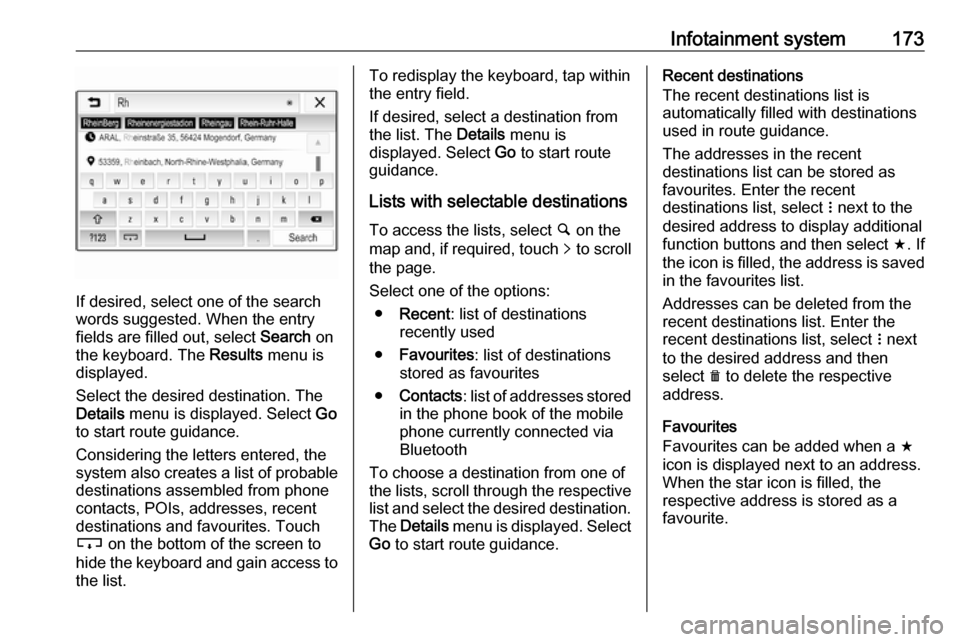
If desired, select one of the search
words suggested. When the entry
fields are filled out, select Search on
the keyboard. The Results menu is
displayed.
Select the desired destination. The
Details menu is displayed. Select Go
to start route guidance.
Considering the letters entered, the
system also creates a list of probable
destinations assembled from phone
contacts, POIs, addresses, recent
destinations and favourites. Touch
c on the bottom of the screen to
hide the keyboard and gain access to the list.
To redisplay the keyboard, tap within
the entry field.
If desired, select a destination from
the list. The Details menu is
displayed. Select Go to start route
guidance.
Lists with selectable destinations
To access the lists, select ½ on the
map and, if required, touch q to scroll
the page.
Select one of the options:
● Recent : list of destinations
recently used
● Favourites : list of destinations
stored as favourites
● Contacts : list of addresses stored
in the phone book of the mobile phone currently connected via
Bluetooth
To choose a destination from one of
the lists, scroll through the respective
list and select the desired destination. The Details menu is displayed. Select
Go to start route guidance.Recent destinations
The recent destinations list is
automatically filled with destinations
used in route guidance.
The addresses in the recent
destinations list can be stored as
favourites. Enter the recent
destinations list, select n next to the
desired address to display additional function buttons and then select f. If
the icon is filled, the address is saved
in the favourites list.
Addresses can be deleted from the
recent destinations list. Enter the
recent destinations list, select n next
to the desired address and then
select e to delete the respective
address.
Favourites
Favourites can be added when a f
icon is displayed next to an address.
When the star icon is filled, the
respective address is stored as a
favourite.
Page 181 of 341

Infotainment system179If you want to be consulted when a
route is modified, activate Always
ask .
If you do not want routes to be
modified, activate Never.
Route settings Parameters for road and route
selection can be set.
Road types
If desired, certain road types can be
avoided.
Select L on the map to display the
Options menu. Select Avoid on
Route and then activate the road
types you want to be avoided.
Note
If route guidance is active when
changing the road settings, the route
is recalculated according to the new
settings.
Route type
To set the route type, select L on the
map to display the Options menu.
Select Navigation Settings , Routing
options and then Route type .Activate the desired option:
● Fastest for the fastest route
● Eco-friendly for a route that
allows ecologically friendly
drivingSpeech recognition
General information
The voice pass-thru application of the Infotainment system allows access tothe speech recognition commands on
your smartphone. See your
smartphone manufacturer's
operating instructions to find out
whether your smartphone supports this feature.
In order to use the voice pass-thru
application, the smartphone must be
connected to the Infotainment system via USB cable 3 159 or via Bluetooth
3 181.
Usage
Activating speech recognition Press and hold g on the control panel
or qw on the steering wheel to start
a speech recognition session. A voice
command message is displayed on
the screen.
Page 182 of 341

180Infotainment systemAs soon as a beep is heard, you can
say a command. For information on
the commands supported, see the
operating instructions of your
smartphone.
Adjusting the volume of voice
prompts
Turn m on the control panel or press
+ / - on the right side of the steering
wheel to increase or decrease the
volume of voice prompts.
Deactivating speech recognition
Press xn on the steering wheel.
The voice command message
disappears and the speech
recognition session is ended.Phone
General information
The phone function provides you with
the possibility of having mobile phone
conversations via a vehicle
microphone and the vehicle
loudspeakers as well as operating the most important mobile phone
functions via the Infotainment system
in the vehicle. To be able to use the
phone function, the mobile phone
must be connected to the
Infotainment system via Bluetooth.
Not all phone functions are supported by every mobile phone. The usable
phone functions depend on the
relevant mobile phone and network
provider. You can find further
information on this in the operating
instructions of your mobile phone, or
you can enquire about them with your
network provider.Important information for
operation and traffic safety9 Warning
Mobile phones have effects on
your environment. For this reason safety regulations and directions
have been prepared. You should
be familiar with the related
directions before you use the
telephone function.
9 Warning
Use of the hands-free facility while
driving can be dangerous because
your concentration is reduced
when telephoning. Park your
vehicle before you use the hands- free facility. Follow the stipulations
of the country in which you find
yourself at present.
Do not forget to follow the special
regulations that apply in specific
areas and always switch off the
mobile phone if the use of mobile
phones is prohibited, if
Page 183 of 341
Infotainment system181interference is caused by the
mobile phone or if dangerous
situations can occur.
Bluetooth
The phone function is certified by theBluetooth Special Interest Group
(SIG).
You can find further information about the specification on the internet at
http://www.bluetooth.com.
Bluetooth connection
Bluetooth is a radio standard for the
wireless connection of e.g. mobile
phones, smartphones or other
devices.
The pairing and connecting of the
Bluetooth devices to the Infotainment
system are carried out via the
Bluetooth menu. Pairing is the PIN
code exchange between the
Bluetooth device and the
Infotainment system.
Bluetooth menu
Press ; and then select Settings.
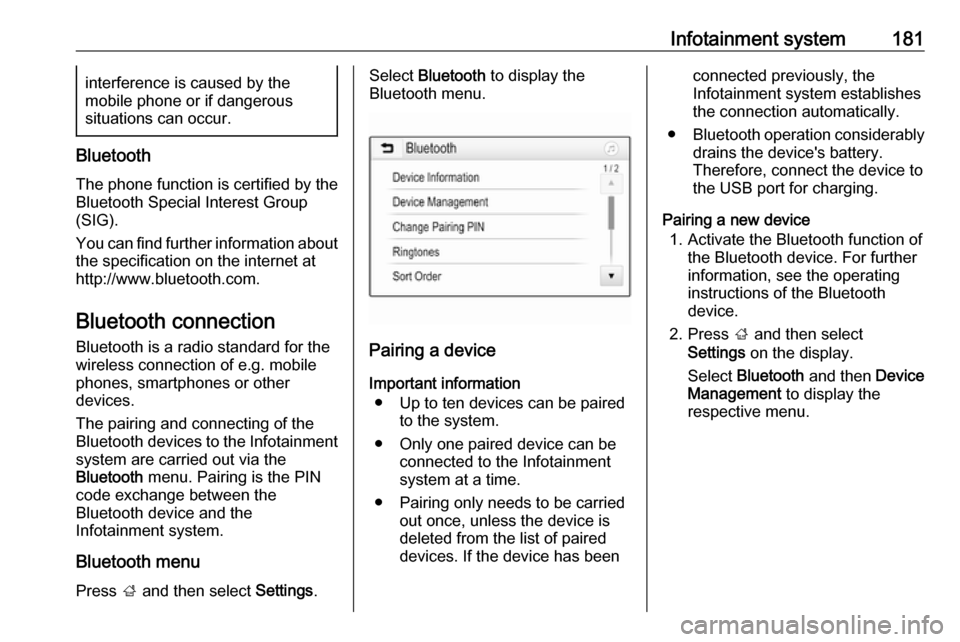
Select Bluetooth to display the
Bluetooth menu.
Pairing a device
Important information ● Up to ten devices can be paired to the system.
● Only one paired device can be connected to the Infotainment
system at a time.
● Pairing only needs to be carried out once, unless the device is
deleted from the list of paired
devices. If the device has been
connected previously, the
Infotainment system establishes
the connection automatically.
● Bluetooth operation considerably
drains the device's battery.
Therefore, connect the device to
the USB port for charging.
Pairing a new device 1. Activate the Bluetooth function of the Bluetooth device. For further
information, see the operating
instructions of the Bluetooth
device.
2. Press ; and then select
Settings on the display.
Select Bluetooth and then Device
Management to display the
respective menu.
Page 184 of 341

182Infotainment system
Note
If no phone is connected, the Device
Management menu can also be
accessed via the phone menu:
Press ; and then select Phone.
3. Touch Search Device . All
discoverable Bluetooth devices in
the environment are displayed in a new search list.
4. Touch the Bluetooth device you wish to pair.
5. Confirm the pairing procedure: ● If SSP (secure simple pairing) is supported:
Confirm the messages on the
Infotainment system and the
Bluetooth device.
● If SSP (secure simple pairing) is not supported:
On the Infotainment system: an Info message is displayed
asking you to enter a PIN
code on your Bluetooth
device.
On the Bluetooth device: enter the PIN code and
confirm your input.
6. The Infotainment system and the device are paired.
Note
If the Bluetooth device is
successfully paired, h next to the
Bluetooth device indicates that the
phone function is enabled and y
indicates that the Bluetooth music
function is enabled.
7. The phone book is downloaded automatically to the Infotainment
system. Depending on the phone, the Infotainment system must be
allowed access to the phone
book. If required, confirm themessages displayed on the
Bluetooth device.
If this function is not supported by
the Bluetooth device, a
corresponding message is
displayed.
Changing the Bluetooth PIN code
Press ; and then select Settings.
Select Bluetooth and then Change
Pairing PIN to display the respective
submenu. A keypad is displayed.
Enter the desired four-digit PIN code.
To delete an entered number, select
⇦.
Confirm your input by selecting Enter.
Connecting a paired device
Press ; and then select Settings.
Select Bluetooth and then Device
Management to display the
respective menu.
Select the Bluetooth device you wish
to connect. The device is connected.
Note
The connected device and the
available options are highlighted.
Page 185 of 341

Infotainment system183Disconnecting a devicePress ; and then select Settings.
Select Bluetooth and then Device
Management to display the
respective menu.
Select the Bluetooth device currently connected. You are prompted with a message.
Select Yes to disconnect the device.
Deleting a device Press ; and then select Settings.
Select Bluetooth and then Device
Management to display the
respective menu.
Select e next to the Bluetooth device.
You are prompted with a message.
Select Yes to delete the device.
Device info Press ; and then select Settings.
Select Bluetooth and then Device
Information to display the respective
menu.The information displayed includes
Device Name , Address , and PIN
Code .
Emergency call9 Warning
Connection setup cannot be
guaranteed in all situations. For
this reason you should not rely
exclusively on a mobile phone
when a vitally important
communication (e.g. a medical
emergency) is concerned.
In some networks it may be
necessary for a valid SIM card to
be properly inserted in the mobile
phone.
9 Warning
Bear in mind that you can make
and receive calls with the mobile
phone if it is in a service area with
a sufficiently strong signal. Under
certain circumstances,
emergency calls cannot be made
in all mobile phone networks;
problems may occur when certain
network services and / or
telephone functions are active.
You can enquire about this with
the local network operators.
The emergency call number can
differ depending on the region and
country. Please enquire
beforehand about the correct
emergency call number for the
relevant region.
Making an emergency call
Dial the emergency call number (e.g.
112 ).
The telephone connection to the
emergency call centre is set up.
Answer when the service personnel
questions you about the emergency.
9 Warning
Do not end the call until you are
requested to do so by the
emergency call centre.
Page 186 of 341

184Infotainment systemOperation
As soon as a connection via
Bluetooth has been set up between
your mobile phone and the
Infotainment system, you can operate many functions of your mobile phone
via the Infotainment system.
Note
In the hands-free mode, mobile
phone operation is still possible, e.g.
taking a call or adjusting the volume.
After setup of a connection between
the mobile phone and the
Infotainment system, mobile phone
data is transmitted to the Infotainment
system. This can take some time
depending on the mobile phone and
the amount of data to be transferred.
During this period, operation of the
mobile phone via the Infotainment
system is possible only to a limited extent.
Note
Not every mobile phone fully
supports the phone function.
Therefore, deviations from the range of functions described below are
possible.Phone main menu
Press ; and then select Phone to
display the respective menu.
Note
The Phone main menu is only
available if a mobile phone is connected to the Infotainment
system via Bluetooth. For a detailed
description 3 181.
Many functions of the mobile phone can now be controlled via the phone
main menu (and associated
submenus), and via the phone-
specific controls on the steering
wheel.
Initiating a phone call
Entering a phone number
Press ; and then select Phone.
Enter a telephone number using the
keypad in the phone main menu.
To delete one or more entered
characters, touch or touch and hold
⇦.
Touch v on the screen or press qw
on the steering wheel to start dialling.
Using the phone book Note
When pairing a mobile phone with
the Infotainment system via
Bluetooth, the phone book of the
mobile phone is downloaded
automatically 3 181.
Press ; and then select Phone.
Select Contacts in the phone main
menu.
Page 188 of 341

186Infotainment systemContacts settings
The contacts list can be sorted by last name or first name.
Press ; and then select Settings to
display the respective menu.
Select Bluetooth and then Sort
Order . Activate the desired option.
Using the call history
All incoming, outgoing, or missed calls are registered.
Press ; and then select Phone.
Select Call History in the phone main
menu.
Select q for outgoing calls, r for
missed calls, s for incoming calls
and p for all calls. The respective call
list is displayed.
Select the desired entry to initiate a
call.
Redialling a number
The last dialled phone number can be
redialled.
Press ; and then select Phone.
Select v on the screen or press qw
on the steering wheel.
Using speed dial numbers
Speed dial numbers that are stored
on the mobile phone can also be
dialled using the keypad of the phone
main menu.
Press ; and then select Phone.
Touch and hold the respective digit on the keypad to initiate the call.
Incoming phone call
Taking a call
If an audio mode, e.g. the radio or
USB mode, is active at the moment a
call comes in, the audio source is
muted and stays muted until the call
ends.
A message with the caller's phone
number or name (if available) is
displayed.