phone OPEL ZAFIRA C 2018.5 Manual user
[x] Cancel search | Manufacturer: OPEL, Model Year: 2018.5, Model line: ZAFIRA C, Model: OPEL ZAFIRA C 2018.5Pages: 341, PDF Size: 10.22 MB
Page 148 of 341
146Infotainment systemFor a detailed description of:● Radio functions 3 153
● External devices 3 161
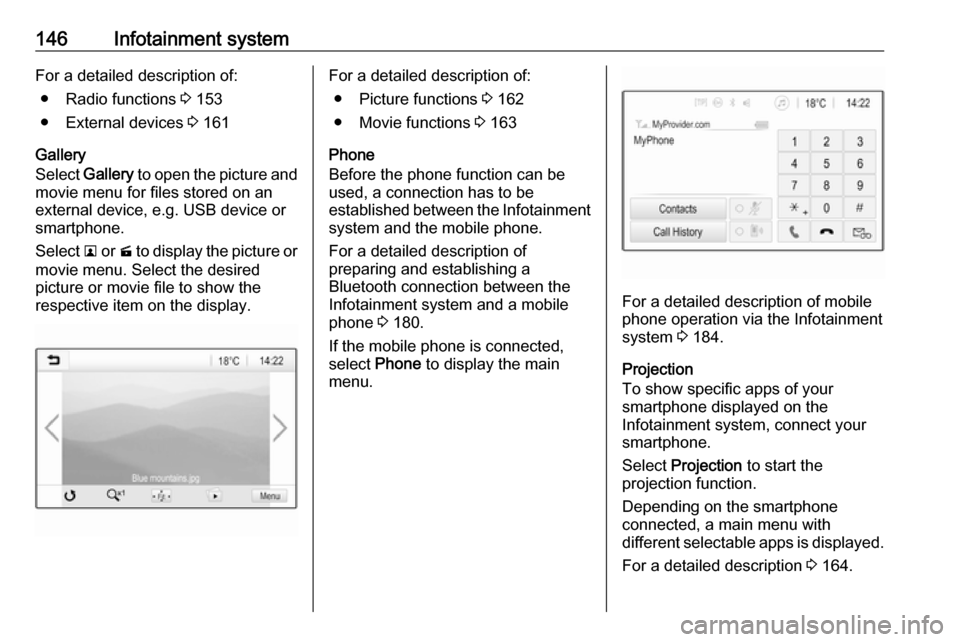
Gallery
Select Gallery to open the picture and
movie menu for files stored on an
external device, e.g. USB device or
smartphone.
Select l or m to display the picture or
movie menu. Select the desired
picture or movie file to show the
respective item on the display.For a detailed description of:
● Picture functions 3 162
● Movie functions 3 163
Phone
Before the phone function can be
used, a connection has to be
established between the Infotainment system and the mobile phone.
For a detailed description of
preparing and establishing a
Bluetooth connection between the Infotainment system and a mobilephone 3 180.
If the mobile phone is connected,
select Phone to display the main
menu.
For a detailed description of mobile
phone operation via the Infotainment
system 3 184.
Projection
To show specific apps of your
smartphone displayed on the
Infotainment system, connect your
smartphone.
Select Projection to start the
projection function.
Depending on the smartphone
connected, a main menu with
different selectable apps is displayed.
For a detailed description 3 164.
Page 155 of 341
Infotainment system153Vehicle settings
To restore all vehicle personalisation
settings, select Reset Vehicle
Settings .
A pop-up is displayed. Confirm the
pop-up message.
Phone information
To delete the paired Bluetooth
devices, the contacts list and the
voice mail numbers stored, select
Clear all phone information .
A pop-up is displayed. Confirm the pop-up message.
Radio settings
To reset tone and volume settings
and delete all favourites, select
Restore Radio Settings .
A pop-up is displayed. Confirm the
pop-up message.
Navigation settings
To reset all navigation parameters
and navigation system settings,
select Restore Navigation Settings . A
submenu is displayed.Depending on which set of
parameters you want to reset, select
Clear navigation history (recent
destinations), Clear navigation
favourites (favourites) or Reset
navigation options and settings (e.g.
settings concerning map display,
voice output or route options).
A pop-up is displayed. Confirm the
pop-up message.
System version
Press ; and then select Settings.
Scroll through the list and select
Software Information .
If a USB device is connected, you
may save the vehicle information to
this USB device.
Select System Update and then Save
Vehicle Info to USB .
For a system update, contact your
workshop.
Vehicle settingsVehicle settings are described in the
Owner's Manual.Radio
Usage
Activating radio
Press ; and then select Audio. The
audio main menu last selected is displayed.
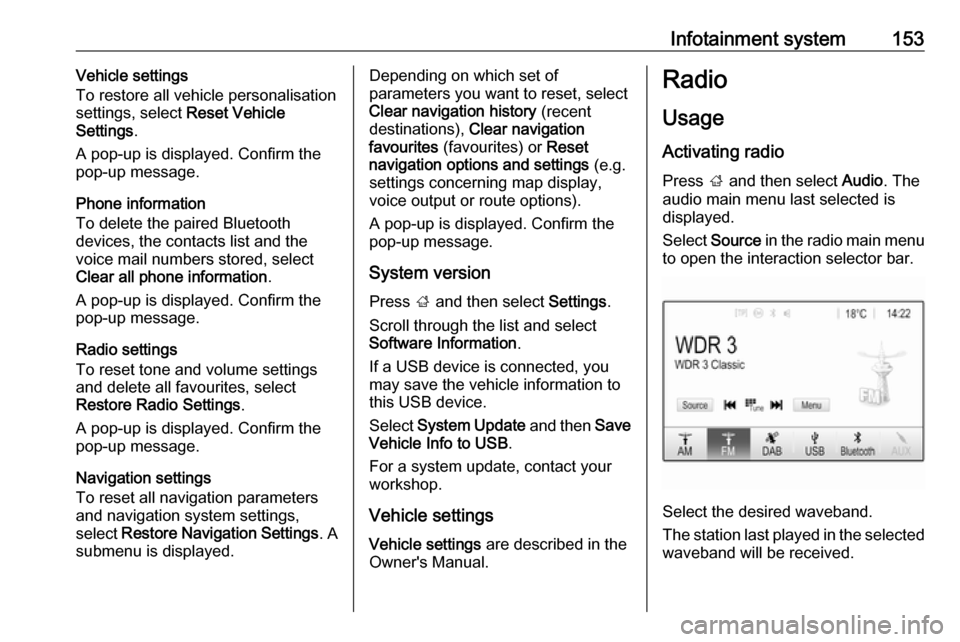
Select Source in the radio main menu
to open the interaction selector bar.
Select the desired waveband.
The station last played in the selected waveband will be received.
Page 161 of 341

Infotainment system159To display the programme of the
desired station, touch the icon next to
the station.External devices
General information
A USB port for the connection of
external devices is located in the
centre console.
Note
The USB port must always be kept
clean and dry.
USB port
An MP3 player, USB device, SD card
(via USB connector / adapter) or
smartphone can be connected to the
USB port.
Up to two USB devices can be
connected to the Infotainment system at a time.
Note
For the connection of two USB
devices, an external USB hub is
required.
The Infotainment system can play audio files, show picture files or play
movie files contained in USB devices.When connected to the USB port,
various functions of the devices
mentioned above can be operated via the controls and menus of the
Infotainment system.
Note
Not all auxiliary devices are
supported by the Infotainment
system. Check the compatibility list
on our website.
Connecting / disconnecting a device
Connect one of the devices
mentioned above to the USB port. If
required, use the appropriate
connection cable. The music function starts automatically.
Note
If a non-readable USB device is
connected, a corresponding error
message appears and the
Infotainment system automatically
switches to the previous function.
To disconnect the USB device, select
another function and then remove the USB device.
Page 162 of 341

160Infotainment systemCaution
Avoid disconnecting the device
during playback. This may
damage the device or the
Infotainment system.
USB Auto Launch
By default, the USB audio menu is displayed automatically as soon as a
USB device is connected.
If desired, this function can be
deactivated.
Press ; and then select Settings to
open the settings menu.
Select Radio, scroll to USB Auto
Launch and touch the screen button
next to the function.
To reactivate the function, touch the
screen button again.
Bluetooth Devices which support the Bluetooth
music profiles A2DP and AVRCP can
be connected wirelessly to the
Infotainment system. The
Infotainment system can play music
files contained in these devices.
Connecting a device
For a detailed description on how to
establish a Bluetooth connection
3 181.
File formats and folders
The maximum capacity of a device
supported by the Infotainment system amounts to 5000 music files,
5000 picture files, 500 movie files,
5000 folders and 15 stages of folder
structure. Only devices formatted in
the FAT16 / FAT32 file system are
supported.
If there are images included in the
audio metadata, these images are
displayed on the screen.
Note
Some files may not be played
properly. This may be due to a
different recording format or the
condition of the file.
Files from online shops to which
Digital Rights Management (DRM)
has been applied cannot be played.
The Infotainment system can play the
following audio, picture and movie
files stored on external devices.Audio files
The playable audio file formats are
MP3 (MPEG-1 Layer 3, MPEG-2
Layer 3), WMA, AAC, AAC+, ALAC
OGG WAF (PCM), AIFF, 3GPP
(audio only), Audio Books and LPCM.
iPod ®
and iPhone ®
devices play
ALAC, AIFF, Audio Books and LPCM.
When playing a file with ID3 tag
information, the Infotainment system
can display information, e.g. on the
track title and artist.
Picture files
The displayable picture file formats
are JPG, JPEG, BMP, PNG and GIF.
JPG files must be 64 to 5000 pixels in
width and 64 to 5000 pixels in height.
BMP, PNG and GIF files must be 64
to 1024 pixels in width and 64 to
1024 pixels in height.
The pictures should not exceed a file
size of 1MB.
Movie files
The playable movie file formats are
AVI and MP4.
Page 166 of 341
164Infotainment systemReturning to the beginning of the
current movie
Touch d after five seconds of the
movie playing.
Fast forwarding and rewinding
Touch and hold d or c. Release to
return to normal playback mode.
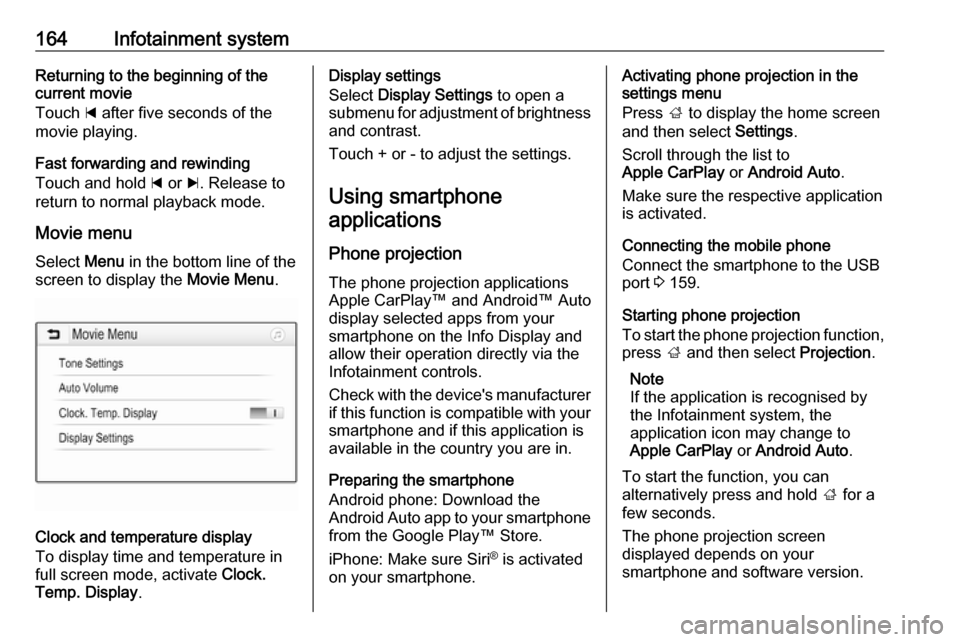
Movie menu Select Menu in the bottom line of the
screen to display the Movie Menu.
Clock and temperature display
To display time and temperature in
full screen mode, activate Clock.
Temp. Display .
Display settings
Select Display Settings to open a
submenu for adjustment of brightness and contrast.
Touch + or - to adjust the settings.
Using smartphone applications
Phone projection The phone projection applications
Apple CarPlay™ and Android™ Auto
display selected apps from your
smartphone on the Info Display and
allow their operation directly via the
Infotainment controls.
Check with the device's manufacturer
if this function is compatible with your smartphone and if this application is
available in the country you are in.
Preparing the smartphone
Android phone: Download the
Android Auto app to your smartphone
from the Google Play™ Store.
iPhone: Make sure Siri ®
is activated
on your smartphone.Activating phone projection in the
settings menu
Press ; to display the home screen
and then select Settings.
Scroll through the list to
Apple CarPlay or Android Auto .
Make sure the respective application
is activated.
Connecting the mobile phone
Connect the smartphone to the USB
port 3 159.
Starting phone projection
To start the phone projection function,
press ; and then select Projection.
Note
If the application is recognised by
the Infotainment system, the
application icon may change to
Apple CarPlay or Android Auto .
To start the function, you can
alternatively press and hold ; for a
few seconds.
The phone projection screen
displayed depends on your
smartphone and software version.
Page 167 of 341

Infotainment system165Returning to the home screen
Press ;.
BringGo
BringGo is a navigation app providing location search, map display and
route guidance.
Note
Before downloading the app, check
whether BringGo is available in your
vehicle.
Downloading the app
Before BringGo can be operated
using the controls and menus of the
Infotainment system, the respective
application must be installed on the
smartphone.
Download the app from App Store ®
or
Google Play Store.
Activating BringGo in the settings
menu
Press ; to display the home screen
and then select Settings.
Scroll through the list to BringGo.
Make sure the application is
activated.Connecting the mobile phone
Connect the smartphone to the USB
port 3 159.
Starting BringGo
To start the app, press ; and then
select the Nav icon.
The main menu of the application is shown on the Info Display.
For further information on how to
operate the app, see the instructions
on the manufacturer's website.Navigation
General information
This chapter is about the embedded
navigation system of Navi 4.0
IntelliLink.
The current traffic situation is taken
into account in the route calculation.
For this purpose, the Infotainment
system receives traffic
announcements in the current
reception area via RDS-TMC.
The navigation system cannot,
however, take into account traffic
incidents, traffic regulations changed
at short notice and hazards or
problems that arise suddenly (e.g.
road works).Caution
The usage of the navigation
system does not release the driver
from the responsibility for a
correct, vigilant attitude in road
traffic. The relevant traffic
regulations must always be
Page 173 of 341

Infotainment system171If Normal voice guidance is activated,
a voice announces the next turning
manoeuvre to be taken.
If Beep only is activated, only beep
tones are given out for notification.
In the submenu of Prompts during
Phone Call , the possible voice
outputs during a phone call can be
set.
Activate the desired options.
Note
Voice guidance prompts are only
given out if Voice Guidance is
activated in the Options menu, see
above.
Information
Select L on the map to display the
Options menu. Select Navigation
Settings and then About.
The texts of the manufacturer's terms
and conditions or privacy statement
can be accessed via the respective
menu items.
The navigation map version is
displayed.Destination input
The navigation application provides
different options to set a destination
for route guidance.
Destination input via map
It is possible to directly enter
destinations from the map screen.
Personal addresses on the map
You can predefine two address
shortcuts (e.g. Home and Work) to
easily start route guidance to these
two places. The addresses can be
defined in the settings menu and be
labelled individually. Then, they can
be directly selected from the map.
To save the addresses, select L on
the map, Navigation Settings and
then Set up My Places .
Select one of the menu items ( Home
and Work by default). Use the
keyboard to enter the required data in the address field. For a detailed
description of the keyboard, see
below.To change the name of the personal
address, select c to hide the
keyboard and select one of the items in the list. Alternatively, enter a new
name in the first entry field.
If necessary, tap within one of the
entry fields to redisplay the keyboard
and select Done. The location is
saved as shortcut.
To start route guidance to one of
these locations, select the ═ screen
button on the map. The two
destinations are displayed.
Select one of the screen buttons. The Routes menu is displayed.
Activate the desired route and then
select Go to start route guidance.
Destination selection via map
Scroll to the desired map section.
Touch and hold the desired location on the screen. The map centres
around this location.
A red d is displayed at the respective
location and the corresponding
address is shown on a label.
Page 174 of 341
172Infotainment system
Touch the label. The Details menu is
displayed. Select Go to start route
guidance.
Keyboard entry
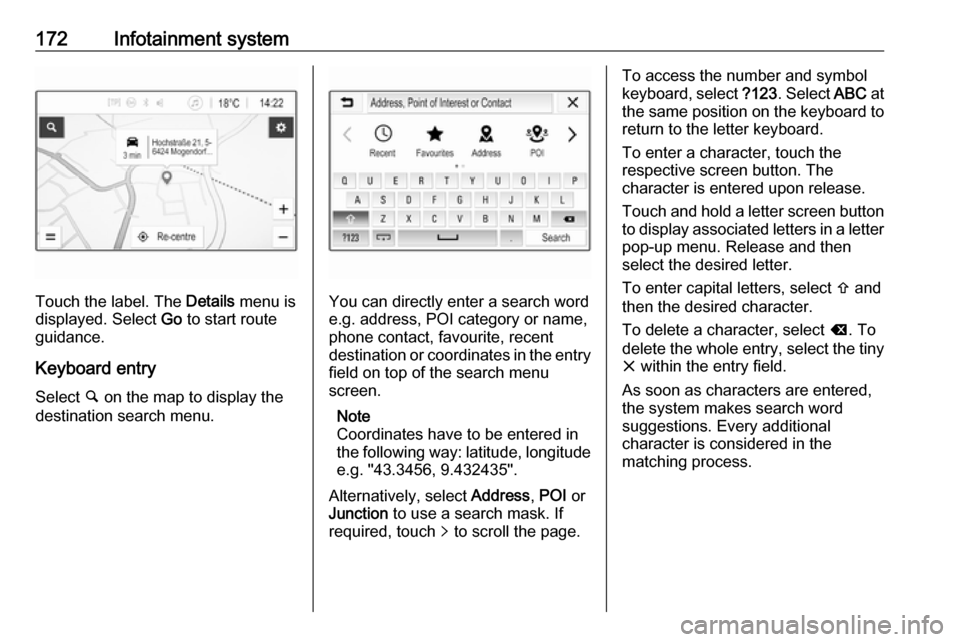
Select ½ on the map to display the
destination search menu.You can directly enter a search word
e.g. address, POI category or name,
phone contact, favourite, recent
destination or coordinates in the entry field on top of the search menu
screen.
Note
Coordinates have to be entered in
the following way: latitude, longitude
e.g. "43.3456, 9.432435".
Alternatively, select Address, POI or
Junction to use a search mask. If
required, touch q to scroll the page.
To access the number and symbol
keyboard, select ?123. Select ABC at
the same position on the keyboard to return to the letter keyboard.
To enter a character, touch the
respective screen button. The
character is entered upon release.
Touch and hold a letter screen button
to display associated letters in a letter pop-up menu. Release and then
select the desired letter.
To enter capital letters, select b and
then the desired character.
To delete a character, select k. To
delete the whole entry, select the tiny
x within the entry field.
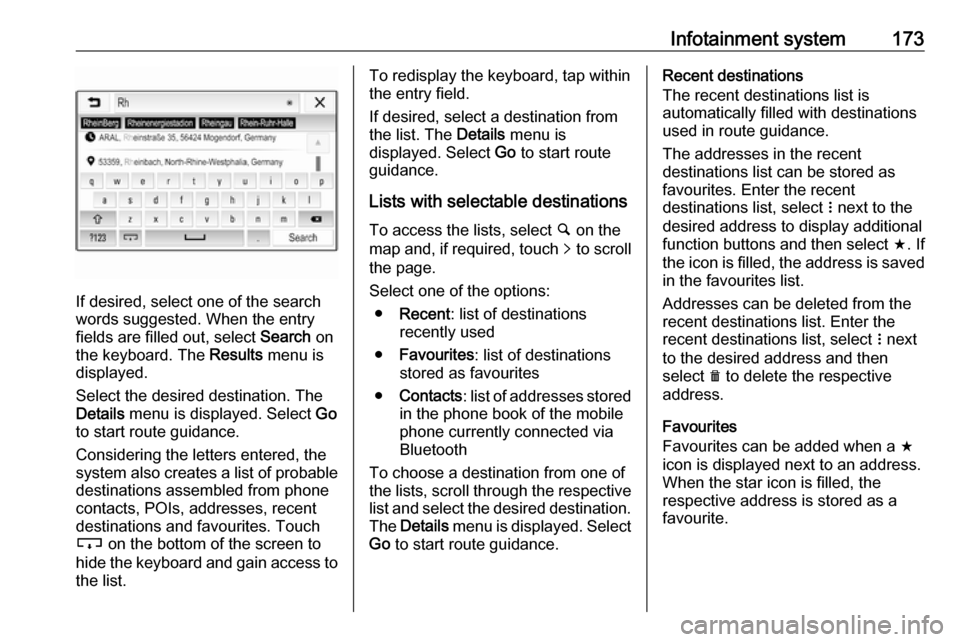
As soon as characters are entered,
the system makes search word
suggestions. Every additional
character is considered in the
matching process.
Page 175 of 341
Infotainment system173
If desired, select one of the search
words suggested. When the entry
fields are filled out, select Search on
the keyboard. The Results menu is
displayed.
Select the desired destination. The
Details menu is displayed. Select Go
to start route guidance.
Considering the letters entered, the
system also creates a list of probable
destinations assembled from phone
contacts, POIs, addresses, recent
destinations and favourites. Touch
c on the bottom of the screen to
hide the keyboard and gain access to the list.
To redisplay the keyboard, tap within
the entry field.
If desired, select a destination from
the list. The Details menu is
displayed. Select Go to start route
guidance.
Lists with selectable destinations
To access the lists, select ½ on the
map and, if required, touch q to scroll
the page.
Select one of the options:
● Recent : list of destinations
recently used
● Favourites : list of destinations
stored as favourites
● Contacts : list of addresses stored
in the phone book of the mobile phone currently connected via
Bluetooth
To choose a destination from one of
the lists, scroll through the respective
list and select the desired destination. The Details menu is displayed. Select
Go to start route guidance.Recent destinations
The recent destinations list is
automatically filled with destinations
used in route guidance.
The addresses in the recent
destinations list can be stored as
favourites. Enter the recent
destinations list, select n next to the
desired address to display additional function buttons and then select f. If
the icon is filled, the address is saved
in the favourites list.
Addresses can be deleted from the
recent destinations list. Enter the
recent destinations list, select n next
to the desired address and then
select e to delete the respective
address.
Favourites
Favourites can be added when a f
icon is displayed next to an address.
When the star icon is filled, the
respective address is stored as a
favourite.
Page 177 of 341
Infotainment system175
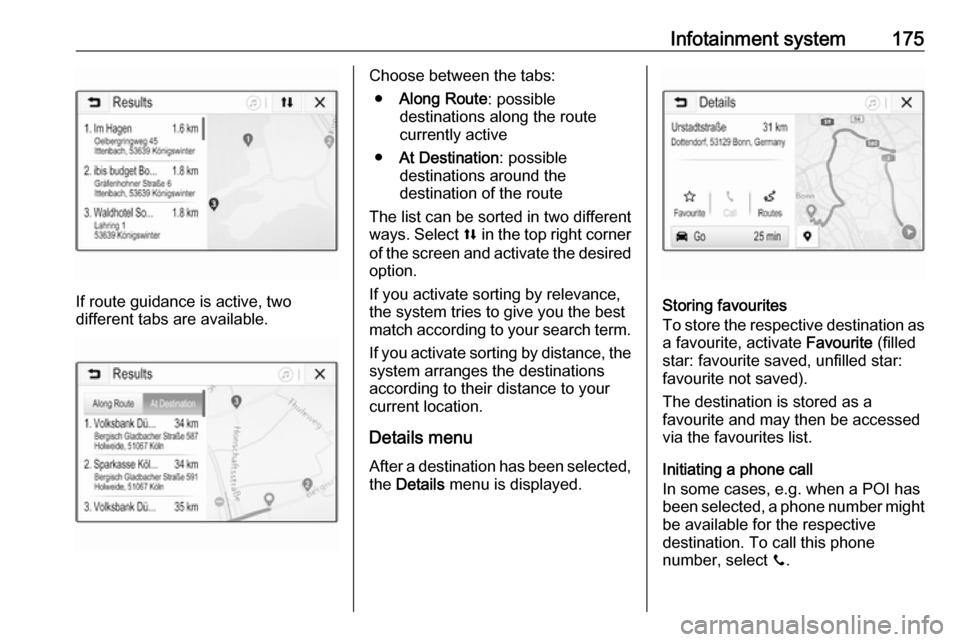
If route guidance is active, two
different tabs are available.
Choose between the tabs:
● Along Route : possible
destinations along the route
currently active
● At Destination : possible
destinations around the
destination of the route
The list can be sorted in two different
ways. Select l in the top right corner
of the screen and activate the desired
option.
If you activate sorting by relevance,
the system tries to give you the best
match according to your search term.
If you activate sorting by distance, the system arranges the destinations
according to their distance to your
current location.
Details menu After a destination has been selected,
the Details menu is displayed.
Storing favourites
To store the respective destination as
a favourite, activate Favourite (filled
star: favourite saved, unfilled star:
favourite not saved).
The destination is stored as a
favourite and may then be accessed
via the favourites list.
Initiating a phone call
In some cases, e.g. when a POI has
been selected, a phone number might be available for the respective
destination. To call this phone
number, select y.