USB OPEL ZAFIRA C 2018 Manual user
[x] Cancel search | Manufacturer: OPEL, Model Year: 2018, Model line: ZAFIRA C, Model: OPEL ZAFIRA C 2018Pages: 341, PDF Size: 9.99 MB
Page 182 of 341

180Infotainment systemSpeech recognitionGeneral information
The voice pass-thru application of the
Infotainment system allows access to the speech recognition commands on your smartphone. See your
smartphone manufacturer's
operating instructions to find out
whether your smartphone supports this feature.
In order to use the voice pass-thru
application, the smartphone must be
connected to the Infotainment system
via USB cable 3 159 or via Bluetooth
3 181.
Usage
Activating speech recognition
Press and hold g on the control panel
or 7w on the steering wheel to start a
speech recognition session. A voice
command message is displayed on
the screen.As soon as a beep is heard, you can
say a command. For information on
the commands supported, see the
operating instructions for your
smartphone.
Adjusting the volume of voice
prompts
Turn m on the control panel or press
+ / - on the right side of the steering
wheel to increase or decrease the
volume of voice prompts.
Deactivating speech recognition
Press xn on the steering wheel.
The voice command message
disappears and the speech
recognition session is ended.Phone
General information
The Phone portal provides you with
the possibility of having mobile phone
conversations via a vehicle
microphone and the vehicle
loudspeakers as well as operating the most important mobile phone
functions via the Infotainment system
in the vehicle. To be able to use the
Phone portal, the mobile phone must
be connected to the Infotainment
system via Bluetooth.
Not all Phone functions are supported by every mobile phone. The usable
phone functions depend on the
relevant mobile phone and network
provider. You can find further
information on this in the operating
instructions for your mobile phone, or you can enquire about them with yournetwork provider.
Page 184 of 341
182Infotainment systemconnected previously, the
Infotainment system establishes
the connection automatically.
● Bluetooth operation considerably
drains the device's battery.
Therefore, connect the device to
the USB port for charging.
Pairing a new device 1. Activate the Bluetooth function of the Bluetooth device. For further
information, see the operating
instructions for the Bluetooth
device.
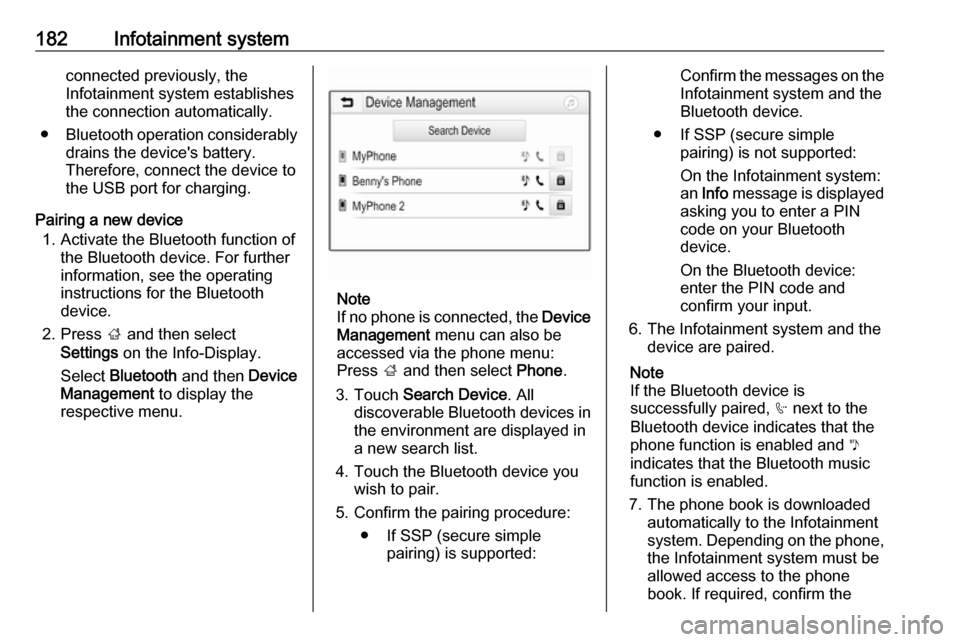
2. Press ; and then select
Settings on the Info-Display.
Select Bluetooth and then Device
Management to display the
respective menu.
Note
If no phone is connected, the Device
Management menu can also be
accessed via the phone menu: Press ; and then select Phone.
3. Touch Search Device . All
discoverable Bluetooth devices in
the environment are displayed in
a new search list.
4. Touch the Bluetooth device you wish to pair.
5. Confirm the pairing procedure: ● If SSP (secure simple pairing) is supported:
Confirm the messages on theInfotainment system and theBluetooth device.
● If SSP (secure simple pairing) is not supported:
On the Infotainment system: an Info message is displayed
asking you to enter a PIN
code on your Bluetooth
device.
On the Bluetooth device:
enter the PIN code and
confirm your input.
6. The Infotainment system and the device are paired.
Note
If the Bluetooth device is
successfully paired, h next to the
Bluetooth device indicates that the
phone function is enabled and y
indicates that the Bluetooth music
function is enabled.
7. The phone book is downloaded automatically to the Infotainment
system. Depending on the phone,
the Infotainment system must be allowed access to the phone
book. If required, confirm the
Page 189 of 341
Infotainment system187Using speed dial numbers
Speed dial numbers that are stored
on the mobile phone can also be
dialled using the keypad of the phone
main menu.
Press ; and then select Phone.
Touch and hold the respective digit on the keypad to initiate the call.
Incoming phone call
Taking a call
If an audio mode, e.g. the radio or
USB mode, is active at the moment a call comes in, the audio source is
muted and stays muted until the call
ends.
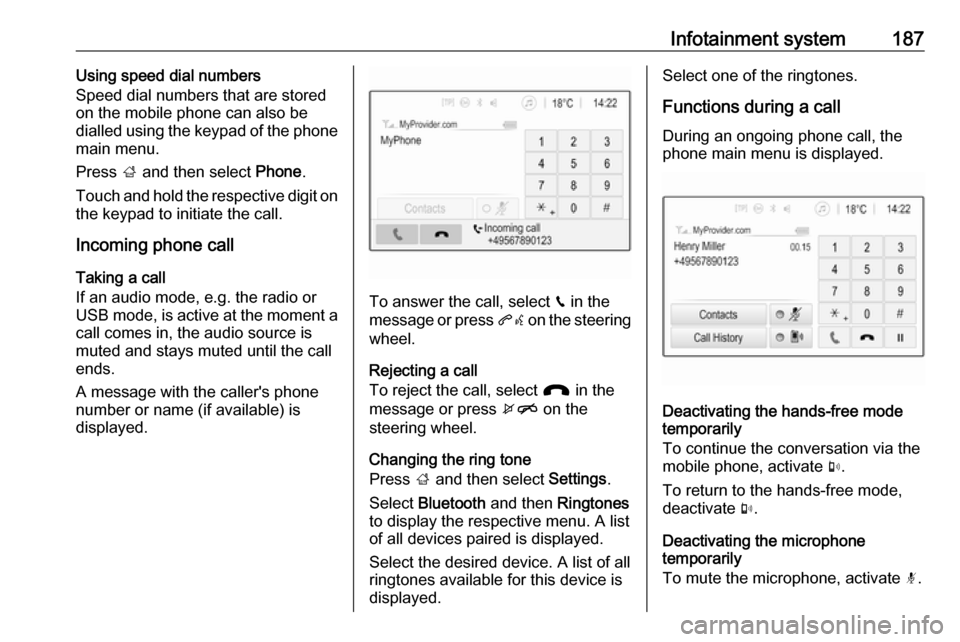
A message with the caller's phone
number or name (if available) is
displayed.
To answer the call, select v in the
message or press qw on the steering
wheel.
Rejecting a call
To reject the call, select J in the
message or press xn on the
steering wheel.
Changing the ring tone
Press ; and then select Settings.
Select Bluetooth and then Ringtones
to display the respective menu. A list
of all devices paired is displayed.
Select the desired device. A list of all
ringtones available for this device is
displayed.
Select one of the ringtones.
Functions during a call
During an ongoing phone call, the
phone main menu is displayed.
Deactivating the hands-free mode
temporarily
To continue the conversation via the mobile phone, activate m.
To return to the hands-free mode,
deactivate m.
Deactivating the microphone
temporarily
To mute the microphone, activate n.
Page 334 of 341

332IndexAAccessories and vehicle modifications .......................... 260
Activating Bluetooth music .........161
Activating phone .........................184
Activating radio ........................... 154
Activating the navigation system 167
Activating USB audio ..................161
Activating USB movie .................163
Activating USB picture ................162
Active Emergency Braking .........234
Active head restraints ...................37
Adaptive cruise control .......117, 223
AdBlue ........................ 115, 207, 305
Adjustable air vents ...................196
Airbag and belt tensioners .........111
Airbag deactivation ..............59, 112
Airbag label................................... 54 Airbag system .............................. 54
Air conditioning regular operation ................................ 197
Air conditioning system .............. 191
Air intake .................................... 197
Air vents...................................... 196
Antilock brake system ................ 214
Antilock brake system (ABS) .....113
Anti-theft alarm system ................26
Anti-theft locking system .............. 26
Appearance care ........................300
Armrest ......................................... 42Armrest storage ........................... 69
Ashtrays ..................................... 102
Audio files ................................... 159
Automatic anti-dazzle ..................30
Automatic light control ...............131
Automatic locking ........................24
Automatic transmission .............210
Autostop ..................................... 202
Auto volume................................ 151
Auxiliary heater ........................... 196
B Basic operation ........................... 148
Battery discharge protection ......139
Battery voltage ........................... 123
Bicycle rack .................................. 70
BlueInjection ............................... 207
Bluetooth Bluetooth connection ..............181
Bluetooth music menu ............161
Connecting device ..................159
General information ................159
Pairing ..................................... 181
Phone ...................................... 184
Bluetooth connection ..................181
Bonnet ....................................... 261
Brake and clutch fluid .................305
Brake and clutch system ...........112
Brake assist ............................... 216
Brake fluid .................................. 265
Page 336 of 341

334Engine oil ................... 262, 305, 310
Engine oil pressure ....................115
Entry lighting .............................. 138
Event data recorders ..................331
Exit lighting ................................ 138
Exterior care .............................. 300
Exterior light ............................... 116
Exterior lighting ....................13, 130
Exterior mirrors ............................. 29
F
Fault ........................................... 212
Favourite lists ............................. 156
Retrieving stations................... 156
Storing stations .......................156
Favourites ................................... 171
File formats Audio files................................ 159
Movie files ............................... 159
Picture files.............................. 159
First aid kit ................................... 92
Fixed air vents ........................... 197
Flex-Fix system ............................ 70
Fog light ..................................... 116
Fog lights ................................... 270
Folding mirrors ............................. 29
Folding tray .................................. 92
Following distance ......................114
Following distance indication ......233
Forward collision alert................. 230Front airbag system .....................57
Front fog lights ........................... 135
Front seats.................................... 38
Front storage ................................ 68
Fuel............................................. 246
Fuel consumption - CO 2-
Emissions ............................... 253
Fuel for diesel engines ..............247
Fuel for liquid gas operation .......248
Fuel for natural gas operation ...248
Fuel for petrol engines ...............246
Fuel gauge ................................. 104
Fuel selector .............................. 105
funnel .......................................... 248
Fuses ......................................... 275
G Gauges ....................................... 103
Gear shifting ............................... 114
General information ...159, 166,
180, 254
Bluetooth ................................. 159
DAB ......................................... 158
Infotainment system ................140
Navigation ............................... 166
Phone ...................................... 180
Smartphone applications ........159
USB ......................................... 159
Glass panel .................................. 34Glovebox ..................................... 66
Guidance ................................... 176
H Halogen headlights ....................268
Hand brake ................................. 214
Hazard warning flashers ............135
Headlight flash ........................... 132
Headlight range adjustment ......132
Headlights................................... 130
Headlights when driving abroad 133
Head restraint adjustment .............8
Head restraints ............................ 36
Heated mirrors ............................. 30
Heated rear window ..................... 33
Heated steering wheel .................97
Heating ........................................ 43
Heating and ventilation system . 190
High beam ......................... 116, 131
High beam assist ................116, 131
Hill start assist ........................... 216
Home menu ................................ 148
Horn ....................................... 14, 98
I
Identification plate .....................308
Ignition switch positions .............199
Immobiliser .......................... 28, 116
Indicators .................................... 103
Info display ................................. 121
Information displays.................... 117
Page 340 of 341

338Radio....................................... 154
USB ......................................... 159
USB Connecting device ..................159
General information ................159
USB audio menu .....................161
USB movie menu ....................163
USB picture menu ...................162
Using smartphone applications ..164
Using this manual ..........................3
V Vehicle battery ........................... 265
Vehicle checks............................ 261
Vehicle data ................................ 310
Vehicle data recording and privacy ..................................... 331
Vehicle detected ahead ..............117
Vehicle dimensions .................... 317
Vehicle Identification Number ....308
Vehicle jack ................................ 282
Vehicle messages .....................122
Vehicle personalisation .............124
Vehicle security ............................ 26
Vehicle specific data ......................3
Vehicle storage ........................... 260
Vehicle tools ............................... 282
Vehicle unlocking ........................... 6
Vehicle weight ........................... 316
Ventilation ................................... 190Voice guidance........................... 167
Voice recognition ........................180
Volume Auto volume ............................ 151
Maximum startup volume ........151
Mute function........................... 145
Ring tone volume ....................151
Setting the volume ..................145
Speed compensated volume ..151
Touch beep volume ................151
TP volume ............................... 151
Volume limitation at high
temperatures ........................... 145
Volume settings .......................... 151
W
Warning chimes .........................123
Warning lights ............................. 103
Warning triangle .......................... 92
Washer and wiper systems .........14
Washer fluid ............................... 265
Waveband selection ...................154
Wheel changing .........................291
Wheel covers ............................. 288
Wheels and tyres .......................282
Windows ....................................... 31
Windscreen................................... 31
Windscreen wiper/washer ...........98
Winter tyres ............................... 282
Wiper blade replacement ..........267