audio OPEL ZAFIRA C 2018 Manual user
[x] Cancel search | Manufacturer: OPEL, Model Year: 2018, Model line: ZAFIRA C, Model: OPEL ZAFIRA C 2018Pages: 341, PDF Size: 9.99 MB
Page 159 of 341

Infotainment system157Radio data system (RDS)
RDS is a service of FM stations that considerably facilitates the finding of
the desired station and its fault-free
reception.
Advantages of RDS ● On the display, the programme name of the station appears
instead of its frequency.
● During a station search, the Infotainment system tunes in to
RDS stations only.
● The Infotainment system always tunes into the best receivable
broadcasting frequency of the set station by means of AF
(alternative frequency).
● Depending on the station that is received, the Infotainment
system displays radio text that
can contain e.g. information on
the current programme.RDS configuration
Touch Menu in the bottom line of the
FM radio main menu to open the corresponding waveband-specific
submenu.
Scroll to RDS.
Activate or deactivate RDS.
Traffic Programme Radio traffic service stations are RDS
stations that broadcast traffic news. If
the traffic service is switched on, the
currently playing audio source is
interrupted for the duration of the
traffic announcement.
Activating the traffic programme
function
Select Menu in the bottom line of the
FM radio main menu to open the corresponding waveband-specific
submenu.
Touch the screen button next to
Traffic Program to activate or
deactivate the function.Note
In the station list, TP is displayed
next to the stations providing a traffic
programme.
If the radio traffic service is activated, [TP] is shown in the top line of all main
menus. If the current station is not a
radio traffic service station, TP is
greyed-out and a search is started
automatically for the next radio traffic
service station. As soon as a radio
traffic service station is found, TP is
highlighted. If no radio traffic service
station is found, TP remains greyed-
out.
If a traffic announcement is
broadcasted on the respective
station, a message is displayed.
To interrupt the announcement and
return to the function previously
activated, touch the screen or press
m .
Regionalisation Sometimes RDS stations broadcast
regionally different programmes on
different frequencies.
Page 160 of 341

158Infotainment systemSelect Menu in the bottom line of the
FM radio main menu to open the
corresponding waveband-specific
submenu and scroll to Region
Activate or deactivate Region.
If regionalisation is activated,
alternative frequencies with the same
regional programmes are selected
where necessary. If regionalisation is
switched off, alternative frequencies
of the stations are selected without
regard to regional programmes.
Digital audio broadcasting
DAB broadcasts radio stations
digitally.
DAB stations are indicated by the
programme name instead of the
broadcasting frequency.
General information ● With DAB, several radio programmes (services) can be
broadcast on a single ensemble.
● Besides high-quality digital audio
services, DAB is also able to
transmit programme-associateddata and a multitude of other data services including travel andtraffic information.
● As long as a given DAB receiver can pick up the signal sent out bya broadcasting station (even if
the signal is very weak), sound
reproduction is ensured.
● In the event of poor reception, the
volume is reduced automatically
to avoid the output of
disagreeable noises.
If the DAB signal is too weak to
be picked up by the receiver,
reception is interrupted
completely. This incident can be
avoided by activating DAB-DAB
Linking and/or DAB-FM Linking
in the DAB menu (see below).
● Interference caused by stations that are on nearby frequencies (a
phenomenon that is typical of AM and FM reception) does not
occur with DAB.
● If the DAB signal is reflected by natural obstacles or buildings,
the reception quality of DAB isimproved, whereas AM or FM
reception is considerably
impaired in such cases.
● When DAB reception is enabled, the FM tuner of the Infotainmentsystem remains active in the
background and continually
searches for the best receivable FM stations. If TP 3 157 is
activated, traffic announcements
of the FM station with the best
reception are issued. Deactivate
TP if DAB reception should not
be interrupted by FM traffic
announcements.
DAB Announcements
Besides their music programmes, a
lot of DAB stations also broadcast
announcements of various
categories. If you activate some or all categories, the currently received
DAB service is interrupted when an
announcement of these categories is
made.
Select Menu in the bottom line of the
DAB radio main menu to open the
corresponding waveband-specific
submenu.
Page 161 of 341

Infotainment system159Scroll through the list and select DAB
Announcements to display a list of the
categories available.
Activate all or just the desired
announcement categories. Different
announcement categories can be
selected at the same time.
DAB-DAB Linking If this function is activated, the device
switches over to the same service
(programme) on another DAB
ensemble (if available) when the DAB
signal is too weak to be picked up bythe receiver.
Select Menu in the bottom line of the
DAB radio main menu to open the corresponding waveband-specific
submenu.
Scroll through the list and activate or
deactivate DAB-DAB Linking .
DAB-FM Linking If this function is activated, the device
switches over to a corresponding FM
station of the active DAB service (if
available) when the DAB signal is too
weak to be picked up by the receiver.Scroll through the list and activate or
deactivate DAB-FM Linking .
L Band With this function, you may define
which DAB wavebands are to be
received by the Infotainment system.
L Band (earth and satellite radio) is
another radio band that can be
received additionally.
Select Menu in the bottom line of the
DAB radio main menu to open the
corresponding waveband-specific
submenu.
Scroll through the list and activate or
deactivate L Band.
EPG The Electronic Programme Guideprovides information on the currentand upcoming programme of the
respective DAB station.
Select Menu in the bottom line of the
DAB radio main menu and then select Station List .
To display the programme of the
desired station, touch the icon next to
the station.External devices
General information
A USB port for the connection of
external devices is located in the
centre console.
Note
The USB port must always be kept
clean and dry.
USB port
An MP3 player, USB device, SD card(via USB connector/adapter) or
smartphone can be connected to the
USB port.
Up to two USB devices can be
connected to the Infotainment system
at a time.
Note
For the connection of two USB
devices, an external USB hub is required.
The Infotainment system can play audio files, show picture files or play
movie files contained in USB devices.
Page 162 of 341
160Infotainment systemWhen connected to the USB port,
various functions of the devices
mentioned above can be operated via
the controls and menus of the
Infotainment system.
Note
Not all auxiliary devices are
supported by the Infotainment
system. Check the compatibility list
on our website.
Connecting/disconnecting a device
Connect one of the devices
mentioned above to the USB port. If
required, use the appropriate
connection cable. The music function starts automatically.
Note
If a non-readable USB device is
connected, a corresponding error
message appears and the
Infotainment system automatically
switches to the previous function.
To disconnect the USB device, select
another function and then remove the
USB device.Caution
Avoid disconnecting the device
during playback. This may
damage the device or the
Infotainment system.
USB Auto Launch
By default, the USB audio menu is displayed automatically as soon as a
USB device is connected.
If desired, this function can be
deactivated.
Press ; and then select Settings to
open the settings menu.
Select Radio, scroll to USB Auto
Launch and touch the screen button
next to the function.
To reactivate the function, touch the
screen button again.
Bluetooth Devices which support the Bluetooth
music profiles A2DP and AVRCP can
be connected wirelessly to the
Infotainment system. The
Infotainment system can play music
files contained in these devices.
Connecting a device
For a detailed description on how to
establish a Bluetooth connection
3 181.
File formats and folders
The maximum capacity of a device
supported by the Infotainment system amounts to 2500 music files,
2500 picture files, 250 movie files,
2500 folders and 10 stages of folder
structure. Only devices formatted in
the FAT16/FAT32 file system are
supported.
If there are images included in the
audio metadata, these images are
displayed on the screen.
Note
Some files may not be played
properly. This may be due to a
different recording format or the
condition of the file.
Files from online shops to which
Digital Rights Management (DRM)
has been applied cannot be played.
The Infotainment system can play the
following audio, picture and movie
files stored on external devices.
Page 163 of 341
Infotainment system161Audio files
The playable audio file formats are
MP3 (MPEG-1 Layer 3, MPEG-2
Layer 3), WMA, AAC, AAC+, ALAC
OGG WAF (PCM), AIFF, 3GPP
(audio only), Audio Books and LPCM.
iPod ®
and iPhone ®
devices play
ALAC, AIFF, Audio Books and LPCM.
When playing a file with ID3 tag
information, the Infotainment system
can display information, e.g. on the
track title and artist.
Picture files
The displayable picture file formats
are JPG, JPEG, BMP, PNG and GIF.
JPG files must be 64 to 5000 pixels in
width and 64 to 5000 pixels in height.
BMP, PNG and GIF files must be 64
to 1024 pixels in width and 64 to
1024 pixels in height.
The pictures should not exceed a file
size of 1MB.
Movie files
The playable movie file formats are
AVI and MP4.The maximum resolution is 1280 x 720 pixels. The frame rate must be
less than 30 fps.
The usable codec is H.264/MPEG-4
AVC.
The playable audio formats are MP3,
AC3, AAC and WMA.
The displayable subtitle format is
SMI.
Playing audio Activating the music function
If the device is not yet connected to
the Infotainment system, connect the
device 3 159.
Usually, the respective audio main
menu is displayed automatically.
If playback is not started
automatically, e.g. if USB Auto
Launch is deactivated 3 159 , take the
following steps:
Press ; and then select Audio to
open the audio main menu last
selected.Select Source in the interaction
selector bar and then select the
desired audio source to open the
respective audio main menu.
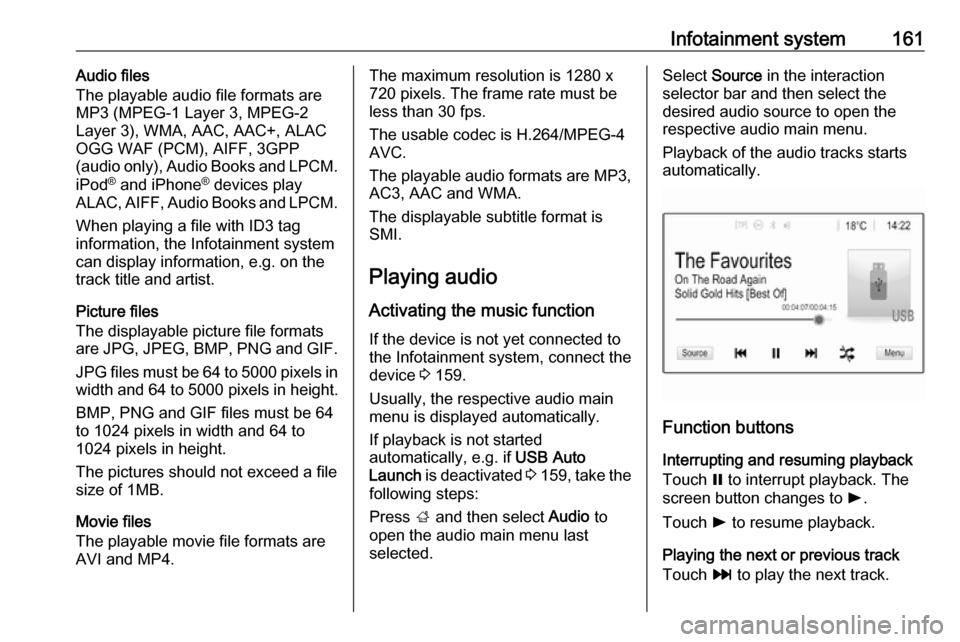
Playback of the audio tracks starts
automatically.
Function buttons
Interrupting and resuming playback
Touch = to interrupt playback. The
screen button changes to l.
Touch l to resume playback.
Playing the next or previous track
Touch v to play the next track.
Page 164 of 341

162Infotainment systemTouch t within the first two seconds
of the track playing to return to the
previous track.
Returning to the beginning of the
current track
Touch t after two seconds of the
track playing.
Fast forwarding and rewinding
Touch and hold t or v. Release to
return to normal playback mode.
Alternatively, you can move the slider
showing the current track position to
the left or right.
Playing tracks randomly
Touch n to play the tracks in random
order. The screen button changes to
o .
Touch o again to deactivate the
shuffle function and go back to the
normal playback mode.
Browse Music function
To display the browse screen, touch
the screen. Alternatively, select
Menu in the bottom line of the audiomain screen to display the respective
audio menu and then select Browse
Music .
Different categories, in which the
tracks are sorted, are displayed, e.g.
Playlists , Artists , or Albums .
Select the desired category,
subcategory (if available) and then
choose a track.
Select the track to start playback.
Displaying pictures
You can view pictures from a USB
device.
Note
For your safety, some features are
disabled while driving.
Activating the picture function
If the device is not yet connected to
the Infotainment system, connect the
device 3 159.
Press ; and then select Gallery to
open the media main menu.
Touch l to open the picture main
menu to display a list of items stored on the USB device. Select the desired
picture. If this is stored within a folder, select the respective folder first.
Page 189 of 341
Infotainment system187Using speed dial numbers
Speed dial numbers that are stored
on the mobile phone can also be
dialled using the keypad of the phone
main menu.
Press ; and then select Phone.
Touch and hold the respective digit on the keypad to initiate the call.
Incoming phone call
Taking a call
If an audio mode, e.g. the radio or
USB mode, is active at the moment a call comes in, the audio source is
muted and stays muted until the call
ends.
A message with the caller's phone
number or name (if available) is
displayed.
To answer the call, select v in the
message or press qw on the steering
wheel.
Rejecting a call
To reject the call, select J in the
message or press xn on the
steering wheel.
Changing the ring tone
Press ; and then select Settings.
Select Bluetooth and then Ringtones
to display the respective menu. A list
of all devices paired is displayed.
Select the desired device. A list of all
ringtones available for this device is
displayed.
Select one of the ringtones.
Functions during a call
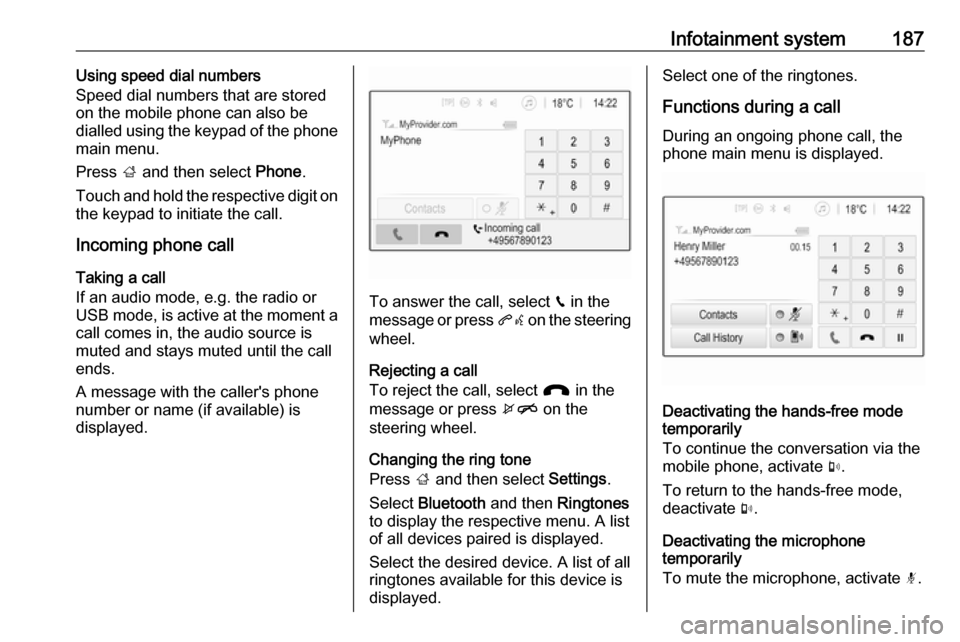
During an ongoing phone call, the
phone main menu is displayed.
Deactivating the hands-free mode
temporarily
To continue the conversation via the mobile phone, activate m.
To return to the hands-free mode,
deactivate m.
Deactivating the microphone
temporarily
To mute the microphone, activate n.
Page 334 of 341

332IndexAAccessories and vehicle modifications .......................... 260
Activating Bluetooth music .........161
Activating phone .........................184
Activating radio ........................... 154
Activating the navigation system 167
Activating USB audio ..................161
Activating USB movie .................163
Activating USB picture ................162
Active Emergency Braking .........234
Active head restraints ...................37
Adaptive cruise control .......117, 223
AdBlue ........................ 115, 207, 305
Adjustable air vents ...................196
Airbag and belt tensioners .........111
Airbag deactivation ..............59, 112
Airbag label................................... 54 Airbag system .............................. 54
Air conditioning regular operation ................................ 197
Air conditioning system .............. 191
Air intake .................................... 197
Air vents...................................... 196
Antilock brake system ................ 214
Antilock brake system (ABS) .....113
Anti-theft alarm system ................26
Anti-theft locking system .............. 26
Appearance care ........................300
Armrest ......................................... 42Armrest storage ........................... 69
Ashtrays ..................................... 102
Audio files ................................... 159
Automatic anti-dazzle ..................30
Automatic light control ...............131
Automatic locking ........................24
Automatic transmission .............210
Autostop ..................................... 202
Auto volume................................ 151
Auxiliary heater ........................... 196
B Basic operation ........................... 148
Battery discharge protection ......139
Battery voltage ........................... 123
Bicycle rack .................................. 70
BlueInjection ............................... 207
Bluetooth Bluetooth connection ..............181
Bluetooth music menu ............161
Connecting device ..................159
General information ................159
Pairing ..................................... 181
Phone ...................................... 184
Bluetooth connection ..................181
Bonnet ....................................... 261
Brake and clutch fluid .................305
Brake and clutch system ...........112
Brake assist ............................... 216
Brake fluid .................................. 265
Page 335 of 341

333Brakes ............................... 214, 265
Breakdown.................................. 298
BringGo ...................................... 164
Bulb replacement ....................... 268
C
Call Functions during a call ............184
Incoming call ........................... 184
Initiating a phone call ..............184
Ring tone ................................. 184
Call history .................................. 184
Capacities .................................. 318
Cargo management system ........88
Car Pass ...................................... 21
Catalytic converter .....................206
Central locking system ................22
Centre console lighting ..............138
Centre console storage ...............69
Changing tyre and wheel size ...288
Charging system ........................ 112
Child locks ................................... 25
Child restraint installation locations ................................... 63
Child restraints.............................. 60
Child restraint systems ................60
Cigarette lighter .........................102
Climate control ............................. 16
Climate control systems .............190
Clock........................................... 100CNG.................................... 105, 248
Code ........................................... 122
Collision damage repair ..............328
Contacts ..................................... 171
Control elements Infotainment system ................142
Steering wheel ........................ 142
Control elements overview .........142
Control indicators........................ 108
Control of the vehicle .................199
Controls ........................................ 97
Convex shape .............................. 29
Coolant and antifreeze ...............305
Cruise control ....................116, 220
Cupholders .................................. 66
Curtain airbag system .................. 58
Curve lighting.............................. 134
D DAB ............................................ 158
Danger, Warnings and Cautions ...4
Daytime running lights ...............133
Declaration of conformity ............323
DEF ............................................ 207
Destination input ........................171
Diesel exhaust fluid ....................207
Diesel fuel system bleeding .......267
Diesel particle filter .............115, 205
Digital audio broadcasting ..........158
Displaying pictures .....................162Display settings ..................162, 163
Door open .................................. 117
Door panel storage .......................68
Doors ............................................ 25
Driver assistance systems ..........220
Driver Information Centre ...........117
Driving characteristics and towing tips .............................. 255
Driving hints ................................ 199
E Electric adjustment ......................29
Electrical system......................... 275
Electric parking brake .........113, 214
Electric parking brake fault .........113
Electronic climate control system 192
Electronic driving programmes ..211
Electronic Stability Control.......... 218
Electronic Stability Control and Traction Control system ..........114
Electronic Stability Control off..... 114
Emergency call ........................... 183
End-of-life vehicle recovery .......261
Engine compartment fuse box ...277
Engine coolant ........................... 263
Engine coolant temperature gauge ..................................... 107
Engine data ............................... 313
Engine exhaust .......................... 205
Engine identification ...................309
Page 336 of 341

334Engine oil ................... 262, 305, 310
Engine oil pressure ....................115
Entry lighting .............................. 138
Event data recorders ..................331
Exit lighting ................................ 138
Exterior care .............................. 300
Exterior light ............................... 116
Exterior lighting ....................13, 130
Exterior mirrors ............................. 29
F
Fault ........................................... 212
Favourite lists ............................. 156
Retrieving stations................... 156
Storing stations .......................156
Favourites ................................... 171
File formats Audio files................................ 159
Movie files ............................... 159
Picture files.............................. 159
First aid kit ................................... 92
Fixed air vents ........................... 197
Flex-Fix system ............................ 70
Fog light ..................................... 116
Fog lights ................................... 270
Folding mirrors ............................. 29
Folding tray .................................. 92
Following distance ......................114
Following distance indication ......233
Forward collision alert................. 230Front airbag system .....................57
Front fog lights ........................... 135
Front seats.................................... 38
Front storage ................................ 68
Fuel............................................. 246
Fuel consumption - CO 2-
Emissions ............................... 253
Fuel for diesel engines ..............247
Fuel for liquid gas operation .......248
Fuel for natural gas operation ...248
Fuel for petrol engines ...............246
Fuel gauge ................................. 104
Fuel selector .............................. 105
funnel .......................................... 248
Fuses ......................................... 275
G Gauges ....................................... 103
Gear shifting ............................... 114
General information ...159, 166,
180, 254
Bluetooth ................................. 159
DAB ......................................... 158
Infotainment system ................140
Navigation ............................... 166
Phone ...................................... 180
Smartphone applications ........159
USB ......................................... 159
Glass panel .................................. 34Glovebox ..................................... 66
Guidance ................................... 176
H Halogen headlights ....................268
Hand brake ................................. 214
Hazard warning flashers ............135
Headlight flash ........................... 132
Headlight range adjustment ......132
Headlights................................... 130
Headlights when driving abroad 133
Head restraint adjustment .............8
Head restraints ............................ 36
Heated mirrors ............................. 30
Heated rear window ..................... 33
Heated steering wheel .................97
Heating ........................................ 43
Heating and ventilation system . 190
High beam ......................... 116, 131
High beam assist ................116, 131
Hill start assist ........................... 216
Home menu ................................ 148
Horn ....................................... 14, 98
I
Identification plate .....................308
Ignition switch positions .............199
Immobiliser .......................... 28, 116
Indicators .................................... 103
Info display ................................. 121
Information displays.................... 117